2017 HONDA ODYSSEY memory
[x] Cancel search: memoryPage 237 of 565
uuAudio System Basic Operation uAudio with Touch Screen
236
Features
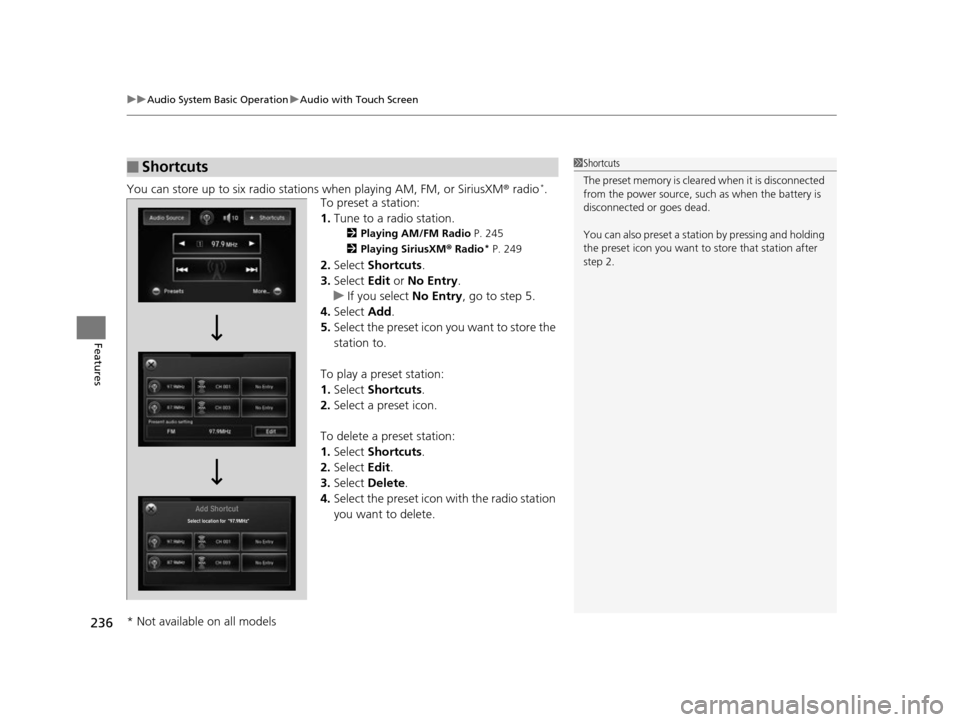
You can store up to six radio stations when playing AM, FM, or SiriusXM ® radio*.
To preset a station:
1. Tune to a radio station.
2 Playing AM/FM Radio P. 245
2 Playing SiriusXM ® Radio
* P. 249
2. Select Shortcuts .
3. Select Edit or No Entry .
u If you select No Entry, go to step 5.
4. Select Add.
5. Select the preset icon you want to store the
station to.
To play a preset station:
1. Select Shortcuts .
2. Select a preset icon.
To delete a preset station:
1. Select Shortcuts .
2. Select Edit.
3. Select Delete.
4. Select the preset icon with the radio station
you want to delete.
■Shortcuts1Shortcuts
The preset memory is cleare d when it is disconnected
from the power source, such as when the battery is
disconnected or goes dead.
You can also preset a stat ion by pressing and holding
the preset icon you want to store that station after
step 2.
* Not available on all models
17 US ODYSSEY (KA KC)-31TK86600.book 236 ページ 2016年10月24日 月曜日 午後4時2分
Page 247 of 565
uuAudio System Basic Operation uPlaying AM/FM Radio
246
Features
To store a station:
1. Tune to the selected station.
2. Press the MENU button.
3. Rotate to select Save Preset, then press .
4. Rotate to select the preset number you want to store that station, then press
.
You can also store that statio n by the following procedure.
1. Tune to the selected station.
2. Rotate to select the preset number you want to store the station.
3. Press and hold for a few seconds.
1. Tune to the selected station.
2. Select More.
3. Select Save Preset .
4. Select the preset number you wa nt to store that station.
You can also store that statio n by the following procedure.
1. Tune to the selected station.
2. Change the display to the preset screen.
3. Select and hold the preset number you want to store that station.
■Preset Memory1Playing AM/FM Radio
The ST indicator appears on the display indicating
stereo FM broadcasts.
Stereo reproduction in AM is not available.
Switching the Audio Mode
Press the MODE button on the steering wheel.
2 Audio Remote Controls P. 210
You can also switch the mode by pressing the MENU
button and selecting Change Source on the Audio
menu screen.
You can store 6 AM stations and 12 FM stations into
the preset memory.
Interface Dial
Audio with Touch Screen
17 US ODYSSEY (KA KC)-31TK86600.book 246 ページ 2016年10月24日 月曜日 午後4時2分
Page 252 of 565
251
uuAudio System Basic Operation uPlaying SiriusXM ® Radio*
Features
To store a station:
1. Tune to the selected station.
2. Press the MENU button.
3. Rotate to select Save Preset, then press .
4. Rotate to select the preset number you want to store that station, then press
.
You can also store that station by the following procedure.
1. Tune to the selected station.
2. Rotate to select the preset number you want to store the station.
3. Press and hold for a few seconds.
1. Tune to the selected station.
2. Select More.
3. Select Save Preset .
4. Select the preset number you want to store that station.
You can also store that station by the following procedure.
1. Tune to the selected station.
2. Change the display to the preset screen.
3. Select and hold the preset number you want to store that station.
■Preset Memory1Playing SiriusXM ® Radio*
You can store 12 SiriusXM ® stations into the preset
memory.
Interface Dial
Audio with Touch Screen
* Not available on all models
17 US ODYSSEY (KA KC)-31TK86600.book 251 ページ 2016年10月24日 月曜日 午後4時2分
Page 310 of 565
309
uuCustomized Features u
Continued
Features
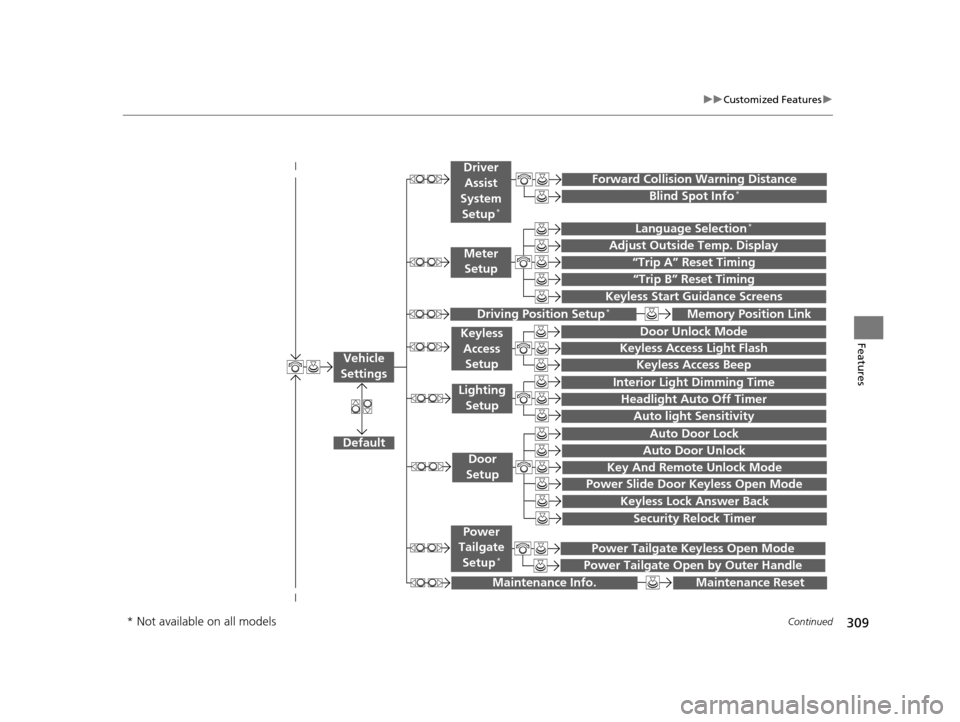
“Trip A” Reset Timing
“Trip B” Reset Timing
Language Selection*
Adjust Outside Temp. Display
Forward Collision Warning Distance
Keyless Start Guidance Screens
Default
Memory Position Link
Door Unlock Mode
Keyless Access Light Flash
Interior Light Dimming Time
Headlight Auto Off Timer
Auto light Sensitivity
Key And Remote Unlock Mode
Keyless Lock Answer Back
Security Relock Timer
Auto Door Lock
Auto Door Unlock
Maintenance Reset
Meter
Setup
Driver
Assist
System
Setup
*
Driving Position Setup*
Keyless Access Setup
Lighting Setup
Door
Setup
Maintenance Info.
Keyless Access Beep
Blind Spot Info*
Power Slide Door Keyless Open Mode
Power Tailgate Keyless Open Mode
Power Tailgate Open by Outer Handle
Power
Tailgate
Setup
*
Vehicle
Settings
* Not available on all models
17 US ODYSSEY (KA KC)-31TK86600.book 309 ページ 2016年10月24日 月曜日 午後4時2分
Page 317 of 565
316
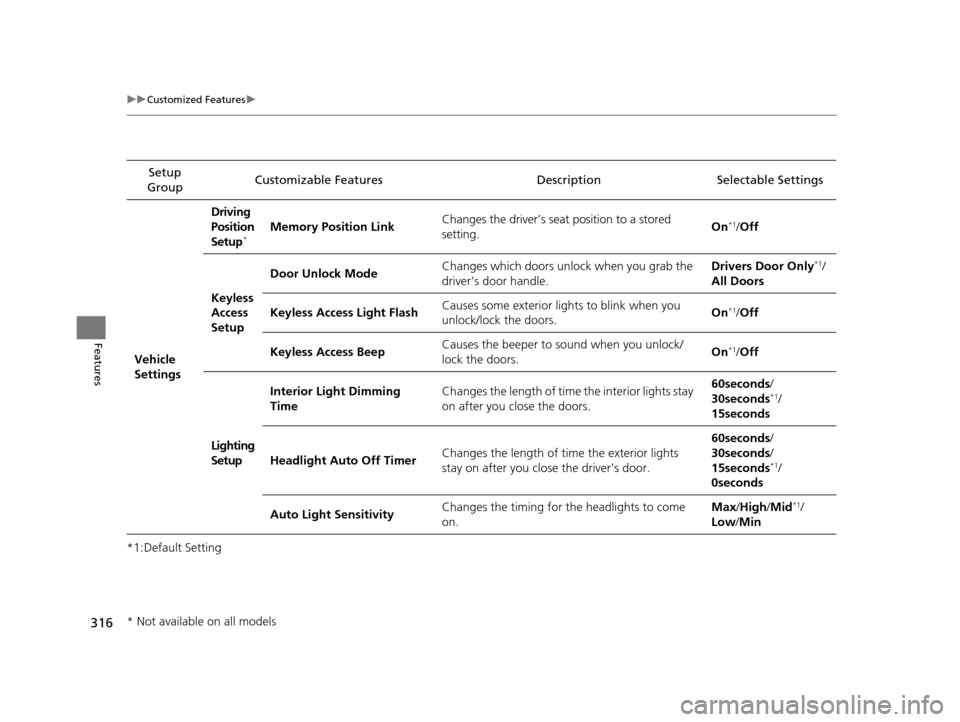
uuCustomized Features u
Features
*1:Default SettingSetup
Group Customizable Features Descri
ption Selectable Settings
Vehicle
Settings Driving
Position
Setup
*Memory Position Link
Changes the driver’s seat position to a stored
setting. On*1/
Off
Keyless
Access
Setup Door Unlock Mode
Changes which doors unlock when you grab the
driver’s door handle. Drivers Door Only
*1/
All Doors
Keyless Access Light Flash Causes some exterior lig
hts to blink when you
unlock/lock the doors. On
*1/
Off
Keyless Access Beep Causes the beeper to sound when you unlock/
lock the doors.
On
*1/
Off
Lighting
Setup Interior Light Dimming
Time
Changes the length of time the interior lights stay
on after you close the doors. 60seconds/
30seconds
*1/
15seconds
Headlight Auto Off Timer Changes the length of time the exterior lights
stay on after you close the driver's door. 60seconds/
30seconds/
15seconds
*1/
0seconds
Auto Light Sensitivity Changes the timing for the headlights to come
on. Max
/High /Mid
*1/
Low /Min
* Not available on all models
17 US ODYSSEY (KA KC)-31TK86600.book 316 ページ 2016年10月24日 月曜日 午後4時2分
Page 327 of 565
uuHomeLink ® Universal Transceiver*u Training HomeLink
326
Features
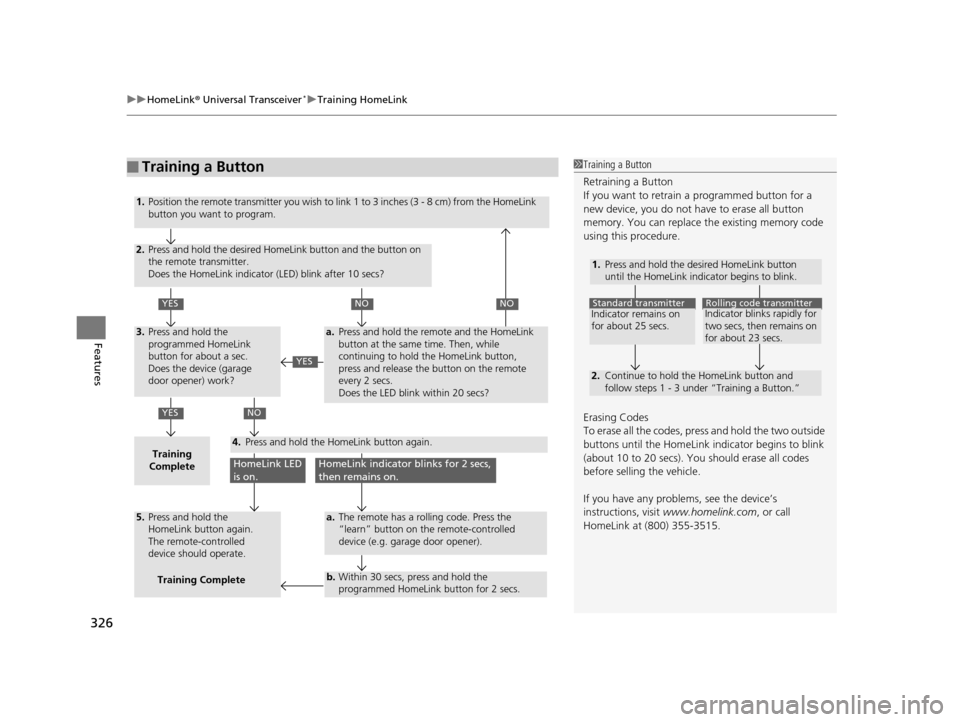
■Training a Button1Training a Button
Retraining a Button
If you want to retrain a programmed button for a
new device, you do not ha ve to erase all button
memory. You can replace the existing memory code
using this procedure.
Erasing Codes
To erase all the codes, press and hold the two outside
buttons until the HomeLink i ndicator begins to blink
(about 10 to 20 secs). You should erase all codes
before selling the vehicle.
If you have any problems, see the device’s
instructions, visit www.homelink.com , or call
HomeLink at (800) 355-3515.
1.
2.
Standard transmitterIndicator remains on
for about 25 secs.Rolling code transmitterIndicator blinks rapidly for
two secs, then remains on
for about 23 secs.
Press and hold the desired HomeLink button
until the HomeLink indicator begins to blink.
Continue to hold the HomeLink button and
follow steps 1 - 3 under “Training a Button.”
1.
2.
YES
YES
YES
NONO
NO
HomeLink LED
is on.HomeLink indicator blinks for 2 secs,
then remains on.
3.
Training
Complete4.
5.
a.
a.
b.
Position the remote transmitter you wish to link 1 to 3 inches (3 - 8 cm) from the HomeLink
button you want to program.
Press and hold the desired HomeLink button and the button on
the remote transmitter.
Does the HomeLink indicator (LED) blink after 10 secs?
Press and hold the
programmed HomeLink
button for about a sec.
Does the device (garage
door opener) work?
Press and hold the remote and the HomeLink
button at the same time. Then, while
continuing to hold the HomeLink button,
press and release the button on the remote
every 2 secs.
Does the LED blink within 20 secs?
The remote has a rolling code. Press the
“learn” button on the remote-controlled
device (e.g. garage door opener).
Within 30 secs, press and hold the
programmed HomeLink button for 2 secs.
Press and hold the HomeLink button again.
Press and hold the
HomeLink button again.
The remote-controlled
device should operate.Training Complete
17 US ODYSSEY (KA KC)-31TK86600.book 326 ページ 2016年10月24日 月曜日 午後4時2分
Page 556 of 565

555
Index
Display Button.................................. 212, 238
Door Mirrors ............................................. 159
Doors ........................................................ 110
Auto Door Locking.................................. 120
Auto Door Unlocking .............................. 120
Door and Tailgate Open Indicator ....... 29, 75
Keys........................................................ 110
Locking/Unlocking the Doors from the
Inside .................................................... 118
Locking/Unlocking the Doors from the Outside ................................................. 113
Lockout Prevention System ..................... 117
DOT Tire Quality Grading ........................ 493
Driving ...................................................... 395
Automatic Transmission .......................... 412
Braking ................................................... 436
Cruise Control ........................................ 415
Shifting Gear .......................................... 413
Starting the Engine ......................... 407, 409
Driving Position Memory System ............ 155
Dust and Pollen Filter .............................. 504
E
Elapsed Time.............................................. 97
Electronic Stability Control (ESC) ............ 426
Emergency ................................................ 539
Emergency Engine Stop ........................... 522
Emissions Testing (Readiness Codes) ...... 547
Engine ....................................................... 544
Coolant .................................................. 470 Jump Starting .......................................... 523
Oil ........................................................... 465
Starting ........................................... 407, 409
Switch Buzzer .......................................... 142
Engine Coolant ......................................... 470
Adding to the Radiator ............................ 471
Adding to the Reserve Tank ..................... 470
Overheating ............................................ 526
Temperature Gauge .................................. 92
Engine Oil ................................................. 465
Adding .................................................... 467
Checking ................................................. 466
Displaying Oil Life ............................ 455, 459
Low Oil Pressure Indicator .................. 71, 528
Recommended Engine Oil ........................ 465
ENGINE START/STOP Button .................... 143
Exhaust Gas Hazard (Carbon Monoxide) .. 66
Expanded View Driver’s Mirror ............... 160
Exterior Care (Cleaning) ........................... 507
Exterior Mirrors ........................................ 159
F
Features..................................................... 205
Filters Dust and Pollen ....................................... 504
Oil ........................................................... 468
Flat Tire ..................................................... 511
Flip-up Trash Bag Ring ............................. 179
Floor Mats ................................................. 506 Fluids
Automatic Transmission .......................... 472
Brake ...................................................... 473
Engine Coolant ....................................... 470
Power Steering ........................................ 474
Windshield Washer ................................. 474
Fog Light Indicator ..................................... 78
Folding Down the Rear Seats .......... 162, 173
Foot Brake ................................................ 437
Forward Collision Warning (FCW) ........... 418
Front Airbags (SRS) ..................................... 42
Front Seats ................................................ 161
Adjusting ................................................ 161
Fuel ...................................................... 19, 446
Economy ................................................. 449
Gauge ....................................................... 92
Instant Fuel Economy .......................... 94, 97
Low Fuel Indicator ..................................... 73
Range ................................................. 94, 97
Recommendation .................................... 446
Refueling................................................. 446
Fuel Economy ........................................... 449
Fuel Fill Cap ........................................ 19, 448
Message.................................................. 529
Fuel Fill Door ...................................... 19, 447
Fuses .......................................................... 533
Inspecting and Changing......................... 538
Locations................. 533, 534, 535, 536, 537
17 US ODYSSEY (KA KC)-31TK86600.book 555 ページ 2016年10月24日 月曜日 午後4時2分