2017 HONDA CR-V battery
[x] Cancel search: batteryPage 494 of 657
493
uuWhen Driving uVehicle Stability Assist (VSA ®), aka Electronic Stability Control (ESC), System
Driving
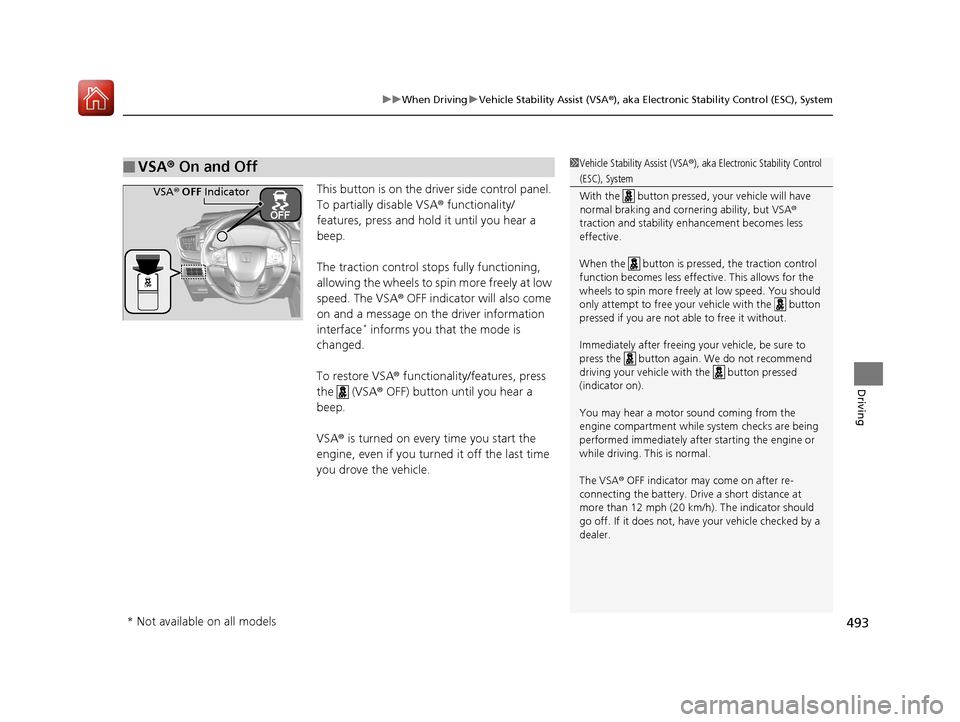
This button is on the driver side control panel.
To partially disable VSA ® functionality/
features, press and hold it until you hear a
beep.
The traction control stop s fully functioning,
allowing the wheels to spin more freely at low
speed. The VSA ® OFF indicator will also come
on and a message on the driver information
interface
* informs you that the mode is
changed.
To restore VSA ® functionality/features, press
the (VSA ® OFF) button until you hear a
beep.
VSA ® is turned on every time you start the
engine, even if you turned it off the last time
you drove the vehicle.
■VSA ® On and Off1 Vehicle Stability Assist (VSA ®), aka Electronic Stability Control
(ESC), System
With the button pressed, your vehicle will have
normal braking and corn ering ability, but VSA®
traction and stability enhancement becomes less
effective.
When the button is pressed, the traction control
function becomes less effective. This allows for the
wheels to spin more freely at low speed. You should
only attempt to free your vehicle with the button
pressed if you are not able to free it without.
Immediately after freeing your vehicle, be sure to
press the button again. We do not recommend
driving your vehicle wi th the button pressed
(indicator on).
You may hear a motor sound coming from the
engine compartment while system checks are being
performed immediately after starting the engine or
while driving. This is normal.
The VSA ® OFF indicator may come on after re-
connecting the battery. Drive a short distance at
more than 12 mph (20 km/h). The indicator should
go off. If it does not, have your vehicle checked by a
dealer.VSA ® OFF Indicator
* Not available on all models
17 CR-V-31TLA6000.book 493 ページ 2016年10月11日 火曜日 午後6時37分
Page 503 of 657

uuWhen Driving uTire Pressure Monitoring System (TPMS)
502
Driving
Press and hold the TPMS button until the low
tire pressure/TPMS indi cator blinks twice,
indicating the calibration process has begun.
• If the low tire pressure/TPMS indicator does
not blink, confirm the above conditions
then press and hold the TPMS button again.
• The calibration pr ocess finishes
automatically.
You can calibrate the system from the customized
features on the driver information interface.
1. Press the then / button to select
(Vehicle Settings ), then press the
ENTER button.
u TPMS Calibration appears on the display.
2. Press the ENTER button.
u The display switches to the
customization setup screen, where you
can select Cancel or Calibrate .
3. Press the / button and select
Calibrate , then press the ENTER button.
u Calibration Started screen appears,
then the display returns to the
customization menu screen.
• If the Calibration Failed to Start message
appears, repeat steps 2-3.
• The calibration process finishes automatically.
1TPMS Calibration
•TPMS cannot be calibrated if a compact spare tire is
installed.
•The calibration process requires approximately 30
minutes of cumulative dr iving at speeds between
30-65 mph (48-105 km/h).
•During calibration, if the ignition is turned off then
on again, and the vehicle is not moved within 45
seconds, the low tire pres sure indicator may come
on briefly. This is norma l and indicates that the
calibration process is not yet complete.
If the snow chains are installed, remove them before
calibrating the TPMS.
If the low tire pressure/TPMS indicator comes on even
when the properly inflated specified regular tires are
installed, have your vehicle checked by a dealer.
We recommend that the tires be replaced with the
same brand, model, and size as the originals. Ask a
dealer for details.
The low tire pressure/TPMS indicator may come on
after re-connecting th e battery. Drive a short distance
at more than 12 mph (20 km/h). The indicator should
go off. If it does not, have your vehicle checked by a
dealer.
TPMS
Button
Low Tire Pressure/
TPMS IndicatorModels with info rmation display
Models with color audio system
Models with driver information interface
34
34
17 CR-V-31TLA6000.book 502 ページ 2016年10月11日 火曜日 午後6時37分
Page 507 of 657

506
Driving
Braking
Brake System
Use the parking brake to keep the vehicle stationary when parked. When the
parking brake is applied, you can manually or automatically release it.
■To apply
The electric parking brake can be applied any
time the vehicle has battery, no matter which
position the ignition switch
*1 is in.
Pull the electric parkin g brake switch up gently
and securely. u The parking brake indicator comes on.
■To release
The vehicle must be ON
(w*1 in order to
release the electric parking brake.
1. Depress the brake pedal.
2. Press the electric parking brake switch.
u The parking brake indicator goes off.
Manually releasing the parking brake using
the switch helps your ve hicle start slowly and
smoothly when facing down hill on steep hills.
*1: Models with the smart entry system have an ENGINE START/STOP button instead of an
ignition switch.
■Parking Brake1 Parking Brake
You may hear the electric parking brake system
operating from the rear wh eel area when you apply
or release the parking brake. This is normal.
The brake pedal may slightly move due to the electric
parking brake system opera tion when you apply or
release the parking br ake. This is normal.
You cannot apply or release the parking brake if the
battery goes dead. 2 Jump Starting P. 611
If you pull up and hold the electric parking brake switch
while driving, the brakes on all four wheels are applied
by the VSA system until the vehicle come to a stop. The
electric parking brake then applies, and the switch
should be released.
In the following situations, the parking brake
automatically operates.
•When the vehicle stops with the automatic brake
hold system activated for more than 10 minutes.
•When the driver’s seat belt is unfastened while your
vehicle is stopped and the brake hold system is applied.
•When the engine is turned off while the brake hold
system is applied.
•When there is a problem with the brake hold
system while brake hold is applied.
•When the vehicle is stops more than 10 minutes
while ACC with LSF is activated.
•When the driver’s seat belt is unfastened while your
vehicle is stopped automatically by ACC with LSF.
•When the engine is turned off while ACC with LSF
is activated.
Models with ACC with LSF
Electric Parking
Brake Switch
Electric Parking
Brake Switch
17 CR-V-31TLA6000.book 506 ページ 2016年10月11日 火曜日 午後6時37分
Page 519 of 657

uuBraking uCollision Mitigation Braking SystemTM (CMBSTM)*
518
Driving
Press this button until the beeper sounds to
switch the system on or off.
When the CMBS
TM is off:
• The CMBSTM indicator in the instrument
panel comes on.
• A message on the driver information
interface reminds you that the system is off.
The CMBS
TM is turned on every time you start
the engine, even if you turned it off the last
time you drove the vehicle.
■CMBSTM On and Off1 Collision Mitigation Braking SystemTM (CMBSTM)*
The CMBSTM may automatically shut off, and the
CMBSTM indicator will come and stay on under certain
conditions.
2 CMBS
TM Conditions and Limitations P. 520
When the CMBS
TM is activated, it will continue to
operate even if the accele rator pedal is partially
depressed. However, it will be canceled if the
accelerator pedal is deeply depressed.
The CMBS
TM indicator may come on after
reconnecting the battery.
Drive a short distance at more than 12 mph (20 km/
h). The indicator should go of f. If it does not, have
your vehicle checked by a dealer.
* Not available on all models
17 CR-V-31TLA6000.book 518 ページ 2016年10月11日 火曜日 午後6時37分
Page 538 of 657

537
Maintenance
This chapter discusses basic maintenance.
Before Performing MaintenanceInspection and Maintenance ............ 538
Safety When Performing Maintenance...539Parts and Fluids Used in Maintenance Service ........................................... 540
Maintenance Minder
TM..................... 541
Maintenance Under the Hood Maintenance Items Under the Hood .. 551
Opening the Hood ........................... 553
Recommended Engine Oil ................ 554
Oil Check ......................................... 555
Adding Engine Oil ............................ 557
Changing the Engine Oil and Oil Filter ...558
Engine Coolant ................................ 561
Transmission Fluid ............................ 565
Brake Fluid ....................................... 566
Refilling Window Washer Fluid......... 567
Replacing Light Bulbs ....................... 568
Checking and Maintaining Wiper Blades... 575Checking and Maintaining Tires
Checking Tires ................................. 579
Tire and Loading Information Label ...... 580Tire Labeling .................................... 580DOT Tire Quality Grading (U.S. Vehicles).. 582Wear Indicators................................ 584
Tire Service Life ................................ 584 Tire and Wheel Replacement ........... 585
Tire Rotation .................................... 586
Winter Tires ..................................... 587
Battery ............................................... 588
Remote Transmitter Care Replacing the Button Battery ........... 590
Climate Control System Maintenance .. 592Cleaning
Interior Care .................................... 593
Exterior Care.................................... 595
Accessories and Modifications .......... 598
17 CR-V-31TLA6000.book 537 ページ 2016年10月11日 火曜日 午後6時37分
Page 540 of 657

539
uuBefore Performing Maintenance uSafety When Performing Maintenance
Maintenance
Safety When Performing Maintenance
Some of the most important safe ty precautions are given here.
However, we cannot warn you of every conceivable hazard that can arise in
performing maintenance. Only you can decide whether you should perform a given
task.
• To reduce the possibility of fire or explos ion, keep cigarettes, sparks, and flames
away from the battery and all fuel related parts.
• Never leave rags, towels, or other flammable objects under the hood.
u Heat from the engine and exhaust can ignite them causing a fire.
• To clean parts, use a co mmercially available degreaser or parts cleaner, not
gasoline.
• Wear eye protection and prot ective clothing when working with the battery or
compressed air.
• Engine exhaust contains carbon monoxide, which is poisonous and can kill you.
u Only operate the engine if th ere is sufficient ventilation.
• The vehicle must be in a stationary condition.
u Make sure your vehicle is parked on le vel ground, the parking brake is set, and
the engine is off.
• Be aware that hot parts can burn you.
u Make sure to let the engine and exhaust system cool thoroughly before
touching vehicle parts.
• Be aware that moving parts can injure you.
u Do not start the engine unless instruct ed, and keep your hands and limbs away
from moving parts.
■Maintenance Safety
■Vehicle Safety
1 Safety When Performing Maintenance
3WARNING
Improperly maintaining this vehicle or
failing to correct a pr oblem before driving
can cause a crash in which you can be
seriously hurt or killed.
Always follow the inspection and
maintenance recommendations according
to the schedules in this owner's manual.
3WARNING
Failure to properly follow maintenance
instructions and prec autions can cause you
to be seriously hurt or killed.
Always follow the procedures and
precautions in this owner's manual.
17 CR-V-31TLA6000.book 539 ページ 2016年10月11日 火曜日 午後6時37分
Page 552 of 657

551Continued
Maintenance
Maintenance Under the Hood
Maintenance Items Under the Hood
1.5 L engine models
Brake Fluid
(Black Cap)
Engine Coolant
Reserve Tank
Radiator Cap Washer Fluid
(Blue Cap) Engine Oil Dipstick
(Orange)
Engine Oil Fill Cap
Battery
17 CR-V-31TLA6000.book 551 ページ 2016年10月11日 火曜日 午後6時37分
Page 553 of 657

552
uuMaintenance Under the Hood uMaintenance Items Under the Hood
Maintenance
2.4 L engine models
Brake Fluid
(Black Cap)
Engine Coolant
Reserve Tank Radiator Cap
Washer Fluid
(Blue Cap)
Engine Oil Dipstick
(Orange)
Engine Oil Fill Cap
Battery
17 CR-V-31TLA6000.book 552 ページ 2016年10月11日 火曜日 午後6時37分