Page 189 of 657
uuOperating the Switches Around the Steering Wheel uDefogger/Heated Door Mirror*
188
Controls
Press the heated windshield button to deice
the windshield when the power mode is in
ON.
■Heated Windshield Button
Canadian models
1Heated Windshield Button
This system consumes a lot of power, so turn it off
when the window has been defogged or deiced.
Also, do not use the system for a long period when
the engine is idling. This may weaken the battery,
making it difficult to start the engine.
17 CR-V-31TLA6000.book 188 ページ 2016年10月11日 火曜日 午後6時37分
Page 213 of 657
uuInterior Lights/Interior Convenience Items uInterior Convenience Items
212
Controls
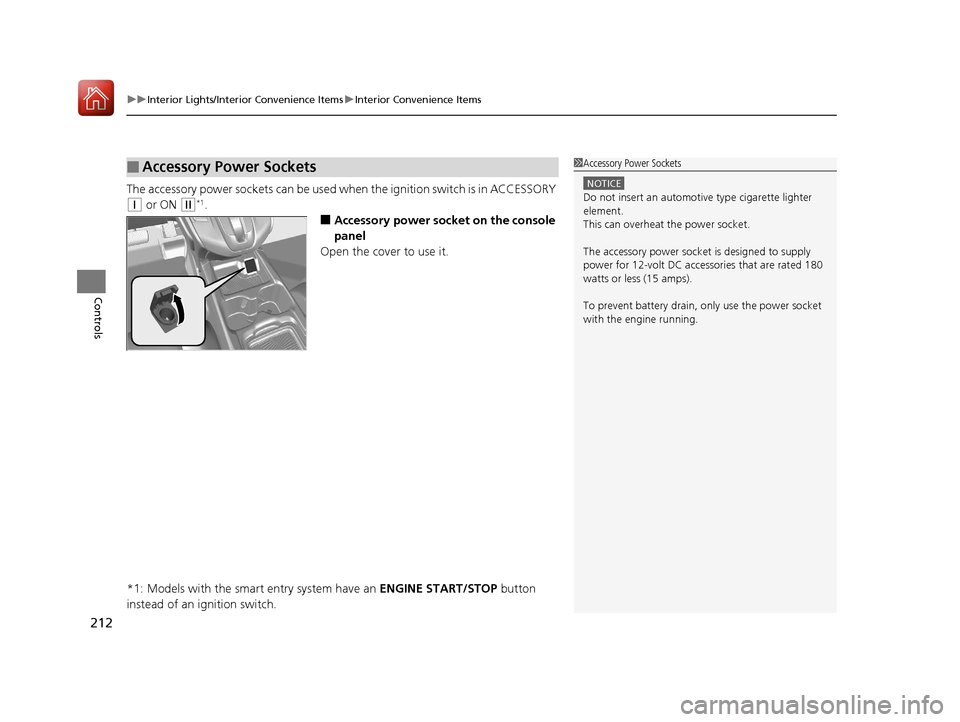
The accessory power sockets can be used wh en the ignition switch is in ACCESSORY
(q or ON (w*1.
■Accessory power socket on the console
panel
Open the cover to use it.
*1: Models with the smart entry system have an ENGINE START/STOP button
instead of an ignition switch.
■Accessory Power Sockets1 Accessory Power Sockets
NOTICE
Do not insert an automotive type cigarette lighter
element.
This can overheat the power socket.
The accessory power socket is designed to supply
power for 12-volt DC accessories that are rated 180
watts or less (15 amps).
To prevent battery drain, only use the power socket
with the engine running.
17 CR-V-31TLA6000.book 212 ページ 2016年10月11日 火曜日 午後6時37分
Page 218 of 657
Continued217
uuInterior Lights/Interior Convenience Items uInterior Convenience Items
Controls
The power mode must be in ON to use the
heated steering wheel.
Press the button on the right side of the
steering wheel.
When a comfortable temperature is reached,
press the button again to turn it off.
The heated steering wheel is turned off every
time you start the engine, even if you turned it
on the last time yo u drove the vehicle.
*1: Canadian models only, if equipped
■Heated Steering Wheel*11 Heated Steering Wheel*1
Do not use the heated steering wheel continuously
when the engine is off. Under such conditions, the
battery may be weaken ed, making the engine
difficult to start.
17 CR-V-31TLA6000.book 217 ページ 2016年10月11日 火曜日 午後6時37分
Page 219 of 657

uuInterior Lights/Interior Convenience Items uInterior Convenience Items
218
Controls
The power mode is in ON to use the seat
heaters. The HI setting heats the seats faster
than the LO setting.
Press the seat heater button:
Once - The HI setting (three indicators on)
Twice - The MID setting (two indicators on)
Three times - The LO setting (one indicator on)
Four times - The OFF se tting (no indicators on)
When the power mode is turn on after it is
turned off, the previous setting of seat heaters
is maintained.
■Front Seat Heaters*1 Front Seat Heaters*
Do not use the seat heaters even in LO when the
engine is off. Under such conditions, the battery may
be weakened, making the engine difficult to start.
After a certain period of time, the strength setting for
the seat heater as well as that for the seat ventilation
system will automatically be reduced by one level at a
time until the seat heater or ventilation system shuts
off. The elapsed time varies according to the interior
environment.
3WARNING
Heat induced burns are possible when
using seat heaters.
Persons with a diminished ability to sense
temperature (e.g., persons with diabetes,
lower-limb nerve damage, or paralysis) or
with sensitive skin should not use seat
heaters.
* Not available on all models
17 CR-V-31TLA6000.book 218 ページ 2016年10月11日 火曜日 午後6時37分
Page 220 of 657

Continued219
uuInterior Lights/Interior Convenience Items uInterior Convenience Items
Controls
There is no heater in the rear center seating
position.
Press the seat heater button:
Once - The HI setting (three indicators on)
Twice - The MID setting (two indicators on)
Three times - The LO setting (one indicator on)
Four times - The OFF setting (no indicators on)
The rear seat heaters is turned off every time
you start the engine, even if you turned it on
the last time you drove the vehicle.
*1: Canadian models only, if equipped
■Rear Seat Heaters*11 Rear Seat Heaters*1
Do not use the seat heaters even in LO when the
engine is off. Under such conditions, the battery may
be weakened, making the engine difficult to start.
The rear seat heater is turned off every time you start
the engine, even if you turned it on the last time you
drove the vehicle.
When the power mode is turned on after it is turned
off, the previous setting of front seat heaters is
maintained.
3WARNING
Heat induced burns are possible when
using seat heaters.
Persons with a diminished ability to sense
temperature (e.g., persons with diabetes,
lower-limb nerve damage, or paralysis) or
with sensitive skin should not use seat
heaters.
17 CR-V-31TLA6000.book 219 ページ 2016年10月11日 火曜日 午後6時37分
Page 230 of 657

229
uuAudio System uUSB Port(s)
Features
USB Port(s)
Install the iPod USB connector or the USB flash
drive to the USB port.
u The USB port (1.0A) is for playing audio
files on a USB flash drive, connecting a
cellular phone, and charging devices.
u The USB port (1.5A) is for charging
devices, playing audio files and
connecting compatib le phones with
Apple CarPlay
TM or Android AutoTM.
■On the back of the center console
compartment*
The USB ports (2.5A) are only for charging
devices.
*1: Models with the smart entry system have an ENGINE START/STOP button instead of an
ignition switch.
1 USB Port(s)
•Do not leave the iPod or USB flash drive in the vehicle.
Direct sunlight and high te mperatures may damage it.
•We recommend using an extension cable with the
USB port.
•Do not connect the iPod or USB flash drive using a
hub.
•Do not use a device such as a card reader or hard disk
drive, as the device or your files may be damaged.
•We recommend keeping y our data backed up
before using the device in your vehicle.
•Displayed messages may vary depending on the
device model and software version.
If the audio system does not recognize the iPod, try
reconnecting it a few times or reboot the device. To
reboot, follow the manufac turer’s instructions
provided with the iPod or visit www.apple.com/ipod.
The USB port can supply up to 1.0A/1.5A/2.5A of
power. It does not output 1.0 A/1.5A/2.5A unless the
device requests.
For amperage details, read the operating manual of
the device that ne eds to be charged.
Turn the ignition switch to ACCESSORY
( q or ON
(w*1 first.
This port is for battery charge only. You cannot play
music even if you have conne cted a music player to it.
Under certain conditions, a de vice connected to the port
may generate noise in the radio you are listening to.
USB Port (2.5A)
In the console compartment
Models
with
Display
Audio
Models
with color
audio
systemModels
with
Display
Audio
Models with Display Audio
On the back of the center console
compartment
* Not available on all models
17 CR-V-31TLA6000.book 229 ページ 2016年10月11日 火曜日 午後6時37分
Page 231 of 657
230
uuAudio System uAudio System Theft Protection
Features
Audio System Theft Protection
The audio system is disabled when it is di sconnected from the power source, such as
when the battery is disconnected or goes dead. In certain conditions, the system
may display a code entry screen. If this occurs, reactivate the audio system.
■Reactivating the audio system
1. Turn the ignition switch to ON
(w*1.
2. Turn on the audio system.
3. Press and hold the audio system power button for more than two seconds.
u The audio system is reac tivated when the audio co ntrol unit establishes a
connection with the vehicle control unit. If the control unit fails to recognize
the audio unit, you must go to a dealer and have the audio unit checked.
*1: Models with the smart entry system have an ENGINE START/STOP button instead of an
ignition switch.
17 CR-V-31TLA6000.book 230 ページ 2016年10月11日 火曜日 午後6時37分
Page 373 of 657

uuBluetooth ® HandsFreeLink ®u Using HFL
372
Features
The audio/information screen notifies you
when there is an incoming call.
Certain manual functions are disabled or inoperable while the ve hicle is in motion.
You cannot select a grayed-out option until the vehicle is stopped.
Only previously stored speed dial entries can be called using voice commands while
the vehicle is in motion.
2 Speed Dial P. 385
■HFL Status Display1Bluetooth ® HandsFreeLink ®
Bluetooth ® Wireless Technology
The Bluetooth ® word mark and logos are registered
trademarks owned by Bluetooth SIG, Inc., and any
use of such marks by Honda Motor Co., Ltd., is under
license. Other trademarks and trade names are those
of their respective owners.
HFL Limitations
An incoming call on HFL will interrupt the audio
s y s te m wh e n it is p la y i n g . It wi ll re s u m e w h en t h e c a l l
is ended.
HFL Mode
Battery Level Status
Signal Strength
Bluetooth Indicator
Appears when your
phone is connected
to HFL.
Roam Status
Call Name
■Limitations for Manual Operation
1HFL Status Display
The information that appears on the audio/
information screen vari es between phone models.
You can change the system language to English,
French, or Spanish. 2 Customized Features P. 335
17 CR-V-31TLA6000.book 372 ページ 2016年10月11日 火曜日 午後6時37分