Page 93 of 657
92
uuIndicators u
Instrument Panel
*1:Models with the smart entry system have an ENGINE START/STOP button instead of an ignition switch.
*2:Canadian models only: Apply and hold the brake pedal before turning the ignition on.
IndicatorNameOn/BlinkingExplanationMessage*
Security System
Alarm Indicator
●Blinks when the security system
alarm has been set.
2 Security System Alarm* P. 158—
Blind spot
information (BSI)
Indicator
*
●Comes on for a few seconds when
you set the power mode to ON,
then goes off.
●Stays on while BSI is turned off.
—
●Comes on when mud, snow, or ice
accumulates in the vicinity of
sensor.●Comes on while driving - Remove the
obstacle in the vicinity of sensor.
2 Blind spot information (BSI) System*
P. 495
●Comes on if there is a problem
with the system.●Comes on while driving - Have your
vehicle checked by a dealer.
Indicator
* Not available on all models
17 CR-V-31TLA6000.book 92 ページ 2016年10月11日 火曜日 午後6時37分
Page 95 of 657

94
uuIndicators u
Instrument Panel
*1:Models with the smart entry system have an ENGINE START/STOP button instead of an ignition switch.
IndicatorNameOn/BlinkingExplanationMessage*
Brake
Depressing
Indicator
*
●Comes on for a few seconds when
you turn the ignition switch to ON
(w*1, then goes off.
●Blinks when the electric parking
brake switch is pressed without
depressing the brake pedal while
the electric parking brake is in
operation.
●Blinks while driving - Press the electric
parking brake switch with the brake pedal
depressed.
2 Parking Brake P. 506
—
●Blinks when the automatic brake
hold button is pressed without
depressing the brake pedal while
the automatic brake hold is in
operation.
●Blinks if the automatic brake hold
is automatically canceled while it
is in operation. The beeper
sounds.
●Blinks while driving - Press the
automatic brake hold button with the
brake pedal depressed.
2 Automatic Brake Hold P. 510
●Immediately depress the brake pedal.
—
Electric Parking Brake System
Automatic Brake Hold System
* Not available on all models
17 CR-V-31TLA6000.book 94 ページ 2016年10月11日 火曜日 午後6時37分
Page 105 of 657

104
uuIndicators uDriver Information Interface Wa rning and Information Messages*
Instrument Panel
*1:Models with the smart entry system have an ENGINE START/STOP button instead of an ignition switch.
MessageConditionExplanation
●Appears when the engine coolant temperature gets
abnormally high.
2Overheating P. 615
●Appears when you turn the ignition switch to ON
(w*1 without fastening the driver's seat belt.
●Fasten the seat belt properly before you start to drive.
●Appears when there is a pr oblem with the sensor on
the battery.●Have your vehicle checked by a dealer.
2 Checking the Battery P. 588
●Appears along with the battery charging system
indicator when the batte ry is not charging.●Turn off the climate control system and rear defogger to
reduce electricity consumption.
2If the Charging System Indicator Comes On P. 619
●Appears if the automatic brake hold is automatically
canceled while it is in operation.●Immediately depress the brake pedal.
●Appears when the automa tic brake hold system is
turned off.2 Automatic Brake Hold P. 510
●Appears when the automa tic brake hold button is
pressed without wearing the driver’s seat belt.●Fasten the driver’s seat belt.
2 Automatic Brake Hold P. 510
●Appears when the automa tic brake hold button is
pressed without depressing the brake pedal while
the automatic brake hold is in operation.●Press the automatic brake hold button with the brake
pedal depressed.
2 Automatic Brake Hold P. 510
17 CR-V-31TLA6000.book 104 ページ 2016年10月11日 火曜日 午後6時37分
Page 106 of 657
105
uuIndicators uDriver Information Interface Wa rning and Information Messages*
Continued
Instrument Panel
MessageConditionExplanation
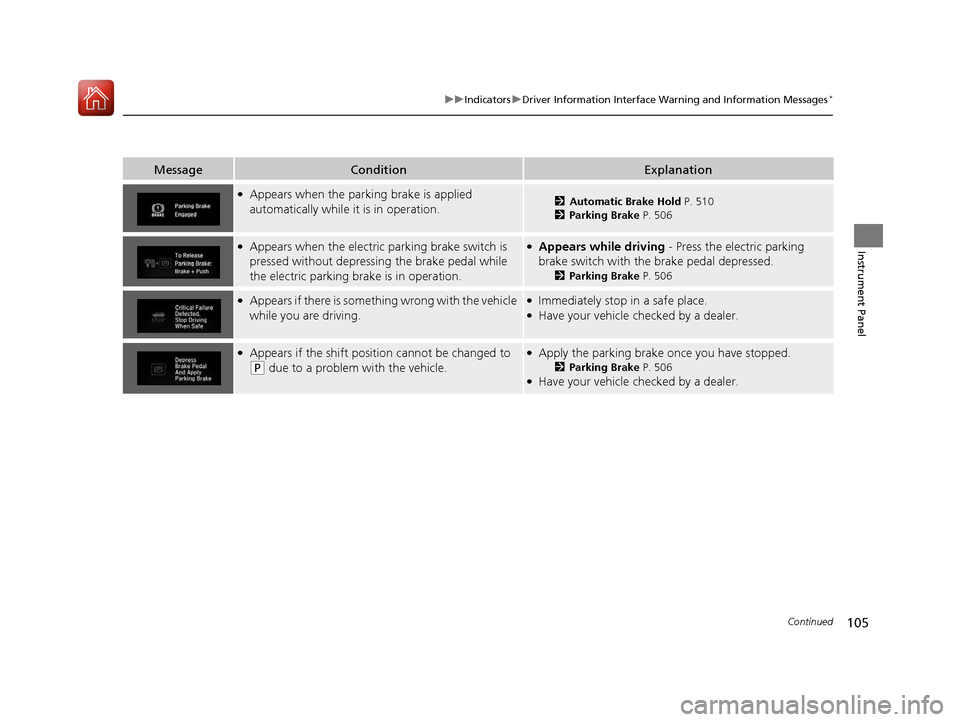
●Appears when the parking brake is applied
automatically while it is in operation.2Automatic Brake Hold P. 510
2 Parking Brake P. 506
●Appears when the electric parking brake switch is
pressed without depressing the brake pedal while
the electric parking brake is in operation.●Appears while driving - Press the electric parking
brake switch with the brake pedal depressed.
2 Parking Brake P. 506
●Appears if there is someth ing wrong with the vehicle
while you are driving.●Immediately stop in a safe place.●Have your vehicle checked by a dealer.
●Appears if the shift position cannot be changed to
(P due to a problem with the vehicle.
●Apply the parking brake once you have stopped.
2 Parking Brake P. 506●Have your vehicle checked by a dealer.
17 CR-V-31TLA6000.book 105 ページ 2016年10月11日 火曜日 午後6時37分
Page 108 of 657

107
uuIndicators uDriver Information Interface Wa rning and Information Messages*
Continued
Instrument Panel
MessageConditionExplanation
●Appears if you push the ENGINE START/STOP
button to turn the engine off without the shift lever
in
(P.
●Move the shift lever to (P. The power mode changes to
VEHICLE OFF.
●Move the shift lever to (P, then press the ENGINE
START/STOP button twice.
●Appears if you push the ENGINE START/STOP
button and the parking brake is not activated or the
shift lever is not in
(N position.
●Move the shift lever to (P position and start the engine.
●Appears when the power mode is in ACCESSORY.
—
●Appears after the driver’s door is opened when the
power mode is in ACCESSORY.●Press the ENGINE START/STOP button twice with your
foot off the brake pedal to change the power mode to
VEHICLE OFF (LOCK).
●Appears when you close the door with the power
mode in ON without the smart entry remote inside
the vehicle.●Disappears when you bring the smart entry remote back
inside the vehicle and close the door.
2 Smart Entry Remote Reminder P. 171
●Appears when the smart entry remote battery
becomes weak.●Replace the battery as soon as possible.
2Replacing the Button Battery P. 590
U.S. models
Canadian models
17 CR-V-31TLA6000.book 107 ページ 2016年10月11日 火曜日 午後6時37分
Page 109 of 657

108
uuIndicators uDriver Information Interface Wa rning and Information Messages*
Instrument Panel
MessageConditionExplanation
●Appears if the smart entry remote battery is too
weak to start the engine or the key is not within
operating range to start the engine.
A beeper sounds six times.●Bring the smart entry remote in front of the ENGINE
START/STOP button to be touched with.
2If the Smart Entry Remote Battery is Weak P. 609
●Appears when the starter system has a problem.●As a temporary measure, press and hold the ENGINE
START/STOP button for up to 15 seconds while pressing
the brake pedal and manually start the engine.
Have your vehicle checked by a dealer.
●Appears as soon as a problem is detected in the
smart entry system or push button starting system.●Appears constantly - Have your vehicle checked by a
dealer.
●Appears if the vehicle is being driven in a manner
consistent with drowsy or inattentive driving.
2 Driver Attention Monitor P. 125
U.S.
Canada
17 CR-V-31TLA6000.book 108 ページ 2016年10月11日 火曜日 午後6時37分
Page 113 of 657

112
uuIndicators uDriver Information Interface Wa rning and Information Messages*
Instrument Panel
MessageConditionExplanation
●Appears when pressing the –/SET button while the
vehicle is stopped on a very steep slope.●ACC with LSF cannot be set.
2 Adaptive Cruise Control (ACC) with Low Speed
Follow (LSF)* P. 465
●Appears when the parking brake is applied
automatically while ACC with LSF is in operation.●ACC with LSF has been automatically canceled.
2Adaptive Cruise Control (ACC) with Low Speed
Follow (LSF)* P. 465
2 Parking Brake P. 506
●Appears when pressing the –/SET button while the
parking brake is applied.●ACC with LSF cannot be set.
2 Adaptive Cruise Control (ACC) with Low Speed
Follow (LSF)* P. 465
2 Parking Brake P. 506
●Appears when pressing the –/SET button while the
vehicle is moving and the brake pedal is depressed.●ACC with LSF cannot be set.
2 Adaptive Cruise Control (ACC) with Low Speed
Follow (LSF)* P. 465
●Appears if ACC with LSF is canceled while your
vehicle is automatically stopped by ACC with LSF.●Immediately depress the brake pedal.
Models with ACC with LSF
* Not available on all models
17 CR-V-31TLA6000.book 112 ページ 2016年10月11日 火曜日 午後6時37分
Page 114 of 657
113
uuIndicators uDriver Information Interface Wa rning and Information Messages*
Continued
Instrument Panel
MessageConditionExplanation
●Flashes when the system senses a likely collision
with a vehicle in front of you.●Take the appropriate means to prevent a collision (apply
the brakes, change lanes, etc.)
2 Collision Mitigation Braking SystemTM (CMBSTM)*
P. 514
2 Adaptive Cruise Control (ACC) with Low Speed
Follow (LSF)
* P. 465
Models with ACC with LSF
* Not available on all models
17 CR-V-31TLA6000.book 113 ページ 2016年10月11日 火曜日 午後6時37分