Page 159 of 657

158
Controls
Security System
Immobilizer System
The immobilizer system prevents a key that has not been pre-registered from
starting the engine. Each key contains electronic transmitters that use electronic
signals to verify the key.
Pay attention to the following when inserti ng the key into the ignition switch or
pressing the ENGINE START/STOP button
*:
• Do not allow objects that emit strong radio waves near the ignition switch*1.
• Make sure the key is not covered by or touching a metal object.
• Do not bring a key from another vehicle's immobilizer system near the ignition
switch.
Security System Alarm*
The security system alarm activates when the tailgate, hood or doors are forcibly
opened. The alarm does not go off if the tailgate or doors are opened with the key,
remote transmitter or smart entry system.
However, the alarm goes off if a door is ope ned with the key, then the shift lever is
moved out of
(P or the hood is opened before the power mode is set to ON.
■When the security sy stem alarm activates
The horn sounds intermittently and all the exterior lights flash.
*1: Models with the smart entry system have an ENGINE START/STOP button
instead of an ignition switch.
1 Immobilizer System
NOTICE
Leaving the key in the vehicl e can result in theft or
accidental movement of the vehicle.
Always take the key with you whenever you leave the
vehicle unattended.
Do not alter the system or add other devices to it.
Doing so may damage the system and make your
vehicle inoperable.
Canadian models only: Apply and hold the brake
pedal before turning the vehicle on the first time after
the battery has been disconnected.
1 Security System Alarm*
The security alarm continues for a maximum of two
minutes until the security system deactivates.
* Not available on all models
17 CR-V-31TLA6000.book 158 ページ 2016年10月11日 火曜日 午後6時37分
Page 170 of 657

169
uuOperating the Switches Around the Steering Wheel uENGINE START/STOP Button*
Continued
Controls
ENGINE START/STOP Button*
*1:Except U.S. models
■Changing the Power Mode1ENGINE START/STOP Button*
ENGINE START/STOP Button Operating Range
You can start the engine when the smart entry
remote is inside the vehicle.
The engine may also run if the smart entry remote is
close to the door or window, ev en if it is outside the
vehicle.
If the smart entry remote battery is weak, beeper
sounds and the To Start, Hold Remote Near Start
Button message appears on the MID. 2 If the Smart Entry Remote Battery is Weak
P. 609
The power system may also start if the keyless access
remote is close to the door or window, even if it is
outside the vehicle.
Operating RangeVEHICLE OFF (LOCK)
The button is off.
The steering wheel is locked
*1.
The power to all electrical components is turned off.
ACCESSORY
The button blinks (in red).
Operate the audio system and other accessories
in this position.
ON
The button blinks (in red).
All electrical components can be used.
Press the button without the
shift lever in
( P.
Without
pressing the
brake pedal
Shift to
(P then press the
button. Press the button.
Shift to
(
P.
U.S. models
* Not available on all models
17 CR-V-31TLA6000.book 169 ページ 2016年10月11日 火曜日 午後6時37分
Page 175 of 657

174
uuOperating the Switches Around the Steering Wheel uLight Switches
Controls
Light Switches
Rotating the light switch turns the lights on
and off, regardless of the power mode setting
or position of the ignition switch.
■High beams
Push the lever forward until you hear a click.
■Low beams
When in high beams, pull the lever back to
return to low beams.
■Flashing the high beams
Pull the lever back, and release it.
■Lights off
Turn the lever to OFF either when:
• The shift lever is in
(P.
• The parking brake is applied.
To turn the lights on again, turn the leve r to OFF to cancel the lights off mode. Even
if you do not cancel the lights off mode, the lights come on automatically when:
• The shift lever is moved out of
(P and the parking brake is released.
• The vehicle starts to move.
■Manual Operation1Light Switches
If you remove the key from the ignition switch with
the lights on, a light on reminder chime sounds when
you open the driver's door.
If you leave the power mode in VEHICLE OFF (LOCK)
while the lights are on, a chime sounds when the
driver’s door is opened.
When the lights are on, the lights on indicator in the
instrument pane l will be on.
2 Indicators P. 80
Do not leave the lights on when the engine is off
because it will cause the battery to discharge.
Models without smart entry system
Models with smart entry system
All models
High Beams
Flashing the high beams
Low Beams
Turns on parking, side marker,
tail, and rear license plate lights
Turns on headlights, parking,
side marker, tail, and rear
license plate lights
17 CR-V-31TLA6000.book 174 ページ 2016年10月11日 火曜日 午後6時37分
Page 182 of 657
181
uuOperating the Switches Around the Steering Wheel uDaytime Running Lights
Controls
Daytime Running Lights
The parking/daytime running lights come on when the following conditions have
been met:
• The ignition switch is in ON
(w*1.
• The headlight switch is AUTO or OFF or .
• The parking brake is released.
The lights remain on even if you set th e parking brake. Turning off the ignition
switch or setting the power mode to VEHI CLE OFF will turn off the daytime running
lights.
The daytime running lights are off once the h eadlight switch is turned on, or when
the headlight switch is in AUTO and it is getting darker outside.
*1: Models with the smart entry system have an ENGINE START/STOP button instead of an
ignition switch.
17 CR-V-31TLA6000.book 181 ページ 2016年10月11日 火曜日 午後6時37分
Page 191 of 657

uuOperating the Switches Around the Steering Wheel uDriving Position Memory System*
190
Controls
1. Set the power mode to ON. Adjust the
driver’s seat to the desired position.
2. Press the SET button.
u You will hear a beep, and the memory
button indicator light will blink.
3. Press and hold memory button
(1 or (2
within five seconds of pressing the SET
button.
u Once the seat position has been
memorized, the indicator light on the
button you pressed stays on.
1. Move the shift lever to
(P.
2. Apply the parking brake.
3. Press a memory button (
(1 or (2).
u You will hear a beep, and the indicator
light will blink.
The seat will automatically move to the
memorized position. When it has finished
moving, you will hear a beeper, and the
indicator light stays on.
■Storing a Position in Memory1 Storing a Position in Memory
After you press the SET button, the storing operation
will be canceled when:
•You do not press the memory button within five
seconds.
•You readjust the seat position before the double-
beep.
•You set the power mode to any position except
ON.
Memory
Button 1
Memory
Button 2
SET Button
■Recalling the Stored Position1Recalling the Stored Position
The seat will st op moving if you:
•Press the SET button, or a memory button ((1 or
(2).
•Adjust the seat position.•Shift into any position except ( P.
Memory
Button 1
Memory
Button 2
17 CR-V-31TLA6000.book 190 ページ 2016年10月11日 火曜日 午後6時37分
Page 202 of 657

201
uuAdjusting the Seats uRear Seats
Controls
Rear Seats
1. Store the center seat belt first. Insert the
latch plate into the slot on the side of the
anchor buckle.
2. Retract the seat belt into the holder on the
ceiling.
2 Seat Belt with Detachable Anchor P. 46
3.Lower the rear seat head restraint to its
lowest position. Put the armrest back into
the seat-back.
4. Pull the release lever and fold down the
seat.
4. Pull the release lever and fold down the
seat.
■Folding Down the Rear Seats1Folding Down the Rear Seats
The rear seat-backs can be folded down to
accommodate bulkier items in the cargo area.
Never drive with the seat-back folded down and the
tailgate open.
2 Exhaust Gas Hazard P. 76
When returning the seat-back to its original position,
push it firmly back. Also, m ake sure all rear shoulder
belts are positioned in front of the seat-back.
Make sure all items in the cargo area or items
extending through the opening into the rear
seats are properly secured. Loose items can fly
forward if you have to brake hard.
3WARNING
Make sure the seat-backs are latched
securely before driving.
Latch plate
anchor buckle
Release LeverFrom the rear seat side
Release LeverFrom the cargo area side
17 CR-V-31TLA6000.book 201 ページ 2016年10月11日 火曜日 午後6時37分
Page 215 of 657
uuInterior Lights/Interior Convenience Items uInterior Convenience Items
214
Controls
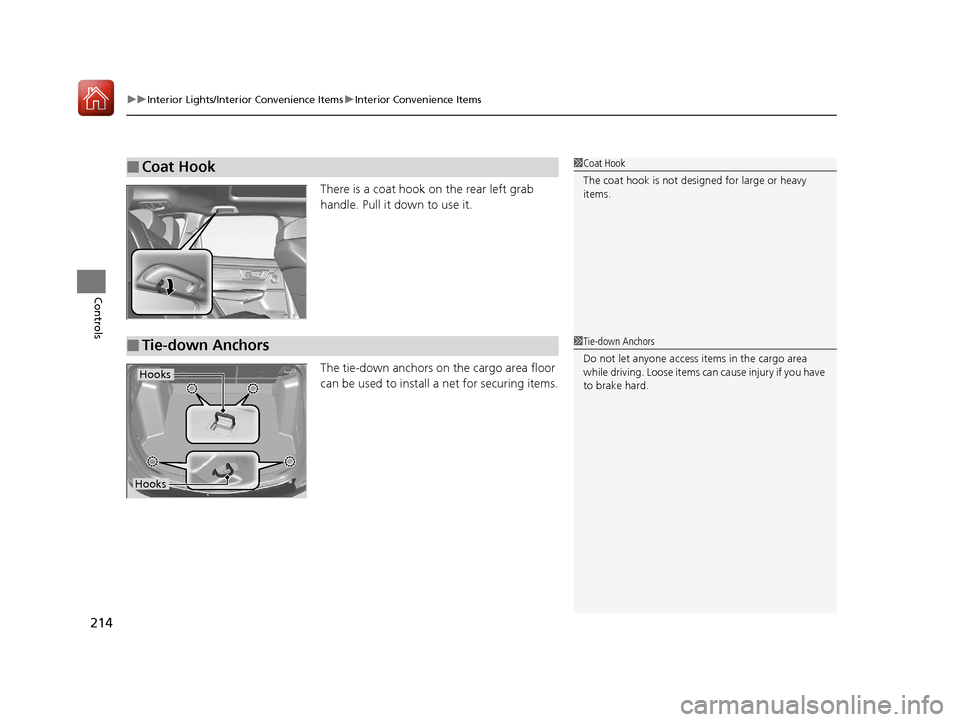
There is a coat hook on the rear left grab
handle. Pull it down to use it.
The tie-down anchors on the cargo area floor
can be used to install a net for securing items.
■Coat Hook1Coat Hook
The coat hook is not desi gned for large or heavy
items.
■Tie-down Anchors1 Tie-down Anchors
Do not let anyone access items in the cargo area
while driving. Loose items ca n cause injury if you have
to brake hard.
Hooks
Hooks
17 CR-V-31TLA6000.book 214 ページ 2016年10月11日 火曜日 午後6時37分
Page 221 of 657

uuInterior Lights/Interior Convenience Items uInterior Convenience Items
220
Controls
The rear cargo cover can be used to conceal
items in the cargo area and protect them from
direct sunlight.
■To extend:
Slightly lift up on the handle at the center
edge of the cover to unhook each end, then
pull the cover rearward and clip the mounting
rods in the hooks at bo th sides of the tailgate
opening.
■To retract:
Slip the rods out of the hooks, then slowly roll
it back until it is completely retracted.
■To remove:
Push either end of the housing inward, then
lift it out of its position.
■Rear Cargo Cover*1 Rear Cargo Cover*
Do not let anyone access items in the cargo area
while driving. Loose items ca n cause injury if you have
to brake hard.
Do not stack objects higher than the top of the seat
in the cargo area. They could block your view and be
thrown about the vehicle during a sudden stop.
To prevent rear cargo cover damage:
•Do not place items on the rear cargo cover.•Do not put weight on the rear cargo cover.
Be sure that each mounting rod sets in its respective
retention groove when you retract the rear cargo
cover. If they are not set in the grooves, the rods may
rattle as they contac t the surrounding surfaces.
Handle
Mounting Rod
Hook
* Not available on all models
17 CR-V-31TLA6000.book 220 ページ 2016年10月11日 火曜日 午後6時37分