Page 200 of 641
Continued199
uuInterior Lights/Interior Convenience Items uInterior Convenience Items
Controls
The accessory power socket can be used wh en the ignition switch is in ACCESSORY
(q or ON (w*1.
Open the cover to use it.
*1: Models with the smart entry system have an ENGINE START/STOP button instead of an
ignition switch.
■Accessory Power Socket1 Accessory Power Socket
NOTICE
Do not insert an automotive type cigarette lighter
element: The power socket can overheat.
The accessory power socket is designed to supply
power for 12 volt DC access ories that are rated 180
watts (15 amps) or less.
To prevent battery drain, use the power socket only
when the engine is running.
17 CIVIC 5D (KA KC KL)-31TGG6000.book 199 ページ 2016年6月8日 水曜日 午 後2時8分
Page 201 of 641

uuInterior Lights/Interior Convenience Items uInterior Convenience Items
200
Controls
To use the wireless charger, the power mode must be in ACCESSORY or ON.
Charge a compatible device on the ar ea indicated by the mark as follows:
1. To turn the system on and off, press and
hold the (power) button.
u When the system is activated, the green
indicator light comes on.
2. Place the device you want to charge on the
charging area.
u The system will automatically start
charging the device, and the amber
indicator light will come on.
u Make sure that the device is compatible
with the system, and placed with the
chargeable side in the center of the
charging area.
3. When charging is completed, the green
indicator light will come on.
u Depending on the device, the amber
indicator light will stay on.
■Wireless Charger*
Canadian models
1Wireless Charger*
This system consumes a lot of power. Do not use the
system for a long time when the engine is not
running. This may weaken the battery, making it
difficult to start the engine.
When using the wireless charger, check the user’s
manual that came with th e compatible device you
want to charge.
3CAUTION
Metal objects between the charge pad and
the device to be charged will get hot and
can burn you.
• Always remove foreign objects from the
charge pad before charging the device.
• Be sure the surface is clear of dust and
other debris before charging.
• Do not spill liquids (i. e. water, drinks,
etc.) on the charger and the device.
• Do not use oil, grease, alcohol, benzine
or thinner for cleaning the charge pad.
• Do not cover the system with towels,
clothing, or other objects while charging
etc.
• Avoid spraying aerosols which may come
in contact with the change pad surface.
Green Indicator
Amber Indicator
Charging Area (Power) Button
* Not available on all models
17 CIVIC 5D (KA KC KL)-31TGG6000.book 200 ページ 2016年6月8日 水曜日 午
後2時8分
Page 205 of 641
uuInterior Lights/Interior Convenience Items uInterior Convenience Items
204
Controls
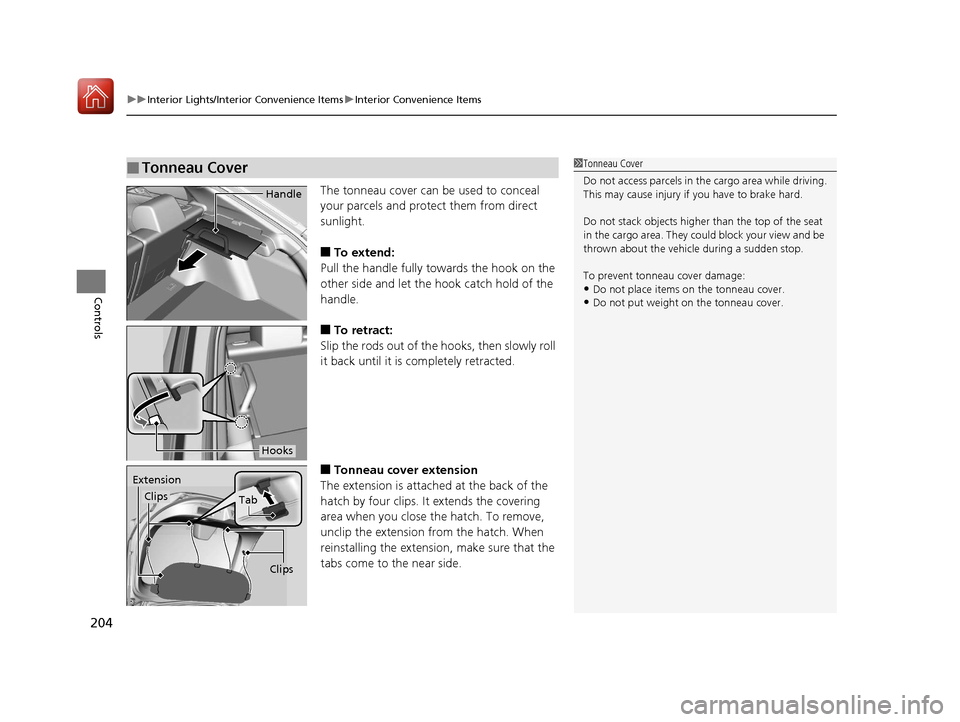
The tonneau cover can be used to conceal
your parcels and protect them from direct
sunlight.
■To extend:
Pull the handle fully towards the hook on the
other side and let the hook catch hold of the
handle.
■To retract:
Slip the rods out of the hooks, then slowly roll
it back until it is completely retracted.
■Tonneau cover extension
The extension is attached at the back of the
hatch by four clips. It extends the covering
area when you close the hatch. To remove,
unclip the extension from the hatch. When
reinstalling the extension, make sure that the
tabs come to the near side.
■Tonneau Cover1 Tonneau Cover
Do not access parcels in the cargo area while driving.
This may cause injury if you have to brake hard.
Do not stack objects higher than the top of the seat
in the cargo area. They could block your view and be
thrown about the vehicle during a sudden stop.
To prevent tonneau cover damage:
•Do not place items on the tonneau cover.
•Do not put weight on the tonneau cover.
Handle
Hooks
Extension
Clips
Tab
Clips
17 CIVIC 5D (KA KC KL)-31TGG6000.book 204 ページ 2016年6月8日 水曜日 午 後2時8分
Page 216 of 641
215
uuClimate Control System uAutomatic Climate Control Sensors
Controls
Automatic Climate Control Sensors
The automatic climate control system is
equipped with sensors. Do not cover or spill
any liquid on them.Sensor
Sensor
17 CIVIC 5D (KA KC KL)-31TGG6000.book 215 ページ 2016年6月8日 水曜日 午 後2時8分
Page 285 of 641
284
uuAudio System Basic Operation uPlaying an iPod
Features
Playing an iPod
Connect the iPod using your USB connector to the USB port, then select the iPod
mode.
2 USB Port(s) P. 219
*1:Some or all of the lists may not be displayed.
VOL (Volume) Icons
Select to adjust the volume.
(Back) Icon
Select to go back to the previous
display.
Song Icons
Select or to change songs.
Select and hold to move rapidly
within a song.
/AUDIO (Power/Audio) Icon
Select to turn the audio system
on and off.
Open/Close Icon*1
Displays/hides the detailed
information.
(Menu) Icon
Select to display the menu items.
Cover Art Audio/Information ScreenPlay/Pause Icon
Driver Information Interface
17 CIVIC 5D (KA KC KL)-31TGG6000.book 284 ページ 2016年6月8日 水曜日 午
後2時8分
Page 292 of 641

291
uuAudio System Basic Operation uPlaying Pandora ®
Continued
Features
Playing Pandora ®
Your audio system allows you to listen to music from the Pandora ® app on a
compatible smartphone.
This function is available when the phone is paired an d connected to the vehicle’s
Bluetooth ® HandsFreeLink ® (HFL) system, or with an iPhone, you can connect using
your USB cable to the USB port.
2 Phone Setup P. 390
2 USB Port(s) P. 219
*1:Some or all of the lists may not be displayed.
U.S. models
1Playing Pandora ®
Pandora ®, the Pandora logo, and the Pandora trade
dress are trademarks or registered trademarks of
Pandora Media, Inc., used with permission. Pandora
is only available in certai n countries. Visit the Pandora
website for more information.
To find out if your phone is compatible with this
feature, visit www.handsfreelink.honda.com , or call
1-888-528-7876.
To use this service in your vehicle, the Pandora ® app
must first be installed on your phone. Visit
www.pandora.com. for more information.
Pandora ® is free, personalized radio that plays music
and comedy you’ll love. Just start with the name of
one of your favorite arti sts, songs, comedians or
composers and Pandora ® will create a custom station
that plays similar tracks. Pandora® also features
hundreds of genre stations ranging from Dubstep to
Smooth Jazz to Power Workout.
If you cannot operate Pandora ® through the audio
system, it may be streaming through Bluetooth®
Audio. Make sure Pandora ® mode on your audio
system is selected.
If your phone is connec ted to Android Auto,
Pandora ® is only available through the Android Auto
interface. Visit the Android Auto website to check
compatibility.
Audio/Information
Screen Cover Art
VOL (Volume) Icons
Select to adjust the
volume. (Back) Icon
Select to go back to the
previous display.
/AUDIO (Power/
Audio) Icon
Select to turn the audio
system on and off.
(Menu) Icon
Select to display the
menu items.
Play/Pause Icon
Select to resume or play a song.
Station Up/Down Icons
Select to change a station. Skip Icon
Select to skip a song.Like/Dislike Icons
Select to evaluate a song.
Driver Information
Interface
17 CIVIC 5D (KA KC KL)-31TGG6000.book 291 ページ 2016年6月8日 水曜日 午
後2時8分
Page 335 of 641
334
uuCustomized Features u
Features
Audio Source Pop-Up
Cover Art
Tune Start
SportsFlash Setup
Traffic & Weather Setup
Other
SXM*
Default
Bluetooth Device ListBluetooth
Multiple Channel Mix Preset
Home Screen Edit Order
Configuration of Instrument Panel
Tachometer Setting
Display Settings
Background Color*1
Display
System
Touch Panel Sensitivity
Brightness
Contrast
Black Level
Blue
Amber
Red
Violet
BlueGreen
Home
Menu Icon Position*2
*1 : Does not appear when you chan ge the screen interface design.
*2 : Appears only when you change the screen interface design.
* Not available on all models
17 CIVIC 5D (KA KC KL)-31TGG6000.book 334 ページ 2016年6月8日 水曜日 午 後2時8分
Page 346 of 641

345
uuCustomized Features u
Continued
Features
*1:Default Setting
*2:Appears only when you change the screen interface design.
Setup
Group Customizable Features Description Selectable Settings
Audio
BluetoothBluetooth Device List
Pairs a new phone to HFL, edits or deletes a
paired phone.
2
Phone Setup P. 390
—
Other
[Your selected media]
Cover ArtTurns the cover art display on and off.On*1/Off
Audio Source Pop-Up
Selects whether the list of selectable audio source
comes on when Audio is selected on the home
screen.
On /Off*1
DefaultCancels/Resets all customized items in the Audio
settings group as default.Yes /No
System Home Home Screen Edit Order
Changes the HOME screen icon layout. —
Menu Icon Position
*2Changes the position of the menu icons on the
Audio , Phone, and Info screen. —
Configuration of
Instrument Panel Changes the
Instrument Panel screen icon
layout. —
Tachometer Setting Turns on and off the tachometer display. On
*1/Off
Bluetooth ® mode
iPod or USB mode
17 CIVIC 5D (KA KC KL)-31TGG6000.book 345 ページ 2016年6月8日 水曜日 午 後2時8分


