2017 HONDA CIVIC HATCHBACK cover
[x] Cancel search: coverPage 364 of 641

Continued363
uuBluetooth ® HandsFreeLink ®*uHFL Menus
Features
■To pair a cell phone (No phone has
been paired to the system)
1. Press the button or the button.
2. Rotate to select Yes, then press .
3. Make sure your phone is in search or
discoverable mode, then press .
u HFL automatically searches for a
Bluetooth ® device.
4. When your phone appears on the list, select
it by pressing .
u If your phone doesn’t appear, select
Phone Not Found? and search for
Bluetooth ® devices using your phone.
From your phone, select
HandsFreeLink .
5. The system gives you a pairing code on the
audio/information screen.
u Confirm if the pairing code on the screen
and your phone match.
This may vary by phone.
6. A notification appears on the screen if
pairing is successful.
■Phone Setup1Phone Setup
Your Bluetooth -compatible phone must be paired to
HFL before you can make and receive hands-free
calls.
Phone Pairing Tips:
•You cannot pair your phone while the vehicle is
moving.
•Up to six phones can be paired.
•Your phone’s battery may dr ain faster when it is
connected to HFL.
•If your phone is not ready for pairing or not found
by the system within three minutes, the system will
time out and return to idle.
Once you have paired a phone, you can see it
displayed on the screen with one or two icons on the
right side.
These icons indicate the following: : The phone can be used with HFL.
: The phone is compatible with Bluetooth® Audio.
17 CIVIC 5D (KA KC KL)-31TGG6000.book 363 ページ 2016年6月8日 水曜日 午 後2時8分
Page 366 of 641
365
uuBluetooth ® HandsFreeLink ®*uHFL Menus
Continued
Features
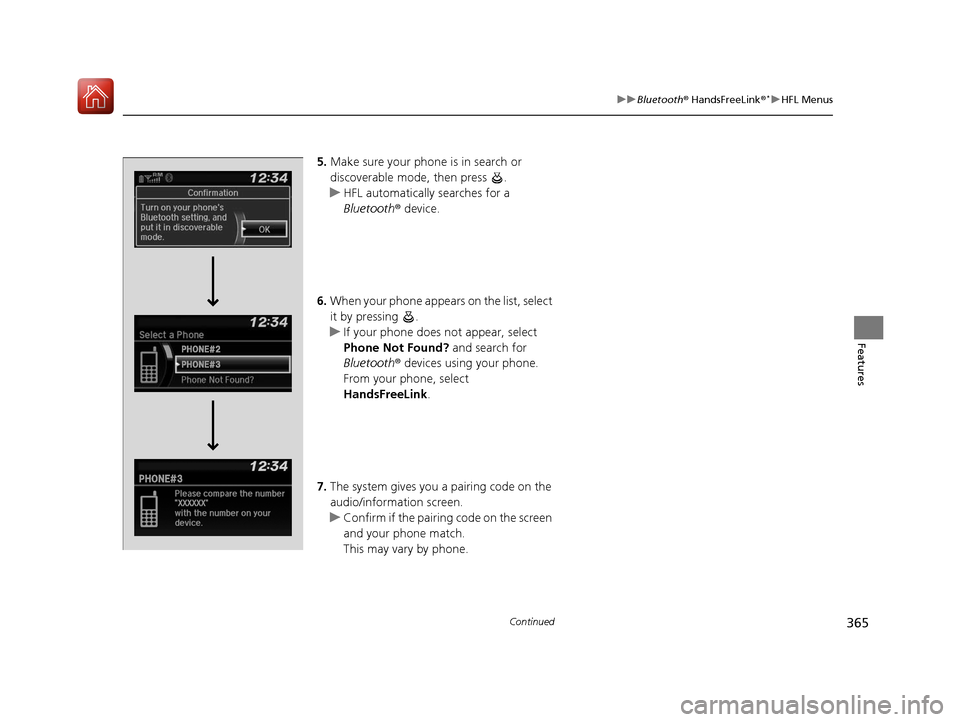
5. Make sure your phone is in search or
discoverable mode, then press .
u HFL automatically searches for a
Bluetooth ® device.
6. When your phone appears on the list, select
it by pressing .
u If your phone does not appear, select
Phone Not Found? and search for
Bluetooth ® devices using your phone.
From your phone, select
HandsFreeLink .
7. The system gives you a pairing code on the
audio/information screen.
u Confirm if the pairing code on the screen
and your phone match.
This may vary by phone.
17 CIVIC 5D (KA KC KL)-31TGG6000.book 365 ページ 2016年6月8日 水曜日 午 後2時8分
Page 391 of 641

uuBluetooth ® HandsFreeLink ®*uHFL Menus
390
Features
■To pair a cell phone (when there is no
phone paired to the system)
1. Select Phone .
2. Select Yes.
3. Make sure your phone is in search or
discoverable mode, then select Continue.
u HFL automatically searches for a
Bluetooth ® device.
4. Select your phone when it appears on the
list.
u If your phone does not appear, you can
select Refresh to search again.
u If your phone still does not appear, select
Phone Not Found and search for
Bluetooth ® devices using your phone.
From your phone, search for
HandsFreeLink .
5. The system gives you a pairing code on the
audio/information screen.
u Confirm if the pairing code on the screen
and your phone match.
This may vary by phone.
■Phone Setup1Phone Setup
Your Bluetooth -compatible phone must be paired to
the system before you ca n make and receive hands-
free calls.
Phone Pairing Tips:
•You cannot pair your phone while the vehicle is
moving.
•Up to six phones can be paired.
•Your phone's battery may dr ain faster when it is
paired to the system.
•If your phone is not ready for pairing or not found
by the system within three minutes, the system will
time out and return to idle.
Once you have paired a phone, you can see it
displayed on the screen with one or two icons on the
right side.
These icons indicate the following: : The phone can be used with HFL.
: The phone is compatible with Bluetooth® Audio.
If there is an active c onnection to Apple CarPlay,
pairing of additional Bluetooth -compatible devices is
unavailable and Add Bluetooth Device is grayed
out from the Bluetooth Device List screen.
17 CIVIC 5D (KA KC KL)-31TGG6000.book 390 ページ 2016年6月8日 水曜日 午 後2時8分
Page 414 of 641
Continued413
uuBluetooth ® HandsFreeLink ®*uHFL Menus
Features
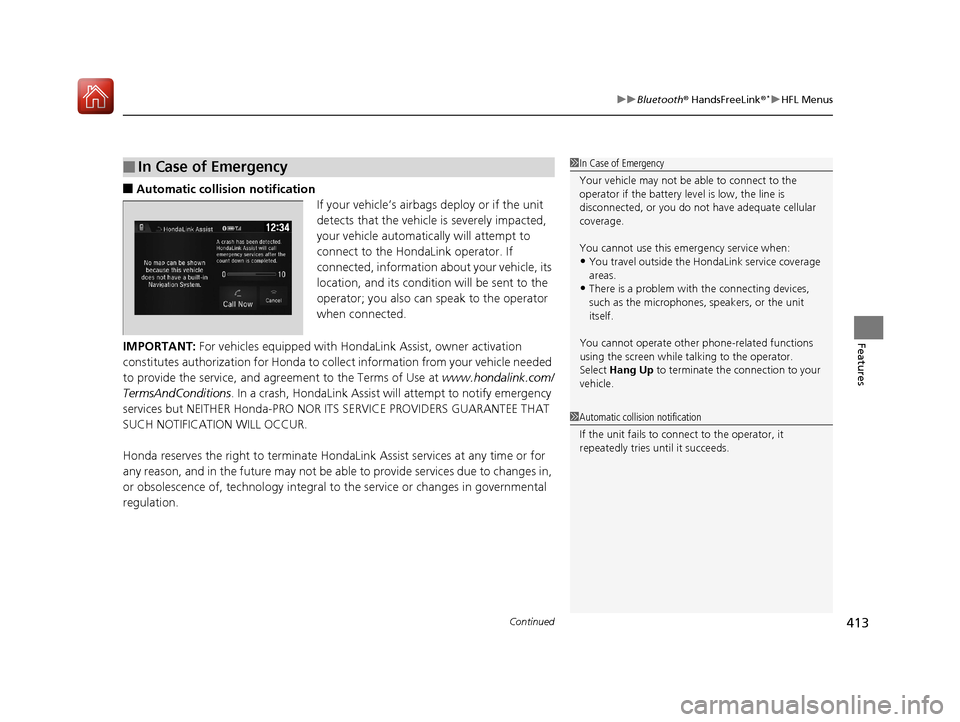
■Automatic collis ion notification
If your vehicle’s airbags deploy or if the unit
detects that the vehicle is severely impacted,
your vehicle automatically will attempt to
connect to the HondaLink operator. If
connected, information about your vehicle, its
location, and its condition will be sent to the
operator; you also can speak to the operator
when connected.
IMPORTANT: For vehicles equipped with Ho ndaLink Assist, owner activation
constitutes authorization for Honda to collect information from your vehicle needed
to provide the service, and agreement to the Terms of Use at www.hondalink.com/
TermsAndConditions . In a crash, HondaLink Assist will attempt to notify emergency
services but NEITHER Honda-PRO NOR ITS SERVICE PROVIDERS GUARANTEE THAT
SUCH NOTIFICATION WILL OCCUR.
Honda reserves the right to terminate HondaLink Assist services at any time or for
any reason, and in the future may not be ab le to provide services due to changes in,
or obsolescence of, technology integral to the service or changes in governmental
regulation.
■In Case of Emergency1 In Case of Emergency
Your vehicle may not be able to connect to the
operator if the battery level is low, the line is
disconnected, or you do not have adequate cellular
coverage.
You cannot use this emergency service when:
•You travel outside the H ondaLink service coverage
areas.
•There is a problem with the connecting devices,
such as the microphones, speakers, or the unit
itself.
You cannot operate othe r phone-related functions
using the screen while talking to the operator.
Select Hang Up to terminate the connection to your
vehicle.
1 Automatic collision notification
If the unit fails to connect to the operator, it
repeatedly tries until it succeeds.
17 CIVIC 5D (KA KC KL)-31TGG6000.book 413 ページ 2016年6月8日 水曜日 午 後2時8分
Page 447 of 641

446
uuWhen Driving uFront Sensor Camera*
Driving
Front Sensor Camera*
The camera, used in system s such as LKAS, RDM, ACC*, ACC with LSF*, CMBSTM
and auto high-beam, is designed to detect an object that triggers any of the systems
to operate its functions.
This camera is located behind the rearview
mirror.
To help reduce the likelihood that high interior
temperatures will cause the camera’s sensing
system to shut off, when parking, find a shady
area or face the front of the vehicle away from
the sun. If you use a re flective sun shade, do
not allow it to cover the camera housing.
Covering the camera can concentrate heat on
it.
■Camera Location and Handling Tips
1 Front Sensor Camera*
Never apply a film or attach any objects to the
windshield, the hood, or the front grill that could
obstruct the camera’s fiel d of vision and cause the
system to operate abnormally.
Scratches, nicks, and othe r damage to the windshield
within the camera’s fiel d of vision can cause the
system to operate abnormall y. If this occurs, we
recommend that you replac e the windshield with a
genuine Honda replacem ent windshield. Making
even minor repairs within th e camera’s field of vision
or installing an aftermarket replacement windshield
may also cause the system to operate abnormally.
After replacing the winds hield, have a dealer
recalibrate the camera. Pr oper calibration of the
camera is necessary for the system to operate
properly.
Do not place an object on the top of the instrument
panel. It may reflect onto the windshield and prevent
the system from detecting lane lines properly.
Front Sensor
Camera
* Not available on all models
17 CIVIC 5D (KA KC KL)-31TGG6000.book 446 ページ 2016年6月8日 水曜日 午 後2時8分
Page 449 of 641

448
uuWhen Driving uAdaptive Cruise Control (ACC) with Low Speed Follow (LSF)*
Driving
Adaptive Cruise Control (ACC) with Low Speed Follow (LSF)*
Helps maintain a constant vehicle speed an d a set following interval behind a vehicle
detected ahead of yours and, if the detect ed vehicle comes to a stop, can decelerate
and stop your vehicle, without you having to keep your foot on the brake or the
accelerator.
When ACC with LSF slows your vehicle by applying the brakes, your vehicle’s brake
lights will illuminate.1 Adaptive Cruise Control (ACC) with Low Speed Follow (LSF)*
Important Reminder
As with any system, there are limits to ACC with LSF.
Use the brake pedal whenever necessary, and always
keep a safe distance between your vehicle and other
vehicles.
3WARNING
Improper use of ACC wi th LSF can lead to a
crash.
Use ACC with LSF only when driving on
expressways or freeways and in good
weather conditions.
3WARNING
ACC with LSF has limited braking capability
and may not stop your vehicle in time to
avoid a collision with a vehicle that quickly
stops in front of you.
Always be prepared to apply the brake
pedal if the conditions require.
When to use
■Vehicle speed for ACC with LSF: A vehicle is detected ahead within ACC with
LSF range – ACC with LSF operates at speeds up to 90 mph (145 km/h).
No vehicle is detected within ACC with LSF range – ACC with LSF operates at
the speed of 25 mph (40km/h) or above.
■Shift position for ACC with LSF: In (D or (S. The radar sensor is in
the lower bumper
next to the fog light
*.
Be careful not to have
the radar sensor cover
strongly impacted.
The camera is
located behind
the rearview
mirror.
* Not available on all models
17 CIVIC 5D (KA KC KL)-31TGG6000.book 448 ページ 2016年6月8日 水曜日 午
後2時8分
Page 454 of 641

Continued453
uuWhen Driving uAdaptive Cruise Control (ACC) with Low Speed Follow (LSF)*
Driving
The system may automatically shut off and the ACC indicator will come on under
certain conditions. Some examples of thes e conditions are listed below. Other
conditions may reduce some of the ACC functions.
2 Front Sensor Camera* P. 446
■Environmental conditions
• Driving in bad weather (rain, fog, snow, etc.).
■Roadway conditions
• Driving on a snowy or wet roadway (obs cured lane marking, vehicle tracks,
reflected lights, road spray, high contrast).
■Vehicle conditions
• The outside of the windshield is blocked by dirt, mud, leaves, wet snow, etc.
• An abnormal tire or wheel condition (Wro ng sized, varied size or construction,
improperly inflated, co mpact spare tire, etc.).
• The camera temperature gets too high.
• The parking brake is applied.
• When the lower bumper next to the fog light
* is dirty.
• When the front of the vehicle tilts up due to heavy cargo in the cargo area or rear
seats.
• When tire chains are installed.
■ACC with LSF Conditions and Limitations1ACC with LSF Conditions and Limitations
You can read about handling information for the
camera equipped with this system.
2 Front Sensor Camera
* P. 446
Do not put a sticker on the radar sensor cover or
replace the radar sensor cover.
Have your vehicle checked by a dealer if you find any
unusual behavior of the system (e.g., the warning
message appears too frequently).
If the front of the vehicle is impacted in any of the
following situations, the ra dar sensor may not work
properly. Have your vehi cle checked by a dealer:
•The vehicle mounted onto a bump, curb, chock,
embankment, etc.
•You drive the vehicle where the water is deep.
•Your vehicle has a frontal collision.
* Not available on all models
17 CIVIC 5D (KA KC KL)-31TGG6000.book 453 ページ 2016年6月8日 水曜日 午 後2時8分
Page 463 of 641

462
uuWhen Driving uAdaptive Cruise Control (ACC)*
Driving
Adaptive Cruise Control (ACC)*
Helps maintain a constant vehicle speed an d a set following interval behind a vehicle
detected ahead of yours, without you havi ng to keep your foot on the brake or the
accelerator.
When ACC slows your vehicle by applying the brakes, your vehicle’s brake lights will
illuminate.1 Adaptive Cruise Control (ACC)*
Important Reminder
As with any system, there are limits to ACC. Use the
brake pedal whenever necessary, and always keep a
safe distance between your vehicle and other
vehicles.
3WARNING
Improper use of ACC can lead to a crash.
Use ACC only when traveling on open
highways in good weather.
3WARNING
ACC has limited braking capability.
When your vehicle speed drops below 22
mph (35 km/h), ACC will automatically
cancel and no longer will apply your
vehicle’s brakes.
Always be prepared to apply the brake
pedal when conditions require.
When to use
■Vehicle speed for adaptive cruise c ontrol: Desired speed in a range above
roughly 25 mph (40 km/h) ~ The radar sensor is in
the lower bumper
next to the fog light.
Be careful not to have
the radar sensor cover
strongly impacted.
The camera is
located behind
the rearview
mirror.
* Not available on all models
17 CIVIC 5D (KA KC KL)-31TGG6000.book 462 ページ 2016年6月8日 水曜日 午
後2時8分