2017 HONDA CIVIC HATCHBACK steering wheel
[x] Cancel search: steering wheelPage 50 of 641

49
uuAirbags uTypes of Airbags
Continued
Safe Driving
Types of Airbags
Your vehicle is equipped wi th three types of airbags:
• Front airbags: Airbags in front of the driver’s and front passenger’s seats.
• Side airbags: Airbags in the driver’s and front passenger’s seat-backs.
• Side curtain airbags: Airbags above the side windows.
Each is discussed in the following pages.
Front Airbags (SRS)
The front SRS airbags inflate in a moderate-to-severe frontal collision to help protect
the head and chest of the driver and/or front passenger.
SRS (Supplemental Restraint System) indica tes that the airbags are designed to
supplement seat belts, not replace them . Seat belts are the occupant's primary
restraint system.
The front airbags are housed in the center of the steering wheel for the driver, and
in the dashboard for the front pass enger. Both airbags are marked SRS AIRBAG.
*1: Models with the smart entry system have an ENGINE START/STOP button instead of an
ignition switch.
■Housing Locations
1 Types of Airbags
The airbags can inflate whenever the ignition switch
is in ON
(w*1.
After an airbag inflates in a crash, you may see a
small amount of smoke. This is from the combustion
process of the infl ator material and is not harmful.
People with respiratory pr oblems may experience
some temporary discomfort. If this occurs, get out of
the vehicle as soon as it is safe to do so.
1 Front Airbags (SRS)
Dual-Stage, Multiple-Threshold Front Airbags
(SRS)
Your vehicle is equipped wi th dual-stage, multiple-
threshold front airbags (SRS).
During a frontal crash severe enough to cause one or
both front airbags to deploy, the airbags can inflate
at different rates, dependi ng on the severity of the
crash, whether or not the se at belts are latched, and/
or other factors. Frontal airbags are designed to
supplement the seat belts to help to reduce the
likelihood of head and chest injuries in frontal
crashes.
17 CIVIC 5D (KA KC KL)-31TGG6000.book 49 ページ 2016年6月8日 水曜日 午後 2時8分
Page 104 of 641

103
uuIndicators uDriver Information Interface Wa rning and Information Messages*
Continued
Instrument Panel
MessageConditionExplanation
●Appears after you set the power mode to
ACCESSORY or ON.
2Starting the Engine P. 424
●Appears when the steering wheel is locked.●Move the steering wheel left an d right while pressing the
ENGINE START/STOP button.
Models with smart entry system
Continuously
variable transmission
models
Manual transmission
models
Canadian models
17 CIVIC 5D (KA KC KL)-31TGG6000.book 103 ページ 2016年6月8日 水曜日 午 後2時8分
Page 113 of 641
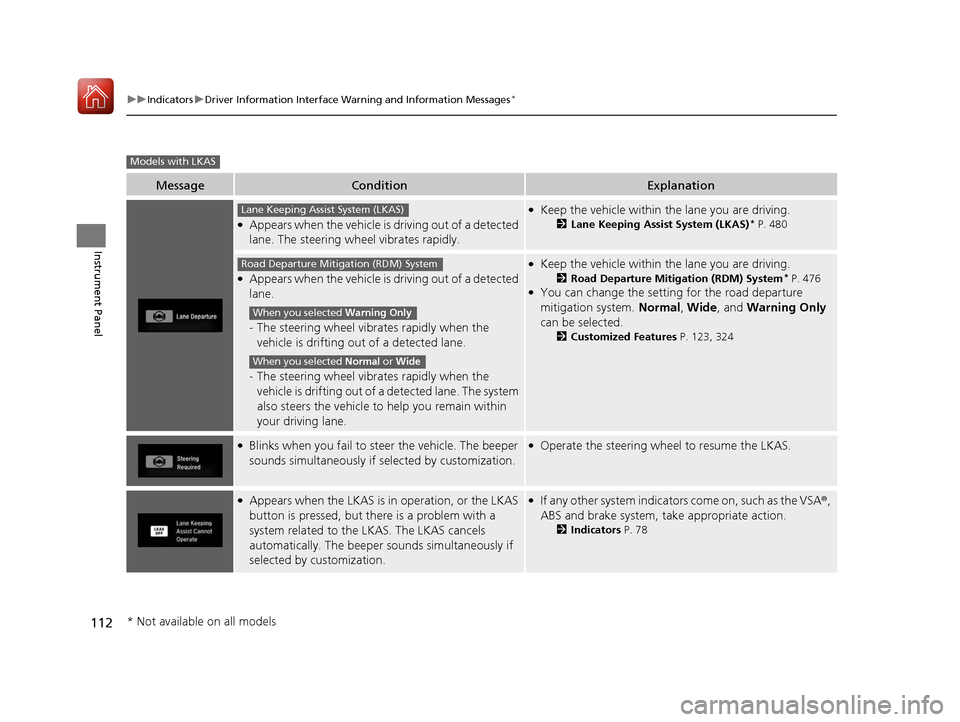
112
uuIndicators uDriver Information Interface Wa rning and Information Messages*
Instrument Panel
MessageConditionExplanation
●Appears when the vehicle is driving out of a detected
lane. The steering wheel vibrates rapidly.
●Keep the vehicle within the lane you are driving.
2Lane Keeping Assist System (LKAS)* P. 480
●Appears when the vehicle is driving out of a detected
lane.
-The steering wheel vibrates rapidly when the
vehicle is drifting out of a detected lane.
- The steering wheel vibrates rapidly when the
vehicle is drifting out of a detected lane. The system
also steers the vehicle to help you remain within
your driving lane.
●Keep the vehicle within the lane you are driving.
2 Road Departure Mitigation (RDM) System* P. 476●You can change the setting for the road departure
mitigation system. Normal, Wide , and Warning Only
can be selected.
2 Customized Features P. 123, 324
●Blinks when you fail to st eer the vehicle. The beeper
sounds simultaneously if selected by customization.●Operate the steering whee l to resume the LKAS.
●Appears when the LKAS is in operation, or the LKAS
button is pressed, but there is a problem with a
system related to the LKAS. The LKAS cancels
automatically. The beeper sounds simultaneously if
selected by customization.●If any other system indicators come on, such as the VSA®,
ABS and brake system, take appropriate action.
2 Indicators P. 78
Models with LKAS
Lane Keeping Assist System (LKAS)
Road Departure Mitigation (RDM) System
When you selected Warning Only
When you selected Normal or Wide
* Not available on all models
17 CIVIC 5D (KA KC KL)-31TGG6000.book 112 ページ 2016年6月8日 水曜日 午 後2時8分
Page 134 of 641

133
Controls
This chapter explains how to operate the various controls necessary for driving.
Clock.................................................. 134
Locking and Unlocking the Doors
Key Types and Functions .................. 136
Low Smart Entry Remote Signal Strength*.. 137Locking/Unlocking the Doors from the Outside .......................................... 138
Locking/Unlocking the Doors from the Inside ............................................. 147
Childproof Door Locks ..................... 149
Auto Door Locking/Unlocking .......... 150
Opening and Closing the Hatch....... 154
Security System
Immobilizer System .......................... 157
Security System Alarm ...................... 158 Opening and Closing the Windows
... 161
Opening and Closing the Moonroof*.. 164Operating the Switches Around the
Steering Wheel Ignition Switch
*............................... 165
ENGINE START/STOP Button*........... 166
Ignition Switch and Power Mode Comparison ................................... 169
Turn Signals ..................................... 170
Light Switches.................................. 170
Fog Lights
*...................................... 173
Daytime Running Lights ................... 173
Auto High-Beam
*............................ 174
Wipers and Washers ........................ 177 Brightness Control ........................... 180
Rear Defogger/Heated Door Mirror
*
Button ........................................... 181
Adjusting the Steering Wheel .......... 182
Adjusting the Mirrors
Interior Rearview Mirror ................... 183
Power Door Mirrors ......................... 184
Adjusting the Seats .......................... 185
Interior Lights/Interior Convenience Items ................................................ 193
Climate Control System
Using Automatic Climate Control .... 208
Automatic Climate Control Sensors......215
* Not available on all models
17 CIVIC 5D (KA KC KL)-31TGG6000.book 133 ページ 2016年6月8日 水曜日 午 後2時8分
Page 166 of 641

165
Controls
Operating the Switches Around the Steering Wheel
Ignition Switch*
1Ignition Switch*
You cannot take the key out unless the shift lever is
in
( P.
If you open the driver’s door when the key is in LOCK
(0 or ACCESSORY (q, a warning buzzer will sound
to remind you to take the key out.
When this happens, the following messages appear
on the driver information interface
*:•In LOCK ( 0: Remove Key From Ignition.
•In ACCESSORY (q: Return Ignition Switch To
Lock (0) Position . The buzzer will stop when you
take the key out.
If the key won’t turn from LOCK
( 0 to ACCESSORY
(q, turn the key while moving the steering wheel left
and right. The steering wh eel will unlock, allowing
the key to turn.
3WARNING
Removing the key from the ignition switch
while driving locks the steering. This can
cause you to lose control of the vehicle.
Remove the key from the ignition switch
only when parked.
Manual transmission models
Continuously variable transmission models
All models
( 0 LOCK: Insert and remove the key in this
position.
( q ACCESSORY: Operate the audio system and
other accessories in this position.
( w ON: This is the position when driving.
(e START: This position is for starting the engine.
The switch returns to ON ( w when you let go of
the key.
* Not available on all models
17 CIVIC 5D (KA KC KL)-31TGG6000.book 165 ページ 2016年6月8日 水曜日 午 後2時8分
Page 167 of 641

166
uuOperating the Switches Around the Steering Wheel uENGINE START/STOP Button*
Controls
ENGINE START/STOP Button*
*1:Canadian models
*2:Except Canadian models
■Changing the Power Mode1ENGINE START/STOP Button*
ENGINE START/STOP Button Operating Range
You can start the engine when the smart entry
remote is inside the vehicle.
The engine may also run if the smart entry remote is
close to the door or window, ev en if it is outside the
vehicle.
ON mode:
The button is off, if the engine is running.
If the smart entry remote battery is weak, beeper
sounds and the To Start, Hold Remote Near Start
Button message appears on th e driver information
interface. 2 If the Smart Entry Remote Battery is Weak
P. 594
Do not leave the power mode in ACCESSORY or ON
when you get out.
Operating RangeContinuously Variable Transmission Manual Transmission
VEHICLE OFF (LOCK)
The button is off.
The steering wheel is locked
*1.
The power to all electrical
components is turned off.
Blinking in white (When the door
is opened).
Press the button without the
shift lever in
( P.
Shift to
( P then press the button. Press the button.
Without pressing
the clutch pedal
Without pressing
the brake pedal ACCESSORY
The button blinks (in red).
Operate the audio system and
other accessories in this position.
ON
The button is on in red.
All electrical components can be
used.
Shift to (P*2.
*2
* Not available on all models
17 CIVIC 5D (KA KC KL)-31TGG6000.book 166 ページ 2016年6月8日 水曜日 午 後2時8分
Page 168 of 641

167
uuOperating the Switches Around the Steering Wheel uENGINE START/STOP Button*
Continued
Controls
If you leave the vehicle for 30 to 60 minutes with the shift lever in (P*1 and the
power mode in ACCESSORY, the vehicle automa tically goes into the mode similar to
VEHICLE OFF (LOCK) to avoid draining the battery.
When in this mode:
The steering wheel does not lock.
You cannot lock or unlock doors with th e remote transmitter or the smart entry
system.
Press the ENGINE START/STOP button twice to switch the mode to VEHICLE OFF
(LOCK).
*1: Continuously variab le transmission models
■Automatic Power Off
Canadian models
17 CIVIC 5D (KA KC KL)-31TGG6000.book 167 ページ 2016年6月8日 水曜日 午 後2時8分
Page 169 of 641

uuOperating the Switches Around the Steering Wheel uENGINE START/STOP Button*
168
Controls
If you open the driver’s doo r when the power mode is set to ACCESSORY, a warning
beep sounds.
Warning buzzers may sound from inside and/
or outside the vehicle to remind you that the
smart entry remote is out of the vehicle. If the
buzzer continues even after the remote is put
back inside, place it to be within its
operational range.
■When the power mode is in ON
If the smart entry remote is taken out of the
vehicle, and the driver’s door is closed, a
warning buzzer sounds from both inside and
outside the vehicle. A warning message on
the driver information interface notifies the
driver inside that the remote outside of the
vehicle.
■When the power mode is in
ACCESSORY
If the smart entry remote is taken out of the
vehicle, and all the doors are closed, a
warning buzzer sounds from outside the
vehicle.
■Power Mode Reminder
■Smart Entry Remote Reminder1 Smart Entry Remote Reminder
When the smart entry remote is within the system’s
operational range, and the driv er’s door is closed, the
warning function cancels.
If the smart entry remote is taken out of the vehicle
after the engine has been started, you can no longer
change the ENGINE START/STOP button mode or
restart the engine. Always make sure if the remote is
in your vehicle when you operate the ENGINE
START/STOP button.
Removing the smart entry remote from the vehicle
through a window does not activate the warning
buzzer.
Do not put the smart entr y remote on the dashboard
or in the glove box. It may cause the warning buzzer
to go off. Under some other conditions that can
prevent the vehicle from locating the remote, the
warning buzzer may al so go off even if the remote is
within the system’s operational range.
17 CIVIC 5D (KA KC KL)-31TGG6000.book 168 ページ 2016年6月8日 水曜日 午 後2時8分