Page 86 of 641

85
uuIndicators u
Continued
Instrument Panel
*1:Models with the smart entry system have an ENGINE START/STOP button instead of an ignition switch.
IndicatorNameOn/BlinkingExplanationMessage*
Vehicle Stability
Assist (VSA®)
OFF Indicator
●Comes on for a few seconds when
you turn the igniti on switch to ON
(w*1, then goes off.●Comes on when you partially
disable VSA®.
2VSA ® On and Off P. 488
●Comes on if the VSA ® system is
deactivated temporarily after the
battery has been disconnected,
then re-connected.●Drive straight for a short distance at more
than 12 mph (20 km /h). The indicator
should go off. If it does not, have your
vehicle checked by a dealer.
Door and Hatch
Open Indicator*
●Comes on for a few seconds if you
turn the ignition switch to ON
(w*1, then goes off.●Comes on if any door or the hatch
is not completely closed.
●The beeper sounds and the
indicator comes on if any door or
the hatch is opened while driving.
●Goes off when all doors and the hatch are
closed.
—
Electric Power
Steering (EPS)
System Indicator
●Comes on when you turn the
ignition switch to ON
(w*1, and
goes off when the engine starts.
●Comes on if there is a problem
with the EPS system.
●Stays on constantly or does not come
on at all - Have your vehicle checked by
a dealer.
2 If the Electric Power Steering (EPS)
System Indicator Comes On P. 606
* Not available on all models
17 CIVIC 5D (KA KC KL)-31TGG6000.book 85 ページ 2016年6月8日 水曜日 午後 2時8分
Page 90 of 641
89
uuIndicators u
Continued
Instrument Panel
*1:Models with the smart entry system have an ENGINE START/STOP button instead of an ignition switch.
*2:Canadian models only: Apply and hold th e brake pedal before turning the ignition on.
IndicatorNameOn/BlinkingExplanationMessage*
Immobilizer
System Indicator
●Blinks if the immobilizer system
cannot recognize the key
information.●Blinks - You cannot start the engine. Turn
the ignition switch to LOCK
(0*1, pull the
key out*2, and then insert the key and turn
it to ON
(w*1 again.●Repeatedly blinks - The system may be
malfunctioning. Have your vehicle
checked by a dealer.
●Do not attempt to alter this system or add
other devices to it. Electrical problems can
occur.
Indicator
Models without
smart entry system
Models with smart
entry system
* Not available on all models
17 CIVIC 5D (KA KC KL)-31TGG6000.book 89 ページ 2016年6月8日 水曜日 午後 2時8分
Page 92 of 641

91
uuIndicators u
Continued
Instrument Panel
*1:Models with the smart entry system have an ENGINE START/STOP button instead of an ignition switch.
IndicatorNameOn/BlinkingExplanationMessage*
Maintenance
Minder
Indicator
*
●Comes on for a few seconds when
you turn the ignition switch to ON
(w*1, then goes off.●Comes on when the scheduled
maintenance is due soon.
2Maintenance MinderTM P. 527—
Brake
Depressing
Indicator
*
●Blinks for a few seconds when you
turn the ignition switch to ON
(w*1, then goes off.
●Blinks when the electric parking
brake switch is pressed without
depressing the brake pedal while
the electric parking brake is in
operation.
●Blinks while driving - Press the electric
parking brake switch with the brake pedal
depressed.
2 Parking Brake P. 497
—
●Blinks when the automatic brake
hold button is pressed without
depressing the brake pedal while
the automatic brake hold is in
operation.
●Blinks if the automatic brake hold
is automatically canceled while it
is in operation. The beeper
sounds.
●Blinks while driving - Press the
automatic brake hold button with the
brake pedal depressed.
2Automatic Brake Hold P. 501
●Immediately depress the brake pedal.
—
Continuously
variable
transmission
models
Manual
transmission
models
Electric Parking Brake System
Automatic Brake Hold System
* Not available on all models
17 CIVIC 5D (KA KC KL)-31TGG6000.book 91 ページ 2016年6月8日 水曜日 午後 2時8分
Page 100 of 641

99
uuIndicators uDriver Information Interface Wa rning and Information Messages*
Continued
Instrument Panel
Driver Information Interface Warning and Information Messages*
The following messages appear only on the driver information interface. Press the (d isplay/information) button to see the message
again with the system message indicator on.
MessageConditionExplanation
●Appears if any door or the hatch is not completely
closed.
●Appears if any door or the hatch is opened while
driving. The beeper sounds.
●Goes off when all doors and the hatch are closed.
●Appears when the washer fluid gets low.●Refill the washer fluid.
2 Refilling Window Washer Fluid P. 547
●Appears when the scheduled maintenance is due
soon.
●Consequently, Maintenance Due Now and
Maintenance Past Due follow.
2Maintenance Minder Messages on the Driver
Information Interface P. 532
●Appears when there is a problem with the sensor on
the battery.●Have your vehicle checked by a dealer.
2Checking the Battery P. 571
●Appears along with the ba ttery charging system
indicator when the battery is not charging.●Turn off the climate control sy stem and rear defogger to
reduce electricity consumption.
2 If the Charging System Indicator Comes On P. 602
Canadian models
* Not available on all models
17 CIVIC 5D (KA KC KL)-31TGG6000.book 99 ページ 2016年6月8日 水曜日 午後 2時8分
Page 103 of 641
102
uuIndicators uDriver Information Interface Wa rning and Information Messages*
Instrument Panel
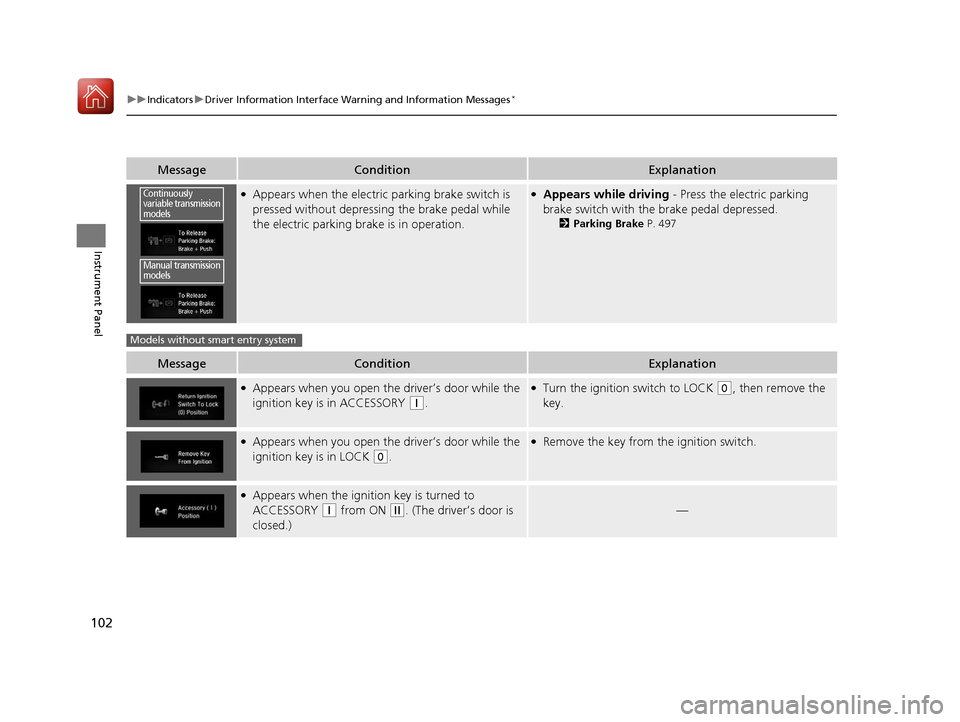
MessageConditionExplanation
●Appears when the electric parking brake switch is
pressed without depressing the brake pedal while
the electric parking brake is in operation.●Appears while driving - Press the electric parking
brake switch with the brake pedal depressed.
2 Parking Brake P. 497
MessageConditionExplanation
●Appears when you open the driver’s door while the
ignition key is in ACCESSORY
(q.
●Turn the ignition switch to LOCK (0, then remove the
key.
●Appears when you open the driver’s door while the
ignition key is in LOCK
(0.
●Remove the key from the ignition switch.
●Appears when the igniti on key is turned to
ACCESSORY
(q from ON (w. (The driver’s door is
closed.)—
Continuously
variable transmission
models
Manual transmission
models
Models without smart entry system
17 CIVIC 5D (KA KC KL)-31TGG6000.book 102 ページ 2016年6月8日 水曜日 午 後2時8分
Page 138 of 641

137
uuLocking and Unlocking the Doors uLow Smart Entry Remote Signal Strength*
Controls
Contains a number that you will need if you
purchase a replacement key.
Low Smart Entry Remote Signal Strength*
The vehicle transmits radio waves to loca te the smart entry remote when locking/
unlocking the doors and hatch, or to start the engine.
In the following cases, locking/unlocking th e doors and hatch, or starting the engine
may be inhibited or operation may be unstable:
• Strong radio waves are being transmitted by nearby equipment.
• You are carrying the smart entry remo te together with telecommunications
equipment, laptop computers, ce ll phones, or wireless devices.
• A metallic object is touching or covering the smart entry remote.
■Key Number Tag1Key Number Tag
Keep the key number tag separate from the key in a
safe place outside of your vehicle.
If you wish to purchase an additional key, contact a
dealer.
If you lose your key and you cannot start the engine,
contact a dealer.
1 Low Smart Entry Remote Signal Strength*
Communication between the smart entry remote and
the vehicle consumes the smart entry remote’s
battery.
Battery life is about two years, but this varies
depending on regularity of use.
The battery is consumed whenever the smart entry
remote is receivi ng strong radio wave s. Avoid placing
it near electrical appliances such as televisions and
personal computers.
* Not available on all models
17 CIVIC 5D (KA KC KL)-31TGG6000.book 137 ページ 2016年6月8日 水曜日 午 後2時8分
Page 167 of 641

166
uuOperating the Switches Around the Steering Wheel uENGINE START/STOP Button*
Controls
ENGINE START/STOP Button*
*1:Canadian models
*2:Except Canadian models
■Changing the Power Mode1ENGINE START/STOP Button*
ENGINE START/STOP Button Operating Range
You can start the engine when the smart entry
remote is inside the vehicle.
The engine may also run if the smart entry remote is
close to the door or window, ev en if it is outside the
vehicle.
ON mode:
The button is off, if the engine is running.
If the smart entry remote battery is weak, beeper
sounds and the To Start, Hold Remote Near Start
Button message appears on th e driver information
interface. 2 If the Smart Entry Remote Battery is Weak
P. 594
Do not leave the power mode in ACCESSORY or ON
when you get out.
Operating RangeContinuously Variable Transmission Manual Transmission
VEHICLE OFF (LOCK)
The button is off.
The steering wheel is locked
*1.
The power to all electrical
components is turned off.
Blinking in white (When the door
is opened).
Press the button without the
shift lever in
( P.
Shift to
( P then press the button. Press the button.
Without pressing
the clutch pedal
Without pressing
the brake pedal ACCESSORY
The button blinks (in red).
Operate the audio system and
other accessories in this position.
ON
The button is on in red.
All electrical components can be
used.
Shift to (P*2.
*2
* Not available on all models
17 CIVIC 5D (KA KC KL)-31TGG6000.book 166 ページ 2016年6月8日 水曜日 午 後2時8分
Page 170 of 641

169
uuOperating the Switches Around the Steering Wheel uIgnition Switch and Power Mode Comparison
Controls
Ignition Switch and Po wer Mode Comparison
*1:Canadian models
Ignition Switch
PositionLOCK (0
(with/without
the key)ACCESSORY (qON (wSTART (e
Without Smart Entry
System●Engine is turned off and
power is shut down.
●The steering wheel is
locked.
●No electrical
components can be
used.
●Engine is turned off.●Some electrical
components such as the
audio system and the
accessory power socket
can be operated.
●Normal key position
while driving.
●All electrical components
can be used.
●Use this position to start
the engine.
●The ignition switch
returns to the ON
(w
position when you
release the key.
Power ModeVEHICLE OFF
(LOCK)ACCESSORYONSTART
With Smart Entry
System and ENGINE
START/STOP
ButtonButton-Off●Engine is turned off and
power is shut down.
●The steering wheel is
locked*1.●No electrical
components can be
used.
Button-Blinking●Engine is turned off.●Some electrical
components such as the
audio system and the
accessory power socket
can be operated.
Button-
Blinking (engine is turned
off)
On (engine is running)
●All electrical components
can be used.
Button-On●The mode automatically
returns to ON after the
engine starts.
Button is: Blinking On
17 CIVIC 5D (KA KC KL)-31TGG6000.book 169 ページ 2016年6月8日 水曜日 午 後2時8分