2017 HONDA CIVIC HATCHBACK Electric
[x] Cancel search: ElectricPage 175 of 641
174
uuOperating the Switches Around the Steering Wheel uAuto High-Beam*
Controls
Auto High-Beam*
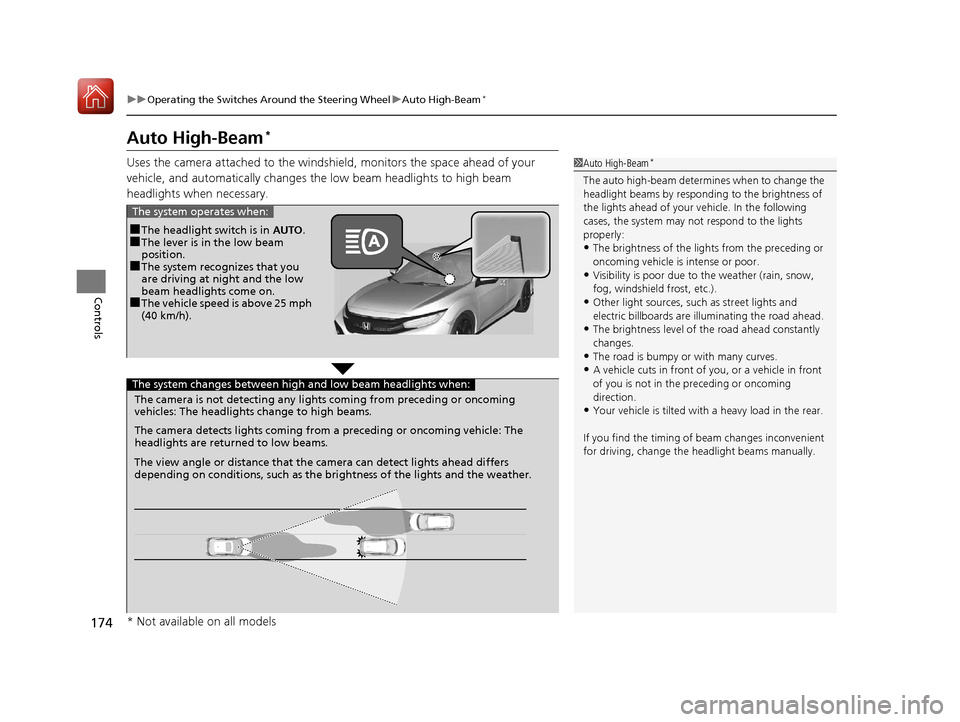
Uses the camera attached to the windsh ield, monitors the space ahead of your
vehicle, and automatically changes th e low beam headlights to high beam
headlights when necessary.1 Auto High-Beam*
The auto high-beam determines when to change the
headlight beams by responding to the brightness of
the lights ahead of your vehicle. In the following
cases, the system may not respond to the lights
properly:
•The brightness of the lights from the preceding or
oncoming vehicle is intense or poor.
•Visibility is poor due to the weather (rain, snow,
fog, windshield frost, etc.).
•Other light sources, such as street lights and
electric billboards are illuminating the road ahead.
•The brightness level of th e road ahead constantly
changes.
•The road is bumpy or with many curves.
•A vehicle cuts in front of you, or a vehicle in front
of you is not in the preceding or oncoming
direction.
•Your vehicle is tilted with a heavy load in the rear.
If you find the timing of beam changes inconvenient
for driving, change the headlight beams manually.
■The headlight switch is in AUTO.■The lever is in the low beam
position.
■The system recognizes that you
are driving at night and the low
beam headlights come on.
■The vehicle speed is above 25 mph
(40 km/h).
The system operates when:
The camera is not detecting any lights coming from preceding or oncoming
vehicles: The headlights change to high beams.
The camera detects lights coming from a preceding or oncoming vehicle: The
headlights are return ed to low beams.
The system changes between high and low beam headlights when:
The view angle or distance that the camera can detect lights ahead differs
depending on conditions, such as the brightness of the lights and the weather.
* Not available on all models
17 CIVIC 5D (KA KC KL)-31TGG6000.book 174 ページ 2016年6月8日 水曜日 午 後2時8分
Page 198 of 641
Continued197
uuInterior Lights/Interior Convenience Items uInterior Convenience Items
Controls
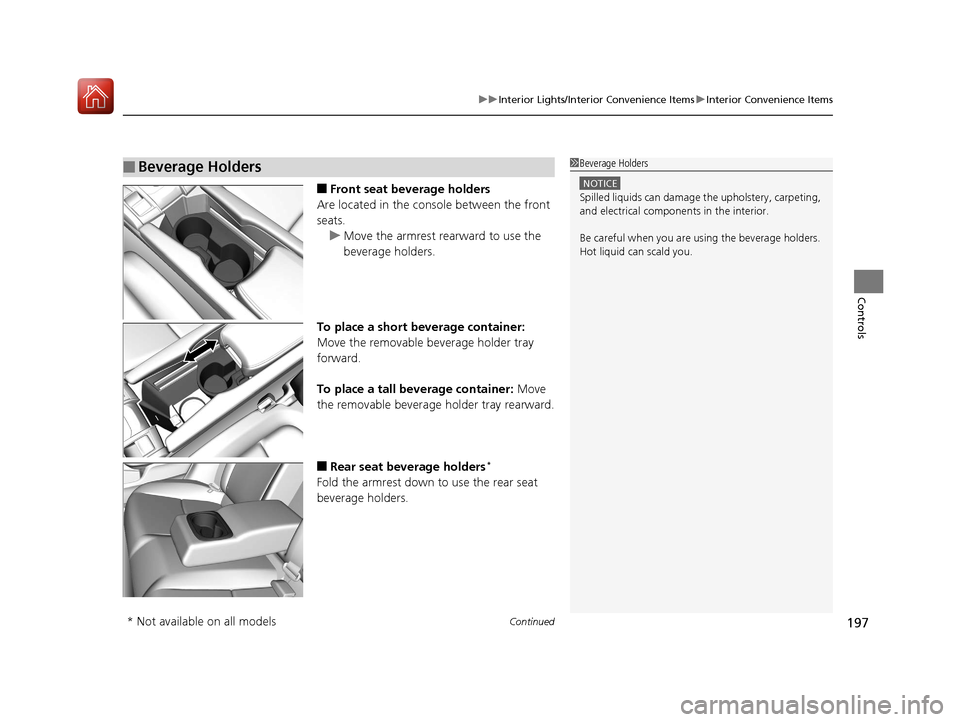
■Front seat beverage holders
Are located in the console between the front
seats. u Move the armrest rearward to use the
beverage holders.
To place a short beverage container:
Move the removable beverage holder tray
forward.
To place a tall beverage container: Move
the removable beverage holder tray rearward.
■Rear seat beverage holders*
Fold the armrest down to use the rear seat
beverage holders.
■Beverage Holders1 Beverage Holders
NOTICE
Spilled liquids ca n damage the upholstery, carpeting,
and electrical components in the interior.
Be careful when you are us ing the beverage holders.
Hot liquid can scald you.
* Not available on all models
17 CIVIC 5D (KA KC KL)-31TGG6000.book 197 ページ 2016年6月8日 水曜日 午 後2時8分
Page 202 of 641

Continued201
uuInterior Lights/Interior Convenience Items uInterior Convenience Items
Controls
■When charging does not start
Perform one of the solutions in the following table.
IndicatorCauseSolution
Green &
AmberBlinking
simulta- neously
There is an obstacle(s) between
the charging area and the
device.Remove the
obstacle(s).
The device is not within the
charging area. Move the device to the
center of the charging
area where is
located.
AmberBlinkingThe wireless charger is faulty.Contact a dealer for
repairs.
1
Wireless Charger*
NOTICE
Do not place any magnetic recording media or precision
machines within the charging area while charging.
The data on your cards such as credit cards can be
lost because of the magneti c effect. Also precision
machines such as watches can go wrong.
“Qi” and marks are the registered trademarks
owned by Wire less Power Consortium (WPC).
In the following cases, ch arging may stop or not start:
•The device is already fully charged.•The temperature of the device is extremely high
while charging.
•You are at a place that emits strong
electromagnetic wave or noises, such as TV station,
electric power plant, or gas station.
A device may not charge if the size or shape of its
chargeable side is not appropriate for use with the
charging area.
Not all devices are compatible with the system.
During the charging phase, it is normal for the
charging area and de vice to heat up.
Charging may be briefl y interrupted when:
•All the doors and the hatch are closed
- to avoid interference with the proper functioning
of the smart entry system.
•The position of the device is altered.
Do not charge more than one device at a time on a
charging area.
* Not available on all models
17 CIVIC 5D (KA KC KL)-31TGG6000.book 201 ページ 2016年6月8日 水曜日 午 後2時8分
Page 423 of 641

422
Driving
When Driving
Starting the Engine
1.Make sure the parking brake is applied.
2. Check that the shift lever is in
(P, then
depress the brake pedal.
u Although it is possibl e to start the vehicle
in
(N, it is safer to start it in (P.
2. Check that the shift lever is in
(N. Then
depress the brake pedal with your right
foot, and the clutch pedal with your left
foot.
u The clutch pedal must be fully depressed
to start the engine.
Models without smart entry system
1Starting the Engine
Keep your foot firmly on the brake pedal when
starting the engine.
The engine is harder to st art in cold weather and in
thinner air found at altitudes above 8,000 feet (2,400
meters).
When starting the engine in cold weather, turn off all
electrical accessories such as the lights, climate
control system, and rear de fogger in order to reduce
battery drain.
If you live in a region where winter is extremely cold,
an engine block heater will improve starting and
warming of the engine. Cons ult a dealer for details.
If the exhaust system sounds abnormal or you can
smell exhaust gas inside the vehicle, have your vehicle
checked by a dealer. There may be a problem with
the engine or exhaust system.
Brake PedalContinuously variable transmission models
Brake Pedal
Clutch Pedal
Manual transmission models
17 CIVIC 5D (KA KC KL)-31TGG6000.book 422 ページ 2016年6月8日 水曜日 午
後2時8分
Page 425 of 641

424
uuWhen Driving uStarting the Engine
Driving
Starting the Engine
1. Make sure the parking brake is applied.
2. Check that the shift lever is in
(P, then
depress the brake pedal.
u Although it is possibl e to start the vehicle
in
(N, it is safer to start it in (P.
2. Check that the shift lever is in
(N. Then
depress the brake pedal with your right
foot, and the clutch pedal with your left
foot.
u The clutch pedal must be fully depressed
to start the engine.
Models with smart entry system
1Starting the Engine
Keep your foot firmly on the brake pedal when
starting the engine.
The engine is harder to st art in cold weather and in
thinner air found at altitudes above 8,000 feet (2,400
meters).
When starting the engine in cold weather, turn off all
electrical accessories such as the lights, climate
control system, and rear de fogger in order to reduce
battery drain.
If you live in a region where winter is extremely cold,
an engine block heater will improve starting and
warming of the engine. Cons ult a dealer for details.
If the exhaust system sounds abnormal or you can
smell exhaust gas inside the vehicle, have your vehicle
checked by a dealer. There may be a problem with
the engine or exhaust system.
The immobilizer system pr otects your vehicle from
theft.
If an improperly c oded device is used, the engine’s
fuel system is disabled. 2 Immobilizer System P. 157
Brake PedalContinuously variable transmission models
Brake Pedal
Clutch Pedal
Manual transmission models
17 CIVIC 5D (KA KC KL)-31TGG6000.book 424 ページ 2016年6月8日 水曜日 午
後2時8分
Page 427 of 641
uuWhen Driving uStarting the Engine
426
Driving
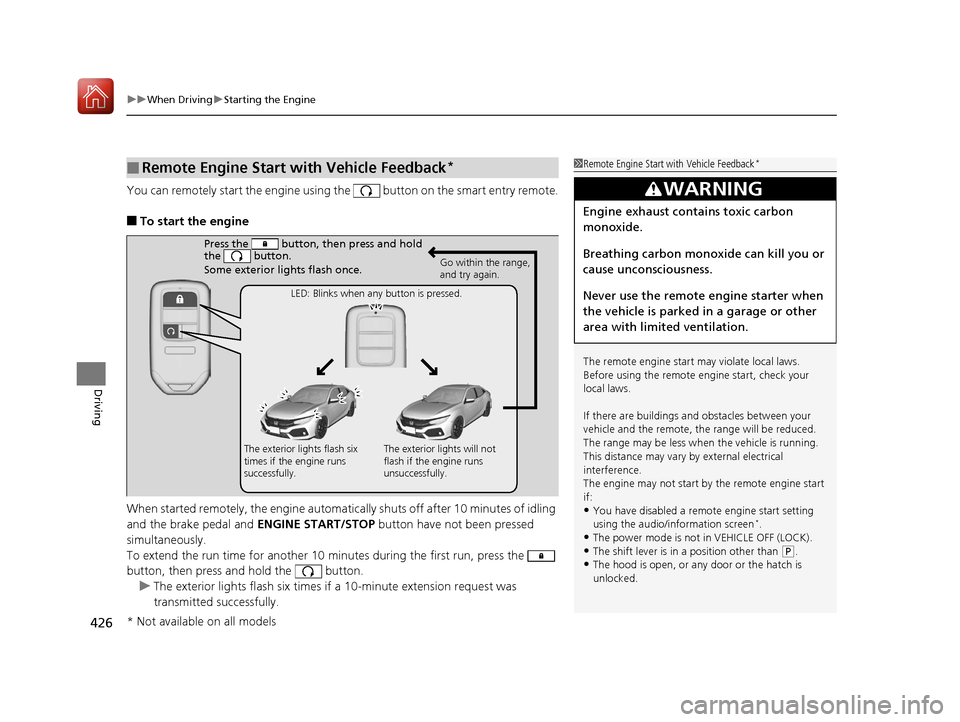
You can remotely start the engine using the button on the smart entry remote.
■To start the engine
When started remotely, the engine automati cally shuts off after 10 minutes of idling
and the brake pedal and ENGINE START/STOP button have not been pressed
simultaneously.
To extend the run time for another 10 minutes during the first run, press the
button, then press and hold the button. u The exterior lights flash six times if a 10-minute extension request was
transmitted successfully.
■Remote Engine Start with Vehicle Feedback*1Remote Engine Start with Vehicle Feedback*
The remote engine start may violate local laws.
Before using the remote e ngine start, check your
local laws.
If there are buildings an d obstacles between your
vehicle and the remote, th e range will be reduced.
The range may be less when the vehicle is running.
This distance may vary by external electrical
interference.
The engine may not start by the remote engine start
if:
•You have disabled a remo te engine start setting
using the audio/information screen*.
•The power mode is not in VEHICLE OFF (LOCK).
•The shift lever is in a position other than ( P.•The hood is open, or any door or the hatch is
unlocked.
3WARNING
Engine exhaust contains toxic carbon
monoxide.
Breathing carbon monoxide can kill you or
cause unconsciousness.
Never use the remote engine starter when
the vehicle is parked in a garage or other
area with limited ventilation.
Press the button, th en press and hold
the button.
Some exterior lights flash once.
Go within the range,
and try again.
LED: Blinks when any button is pressed.
The exterior lights flash six
times if the engine runs
successfully. The exterior lights will not
flash if the engine runs
unsuccessfully.
* Not available on all models
17 CIVIC 5D (KA KC KL)-31TGG6000.book 426 ページ 2016年6月8日 水曜日 午
後2時8分
Page 430 of 641

429
uuWhen Driving uPrecautions While Driving
Driving
Precautions While Driving
Avoid driving in deep water and on flooded roads. This can damage the engine or
driveline, or cause electrical component failure.
If there is a strong impact with something under the vehicle, stop in a safe location.
Check the underside of the vehicle for damage or any fluid leaks.
*1: Models with the smart entry system have an ENGINE START/STOP button instead of an
ignition switch.
■In Rain
■Other Precautions
1 Precautions While Driving
NOTICE
Do not operate the shift lever while pressing the
accelerator pedal. You could damage the
transmission.
NOTICE
If you repeatedly turn the steering wheel at an
extremely low speed, or hold the steering wheel in
the full left or right position for a while, the electric
power steering (EPS) system heats up. The system
goes into a protective mode, and limits its
performance. The steering wheel becomes harder
and harder to operate. Once the system cools down,
the EPS system is restored.
Repeated operation under these conditions can
eventually damage the system.
If the ignition switch is turned to ACCESSORY
( q*1
while driving, the engine will shut down and all
steering and brake power a ssist functions will stop,
making it difficult to control the vehicle.
Do not put the shift lever in
( N, as you will lose
engine braking (and acce leration) performance.
During the first 600 miles (1,000 km) of operation,
avoid sudden acceleration or full throttle operation so
as not to damage the engine or powertrain.
Avoid hard braking for the first 200 miles (300 km).
You should also follow this when the brake pads are
replaced.
17 CIVIC 5D (KA KC KL)-31TGG6000.book 429 ページ 2016年6月8日 水曜日 午 後2時8分
Page 482 of 641
Continued481
uuWhen Driving uLane Keeping Assist System (LKAS)*
Driving
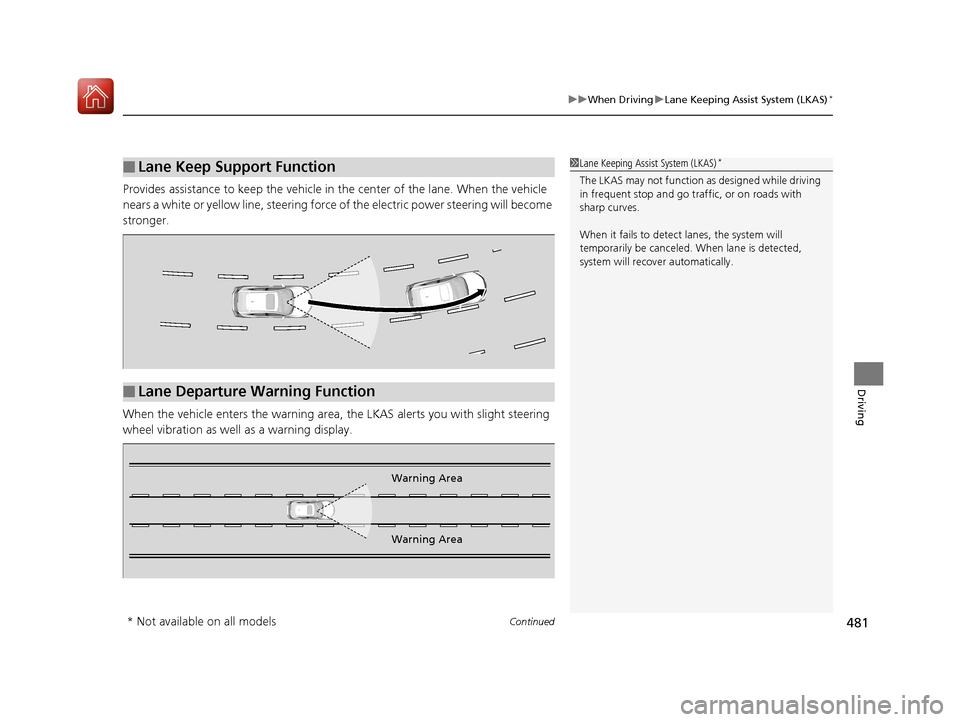
Provides assistance to keep the vehicle in the center of the lane. When the vehicle
nears a white or yellow line, steering force of the electric power steering will become
stronger.
When the vehicle enters the warning area, the LKAS alerts you with slight steering
wheel vibration as well as a warning display.
■Lane Keep Support Function1 Lane Keeping Assist System (LKAS)*
The LKAS may not function as designed while driving
in frequent stop and go traf fic, or on roads with
sharp curves.
When it fails to detect lanes, the system will
temporarily be canceled. When lane is detected,
system will recover automatically.
■Lane Departure Warning Function
Warning Area
Warning Area
* Not available on all models
17 CIVIC 5D (KA KC KL)-31TGG6000.book 481 ページ 2016年6月8日 水曜日 午 後2時8分