Page 325 of 613

324
uuCustomized Features u
Features
■List of customizable options
*1:Default Setting Setup
Group Customizable Features Description Selectable Settings
System
Display
Display
Settings
BrightnessChanges the brightness of the audio/information
touch screen.—
ContrastChanges the contrast of the audio/information touch
screen.—
Black LevelChanges the black level of the audio/information
touch screen.—
Background ColorChanges the background color of the audio/
information touch screen.Blue*1/
Amber /Red /
Violet /Blue Green
Sound/
Beep
Guidance VolumeChanges the sound volume.
Adjusts the guidance volume of the navigation system.1 ~6*1~11
Text Message VolumeChanges the text/e-mail message reading volume.1~6*1~11
Voice Recog. VolumeChanges the volume of the voice prompt.1~6*1~11
Verbal Reminder*Turns the verbal reminders on and off.On*1/Off
Beep VolumeChanges the beep volume.Off /1 /2*1/ 3
* Not available on all models
17 ACCORD 4D GAS-31T2A6400.book 324 ページ 2016年6月7日 火曜日 午後5時6分
Page 326 of 613
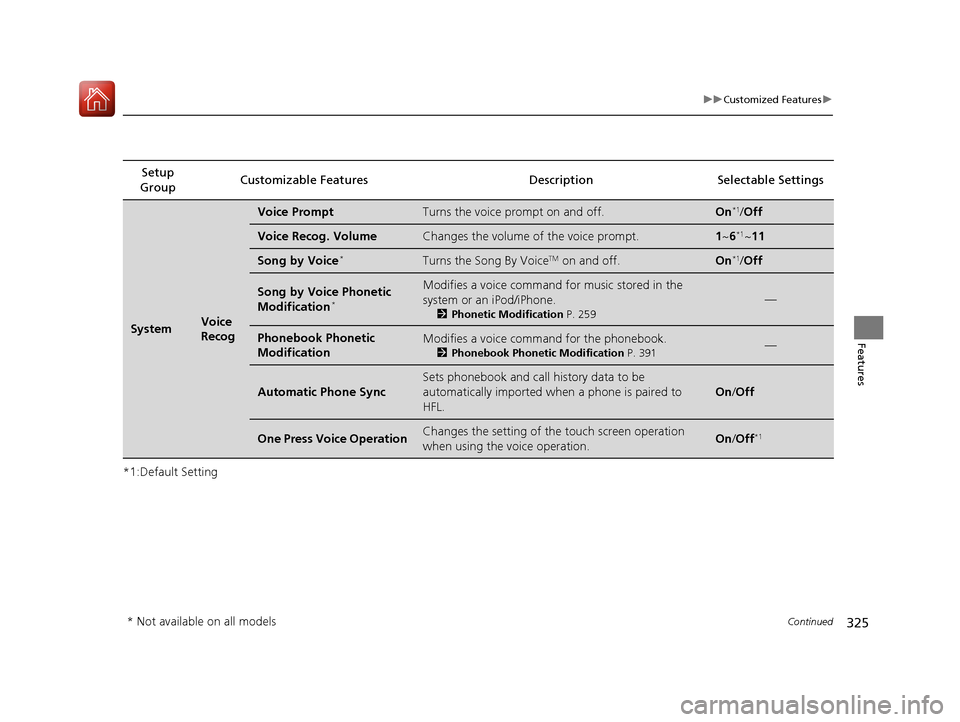
325
uuCustomized Features u
Continued
Features
*1:Default SettingSetup
Group Customizable Featur
es Description Sel ectable Settings
SystemVoice
Recog
Voice PromptTurns the voice prompt on and off.On*1/Off
Voice Recog. VolumeChanges the volume of the voice prompt.1 ~6*1~11
Song by Voice*Turns the Song By VoiceTM on and off.On*1/Off
Song by Voice Phonetic
Modification*
Modifies a voice command for music stored in the
system or an iPod/iPhone.
2 Phonetic Modification P. 259
—
Phonebook Phonetic
ModificationModifies a voice command for the phonebook.
2Phonebook Phonetic Modification P. 391—
Automatic Phone Sync
Sets phonebook and call history data to be
automatically imported when a phone is paired to
HFL.
On /Off
One Press Voice OperationChanges the setting of the touch screen operation
when using the voice operation.On/Off*1
* Not available on all models
17 ACCORD 4D GAS-31T2A6400.book 325 ページ 2016年6月7日 火曜日 午後5時6分
Page 330 of 613
329
uuCustomized Features u
Continued
Features
*1:Default SettingSetup
Group Customizable Features Descri
ption Selectable Settings
Vehicle Meter
SetupLanguage Selection
Changes the displayed language on the multi-
information display. English
*1/
French /
Spanish
Adjust Outside Temp.
Display Adjusts the temperature reading by a few degrees. -5°F ~ ±0°F
*1
~ +5°F
(U.S.)
-3°C ~ ±0°C
*1 ~ +3°C
(Canada)
“Trip A” Reset Timing Changes the setting of how to reset trip meter A and
average fuel economy A. With Refuel
/IGN
Off /Manually
Reset
*1
“Trip B” Reset Timing Changes the setting of how to reset trip meter B and
average fuel economy B. With Refuel
/IGN
Off /Manually
Reset*1
Fuel Efficiency Backlight Turns the ambient meter feature on and off. On*1/Off
Keyless Start Guidance
Screens
*Displays the push button start guidance when
conditions are met to change power mode. On*1/
Off
* Not available on all models
17 ACCORD 4D GAS-31T2A6400.book 329 ページ 2016年6月7日 火曜日 午後5時6分
Page 337 of 613

336
uuCustomized Features u
Features
*1:Default SettingSetup
Group Customizable Features Description Selectable Settings
Camera
Rear Camera
Fixed Guideline
Selects whether the fixed guidelines come on the rear
camera monitor.
2
Multi-View Rear Camera P. 497
On*1/Off
Dynamic Guideline
Selects whether the dynamic guidelines come on the
rear camera monitor.
2 Multi-View Rear Camera P. 497
On*1/Off
DefaultCancels/Resets all cust omized items in the Rear
Camera setting group as default.Yes/No
LaneWatch*
Show with Turn
SignalSelects whether the LaneWatch display comes on
when you move the turn signal lever to indicate a
right turn.
On*1/ Off
Display Time after
Turn Signal OffChanges the length of time the LaneWatch display
stays on after the turn signal lever returns to the
center.0 second*1/
2 seconds
Reference LineSelects whether the reference lines come on the
LaneWatch monitor.On*1/ Off
DefaultCancels/Resets all cust omized items in the
LaneWatch group as default.Yes/No
* Not available on all models
17 ACCORD 4D GAS-31T2A6400.book 336 ページ 2016年6月7日 火曜日 午後5時6分
Page 409 of 613

408
Features
Compass*
When you turn the ignition switch to ON (w*1, the compass self-calibrates, and the
compass display appears.
Compass Calibration
If the compass indicates the wrong direction, or the CAL indicator blinks, you need
to manually calibrate the system. 1.Turn the ignition switch to ON
(w*1.
2. On the top screen of any audio source,
press and hold for five seconds.
u The display switches to the Compass
settings screen.
3. Select Calibration .
4. Select Calibration Start .
5. Drive the vehicle slowly in two circles.
u The compass starts to show a direction
after the calibration. The CAL indicator
goes off.
*1:Models with the smart entry system have an ENGINE START/STOP button instead of an
ignition switch.
1 Compass*
Compass operation can be affected under the
following conditions:
•Driving near power lines or stations
•Crossing a bridge•Passing a large vehicle, or driving near a large
object that can cause a magnetic disturbance
•When accessories such as antennas and roof racks
are mounted by magnets
1 Compass Calibration
Calibrate the compass in an open area.
While setting the compass, select to cancel the
setting mode and return to the previous screen.
* Not available on all models
17 ACCORD 4D GAS-31T2A6400.book 408 ページ 2016年6月7日 火曜日 午後5時6分
Page 410 of 613
409
uuCompass*uCompass Zone Selection
Features
Compass Zone Selection
1. Turn the ignition switch to ON (w*1.
2. On the top screen of any audio source,
press and hold for five seconds.
u The display swit ches to the Compass
settings screen.
3. Select Zone Adjust .
u The display shows the current zone
number the system is set to.
4. Select the zone number of your area (See
Zone Map).
*1:Models with the smart entry system have an ENGINE START/STOP button instead of an
ignition switch.
1 Compass Zone Selection
The zone selection is done to compensate the
variation between magneti c north and true north.
If the calibration starts while the audio system is in
use, the display returns to normal after the calibration
is completed.
2
3
4 5678910
111213
14
15Zone Map
Guam Island: Zone 8
Puerto Rico: Zone 11
17 ACCORD 4D GAS-31T2A6400.book 409 ページ 2016年6月7日 火曜日 午後5時6分
Page 412 of 613

411
Driving
This chapter discusses driving, refueling, and information on items such as accessories.
Before Driving
Driving Preparation .......................... 412
Maximum Load Limit........................ 415
Towing a Trailer Towing Preparation .......................... 417
Driving Safely with a Trailer .............. 419
Towing Your Vehicle ........................ 420
When Driving Starting the Engine .................. 421, 423
Precautions While Driving................. 428
Automatic Transmission/CVT
*.......... 429
Shifting .................... 430, 432, 436, 438
ECON Button ................................... 441 Cruise Control
*................................ 442
Front Sensor Camera*..................... 445
Adaptive Cruise Control (ACC)*....... 447Road Departure Mitigation (RDM) System*...... 461Lane Keeping Assist System (LKAS)*.... 465
Vehicle Stabilit y Assist (VSA®), aka Electronic
Stability Control (ESC), System........... 472
LaneWatchTM*.................................. 474Tire Pressure Monitoring System (TPMS) ... 476Tire Pressure Monitoring System (TPMS) - Required Federal Explanation ......... 478
Braking Brake System ................................... 480 Anti-lock Brake System (ABS) ........... 482
Brake Assist System ......................... 483
Collision Mitigation Braking System
TM
(CMBSTM)*..................................... 484
Parking Your Vehicle When Stopped ................................ 492
Parking Sensor System
*................... 493
Multi-View Rear Camera .................. 497
Refueling Fuel Information .............................. 499
How to Refuel ................................. 500
Fuel Economy and CO
2 Emissions
Improving Fuel Economy and Reducing
CO
2 Emissions ................................ 501
* Not available on all models
17 ACCORD 4D GAS-31T2A6400.book 411 ページ 2016年6月7日 火曜日 午後5時6分
Page 423 of 613

uuWhen Driving uStarting the Engine
422
Driving
3. Turn the ignition switch to START (e
without depressing the accelerator pedal.
1. Keeping your right foot on the brake peda l, release the parking brake. Check that
the parking brake indicator has gone off.
2 Parking Brake P. 480
2.Put the shift lever in (D. Select (R when reversing.
3. Gradually release the brake pedal and gently depress the accelerator pedal to pull
away.
■Hill start assist system
Hill start assist keeps the brake engaged br iefly to help prevent the vehicle from
rolling on inclines as you move your fo ot from the brake pedal to the accelerator.
Depress the clutch pedal, and shift to on e of the forward gears when facing uphill,
or
(R when facing downhill, then release the brake pedal.
Move the shift lever to
(D, (S, or (L* when facing uphill, or (R when facing
downhill, then release the brake pedal.
1 Starting the Engine
Do not hold the key in START
(e for more than 10
seconds.
•If the engine does not sta rt right away, wait for at
least 30 seconds before trying again.
•If the engine starts, but then immediately stops,
wait at least 30 seconds before repeating step 3
while gently depressing the accelerator pedal.
Release the accelerator pedal once the engine
starts.
The immobilizer system pr otects your vehicle from
theft. If an improperly code d key (or other device) is
used, the engine's fuel system is disabled.
2 Immobilizer System P. 132
■Starting to Drive
Continuously variable transmission (CVT) models
Manual transmission models
Continuously variable transmission (CVT) models
1Hill start assist system
Hill start assist may not prevent the vehicle from
rolling downhill on a very steep or slippe ry slope, and
does not operate on small inclines.
Hill start assist is not a replacement for the parking
brake.
* Not available on all models
17 ACCORD 4D GAS-31T2A6400.book 422 ページ 2016年6月7日 火曜日 午後5時6分