Page 236 of 613

235
uuAudio System Basic Operation uVoice Control Operation
Continued
Features
Voice Control Operation
Your vehicle has a voice control syst em that allows hands-free operation.
The voice control system uses the (Tal k) and (hang-up/back) buttons on the
steering wheel and a microphone near the map lights on the ceiling.
To achieve optimum voice recognition when using the voice control system:
• Make sure the correct screen is displa yed for the voice command that you are
using.
• Close the windows and moonroof
*.
• Adjust the dashboard and side vents so air does not blow onto the microphone
on the ceiling.
• Speak clearly in a natural speaking vo ice without pausing between words.
• Reduce any background noise if possible. The system may misinterpret your
command if more than one person is speaking at the same time.
■Voice Recognition
1Voice Control Operation
When you press the button, a helpful prompt asks
what you would like to do. Press and release the
button again to bypass th is prompt and give a
command.
1 Voice Recognition
The voice control system can only be used from the
driver’s seat because the microphone unit removes
noises from the front passenger’s side.
* Not available on all models
17 ACCORD 4D GAS-31T2A6400.book 235 ページ 2016年6月7日 火曜日 午後5時6分
Page 237 of 613
236
uuAudio System Basic Operation uVoice Control Operation
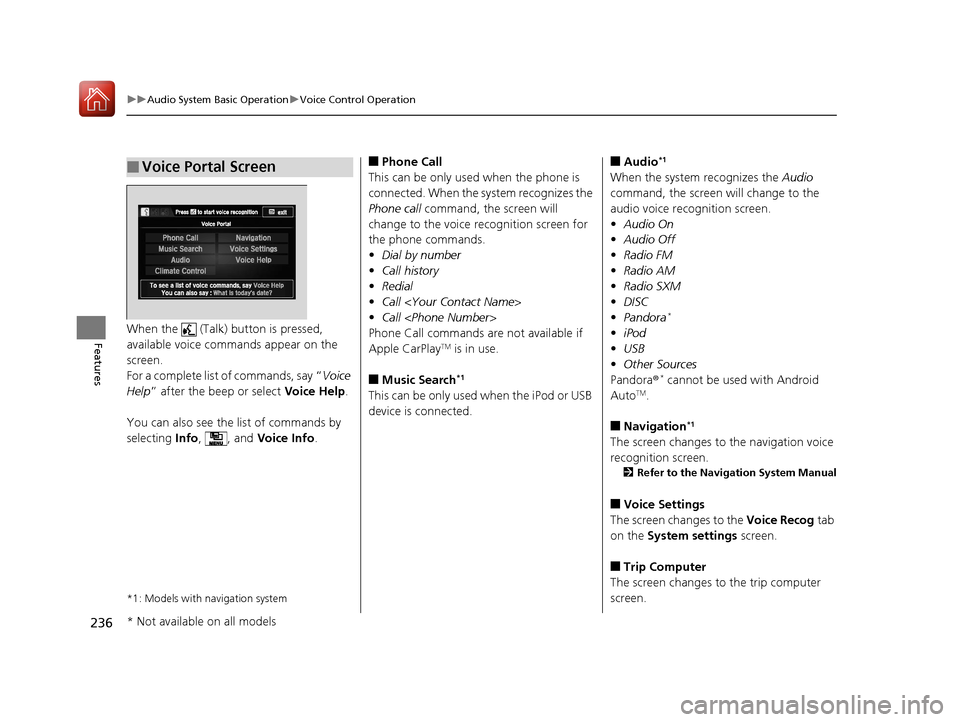
FeaturesWhen the (Talk) button is pressed,
available voice commands appear on the
screen.
For a complete list of commands, say “ Voice
Help ” after the beep or select Voice Help.
You can also see the list of commands by
selecting Info, , and Voice Info.
*1: Models with navigation system
■Voice Portal Screen■Phone Call
This can be only used when the phone is
connected. When the sy stem recognizes the
Phone call command, the screen will
change to the voice recognition screen for
the phone commands.
• Dial by number
• Call history
• Redial
• Call
• Call
Phone Call commands are not available if
Apple CarPlay
TM is in use.
■Music Search*1
This can be only used when the iPod or USB
device is connected.
■Audio*1
When the system recognizes the Audio
command, the screen will change to the
audio voice recognition screen.
• Audio On
• Audio Off
• Radio FM
• Radio AM
• Radio SXM
• DISC
• Pandora
*
•iPod
• USB
• Other Sources
Pandora ®
* cannot be used with Android
AutoTM.
■Navigation*1
The screen changes to the navigation voice
recognition screen.
2 Refer to the Navigation System Manual
■Voice Settings
The screen changes to the Voice Recog tab
on the System settings screen.
■Trip Computer
The screen changes to the trip computer
screen.
* Not available on all models
17 ACCORD 4D GAS-31T2A6400.book 236 ページ 2016年6月7日 火曜日 午後5時6分
Page 238 of 613

237
uuAudio System Basic Operation uVoice Control Operation
Continued
Features
■Voice Help
You can see a list of the available
commands on the screen.
• Useful Commands
• Phone Commands
• Audio Commands
• On Screen Commands
• Music Search Commands
• General Commands
• Climate Control Commands
• All Commands
• Voice Settings
• Getting Started
The system accepts these commands on the
voice portal top screen.
• Call
• Call
• What time is it?
• What is today’s date?
*1: Models with navigation system
■Useful Commands
The system accepts these commands on the
dedicated screen for the voice recognition
of the phone.
• Call by Number
• Call by Name
• Call
• Call
The system accepts these commands on the
dedicated screen for the voice recognition
of the audio.
■Radio FM Commands
• Radio tune to <87.7-107.9> FM
• Radio tune to <87.7 -107.9> HD <1-8>
FM
• Radio FM preset <1-12>
■Radio AM Commands
• Radio tune to <530-1710> AM
• Radio AM preset <1-6>
■Radio SXM Commands
• SXM channel <1-999>
• SXM channel
• Radio SXM preset <1-12>
■Phone Commands
■Audio Commands*1
■DISC Commands
• DISC play
• DISC play track <1-30>
■Pandora Commands*
•Pandora play
■iPod Commands
• iPod play
• iPod play track <1-30>
• Music Search
• What album is this?
• What am I listening to?
■USB Commands
• USB play
• USB play track <1-30>
• Music Search
• What album is this?
• What am I listening to?
■Bluetooth ® audio Commands
• Bluetooth ® audio play
NOTE:
Bluetooth ® Audio commands may not work
on some phones or Bluetooth® Audio
devices.
* Not available on all models
17 ACCORD 4D GAS-31T2A6400.book 237 ページ 2016年6月7日 火曜日 午後5時6分
Page 242 of 613
241
uuAudio System Basic Operation uPlaying AM/FM Radio
Continued
Features
Samples each of the strongest stations on the selected band for 10 seconds. To turn
off scan, select Cancel or .
Displays the subchannel list when an HD Radio
TM station is selected while listening to
an FM station.
1. Select .
2. Select HD Radio Subchannel .
3. Select the channel number.
■Scan
■HD Subchannel
Models with HD RadioTM
17 ACCORD 4D GAS-31T2A6400.book 241 ページ 2016年6月7日 火曜日 午後5時6分
Page 248 of 613

Continued247
uuAudio System Basic Operation uPlaying SiriusXM ® Radio*
Features
The system can record up to the last 60 minutes broadcast of your currently tuned
channel as well as the last 30 minutes br oadcast of preset channels, starting from
the moment you turn the vehicle on. If you tuned to a preset channel, the system
records up to 60 minutes of a broadcast instead of up to 30 minutes. You can
rewind and replay the last 30 or 60 minutes of a broadcast.
1. Select .
2. Select Playback Position .
3. Move the gauge to the position you want to replay.
To play or pause on playback mode:
1. Select .
2. Select Play/Pause .
■Returning to real-time broadcast
1. Select .
2. Select Play Live Broadcast .
■Replay Function1Replay Function
The system starts storing broadcast in memory when
the ignition switch is turned to ACCESSORY
(q or
ON ( w*1. You can go back to the program from that
point.
You can no longer repl ay any program once the
ignition switch is turned to LOCK
( 0*1 as it erases
memory.
You can check how long the program has been
stored in memory from the audio/information touch
screen.
After 30 or 60 minutes of recording the system will
automatically start deleting the oldest data.
(A): Shows how much time the replayed segment is
behind the real-time broadcast
(B): Replayed segment
(C): Length stored in memory
*1:Models with the smart entry system have an
ENGINE START/STOP button instead of an ignition
switch.
Audio/Information Touch Screen
(C) (B)
(A)
17 ACCORD 4D GAS-31T2A6400.book 247 ページ 2016年6月7日 火曜日 午後5時6分
Page 251 of 613
uuAudio System Basic Operation uPlaying SiriusXM ® Radio*
250
Features
Sample each channel on the sele cted mode for 10 seconds.
1. Select Scan.
2. Select Scan Channels .
u To only scan preset stations, select Scan Songs in Presets.
To turn off scan, select Cancel Scan.
■Scan1Scan
The “Scan Songs in Preset s” function is based on
TuneScan
TM technology of SiriusXM ®.
The “Featured Channels ” function is based on
Featured Favorites
TM technology of SiriusXM ®.
TuneScan
TM and Featured FavoritesTM are registered
trademarks of SiriusXM ® Radio, Inc.
17 ACCORD 4D GAS-31T2A6400.book 250 ページ 2016年6月7日 火曜日 午後5時6分
Page 252 of 613

251
uuAudio System Basic Operation uPlaying a CD
Continued
Features
Playing a CD
Your audio system supports audio CDs, CD-Rs, and CD-RWs in either MP3, WMA,
or AAC*1 format. With the CD loaded, select the CD mode.
*1:Only AAC format files recorded with iTunes are playable on this unit.
*2:Some or all of the lists may not be displayed.
VOL (Volume) Icons
Select to adjust the volume.
(BACK) Icon
Select to go back to the previous
display.
Track Icons
Select or to change tracks
(files in MP3, WMA, or AAC).
Select and hold to move rapidly
within a track.
(Power) Button
Press to turn the audio system
on and off.
Open/Close Icon*2
Displays/hides the detailed
information.
(MENU) Icon
Select to display the menu items.
(Eject) Button
Press to eject a CD.
Audio/Information Touch Screen
Folder Icons
Select to skip to the next folder, and to skip to the
beginning of the previous folder in MP3, WMA, or AAC.
Audio/Information Screen
CD Slot
Insert a CD about halfway into the
CD slot.
17 ACCORD 4D GAS-31T2A6400.book 251 ページ 2016年6月7日 火曜日 午後5時6分
Page 253 of 613
uuAudio System Basic Operation uPlaying a CD
252
Features
1. Select and select Music Search.
2. Select a folder.
3. Select a track.
■How to Select a File from the Music Search List (MP3/WMA/
AAC)1Playing a CD
NOTICE
Do not use CDs with adhesive labels. The label can
cause the CD to jam in the unit.
WMA files protected by di gital rights management
(DRM) cannot be played.
The audio system displays Unplayable File, then
skips to the next file.
Text data appears on the di splay under the following
circumstances:
•When you select a new folder, file, or track.
•When you change the audio mode to CD.
•When you insert a CD.
If you eject the CD but do not remove it from the slot,
the system reloads the CD automatically after several
seconds.
Folder Selection
Track Selection
17 ACCORD 4D GAS-31T2A6400.book 252 ページ 2016年6月7日 火曜日 午後5時6分