2017 GENESIS G90 driver
[x] Cancel search: driverPage 310 of 524

5-49
05
The Blind Spot Detection System
(BSD) uses radar sensors in the rear
bumper to monitor and warn the driv-
er of an approaching vehicle in the
driver's blind spot area.
The system monitors the rear area of
the vehicle and provides information
to the driver with an audible alert and
an indicator on the outer side view
mirrors.
(1) BSD (Blind Spot Detection)The blind spot detection range
varies relative to vehicle speed.
Note that if your vehicle is travel-
ing much faster than the vehicles
around you, the warning will not
occur.
(2) LCA (Lane Change Assist) The Lane Change Assist feature
will alert you when a vehicle is
approaching in an adjacent lane
at a high rate of speed. If the driv-
er activates the turn signal when
the system detects an oncoming
vehicle, the system sounds an
audible alert. (3) RCTA (Rear Cross Traffic Alert)
The Rear Cross Traffic Alert fea-
ture monitors approaching cross
traffic from the left and right side
of the vehicle when your vehicle is
in reverse. The feature will operate
when the vehicle is moving in
reverse below about 6 mph (10
km/h). If oncoming cross traffic is
detected a warning chime will
sound.
B BL
LI
IN
N D
D
S
S P
P O
O T
T
D
D E
ET
T E
EC
CT
T I
IO
O N
N
S
S Y
Y S
ST
T E
EM
M
(
( B
B S
SD
D )
)
(
( I
IF
F
E
E Q
Q U
UI
IP
P P
PE
ED
D )
)
OHI056206
Blind spot area
Closing at high speed
Always be aware of road con-
ditions while driving and be
alert for unexpected situa-
tions even though the Blind
Spot Detection System is
operating.
The Blind Spot Detection System (BSD) is a supplemen-
tal system to assist you. Do
not entirely rely on the sys-
tem. Always pay attention,
while driving, for your safety.
The Blind Spot Detection System (BSD) is not a substi-
tute for proper and safe driv-
ing. Always drive safely and
use caution when changing
lanes or backing up the vehi-
cle. The Blind Spot Detection
System (BSD) may not detect
every object alongside the
vehicle.
WARNING
Page 312 of 524

5-51
05
Second stage alert
A warning chime to alert the driver
will activate when:
1. A vehicle has been detected in theblind spot area by the radar sys-
tem (the warning light will illumi-
nate on the outer side view mirror)
AND
2. The turn signal is applied (same side as where the vehicle is being
detected).
When this alert is activated, the warn-
ing light on the side view mirror and
the head-up display (if equipped) will
also blink.
If you turn off the turn signal indica-
tor, the warning chime will be deacti-
vated. The second stage alarm may be
deactivated.
- To activate the warning chime : Goto the 'User Settings →Driving
Assist and select Blind Spot
Detection Sound' on the LCD dis-
play.
- To deactivate the warning chime : Go to the 'User Settings →Driving
Assist and deselect Blind Spot
Detection Sound' on the LCD dis-
play.
Information
The warning chime function helps
alert the driver. Deactivate this func-
tion only when it is necessary.
i
OHI056064
■ Left side
OHI056064
■Right side
Page 315 of 524
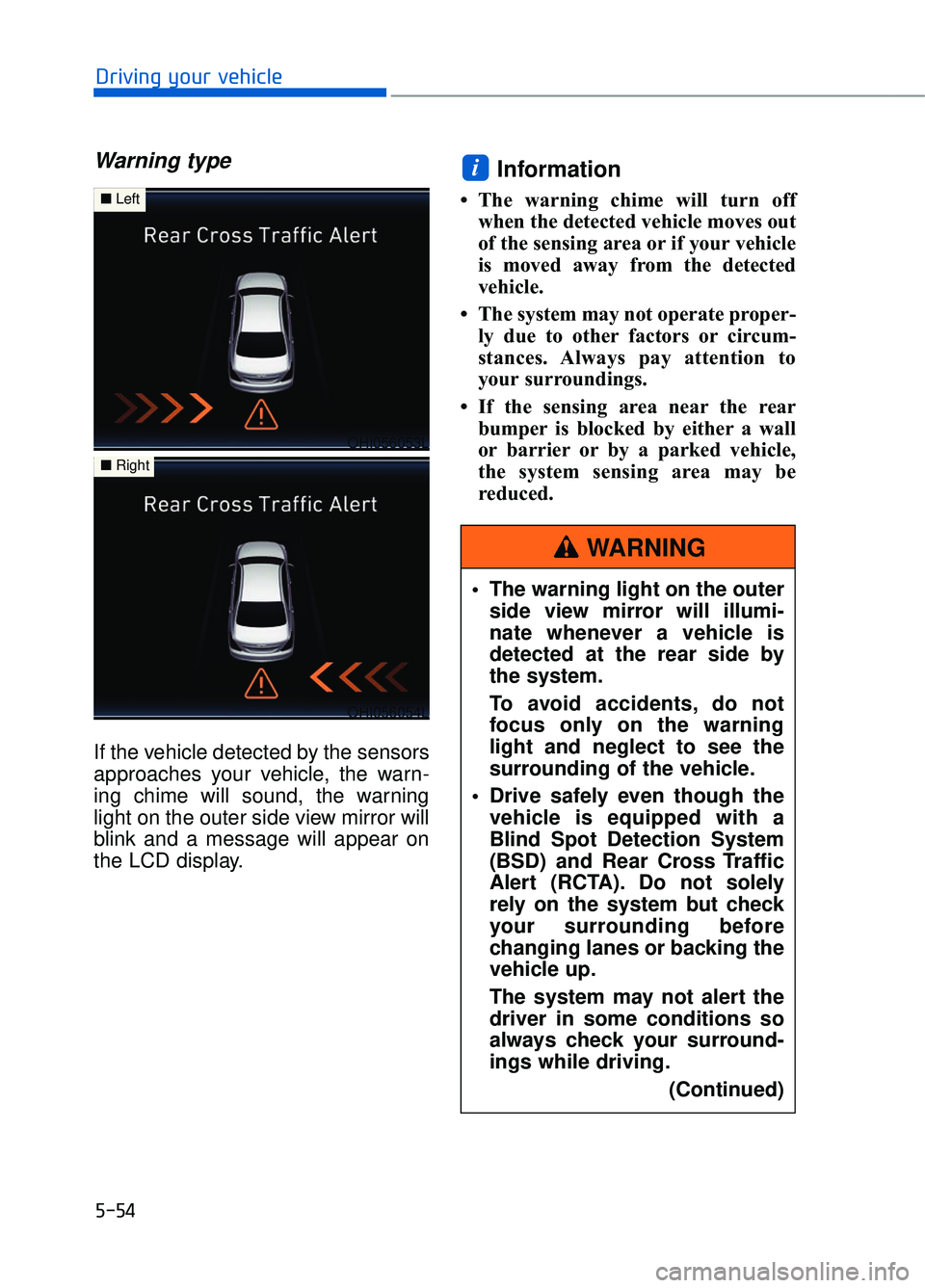
Warning type
If the vehicle detected by the sensors
approaches your vehicle, the warn-
ing chime will sound, the warning
light on the outer side view mirror will
blink and a message will appear on
the LCD display.
Information
• The warning chime will turn offwhen the detected vehicle moves out
of the sensing area or if your vehicle
is moved away from the detected
vehicle.
• The system may not operate proper- ly due to other factors or circum-
stances. Always pay attention to
your surroundings.
• If the sensing area near the rear bumper is blocked by either a wall
or barrier or by a parked vehicle,
the system sensing area may be
reduced.
i
5-54
Driving your vehicle
OHI056053L
■ Left
OHI056054L
■Right
The warning light on the outer
side view mirror will illumi-
nate whenever a vehicle is
detected at the rear side by
the system.
To avoid accidents, do not
focus only on the warning
light and neglect to see the
surrounding of the vehicle.
Drive safely even though the vehicle is equipped with a
Blind Spot Detection System
(BSD) and Rear Cross Traffic
Alert (RCTA). Do not solely
rely on the system but check
your surrounding before
changing lanes or backing the
vehicle up.
The system may not alert the
driver in some conditions so
always check your surround-
ings while driving.
(Continued)
WARNING
Page 317 of 524

5-56
Driving your vehicle
Limitations of the System
The driver must be cautious in the
below situations, because the sys-
tem may not detect other vehicles or
objects in certain circumstances.
The vehicle drives on a curvedroad or through a tollgate.
The sensor is polluted with rain, snow, mud, etc.
The rear bumper where the sensor is located is covered with a foreign
object such as a bumper sticker, a
bumper guard, a bike rack, etc.
The rear bumper is damaged, or the sensor is out of the original
default position.
The vehicle height gets lower or higher due to heavy loading in a
trunk, abnormal tire pressure, etc.
The vehicle drives in inclement weather such as heavy rain or
snow.
There is a fixed object near the vehicle, such as a guardrail.
A big vehicle is near such as a bus or truck.
A motorcycle or bicycle is near.
A flat trailer is near.
If the vehicle has started at the same time as the vehicle next to
you and has accelerated.
When the other vehicle passes at a very fast speed.
While changing lanes.
While going down or up a steep road where the height of the lane is
different.
When the other vehicle approach- es very close. When a trailer or carrier is
installed.
When the temperature of the rear bumper is high.
When the sensors are blocked by the other vehicles, walls or park-
ing-lot pillars.
When the detected vehicle also moves back, as your vehicle drives
back.
If there are small objects in the detecting area such as a shopping
cart or a baby stroller.
If there is a low height vehicle such as a sports car.
When other vehicles are close to your vehicle.
When the vehicle in the next lane moves two lanes away from you
OR when the vehicle two lanes
away moves to the next lane from
you.
When driving through a narrow road with many trees or bushes.
Information
This device complies with Part 15 of
the FCC rules.
Operation is subject to the following
two conditions:
1. This device may not cause harmful interference, and
2. This device must accept any inter- ference received, including interfer-
ence that may cause undesired
operation.
i
Page 318 of 524

5-57
05
S
SM
M A
AR
RT
T
B
B L
LI
IN
N D
D
S
S P
P O
O T
T
D
D E
ET
T E
EC
CT
T I
IO
O N
N
S
S Y
Y S
ST
T E
EM
M
(
( I
IF
F
E
E Q
Q U
UI
IP
P P
PE
ED
D )
)
The Smart Blind Spot Detection
System detects the front area
through the camera installed on the
upper front windshield and detects
the side/rear areas through radar
sensors.
The Smart Blind Spot Detection
System may activate the Electronic
Stability Control (ESC) in accor-
dance with a colliding possibility with
an approaching vehicle while chang-
ing lanes. It is to lower the colliding
risk or mitigate the colliding damage.
Operating conditions
The system enters the ready status,
when the following conditions are
satisfied with the smart blind system
in the ON position:
- Vehicle speed is between 40 mph
and 110 mph (60 km/h and 180
km/h).
- The system detects both of the lane lines.
- An approaching vehicle is detected next to/behind your vehicle.
Activation (with braking per-formance)
The Smart Blind Spot Detection
System may apply braking power,
when an approaching vehicle is
detected within a certain distance
next to/behind your vehicle.
It gently applies braking power on
the tire, which is located in the oppo-
site side of the possibly-colliding
point. The instrument cluster will
inform the driver of the system acti-
vation.
The Smart Blind Spot Detection
System is automatically deactivated,
when the vehicle drives a certain dis-
tance away, when the vehicle direc-
tion is changed against the possible-
colliding point, when the steering
wheel is abruptly moved, or when the
brake pedal is depressed.
OHI056114
OHI056115
■ Left side detection
■Right side detection
Page 319 of 524

5-58
Driving your vehicle
When the turn signals operate, the
Smart Blind Spot Detection System
operates only once. However, when
the turn signals are turned OFF, the
system re-enters the activation con-
ditions.
The driver should drive the vehicle in
the middle of the vehicle lanes to
keep the system in the ready status.
When the vehicle drives too close to
one side of the vehicle lanes, the
system may not properly operate.
In addition, the system may not prop-
erly control your vehicle in accor-
dance with driving situations. Thus,
always pay close attention to road
situations.
Warning message
Smart BSD braking system mal-
function
When there is a malfunction with the
Smart Blind Spot Detection System,
warning message appears on the
LCD display and deactivates the
Smart Blind Spot Detection System.
In this case, have your vehicle
inspected by an authorized Dealer of
Genesis Brand Products.
Limitations of the System
The driver must be cautious in the
below situations, because the sys-
tem may not detect other vehicles or
objects in certain circumstances.
The vehicle drives on a curved road or through a tollgate.
The sensor is polluted with rain, snow, mud, etc.
The rear bumper where the sensor is located is covered with a foreign
object such as a bumper sticker, a
bumper guard, a bike rack, etc.
The rear bumper is damaged, or the sensor is out of the original
default position.
The vehicle height gets lower or higher due to heavy loading in a
trunk, abnormal tire pressure, etc.
The vehicle drives in inclement weather such as heavy rain or
snow.
There is a fixed object near the vehicle, such as a guardrail.
A big vehicle is near such as a bus or truck.
A motorcycle or bicycle is near.
A flat trailer is near.
If the vehicle has started at the same time as the vehicle next to
you and has accelerated.
When the other vehicle passes at a very fast speed.
While changing lanes.
While going down or up a steep road where the height of the lane is
different.
When the other vehicle approach- es very close.
When a trailer or carrier is installed.
OHI056116L
Page 321 of 524

5-60
Driving your vehicle
The vehicle drives under 40 mph (60 km/h) or over 110 mph (180
km/h).
The vehicle abruptly changes driv- ing direction.
The vehicle abruptly enters the next lane.
The vehicle sharply stops.
Temperature is extremely low around the vehicle.
The vehicle severely vibrates while driving over a bumpy road, uneven/
bumpy road, or concrete patch.
The vehicle drives on a slippery surface due to snow, water puddle,
or ice.
Information
This device complies with Part 15 of
the FCC rules.
Operation is subject to the following
two conditions:
1. This device may not cause harmful interference, and
2. This device must accept any inter- ference received, including interfer-
ence that may cause undesired
operation.
i
The driver is responsible foraccurate steering.
Do not unnecessarily operate the steering wheel, when the
Smart Blind Spot Detection
System is in operation.
Always pay extreme caution while driving. The Smart Blind
Spot Detection System may
not operate or unnecessarily
operate in accordance with
your driving situations.
The Smart Blind Spot Detection System is not a substitute for
safe driving practices, but a
convenience function only. It is
the responsibility of the driver
to always drive cautiously to
prevent unexpected and sud-
den situations from occur-
ring. Pay attention to the road
conditions at all times.
WARNING
Page 322 of 524

5-61
05
The Automatic Emergency Braking
(AEB) system is designed to help
detect and monitor the vehicle ahead
or detect a pedestrian in the roadway
through radar signals and camera
recognition to warn the driver that a
collision is imminent, and if neces-
sary, apply emergency braking.System Setting and Activation
System setting
The driver can activate the AEB by
placing the Engine Start/Stop button
to the ON position and by selecting
'User Settings →Driving Assist →
Autonomous Emergency Braking'.
The AEB deactivates, when the driv-
er cancels the system setting.
The warning light illumi-
nates on the LCD display,
when you cancel the AEB
system. The driver can
monitor the AEB ON/OFF status on
the LCD display. If the warning light
remains ON when the AEB is activat-
ed, have the system checked by an
authorized Dealer of Genesis Brand
Products.
A A U
U T
TO
O M
M A
AT
TI
IC
C
E
E M
M E
ER
R G
G E
EN
N C
CY
Y
B
B R
RA
A K
KI
IN
N G
G
(
( A
A E
EB
B )
)
(
( I
IF
F
E
E Q
Q U
UI
IP
P P
PE
ED
D )
)
Take the following precautions
when using the Automatic
Emergency Braking (AEB):
This system is only a supple-
mental system and it is not
intended to, nor does it
replace the need for extreme
care and attention of the driv-
er. The sensing range and
objects detectable by the sen-
sors are limited. Pay attention
to the road conditions at all
times.
NEVER drive too fast in accor- dance with the road condi-
tions or while cornering.
Always drive cautiously to prevent unexpected and sud-
den situations from occur-
ring. AEB does not stop the
vehicle completely and is not
a collision avoidance system.
WARNING
OHI046208L