2017 FORD TAURUS turn off
[x] Cancel search: turn offPage 171 of 504
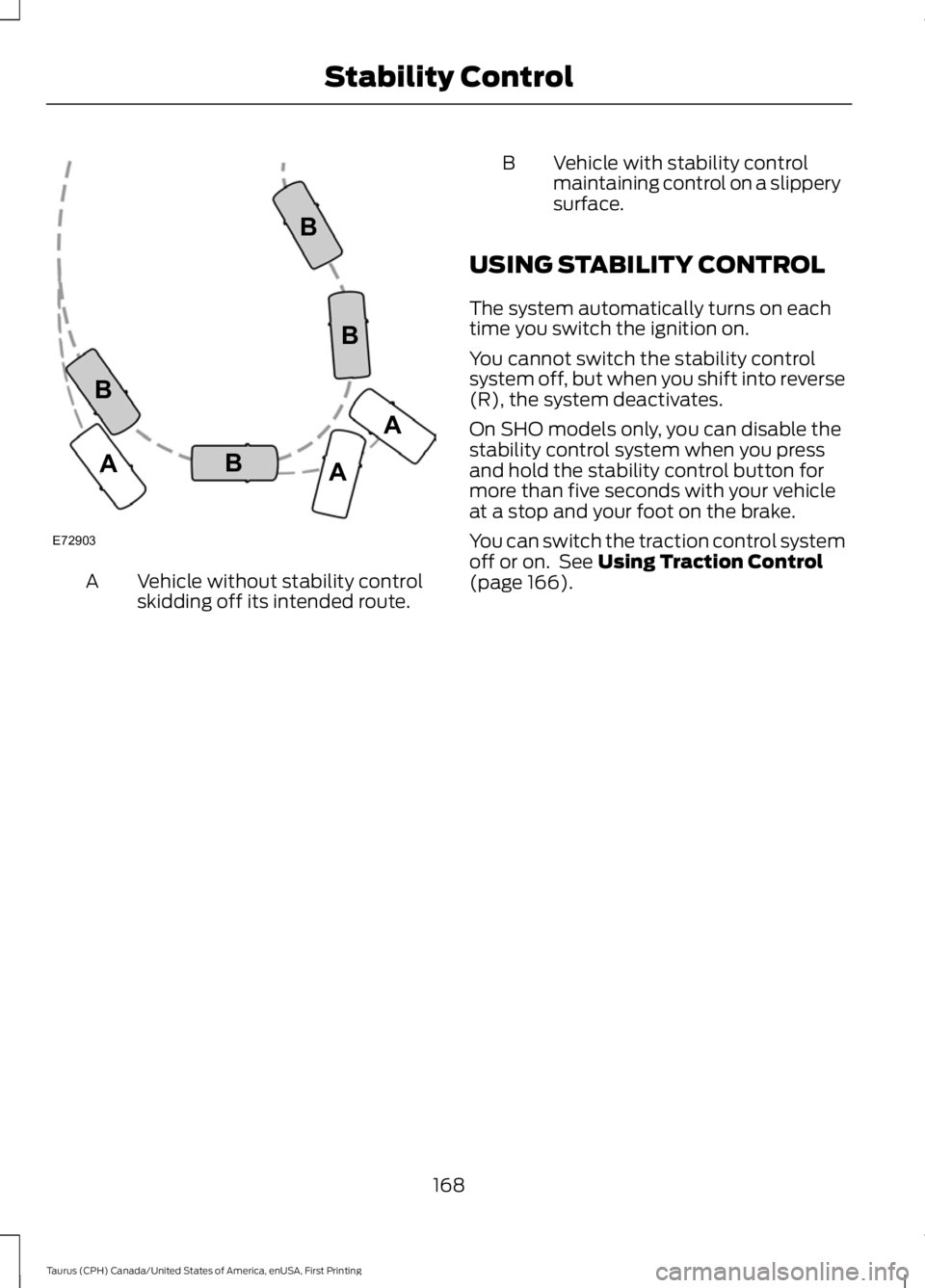
Vehicle without stability controlskidding off its intended route.A
B Vehicle with stability controlmaintaining control on a slipperysurface.
USING STABILITY CONTROL
The system automatically turns on eachtime you switch the ignition on.
You cannot switch the stability controlsystem off, but when you shift into reverse(R), the system deactivates.
On SHO models only, you can disable thestability control system when you pressand hold the stability control button formore than five seconds with your vehicleat a stop and your foot on the brake.
You can switch the traction control systemoff or on. See Using Traction Control(page 166).
168
Taurus (CPH) Canada/United States of America, enUSA, First Printing
Stability ControlE72903A
AA
B
BB
B
Page 173 of 504

PRINCIPLE OF OPERATION
WARNINGS
To help avoid personal injury, pleaseread and understand the limitationsof the system as contained in thissection. Sensing is only an aid for some(generally large and fixed) objects whenmoving on a flat surface at parking speeds.Certain objects with surfaces that absorbultrasonic waves, surrounding vehicle'sparking aid systems, traffic controlsystems, fluorescent lamps, inclementweather, air brakes, and external motorsand fans may also affect the function ofthe sensing system; this may includereduced performance or a false activation.
To help avoid personal injury, alwaysuse caution when in reverse (R) andwhen using the sensing system.
This system is not designed toprevent contact with small or movingobjects. The system is designed toprovide a warning to assist the driver indetecting large stationary objects to avoiddamaging your vehicle. The system maynot detect smaller objects, particularlythose close to the ground.
Certain add-on devices such as largetrailer hitches, bike or surfboard racksand any device that may block thenormal detection zone of the system, maycreate false beeps.
Note:Keep the sensors, located on thebumper or fascia, free from snow, ice andlarge accumulations of dirt. If the sensorsare covered, the system’s accuracy can beaffected. Do not clean the sensors withsharp objects.
Note:If your vehicle sustains damage tothe bumper or fascia, leaving it misalignedor bent, the sensing zone may be alteredcausing inaccurate measurement ofobstacles or false alarms.
Note:The sensing system cannot be turnedoff when a MyKey is present. See Principleof Operation (page 51).
Note:If you attach certain add-on devicessuch as a trailer or bike rack, the rear sensingsystem may detect that add-on device andtherefore provide warnings. It is suggestedthat you disable the rear sensing systemwhen you attach an add-on device to yourvehicle to prevent these warnings.
The sensing system warns the driver ofobstacles within a certain range of yourvehicle. The system turns on automaticallywhenever you switch the ignition on.
You can turn the system on oroff by pressing the parking aidbutton. If your vehicle does nothave a parking aid button, the system canbe switched off through the informationdisplay menu or from the pop-up messagethat appears once you shift thetransmission into reverse (R). See GeneralInformation (page 89).
If a fault is present in the system, a warningmessage appears in the informationdisplay. See Information Messages(page 98).
REAR PARKING AID
The rear sensors are only active when thetransmission is in reverse (R). As yourvehicle moves closer to the obstacle, therate of the audible warning increases.When the obstacle is less than 12 in(30 cm) away, the warning soundscontinuously. If the system detects astationary or receding object farther than12 in (30 cm) from the corners of thebumper, the tone sounds for only threeseconds. Once the system detects anobject approaching, the warning soundsagain.
170
Taurus (CPH) Canada/United States of America, enUSA, First Printing
Parking AidsE139213
Page 175 of 504

The system may not operate correctly inany of the following conditions:
•You use a spare tire or a tiresignificantly worn more than the othertires.
•One or more tires are improperlyinflated.
•You try to park on a tight curve.
Do not use the system if:
•You have attached a bike rack, traileror other object near the sensors on thefront or rear of your vehicle.
•You have attached an overhangingobject (surfboard) to the roof.
•The front bumper or side sensors aredamaged or obstructed (front bumpercover).
•The correct tire size is not in use on yourvehicle (for example, a mini-spare tire).
Using Active Park Assist
Press the button to turn thesystem on or off.
When driving at a speed less than 22 mph(35 km/h), the system automatically scansboth sides of your vehicle for an availableparking space. The system displays amessage and a corresponding graphic toindicate it is searching for a parking space.Use the direction indicator to selectsearching either to the left hand side orright hand side of your vehicle. If thedirection indicator is not used, the systemdefaults to the passenger side of yourvehicle.
When the system finds a suitable space itdisplays a message and a tone sounds.Stop your vehicle and follow theinstructions on the display screen. If yourvehicle is moving very slowly, you mayneed to pull forward a short distancebefore the system is ready to park.
Note:You can also activate the systemafter you have already driven partially orcompletely past the parking space. To doso, press the active park assist button andthe system will inform you if you haverecently past a suitable parking space.
Note:You must observe that the selectedspace remains clear of obstructions at alltimes in the maneuver.
172
Taurus (CPH) Canada/United States of America, enUSA, First Printing
Parking AidsE146186 E130107
Page 176 of 504
Note:Active park assist may not detectvehicles with overhanging loads (a bus or atruck), street furniture and other items. Youmust make sure the selected space issuitable for parking.
Note:You should drive your vehicle within5 ft (1.5 m) and as parallel to the othervehicles as possible while passing a parkingspace.
Note:The system always offers the lastdetected parking space (for example, if yourvehicle detects multiple spaces while youare driving, it offers the last one).
Note:If driven above approximately 22 mph(35 km/h), the display screen shows amessage to alert you to reduce your vehiclespeed.
Automatic Steering into ParkingSpace
Note:If vehicle speed exceeds 6 mph(10 km/h) or the maneuver is interrupted(driver input is detected), the systemswitches off and you need to take fullcontrol of your vehicle.
Note:If a maneuver is interrupted beforecompletion, the system switches off. Thesteering wheel position will not indicate theactualy position of the steering and you haveto take full control of your vehicle.
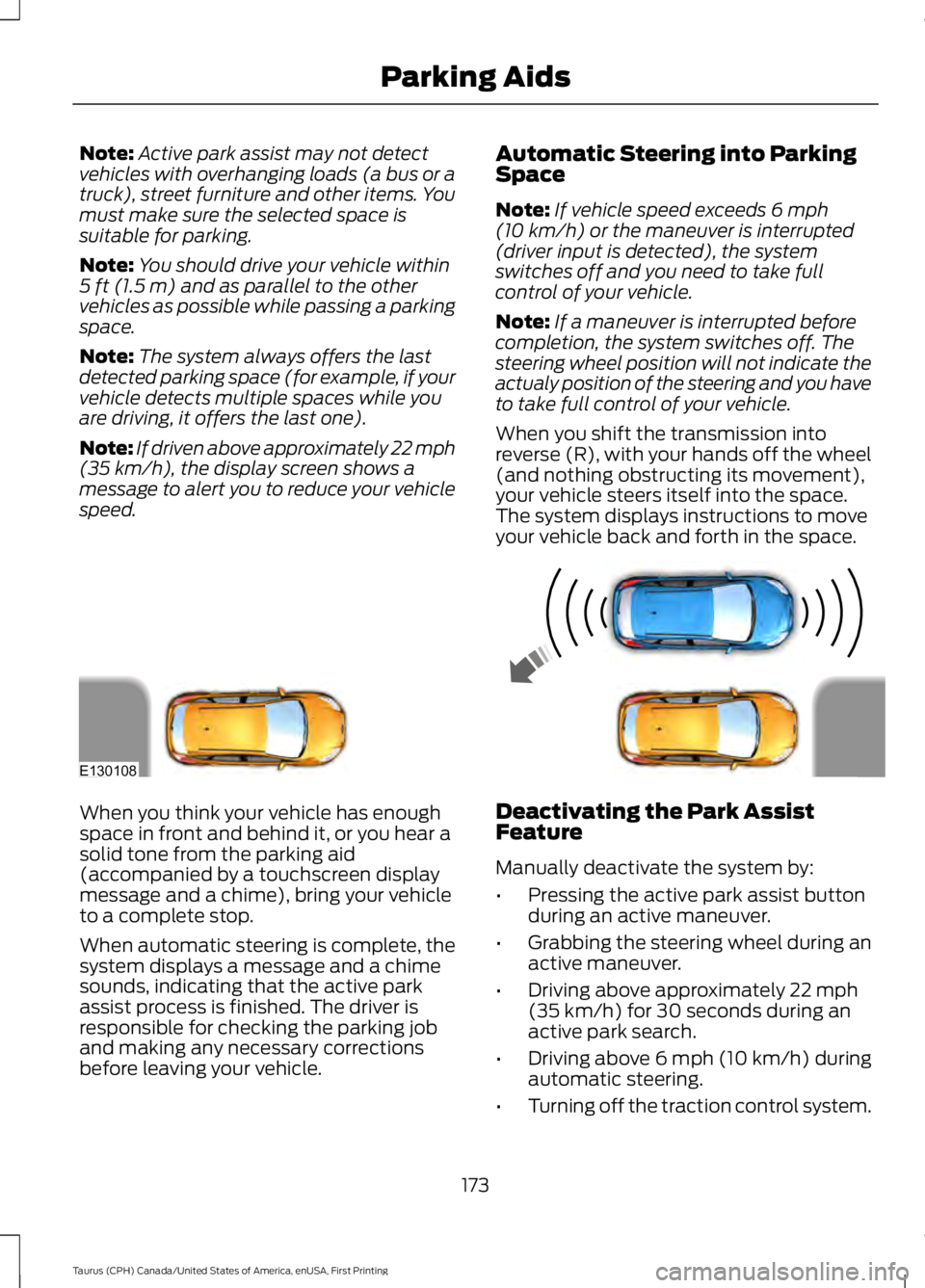
When you shift the transmission intoreverse (R), with your hands off the wheel(and nothing obstructing its movement),your vehicle steers itself into the space.The system displays instructions to moveyour vehicle back and forth in the space.
When you think your vehicle has enoughspace in front and behind it, or you hear asolid tone from the parking aid(accompanied by a touchscreen displaymessage and a chime), bring your vehicleto a complete stop.
When automatic steering is complete, thesystem displays a message and a chimesounds, indicating that the active parkassist process is finished. The driver isresponsible for checking the parking joband making any necessary correctionsbefore leaving your vehicle.
Deactivating the Park AssistFeature
Manually deactivate the system by:
•Pressing the active park assist buttonduring an active maneuver.
•Grabbing the steering wheel during anactive maneuver.
•Driving above approximately 22 mph(35 km/h) for 30 seconds during anactive park search.
•Driving above 6 mph (10 km/h) duringautomatic steering.
•Turning off the traction control system.
173
Taurus (CPH) Canada/United States of America, enUSA, First Printing
Parking AidsE130108
Page 181 of 504
PRINCIPLE OF OPERATION
Cruise control lets you maintain a setspeed without keeping your foot on theaccelerator pedal. You can use cruisecontrol when your vehicle speed is greaterthan 20 mph (30 km/h).
USING CRUISE CONTROL
WARNINGS
Do not use cruise control on windingroads, in heavy traffic or when theroad surface is slippery. This couldresult in loss of vehicle control, seriousinjury or death.
When you are going downhill, yourvehicle speed may increase abovethe set speed. The system will notapply the brakes. Change down a gear toassist the system in maintaining the setspeed. Failure to do so could result in lossof vehicle control, serious injury or death.
Note:Cruise control will disengage if thevehicle speed decreases more than 10 mph(16 km/h) below the set speed while drivinguphill.
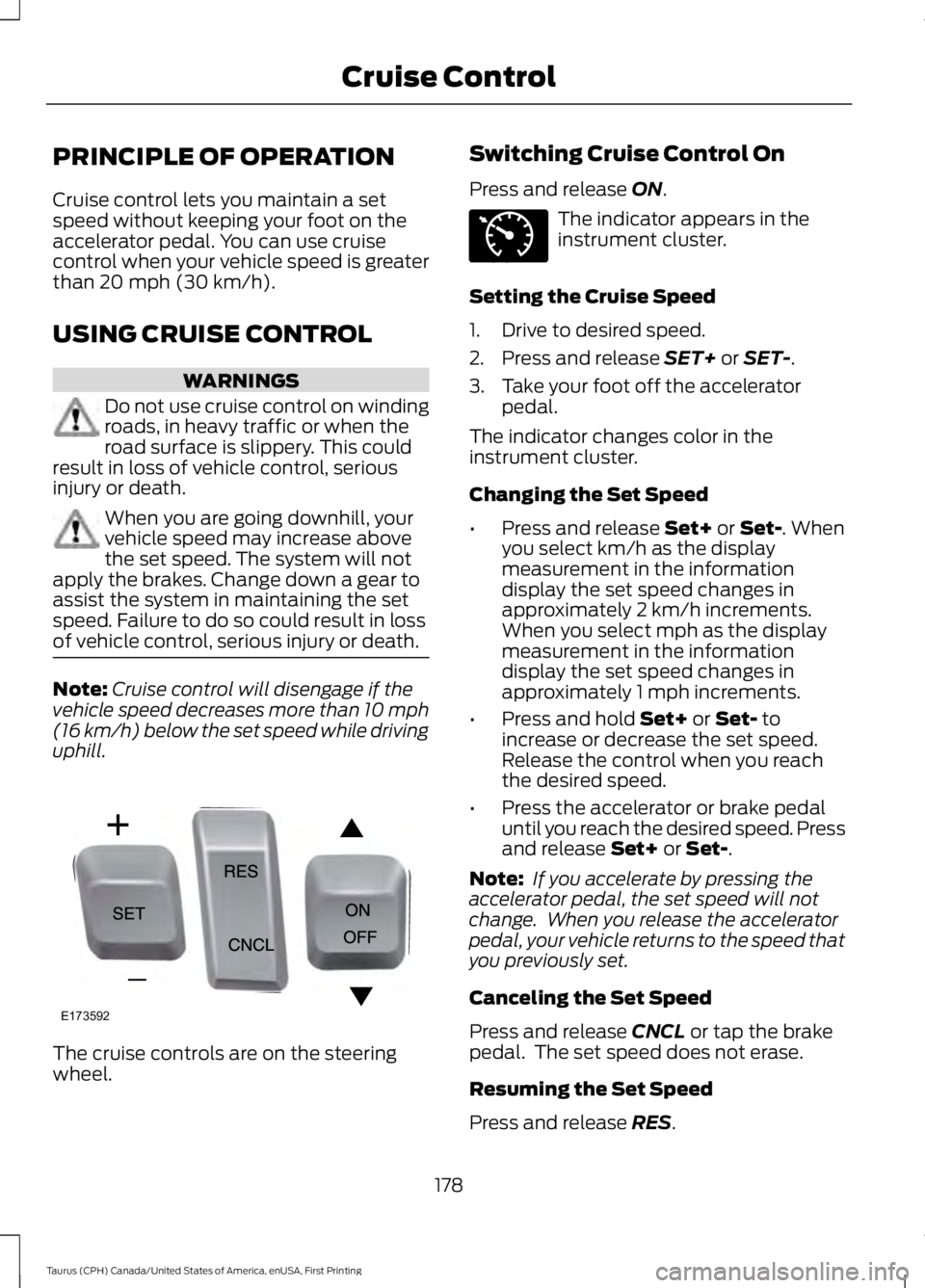
The cruise controls are on the steeringwheel.
Switching Cruise Control On
Press and release ON.
The indicator appears in theinstrument cluster.
Setting the Cruise Speed
1. Drive to desired speed.
2. Press and release SET+ or SET-.
3. Take your foot off the acceleratorpedal.
The indicator changes color in theinstrument cluster.
Changing the Set Speed
•Press and release Set+ or Set-. Whenyou select km/h as the displaymeasurement in the informationdisplay the set speed changes inapproximately 2 km/h increments.When you select mph as the displaymeasurement in the informationdisplay the set speed changes inapproximately 1 mph increments.
•Press and hold Set+ or Set- toincrease or decrease the set speed.Release the control when you reachthe desired speed.
•Press the accelerator or brake pedaluntil you reach the desired speed. Pressand release Set+ or Set-.
Note: If you accelerate by pressing theaccelerator pedal, the set speed will notchange. When you release the acceleratorpedal, your vehicle returns to the speed thatyou previously set.
Canceling the Set Speed
Press and release CNCL or tap the brakepedal. The set speed does not erase.
Resuming the Set Speed
Press and release RES.
178
Taurus (CPH) Canada/United States of America, enUSA, First Printing
Cruise ControlE173592 E71340
Page 183 of 504

The indicator appears in theinformation display.
The current gap setting and SET alsoappears in the instrument cluster.
Setting the Adaptive Cruise Speed
1. Drive to desired speed.
2. Press and release SET+ or SET-.
3. Take your foot off the acceleratorpedal.
4. The information display will show agreen indicator light, current gapsetting and desired set speed.
5. A vehicle graphic illuminates if there isa vehicle detected in front of you.
Note:When adaptive cruise control isactive, the speedometer may vary slightlyfrom the set speed displayed in theinformation display.
Following a Vehicle
WARNINGS
When following a vehicle, yourvehicle does not decelerateautomatically to a stop, nor doesyour vehicle always decelerate quicklyenough to avoid a crash without driverintervention. Always apply the brakes whennecessary. Failing to do so may result in acrash, serious injury or death.
Adaptive cruise control only warnsof vehicles detected by the radarsensor. In some cases there may beno warning or a delayed warning. Alwaysapply the brakes when necessary. Failureto do so may result in a crash, serious injuryor death.
Note:The brakes may emit a sound whenmodulated by the adaptive cruise controlsystem.
When a vehicle ahead of you enters thesame lane or a slower vehicle is ahead inthe same lane, the vehicle speed adjuststo maintain a preset gap distance. Thedistance setting is adjustable.
The lead vehicle graphic will illuminate.
To help you pass a vehicle in front of you,the adaptive cruise control system mayprovide a small temporary accelerationwhen you switch on your left turn signalwhile following a lead car.
Your vehicle maintains a consistent gapfrom the vehicle ahead until:
•The vehicle in front of you acceleratesto a speed above the set speed.
•The vehicle in front of you moves outof your lane or out of view.
•The vehicle speed falls below 12 mph(20 km/h).
•A new gap distance is set.
180
Taurus (CPH) Canada/United States of America, enUSA, First Printing
Cruise ControlE144529 E173594 E173595
Page 186 of 504

Switching the System Off
Note:The set speed memory erases whenyou switch off the system.
Press and release OFF or turn off theignition.
Detection Issues
WARNING
On rare occasions, detection issuescan occur due to the roadinfrastructures, for example bridges,tunnels and safety barriers. In these cases,the system may brake late orunexpectedly. At all times, you areresponsible for controlling your vehicle,supervising the system and intervening, ifrequired.
The radar sensor has a limited field ofvision. It may not detect vehicles at all ordetect a vehicle later than expected insome situations. The lead vehicle graphicwill not illuminate if the system does notdetect a vehicle in front of you.Detection issues can occur:
When driving on a different linethan the vehicle in front.A
With vehicles that edge into yourlane. The system can only detectthese vehicles once they movefully into your lane.
B
There may be issues with thedetection of vehicles in frontwhen driving into and coming outof a bend or curve in the road.
C
In these cases the system may brake lateor unexpectedly. The driver should stayalert and intervene when necessary.
183
Taurus (CPH) Canada/United States of America, enUSA, First Printing
Cruise ControlE71621
Page 190 of 504

System Display
When active the system will runautomatically in the background and onlyissue a warning if required. You can viewthe status at any time using theinformation display. See GeneralInformation (page 89).
The alertness level is shown by six stepsin a colored bar.
The current assessment of your alertnessis within a typical range.
The current assessment of your alertnessindicates that you should rest as soon assafely possible.
The status bar will travel from left to rightas the calculated alertness leveldecreases. As the rest icon is approachedthe color turns from green to yellow to red.
The yellow position indicates the firstwarning is active and the red positionindicates the second warning is active.
Note:If you have recently received awarning; you should consider resting, evenif the current assessment is within thetypical range.
Note:If the camera sensor cannot track theroad lane markings or if your vehicle speeddrops below approximately 40 mph(64 km/h), the alertness level will changeto grey for a short time and the informationdisplay will inform you that the system isunavailable.
Resetting the System
You can reset the system by either:
•Switching the ignition off and on.
•Stopping the vehicle and then openingand closing the driver’s door.
LANE KEEPING SYSTEM (If
Equipped)
WARNINGS
The system is designed to aid thedriver. It is not intended to replaceyour attention and judgment. You arestill responsible to drive with due care andattention.
At all times, you are responsible forcontrolling your vehicle, supervisingthe system and intervening, ifrequired. Failure to take care may result inthe loss of control of your vehicle, seriouspersonal injury or death.
The system is designed to aid thedriver. It is not intended to replaceyour attention and judgment. You arestill responsible to drive with due care andattention.
In cold and severe weatherconditions the system may notfunction. Rain, snow and spray canall limit sensor performance.
If damage occurs in the immediatearea surrounding the sensor, haveyour vehicle checked as soon aspossible.
187
Taurus (CPH) Canada/United States of America, enUSA, First Printing
Driving AidsE131358 E131359