Page 84 of 504

INTERIOR MIRROR
WARNING
Do not adjust the mirror when yourvehicle is moving.
Note:Do not clean the housing or glass ofany mirror with harsh abrasives, fuel or otherpetroleum or ammonia-based cleaningproducts.
You can adjust the interior mirror to yourpreference. Some mirrors also have asecond pivot point. This lets you move themirror head up or down and from side toside.
Pull the tab below the mirror toward youto reduce glare at night.
Auto-Dimming Mirror (If Equipped)
Note:Do not block the sensors on the frontand back of the mirror. Mirror performancemay be affected. A rear center passenger orraised rear center head restraint may alsoblock light from reaching the sensor.
The mirror will dim automatically to reduceglare when bright lights are detected frombehind your vehicle. It will automaticallyreturn to normal reflection when you selectreverse gear to make sure you have a clearview when backing up.
SUN VISORS
Rotate the sun visor toward the sidewindow and extend it rearward for extrashade.
Illuminated Vanity Mirror
Lift the cover to switch the lamp on.
SUN SHADES (If Equipped)
Note:Do not try to move the sun shademanually.
The power rear sun shade covers the rearwindow of the vehicle.
81
Taurus (CPH) Canada/United States of America, enUSA, First Printing
Windows and MirrorsE138666 E162197
Page 85 of 504
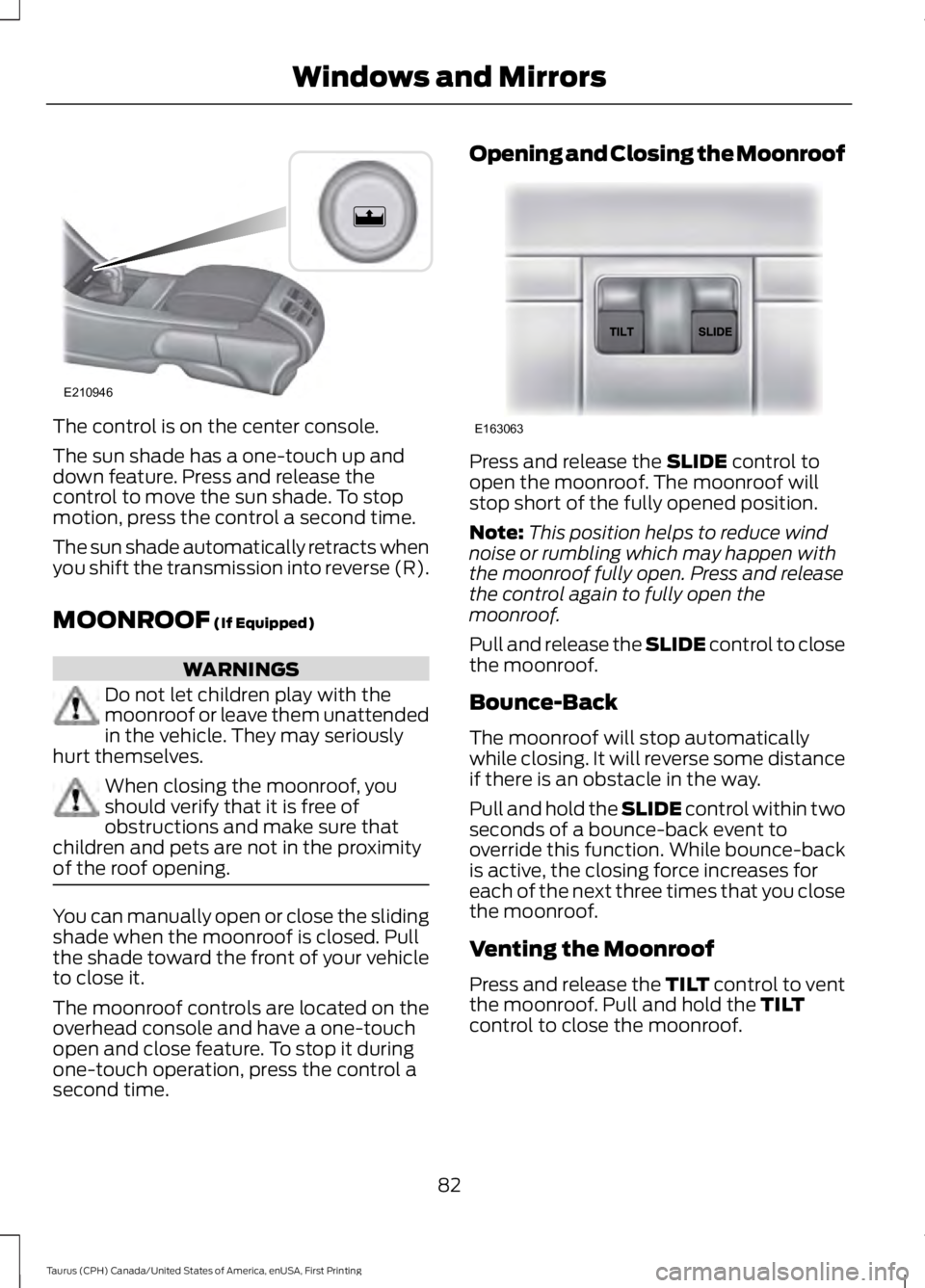
The control is on the center console.
The sun shade has a one-touch up anddown feature. Press and release thecontrol to move the sun shade. To stopmotion, press the control a second time.
The sun shade automatically retracts whenyou shift the transmission into reverse (R).
MOONROOF (If Equipped)
WARNINGS
Do not let children play with themoonroof or leave them unattendedin the vehicle. They may seriouslyhurt themselves.
When closing the moonroof, youshould verify that it is free ofobstructions and make sure thatchildren and pets are not in the proximityof the roof opening.
You can manually open or close the slidingshade when the moonroof is closed. Pullthe shade toward the front of your vehicleto close it.
The moonroof controls are located on theoverhead console and have a one-touchopen and close feature. To stop it duringone-touch operation, press the control asecond time.
Opening and Closing the Moonroof
Press and release the SLIDE control toopen the moonroof. The moonroof willstop short of the fully opened position.
Note:This position helps to reduce windnoise or rumbling which may happen withthe moonroof fully open. Press and releasethe control again to fully open themoonroof.
Pull and release the SLIDE control to closethe moonroof.
Bounce-Back
The moonroof will stop automaticallywhile closing. It will reverse some distanceif there is an obstacle in the way.
Pull and hold the SLIDE control within twoseconds of a bounce-back event tooverride this function. While bounce-backis active, the closing force increases foreach of the next three times that you closethe moonroof.
Venting the Moonroof
Press and release the TILT control to ventthe moonroof. Pull and hold the TILTcontrol to close the moonroof.
82
Taurus (CPH) Canada/United States of America, enUSA, First Printing
Windows and MirrorsE210946 E163063
Page 87 of 504
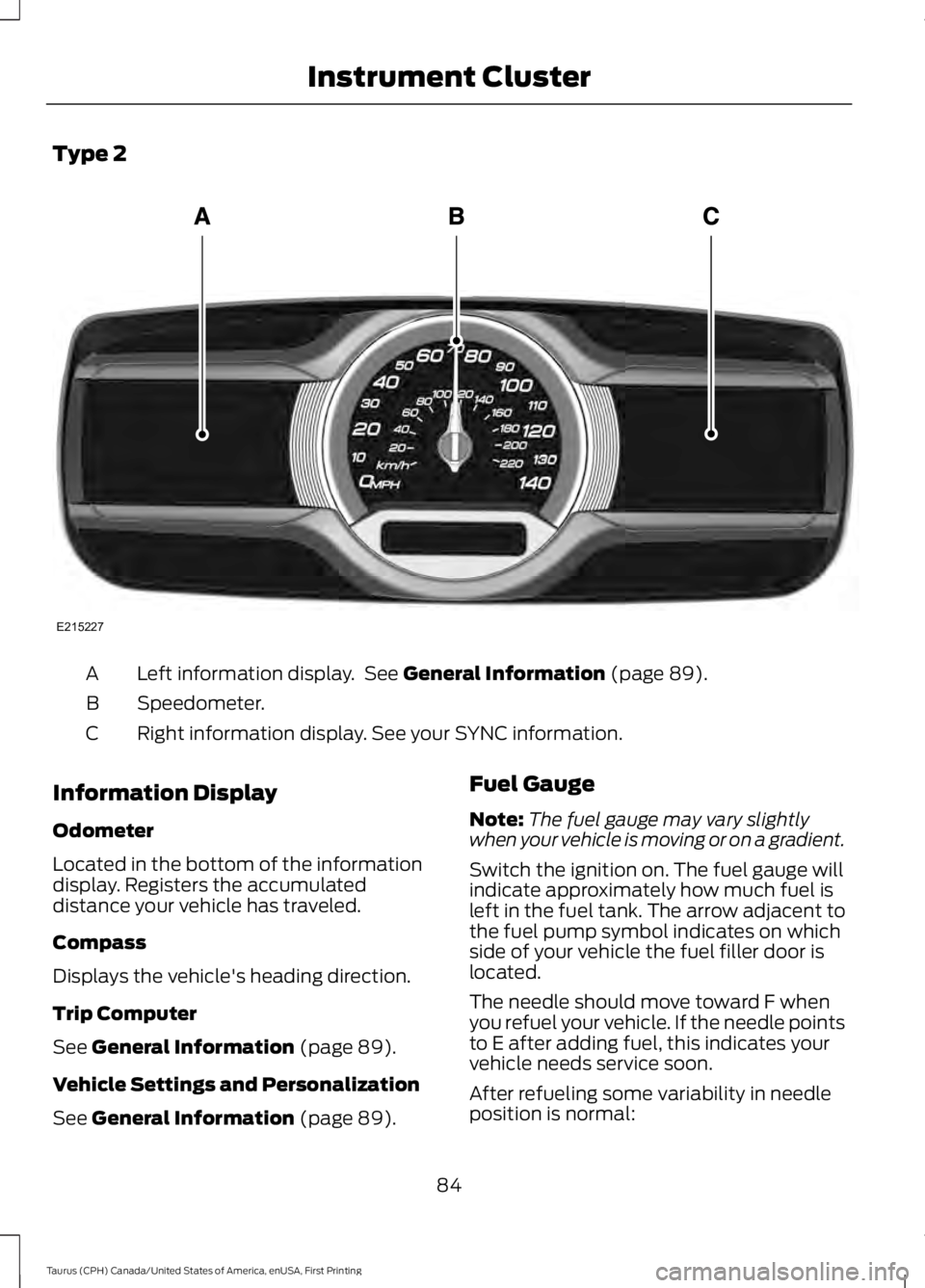
Type 2
Left information display. See General Information (page 89).A
Speedometer.B
Right information display. See your SYNC information.C
Information Display
Odometer
Located in the bottom of the informationdisplay. Registers the accumulateddistance your vehicle has traveled.
Compass
Displays the vehicle's heading direction.
Trip Computer
See General Information (page 89).
Vehicle Settings and Personalization
See General Information (page 89).
Fuel Gauge
Note:The fuel gauge may vary slightlywhen your vehicle is moving or on a gradient.
Switch the ignition on. The fuel gauge willindicate approximately how much fuel isleft in the fuel tank. The arrow adjacent tothe fuel pump symbol indicates on whichside of your vehicle the fuel filler door islocated.
The needle should move toward F whenyou refuel your vehicle. If the needle pointsto E after adding fuel, this indicates yourvehicle needs service soon.
After refueling some variability in needleposition is normal:
84
Taurus (CPH) Canada/United States of America, enUSA, First Printing
Instrument ClusterE215227
Page 95 of 504
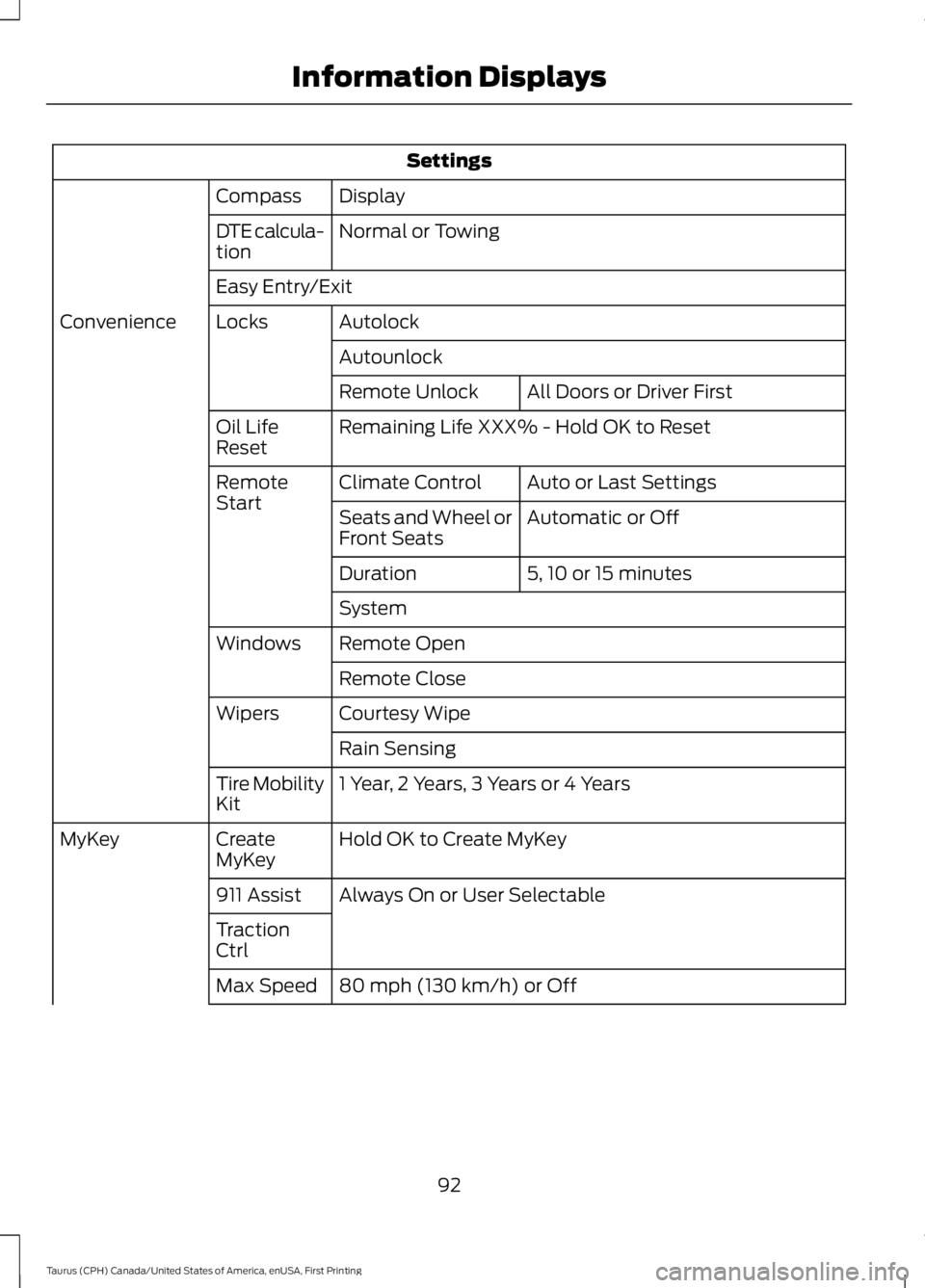
Settings
DisplayCompass
Normal or TowingDTE calcula-tion
Easy Entry/Exit
AutolockLocksConvenience
Autounlock
All Doors or Driver FirstRemote Unlock
Remaining Life XXX% - Hold OK to ResetOil LifeReset
Auto or Last SettingsClimate ControlRemoteStartAutomatic or OffSeats and Wheel orFront Seats
5, 10 or 15 minutesDuration
System
Remote OpenWindows
Remote Close
Courtesy WipeWipers
Rain Sensing
1 Year, 2 Years, 3 Years or 4 YearsTire MobilityKit
Hold OK to Create MyKeyCreateMyKeyMyKey
Always On or User Selectable911 Assist
TractionCtrl
80 mph (130 km/h) or OffMax Speed
92
Taurus (CPH) Canada/United States of America, enUSA, First Printing
Information Displays
Page 99 of 504
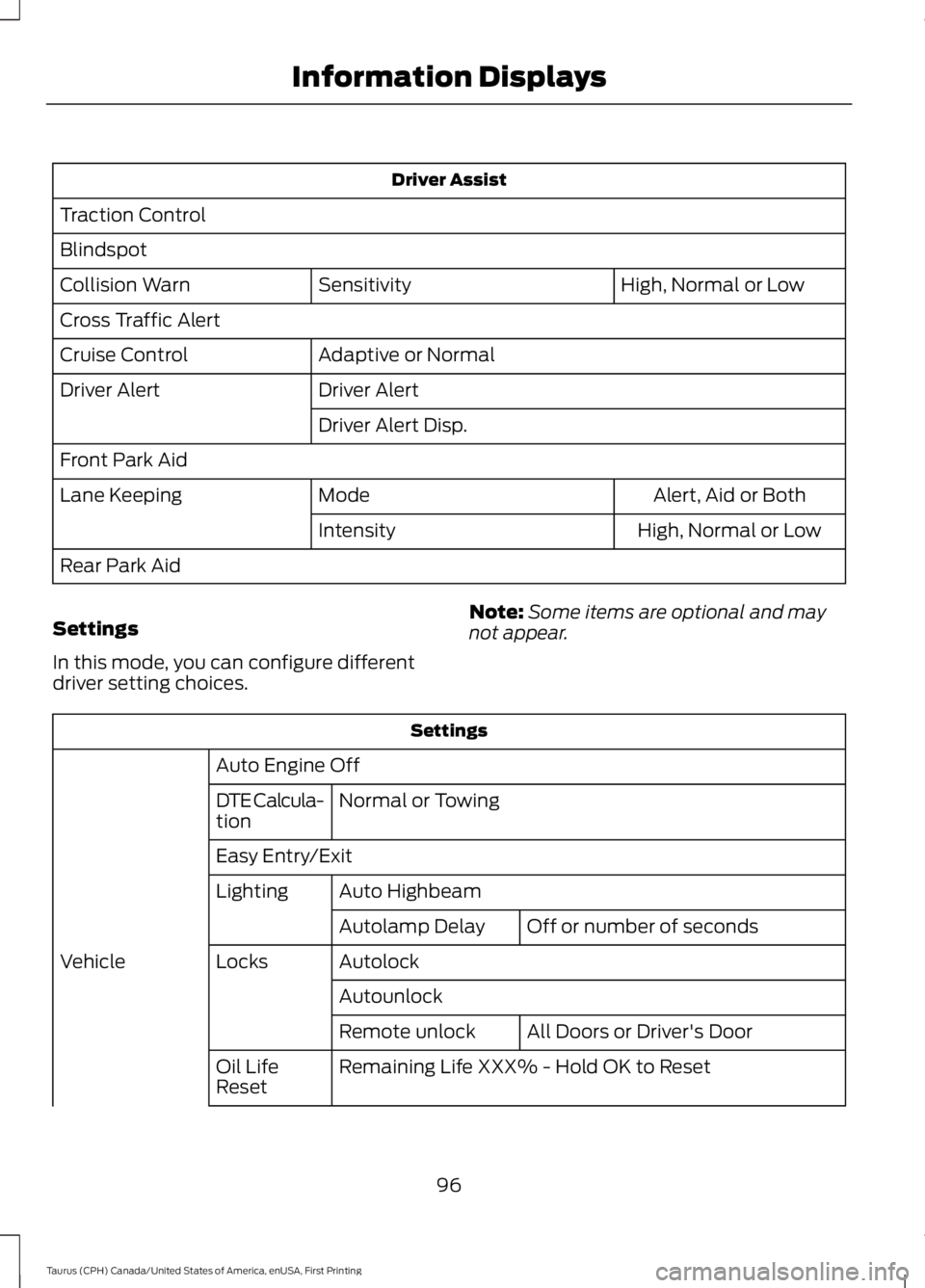
Driver Assist
Traction Control
Blindspot
High, Normal or LowSensitivityCollision Warn
Cross Traffic Alert
Adaptive or NormalCruise Control
Driver AlertDriver Alert
Driver Alert Disp.
Front Park Aid
Alert, Aid or BothModeLane Keeping
High, Normal or LowIntensity
Rear Park Aid
Settings
In this mode, you can configure differentdriver setting choices.
Note:Some items are optional and maynot appear.
Settings
Auto Engine Off
Normal or TowingDTE Calcula-tion
Easy Entry/Exit
Auto HighbeamLighting
Off or number of secondsAutolamp Delay
AutolockLocksVehicle
Autounlock
All Doors or Driver's DoorRemote unlock
Remaining Life XXX% - Hold OK to ResetOil LifeReset
96
Taurus (CPH) Canada/United States of America, enUSA, First Printing
Information Displays
Page 124 of 504
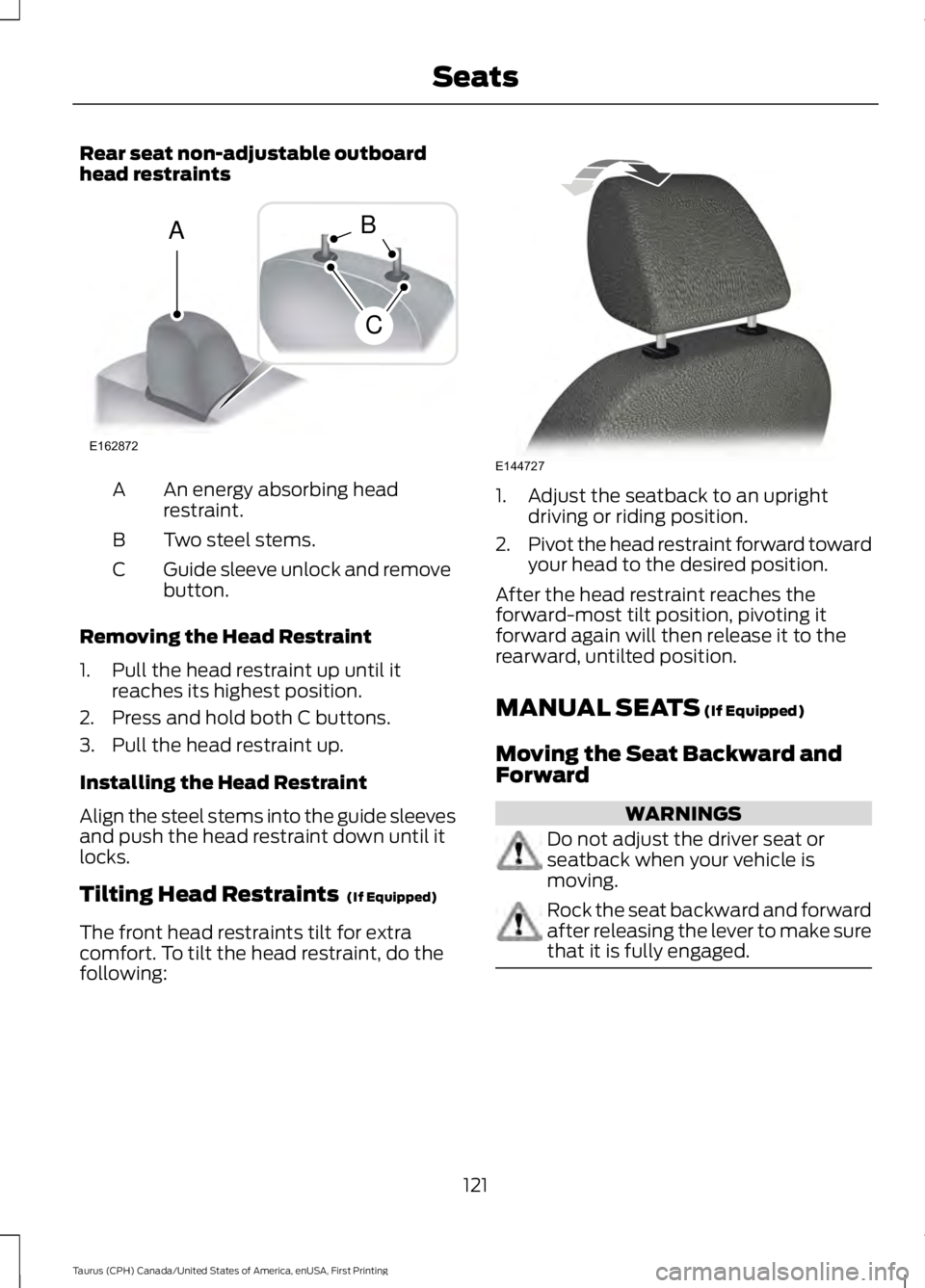
Rear seat non-adjustable outboardhead restraints
An energy absorbing headrestraint.A
Two steel stems.B
Guide sleeve unlock and removebutton.C
Removing the Head Restraint
1. Pull the head restraint up until itreaches its highest position.
2. Press and hold both C buttons.
3. Pull the head restraint up.
Installing the Head Restraint
Align the steel stems into the guide sleevesand push the head restraint down until itlocks.
Tilting Head Restraints (If Equipped)
The front head restraints tilt for extracomfort. To tilt the head restraint, do thefollowing:
1. Adjust the seatback to an uprightdriving or riding position.
2.Pivot the head restraint forward towardyour head to the desired position.
After the head restraint reaches theforward-most tilt position, pivoting itforward again will then release it to therearward, untilted position.
MANUAL SEATS (If Equipped)
Moving the Seat Backward andForward
WARNINGS
Do not adjust the driver seat orseatback when your vehicle ismoving.
Rock the seat backward and forwardafter releasing the lever to make surethat it is fully engaged.
121
Taurus (CPH) Canada/United States of America, enUSA, First Printing
SeatsE162872
A
C
B E144727
Page 139 of 504
CENTER CONSOLE
Stow items in the cup holder carefully asitems may become loose during hardbraking, acceleration or crashes, includinghot drinks which may spill.
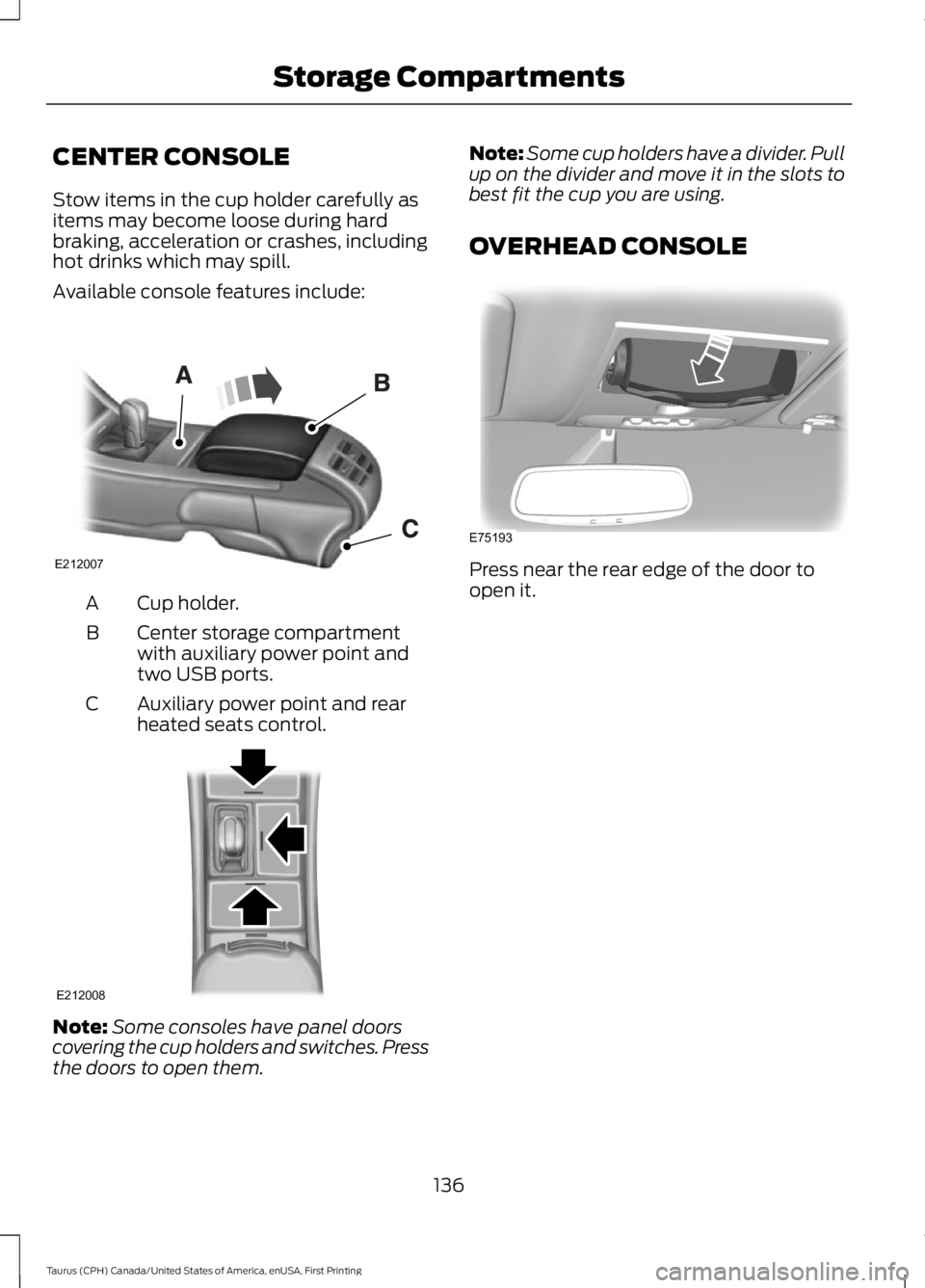
Available console features include:
Cup holder.A
Center storage compartmentwith auxiliary power point andtwo USB ports.
B
Auxiliary power point and rearheated seats control.C
Note:Some consoles have panel doorscovering the cup holders and switches. Pressthe doors to open them.
Note:Some cup holders have a divider. Pullup on the divider and move it in the slots tobest fit the cup you are using.
OVERHEAD CONSOLE
Press near the rear edge of the door toopen it.
136
Taurus (CPH) Canada/United States of America, enUSA, First Printing
Storage CompartmentsE212007 E212008 E75193
Page 145 of 504
We recommend that you do the followingfor a safe and correct operation:
•Use a 16-gauge outdoor extension cordthat is product certified byUnderwriter’s Laboratory (UL) orCanadian Standards Association(CSA). This extension cord must besuitable for use outdoors, in coldtemperatures, and be clearly markedSuitable for Use with OutdoorAppliances. Do not use an indoorextension cord outdoors. This couldresult in an electric shock or become afire hazard.
•Use as short an extension cord aspossible.
•Do not use multiple extension cords.
•Make sure that when in operation, theextension cord plug and heater cordplug connections are free and clear ofwater. This could cause an electricshock or fire.
•Make sure your vehicle is parked in aclean area, clear of combustibles.
•Make sure the heater, heater cord andextension cord are firmly connected.
•Check for heat anywhere in theelectrical hookup once the system hasbeen operating for approximately 30minutes.
•Make sure the system is unplugged andproperly stowed before starting anddriving your vehicle. Make sure theprotective cover seals the prongs of theblock heater cord plug when not in use.
•Make sure the heater system ischecked for proper operation beforewinter.
Using the Engine Block Heater
Make sure the receptacle terminals areclean and dry prior to use. Clean them witha dry cloth if necessary.
The heater uses 0.4 to 1.0 kilowatt-hoursof energy per hour of use. The system doesnot have a thermostat. It achievesmaximum temperature afterapproximately three hours of operation.Using the heater longer than three hoursdoes not improve system performance andunnecessarily uses electricity.
142
Taurus (CPH) Canada/United States of America, enUSA, First Printing
Starting and Stopping the Engine