2017 FORD TAURUS ECO mode
[x] Cancel search: ECO modePage 63 of 504

6. Press the power door unlock controland within five seconds, press thepower door lock control. The hornsounds once if disabled or twice ifenabled.
7. Switch the ignition off. The hornsounds indicating programming iscomplete.
To enable or disable autounlock, do thefollowing:
1. Switch the ignition on.
2. Press the power door unlock controlthree times.
3. Switch the ignition off.
4. Press the power door unlock controlthree times.
5. Switch the ignition on. The hornsounds indicating your vehicle is inprogramming mode.
6. Press the power door lock control andwithin five seconds, press the powerdoor unlock control. The horn soundsonce if disabled or twice if enabled.
7. Switch the ignition off. The hornsounds indicating programming iscomplete.
Illuminated Entry (If Equipped)
The interior lamps and some exteriorlamps illuminate when you unlock thedoors with the remote control.
The lamps turn off if:
•The ignition is on.
•You press the remote control lockbutton.
•25 seconds have elapsed.
The lamps do not turn off if:
•You switch them on with the lightingcontrol.
•Any door is open.
Illuminated Exit (If Equipped)
The interior lamps and some exteriorlamps illuminate when all doors are closedand you switch the ignition off.
The lamps will turn off if all the doorsremain closed and:
•25 seconds have elapsed.
•You lock your vehicle from the outside.
Battery Saver
If you leave the courtesy lamps, interiorlamps or headlamps on, the battery savershuts them off 10 minutes after you switchthe ignition off.
Battery Saver for Intelligent AccessKeys (If Equipped)
If you leave the ignition switched on andthe engine is not running, the battery saverwill turn the ignition off when it detects acertain amount of battery drain, or after45 minutes have elapsed.
KEYLESS ENTRY
SECURICODE™ Keyless EntryKeypad
The keypad is near the driver window. Itilluminates when touched.
Note: If you enter your entry code too faston the keypad, the unlock function may notwork. Enter your entry code again moreslowly.
60
Taurus (CPH) Canada/United States of America, enUSA, First Printing
Doors and Locks
Page 64 of 504
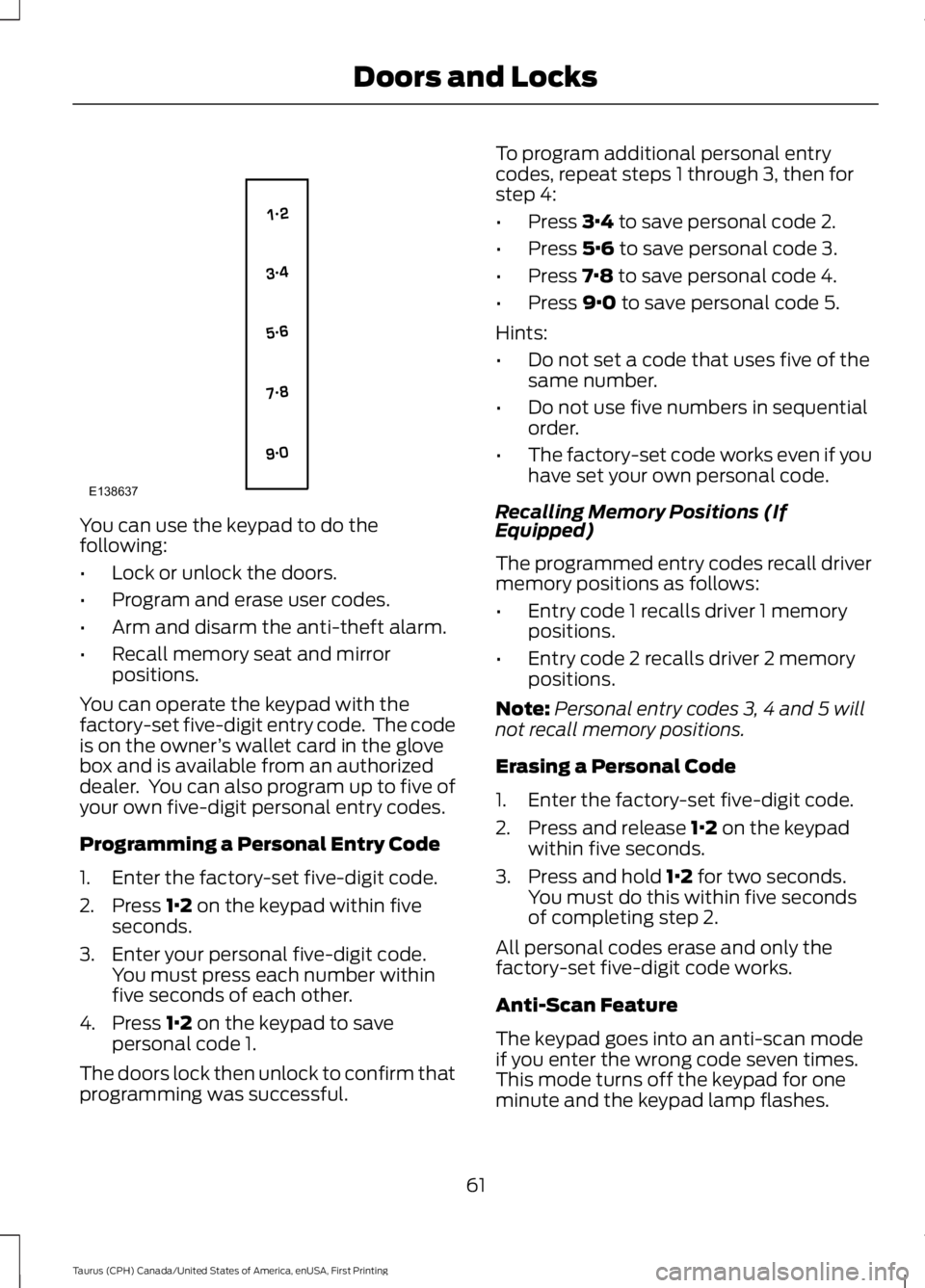
You can use the keypad to do thefollowing:
•Lock or unlock the doors.
•Program and erase user codes.
•Arm and disarm the anti-theft alarm.
•Recall memory seat and mirrorpositions.
You can operate the keypad with thefactory-set five-digit entry code. The codeis on the owner’s wallet card in the glovebox and is available from an authorizeddealer. You can also program up to five ofyour own five-digit personal entry codes.
Programming a Personal Entry Code
1. Enter the factory-set five-digit code.
2. Press 1·2 on the keypad within fiveseconds.
3. Enter your personal five-digit code.You must press each number withinfive seconds of each other.
4. Press 1·2 on the keypad to savepersonal code 1.
The doors lock then unlock to confirm thatprogramming was successful.
To program additional personal entrycodes, repeat steps 1 through 3, then forstep 4:
•Press 3·4 to save personal code 2.
•Press 5·6 to save personal code 3.
•Press 7·8 to save personal code 4.
•Press 9·0 to save personal code 5.
Hints:
•Do not set a code that uses five of thesame number.
•Do not use five numbers in sequentialorder.
•The factory-set code works even if youhave set your own personal code.
Recalling Memory Positions (IfEquipped)
The programmed entry codes recall drivermemory positions as follows:
•Entry code 1 recalls driver 1 memorypositions.
•Entry code 2 recalls driver 2 memorypositions.
Note:Personal entry codes 3, 4 and 5 willnot recall memory positions.
Erasing a Personal Code
1. Enter the factory-set five-digit code.
2. Press and release 1·2 on the keypadwithin five seconds.
3. Press and hold 1·2 for two seconds.You must do this within five secondsof completing step 2.
All personal codes erase and only thefactory-set five-digit code works.
Anti-Scan Feature
The keypad goes into an anti-scan modeif you enter the wrong code seven times.This mode turns off the keypad for oneminute and the keypad lamp flashes.
61
Taurus (CPH) Canada/United States of America, enUSA, First Printing
Doors and LocksE138637
Page 70 of 504
End of Travel Position
The steering column sets a stoppingposition just short of the end of the columnposition to prevent damage to the steeringcolumn. A new stopping position sets if thesteering column encounters an objectwhen tilting or telescoping.
To reset the steering column to its normalstopping position:
1. Confirm there is nothing obstructingthe motion of the steering column.
2. Press and hold the steering columncontrol until the steering column stopsmoving.
3. Press the steering column controlagain. The steering column may beginto move again.
4. When the steering column stops,continue holding the control for anadditional few seconds.
5.Repeat for each direction as necessary.
A new stopping position is set. The nexttime you tilt or telescope the steeringcolumn, it will stop just short of the end ofthe column position.
Memory Feature
You can save and recall the steeringcolumn position with the memory function.See Memory Function (page 125).
Note:Pressing the adjustment controlduring memory recall cancels the operation.
Easy Entry and Exit Feature
When you switch the ignition off, thesteering column will move to allow extraroom to exit your vehicle. The column willreturn to the previous setting when youswitch the ignition on. You can enable ordisable this feature in the informationdisplay. See Information Displays (page89).
AUDIO CONTROL
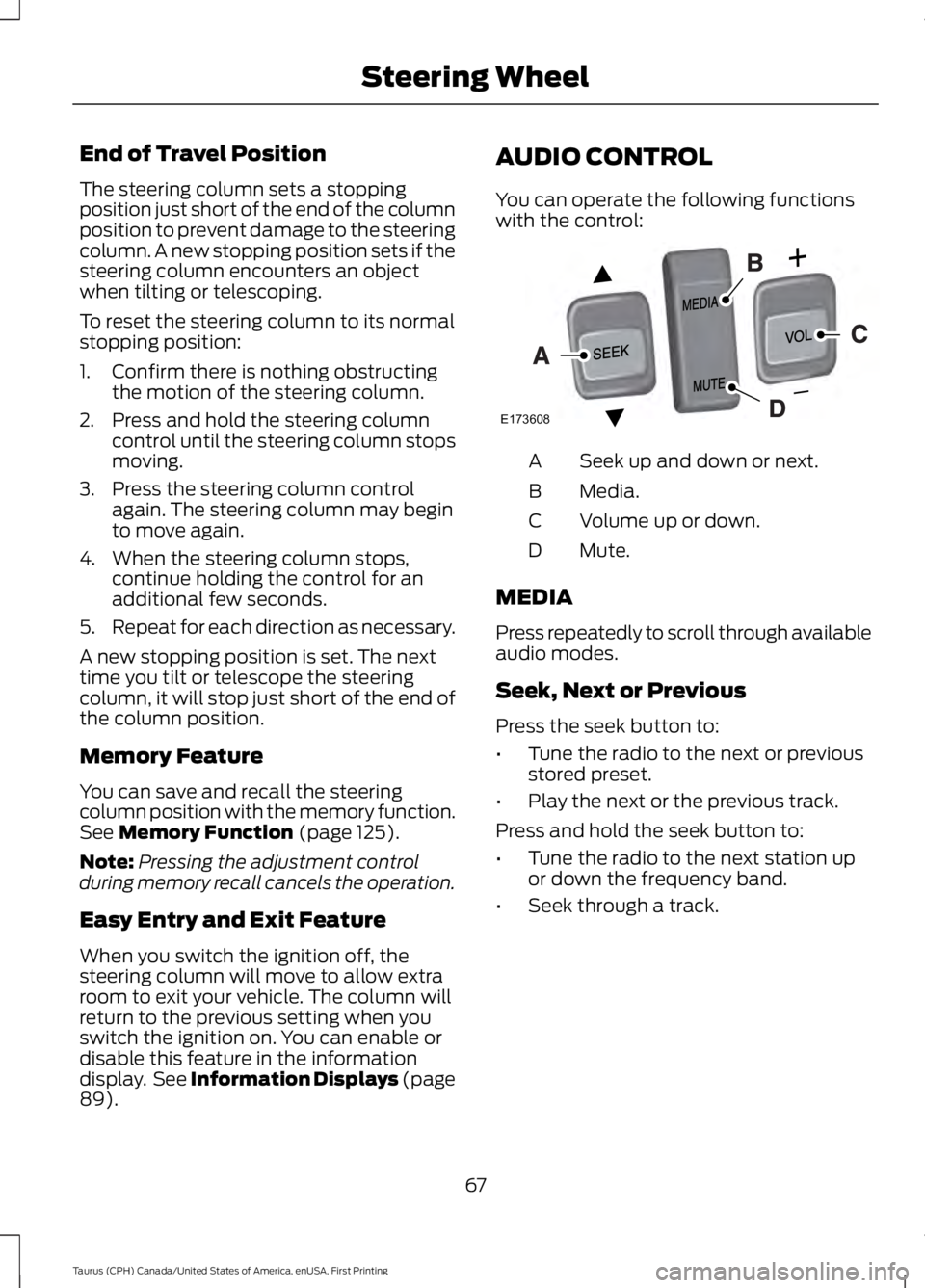
You can operate the following functionswith the control:
Seek up and down or next.A
Media.B
Volume up or down.C
Mute.D
MEDIA
Press repeatedly to scroll through availableaudio modes.
Seek, Next or Previous
Press the seek button to:
•Tune the radio to the next or previousstored preset.
•Play the next or the previous track.
Press and hold the seek button to:
•Tune the radio to the next station upor down the frequency band.
•Seek through a track.
67
Taurus (CPH) Canada/United States of America, enUSA, First Printing
Steering WheelE173608
Page 71 of 504
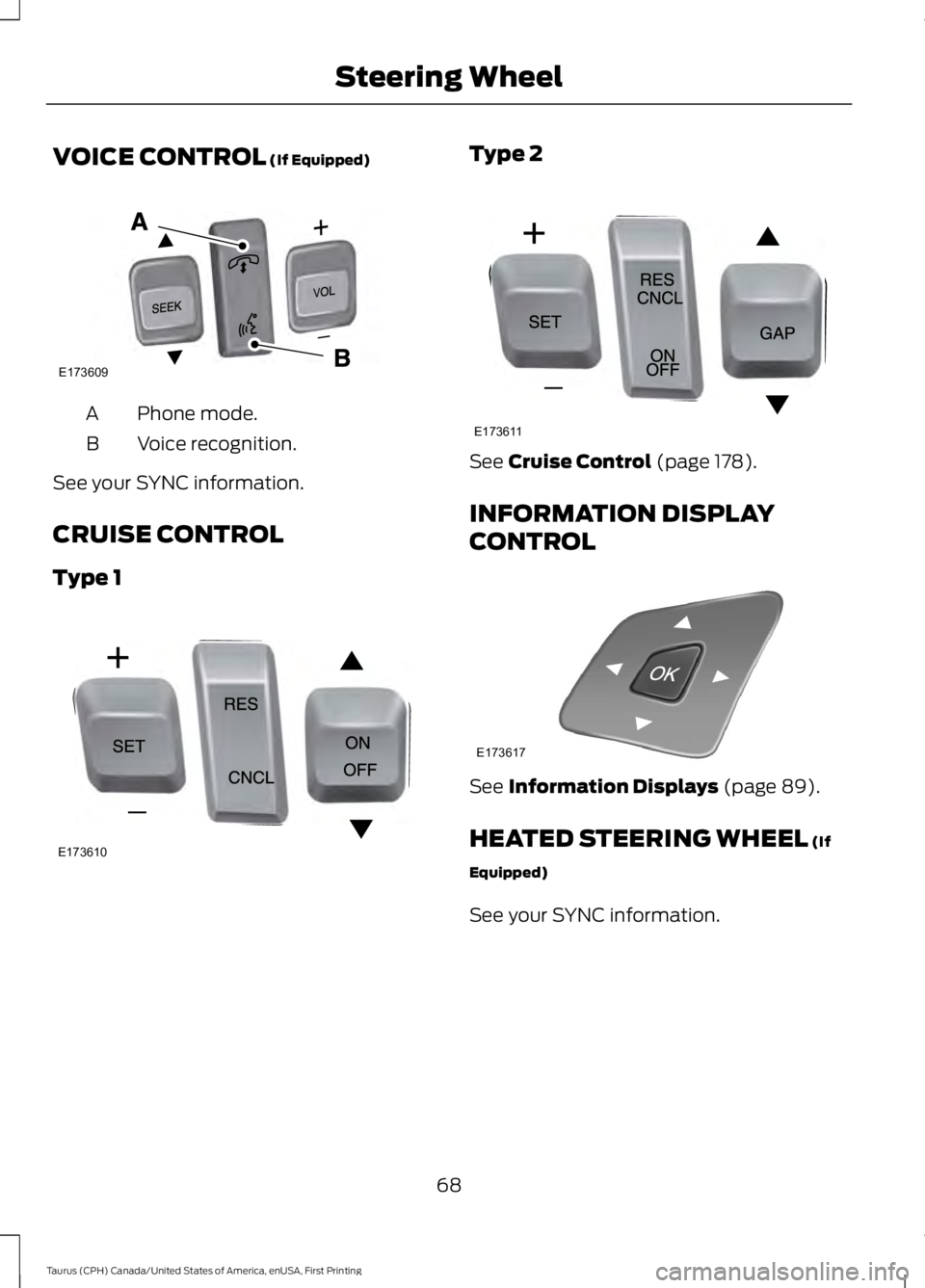
VOICE CONTROL (If Equipped)
Phone mode.A
Voice recognition.B
See your SYNC information.
CRUISE CONTROL
Type 1
Type 2
See Cruise Control (page 178).
INFORMATION DISPLAY
CONTROL
See Information Displays (page 89).
HEATED STEERING WHEEL (If
Equipped)
See your SYNC information.
68
Taurus (CPH) Canada/United States of America, enUSA, First Printing
Steering WheelE173609
V E173610 E173611 E173617
Page 76 of 504

Headlamp Flasher
Slightly pull the lever toward you andrelease it to flash the headlamps.
AUTOLAMPS
WARNING
The autolamps switch position maynot activate the headlamps in all lowvisibility conditions, such as daytimefog. Make sure the headlamps areswitched to auto or on, as appropriate,during all low visibility conditions. Failureto do so may result in a crash.
When the lighting control is in theautolamps position, the headlampsautomatically turn on in low light situationsor when the wipers activate.
If equipped, the following also activatewhen the lighting control is in theautolamps position and you switch themon in the information display:
•Configurable daytime running lamps.
•Automatic high beam control.
•Adaptive headlamp control.
The headlamps remain on for a period oftime after you switch the ignition off. Usethe information display controls to adjustthe period of time that the headlampsremain on. See Information Displays(page 89).
Note:With the headlamps in theautolamps position, you cannot switch thehigh beam headlamps on until theautolamps system turns the low beamheadlamps on.
Windshield Wiper ActivatedHeadlamps
The windshield wiper activated headlampsturn on within 10 seconds when you switchthe windshield wipers on and the lightingcontrol is in the autolamps position. Theyturn off approximately 60 seconds afteryou switch the windshield wipers off.
The headlamps do not turn on by wiperactivation:
•During a mist wipe.
•When the wipers are on to clear washerfluid during a wash condition.
•If the wipers are in intermittent mode.
Note:If you switch autolamps andautowipers on, the headlamps willautomatically turn on when the windshieldwipers continuously operate.
73
Taurus (CPH) Canada/United States of America, enUSA, First Printing
LightingE163268 E224686
A
Page 78 of 504
The daytime running lamps turn on when:
1. The ignition is switched to the onposition.
2. The lighting control is in the offposition, parking lamps position or theautolamps position, and the sensordetects daylight.
3. Your vehicle is in drive (D).
AUTOMATIC HIGH BEAM
CONTROL (If Equipped)
The system will automatically turn on yourhigh beams if it is dark enough and no othertraffic is present. When it detects theheadlights of an approaching vehicle, thetail lamps of the preceding vehicle or streetlighting, the system will turn off the highbeams. The low beams remain on.
Note:If it appears that automatic controlof the high beams is not functioningproperly, check the windshield in front ofthe camera for a blockage. A clear view ofthe road is required for proper systemoperation. Have any windshield damage inthe area of the camera’s field-of-viewrepaired.
Note:If the system detects a blockage suchas bird droppings, bug splatter, snow or ice,and you do not observe changes, the systemwill go into low beam mode until you clearthe blockage. A message may also appearin the instrument cluster display noting thefront camera is blocked.
Note:In cold or inclement weatherconditions, you will notice a decrease in theavailability of the high beam system,especially at start up. If you want to changethe beam state independently of theautomatic control, you may switch the highbeams on or off using the lever. Automaticcontrol will resume when conditions arecorrect.
Note:Modification of the vehicle ride heightsuch as using much larger tires, maydegrade feature performance.
A camera sensor, centrally mountedbehind the windshield of your vehicle,continuously monitors conditions to decidewhen to turn the high beams off and on.
Once the system is active, the high beamswill turn on if:
•The ambient light level is low enough.
•There is no traffic in front of the vehicle.
•The vehicle speed is greater than32 mph (52 km/h).
The high beams will turn off if:
•The system detects the headlamps ofan approaching vehicle or the taillamps of a preceding vehicle.
•Vehicle speed falls below 27 mph(44 km/h).
•The ambient light level is high enoughthat high beams are not required.
•The system detects severe rain, snowor fog.
•The camera is blocked.
Activating the System
Switch on the system using the informationdisplay and autolamps. See InformationDisplays (page 89).
Switch the lighting control to theautolamps position. See Autolamps(page 73).
75
Taurus (CPH) Canada/United States of America, enUSA, First Printing
Lighting
Page 88 of 504
•It may take a short time for the needleto reach full after leaving the gasstation. This is normal and dependsupon the slope of pavement at the gasstation.
•The fuel amount dispensed into thetank is a little less or more than thegauge indicated. This is normal anddepends upon the slope of pavementat the gas station.
•If the gas station nozzle shuts offbefore the tank is full, try a differentgas pump nozzle.
•There is a small reserve left in the tankwhen the fuel gauge reaches empty.
Low Fuel Reminder
A low fuel reminder triggers when thedistance to empty reaches 75 miles (120km), 50 miles (80 km), 25 miles (40 km),10 miles (20 km) and 0 miles (0 km) .
Variations:
Note:The low fuel warning anddistance-to-empty warning can appear atdifferent fuel gauge positions depending onfuel economy conditions. This variation isnormal.
WARNING LAMPS AND
INDICATORS
The following warning lamps andindicators alert you to a vehicle conditionthat may become serious. Some lampsilluminate when you start your vehicle tomake sure they work. If any lamps remainon after starting your vehicle, refer to therespective system warning lamp for furtherinformation.
Note:Some warning indicators appear inthe information display and function thesame as a warning lamp, but do not displaywhen you start your vehicle.
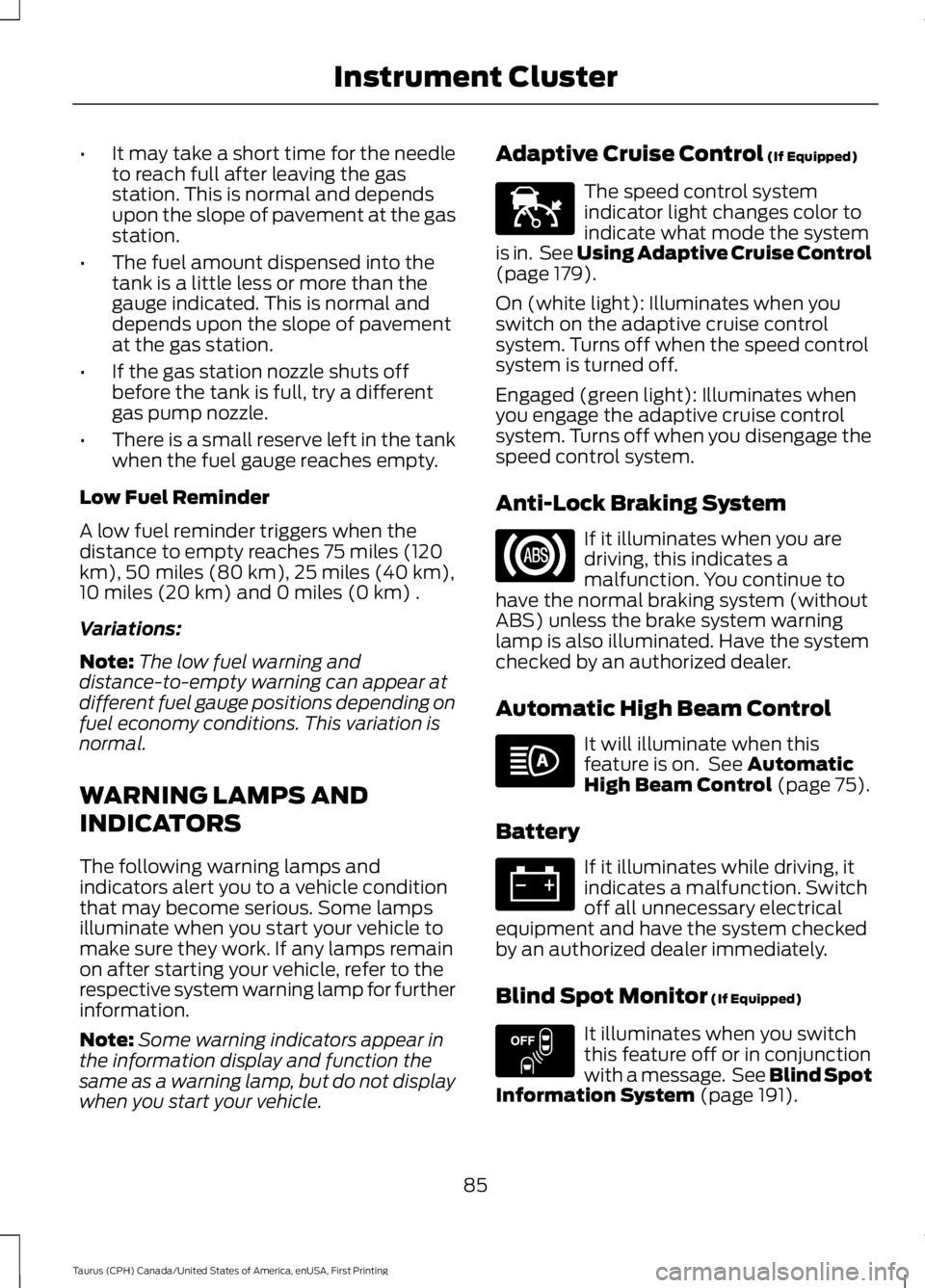
Adaptive Cruise Control (If Equipped)
The speed control systemindicator light changes color toindicate what mode the systemis in. See Using Adaptive Cruise Control(page 179).
On (white light): Illuminates when youswitch on the adaptive cruise controlsystem. Turns off when the speed controlsystem is turned off.
Engaged (green light): Illuminates whenyou engage the adaptive cruise controlsystem. Turns off when you disengage thespeed control system.
Anti-Lock Braking System
If it illuminates when you aredriving, this indicates amalfunction. You continue tohave the normal braking system (withoutABS) unless the brake system warninglamp is also illuminated. Have the systemchecked by an authorized dealer.
Automatic High Beam Control
It will illuminate when thisfeature is on. See AutomaticHigh Beam Control (page 75).
Battery
If it illuminates while driving, itindicates a malfunction. Switchoff all unnecessary electricalequipment and have the system checkedby an authorized dealer immediately.
Blind Spot Monitor (If Equipped)
It illuminates when you switchthis feature off or in conjunctionwith a message. See Blind SpotInformation System (page 191).
85
Taurus (CPH) Canada/United States of America, enUSA, First Printing
Instrument ClusterE144524 E151262
Page 94 of 504
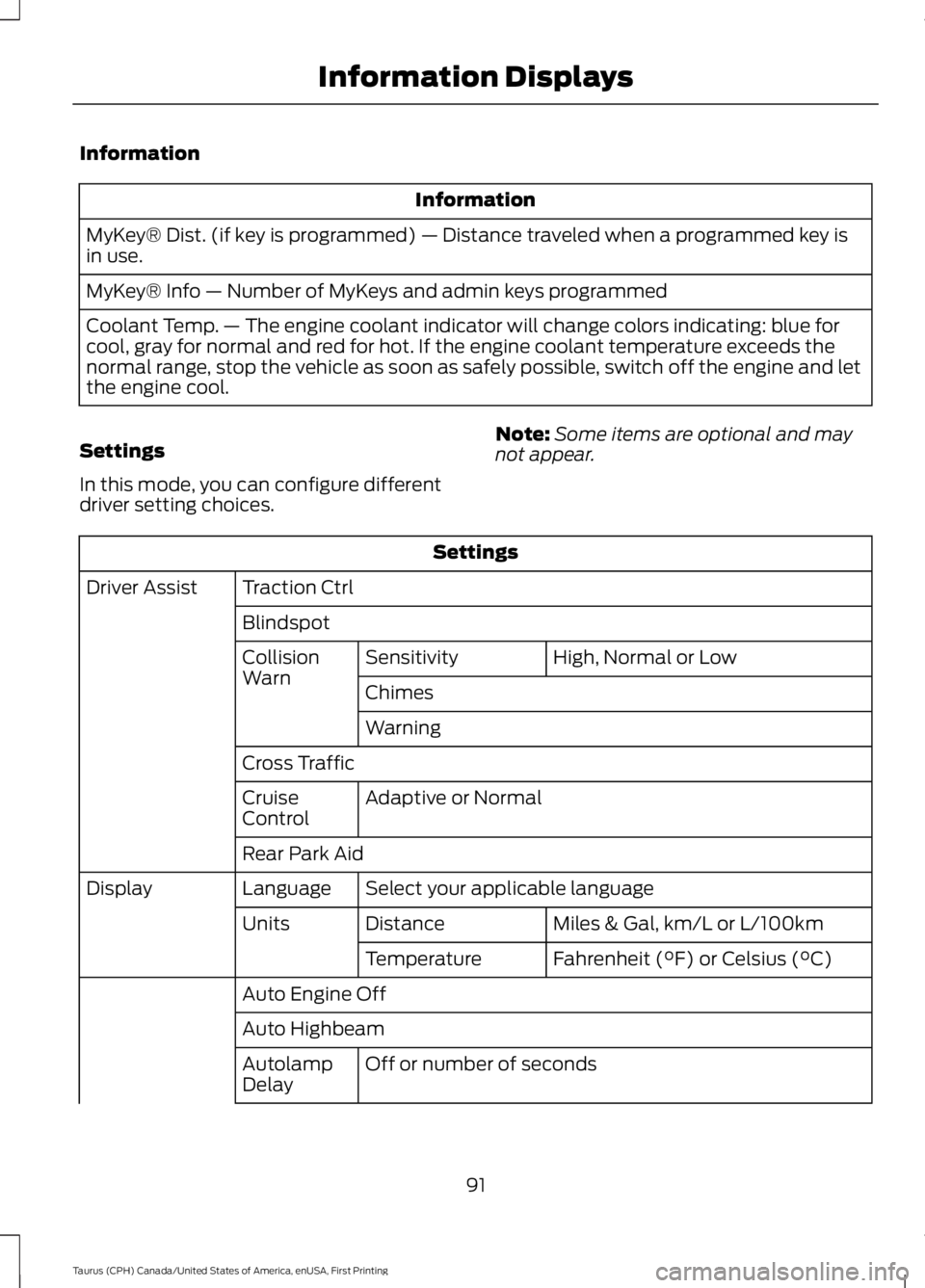
Information
Information
MyKey® Dist. (if key is programmed) — Distance traveled when a programmed key isin use.
MyKey® Info — Number of MyKeys and admin keys programmed
Coolant Temp. — The engine coolant indicator will change colors indicating: blue forcool, gray for normal and red for hot. If the engine coolant temperature exceeds thenormal range, stop the vehicle as soon as safely possible, switch off the engine and letthe engine cool.
Settings
In this mode, you can configure differentdriver setting choices.
Note:Some items are optional and maynot appear.
Settings
Traction CtrlDriver Assist
Blindspot
High, Normal or LowSensitivityCollisionWarnChimes
Warning
Cross Traffic
Adaptive or NormalCruiseControl
Rear Park Aid
Select your applicable languageLanguageDisplay
Miles & Gal, km/L or L/100kmDistanceUnits
Fahrenheit (°F) or Celsius (°C)Temperature
Auto Engine Off
Auto Highbeam
Off or number of secondsAutolampDelay
91
Taurus (CPH) Canada/United States of America, enUSA, First Printing
Information Displays