2017 FORD SUPER DUTY change time
[x] Cancel search: change timePage 554 of 636
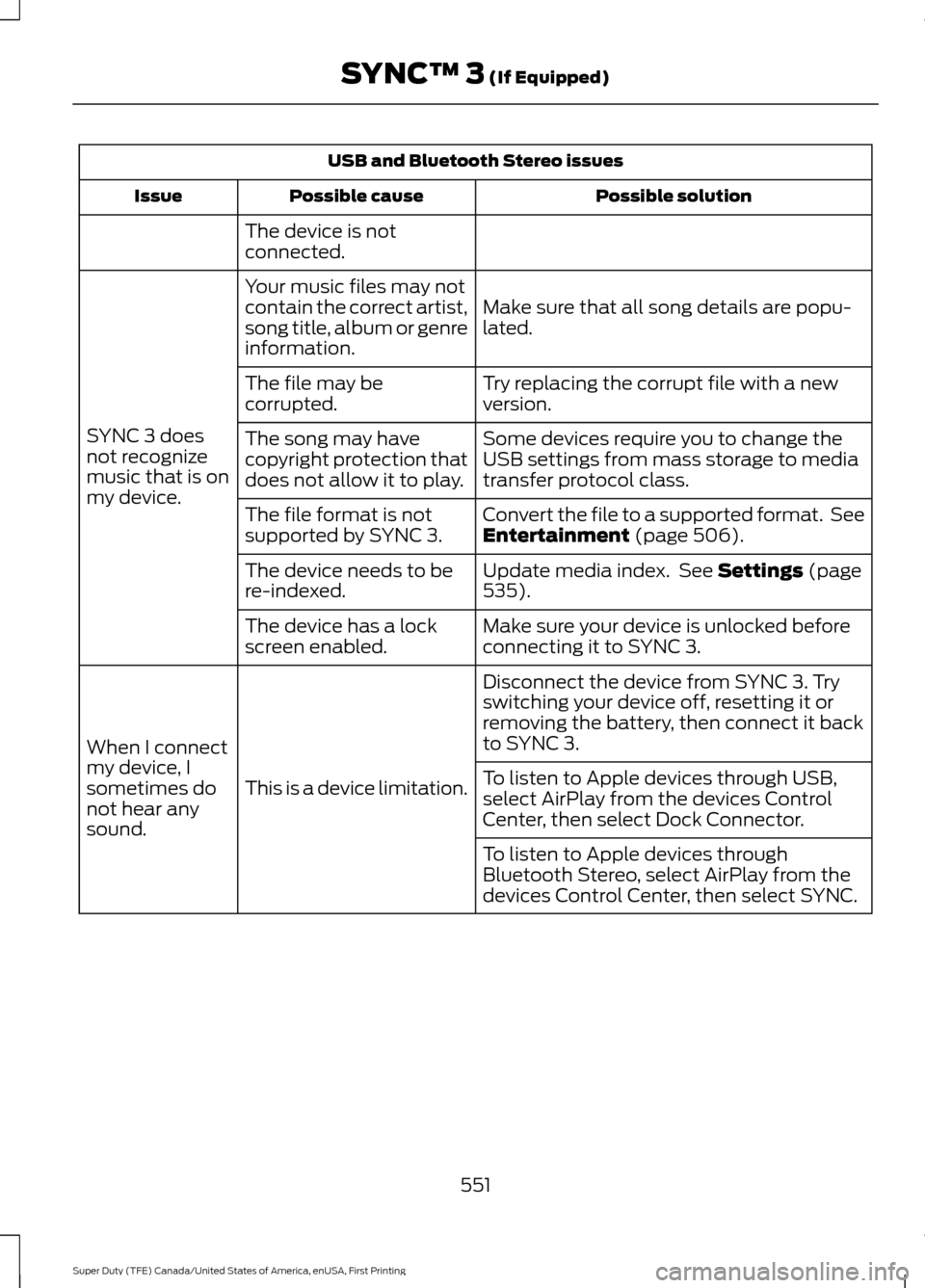
USB and Bluetooth Stereo issues
Possible solution
Possible cause
Issue
The device is not
connected.
Make sure that all song details are popu-
lated.
Your music files may not
contain the correct artist,
song title, album or genre
information.
SYNC 3 does
not recognize
music that is on
my device. Try replacing the corrupt file with a new
version.
The file may be
corrupted.
Some devices require you to change the
USB settings from mass storage to media
transfer protocol class.
The song may have
copyright protection that
does not allow it to play.
Convert the file to a supported format. See
Entertainment (page 506).
The file format is not
supported by SYNC 3.
Update media index. See
Settings (page
535).
The device needs to be
re-indexed.
Make sure your device is unlocked before
connecting it to SYNC 3.
The device has a lock
screen enabled.
Disconnect the device from SYNC 3. Try
switching your device off, resetting it or
removing the battery, then connect it back
to SYNC 3.
This is a device limitation.
When I connect
my device, I
sometimes do
not hear any
sound. To listen to Apple devices through USB,
select AirPlay from the devices Control
Center, then select Dock Connector.
To listen to Apple devices through
Bluetooth Stereo, select AirPlay from the
devices Control Center, then select SYNC.
551
Super Duty (TFE) Canada/United States of America, enUSA, First Printing SYNC™ 3
(If Equipped)
Page 569 of 636
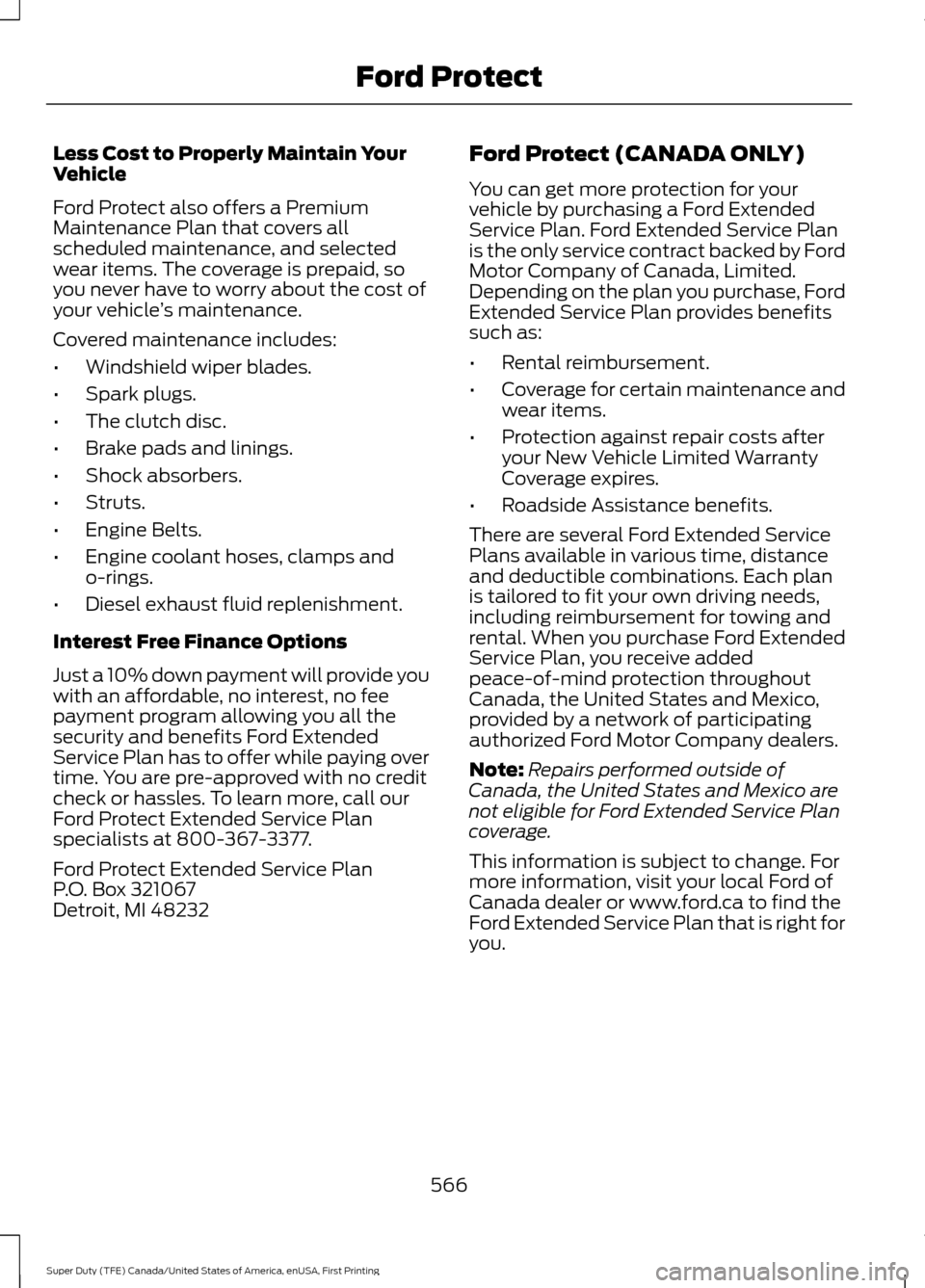
Less Cost to Properly Maintain Your
Vehicle
Ford Protect also offers a Premium
Maintenance Plan that covers all
scheduled maintenance, and selected
wear items. The coverage is prepaid, so
you never have to worry about the cost of
your vehicle
’s maintenance.
Covered maintenance includes:
• Windshield wiper blades.
• Spark plugs.
• The clutch disc.
• Brake pads and linings.
• Shock absorbers.
• Struts.
• Engine Belts.
• Engine coolant hoses, clamps and
o-rings.
• Diesel exhaust fluid replenishment.
Interest Free Finance Options
Just a 10% down payment will provide you
with an affordable, no interest, no fee
payment program allowing you all the
security and benefits Ford Extended
Service Plan has to offer while paying over
time. You are pre-approved with no credit
check or hassles. To learn more, call our
Ford Protect Extended Service Plan
specialists at 800-367-3377.
Ford Protect Extended Service Plan
P.O. Box 321067
Detroit, MI 48232 Ford Protect (CANADA ONLY)
You can get more protection for your
vehicle by purchasing a Ford Extended
Service Plan. Ford Extended Service Plan
is the only service contract backed by Ford
Motor Company of Canada, Limited.
Depending on the plan you purchase, Ford
Extended Service Plan provides benefits
such as:
•
Rental reimbursement.
• Coverage for certain maintenance and
wear items.
• Protection against repair costs after
your New Vehicle Limited Warranty
Coverage expires.
• Roadside Assistance benefits.
There are several Ford Extended Service
Plans available in various time, distance
and deductible combinations. Each plan
is tailored to fit your own driving needs,
including reimbursement for towing and
rental. When you purchase Ford Extended
Service Plan, you receive added
peace-of-mind protection throughout
Canada, the United States and Mexico,
provided by a network of participating
authorized Ford Motor Company dealers.
Note: Repairs performed outside of
Canada, the United States and Mexico are
not eligible for Ford Extended Service Plan
coverage.
This information is subject to change. For
more information, visit your local Ford of
Canada dealer or www.ford.ca to find the
Ford Extended Service Plan that is right for
you.
566
Super Duty (TFE) Canada/United States of America, enUSA, First Printing Ford Protect
Page 575 of 636
Diesel Engine(s)
Intelligent Oil-Life Monitor
Your vehicle has an Intelligent Oil-Life
Monitor that determines when you should
change the engine oil based on how you
use your vehicle. By using several
important factors in its calculations, the
monitor helps reduce the cost of owning
your vehicle and reduces environmental
waste at the same time.
This means you do not have to remember
to change the oil on a mileage-based
schedule. Your vehicle lets you know when
an oil change is due by displaying a
message in the information display.
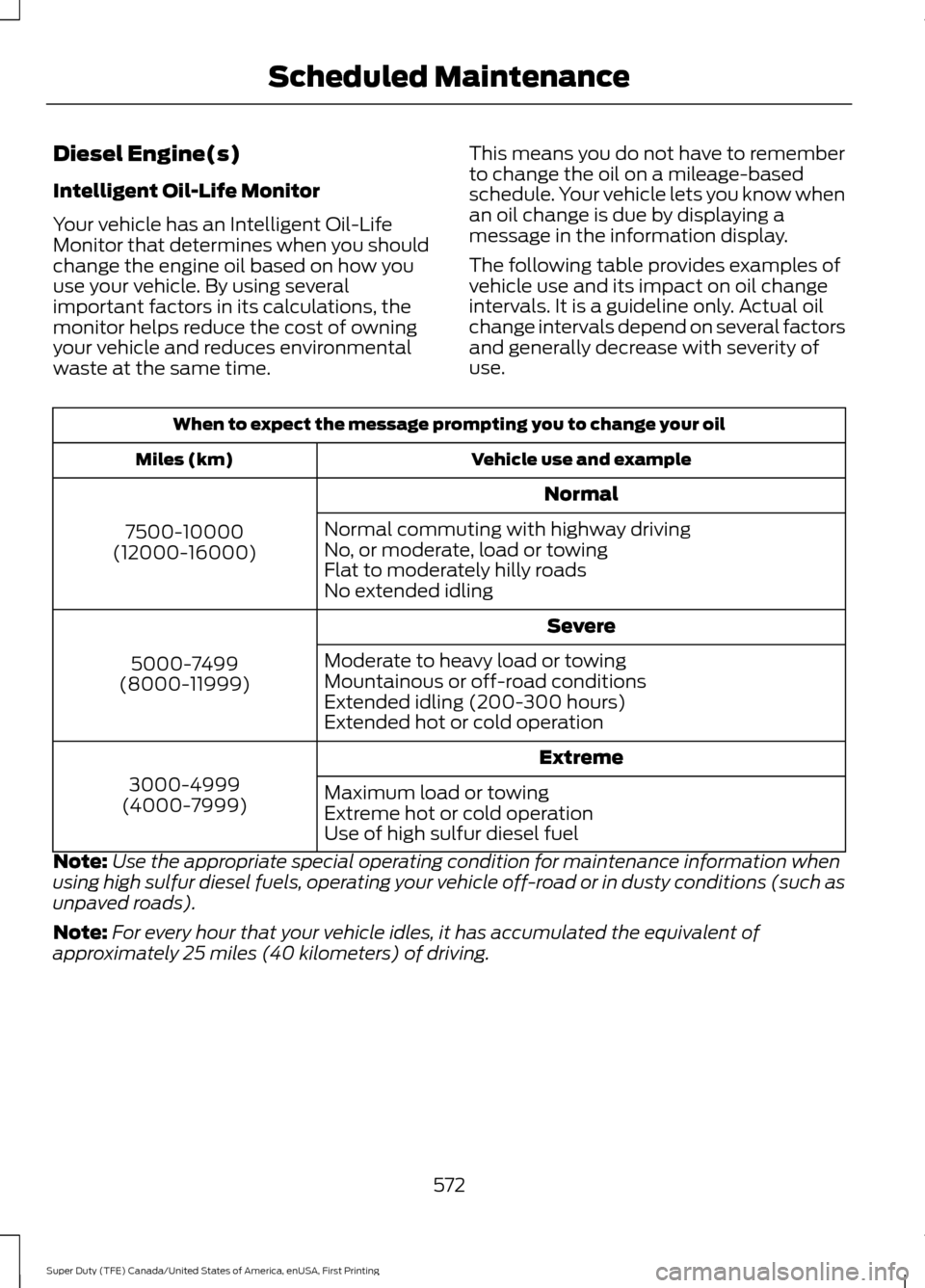
The following table provides examples of
vehicle use and its impact on oil change
intervals. It is a guideline only. Actual oil
change intervals depend on several factors
and generally decrease with severity of
use.When to expect the message prompting you to change your oil
Vehicle use and example
Miles (km)
Normal
7500-10000
(12000-16000) Normal commuting with highway driving
No, or moderate, load or towing
Flat to moderately hilly roads
No extended idling
Severe
5000-7499
(8000-11999) Moderate to heavy load or towing
Mountainous or off-road conditions
Extended idling (200-300 hours)
Extended hot or cold operation
Extreme
3000-4999
(4000-7999) Maximum load or towing
Extreme hot or cold operation
Use of high sulfur diesel fuel
Note: Use the appropriate special operating condition for maintenance information when
using high sulfur diesel fuels, operating your vehicle off-road or in dusty conditions (such as
unpaved roads).
Note: For every hour that your vehicle idles, it has accumulated the equivalent of
approximately 25 miles (40 kilometers) of driving.
572
Super Duty (TFE) Canada/United States of America, enUSA, First Printing Scheduled Maintenance
Page 620 of 636
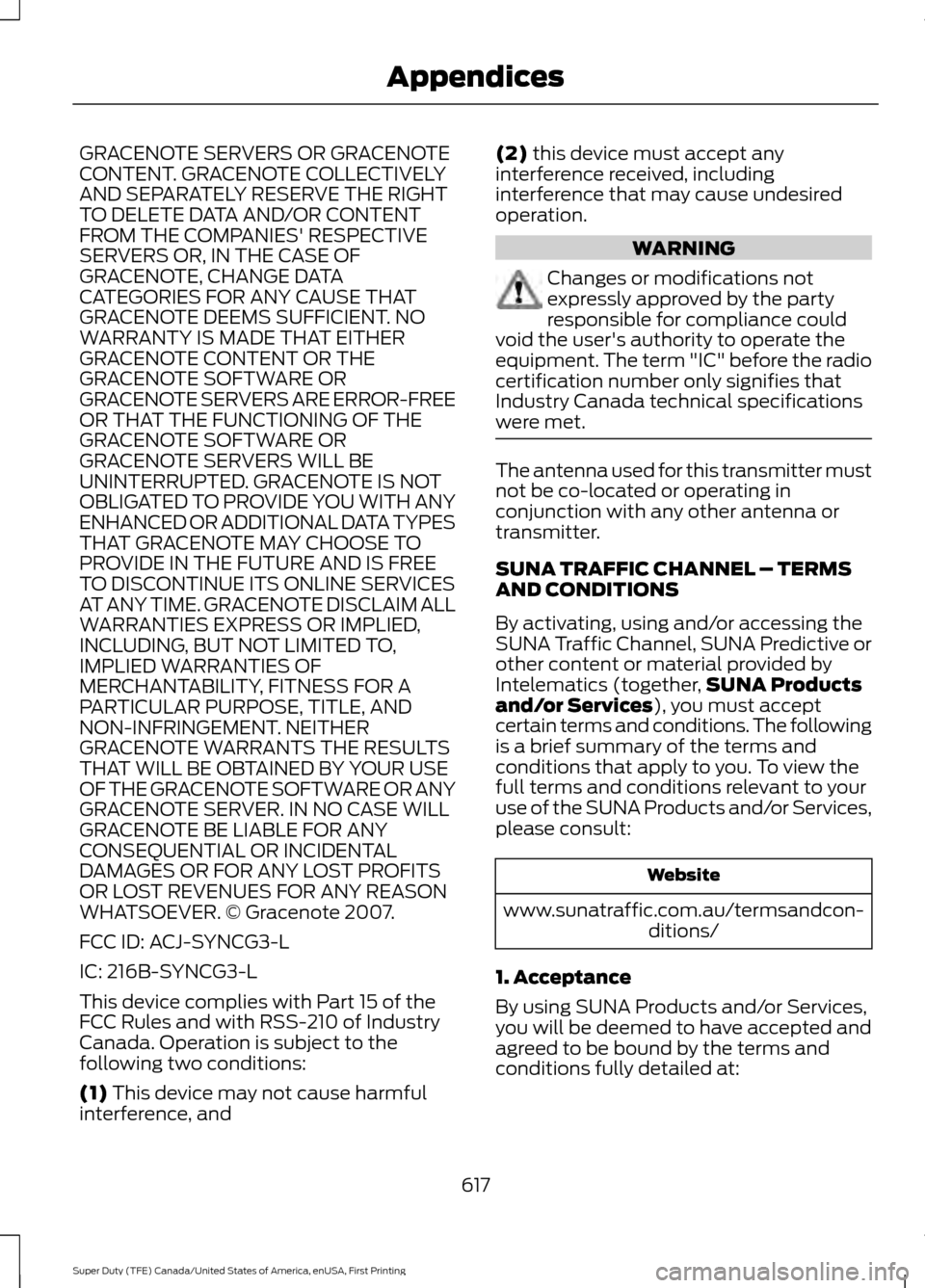
GRACENOTE SERVERS OR GRACENOTE
CONTENT. GRACENOTE COLLECTIVELY
AND SEPARATELY RESERVE THE RIGHT
TO DELETE DATA AND/OR CONTENT
FROM THE COMPANIES' RESPECTIVE
SERVERS OR, IN THE CASE OF
GRACENOTE, CHANGE DATA
CATEGORIES FOR ANY CAUSE THAT
GRACENOTE DEEMS SUFFICIENT. NO
WARRANTY IS MADE THAT EITHER
GRACENOTE CONTENT OR THE
GRACENOTE SOFTWARE OR
GRACENOTE SERVERS ARE ERROR-FREE
OR THAT THE FUNCTIONING OF THE
GRACENOTE SOFTWARE OR
GRACENOTE SERVERS WILL BE
UNINTERRUPTED. GRACENOTE IS NOT
OBLIGATED TO PROVIDE YOU WITH ANY
ENHANCED OR ADDITIONAL DATA TYPES
THAT GRACENOTE MAY CHOOSE TO
PROVIDE IN THE FUTURE AND IS FREE
TO DISCONTINUE ITS ONLINE SERVICES
AT ANY TIME. GRACENOTE DISCLAIM ALL
WARRANTIES EXPRESS OR IMPLIED,
INCLUDING, BUT NOT LIMITED TO,
IMPLIED WARRANTIES OF
MERCHANTABILITY, FITNESS FOR A
PARTICULAR PURPOSE, TITLE, AND
NON-INFRINGEMENT. NEITHER
GRACENOTE WARRANTS THE RESULTS
THAT WILL BE OBTAINED BY YOUR USE
OF THE GRACENOTE SOFTWARE OR ANY
GRACENOTE SERVER. IN NO CASE WILL
GRACENOTE BE LIABLE FOR ANY
CONSEQUENTIAL OR INCIDENTAL
DAMAGES OR FOR ANY LOST PROFITS
OR LOST REVENUES FOR ANY REASON
WHATSOEVER. © Gracenote 2007.
FCC ID: ACJ-SYNCG3-L
IC: 216B-SYNCG3-L
This device complies with Part 15 of the
FCC Rules and with RSS-210 of Industry
Canada. Operation is subject to the
following two conditions:
(1) This device may not cause harmful
interference, and (2)
this device must accept any
interference received, including
interference that may cause undesired
operation. WARNING
Changes or modifications not
expressly approved by the party
responsible for compliance could
void the user's authority to operate the
equipment. The term "IC" before the radio
certification number only signifies that
Industry Canada technical specifications
were met. The antenna used for this transmitter must
not be co-located or operating in
conjunction with any other antenna or
transmitter.
SUNA TRAFFIC CHANNEL – TERMS
AND CONDITIONS
By activating, using and/or accessing the
SUNA Traffic Channel, SUNA Predictive or
other content or material provided by
Intelematics (together,
SUNA Products
and/or Services
), you must accept
certain terms and conditions. The following
is a brief summary of the terms and
conditions that apply to you. To view the
full terms and conditions relevant to your
use of the SUNA Products and/or Services,
please consult: Website
www.sunatraffic.com.au/termsandcon- ditions/
1. Acceptance
By using SUNA Products and/or Services,
you will be deemed to have accepted and
agreed to be bound by the terms and
conditions fully detailed at:
617
Super Duty (TFE) Canada/United States of America, enUSA, First Printing Appendices
Page 621 of 636
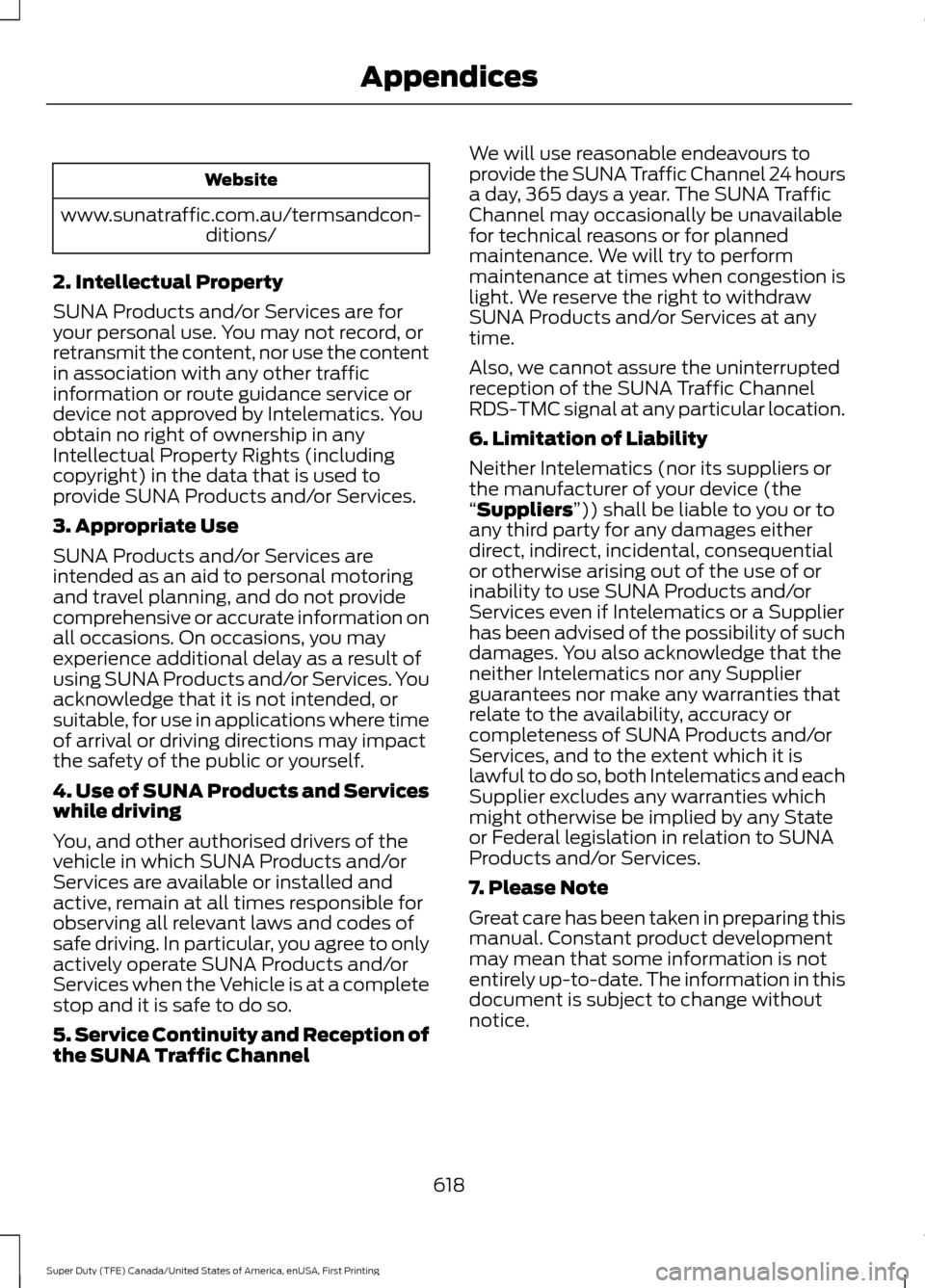
Website
www.sunatraffic.com.au/termsandcon- ditions/
2. Intellectual Property
SUNA Products and/or Services are for
your personal use. You may not record, or
retransmit the content, nor use the content
in association with any other traffic
information or route guidance service or
device not approved by Intelematics. You
obtain no right of ownership in any
Intellectual Property Rights (including
copyright) in the data that is used to
provide SUNA Products and/or Services.
3. Appropriate Use
SUNA Products and/or Services are
intended as an aid to personal motoring
and travel planning, and do not provide
comprehensive or accurate information on
all occasions. On occasions, you may
experience additional delay as a result of
using SUNA Products and/or Services. You
acknowledge that it is not intended, or
suitable, for use in applications where time
of arrival or driving directions may impact
the safety of the public or yourself.
4. Use of SUNA Products and Services
while driving
You, and other authorised drivers of the
vehicle in which SUNA Products and/or
Services are available or installed and
active, remain at all times responsible for
observing all relevant laws and codes of
safe driving. In particular, you agree to only
actively operate SUNA Products and/or
Services when the Vehicle is at a complete
stop and it is safe to do so.
5. Service Continuity and Reception of
the SUNA Traffic Channel We will use reasonable endeavours to
provide the SUNA Traffic Channel 24 hours
a day, 365 days a year. The SUNA Traffic
Channel may occasionally be unavailable
for technical reasons or for planned
maintenance. We will try to perform
maintenance at times when congestion is
light. We reserve the right to withdraw
SUNA Products and/or Services at any
time.
Also, we cannot assure the uninterrupted
reception of the SUNA Traffic Channel
RDS-TMC signal at any particular location.
6. Limitation of Liability
Neither Intelematics (nor its suppliers or
the manufacturer of your device (the
“Suppliers”)) shall be liable to you or to
any third party for any damages either
direct, indirect, incidental, consequential
or otherwise arising out of the use of or
inability to use SUNA Products and/or
Services even if Intelematics or a Supplier
has been advised of the possibility of such
damages. You also acknowledge that the
neither Intelematics nor any Supplier
guarantees nor make any warranties that
relate to the availability, accuracy or
completeness of SUNA Products and/or
Services, and to the extent which it is
lawful to do so, both Intelematics and each
Supplier excludes any warranties which
might otherwise be implied by any State
or Federal legislation in relation to SUNA
Products and/or Services.
7. Please Note
Great care has been taken in preparing this
manual. Constant product development
may mean that some information is not
entirely up-to-date. The information in this
document is subject to change without
notice.
618
Super Duty (TFE) Canada/United States of America, enUSA, First Printing Appendices
Page 627 of 636
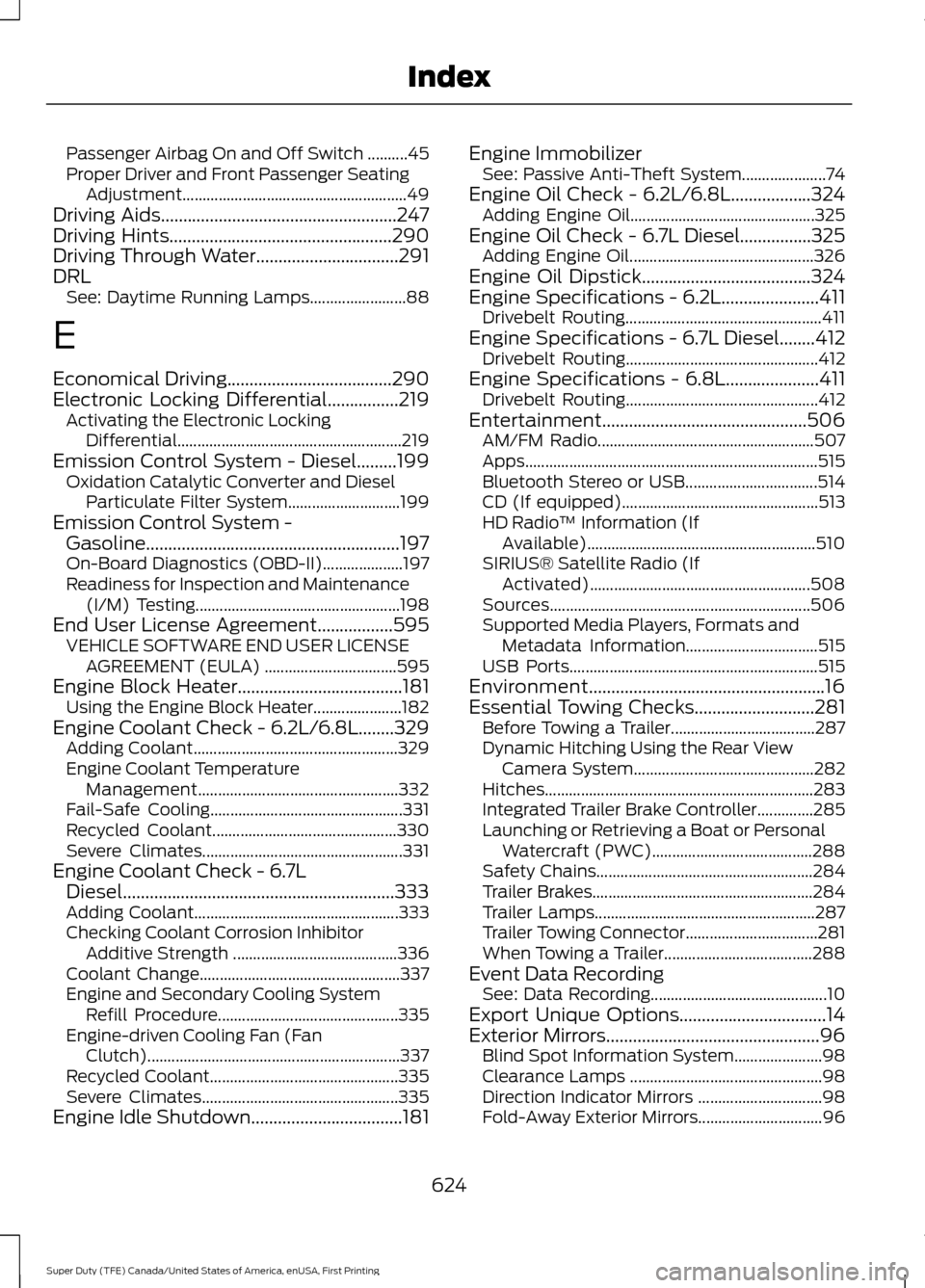
Passenger Airbag On and Off Switch ..........45
Proper Driver and Front Passenger Seating
Adjustment........................................................ 49
Driving Aids.....................................................247
Driving Hints..................................................290
Driving Through Water................................291
DRL See: Daytime Running Lamps........................88
E
Economical Driving
.....................................290
Electronic Locking Differential................219
Activating the Electronic Locking
Differential........................................................219
Emission Control System - Diesel.........199 Oxidation Catalytic Converter and Diesel
Particulate Filter System............................ 199
Emission Control System - Gasoline.........................................................197
On-Board Diagnostics (OBD-II).................... 197
Readiness for Inspection and Maintenance (I/M) Testing................................................... 198
End User License Agreement.................595 VEHICLE SOFTWARE END USER LICENSE
AGREEMENT (EULA) ................................. 595
Engine Block Heater.....................................181 Using the Engine Block Heater...................... 182
Engine Coolant Check - 6.2L/6.8L
........329
Adding Coolant................................................... 329
Engine Coolant Temperature Management.................................................. 332
Fail-Safe Cooling................................................ 331
Recycled Coolant.............................................. 330
Severe Climates.................................................. 331
Engine Coolant Check - 6.7L Diesel.............................................................333
Adding Coolant................................................... 333
Checking Coolant Corrosion Inhibitor Additive Strength ......................................... 336
Coolant Change.................................................. 337
Engine and Secondary Cooling System Refill Procedure............................................. 335
Engine-driven Cooling Fan (Fan Clutch)............................................................... 337
Recycled Coolant............................................... 335
Severe Climates................................................. 335
Engine Idle Shutdown..................................181 Engine Immobilizer
See: Passive Anti-Theft System.....................74
Engine Oil Check - 6.2L/6.8L..................324 Adding Engine Oil.............................................. 325
Engine Oil Check - 6.7L Diesel................325 Adding Engine Oil.............................................. 326
Engine Oil Dipstick......................................324
Engine Specifications - 6.2L......................411 Drivebelt Routing................................................. 411
Engine Specifications - 6.7L Diesel
........412
Drivebelt Routing................................................ 412
Engine Specifications - 6.8L.....................411 Drivebelt Routing................................................ 412
Entertainment..............................................506 AM/FM Radio...................................................... 507
Apps........................................................................\
. 515
Bluetooth Stereo or USB................................. 514
CD (If equipped)................................................. 513
HD Radio ™ Information (If
Available)......................................................... 510
SIRIUS® Satellite Radio (If Activated)....................................................... 508
Sources................................................................. 506
Supported Media Players, Formats and Metadata Information................................. 515
USB Ports.............................................................. 515
Environment.....................................................16
Essential Towing Checks...........................281 Before Towing a Trailer.................................... 287
Dynamic Hitching Using the Rear View Camera System............................................. 282
Hitches................................................................... 283
Integrated Trailer Brake Controller..............285
Launching or Retrieving a Boat or Personal Watercraft (PWC)........................................ 288
Safety Chains...................................................... 284
Trailer Brakes....................................................... 284
Trailer Lamps....................................................... 287
Trailer Towing Connector................................. 281
When Towing a Trailer..................................... 288
Event Data Recording See: Data Recording............................................ 10
Export Unique Options.................................14
Exterior Mirrors
................................................96
Blind Spot Information System......................98
Clearance Lamps ................................................ 98
Direction Indicator Mirrors ............................... 98
Fold-Away Exterior Mirrors............................... 96
624
Super Duty (TFE) Canada/United States of America, enUSA, First Printing Index
Page 631 of 636
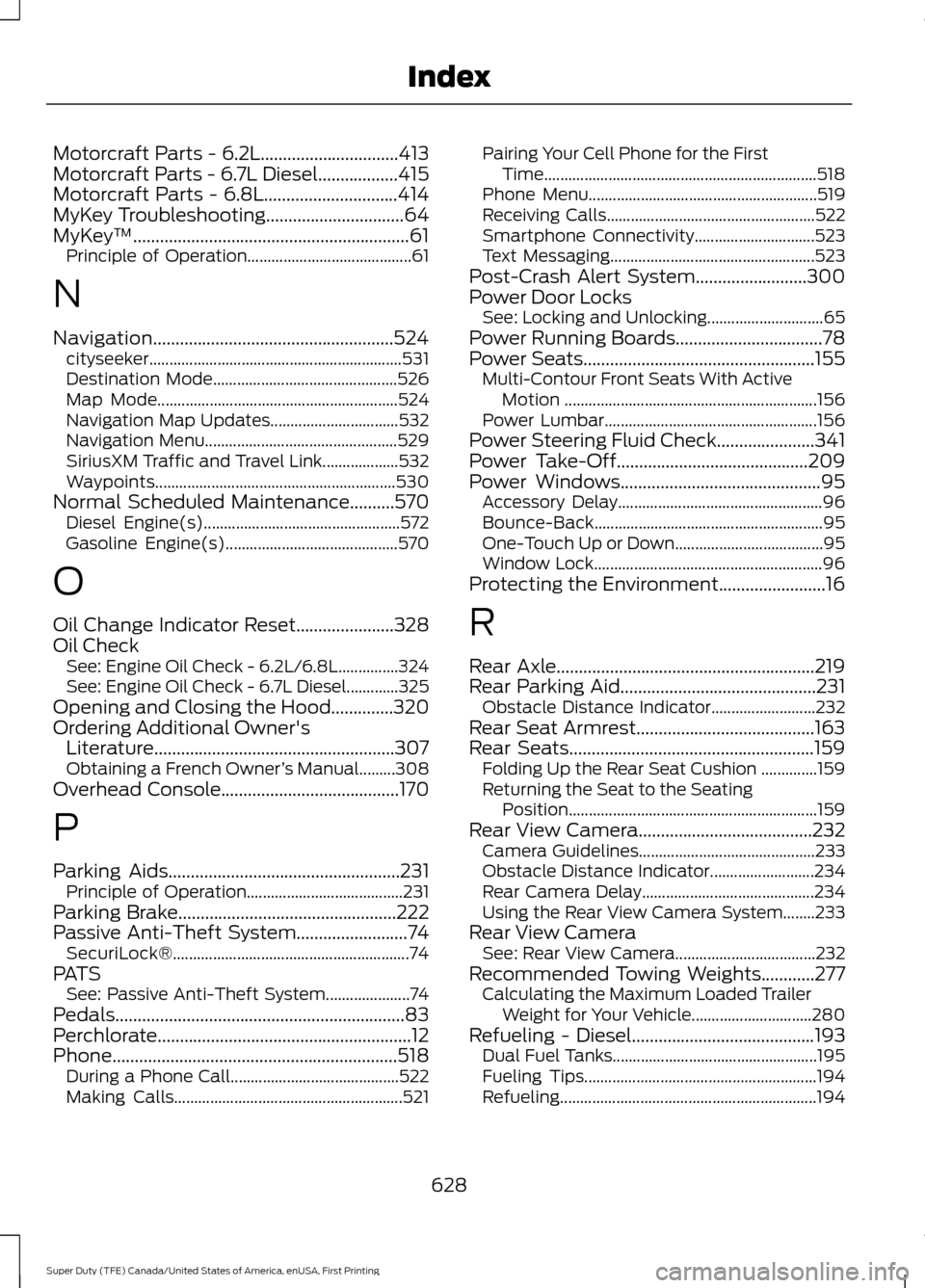
Motorcraft Parts - 6.2L...............................413
Motorcraft Parts - 6.7L Diesel..................415
Motorcraft Parts - 6.8L..............................414
MyKey Troubleshooting...............................64
MyKey
™..............................................................61
Principle of Operation......................................... 61
N
Navigation......................................................524 cityseeker............................................................... 531
Destination Mode.............................................. 526
Map Mode............................................................ 524
Navigation Map Updates................................ 532
Navigation Menu................................................ 529
SiriusXM Traffic and Travel Link...................532
Waypoints............................................................ 530
Normal Scheduled Maintenance..........570 Diesel Engine(s)................................................. 572
Gasoline Engine(s)........................................... 570
O
Oil Change Indicator Reset......................328
Oil Check See: Engine Oil Check - 6.2L/6.8L...............324
See: Engine Oil Check - 6.7L Diesel.............325
Opening and Closing the Hood..............320
Ordering Additional Owner's Literature......................................................307
Obtaining a French Owner ’s Manual.........308
Overhead Console........................................170
P
Parking Aids
....................................................231
Principle of Operation....................................... 231
Parking Brake.................................................222
Passive Anti-Theft System
.........................74
SecuriLock®........................................................... 74
PATS See: Passive Anti-Theft System.....................74
Pedals.................................................................83
Perchlorate.........................................................12
Phone
................................................................518
During a Phone Call.......................................... 522
Making Calls......................................................... 521Pairing Your Cell Phone for the First
Time.................................................................... 518
Phone Menu......................................................... 519
Receiving Calls.................................................... 522
Smartphone Connectivity.............................. 523
Text Messaging................................................... 523
Post-Crash Alert System.........................300
Power Door Locks See: Locking and Unlocking............................. 65
Power Running Boards
.................................78
Power Seats....................................................155
Multi-Contour Front Seats With Active
Motion
............................................................... 156
Power Lumbar..................................................... 156
Power Steering Fluid Check......................341
Power Take-Off
...........................................209
Power Windows.............................................95
Accessory Delay................................................... 96
Bounce-Back......................................................... 95
One-Touch Up or Down..................................... 95
Window Lock......................................................... 96
Protecting the Environment........................16
R
Rear Axle
..........................................................219
Rear Parking Aid............................................231
Obstacle Distance Indicator.......................... 232
Rear Seat Armrest........................................163
Rear Seats
.......................................................159
Folding Up the Rear Seat Cushion ..............159
Returning the Seat to the Seating
Position.............................................................. 159
Rear View Camera
.......................................232
Camera Guidelines............................................ 233
Obstacle Distance Indicator.......................... 234
Rear Camera Delay........................................... 234
Using the Rear View Camera System........233
Rear View Camera See: Rear View Camera................................... 232
Recommended Towing Weights............277 Calculating the Maximum Loaded Trailer
Weight for Your Vehicle.............................. 280
Refueling - Diesel
.........................................193
Dual Fuel Tanks................................................... 195
Fueling Tips.......................................................... 194
Refueling................................................................ 194
628
Super Duty (TFE) Canada/United States of America, enUSA, First Printing Index