2017 FORD FUSION ENERGI lock
[x] Cancel search: lockPage 108 of 526

Airbag
ActionMessage
The system detects a malfunction due to a blocked sensor.Remove blockage.Occupant SensorBLOCKED RemoveObjects Near PassengerSeat
Alarm
ActionMessage
Alarm triggered due to unauthorized entry. See Anti-TheftAlarm (page 66).Vehicle Alarm To StopAlarm, Start Vehicle.
Automatic Engine Shutdown
ActionMessage
The engine is getting ready to shut off.Engine Shuts Off In{seconds to shut off:#0}Seconds
The engine has shut off to help increase fuel economy.Engine Shut Off For FuelEconomy
The engine is getting ready to shut off. You can press OK onthe left steering wheel button to override the shut down.Engine Shuts Off in{seconds to shut off:#0}Seconds Press Ok toOverride
105
Fusion Energi / Fusion Hybrid (CC7) Hybrid Electric Vehicle (HEV)/Plug-In Hybrid Electric Vehicle (PHEV), Canada/United States of America, enUSA, Edition date: 201602, Second Printing
Information Displays
Page 110 of 526
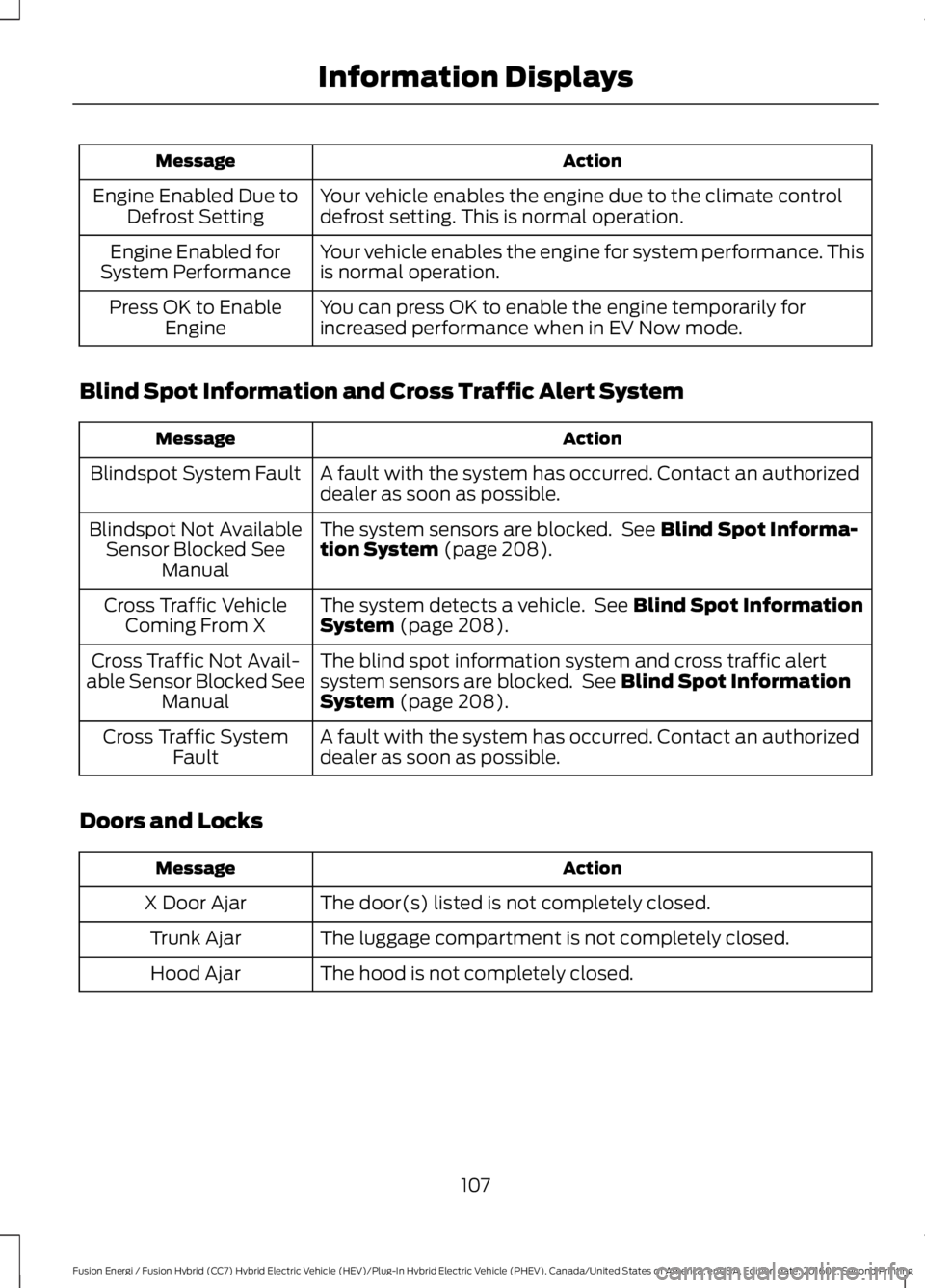
ActionMessage
Your vehicle enables the engine due to the climate controldefrost setting. This is normal operation.Engine Enabled Due toDefrost Setting
Your vehicle enables the engine for system performance. Thisis normal operation.Engine Enabled forSystem Performance
You can press OK to enable the engine temporarily forincreased performance when in EV Now mode.Press OK to EnableEngine
Blind Spot Information and Cross Traffic Alert System
ActionMessage
A fault with the system has occurred. Contact an authorizeddealer as soon as possible.Blindspot System Fault
The system sensors are blocked. See Blind Spot Informa-tion System (page 208).Blindspot Not AvailableSensor Blocked SeeManual
The system detects a vehicle. See Blind Spot InformationSystem (page 208).Cross Traffic VehicleComing From X
The blind spot information system and cross traffic alertsystem sensors are blocked. See Blind Spot InformationSystem (page 208).
Cross Traffic Not Avail-able Sensor Blocked SeeManual
A fault with the system has occurred. Contact an authorizeddealer as soon as possible.Cross Traffic SystemFault
Doors and Locks
ActionMessage
The door(s) listed is not completely closed.X Door Ajar
The luggage compartment is not completely closed.Trunk Ajar
The hood is not completely closed.Hood Ajar
107
Fusion Energi / Fusion Hybrid (CC7) Hybrid Electric Vehicle (HEV)/Plug-In Hybrid Electric Vehicle (PHEV), Canada/United States of America, enUSA, Edition date: 201602, Second Printing
Information Displays
Page 111 of 526

ActionMessage
The system has disabled the door switches.Switches InhibitedSecurity Mode
There is a system malfunction with the child locks. Contactan authorized dealer as soon as possible.Child Lock MalfunctionService Required
The factory keypad code displays in the information displayafter system resets the keypad.Factory Keypad Code {XX X X X}
Driver Alert
ActionMessage
Stop and rest as soon as it is safe to do so.Driver Alert Warning RestNow
Take a rest soon.Driver Alert Warning RestSuggested
Fuel
ActionMessage
An early reminder of a low fuel condition.Fuel Level Low
The fuel fill inlet may not be properly closed.Check Fuel Fill Inlet
EV functionality is disabled and the engine is running tomaintain fuel freshness. See Fuel Quality (page 154).Fuel Freshness Enginemay run to maintain fuelfreshness
Wait for up to 15 seconds while the fuel system depressurizes.Fuel Door Opening
The fuel system has finished depressurizing and you can beginto refuel.Fuel Door Open
A reminder to close the fuel door.Close Fuel Door
There is an error in attempting to refill your vehicle.Refuel Error See Manual
108
Fusion Energi / Fusion Hybrid (CC7) Hybrid Electric Vehicle (HEV)/Plug-In Hybrid Electric Vehicle (PHEV), Canada/United States of America, enUSA, Edition date: 201602, Second Printing
Information Displays
Page 116 of 526
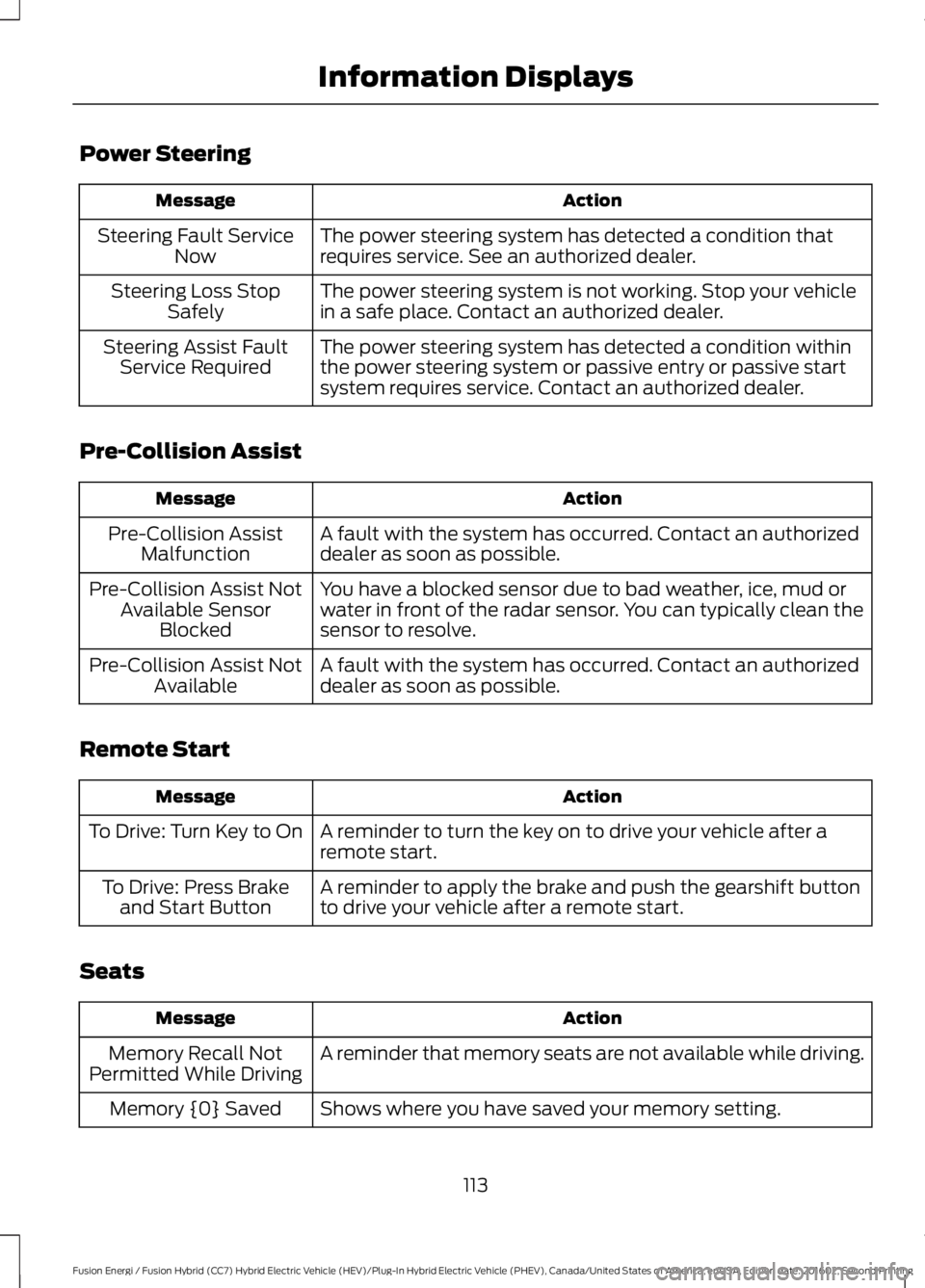
Power Steering
ActionMessage
The power steering system has detected a condition thatrequires service. See an authorized dealer.Steering Fault ServiceNow
The power steering system is not working. Stop your vehiclein a safe place. Contact an authorized dealer.Steering Loss StopSafely
The power steering system has detected a condition withinthe power steering system or passive entry or passive startsystem requires service. Contact an authorized dealer.
Steering Assist FaultService Required
Pre-Collision Assist
ActionMessage
A fault with the system has occurred. Contact an authorizeddealer as soon as possible.Pre-Collision AssistMalfunction
You have a blocked sensor due to bad weather, ice, mud orwater in front of the radar sensor. You can typically clean thesensor to resolve.
Pre-Collision Assist NotAvailable SensorBlocked
A fault with the system has occurred. Contact an authorizeddealer as soon as possible.Pre-Collision Assist NotAvailable
Remote Start
ActionMessage
A reminder to turn the key on to drive your vehicle after aremote start.To Drive: Turn Key to On
A reminder to apply the brake and push the gearshift buttonto drive your vehicle after a remote start.To Drive: Press Brakeand Start Button
Seats
ActionMessage
A reminder that memory seats are not available while driving.Memory Recall NotPermitted While Driving
Shows where you have saved your memory setting.Memory {0} Saved
113
Fusion Energi / Fusion Hybrid (CC7) Hybrid Electric Vehicle (HEV)/Plug-In Hybrid Electric Vehicle (PHEV), Canada/United States of America, enUSA, Edition date: 201602, Second Printing
Information Displays
Page 118 of 526

Transmission
ActionMessage
See an authorized dealer.Transmission Malfunc-tion Service Now
The transmission is overheating and needs to cool. Stop in asafe place as soon as possible.Transmission OverTemperature StopSafely
The transmission has overheated and needs to cool. Stop ina safe place as soon as possible.Transmission Over-heating Stop Safely
See an authorized dealer.Transmission ServiceRequired
The transmission is getting hot. Stop to let it cool.Transmission Too HotPress Brake
The transmission has limited functionality. See an authorizeddealer.Transmission LimitedFunction See Manual
The transmission is too cold. Wait for it to warm up beforeyou drive.Transmission WarmingUp Please Wait
A reminder to shift into park.Transmission Not in Park
A request for you to apply the brake as needed by the trans-mission.Press Brake Pedal
Displays when a button needs to be pressed again to enterneutral hold. See Automatic Transmission (page 170).Select L to Confirm Stayin Neutral Mode
The transmission has adjusted the shift strategy.Transmission Adjusted
The transmission is adjusting the shift strategy.Transmission Adapt-Mode
The transmission is locked and unable to select gears.Transmission Indicat-Mode Lockup On
The transmission is unlocked and free to select gears.Transmission Indicat-Mode Lockup Off
115
Fusion Energi / Fusion Hybrid (CC7) Hybrid Electric Vehicle (HEV)/Plug-In Hybrid Electric Vehicle (PHEV), Canada/United States of America, enUSA, Edition date: 201602, Second Printing
Information Displays
Page 126 of 526

WARNINGS
Install the head restraint properly tohelp minimize the risk of neck injuryin the event of a crash.
Note:Adjust the seatback to an uprightdriving position before adjusting the headrestraint. Adjust the head restraint so thatthe top of it is level with the top of your headand as far forward as possible. Make surethat you remain comfortable. If you areextremely tall, adjust the head restraint toits highest position.
Front seat and rear seat outboard headrestraints
Rear center head restraint
The head restraints consist of:
An energy absorbing headrestraint.A
Two steel stems.B
Guide sleeve adjust and unlockbutton.C
Guide sleeve unlock and removebutton.D
Adjusting the Head Restraint
Raising the Head Restraint
Pull the head restraint up.
Lowering the Head Restraint
1. Press and hold button C.
2. Push the head restraint down.
Removing the Head Restraint
1. Pull the head restraint up until itreaches its highest position.
2. Press and hold buttons C and D.
3. Pull the head restraint up.
Installing the Head Restraint
Align the steel stems into the guide sleevesand push the head restraint down until itlocks.
Tilting Head Restraints
The front head restraints tilt for extracomfort. To tilt the head restraint, do thefollowing:
123
Fusion Energi / Fusion Hybrid (CC7) Hybrid Electric Vehicle (HEV)/Plug-In Hybrid Electric Vehicle (PHEV), Canada/United States of America, enUSA, Edition date: 201602, Second Printing
SeatsE138642 E138645
Page 130 of 526

•Driver seat.
•Power mirrors.
•Power steering column.
The memory control is on the driver door.
Saving a PreSet Position
1. Adjust the memory features to yourdesired position.
2. Press and hold the SET button untilyou hear a single tone.
3. Press the desired preset button untilyou hear a single tone.
You can save up to two preset memorypositions. You can save a memory presetat any time.
Recalling a PreSet Position
Press and release the preset buttonassociated with your desired drivingposition. The memory features move tothe position stored for that preset.
Note:A preset memory position can onlybe recalled when the ignition is off, or whenthe transmission is in park (P) or neutral (N)if the ignition is on and the vehicle is notmoving.
You can also recall a preset memoryposition by:
•Pressing the unlock button on yourintelligent access key fob if it is linkedto a preset position.
•Unlocking the intelligent driver doorhandle if a linked key fob is present.
•Entering a personal entry code on theSecuricode keypad. See Doors andLocks (page 58).
Note:Using a linked key fob to recall yourmemory position when the ignition is offmoves the seat to the Easy Entry position.
Note:Pressing any active memory featurecontrol - power seat, mirror, or steeringcolumn (or any memory button) during amemory recall cancels the operation.
Linking a PreSet Position to yourRemote Control or IntelligentAccess Key Fob
Your vehicle can save the preset memorypositions for up to two remote controls orintelligent access (IA) keys.
After you have saved your desired memorypreset positions:
1. Press and hold the desired presetbutton for about three seconds untilyou hear a single tone.
2. Within three seconds, press the lockbutton on the remote control you arelinking.
To unlink a remote control, follow thesame procedure – except in step 2, pressthe unlock button on the remote control.
Note:If more than one linked remotecontrol or intelligent access key is in range,the memory function moves to the settingsof the first key to initiate a memory recall.
127
Fusion Energi / Fusion Hybrid (CC7) Hybrid Electric Vehicle (HEV)/Plug-In Hybrid Electric Vehicle (PHEV), Canada/United States of America, enUSA, Edition date: 201602, Second Printing
SeatsE223340
Page 135 of 526

HomeLink Wireless ControlSystem
WARNINGS
Make sure that the garage door andsecurity device are free fromobstruction when you areprogramming. Do not program the systemwith the vehicle in the garage.
Do not use the system with anygarage door opener that does nothave the safety stop and reversefeature as required by U.S. Federal SafetyStandards (this includes any garage dooropener manufactured before April 1, 1982).A garage door opener which cannot detectan object, signaling the door to stop andreverse, does not meet current federalsafety standards. Using a garage dooropener without these features increasesthe risk of serious injury or death.
Note:Make sure you keep the originalremote control transmitter for use in othervehicles as well as for future systemprogramming.
Note:We recommend that upon the saleor lease termination of your vehicle, youerase the programmed function buttons forsecurity reasons. See Erasing the FunctionButton Codes.
Note:You can program a maximum ofthree devices. To change or replace any ofthe three devices after it has been initiallyprogrammed, you must first erase thecurrent settings. See Erasing the FunctionButton Codes.
The universal garage door opener replacesthe common hand-held garage dooropener with a three-button transmitterthat is integrated into the driver’s sun visor.
The system includes two primary features,a garage door opener and a platform forremote activation of devices within thehome. As well as being programmed forgarage doors, the system transmitter canbe programmed to operate entry gateoperators, security systems, entry doorlocks and home or office lighting.
Additional system information can befound online at www.homelink.com,www.youtube.com/HomeLinkGentex orby calling the toll-free help line on1-800-355-3515.
In-Vehicle Programming
This process is to program your hand-heldtransmitter and your in-vehicle HomeLinkbutton.
Note:The programming steps belowassume you will be programming HomeLinkthat was not previously programmed.
Note:Put a new battery in the hand-heldtransmitter. This will ensure quicker trainingand accurate transmission of theradio-frequency signal.
132
Fusion Energi / Fusion Hybrid (CC7) Hybrid Electric Vehicle (HEV)/Plug-In Hybrid Electric Vehicle (PHEV), Canada/United States of America, enUSA, Edition date: 201602, Second Printing
Universal Garage Door Opener (If Equipped)E142657