2017 FORD FUSION ENERGI ECO mode
[x] Cancel search: ECO modePage 124 of 526

Note:Do not remove ice from the mirrorswith a scraper or adjust the mirror glasswhen it is frozen in place.
Note:Do not clean the mirror housing orglass with harsh abrasives, fuel or otherpetroleum-based cleaning products.
CABIN AIR FILTER
Your vehicle is equipped with a cabin airfilter, which gives you and your passengersthe following benefits:
•It improves your driving comfort byreducing particle concentration.
•It improves the interior compartmentcleanliness.
•It protects the climate controlcomponents from particle deposits.
You can locate the cabin air filter behindthe glove box.
Note:Make sure you have a cabin air filterinstalled at all times. This prevents foreignobjects from entering the system. Runningthe system without a filter in place couldresult in degradation or damage to thesystem.
Replace the filter at regular intervals. SeeScheduled Maintenance (page 467).
For additional cabin air filter information,or to replace the filter, see an authorizeddealer.
REMOTE START (If Equipped)
You can switch this feature on or off andadjust the settings using the informationdisplay.
The system adjusts the interiortemperature depending on your chosensettings during remote start.
You cannot adjust the climate controlsetting during remote start operation.When you switch the ignition on, theclimate control system will return to theprevious settings. You can now makeadjustments.
You can switch on certainvehicle-dependent features when needed,such as:
•Heated seats.
•Cooled seats.
•Heated steering wheel.
•Heated mirrors.
•Heated rear window.
Automatic Settings
In hot weather, the system is set to 72°F(22°C). The cooled seats are set to high(if available, and selected to AUTO in theinformation display).
In moderate weather, the system eitherheats or cools (based on previoussettings). The rear defroster, heatedmirrors and heated or cooled seats do notautomatically turn on.
In cold weather, the system is set to 72°F(22°C). The heated seats are set to high(if available, and selected to AUTO in theinformation display). The heated rearwindow and heated mirrors automaticallyturn on.
121
Fusion Energi / Fusion Hybrid (CC7) Hybrid Electric Vehicle (HEV)/Plug-In Hybrid Electric Vehicle (PHEV), Canada/United States of America, enUSA, Edition date: 201602, Second Printing
Climate Control
Page 137 of 526
Gate Operator / CanadianProgramming
Canadian radio-frequency laws requiretransmitter signals to “time-out” (or quit)after several seconds of transmission –which may not be long enough forHomeLink to pick up the signal duringprogramming. Similar to this Canadian law,some U.S. gate operators are designed to“time-out” in the same manner.
Note:If programming a garage door openeror gate operator, it is advised to unplug thedevice during the “cycling” process toprevent possible overheating.
1. Press and hold the HomeLink buttonwhile you press and release,every twoseconds, your hand-held transmitteruntil the HomeLink indicator lightchanges from a slow to a rapidlyblinking light.
2. Release both the HomeLink andhand-held transmitter buttons.
3. Continue programing HomeLink. SeeIn-Vehicle Programming.
Erasing the Function Button Codes
Note:You cannot erase individual buttons.
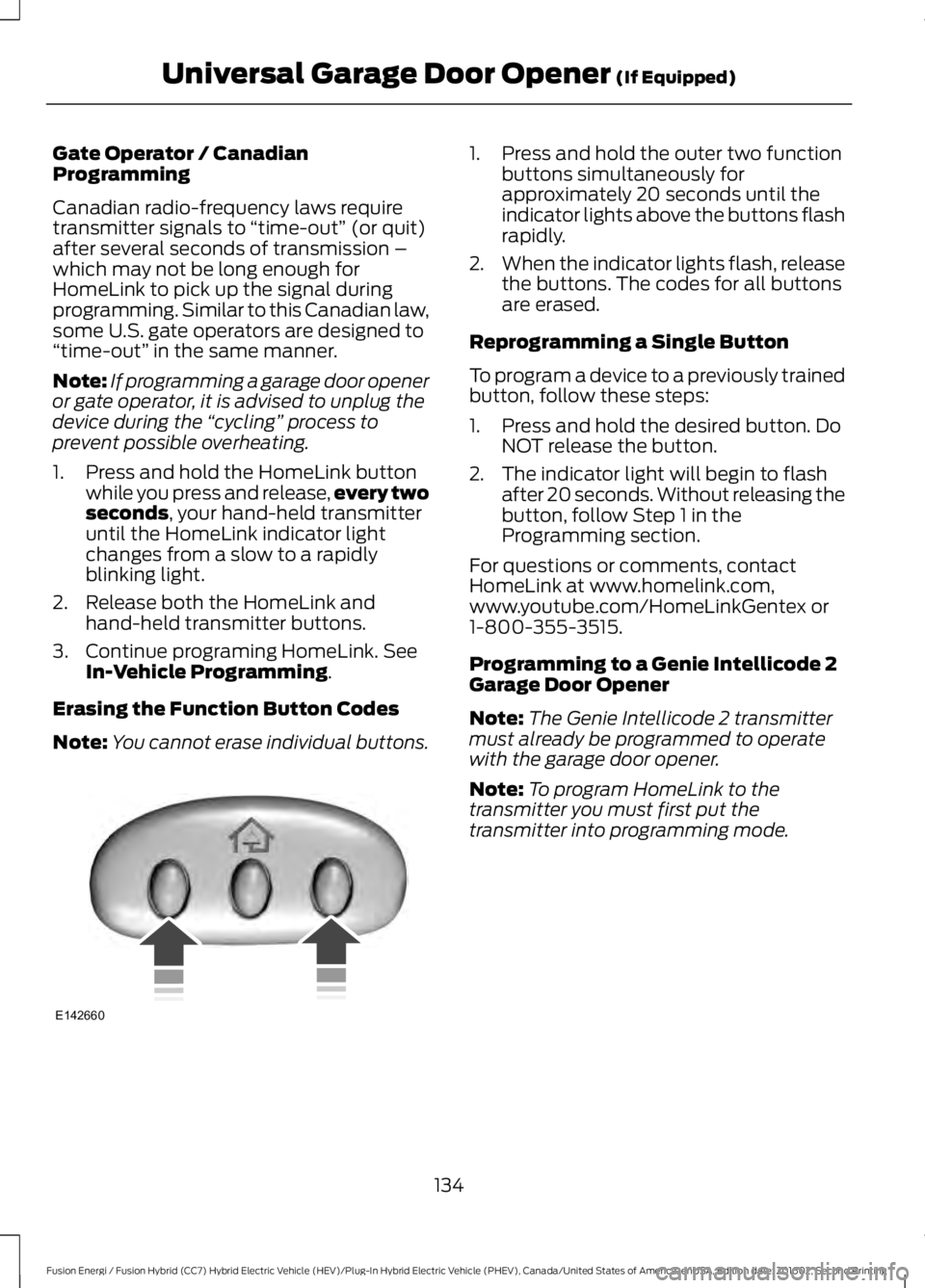
1. Press and hold the outer two functionbuttons simultaneously forapproximately 20 seconds until theindicator lights above the buttons flashrapidly.
2.When the indicator lights flash, releasethe buttons. The codes for all buttonsare erased.
Reprogramming a Single Button
To program a device to a previously trainedbutton, follow these steps:
1. Press and hold the desired button. DoNOT release the button.
2. The indicator light will begin to flashafter 20 seconds. Without releasing thebutton, follow Step 1 in theProgramming section.
For questions or comments, contactHomeLink at www.homelink.com,www.youtube.com/HomeLinkGentex or1-800-355-3515.
Programming to a Genie Intellicode 2Garage Door Opener
Note:The Genie Intellicode 2 transmittermust already be programmed to operatewith the garage door opener.
Note:To program HomeLink to thetransmitter you must first put thetransmitter into programming mode.
134
Fusion Energi / Fusion Hybrid (CC7) Hybrid Electric Vehicle (HEV)/Plug-In Hybrid Electric Vehicle (PHEV), Canada/United States of America, enUSA, Edition date: 201602, Second Printing
Universal Garage Door Opener (If Equipped)E142660
Page 138 of 526

Red indicator lightA.
Green indicator lightB.
1. Press and hold one of the buttons onthe hand-held transmitter for 10seconds. The indicator light will changefrom green to red and green.
2.Press the same button twice to confirmthe change to programming mode. Ifdone properly the indicator light willappear red.
3. Hold the transmitter within 1–3 inches(2–8 centimeters) of the button on thevisor you want to program.
4. Press and hold both the programmedGenie button on the hand-heldtransmitter and the button you wantto program. The indicator light on thevisor will flash rapidly when theprogramming is successful.
Note:The Genie transmitter will transmitfor up to 30 seconds. If HomeLink does notprogram within 30 seconds the Genietransmitter will need to be pressed again. Ifthe Genie transmitter indicator light displaysgreen and red, release the button until theindicator light turns off before pressing thebutton again.
Once HomeLink has been programmedsuccessfully, the Genie transmitter mustbe changed out of program mode. To dothis:
1. Press and hold the previouslyprogrammed Genie button on thehand-held transmitter for 10 seconds.The indicator light will change from redto red and green.
2.Press the same button twice to confirmthe change. If done correctly theindicator light will turn green.
Programming HomeLink to the GenieIntellicode Garage Door Opener Motor
Note:You may need a ladder to access thegarage door opener motor.
1. Press and hold the program button onthe garage door opener motor untilboth blue indicator lights turn on.
2. Release the program button. Only thesmaller round indicator light should beon.
3.Press and release the program button.The larger purple indicator light willflash.
Note:The next two steps must becompleted in 30 seconds.
4.Press and release the Genie Intellicode2 hand-held transmitter’s previouslyprogrammed button. Both indicatorlights on the garage door opener motorunit should now flash purple.
135
Fusion Energi / Fusion Hybrid (CC7) Hybrid Electric Vehicle (HEV)/Plug-In Hybrid Electric Vehicle (PHEV), Canada/United States of America, enUSA, Edition date: 201602, Second Printing
Universal Garage Door Opener (If Equipped)BAE142661 E142662
Page 139 of 526

5. Press and hold the previouslyprogrammed button on the visor for 2seconds. Repeat this step up to 3 timesuntil the garage door moves.
Programming is now complete.
Clearing a HomeLink Device
To erase programming from the threeHomeLink buttons press and hold the twoouter HomeLink buttons until the indicatorlight begins to flash. The indicator light willbegin flashing in 10 to 20 seconds, at whichtime both buttons should be released.Programming has now been erased, andthe indicator light should blink slowly toindicate the device is in train mode whenany of the three HomeLink buttons arepressed.
FCC and RSS-210 Industry CanadaCompliance
This device complies with Part 15 of theFCC Rules and with RSS-210 of IndustryCanada. Operation is subject to thefollowing two conditions: (1) this devicemay not cause harmful interference, and(2) this device must accept anyinterference received, includinginterference that may cause undesiredoperation.
Changes or modifications to your devicenot expressly approved by the partyresponsible for compliance can void theuser’s authority to operate the equipment.
136
Fusion Energi / Fusion Hybrid (CC7) Hybrid Electric Vehicle (HEV)/Plug-In Hybrid Electric Vehicle (PHEV), Canada/United States of America, enUSA, Edition date: 201602, Second Printing
Universal Garage Door Opener (If Equipped)
Page 141 of 526

When the indicator light on the power pointis:
•On: The power point is working, theignition is on and a device is pluggedin.
•Off: The power point is off, the ignitionis off or no device is plugged in.
•Flashing: The power point is in faultmode.
The power outlet temporarily turns offpower when in fault mode if the deviceexceeds the 150 watt limit. Unplug yourdevice and switch the ignition off. Switchthe ignition back on, but do not plug yourdevice back in. Let the system cool off andswitch the ignition off to reset the faultmode. Switch the ignition back on andmake sure the indicator light remains on.
Do not use the power point for certainelectric devices, including:
•Cathode-ray, tube-type televisions.
•Motor loads, such as vacuum cleaners,electric saws and other electric powertools or compressor-drivenrefrigerators.
•Measuring devices, which processprecise data, such as medicalequipment or measuring equipment.
•Other appliances requiring anextremely stable power supply such asmicrocomputer-controlled electricblankets or touch-sensor lamps.
138
Fusion Energi / Fusion Hybrid (CC7) Hybrid Electric Vehicle (HEV)/Plug-In Hybrid Electric Vehicle (PHEV), Canada/United States of America, enUSA, Edition date: 201602, Second Printing
Auxiliary Power Points
Page 144 of 526

GENERAL INFORMATION
WARNINGS
Extended idling at high enginespeeds can produce very hightemperatures in the engine andexhaust system, creating the risk of fire orother damage.
Do not park, idle or drive your vehicleon dry grass or other dry groundcover. The emission system heats upthe engine compartment and exhaustsystem, creating the risk of fire.
Do not start the vehicle in a closedgarage or in other enclosed areas.Exhaust fumes can be toxic. Alwaysopen the garage door before you start thevehicle.
If you smell exhaust fumes insideyour vehicle, have your vehiclechecked by an authorized dealerimmediately. Do not drive your vehicle ifyou smell exhaust fumes.
If you disconnect the battery, your vehiclemay exhibit some unusual drivingcharacteristics for approximately 5 mi(8 km) after you reconnect it. This isbecause the engine management systemmust realign itself with the engine. You candisregard any unusual drivingcharacteristics during this period.
The powertrain control system meets allCanadian interference-causing equipmentstandard requirements regulating theimpulse electrical field or radio noise.
When you start your vehicle, avoid pressingthe accelerator pedal until the ready todrive indicator illuminates. Only use theaccelerator pedal when you have difficultystarting your vehicle.
KEYLESS STARTING
Note:The system may not function if thepassive key is close to metal objects orelectronic devices, for example keys or a cellphone.
Note:A valid passive key must be locatedinside your vehicle to switch the ignition onand start your vehicle.
Ignition Modes
The keyless starting system has threemodes:
Off: Turns the ignition off.
•Without applying the brake pedal,press and release the button oncewhen the ignition is in the on mode, orwhen your vehicle is running but is notmoving.
On: All electrical circuits are operationaland the warning lamps and indicatorsilluminate.
•Without applying the brake pedal,press and release the button once.
Start: Starts your vehicle. The engine maynot start when your vehicle starts.
•Press the brake pedal, and then pressthe button for any length of time. Anindicator light on the button illuminateswhen the ignition is on and when yourvehicle starts.
141
Fusion Energi / Fusion Hybrid (CC7) Hybrid Electric Vehicle (HEV)/Plug-In Hybrid Electric Vehicle (PHEV), Canada/United States of America, enUSA, Edition date: 201602, Second Printing
Starting and Stopping the EngineE144447
Page 149 of 526

HYBRID VEHICLE OPERATION
This hybrid vehicle combines electric andgasoline propulsion to providebreakthrough performance and improvedefficiency.
Familiarizing yourself with these uniquecharacteristics will provide an optimaldriving experience from your new vehicle.
Note:You may notice higher engine speedsupon start-up. This temporary condition isnormal and necessary to heat up the cabinand minimize emissions.
Starting:
When you start your vehicle, agreen ready indicator light willappear in the lower right portionof the instrument cluster and a ready todrive message will appear in the middle ofthe left cluster screen, letting you knowthat your vehicle is ready for driving.
The engine may not start because thisvehicle is equipped with silent key start.This fuel saving feature allows your vehicleto be ready–to–drive without requiring thegas engine to be running. This indicator willremain on while your vehicle is on, whetherthe engine is running or not to indicate yourvehicle is capable of movement (using itselectric motor, engine, or both). Typically,the engine will not start unless the vehicleis cold, a climate control change isrequested, or the accelerator is pressed.
Driving:
The gas engine automatically starts andstops to provide power when needed andto save fuel when not needed. Whilecoasting at low speeds, coming to a stop,or standing, the gas engine normally shutsdown and your vehicle operates inelectric-only mode.
Conditions that may cause the engine tostart up or remain running include:
•Considerable vehicle acceleration.
•Vehicle speed above 85 mph(137 km/h). However, the maximumspeed for electric-only operation maybe lower while driving in hottemperatures or on hilly terrain.
•Ascending a hill.
•Charge level of high voltage battery islow.
•Very high or low outside temperature(to provide system cooling or heating).For Energi vehicles, climate controldemands by passengers may notdirectly cause the engine to run. Thisonly occurs when the high voltagebattery charge is low, or if the outsidetemperature is cold enough to requirethe engine to provide additional heatfor the cabin.
•Engine not warm enough to providepassenger requested cabintemperature.
Stopping:
The gas engine may shut off to conservefuel as you come to a stop. Restarting yourvehicle is not required. Simply step on theaccelerator when you are ready to drive.
Transmission Operation:
Due to the technologically advanced,electronically-controlled continuouslyvariable transaxle, you will not feel shiftchanges like those of a non-hybrid vehicle.
Note:Since engine speed is controlled bythe transmission, it may seem elevated attimes. This is normal hybrid operation andhelps deliver fuel efficiency andperformance.
146
Fusion Energi / Fusion Hybrid (CC7) Hybrid Electric Vehicle (HEV)/Plug-In Hybrid Electric Vehicle (PHEV), Canada/United States of America, enUSA, Edition date: 201602, Second Printing
Unique Driving CharacteristicsE144692
Page 150 of 526

Neutral:
It is not recommended to idle the vehiclein neutral (N) for an extended period oftime because this will discharge your highvoltage battery and decrease fueleconomy. The engine will not start or stop,and cannot provide power to the hybridsystem in neutral (N).
Low:
Low (L) is designed to mimic the enhancedengine braking available in non-hybridvehicles. Low gear will produce high enginespeeds to provide necessary enginebraking. This is normal and will not damageyour vehicle. In low gear, the gas enginewill remain on more often than in drive (D).
Reverse:
In reverse (R), vehicle speed is limited to22 mph (35 km/h).
Battery:
Your hybrid is equipped with a high voltagebattery. A cool battery maintains batterylife and provides the best possibleperformance. The high voltage battery iscooled by cabin air drawn from vent holesin the trim panels behind the rear seats.Avoid placing objects at the vent holes thatblock airflow to the high voltage battery.
Engine:
The engine speed in your hybrid is notdirectly tied to your vehicle speed. Yourvehicle's engine and transmission aredesigned to deliver the power you need atthe most efficient engine speed. Duringheavy accelerations, your hybrid may reachhigh engine speeds (up to 6000 RPM).
In prolonged mountainous driving, you maysee the engine speed changing withoutyour input. This is intentional and maintainsthe battery charge level. You may alsonotice during extended downhill drivingthat your engine continues to run insteadof shutting off.
During this engine braking, the engine stayson, but it is not using any fuel. You may alsohear a slight whine or whistle whenoperating your vehicle. This is the normaloperation of the electric generator in thehybrid system.
During certain events (such as vehicleservicing) your low voltage 12-volt batterymay become disconnected or disabled.Once the battery is reconnected and afterdriving the vehicle, the engine maycontinue to operate for three to fiveseconds after the key is turned to off. Thisis a normal condition.
Braking:
Your hybrid is equipped with standardhydraulic braking and regenerative braking.Regenerative braking is performed by yourtransmission and it captures brake energyand stores it in your high voltage battery.
Driving to Optimize Fuel Economy
Note:Having your engine running is notalways an indication of inefficiency. In somecases, it is actually more efficient thandriving in electric mode.
Your fuel economy should improvethroughout your hybrid's break-in period.As with any vehicle, your driving habits andaccessory usage can significantly impactyour fuel economy. For best results, keepin mind these tips:
147
Fusion Energi / Fusion Hybrid (CC7) Hybrid Electric Vehicle (HEV)/Plug-In Hybrid Electric Vehicle (PHEV), Canada/United States of America, enUSA, Edition date: 201602, Second Printing
Unique Driving Characteristics