2017 FORD FOCUS ELECTRIC rear view mirror
[x] Cancel search: rear view mirrorPage 128 of 367
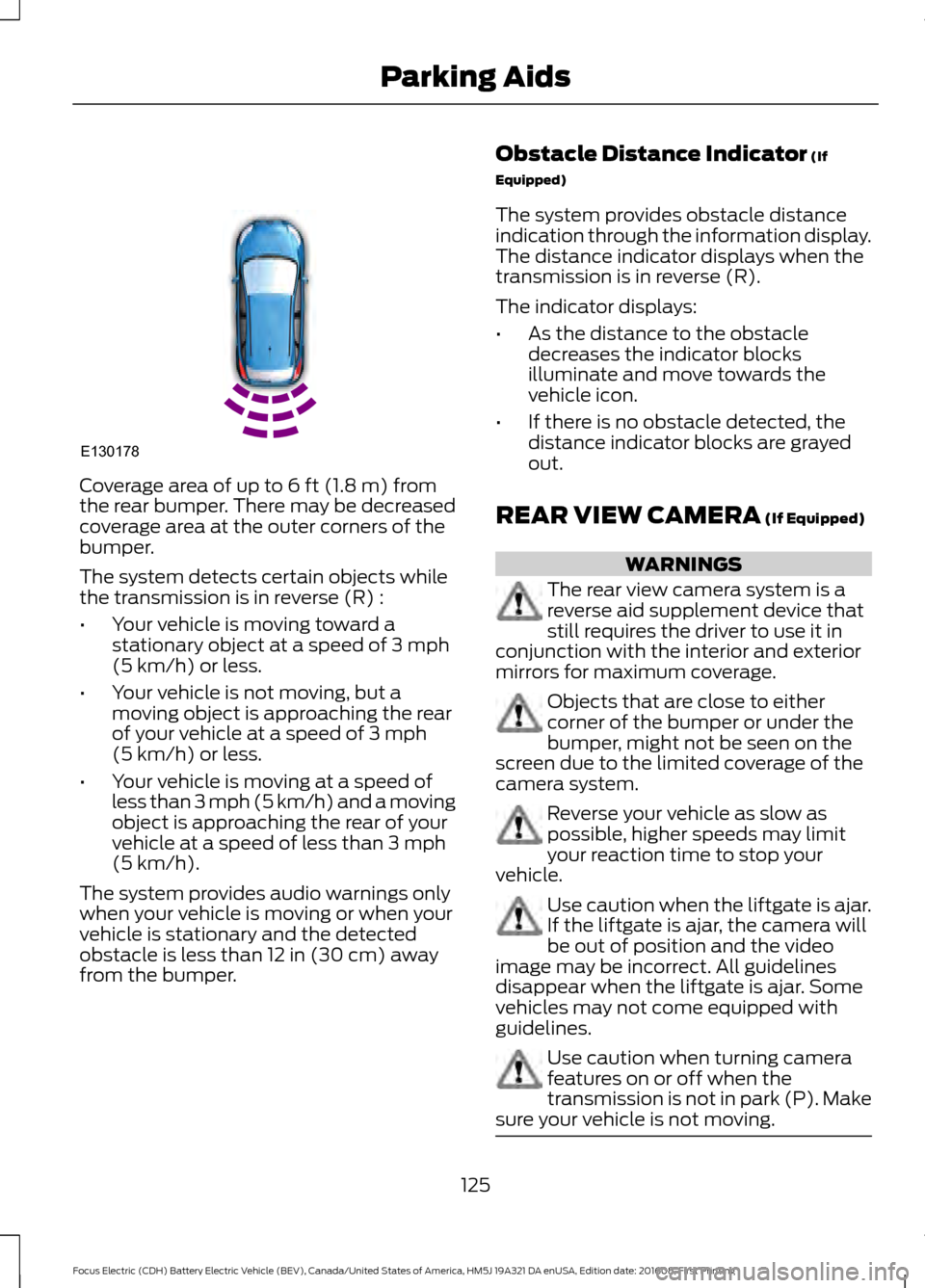
Coverage area of up to 6 ft (1.8 m) from
the rear bumper. There may be decreased
coverage area at the outer corners of the
bumper.
The system detects certain objects while
the transmission is in reverse (R) :
• Your vehicle is moving toward a
stationary object at a speed of
3 mph
(5 km/h) or less.
• Your vehicle is not moving, but a
moving object is approaching the rear
of your vehicle at a speed of
3 mph
(5 km/h) or less.
• Your vehicle is moving at a speed of
less than 3 mph (5 km/h) and a moving
object is approaching the rear of your
vehicle at a speed of less than
3 mph
(5 km/h).
The system provides audio warnings only
when your vehicle is moving or when your
vehicle is stationary and the detected
obstacle is less than
12 in (30 cm) away
from the bumper. Obstacle Distance Indicator
(If
Equipped)
The system provides obstacle distance
indication through the information display.
The distance indicator displays when the
transmission is in reverse (R).
The indicator displays:
• As the distance to the obstacle
decreases the indicator blocks
illuminate and move towards the
vehicle icon.
• If there is no obstacle detected, the
distance indicator blocks are grayed
out.
REAR VIEW CAMERA
(If Equipped) WARNINGS
The rear view camera system is a
reverse aid supplement device that
still requires the driver to use it in
conjunction with the interior and exterior
mirrors for maximum coverage. Objects that are close to either
corner of the bumper or under the
bumper, might not be seen on the
screen due to the limited coverage of the
camera system. Reverse your vehicle as slow as
possible, higher speeds may limit
your reaction time to stop your
vehicle. Use caution when the liftgate is ajar.
If the liftgate is ajar, the camera will
be out of position and the video
image may be incorrect. All guidelines
disappear when the liftgate is ajar. Some
vehicles may not come equipped with
guidelines. Use caution when turning camera
features on or off when the
transmission is not in park (P). Make
sure your vehicle is not moving. 125
Focus Electric (CDH) Battery Electric Vehicle (BEV), Canada/United States of America, HM5J 19A321 DA enUSA, Edition date: 201608, First Printing Parking AidsE130178
Page 130 of 367
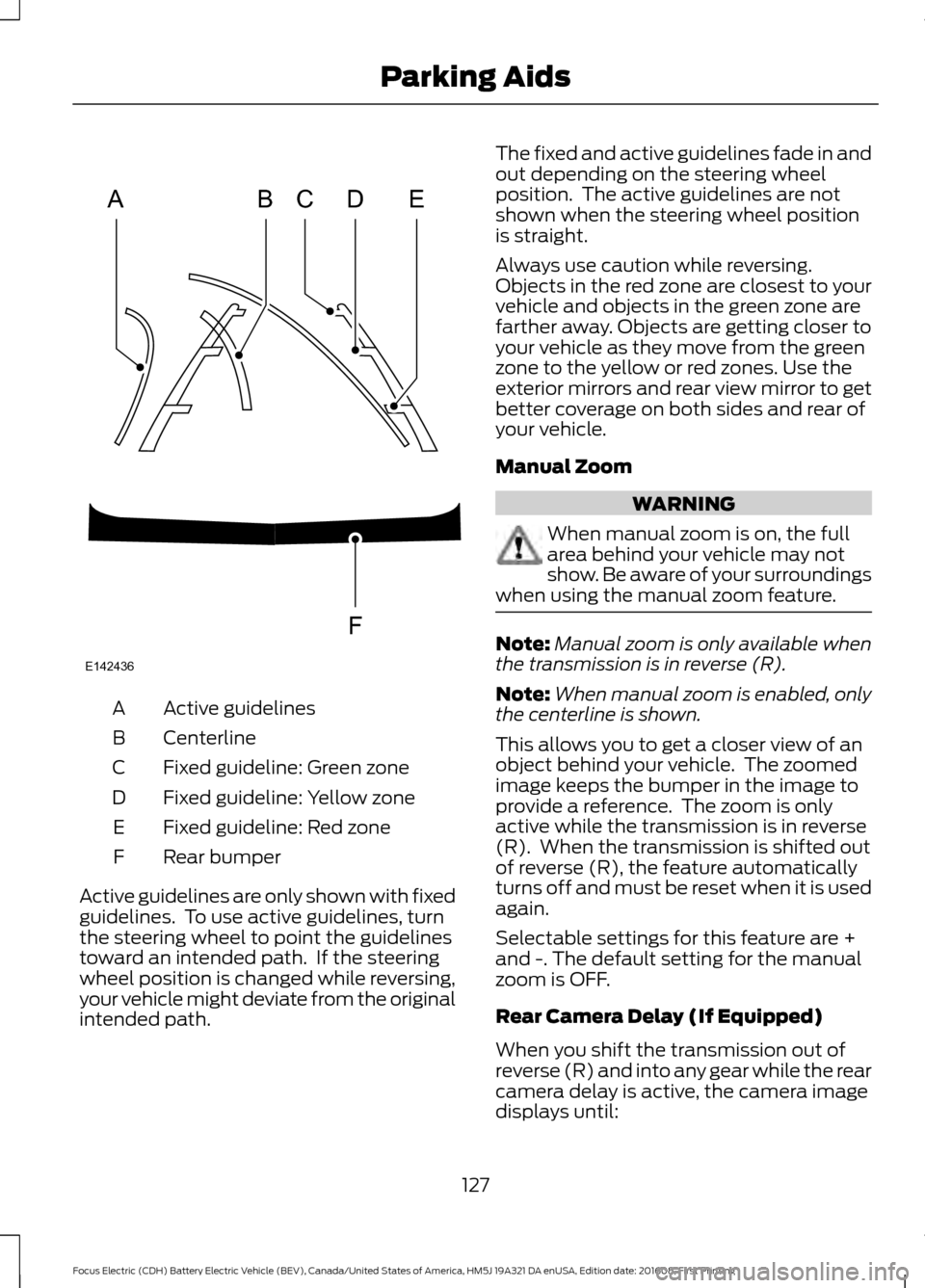
Active guidelines
A
Centerline
B
Fixed guideline: Green zone
C
Fixed guideline: Yellow zone
D
Fixed guideline: Red zone
E
Rear bumper
F
Active guidelines are only shown with fixed
guidelines. To use active guidelines, turn
the steering wheel to point the guidelines
toward an intended path. If the steering
wheel position is changed while reversing,
your vehicle might deviate from the original
intended path. The fixed and active guidelines fade in and
out depending on the steering wheel
position. The active guidelines are not
shown when the steering wheel position
is straight.
Always use caution while reversing.
Objects in the red zone are closest to your
vehicle and objects in the green zone are
farther away. Objects are getting closer to
your vehicle as they move from the green
zone to the yellow or red zones. Use the
exterior mirrors and rear view mirror to get
better coverage on both sides and rear of
your vehicle.
Manual Zoom
WARNING
When manual zoom is on, the full
area behind your vehicle may not
show. Be aware of your surroundings
when using the manual zoom feature. Note:
Manual zoom is only available when
the transmission is in reverse (R).
Note: When manual zoom is enabled, only
the centerline is shown.
This allows you to get a closer view of an
object behind your vehicle. The zoomed
image keeps the bumper in the image to
provide a reference. The zoom is only
active while the transmission is in reverse
(R). When the transmission is shifted out
of reverse (R), the feature automatically
turns off and must be reset when it is used
again.
Selectable settings for this feature are +
and -. The default setting for the manual
zoom is OFF.
Rear Camera Delay (If Equipped)
When you shift the transmission out of
reverse (R) and into any gear while the rear
camera delay is active, the camera image
displays until:
127
Focus Electric (CDH) Battery Electric Vehicle (BEV), Canada/United States of America, HM5J 19A321 DA enUSA, Edition date: 201608, First Printing Parking AidsABCD
F
E
E142436
Page 364 of 367
Opening the Liftgate............................................
57
Manual Seats................................................100
Media Hub......................................................223
Message Center See: Information Displays................................ 80
Mirrors See: Heated Windows and Mirrors................96
See: Windows and Mirrors................................. 71
Mobile Communications Equipment........11
Motorcraft Parts
............................................215
MyKey Troubleshooting...............................52
MyKey ™............................................................48
Principle of Operation........................................ 48
N
Navigation.......................................................257 cityseeker.............................................................. 265
Destination Mode.............................................. 260
Map Mode............................................................. 257
Navigation Map Updates............................... 266
Navigation Menu................................................ 263
SiriusXM Traffic and Travel Link................... 266
Waypoints............................................................ 264
Normal Scheduled Maintenance...........319
O
Opening and Closing the Hood...............167 Closing the Hood................................................. 167
Opening the Hood.............................................. 167
Ordering Additional Owner's Literature........................................................151
Obtaining a French Owner ’s Manual...........152
Overhead Console
.......................................105
P
Parking Aids
....................................................124
Principle of Operation....................................... 124
Parking Brake
..................................................119
Passive Anti-Theft System........................58
SecuriLock.............................................................. 58
PATS See: Passive Anti-Theft System..................... 58
Perchlorate..........................................................9 Personal Safety System
™
..........................34
How Does the Personal Safety System
Work?.................................................................. 34
Phone...............................................................252 During a Phone Call.......................................... 255
Making Calls........................................................ 254
Pairing Your Cell Phone for the First Time................................................................... 252
Phone Menu......................................................... 253
Receiving Calls.................................................... 255
Smartphone Connectivity.............................. 256
Text Messaging................................................... 256
Post-Crash Alert System
...........................146
Power Door Locks See: Locking and Unlocking............................. 53
Power Seats...................................................100 Power Lumbar...................................................... 101
Power Windows
...............................................71
Accessory Delay.................................................... 72
Bounce-Back........................................................... 71
One-Touch Down.................................................. 71
One-Touch Up........................................................ 71
Window Lock........................................................... 71
Protecting the Environment
........................12
R
Rear Parking Aid............................................124 Obstacle Distance Indicator........................... 125
Rear Seats
........................................................101
Folding the Seatback......................................... 101
Rear Under Floor Storage..........................132 Cargo Management System........................... 132
Rear View Camera
........................................125
Enhanced Park Aids........................................... 128
Using the Rear View Camera System.........126
Rear View Camera See: Rear View Camera.................................... 125
Rear Window Wiper and Washers...........65 Rear Window Washer......................................... 65
Rear Window Wiper............................................ 65
Rear Wiper Blades See: Changing the Rear Wiper Blades........174
Remote Control..............................................44 Changing the Remote Control Battery........45
Intelligent Access Key........................................ 44
Locating Your Vehicle......................................... 45
Programming a New Remote Control..........45
361
Focus Electric (CDH) Battery Electric Vehicle (BEV), Canada/United States of America, HM5J 19A321 DA enUSA, Edition date: 201608, First Printing Index