2017 FORD FOCUS ELECTRIC key
[x] Cancel search: keyPage 62 of 367
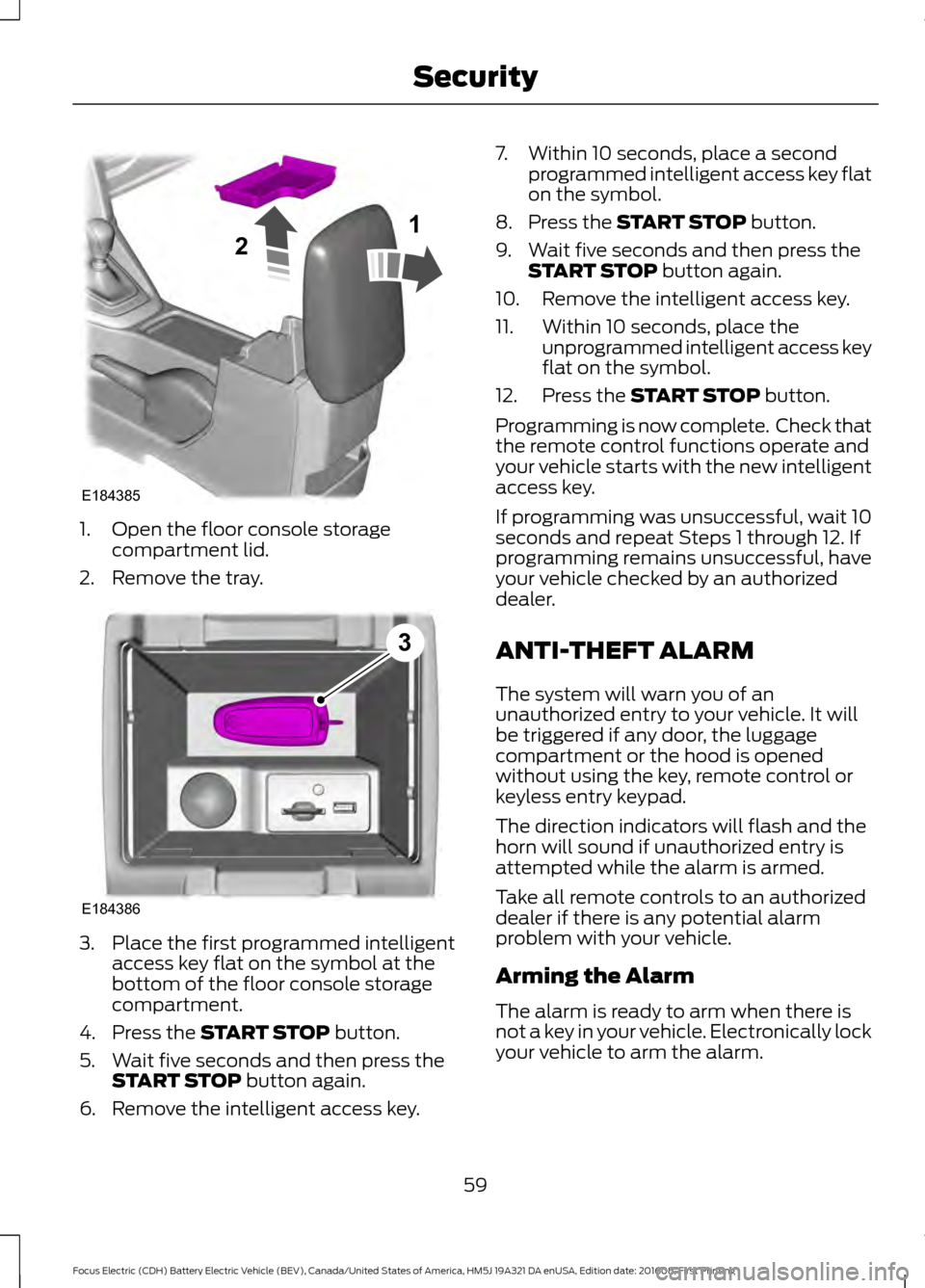
1. Open the floor console storage
compartment lid.
2. Remove the tray. 3. Place the first programmed intelligent
access key flat on the symbol at the
bottom of the floor console storage
compartment.
4. Press the START STOP button.
5. Wait five seconds and then press the START STOP
button again.
6. Remove the intelligent access key. 7. Within 10 seconds, place a second
programmed intelligent access key flat
on the symbol.
8. Press the
START STOP button.
9. Wait five seconds and then press the START STOP
button again.
10. Remove the intelligent access key.
11. Within 10 seconds, place the unprogrammed intelligent access key
flat on the symbol.
12. Press the
START STOP button.
Programming is now complete. Check that
the remote control functions operate and
your vehicle starts with the new intelligent
access key.
If programming was unsuccessful, wait 10
seconds and repeat Steps 1 through 12. If
programming remains unsuccessful, have
your vehicle checked by an authorized
dealer.
ANTI-THEFT ALARM
The system will warn you of an
unauthorized entry to your vehicle. It will
be triggered if any door, the luggage
compartment or the hood is opened
without using the key, remote control or
keyless entry keypad.
The direction indicators will flash and the
horn will sound if unauthorized entry is
attempted while the alarm is armed.
Take all remote controls to an authorized
dealer if there is any potential alarm
problem with your vehicle.
Arming the Alarm
The alarm is ready to arm when there is
not a key in your vehicle. Electronically lock
your vehicle to arm the alarm.
59
Focus Electric (CDH) Battery Electric Vehicle (BEV), Canada/United States of America, HM5J 19A321 DA enUSA, Edition date: 201608, First Printing SecurityE184385
21 E184386
3
Page 63 of 367
Disarming the Alarm
Disarm the alarm by any of the following
actions:
•
Unlock the doors or luggage
compartment with the remote control
or keyless entry keypad.
• Switch your vehicle on or start your
vehicle.
• Use a key in the driver door to unlock
your vehicle, then switch your vehicle
on within 12 seconds.
Note: Pressing the panic button on the
remote control will stop the horn and signal
indicators, but will not disarm the system.
60
Focus Electric (CDH) Battery Electric Vehicle (BEV), Canada/United States of America, HM5J 19A321 DA enUSA, Edition date: 201608, First Printing Security
Page 79 of 367
•
State of Charge - The state of charge
for the high voltage battery is shown
as a colored fill. The fill color is
normally blue. When a low battery
condition is reached the fill turns
amber. When the battery is depleted
the fill turns red. See the Information
Messages section for details on
associated Low Battery and Depleted
Battery warnings.
• Distance to Empty - The Range
Estimate in the Battery Gauge is
personalized to your key. This is the
estimated distance your vehicle can
travel before needing a recharge. The
Range Estimate is based on your
typical energy usage while driving. This
includes your Drive Habits as well as
your use of accessories such as Climate
Control. Your Range Estimate may
change immediately when you change
your Climate Control settings.
• Regen Display - A circular arrow
symbol appears in the center of the
Battery Gauge when energy is being
recaptured through the regenerative
braking system.
Brake Coach Display
The Brake Coach appears after your
vehicle has come to a stop. It coaches you
to brake in a manner which maximizes the
amount of energy returned through the
regenerative braking system. The percent
displayed is an indication of the
regenerative braking efficiency with 100%
representing the maximum amount of
energy recovery. If desired, this feature can
be disabled in the Display section of the
Settings menu. Trip Summary and Lifetime Summary
These summaries display after switching
off your vehicle. The Trip Summary
appears first, followed by the Lifetime
Summary. You can toggle between these
displays using the up and down arrow keys
on the left hand steering wheel controls.
Trip Summary data is from the last power
cycle, while Lifetime Summary data is
cumulative from the last Lifetime
Summary reset done through the Settings
menu in the information display.
Trip Summary:
•
Distance - The total distance traveled,
and regen distance are displayed.
Regen distance is the estimated range
gained from energy recaptured through
regenerative braking.
• Energy Used - The total kilowatt hours
and average watt hours per unit of
distance are displayed. The average
watt hours per mi (km) will be shown
in blue if less than (better than) the
lifetime average watt hours per mi
(km).
• Brake Score - The percentage of
braking energy recaptured and returned
to the high voltage battery through
regenerative braking. The brake score
will be shown in blue if greater than
(better than) the lifetime brake score.
Lifetime Summary:
• Distance - The total regen distance,
which is the estimated range gained
from energy recaptured through
regenerative braking.
• Energy Used - The average watt hours
per mi (km).
• Brake Score - The average percentage
of braking energy recaptured and
returned to the high voltage battery
through regenerative braking.
76
Focus Electric (CDH) Battery Electric Vehicle (BEV), Canada/United States of America, HM5J 19A321 DA enUSA, Edition date: 201608, First Printing Instrument Cluster
Page 82 of 367
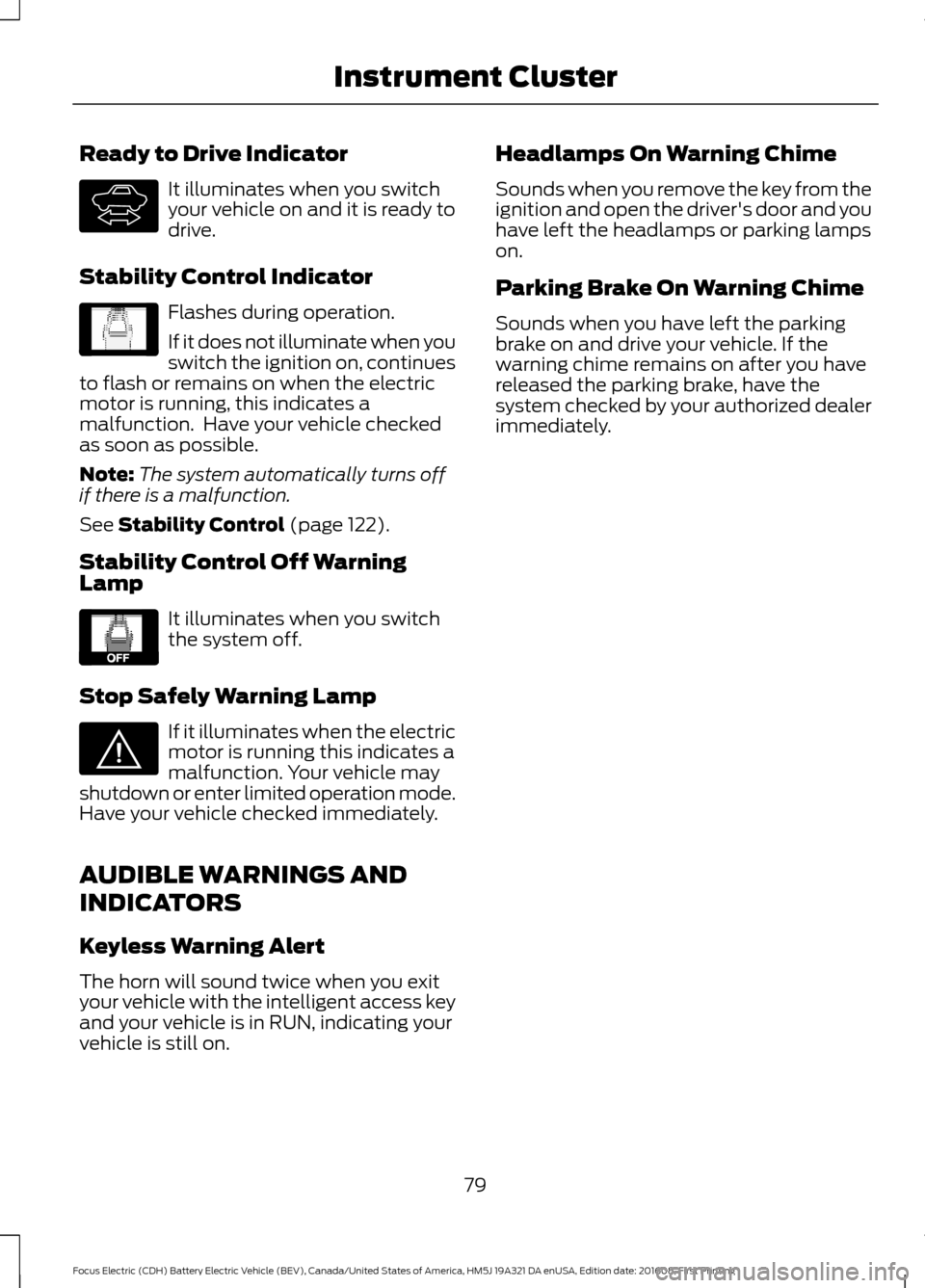
Ready to Drive Indicator
It illuminates when you switch
your vehicle on and it is ready to
drive.
Stability Control Indicator Flashes during operation.
If it does not illuminate when you
switch the ignition on, continues
to flash or remains on when the electric
motor is running, this indicates a
malfunction. Have your vehicle checked
as soon as possible.
Note: The system automatically turns off
if there is a malfunction.
See Stability Control (page 122).
Stability Control Off Warning
Lamp It illuminates when you switch
the system off.
Stop Safely Warning Lamp If it illuminates when the electric
motor is running this indicates a
malfunction. Your vehicle may
shutdown or enter limited operation mode.
Have your vehicle checked immediately.
AUDIBLE WARNINGS AND
INDICATORS
Keyless Warning Alert
The horn will sound twice when you exit
your vehicle with the intelligent access key
and your vehicle is in RUN, indicating your
vehicle is still on. Headlamps On Warning Chime
Sounds when you remove the key from the
ignition and open the driver's door and you
have left the headlamps or parking lamps
on.
Parking Brake On Warning Chime
Sounds when you have left the parking
brake on and drive your vehicle. If the
warning chime remains on after you have
released the parking brake, have the
system checked by your authorized dealer
immediately.
79
Focus Electric (CDH) Battery Electric Vehicle (BEV), Canada/United States of America, HM5J 19A321 DA enUSA, Edition date: 201608, First Printing Instrument ClusterE144692 E138639 E130458 E144693
Page 87 of 367
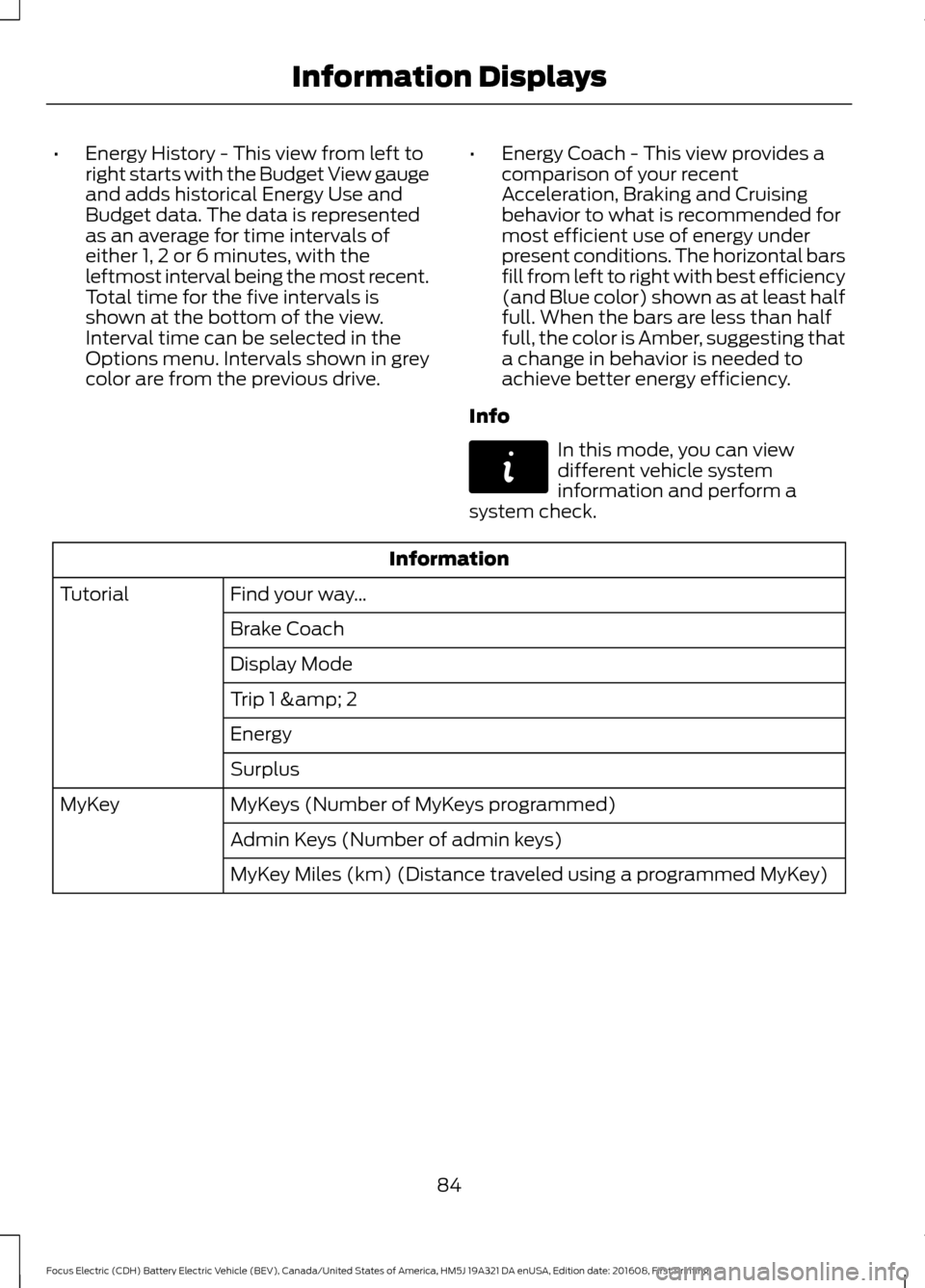
•
Energy History - This view from left to
right starts with the Budget View gauge
and adds historical Energy Use and
Budget data. The data is represented
as an average for time intervals of
either 1, 2 or 6 minutes, with the
leftmost interval being the most recent.
Total time for the five intervals is
shown at the bottom of the view.
Interval time can be selected in the
Options menu. Intervals shown in grey
color are from the previous drive. •
Energy Coach - This view provides a
comparison of your recent
Acceleration, Braking and Cruising
behavior to what is recommended for
most efficient use of energy under
present conditions. The horizontal bars
fill from left to right with best efficiency
(and Blue color) shown as at least half
full. When the bars are less than half
full, the color is Amber, suggesting that
a change in behavior is needed to
achieve better energy efficiency.
Info In this mode, you can view
different vehicle system
information and perform a
system check. Information
Find your way …
Tutorial
Brake Coach
Display Mode
Trip 1 & 2
Energy
Surplus
MyKeys (Number of MyKeys programmed)
MyKey
Admin Keys (Number of admin keys)
MyKey Miles (km) (Distance traveled using a programmed MyKey)
84
Focus Electric (CDH) Battery Electric Vehicle (BEV), Canada/United States of America, HM5J 19A321 DA enUSA, Edition date: 201608, First Printing Information DisplaysE144642
Page 88 of 367
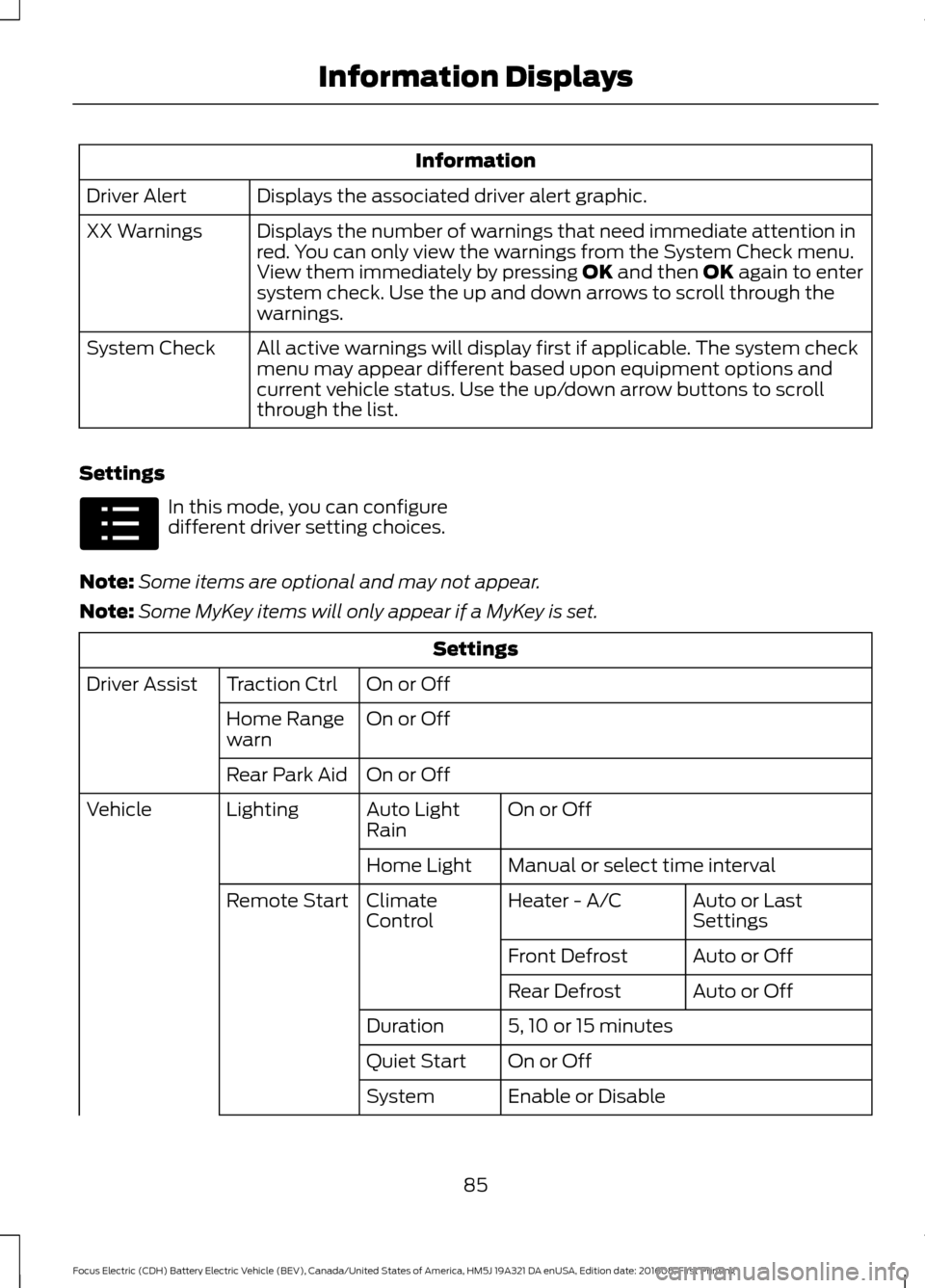
Information
Displays the associated driver alert graphic.
Driver Alert
Displays the number of warnings that need immediate attention in
red. You can only view the warnings from the System Check menu.
View them immediately by pressing OK and then OK again to enter
system check. Use the up and down arrows to scroll through the
warnings.
XX Warnings
All active warnings will display first if applicable. The system check
menu may appear different based upon equipment options and
current vehicle status. Use the up/down arrow buttons to scroll
through the list.
System Check
Settings In this mode, you can configure
different driver setting choices.
Note: Some items are optional and may not appear.
Note: Some MyKey items will only appear if a MyKey is set. Settings
On or Off
Traction Ctrl
Driver Assist
On or Off
Home Range
warn
On or Off
Rear Park Aid
On or Off
Auto Light
Rain
Lighting
Vehicle
Manual or select time interval
Home Light
Auto or Last
Settings
Heater - A/C
Climate
Control
Remote Start
Auto or Off
Front Defrost
Auto or Off
Rear Defrost
5, 10 or 15 minutes
Duration
On or Off
Quiet Start
Enable or Disable
System
85
Focus Electric (CDH) Battery Electric Vehicle (BEV), Canada/United States of America, HM5J 19A321 DA enUSA, Edition date: 201608, First Printing Information DisplaysE100023
Page 89 of 367
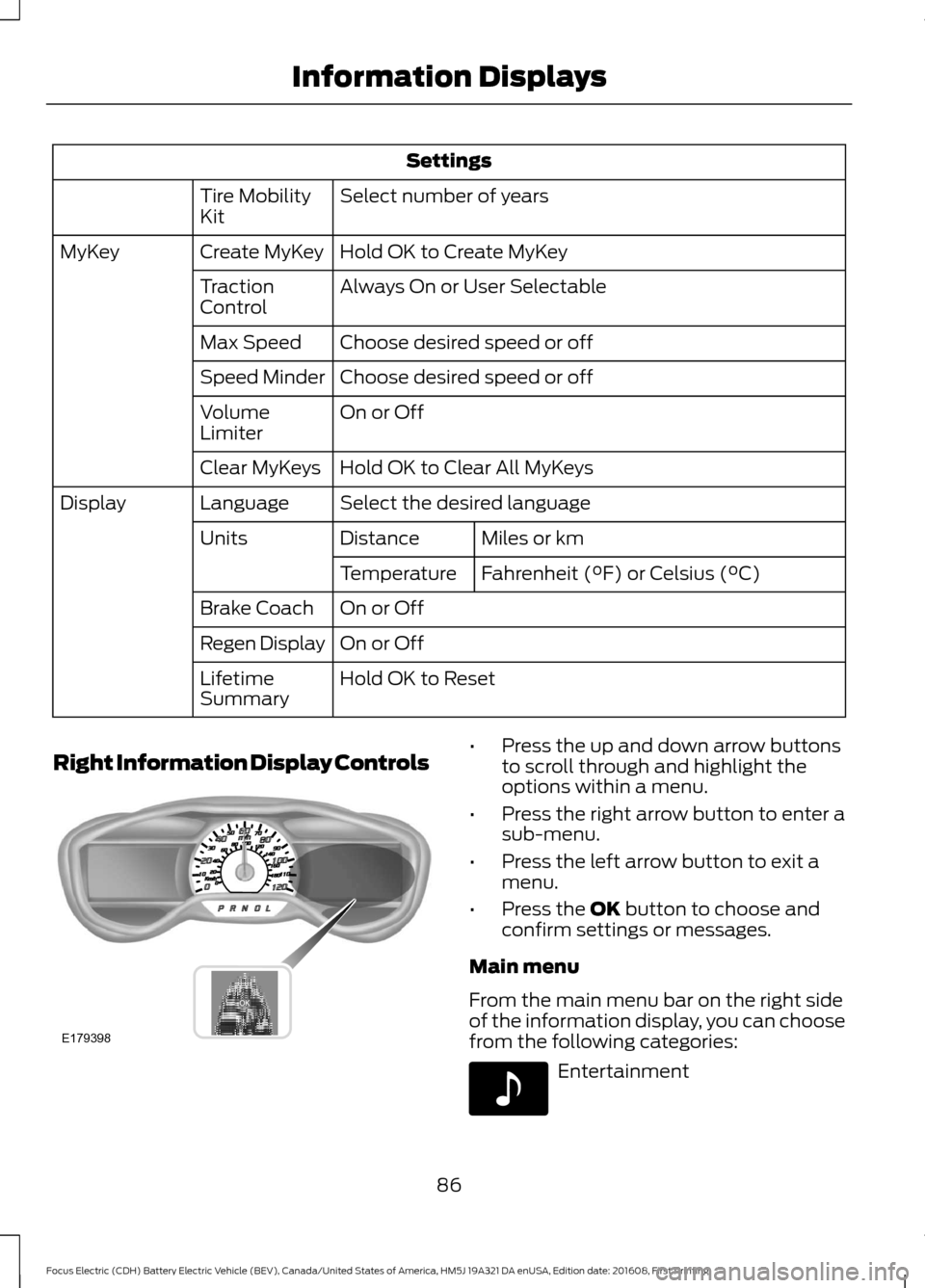
Settings
Select number of years
Tire Mobility
Kit
Hold OK to Create MyKey
Create MyKey
MyKey
Always On or User Selectable
Traction
Control
Choose desired speed or off
Max Speed
Choose desired speed or off
Speed Minder
On or Off
Volume
Limiter
Hold OK to Clear All MyKeys
Clear MyKeys
Select the desired language
Language
Display
Miles or km
Distance
Units
Fahrenheit (°F) or Celsius (°C)
Temperature
On or Off
Brake Coach
On or Off
Regen Display
Hold OK to Reset
Lifetime
Summary
Right Information Display Controls •
Press the up and down arrow buttons
to scroll through and highlight the
options within a menu.
• Press the right arrow button to enter a
sub-menu.
• Press the left arrow button to exit a
menu.
• Press the OK button to choose and
confirm settings or messages.
Main menu
From the main menu bar on the right side
of the information display, you can choose
from the following categories: Entertainment
86
Focus Electric (CDH) Battery Electric Vehicle (BEV), Canada/United States of America, HM5J 19A321 DA enUSA, Edition date: 201608, First Printing Information DisplaysE179398 E142611
Page 91 of 367
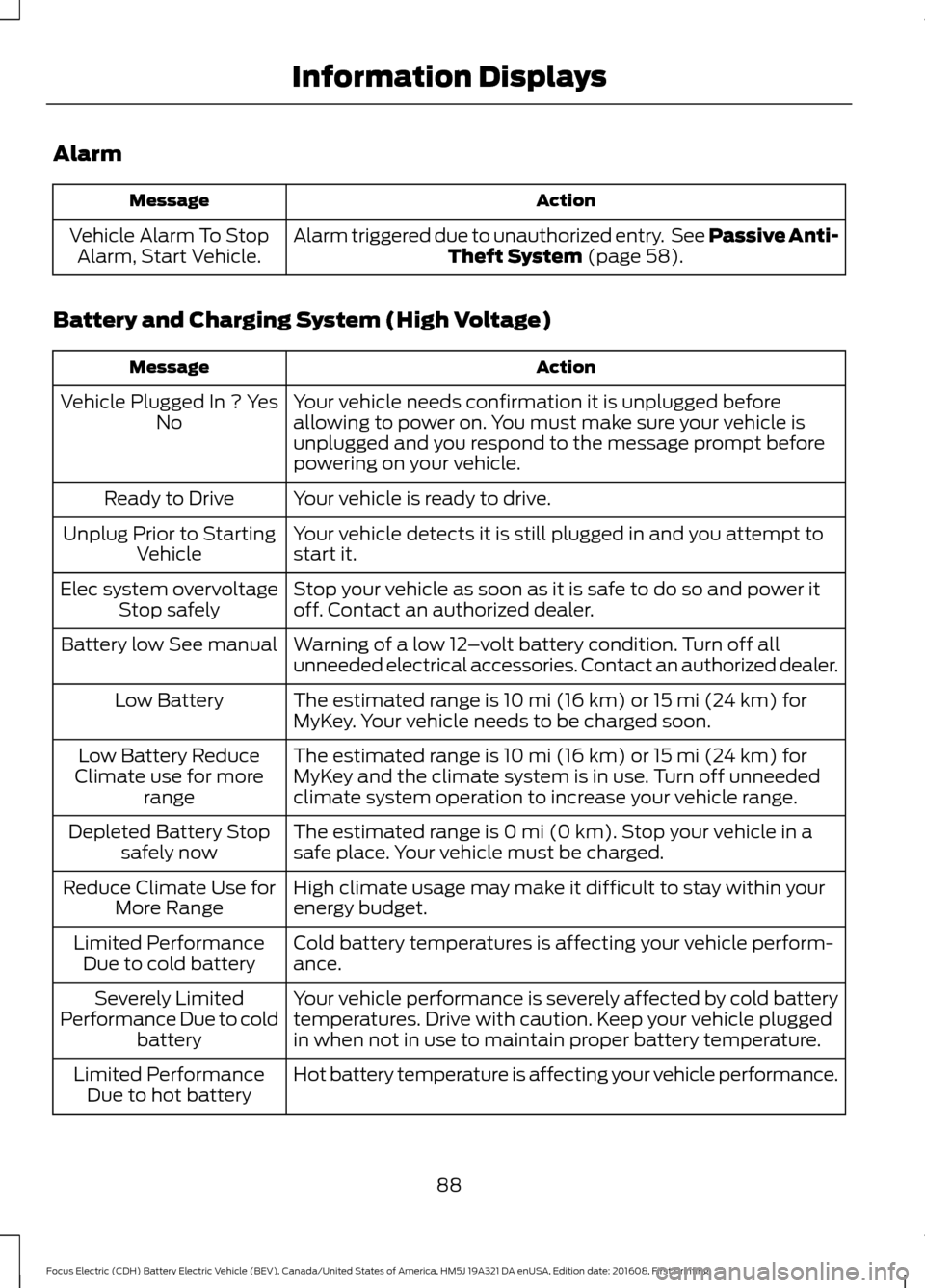
Alarm
Action
Message
Alarm triggered due to unauthorized entry. See Passive Anti-Theft System (page 58).
Vehicle Alarm To Stop
Alarm, Start Vehicle.
Battery and Charging System (High Voltage) Action
Message
Your vehicle needs confirmation it is unplugged before
allowing to power on. You must make sure your vehicle is
unplugged and you respond to the message prompt before
powering on your vehicle.
Vehicle Plugged In ? Yes
No
Your vehicle is ready to drive.
Ready to Drive
Your vehicle detects it is still plugged in and you attempt to
start it.
Unplug Prior to Starting
Vehicle
Stop your vehicle as soon as it is safe to do so and power it
off. Contact an authorized dealer.
Elec system overvoltage
Stop safely
Warning of a low 12–volt battery condition. Turn off all
unneeded electrical accessories. Contact an authorized dealer.
Battery low See manual
The estimated range is 10 mi (16 km) or 15 mi (24 km) for
MyKey. Your vehicle needs to be charged soon.
Low Battery
The estimated range is 10 mi (16 km) or 15 mi (24 km) for
MyKey and the climate system is in use. Turn off unneeded
climate system operation to increase your vehicle range.
Low Battery Reduce
Climate use for more range
The estimated range is 0 mi (0 km). Stop your vehicle in a
safe place. Your vehicle must be charged.
Depleted Battery Stop
safely now
High climate usage may make it difficult to stay within your
energy budget.
Reduce Climate Use for
More Range
Cold battery temperatures is affecting your vehicle perform-
ance.
Limited Performance
Due to cold battery
Your vehicle performance is severely affected by cold battery
temperatures. Drive with caution. Keep your vehicle plugged
in when not in use to maintain proper battery temperature.
Severely Limited
Performance Due to cold battery
Hot battery temperature is affecting your vehicle performance.
Limited Performance
Due to hot battery
88
Focus Electric (CDH) Battery Electric Vehicle (BEV), Canada/United States of America, HM5J 19A321 DA enUSA, Edition date: 201608, First Printing Information Displays