2017 FORD FIESTA pairing phone
[x] Cancel search: pairing phonePage 372 of 450
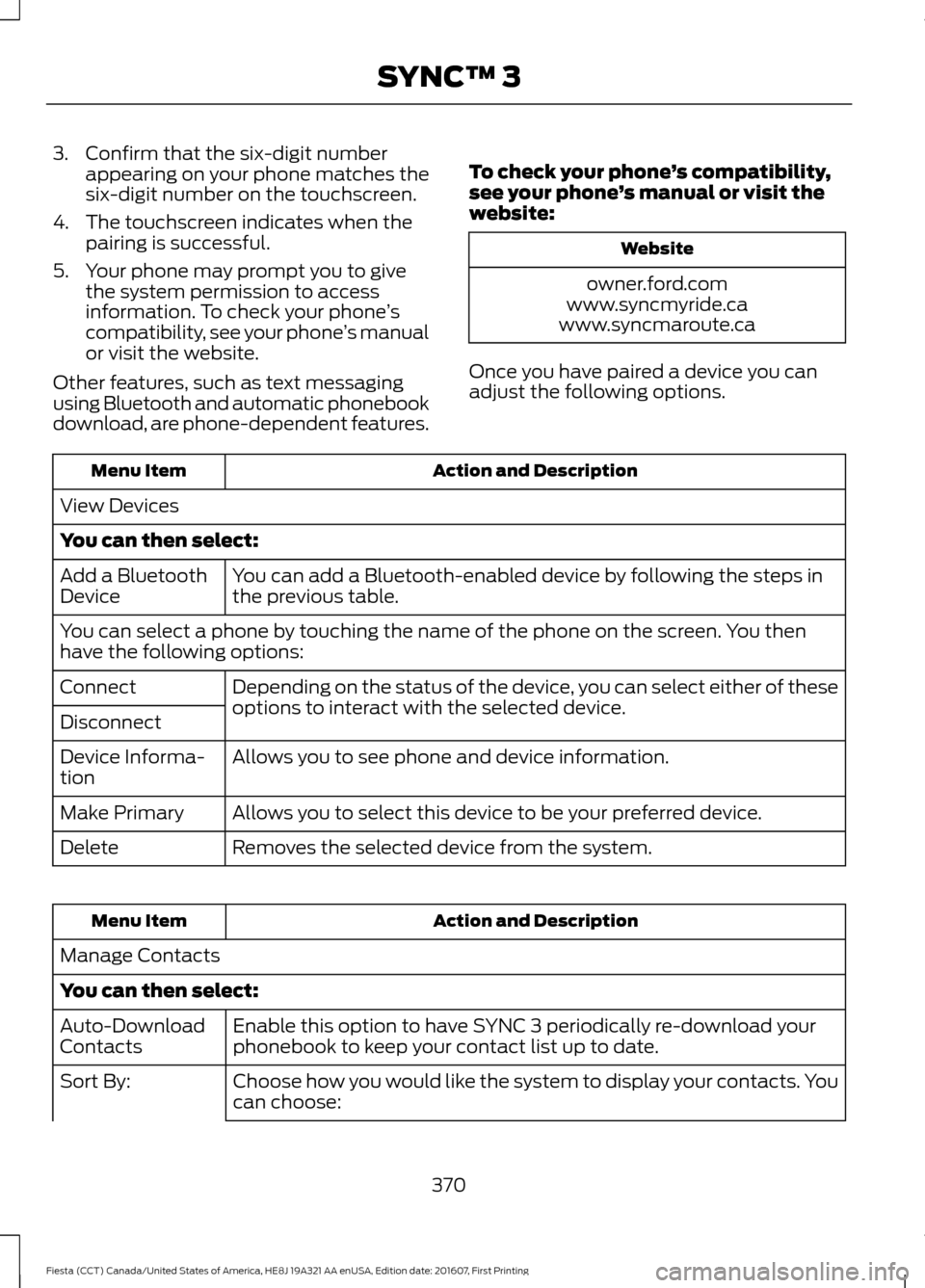
3. Confirm that the six-digit number
appearing on your phone matches the
six-digit number on the touchscreen.
4. The touchscreen indicates when the pairing is successful.
5. Your phone may prompt you to give the system permission to access
information. To check your phone ’s
compatibility, see your phone ’s manual
or visit the website.
Other features, such as text messaging
using Bluetooth and automatic phonebook
download, are phone-dependent features. To check your phone
’s compatibility,
see your phone ’s manual or visit the
website: Website
owner.ford.com
www.syncmyride.ca
www.syncmaroute.ca
Once you have paired a device you can
adjust the following options. Action and Description
Menu Item
View Devices
You can then select: You can add a Bluetooth-enabled device by following the steps in
the previous table.
Add a Bluetooth
Device
You can select a phone by touching the name of the phone on the screen. You then
have the following options:
Depending on the status of the device, you can select either of these
options to interact with the selected device.
Connect
Disconnect
Allows you to see phone and device information.
Device Informa-
tion
Allows you to select this device to be your preferred device.
Make Primary
Removes the selected device from the system.
Delete Action and Description
Menu Item
Manage Contacts
You can then select: Enable this option to have SYNC 3 periodically re-download your
phonebook to keep your contact list up to date.
Auto-Download
Contacts
Choose how you would like the system to display your contacts. You
can choose:
Sort By:
370
Fiesta (CCT) Canada/United States of America, HE8J 19A321 AA enUSA, Edition date: 201607, First Printing SYNC™ 3
Page 384 of 450
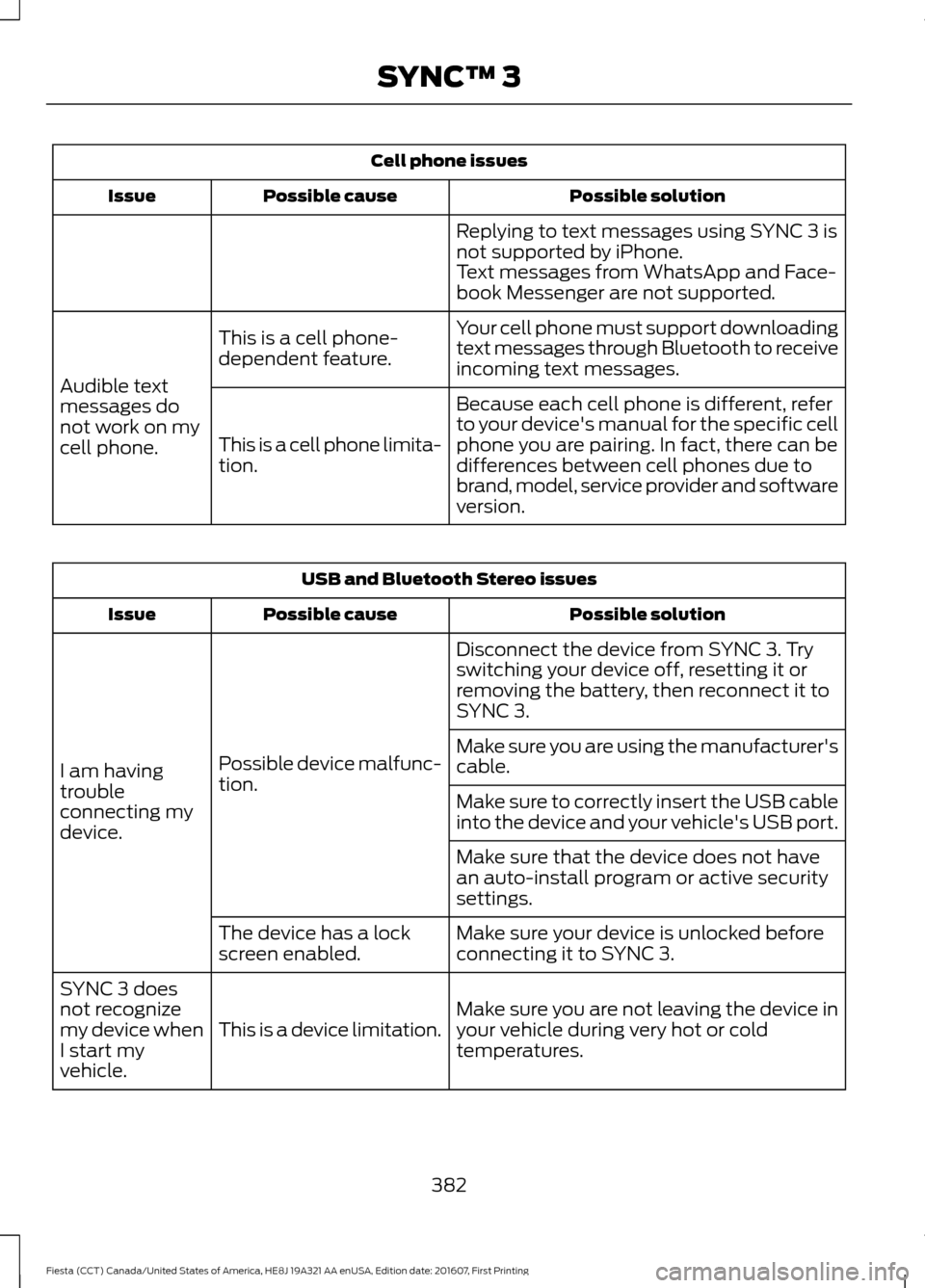
Cell phone issues
Possible solution
Possible cause
Issue
Replying to text messages using SYNC 3 is
not supported by iPhone.
Text messages from WhatsApp and Face-
book Messenger are not supported.
Your cell phone must support downloading
text messages through Bluetooth to receive
incoming text messages.
This is a cell phone-
dependent feature.
Audible text
messages do
not work on my
cell phone. Because each cell phone is different, refer
to your device's manual for the specific cell
phone you are pairing. In fact, there can be
differences between cell phones due to
brand, model, service provider and software
version.
This is a cell phone limita-
tion. USB and Bluetooth Stereo issues
Possible solution
Possible cause
Issue
Disconnect the device from SYNC 3. Try
switching your device off, resetting it or
removing the battery, then reconnect it to
SYNC 3.
Possible device malfunc-
tion.
I am having
trouble
connecting my
device. Make sure you are using the manufacturer's
cable.
Make sure to correctly insert the USB cable
into the device and your vehicle's USB port.
Make sure that the device does not have
an auto-install program or active security
settings.
Make sure your device is unlocked before
connecting it to SYNC 3.
The device has a lock
screen enabled.
Make sure you are not leaving the device in
your vehicle during very hot or cold
temperatures.
This is a device limitation.
SYNC 3 does
not recognize
my device when
I start my
vehicle.
382
Fiesta (CCT) Canada/United States of America, HE8J 19A321 AA enUSA, Edition date: 201607, First Printing SYNC™ 3
Page 447 of 450
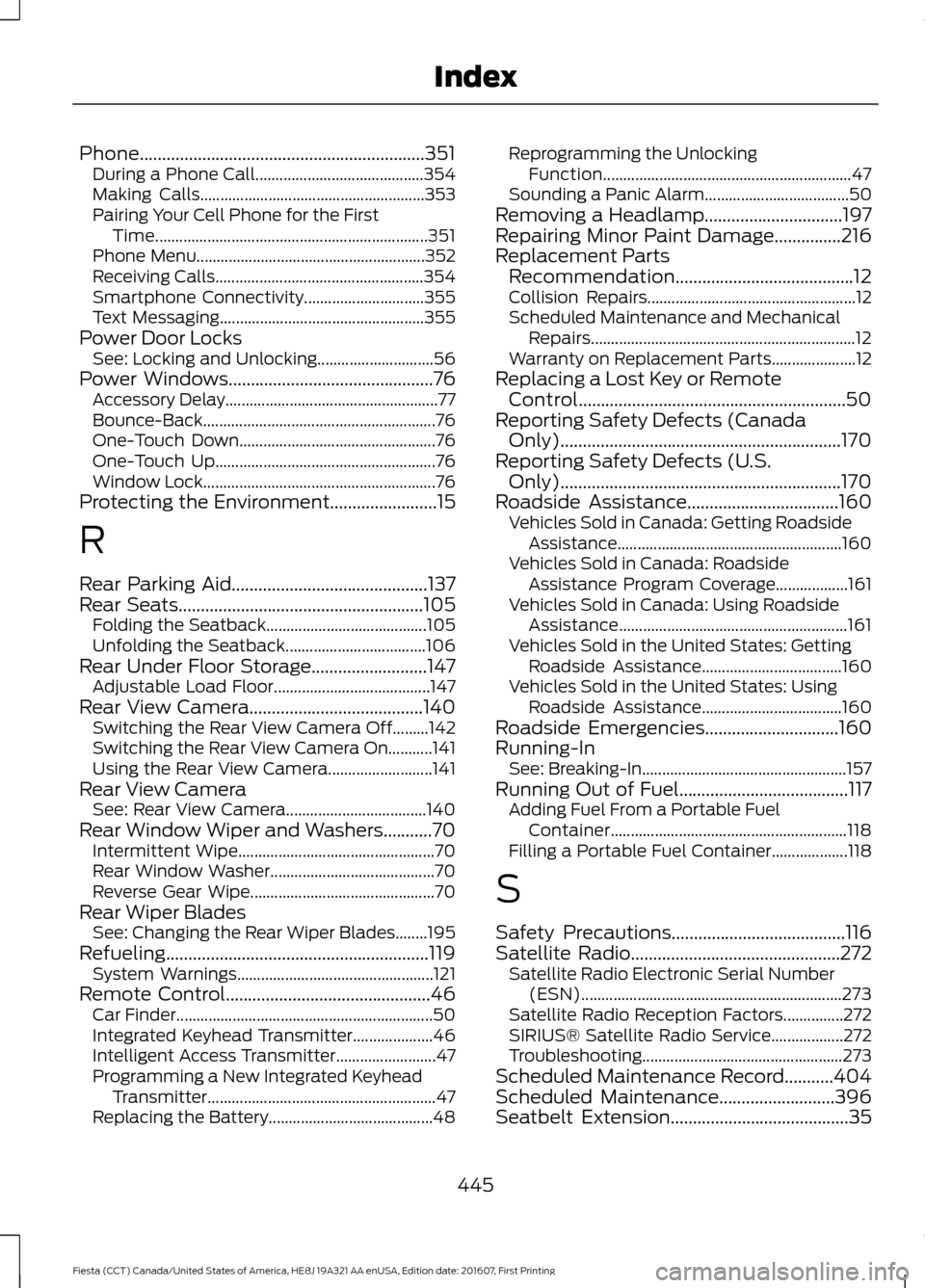
Phone................................................................351
During a Phone Call.......................................... 354
Making Calls........................................................ 353
Pairing Your Cell Phone for the First Time.................................................................... 351
Phone Menu......................................................... 352
Receiving Calls.................................................... 354
Smartphone Connectivity.............................. 355
Text Messaging................................................... 355
Power Door Locks See: Locking and Unlocking............................. 56
Power Windows..............................................76 Accessory Delay..................................................... 77
Bounce-Back.......................................................... 76
One-Touch Down................................................. 76
One-Touch Up....................................................... 76
Window Lock.......................................................... 76
Protecting the Environment........................15
R
Rear Parking Aid
............................................137
Rear Seats.......................................................105
Folding the Seatback........................................ 105
Unfolding the Seatback................................... 106
Rear Under Floor Storage..........................147 Adjustable Load Floor....................................... 147
Rear View Camera.......................................140 Switching the Rear View Camera Off.........142
Switching the Rear View Camera On...........141
Using the Rear View Camera.......................... 141
Rear View Camera See: Rear View Camera................................... 140
Rear Window Wiper and Washers...........70 Intermittent Wipe................................................. 70
Rear Window Washer......................................... 70
Reverse Gear Wipe.............................................. 70
Rear Wiper Blades See: Changing the Rear Wiper Blades........195
Refueling...........................................................119 System Warnings................................................. 121
Remote Control
..............................................46
Car Finder................................................................ 50
Integrated Keyhead Transmitter.................... 46
Intelligent Access Transmitter......................... 47
Programming a New Integrated Keyhead Transmitter......................................................... 47
Replacing the Battery......................................... 48Reprogramming the Unlocking
Function.............................................................. 47
Sounding a Panic Alarm.................................... 50
Removing a Headlamp
...............................197
Repairing Minor Paint Damage...............216
Replacement Parts Recommendation........................................12
Collision Repairs.................................................... 12
Scheduled Maintenance and Mechanical Repairs.................................................................. 12
Warranty on Replacement Parts..................... 12
Replacing a Lost Key or Remote Control............................................................50
Reporting Safety Defects (Canada Only)...............................................................170
Reporting Safety Defects (U.S. Only)...............................................................170
Roadside Assistance..................................160 Vehicles Sold in Canada: Getting Roadside
Assistance........................................................ 160
Vehicles Sold in Canada: Roadside Assistance Program Coverage.................. 161
Vehicles Sold in Canada: Using Roadside Assistance......................................................... 161
Vehicles Sold in the United States: Getting Roadside Assistance................................... 160
Vehicles Sold in the United States: Using Roadside Assistance................................... 160
Roadside Emergencies
..............................160
Running-In See: Breaking-In................................................... 157
Running Out of Fuel
......................................117
Adding Fuel From a Portable Fuel
Container........................................................... 118
Filling a Portable Fuel Container................... 118
S
Safety Precautions
.......................................116
Satellite Radio...............................................272
Satellite Radio Electronic Serial Number
(ESN)................................................................. 273
Satellite Radio Reception Factors...............272
SIRIUS® Satellite Radio Service.................. 272
Troubleshooting.................................................. 273
Scheduled Maintenance Record
...........404
Scheduled Maintenance..........................396
Seatbelt Extension........................................35
445
Fiesta (CCT) Canada/United States of America, HE8J 19A321 AA enUSA, Edition date: 201607, First Printing Index
Page 449 of 450
Information Contained on the Tire
Sidewall............................................................ 222
Temperature A B C............................................ 220
Traction AA A B C.............................................. 220
Treadwear............................................................ 220
Tire Pressure Monitoring System...........234 Changing Tires With a Tire Pressure
Monitoring System....................................... 235
Understanding Your Tire Pressure Monitoring System ...................................... 236
Tires See: Wheels and Tires...................................... 219
Towing a Trailer.............................................154
Towing the Vehicle on Four Wheels...........................................................154
Emergency Towing............................................. 154
Recreational Towing.......................................... 155
Towing..............................................................154
Traction Control............................................134 Principle of Operation....................................... 134
Transmission Code Designation............249
Transmission Specifications - 1.0L EcoBoost™, Automatic
Transmission..............................................243
Transmission Specifications - 1.6L Duratec-16V Ti-VCT (Sigma),
Automatic Transmission
........................244
Transmission Specifications - 5-Speed Manual Transmission
..............................245
Transmission..................................................125
Transmission See: Transmission............................................... 125
Transporting the Vehicle............................154
Trip Computer
.................................................86
U
Under Hood Overview - 1.0L EcoBoost™..................................................184
Under Hood Overview - 1.6L Duratec-16V Ti-VCT (Sigma)
.........................................185
USB Port..........................................................275
Using Cruise Control
....................................143
Switching Cruise Control Off......................... 144
Switching Cruise Control On.......................... 143
Using MyKey With Remote Start Systems..........................................................54
Using Snow Chains.....................................234 Using Stability Control...............................136
Using Summer Tires
...................................234
Using SYNC™ With Your Media Player............................................................304
Accessing Your Play Menu............................. 309
Connecting Your Digital Media Player to the USB Port.......................................................... 304
Media Menu Features....................................... 307
Media Voice Commands................................ 306
System Settings................................................... 311
What's Playing?................................................. 305
Using SYNC™ With Your Phone.............281 Accessing Features Through the Phone
Menu.................................................................. 285
Accessing Your Phone Settings................... 290
Making a Call....................................................... 284
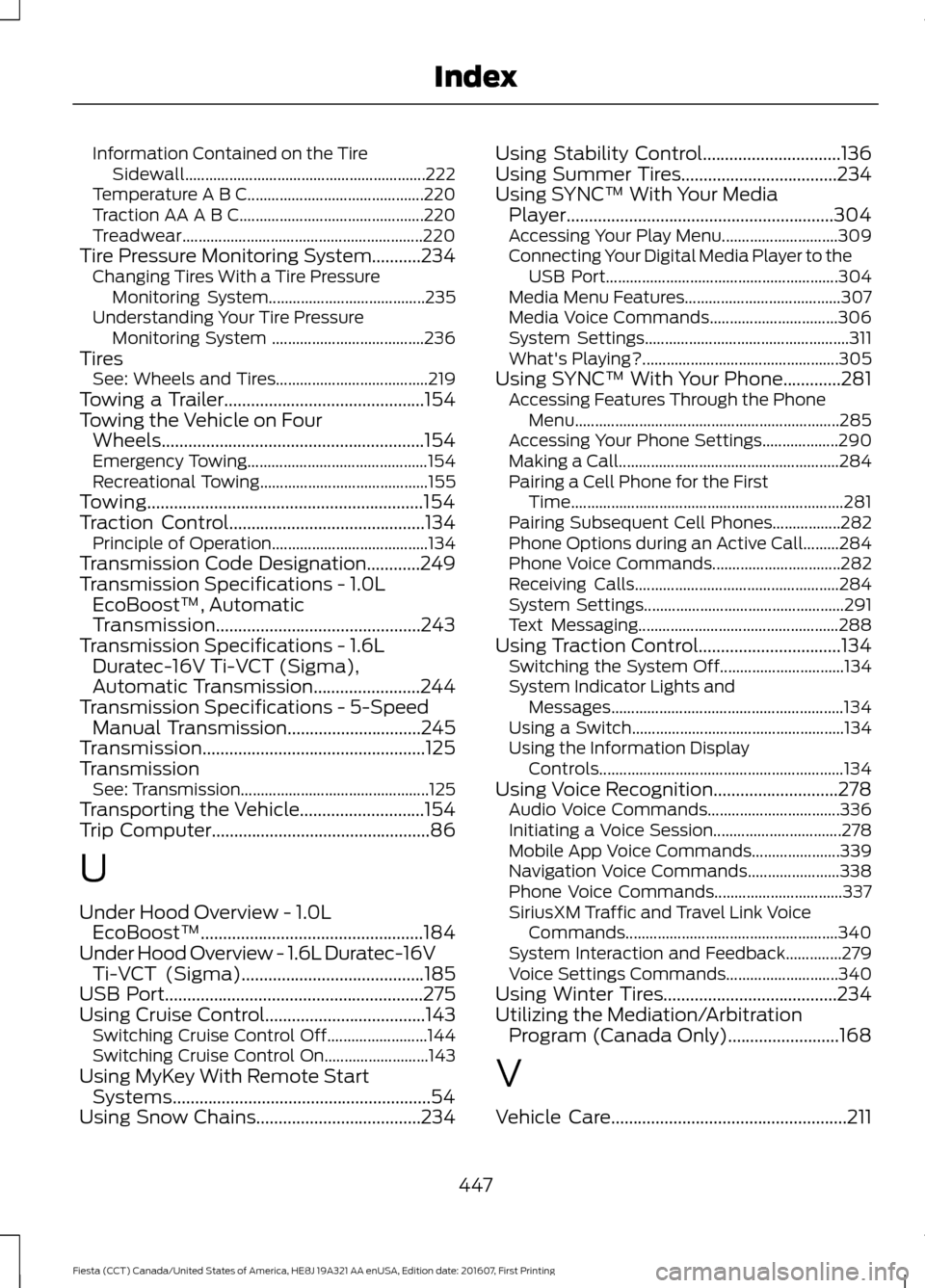
Pairing a Cell Phone for the First Time.................................................................... 281
Pairing Subsequent Cell Phones.................282
Phone Options during an Active Call.........284
Phone Voice Commands................................ 282
Receiving Calls................................................... 284
System Settings.................................................. 291
Text Messaging.................................................. 288
Using Traction Control................................134 Switching the System Off............................... 134
System Indicator Lights and Messages.......................................................... 134
Using a Switch..................................................... 134
Using the Information Display Controls............................................................. 134
Using Voice Recognition............................278 Audio Voice Commands................................. 336
Initiating a Voice Session................................ 278
Mobile App Voice Commands...................... 339
Navigation Voice Commands....................... 338
Phone Voice Commands................................ 337
SiriusXM Traffic and Travel Link Voice Commands..................................................... 340
System Interaction and Feedback..............279
Voice Settings Commands............................ 340
Using Winter Tires.......................................234
Utilizing the Mediation/Arbitration Program (Canada Only).........................168
V
Vehicle Care
.....................................................211
447
Fiesta (CCT) Canada/United States of America, HE8J 19A321 AA enUSA, Edition date: 201607, First Printing Index