2017 FORD FIESTA alarm
[x] Cancel search: alarmPage 3 of 450

Introduction
About This Manual...........................................7
Symbols Glossary
.............................................7
Data Recording
..................................................9
California Proposition 65..............................11
Perchlorate.........................................................11
Ford Credit
..........................................................11
Replacement Parts Recommendation.......................................12
Special Notices................................................12
Mobile Communications Equipment.....................................................13
Export Unique Options..................................13
Environment
Protecting the Environment........................15
Child Safety
General Information
.......................................16
Installing Child Restraints
.............................17
Booster Seats
..................................................23
Child Restraint Positioning.........................25
Child Safety Locks..........................................27
Seatbelts
Principle of Operation..................................29
Fastening the Seatbelts..............................30
Seatbelt Height Adjustment......................32
Seatbelt Warning Lamp and Indicator Chime
..............................................................32
Seatbelt Reminder
.........................................33
Child Restraint and Seatbelt Maintenance
................................................35
Seatbelt Extension
........................................35
Personal Safety System ™
Personal Safety System ™
..........................36Supplementary Restraints
System
Principle of Operation...................................37
Driver and Passenger Airbags...................38
Front Passenger Sensing System............39
Side Airbags
......................................................41
Driver Knee Airbag.........................................42
Side Curtain Airbags
.....................................43
Crash Sensors and Airbag Indicator.......44
Airbag Disposal...............................................45
Keys and Remote Controls
General Information on Radio Frequencies.................................................46
Remote Control
..............................................46
Replacing a Lost Key or Remote Control...........................................................50
MyKey ™
Principle of Operation
...................................51
Creating a MyKey............................................52
Clearing All MyKeys.......................................52
Checking MyKey System Status...............54
Using MyKey With Remote Start Systems.........................................................54
MyKey Troubleshooting
...............................54
Doors and Locks
Locking and Unlocking
.................................56
Manual Liftgate
..............................................59
Keyless Entry
...................................................60
Interior Luggage Compartment Release..........................................................62
Security
Passive Anti-Theft System........................64
Anti-Theft Alarm
............................................65
Steering Wheel
Adjusting the Steering Wheel....................67
1
Fiesta (CCT) Canada/United States of America, HE8J 19A321 AA enUSA, Edition date: 201607, First Printing Table of Contents
Page 10 of 450

Cabin air filter
Check fuel cap
Child safety door lock or unlock
Child seat lower anchor
Child seat tether anchor
Cruise control
Do not open when hot
Engine air filter
Engine coolant
Engine coolant temperature
Engine oil
Explosive gas
Fan warning
Fasten seatbelt
Flammable Front airbag
Front fog lamps
Fuel pump reset
Fuse compartment
Hazard warning flashers
Heated rear window
Heated windshield
Interior luggage compartment
release
Jack
Keep out of reach of children
Lighting control
Low tire pressure warning
Maintain correct fluid level
Note operating instructions
Panic alarm
8
Fiesta (CCT) Canada/United States of America, HE8J 19A321 AA enUSA, Edition date: 201607, First Printing Introduction E71340 E71880 E231160 E67017 E161353
Page 48 of 450
GENERAL INFORMATION ON
RADIO FREQUENCIES
This device complies with Part 15 of the
FCC Rules and with Industry Canada
license-exempt RSS standard(s).
Operation is subject to the following two
conditions: (1) This device may not cause
harmful interference, and (2) This device
must accept any interference received,
including interference that may cause
undesired operation.
Note:
Changes or modifications not
expressively approved by the party
responsible for compliance could void the
user's authority to operate the equipment.
The term IC before the radio certification
number only signifies that Industry Canada
technical specifications were met.
The typical operating range for your
transmitter is approximately
33 ft (10 m).
Vehicles with the remote start feature will
have a greater range.
One of the following could cause a
decrease in operating range:
• Weather conditions.
• Nearby radio towers.
• Structures around the vehicle.
• Other vehicles parked next to your
vehicle.
The radio frequency used by your remote
control can also be used by other radio
transmitters, for example amateur radios,
medical equipment, wireless headphones,
wireless remote controls, cell phones,
battery chargers and alarm systems. If the
frequencies are jammed, you will not be
able to use your remote control. You can
lock and unlock the doors with the key.
Note: Make sure to lock your vehicle before
leaving it unattended. Note:
If you are in range, the remote control
will operate if you press any button
unintentionally.
Note: The remote control contains sensitive
electrical components. Exposure to moisture
or impact may cause permanent damage.
Intelligent Access
(If Equipped)
The system uses a radio frequency signal
to communicate with your vehicle and
authorize your vehicle to unlock when one
of the following conditions are met:
• You activate the front exterior door
handle switch.
• You press the luggage compartment
button.
• You press a button on the transmitter.
If excessive radio frequency interference
is present in the area or if the transmitter
battery is low, you may need to
mechanically unlock your door. You can
use the mechanical key blade in your
intelligent access key to open the driver
door in this situation. See
Remote
Control (page 46).
REMOTE CONTROL
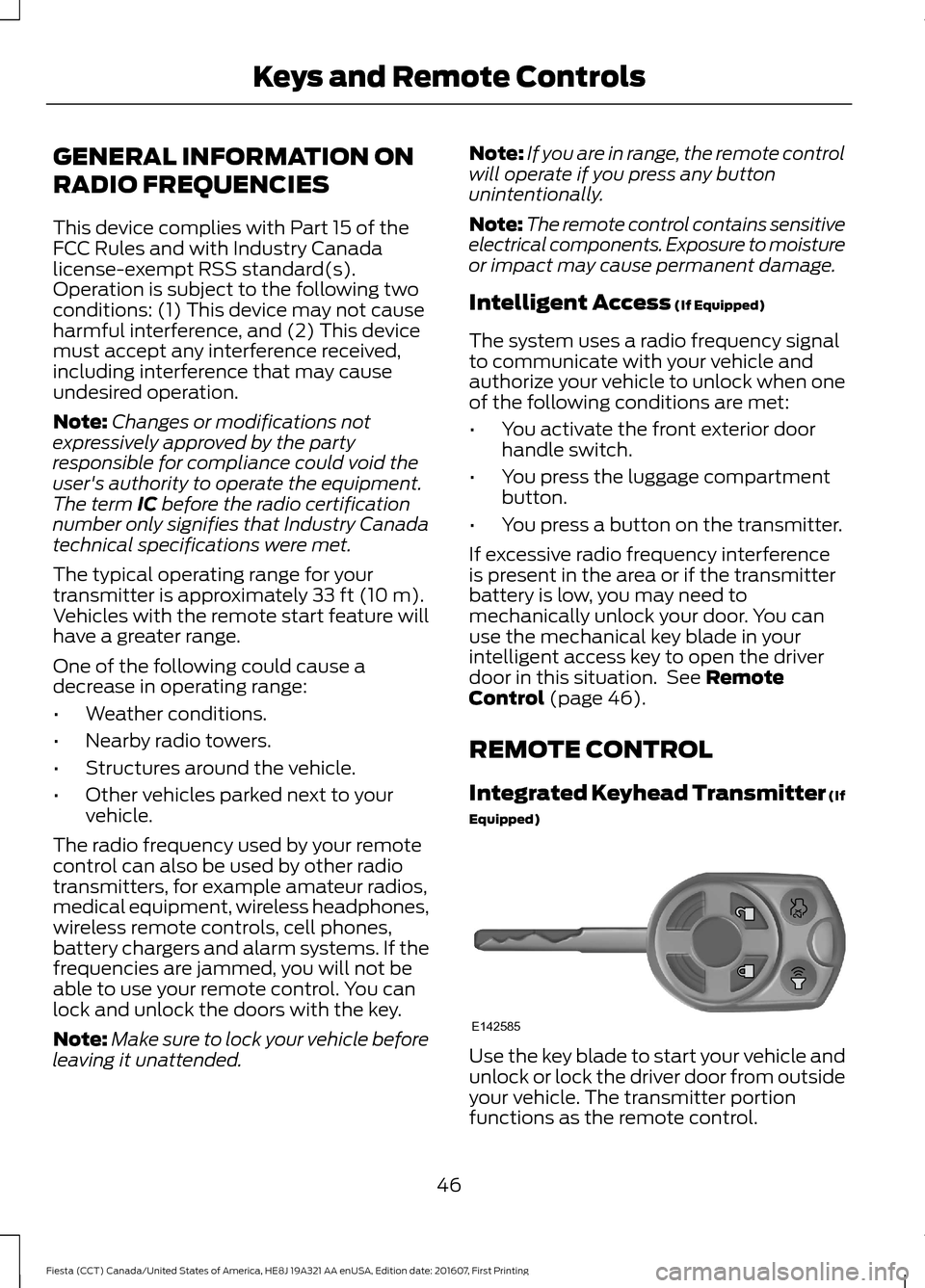
Integrated Keyhead Transmitter (If
Equipped) Use the key blade to start your vehicle and
unlock or lock the driver door from outside
your vehicle. The transmitter portion
functions as the remote control.
46
Fiesta (CCT) Canada/United States of America, HE8J 19A321 AA enUSA, Edition date: 201607, First Printing Keys and Remote ControlsE142585
Page 52 of 450
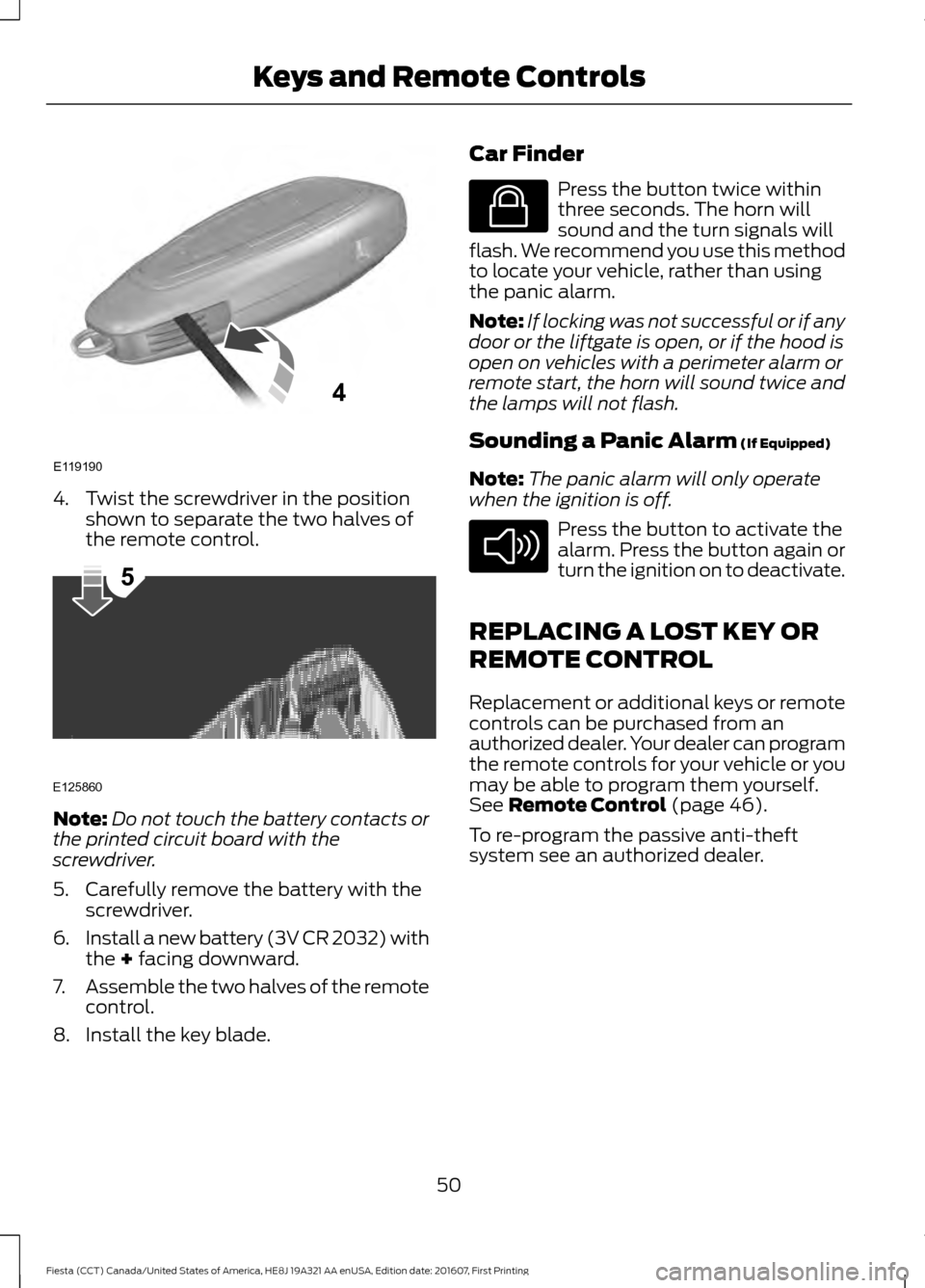
4. Twist the screwdriver in the position
shown to separate the two halves of
the remote control. Note:
Do not touch the battery contacts or
the printed circuit board with the
screwdriver.
5. Carefully remove the battery with the screwdriver.
6. Install a new battery (3V CR 2032) with
the + facing downward.
7. Assemble the two halves of the remote
control.
8. Install the key blade. Car Finder Press the button twice within
three seconds. The horn will
sound and the turn signals will
flash. We recommend you use this method
to locate your vehicle, rather than using
the panic alarm.
Note: If locking was not successful or if any
door or the liftgate is open, or if the hood is
open on vehicles with a perimeter alarm or
remote start, the horn will sound twice and
the lamps will not flash.
Sounding a Panic Alarm
(If Equipped)
Note: The panic alarm will only operate
when the ignition is off. Press the button to activate the
alarm. Press the button again or
turn the ignition on to deactivate.
REPLACING A LOST KEY OR
REMOTE CONTROL
Replacement or additional keys or remote
controls can be purchased from an
authorized dealer. Your dealer can program
the remote controls for your vehicle or you
may be able to program them yourself.
See
Remote Control (page 46).
To re-program the passive anti-theft
system see an authorized dealer.
50
Fiesta (CCT) Canada/United States of America, HE8J 19A321 AA enUSA, Edition date: 201607, First Printing Keys and Remote ControlsE119190
4 E125860
5 E138623 E138624
Page 58 of 450
LOCKING AND UNLOCKING
Remote Control
Unlocking the Doors
Note:
The driver door can be unlocked with
the key if the remote control is not
functioning.
Note: When you lock your vehicle for
several weeks, the remote control will be
switched off. Your vehicle must be unlocked
and the engine started using the key.
Unlocking and starting your vehicle once will
enable the remote control.
One-Stage Unlocking Press the button to unlock all
doors.
The direction indicators will flash.
Two-Stage Unlocking Press the button to unlock the
driver door.
Press the button again within three
seconds to unlock all doors.
The direction indicators will flash.
Reprogramming the Unlocking
Function
You can reprogram the unlocking function
using the remote control to change
between one-stage and two-stage
unlocking. See Remote Control (page
46).
Locking the Doors Press the button to lock all the
doors. The direction indicators
will flash. Press the button again within three
seconds to confirm that all the doors are
closed. The doors will lock again, the
direction indicators will flash and the horn
will sound, if all the doors and the luggage
compartment are closed.
Note:
If any door, the hood or the luggage
compartment is open on vehicles that have
an anti-theft alarm or remote start, the
direction indicators will not flash but the
horn will sound.
Automatic Re-locking
The doors will relock automatically if you
do not open a door within 45 seconds of
unlocking the doors with the remote
control. The door locks and the alarm will
return to their previous state.
Locking and Unlocking the Doors
From Inside
The power door lock control is located on
the instrument panel near the radio. Press the button to lock and
unlock all the doors. The lamp
illuminates with the doors
locked.
Locking and Unlocking the Doors
With the Key
Note: Do not leave your keys in your vehicle.
Locking With the Key
Turn the top of the key toward the front of
your vehicle.
Unlocking With the Key
Turn the top of the key toward the rear of
your vehicle to unlock the driver door. Turn
the key again within a few seconds to
unlock the remaining doors.
56
Fiesta (CCT) Canada/United States of America, HE8J 19A321 AA enUSA, Edition date: 201607, First Printing Doors and Locks E138623 E102566
Page 62 of 450
KEYLESS ENTRY
General Information
WARNING
The system may not function if the
key is close to metal objects or
electronic devices such as cell
phones. The system will not function if:
•
Your vehicle battery has no charge.
• The passive key frequencies are
jammed.
• The passive key battery has no charge.
Note: If the system does not function, you
will need to use the key blade to lock and
unlock your vehicle.
The system allows you to operate your
vehicle without the use of a key or remote
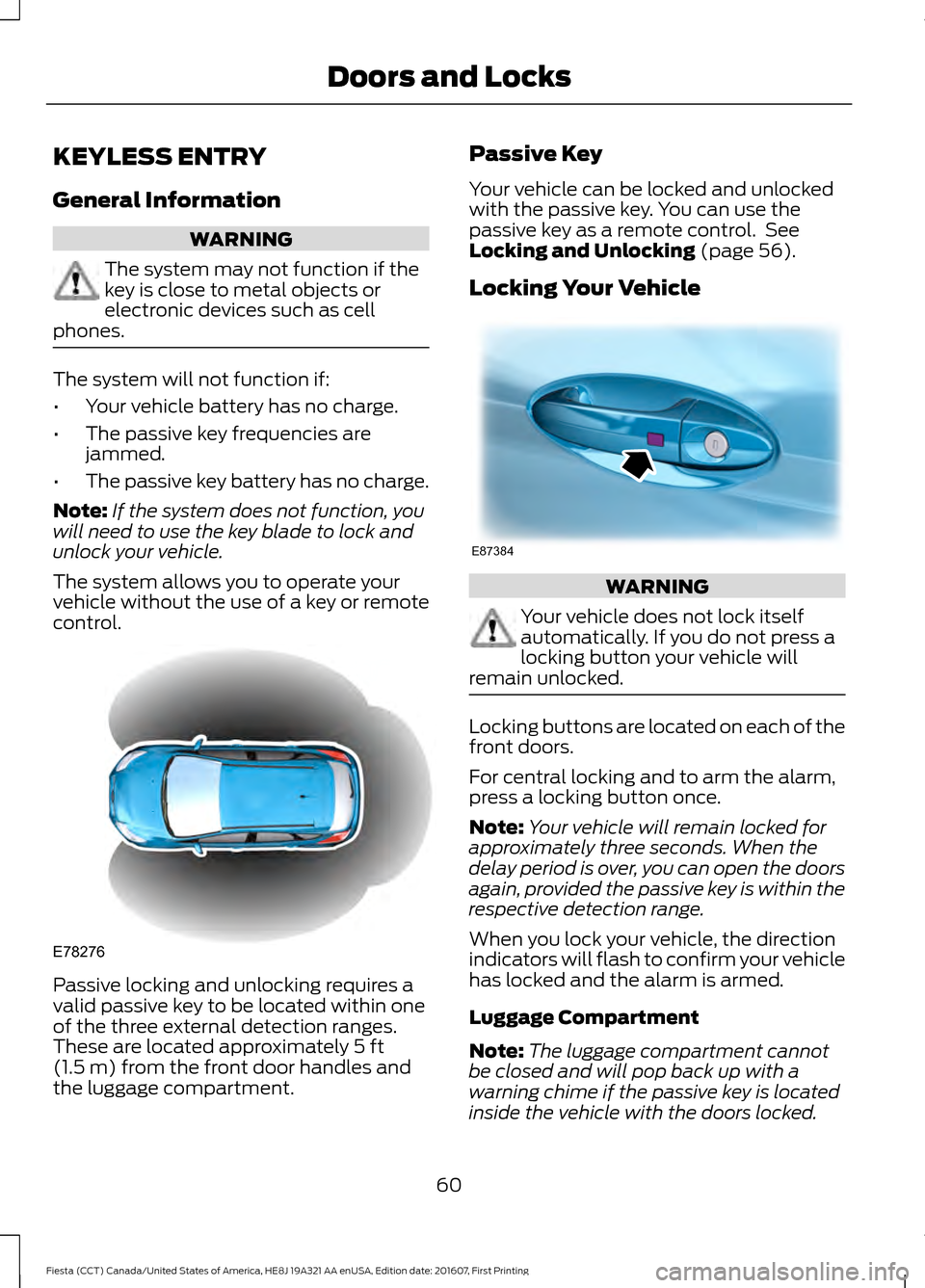
control. Passive locking and unlocking requires a
valid passive key to be located within one
of the three external detection ranges.
These are located approximately 5 ft
(1.5 m) from the front door handles and
the luggage compartment. Passive Key
Your vehicle can be locked and unlocked
with the passive key. You can use the
passive key as a remote control. See
Locking and Unlocking
(page 56).
Locking Your Vehicle WARNING
Your vehicle does not lock itself
automatically. If you do not press a
locking button your vehicle will
remain unlocked. Locking buttons are located on each of the
front doors.
For central locking and to arm the alarm,
press a locking button once.
Note:
Your vehicle will remain locked for
approximately three seconds. When the
delay period is over, you can open the doors
again, provided the passive key is within the
respective detection range.
When you lock your vehicle, the direction
indicators will flash to confirm your vehicle
has locked and the alarm is armed.
Luggage Compartment
Note: The luggage compartment cannot
be closed and will pop back up with a
warning chime if the passive key is located
inside the vehicle with the doors locked.
60
Fiesta (CCT) Canada/United States of America, HE8J 19A321 AA enUSA, Edition date: 201607, First Printing Doors and LocksE78276 E87384
Page 63 of 450
Note:
If a second valid passive key is
located within the luggage compartment
detection range, the luggage compartment
can be closed.
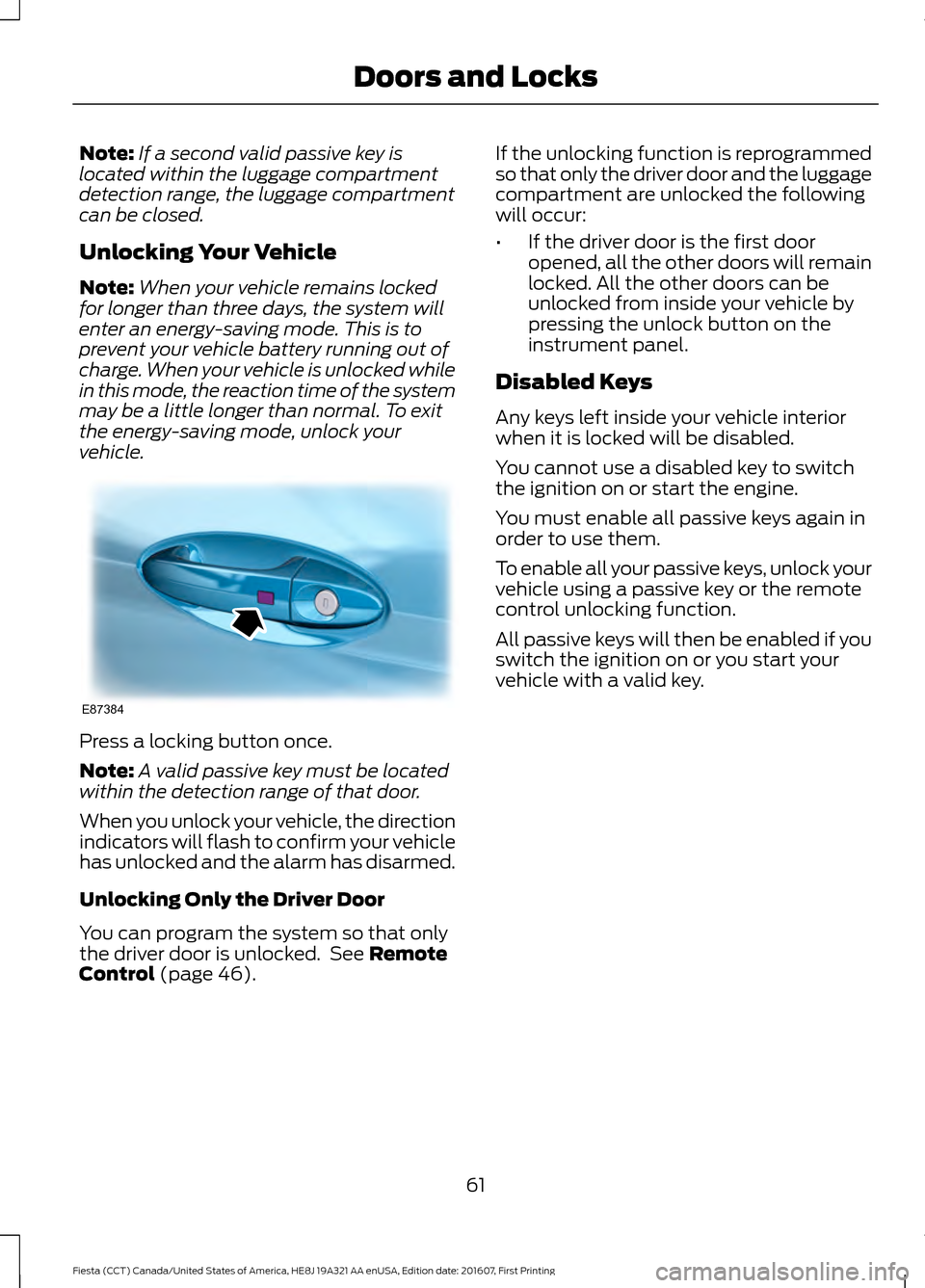
Unlocking Your Vehicle
Note: When your vehicle remains locked
for longer than three days, the system will
enter an energy-saving mode. This is to
prevent your vehicle battery running out of
charge. When your vehicle is unlocked while
in this mode, the reaction time of the system
may be a little longer than normal. To exit
the energy-saving mode, unlock your
vehicle. Press a locking button once.
Note:
A valid passive key must be located
within the detection range of that door.
When you unlock your vehicle, the direction
indicators will flash to confirm your vehicle
has unlocked and the alarm has disarmed.
Unlocking Only the Driver Door
You can program the system so that only
the driver door is unlocked. See Remote
Control (page 46). If the unlocking function is reprogrammed
so that only the driver door and the luggage
compartment are unlocked the following
will occur:
•
If the driver door is the first door
opened, all the other doors will remain
locked. All the other doors can be
unlocked from inside your vehicle by
pressing the unlock button on the
instrument panel.
Disabled Keys
Any keys left inside your vehicle interior
when it is locked will be disabled.
You cannot use a disabled key to switch
the ignition on or start the engine.
You must enable all passive keys again in
order to use them.
To enable all your passive keys, unlock your
vehicle using a passive key or the remote
control unlocking function.
All passive keys will then be enabled if you
switch the ignition on or you start your
vehicle with a valid key.
61
Fiesta (CCT) Canada/United States of America, HE8J 19A321 AA enUSA, Edition date: 201607, First Printing Doors and LocksE87384
Page 67 of 450
You must have two previously
programmed coded keys and the new
unprogrammed key readily accessible. See
your authorized dealer to have the spare
key programmed if two previously
programmed coded keys are not available.
Read and understand the entire procedure
before you begin.
1.
Insert the first previously programmed
coded key into the ignition.
2. Switch the ignition from off to on. Keep
the ignition on for at least three
seconds, but no more than 10 seconds.
3. Switch the ignition off and remove the
first coded key from the ignition.
4. After three seconds but within 10 seconds of switching the ignition off,
insert the second previously coded key
into the ignition.
5. Switch the ignition from off to on. Keep
the ignition on for at least three
seconds, but no more than 10 seconds.
6. Switch the ignition off and remove the
second previously programmed coded
key from the ignition.
7. After three seconds but within 10 seconds of switching the ignition off
and removing the previously
programmed coded key, insert the new
unprogrammed key into the ignition.
8. Switch the ignition from off to on. Keep
the ignition on for at least six seconds.
9. Remove the newly programmed coded
key from the ignition.
If the key has been successfully
programmed it will start the engine and
operate the remote entry system (if the
new key is an integrated keyhead
transmitter).
If programming was not successful, wait
10 seconds and repeat Steps 1 through 8.
If you are still unsuccessful, take your
vehicle to your authorized dealer. Programming a Spare Intelligent
Access Key
See your authorized dealer to have
additional keys programmed to your
vehicle.
ANTI-THEFT ALARM
Alarm System
The perimeter alarm is a deterrent against
unauthorized access to your vehicle
through the doors and the hood. It also
protects the audio unit.
Triggering the Alarm
Once armed, the alarm is triggered in any
of the following ways:
•
If someone opens a door, the liftgate
or the hood without a valid key or
remote control.
• If someone removes the audio or
navigation system.
• If you switch the ignition on without a
valid key.
If the alarm is triggered, the alarm horn will
sound for 30 seconds and the hazard
warning flasher will flash for five minutes.
Any further attempts to perform one of the
above will trigger the alarm again.
Arming the Alarm
To arm the alarm, lock your vehicle. See
Doors and Locks (page 56).
Disarming the Alarm
Vehicles Without Keyless Entry
Disarm and silence the alarm by unlocking
the doors with the key and switching the
ignition on with a correctly coded key or
unlocking the doors with the remote
control.
65
Fiesta (CCT) Canada/United States of America, HE8J 19A321 AA enUSA, Edition date: 201607, First Printing Security