2017 FORD F450 SUPER DUTY warning light
[x] Cancel search: warning lightPage 109 of 642

Adaptive Steering (If Equipped)
The adaptive steering systemindicator illuminates if thesystem detects a fault during thecontinuous diagnostic checks.
Adaptive Steering Initialization (yellow,flashing): The adaptive steering systemhas detected a difference betweensteering wheel angle and the desired roadwheel angle. The steering wheel adjustsitself to correct this difference. Thisadjustment is part of normal systemoperation.
Adaptive Steering Off (yellow, solid): Theadaptive steering system is off. It ispossible that the steering wheel may notbe straight when the vehicle is drivingstraight ahead. If this message persists,see an authorized dealer.
Adaptive Steering Loss (red, solid): Theadaptive steering system integrity cannotbe verified. Do not drive the vehicle andcontact an authorized dealer immediately.See Steering (page 256).
Anti-Lock Braking System
If it illuminates when you aredriving, this indicates amalfunction. You will continueto have the normal braking system(without ABS) unless the brake systemwarning lamp is also illuminated. Have thesystem checked by your authorized dealer.
Automatic High Beam (If Equipped)
Illuminates when this feature ison. See Automatic High BeamControl (page 88).
Battery
If it illuminates while driving, itindicates a malfunction. Switchoff all unnecessary electricalequipment and have the system checkedby your authorized dealer immediately.
Brake System
Illuminates when you engage theparking brake with the ignitionon.
If it illuminates when you are driving, checkthat the parking brake is not engaged. Ifthe parking brake is not engaged, thisindicates low brake fluid level or a brakesystem malfunction. Have the systemchecked immediately by your authorizeddealer.
WARNING
Driving your vehicle with the warninglamp on is dangerous. A significantdecrease in braking performancemay occur. It may take you longer to stopyour vehicle. Have your vehicle checked assoon as possible. Driving extendeddistances with the parking brake engagedcan cause brake failure and the risk ofpersonal injury.
Blind Spot Monitor (If Equipped)
It illuminates when you switchthis feature off or in conjunctionwith a message. See Blind SpotInformation System (page 249).
Check Fuel Cap (If Equipped)
Illuminates when the fuel capmay not be properly installed.Continued driving with this lighton may cause the Service engine soonwarning indicator to come on.
106
Super Duty (TFE) Canada/United States of America, enUSA, Edition date: 201710, Second Printing
Instrument ClusterE223375 E144522 E151262
Page 111 of 642

It also illuminates momentarily when youswitch the ignition on to confirm the lampis functional. If it does not illuminate whenyou switch the ignition on, or begins toflash at any time, have the system checkedby your authorized dealer.
Powertrain Malfunction/ReducedPower/Electronic Throttle Control
Illuminates when a powertrainor an 4WD fault has beendetected. Contact yourauthorized dealer as soon as possible.
Service Engine Soon
If the service engine soonindicator light stays illuminatedafter the engine is started, itindicates that the On-Board Diagnostics(OBD-II) system has detected amalfunction of the vehicle emissionscontrol system. Refer to On-BoardDiagnostics (OBD-II) in the Fuel andRefueling chapter for more informationabout having your vehicle serviced. SeeEmission Control System (page 196).
If the light is blinking, engine misfire isoccurring which could damage yourcatalytic converter. Drive in a moderatefashion (avoid heavy acceleration anddeceleration) and have your vehicleserviced immediately.
WARNING
Under engine misfire conditions,excessive exhaust temperaturescould damage the catalyticconverter, the fuel system, interior floorcoverings or other vehicle components,possibly causing a fire. Have your vehiclechecked as soon as possible.
The service engine soon indicator lightilluminates when the ignition is first turnedon prior to engine start to check the bulband to indicate whether the vehicle is readyfor Inspection/Maintenance (I/M) testing.
Normally, the service engine soon light willstay on until the engine is cranked, thenturn itself off if no malfunctions arepresent. However, if after 15 seconds theservice engine soon light blinks eight times,it means that the vehicle is not ready forI/M testing. See Emission ControlSystem (page 196).
Stability Control
Illuminates when the system isactive. If it remains illuminatedor does not illuminate when youswitch the ignition on, this indicates amalfunction. During a malfunction thesystem will switch off. Have the systemchecked by your authorized dealerimmediately. See Using StabilityControl (page 227).
Stability Control Off
Illuminates when you switch thesystem off. It will go out whenyou switch the system back onor when you switch the ignition off. SeeUsing Stability Control (page 227).
Transmission Tow/Haul (If Equipped)
Illuminates when the tow/haulfeature has been activated. If thelight flashes steadily, have thesystem serviced immediately, damage tothe transmission could occur.
108
Super Duty (TFE) Canada/United States of America, enUSA, Edition date: 201710, Second Printing
Instrument Cluster E138639 E130458 E161509
Page 112 of 642
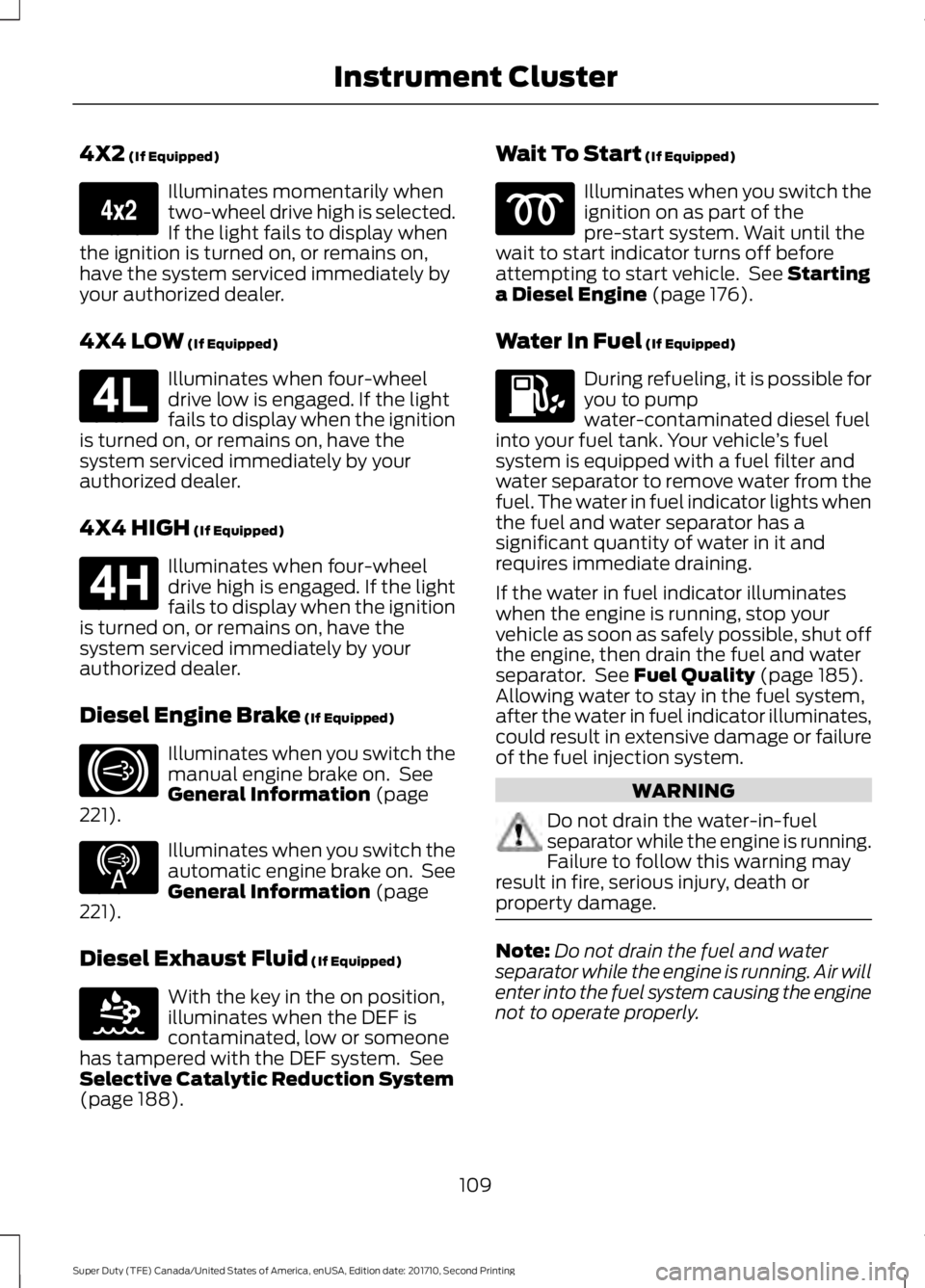
4X2 (If Equipped)
Illuminates momentarily whentwo-wheel drive high is selected.If the light fails to display whenthe ignition is turned on, or remains on,have the system serviced immediately byyour authorized dealer.
4X4 LOW (If Equipped)
Illuminates when four-wheeldrive low is engaged. If the lightfails to display when the ignitionis turned on, or remains on, have thesystem serviced immediately by yourauthorized dealer.
4X4 HIGH (If Equipped)
Illuminates when four-wheeldrive high is engaged. If the lightfails to display when the ignitionis turned on, or remains on, have thesystem serviced immediately by yourauthorized dealer.
Diesel Engine Brake (If Equipped)
Illuminates when you switch themanual engine brake on. SeeGeneral Information (page221).
Illuminates when you switch theautomatic engine brake on. SeeGeneral Information (page221).
Diesel Exhaust Fluid (If Equipped)
With the key in the on position,illuminates when the DEF iscontaminated, low or someonehas tampered with the DEF system. SeeSelective Catalytic Reduction System(page 188).
Wait To Start (If Equipped)
Illuminates when you switch theignition on as part of thepre-start system. Wait until thewait to start indicator turns off beforeattempting to start vehicle. See Startinga Diesel Engine (page 176).
Water In Fuel (If Equipped)
During refueling, it is possible foryou to pumpwater-contaminated diesel fuelinto your fuel tank. Your vehicle’s fuelsystem is equipped with a fuel filter andwater separator to remove water from thefuel. The water in fuel indicator lights whenthe fuel and water separator has asignificant quantity of water in it andrequires immediate draining.
If the water in fuel indicator illuminateswhen the engine is running, stop yourvehicle as soon as safely possible, shut offthe engine, then drain the fuel and waterseparator. See Fuel Quality (page 185).Allowing water to stay in the fuel system,after the water in fuel indicator illuminates,could result in extensive damage or failureof the fuel injection system.
WARNING
Do not drain the water-in-fuelseparator while the engine is running.Failure to follow this warning mayresult in fire, serious injury, death orproperty damage.
Note:Do not drain the fuel and waterseparator while the engine is running. Air willenter into the fuel system causing the enginenot to operate properly.
109
Super Duty (TFE) Canada/United States of America, enUSA, Edition date: 201710, Second Printing
Instrument ClusterE163173 E181780 E181779 E171217 E234452 E163176
Page 114 of 642
GENERAL INFORMATION
WARNING
Driving while distracted can result inloss of vehicle control, crash andinjury. We strongly recommend thatyou use extreme caution when using anydevice that may take your focus off theroad. Your primary responsibility is the safeoperation of your vehicle. We recommendagainst the use of any hand-held devicewhile driving and encourage the use ofvoice-operated systems when possible.Make sure you are aware of all applicablelocal laws that may affect the use ofelectronic devices while driving.
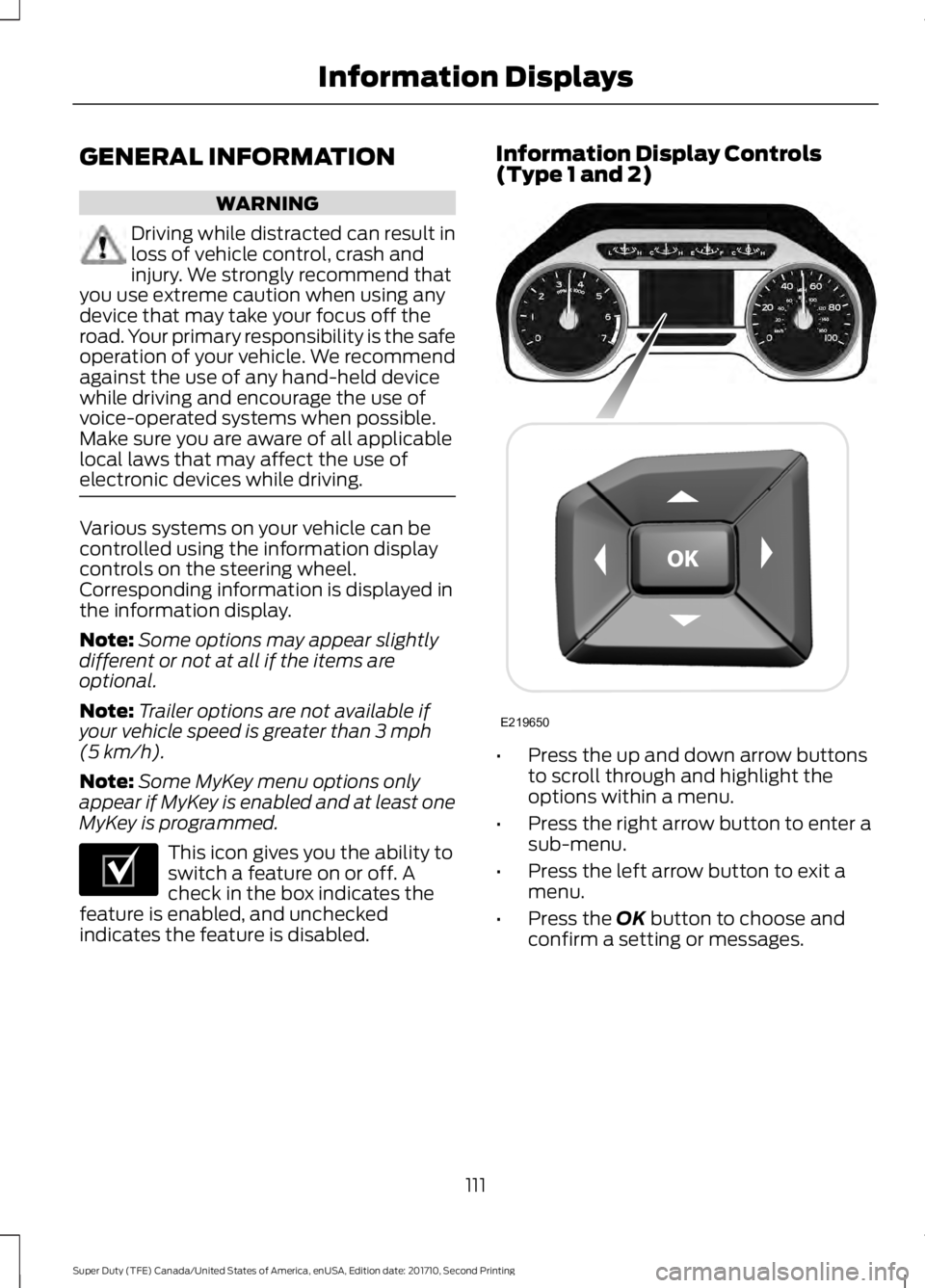
Various systems on your vehicle can becontrolled using the information displaycontrols on the steering wheel.Corresponding information is displayed inthe information display.
Note:Some options may appear slightlydifferent or not at all if the items areoptional.
Note:Trailer options are not available ifyour vehicle speed is greater than 3 mph(5 km/h).
Note:Some MyKey menu options onlyappear if MyKey is enabled and at least oneMyKey is programmed.
This icon gives you the ability toswitch a feature on or off. Acheck in the box indicates thefeature is enabled, and uncheckedindicates the feature is disabled.
Information Display Controls(Type 1 and 2)
•Press the up and down arrow buttonsto scroll through and highlight theoptions within a menu.
•Press the right arrow button to enter asub-menu.
•Press the left arrow button to exit amenu.
•Press the OK button to choose andconfirm a setting or messages.
111
Super Duty (TFE) Canada/United States of America, enUSA, Edition date: 201710, Second Printing
Information DisplaysE204495 E219650
Page 146 of 642

ActionMessage
A trailer connection becomes disconnected, eitherintentionally or unintentionally, and has been sensedduring a given ignition cycle.
Trailer Disconnected
The trailer sway control has detected trailer sway.Trailer Sway Reduce Speed
There are certain faults in your vehicle wiring and trailerwiring/brake system. See Towing a Trailer (page 268).Trailer Wiring Fault
There is a fault with your trailer turn lamp. Check yourlamp.Trailer Left Turn Lamps FaultCheck Lamps
There is a fault with your trailer turn lamp. Check yourlamp.Trailer Right Turn Lamps FaultCheck Lamps
There is a fault with your trailer battery. See Towinga Trailer (page 268).Trailer Battery Not Charging SeeManual
There is a fault with your vehicle trailer lighting module.See Towing a Trailer (page 268).Trailer Lighting Module FaultSee Manual
One or more tires on your trailer is below the specifiedtire pressure.Trailer Tire Low Specified:
A trailer tire pressure sensor is malfunctioning. If thewarning stays on or continues to come on, contact anauthorized dealer as soon as possible.
Trailer Tire Pressure SensorFault
The trailer tire pressure monitoring system ismalfunctioning. If the warning stays on or continuesto come on, contact an authorized dealer.
Trailer Tire Pressure MonitorFault
The system cannot detect the trailer tire pressuremonitoring system.Trailer Tire Pressure MonitorCapability Not Detected
The trailer tire pressure monitoring system is not setup.See General Information (page 111).Trailer Tire Pressure IndicationNot Setup See Manual
143
Super Duty (TFE) Canada/United States of America, enUSA, Edition date: 201710, Second Printing
Information Displays
Page 155 of 642
SITTING IN THE CORRECT
POSITION
WARNINGS
Sitting improperly, out of position orwith the seatback reclined too farcan take weight off the seat cushionand affect the decision of the passengersensing system, resulting in serious injuryor death in the event of a crash. Always situpright against your seat back, with yourfeet on the floor.
Do not recline the seatback as thiscan cause the occupant to slideunder the safety belt, resulting inserious injury in the event of a crash.
Do not place objects higher than theseatback to reduce the risk of seriousinjury in the event of a crash or duringheavy braking.
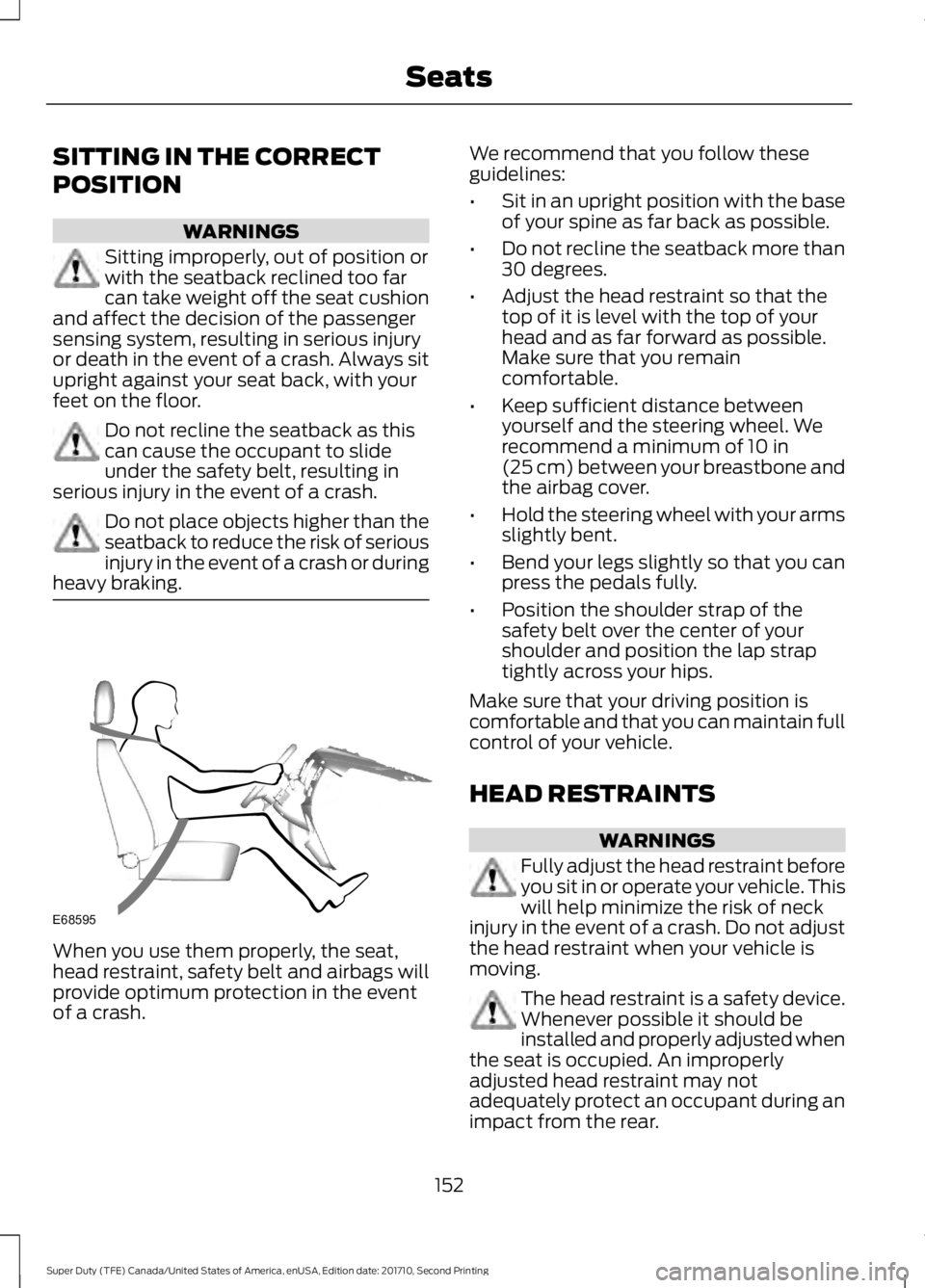
When you use them properly, the seat,head restraint, safety belt and airbags willprovide optimum protection in the eventof a crash.
We recommend that you follow theseguidelines:
•Sit in an upright position with the baseof your spine as far back as possible.
•Do not recline the seatback more than30 degrees.
•Adjust the head restraint so that thetop of it is level with the top of yourhead and as far forward as possible.Make sure that you remaincomfortable.
•Keep sufficient distance betweenyourself and the steering wheel. Werecommend a minimum of 10 in(25 cm) between your breastbone andthe airbag cover.
•Hold the steering wheel with your armsslightly bent.
•Bend your legs slightly so that you canpress the pedals fully.
•Position the shoulder strap of thesafety belt over the center of yourshoulder and position the lap straptightly across your hips.
Make sure that your driving position iscomfortable and that you can maintain fullcontrol of your vehicle.
HEAD RESTRAINTS
WARNINGS
Fully adjust the head restraint beforeyou sit in or operate your vehicle. Thiswill help minimize the risk of neckinjury in the event of a crash. Do not adjustthe head restraint when your vehicle ismoving.
The head restraint is a safety device.Whenever possible it should beinstalled and properly adjusted whenthe seat is occupied. An improperlyadjusted head restraint may notadequately protect an occupant during animpact from the rear.
152
Super Duty (TFE) Canada/United States of America, enUSA, Edition date: 201710, Second Printing
SeatsE68595
Page 163 of 642
HEATED SEATS (If Equipped)
WARNING
People who are unable to feel painto their skin because of advancedage, chronic illness, diabetes, spinalcord injury, medication, alcohol use,exhaustion or other physical conditions,must exercise care when using the heatedseat. The heated seat may cause burnseven at low temperatures, especially ifused for long periods of time. Do not placeanything on the seat that insulates againstheat, such as a blanket or cushion. Thismay cause the heated seat to overheat.Do not puncture the seat with pins, needlesor other pointed objects. This may damagethe heating element which may cause theheated seat to overheat. An overheatedseat may cause serious personal injury.
Do not do the following:
•Place heavy objects on the seat.
•Operate the heated seat if water or anyother liquid spills on the seat. Allow theseat to dry thoroughly.
Note:The engine must be running to usethis feature.
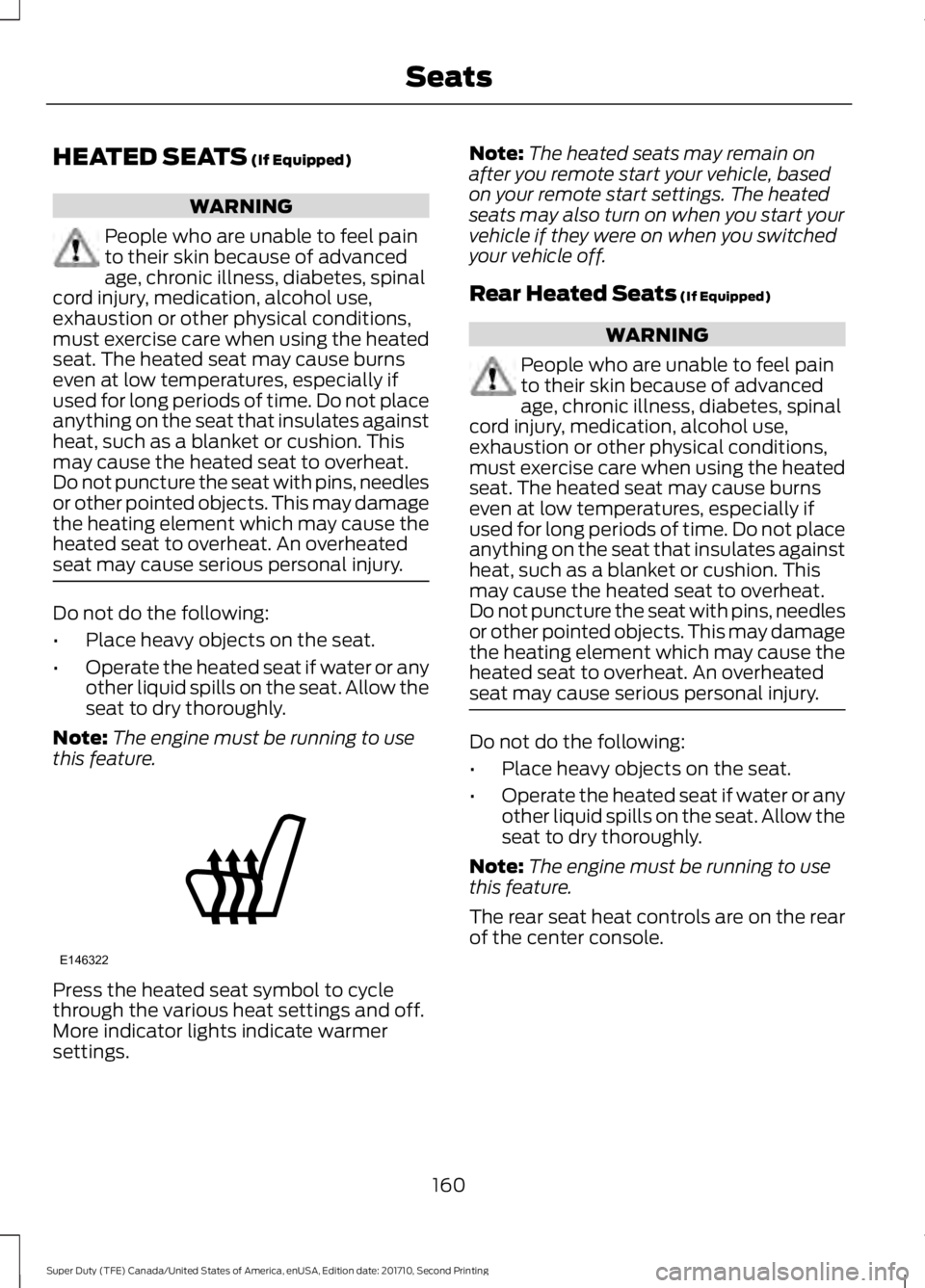
Press the heated seat symbol to cyclethrough the various heat settings and off.More indicator lights indicate warmersettings.
Note:The heated seats may remain onafter you remote start your vehicle, basedon your remote start settings. The heatedseats may also turn on when you start yourvehicle if they were on when you switchedyour vehicle off.
Rear Heated Seats (If Equipped)
WARNING
People who are unable to feel painto their skin because of advancedage, chronic illness, diabetes, spinalcord injury, medication, alcohol use,exhaustion or other physical conditions,must exercise care when using the heatedseat. The heated seat may cause burnseven at low temperatures, especially ifused for long periods of time. Do not placeanything on the seat that insulates againstheat, such as a blanket or cushion. Thismay cause the heated seat to overheat.Do not puncture the seat with pins, needlesor other pointed objects. This may damagethe heating element which may cause theheated seat to overheat. An overheatedseat may cause serious personal injury.
Do not do the following:
•Place heavy objects on the seat.
•Operate the heated seat if water or anyother liquid spills on the seat. Allow theseat to dry thoroughly.
Note:The engine must be running to usethis feature.
The rear seat heat controls are on the rearof the center console.
160
Super Duty (TFE) Canada/United States of America, enUSA, Edition date: 201710, Second Printing
SeatsE146322
Page 164 of 642
Press the heated seat symbol to cyclethrough the various heat settings and off.More indicator lights indicate warmersettings.
The heated seat module resets at everyignition run cycle. While the ignition is inthe on position, press the heated seatswitch to enable heating mode. Whenactivated, they turn off automatically whenyou switch off the engine.
CLIMATE CONTROLLED SEATS
(If Equipped)
Heated Seats
WARNING
People who are unable to feel painto their skin because of advancedage, chronic illness, diabetes, spinalcord injury, medication, alcohol use,exhaustion or other physical conditions,must exercise care when using the heatedseat. The heated seat may cause burnseven at low temperatures, especially ifused for long periods of time. Do not placeanything on the seat that insulates againstheat, such as a blanket or cushion. Thismay cause the heated seat to overheat.Do not puncture the seat with pins, needlesor other pointed objects. This may damagethe heating element which may cause theheated seat to overheat. An overheatedseat may cause serious personal injury.
Do not do the following:
•Place heavy objects on the seat.
•Operate the heated seat if water or anyother liquid spills on the seat. Allow theseat to dry thoroughly.
Note:The engine must be running to usethis feature.
Press the heated seat symbol to cyclethrough the various heat settings and off.More indicator lights indicate warmersettings.
Note:The heated seats may remain onafter you remote start your vehicle, basedon your remote start settings. The heatedseats may also turn on when you start yourvehicle if they were on when you switchedyour vehicle off.
Note:After 60 minutes of operation, theheated seats switch off. Press the heatedseat symbol to switch the heated seats on.
Cooled Seats
Note:The engine must be running to usethis feature.
161
Super Duty (TFE) Canada/United States of America, enUSA, Edition date: 201710, Second Printing
SeatsE146322 E146322 E146309