2017 FORD F450 SUPER DUTY tailgate
[x] Cancel search: tailgatePage 79 of 642
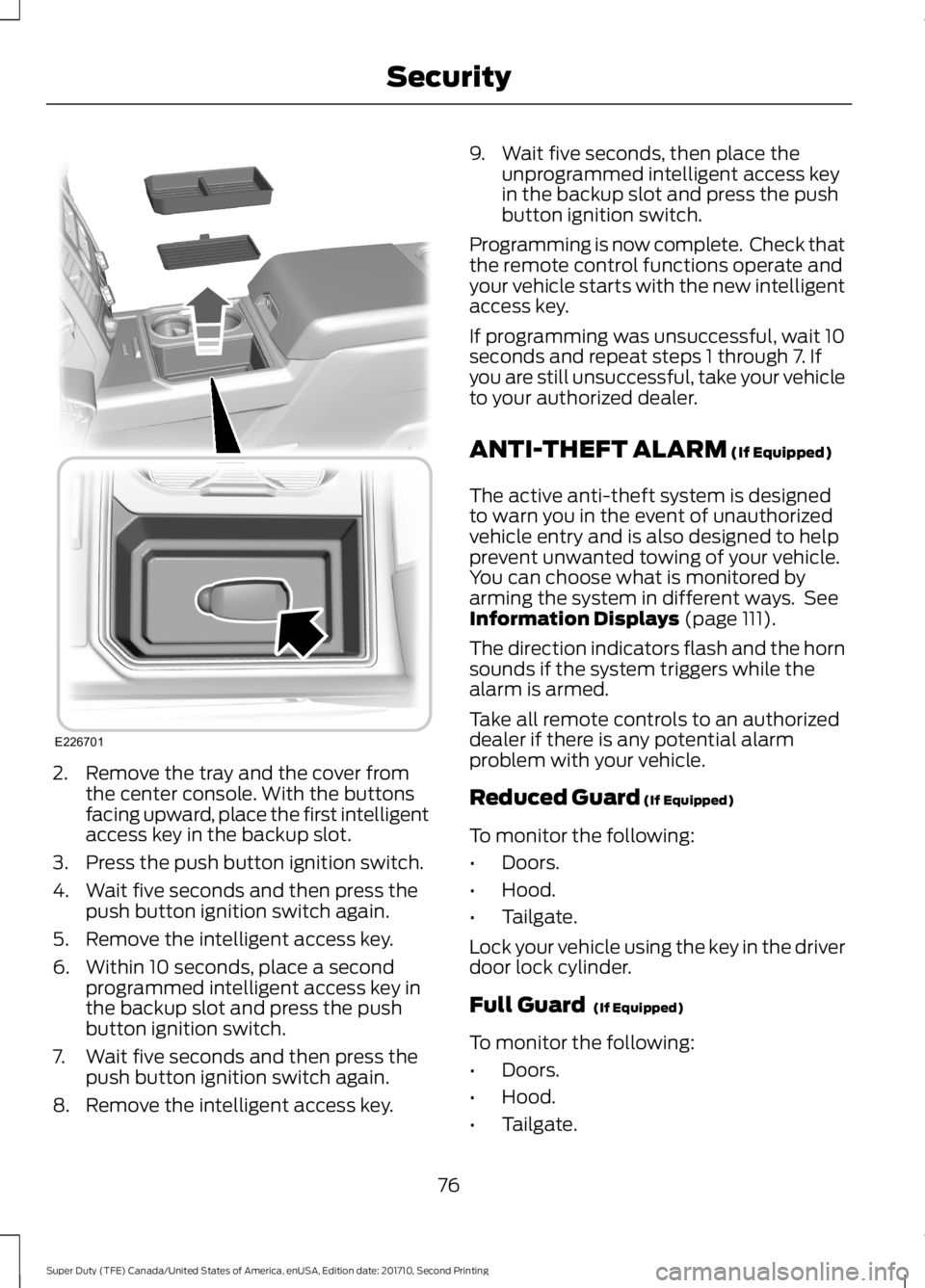
2. Remove the tray and the cover fromthe center console. With the buttonsfacing upward, place the first intelligentaccess key in the backup slot.
3. Press the push button ignition switch.
4. Wait five seconds and then press thepush button ignition switch again.
5. Remove the intelligent access key.
6. Within 10 seconds, place a secondprogrammed intelligent access key inthe backup slot and press the pushbutton ignition switch.
7. Wait five seconds and then press thepush button ignition switch again.
8. Remove the intelligent access key.
9. Wait five seconds, then place theunprogrammed intelligent access keyin the backup slot and press the pushbutton ignition switch.
Programming is now complete. Check thatthe remote control functions operate andyour vehicle starts with the new intelligentaccess key.
If programming was unsuccessful, wait 10seconds and repeat steps 1 through 7. Ifyou are still unsuccessful, take your vehicleto your authorized dealer.
ANTI-THEFT ALARM (If Equipped)
The active anti-theft system is designedto warn you in the event of unauthorizedvehicle entry and is also designed to helpprevent unwanted towing of your vehicle.You can choose what is monitored byarming the system in different ways. SeeInformation Displays (page 111).
The direction indicators flash and the hornsounds if the system triggers while thealarm is armed.
Take all remote controls to an authorizeddealer if there is any potential alarmproblem with your vehicle.
Reduced Guard (If Equipped)
To monitor the following:
•Doors.
•Hood.
•Tailgate.
Lock your vehicle using the key in the driverdoor lock cylinder.
Full Guard (If Equipped)
To monitor the following:
•Doors.
•Hood.
•Tailgate.
76
Super Duty (TFE) Canada/United States of America, enUSA, Edition date: 201710, Second Printing
SecurityE226701
Page 94 of 642
Cargo and Trailer Hookup Lamps
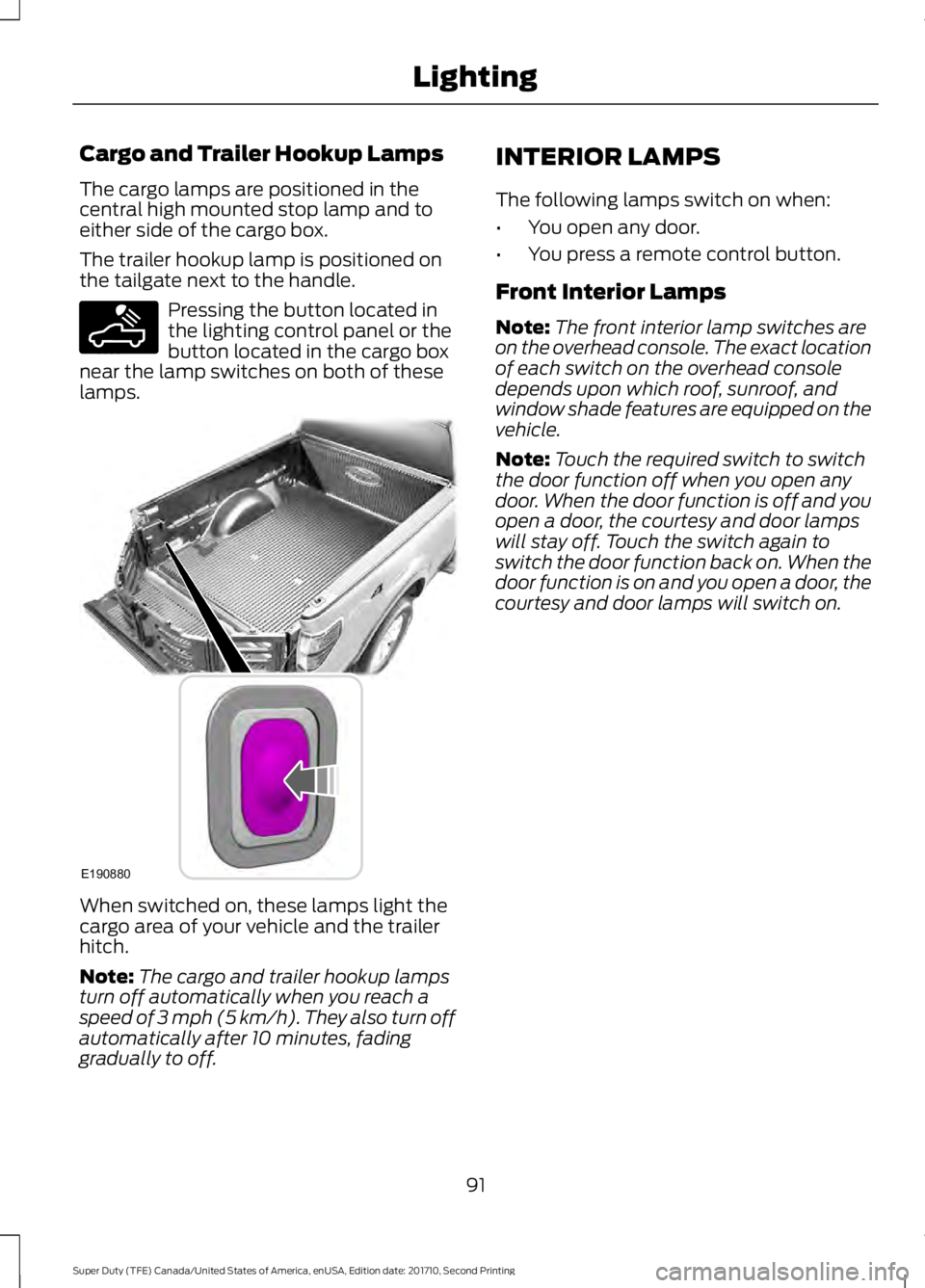
The cargo lamps are positioned in thecentral high mounted stop lamp and toeither side of the cargo box.
The trailer hookup lamp is positioned onthe tailgate next to the handle.
Pressing the button located inthe lighting control panel or thebutton located in the cargo boxnear the lamp switches on both of theselamps.
When switched on, these lamps light thecargo area of your vehicle and the trailerhitch.
Note:The cargo and trailer hookup lampsturn off automatically when you reach aspeed of 3 mph (5 km/h). They also turn offautomatically after 10 minutes, fadinggradually to off.
INTERIOR LAMPS
The following lamps switch on when:
•You open any door.
•You press a remote control button.
Front Interior Lamps
Note:The front interior lamp switches areon the overhead console. The exact locationof each switch on the overhead consoledepends upon which roof, sunroof, andwindow shade features are equipped on thevehicle.
Note:Touch the required switch to switchthe door function off when you open anydoor. When the door function is off and youopen a door, the courtesy and door lampswill stay off. Touch the switch again toswitch the door function back on. When thedoor function is on and you open a door, thecourtesy and door lamps will switch on.
91
Super Duty (TFE) Canada/United States of America, enUSA, Edition date: 201710, Second Printing
LightingE189587 E190880
Page 235 of 642
stationary or receding object farther than12 in (30 cm) from the corners of thebumper, the tone sounds for only threeseconds. Once the system detects anobject approaching, the warning soundsagain.
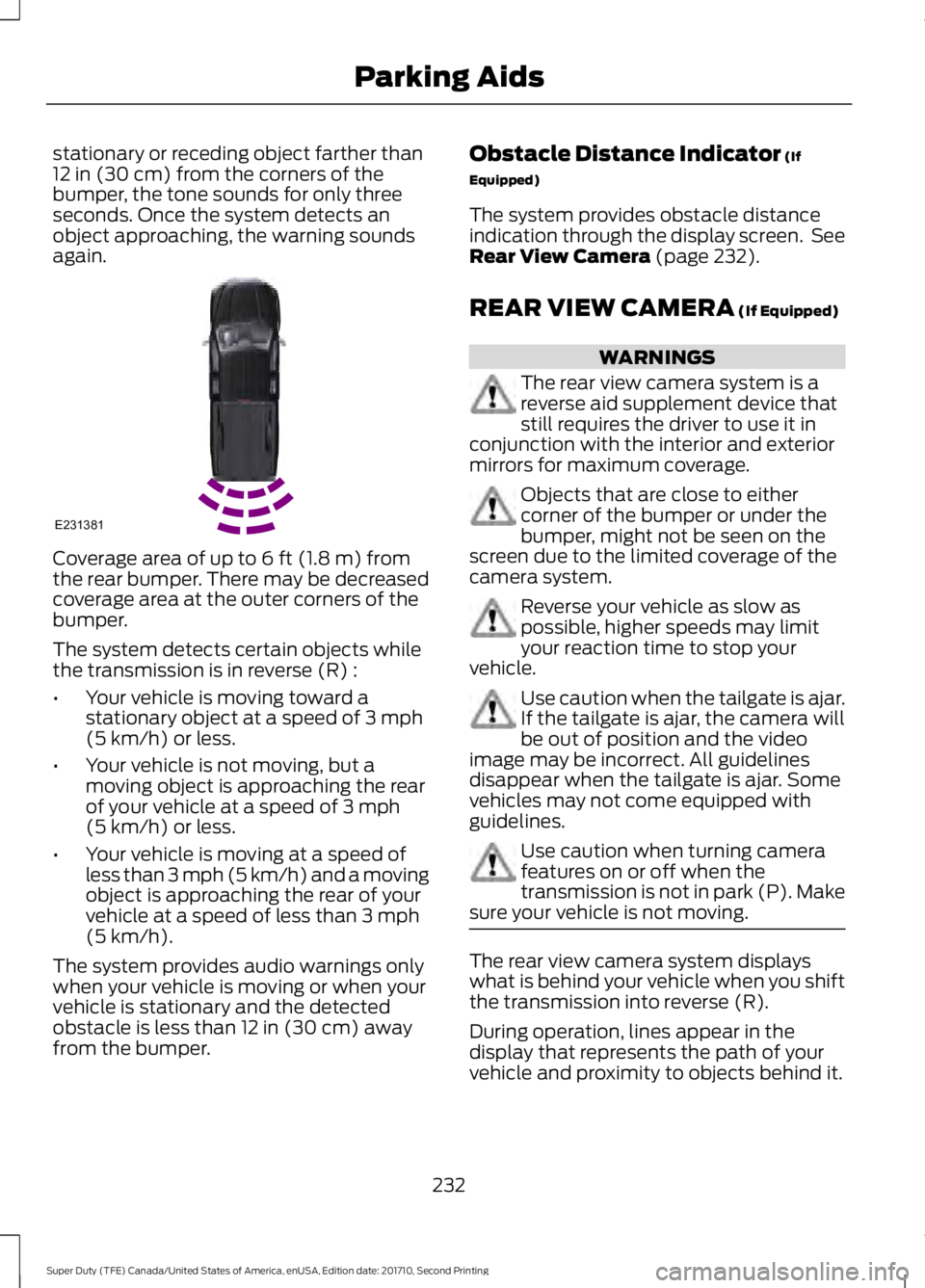
Coverage area of up to 6 ft (1.8 m) fromthe rear bumper. There may be decreasedcoverage area at the outer corners of thebumper.
The system detects certain objects whilethe transmission is in reverse (R) :
•Your vehicle is moving toward astationary object at a speed of 3 mph(5 km/h) or less.
•Your vehicle is not moving, but amoving object is approaching the rearof your vehicle at a speed of 3 mph(5 km/h) or less.
•Your vehicle is moving at a speed ofless than 3 mph (5 km/h) and a movingobject is approaching the rear of yourvehicle at a speed of less than 3 mph(5 km/h).
The system provides audio warnings onlywhen your vehicle is moving or when yourvehicle is stationary and the detectedobstacle is less than 12 in (30 cm) awayfrom the bumper.
Obstacle Distance Indicator (If
Equipped)
The system provides obstacle distanceindication through the display screen. SeeRear View Camera (page 232).
REAR VIEW CAMERA (If Equipped)
WARNINGS
The rear view camera system is areverse aid supplement device thatstill requires the driver to use it inconjunction with the interior and exteriormirrors for maximum coverage.
Objects that are close to eithercorner of the bumper or under thebumper, might not be seen on thescreen due to the limited coverage of thecamera system.
Reverse your vehicle as slow aspossible, higher speeds may limityour reaction time to stop yourvehicle.
Use caution when the tailgate is ajar.If the tailgate is ajar, the camera willbe out of position and the videoimage may be incorrect. All guidelinesdisappear when the tailgate is ajar. Somevehicles may not come equipped withguidelines.
Use caution when turning camerafeatures on or off when thetransmission is not in park (P). Makesure your vehicle is not moving.
The rear view camera system displayswhat is behind your vehicle when you shiftthe transmission into reverse (R).
During operation, lines appear in thedisplay that represents the path of yourvehicle and proximity to objects behind it.
232
Super Duty (TFE) Canada/United States of America, enUSA, Edition date: 201710, Second Printing
Parking AidsE231381
Page 236 of 642
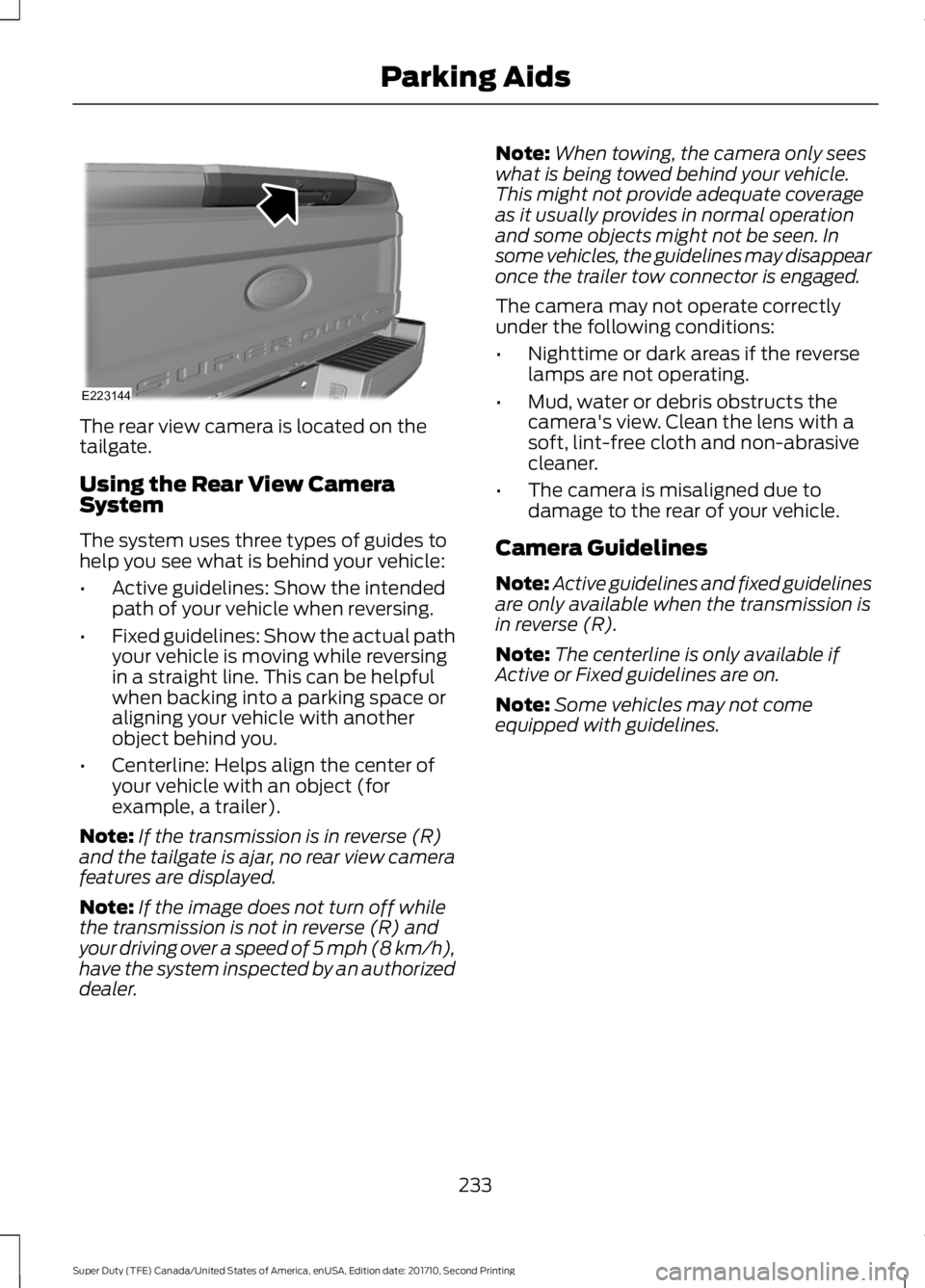
The rear view camera is located on thetailgate.
Using the Rear View CameraSystem
The system uses three types of guides tohelp you see what is behind your vehicle:
•Active guidelines: Show the intendedpath of your vehicle when reversing.
•Fixed guidelines: Show the actual pathyour vehicle is moving while reversingin a straight line. This can be helpfulwhen backing into a parking space oraligning your vehicle with anotherobject behind you.
•Centerline: Helps align the center ofyour vehicle with an object (forexample, a trailer).
Note:If the transmission is in reverse (R)and the tailgate is ajar, no rear view camerafeatures are displayed.
Note:If the image does not turn off whilethe transmission is not in reverse (R) andyour driving over a speed of 5 mph (8 km/h),have the system inspected by an authorizeddealer.
Note:When towing, the camera only seeswhat is being towed behind your vehicle.This might not provide adequate coverageas it usually provides in normal operationand some objects might not be seen. Insome vehicles, the guidelines may disappearonce the trailer tow connector is engaged.
The camera may not operate correctlyunder the following conditions:
•Nighttime or dark areas if the reverselamps are not operating.
•Mud, water or debris obstructs thecamera's view. Clean the lens with asoft, lint-free cloth and non-abrasivecleaner.
•The camera is misaligned due todamage to the rear of your vehicle.
Camera Guidelines
Note:Active guidelines and fixed guidelinesare only available when the transmission isin reverse (R).
Note:The centerline is only available ifActive or Fixed guidelines are on.
Note:Some vehicles may not comeequipped with guidelines.
233
Super Duty (TFE) Canada/United States of America, enUSA, Edition date: 201710, Second Printing
Parking AidsE223144
Page 268 of 642
- 1200 = - 240 pounds. No, you donot have enough cargo capacityto carry that much weight. Inmetric units, the calculation wouldbe: 635 kilograms - (2 x 99kilograms) - (12 x 45 kilograms) =635 - 198 - 540 = -103 kilograms.You will need to reduce the loadweight by at least 240 pounds(104 kilograms). If you removethree 100-pound (45-kilogram)cement bags, then the loadcalculation would be:1400 - (2 x220) - (9 x 100) = 1400 - 440 -900 = 60 pounds. Now you havethe load capacity to transport thecement and your friend home. Inmetric units, the calculation wouldbe: 635 kilograms - (2 x 99kilograms) - (9 x 45 kilograms) =635 - 198 - 405 = 32 kilograms.
The above calculations alsoassume that the loads arepositioned in your vehicle in amanner that does not overloadthe front or the rear gross axleweight rating specified for yourvehicle on the Safety ComplianceCertification label.
Special Loading Instructionsfor Owners of Pick-up Trucksand Utility-type Vehicles
WARNING
Loaded vehicles may handledifferently than unloadedvehicles. Take extra precautions,such as slower speeds andincreased stopping distance, whendriving a heavily loaded vehicle.
BED RAMPS (If Equipped)
WARNINGS
The slide action of the ramp is apinch point. Do not place fingers orhands in the pinch point.
Extend and retract the ramp onlywhen connected to the tailgateplate.
Be sure the ramp is installedcorrectly when loading andunloading equipment on and off theramp.
Do not step or sit on the ramp whenit is in the stowed position.
Install the ramp only within theprescribed ramp angles.
Note:The ramp maximum capacity is800 lb (363 kg).
Note:Verify the ramp is on stable groundbefore usage.
Note:For loading and unloadingequipment, your ramp should be setbetween 10° upward and 26° downward toavoid damage to the ramp claw and tailgateplate.
Using the Bed Ramp
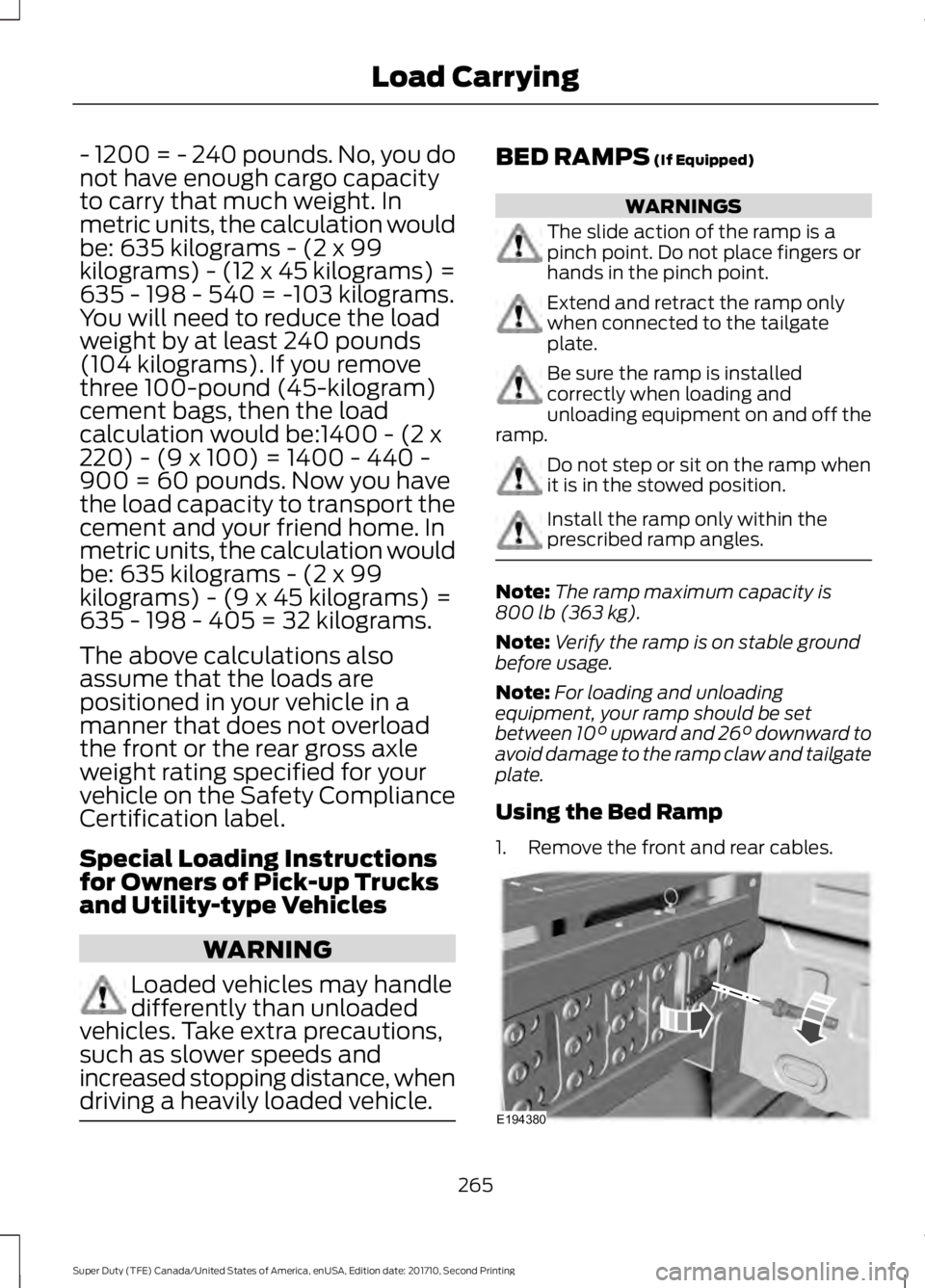
1. Remove the front and rear cables.
265
Super Duty (TFE) Canada/United States of America, enUSA, Edition date: 201710, Second Printing
Load CarryingE194380
Page 269 of 642
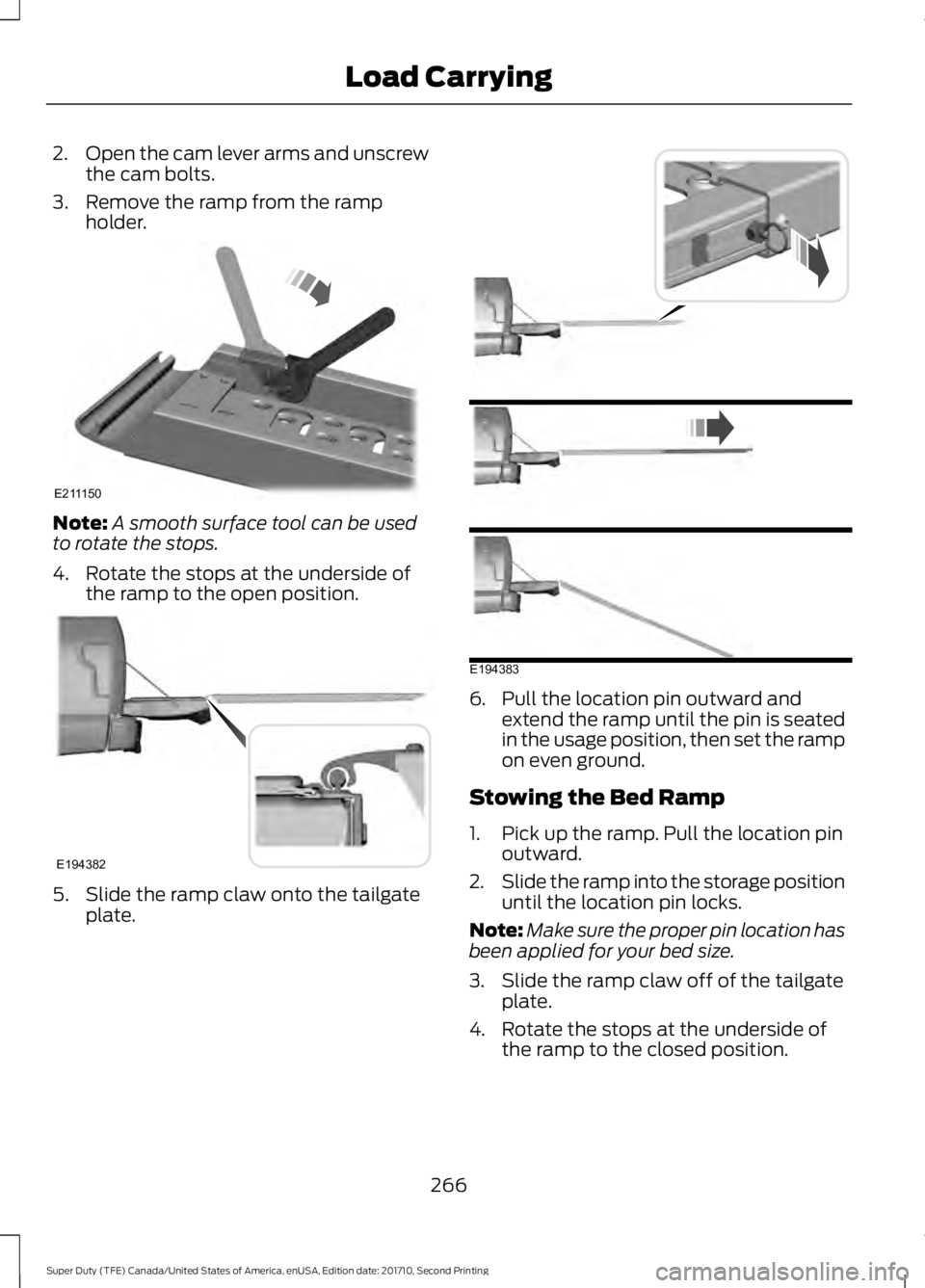
2.Open the cam lever arms and unscrewthe cam bolts.
3. Remove the ramp from the rampholder.
Note:A smooth surface tool can be usedto rotate the stops.
4. Rotate the stops at the underside ofthe ramp to the open position.
5. Slide the ramp claw onto the tailgateplate.
6. Pull the location pin outward andextend the ramp until the pin is seatedin the usage position, then set the rampon even ground.
Stowing the Bed Ramp
1. Pick up the ramp. Pull the location pinoutward.
2.Slide the ramp into the storage positionuntil the location pin locks.
Note:Make sure the proper pin location hasbeen applied for your bed size.
3. Slide the ramp claw off of the tailgateplate.
4. Rotate the stops at the underside ofthe ramp to the closed position.
266
Super Duty (TFE) Canada/United States of America, enUSA, Edition date: 201710, Second Printing
Load CarryingE211150 E194382 E194383
Page 274 of 642
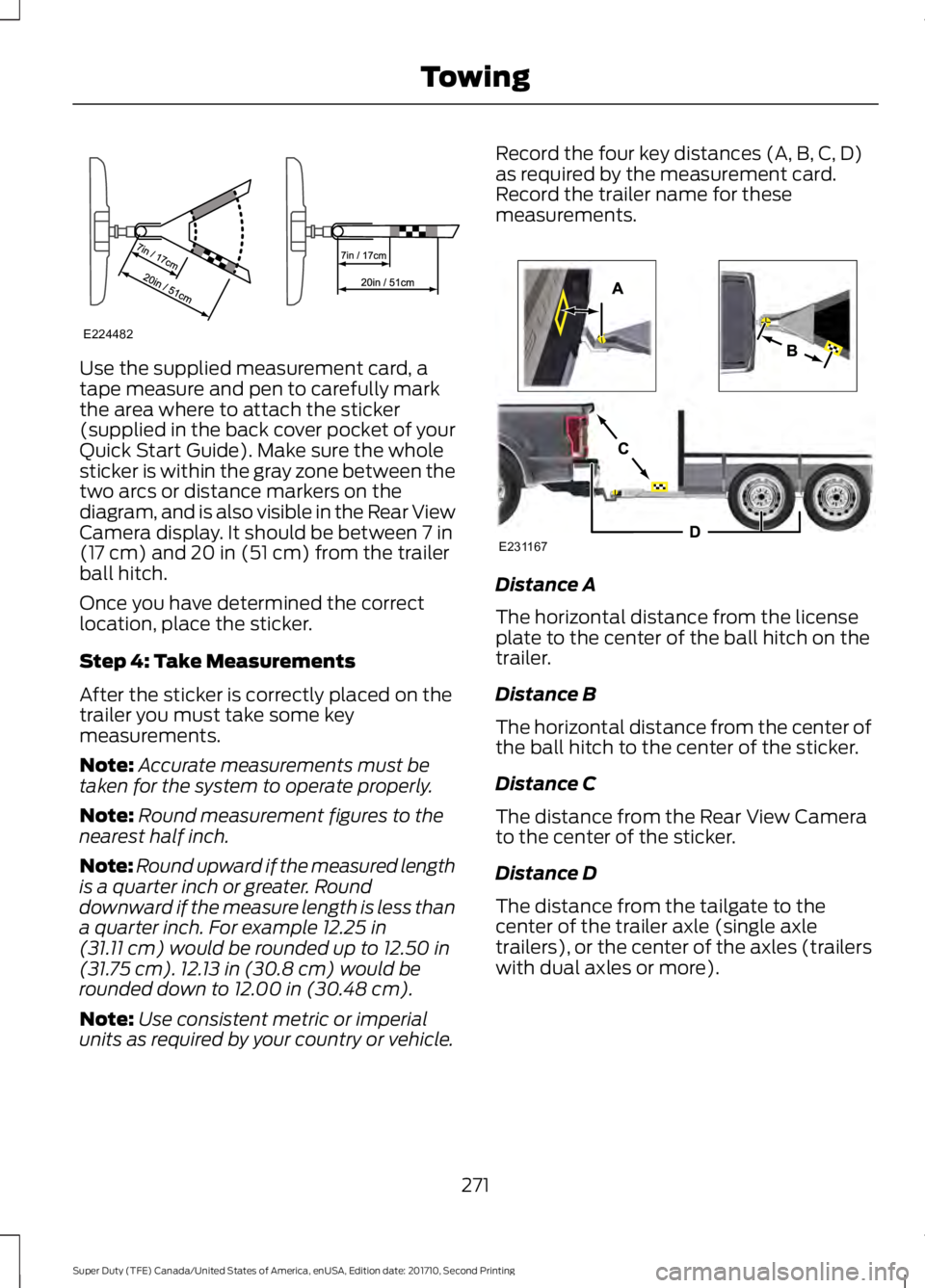
Use the supplied measurement card, atape measure and pen to carefully markthe area where to attach the sticker(supplied in the back cover pocket of yourQuick Start Guide). Make sure the wholesticker is within the gray zone between thetwo arcs or distance markers on thediagram, and is also visible in the Rear ViewCamera display. It should be between 7 in(17 cm) and 20 in (51 cm) from the trailerball hitch.
Once you have determined the correctlocation, place the sticker.
Step 4: Take Measurements
After the sticker is correctly placed on thetrailer you must take some keymeasurements.
Note:Accurate measurements must betaken for the system to operate properly.
Note:Round measurement figures to thenearest half inch.
Note:Round upward if the measured lengthis a quarter inch or greater. Rounddownward if the measure length is less thana quarter inch. For example 12.25 in(31.11 cm) would be rounded up to 12.50 in(31.75 cm). 12.13 in (30.8 cm) would berounded down to 12.00 in (30.48 cm).
Note:Use consistent metric or imperialunits as required by your country or vehicle.
Record the four key distances (A, B, C, D)as required by the measurement card.Record the trailer name for thesemeasurements.
Distance A
The horizontal distance from the licenseplate to the center of the ball hitch on thetrailer.
Distance B
The horizontal distance from the center ofthe ball hitch to the center of the sticker.
Distance C
The distance from the Rear View Camerato the center of the sticker.
Distance D
The distance from the tailgate to thecenter of the trailer axle (single axletrailers), or the center of the axles (trailerswith dual axles or more).
271
Super Duty (TFE) Canada/United States of America, enUSA, Edition date: 201710, Second Printing
TowingE224482 E231167
Page 278 of 642
Measurement D has reached maximum orminimum value:
•Make sure that the measurement beingmade is the horizontal distance onlyfrom tailgate to the center of the singleaxle or the center of all the axles on thetrailer. See step 4 of the setup foradditional measurement instructions.The TBA system does not supporttrailer lengths outside the rangeallowed by the information display.
System is circling something beside thesticker or system cannot find the sticker:
•Make sure the rear camera is clean andthe sticker is clearly visible in thecamera image. Clean the camera andsticker if necessary.
•The camera system uses the enteredmeasurements to help locate thesticker. Inaccurate stickermeasurements will degrade thesystem’s ability to locate the sticker.Verify the measurements entered intothe system are accurate.
•Remove the incorrectly circled label ordecal if possible.
•If you cannot resolve the issue a newsticker location should be tried. Thesticker location must still meet therequirements noted in step 3 of thesetup instructions. Only one sticker canbe placed on the trailer for correctsystem function. The previous stickermust be removed or covered so onlyone sticker is visible to the camera.
Calibration
The system monitors various vehicleparameters to ensure your vehicle is beingdriven straight and the trailer straightbehind your vehicle. Any steering input ortrailer movement will pause the calibration.
For best results:
•Use a long, straight and smooth roadwhen attempting to calibrate.
•Drive straight forward.
•Drive between 4 mph (6 km/h) and24 mph (39 km/h).
System Operation
The following warnings or difficulties mayoccur during feature operation. Tips toresolve them are listed below.
The system is not available:
•The system relies on manysub-systems in your vehicle to operatecorrectly. If those sub-systems are notoperating correctly the system may notbe available.
•Low battery voltage is a conditionwhich will prevent the system fromoperating. Please make sure thebattery is correctly charged if thesystem is not available.
•You may need to drive your vehiclestraight forward above 25 mph(40 km/h) before the system isavailable again.
•If the message still displays take yourvehicle to an authorized dealer forservice.
275
Super Duty (TFE) Canada/United States of America, enUSA, Edition date: 201710, Second Printing
Towing