2017 FORD F450 SUPER DUTY length
[x] Cancel search: lengthPage 277 of 642
Accurate measurements are critical tocorrect system function. If you need tocheck measurements entered or changethem you can access them through thetrailer menus in the information display.Choose the option to change the stickerfrom the change trailer settings menu. It isnot necessary to remove the sticker if youare just reviewing or changingmeasurements.
The following menu warnings or difficultiesmay occur during setup. Tips to resolvethem are listed below.
Measurement A has reached maximum orminimum value:
•The system is designed to work withdrawbars that have a license plate tohitch ball center measurement of 9 in(229 mm) to 16 in (406 mm) wheninstalled. Do not attempt to usedrawbars that have a length outsidethis range as the system performancewill be degraded and could causeimproper system function.
•Make sure that the measurement beingmade is the horizontal distance onlyfrom license plate and the hitch ballcenter. A straight line distance thatincludes any vertical rise or drop willincrease the measurement and makeit inaccurate. Inaccuratemeasurements will degrade systemperformance and could cause impropersystem function. See step 4 of thesetup instruction to reviewmeasurement instructions.
Measurement B has reached maximum orminimum value:
•Make sure that the sticker placementinstruction in step 3 of the setup hasbeen followed. Stickers placed outsidethe allowed zone will adversely affectthe system performance and couldcause improper feature function.
•Make sure that the measurement beingmade is the horizontal distance onlyfrom center of sticker to the hitch ballcenter. A straight line distance thatincludes any vertical rise or drop willincrease the measurement and causean inaccurate value to be entered intothe system. See step 4 of the setup foradditional measurement instructions.
Measurement C has reached maximum orminimum value:
•Make sure that the sticker placementinstructions in step 3 of the setup havebeen followed. Stickers placed outsidethe allowed zone will adversely affectthe system performance and couldcause improper feature function. If youhave met all the criteria for stickerplacement and you see this messagethis sticker is either too far below or tooclose to the camera to properlyrecognize the sticker. In order for thesystem to operate correctly the stickerheight must be lowered if you receivethe minimum warning or the stickerheight must be raised if you receive themaximum warning.
•Only one sticker can be placed onthe trailer for correct systemfunction. The previous sticker mustbe removed or covered so only onesticker is visible to the camera.
•Measurement B and C must bemeasured again if a new sticker isplaced on the trailer.
274
Super Duty (TFE) Canada/United States of America, enUSA, Edition date: 201710, Second Printing
Towing
Page 278 of 642
Measurement D has reached maximum orminimum value:
•Make sure that the measurement beingmade is the horizontal distance onlyfrom tailgate to the center of the singleaxle or the center of all the axles on thetrailer. See step 4 of the setup foradditional measurement instructions.The TBA system does not supporttrailer lengths outside the rangeallowed by the information display.
System is circling something beside thesticker or system cannot find the sticker:
•Make sure the rear camera is clean andthe sticker is clearly visible in thecamera image. Clean the camera andsticker if necessary.
•The camera system uses the enteredmeasurements to help locate thesticker. Inaccurate stickermeasurements will degrade thesystem’s ability to locate the sticker.Verify the measurements entered intothe system are accurate.
•Remove the incorrectly circled label ordecal if possible.
•If you cannot resolve the issue a newsticker location should be tried. Thesticker location must still meet therequirements noted in step 3 of thesetup instructions. Only one sticker canbe placed on the trailer for correctsystem function. The previous stickermust be removed or covered so onlyone sticker is visible to the camera.
Calibration
The system monitors various vehicleparameters to ensure your vehicle is beingdriven straight and the trailer straightbehind your vehicle. Any steering input ortrailer movement will pause the calibration.
For best results:
•Use a long, straight and smooth roadwhen attempting to calibrate.
•Drive straight forward.
•Drive between 4 mph (6 km/h) and24 mph (39 km/h).
System Operation
The following warnings or difficulties mayoccur during feature operation. Tips toresolve them are listed below.
The system is not available:
•The system relies on manysub-systems in your vehicle to operatecorrectly. If those sub-systems are notoperating correctly the system may notbe available.
•Low battery voltage is a conditionwhich will prevent the system fromoperating. Please make sure thebattery is correctly charged if thesystem is not available.
•You may need to drive your vehiclestraight forward above 25 mph(40 km/h) before the system isavailable again.
•If the message still displays take yourvehicle to an authorized dealer forservice.
275
Super Duty (TFE) Canada/United States of America, enUSA, Edition date: 201710, Second Printing
Towing
Page 307 of 642
•Use a damper device such as a tarp,heavy blanket or piece of carpetdraped over the recovery strap to helpabsorb the energy in the event thestrap breaks.
•Make sure the stuck vehicle is notloaded heavier than its gross vehicleweight rating specified on thecertification label.
•Always align the tow vehicle and stuckvehicle in a straight line (within 10degrees).
•Keep bystanders to the sides of thevehicle, at a distance of at least twicethe length of the recovery strap. Thishelps avoid injury from the hazard of arecovery hook or strap breaking, or avehicle lurching into their path.
304
Super Duty (TFE) Canada/United States of America, enUSA, Edition date: 201710, Second Printing
Roadside Emergencies
Page 311 of 642
UTILIZING THE
MEDIATION/ARBITRATION
PROGRAM (CANADA ONLY)
For vehicles delivered to authorizedCanadian dealers. In those cases whereyou continue to feel that the efforts by Fordof Canada and the authorized dealer toresolve a factory-related vehicle serviceconcern have been unsatisfactory, Ford ofCanada participates in an impartial thirdparty mediation/arbitration programadministered by the Canadian MotorVehicle Arbitration Plan (CAMVAP).
The CAMVAP program is a straight forwardand relatively speedy alternative to resolvea disagreement when all other efforts toproduce a settlement have failed. Thisprocedure is without cost to you and isdesigned to eliminate the need for lengthyand expensive legal proceedings.
In the CAMVAP program, impartialthird-party arbitrators conduct hearings atmutually convenient times and places inan informal environment. These impartialarbitrators review the positions of theparties, make decisions and, whenappropriate, render awards to resolvedisputes. CAMVAP decisions are fast, fair,and final as the arbitrator’s award isbinding on both you and Ford of Canada.
CAMVAP services are available in allCanadian territories and provinces. Formore information, without charge orobligation, call your CAMVAP ProvincialAdministrator directly at 1-800-207-0685or visit www.camvap.ca.
GETTING ASSISTANCE
OUTSIDE THE U.S. AND
CANADA
Before exporting your vehicle to a foreigncountry, contact the appropriate foreignembassy or consulate. These officials caninform you of local vehicle registrationregulations and where to find unleadedfuel or petrol/gas engines or the propersulfur fuel for diesel engines.
If you cannot find the proper fuelrecommended for your vehicle, contactour Customer Relationship Center.
The use of improper fuels in your vehiclewithout proper conversion may damagethe effectiveness of your emission controlsystem and may cause engine knocking orserious engine damage. Ford MotorCompany or Ford of Canada is notresponsible for any damage caused by useof improper fuel. Using improper fuels mayalso result in difficulty importing yourvehicle back into the United States.
If your vehicle must be serviced while youare traveling or living in Asia-Pacific Region,Sub-Saharan Africa, U.S. Virgin Islandsand/or Puerto Rico , Central America, theCaribbean, and Israel and the Middle East,contact the nearest authorized dealer. Ifthe authorized dealer cannot help you,contact the corresponding Ford CustomerAssistance Center:
FORD MOTOR COMPANY
Customer Relationship Centers in:
308
Super Duty (TFE) Canada/United States of America, enUSA, Edition date: 201710, Second Printing
Customer Assistance
Page 363 of 642
Pick-up Truck
Filter LocationBox LengthCab Type
Left side of fuel tank.8 ft (2.4 m)Regular.
6.75 ft (2.057 m)SuperCab.
In front of fuel tank.8 ft (2.4 m)
6.75 ft (2.057 m)Super Crew Cab.Left side of fuel tank.8 ft (2.4 m)
Chassis Cab
Filter LocationFuel Tank TypeCab Type
Right side of fuel tank.Single midship fuel tankChassis Cab.
Right side of midship fueltank.Aft axle/midship fuel tanksChassis Cab.
Front of fuel tank.Single aft axle fuel tankChassis Cab.
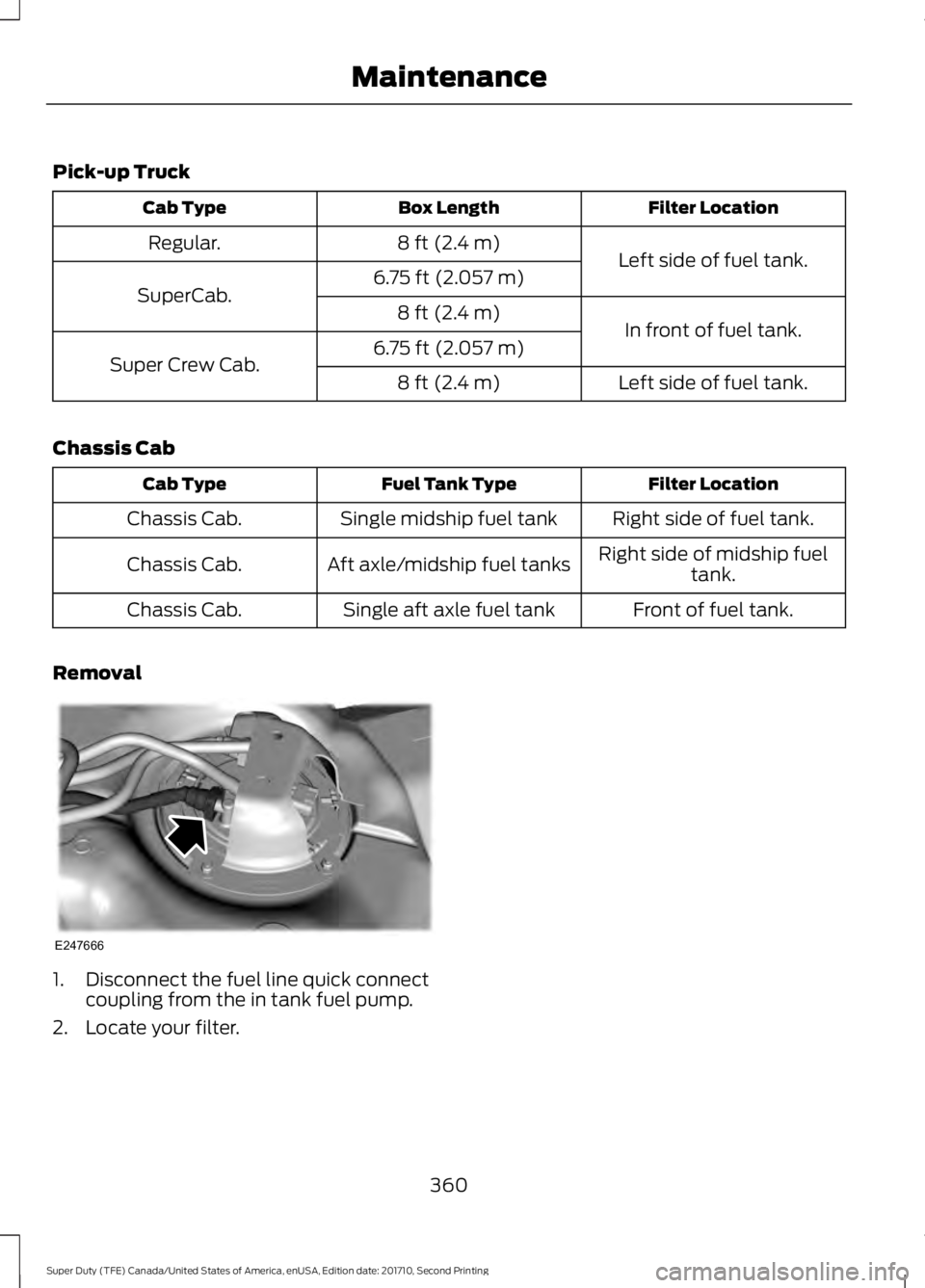
Removal
1. Disconnect the fuel line quick connectcoupling from the in tank fuel pump.
2. Locate your filter.
360
Super Duty (TFE) Canada/United States of America, enUSA, Edition date: 201710, Second Printing
MaintenanceE247666
Page 507 of 642
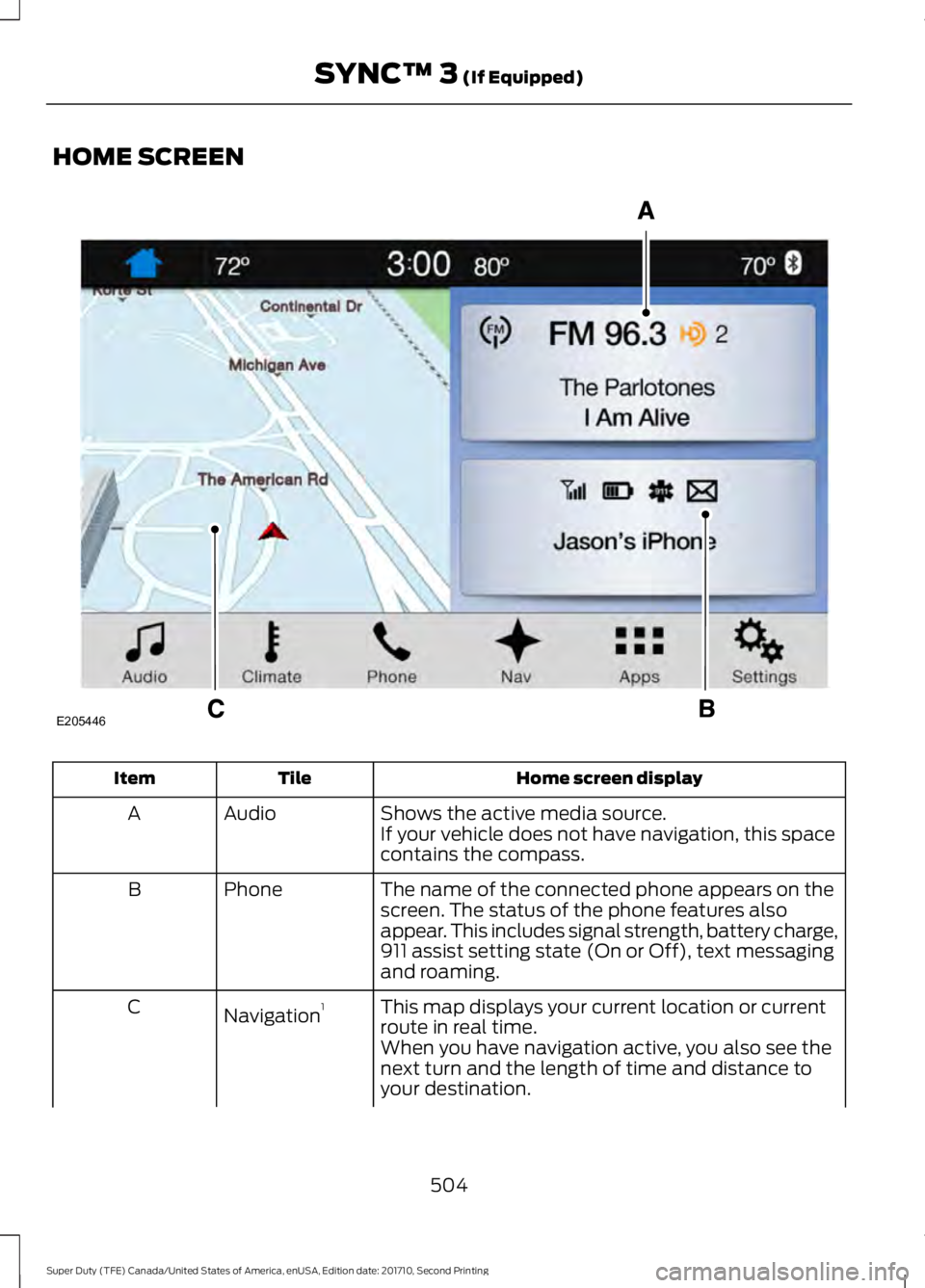
HOME SCREEN
Home screen displayTileItem
Shows the active media source.AudioAIf your vehicle does not have navigation, this spacecontains the compass.
The name of the connected phone appears on thescreen. The status of the phone features alsoappear. This includes signal strength, battery charge,911 assist setting state (On or Off), text messagingand roaming.
PhoneB
This map displays your current location or currentroute in real time.Navigation1C
When you have navigation active, you also see thenext turn and the length of time and distance toyour destination.
504
Super Duty (TFE) Canada/United States of America, enUSA, Edition date: 201710, Second Printing
SYNC™ 3 (If Equipped)E205446