2017 FIAT 124 SPIDER engine
[x] Cancel search: enginePage 157 of 300

Never leave children alone in a vehicle,
or with access to an unlocked vehicle.
Allowing children to be in a vehicle
unattended is dangerous for a number of
reasons. A child or others could be
seriously or fatally injured. Children should
be warned not to touch the park brake,
brake pedal or the transmission gear
selector.
Do not leave the key fob in or near the
vehicle (or in a location accessible to
children), and do not leave the ignition in
the ACC or ON/RUN mode. A child could
operate power windows, other controls, or
move the vehicle.
Caution!
Before moving the transmission gear
selector out of PARK, you must place the
ignition from the LOCK/OFF mode to the
ON/RUN mode, and also press the brake
pedal. Otherwise, damage to the gear
selector could result.
DO NOT race the engine when shifting
from PARK or NEUTRAL into another gear
range, as this can damage the drivetrain.
Note:
Shifting into PARK (P), NEUTRAL (N)
or REVERSE (R) while the vehicle is
moving can damage your transmission.
Shifting into a gear or reverse when
the engine is running faster than idle
can damage the transmission. REVERSE (R)
In position REVERSE (R), the vehicle
moves only backward. You must be at
a complete stop before shifting to or
from REVERSE (R), except under rare
circumstances.
With Parking Sensor system
: when
the gear selector is shifted to the
REVERSE (R) position with the ignition
placed in the ON mode, the parking
sensor system is activated and an
audible sound is heard.
NEUTRAL (N)
In NEUTRAL (N), the wheels and
transmission are not locked. The vehicle
will roll freely even on the slightest
incline unless the parking brake or
brakes are on.
Warning!
Do not coast in NEUTRAL and never turn
off the ignition to coast down a hill. These
are unsafe practices that limit your
response to changing traffic or road
conditions. You might lose control of the
vehicle and have a collision.
Note: Do not shift into NEUTRAL (N)
when driving the vehicle. Doing so can
cause transaxle damage. Apply the
parking brake or depress the brake
pedal before moving the gear selector
from NEUTRAL (N) to prevent the
vehicle from moving unexpectedly. DRIVE (D)
DRIVE (D) is the normal driving position.
From a stop, the transmission will
automatically shift through all six gears
in sequence.
MANUAL (M)
MANUAL (M) is the manual shift mode
position. Gears can be shifted up or
down by operating the gear selector.
(Refer to “Manual Shift Mode”
paragraph in this section).
Warning!
Do not downshift for additional engine
braking on a slippery surface. The drive
wheels could lose their grip and the vehicle
could skid, causing a collision or personal
injury.
Active Adaptive Shift
(AAS)
Active Adaptive Shift (AAS)
automatically controls the transmission
shift points to best suit the road
conditions and driver input. This
improves driving feel.
The transmission may switch to AAS
mode when driving up and down
slopes, cornering, driving at high
elevations, or depressing the
accelerator pedal quickly while the gear
selector is in the Drive (D) position.
155
Page 158 of 300

Depending on the road and driving
conditions/vehicle operations, gear
shifting could be delayed or not occur,
however, this does not indicate a
problem because the AAS mode will
maintain the optimum gear position.
Shift-Lock System
The shift-lock system prevents shifting
out of PARK (P) unless the brake pedal
is depressed.
To shift from PARK (P):
1. Depress and hold the brake pedal.
2. Start the engine.
3. Press and hold the lock-release
button.
4. Move the gear selector.
When the ignition is placed in the ACC
mode or in the OFF mode, the gear
selector cannot be shifted from PARK
(P).
The ignition cannot be placed in the
OFF mode if the gear selector is not in
PARK (P).
Shift — Lock Override
If the gear selector will not move from
Park (P) using the proper shift
procedure, continue to press the brake
pedal.Proceed as follows:
1. Remove the shift — lock override
cover using a cloth-wrapped flat head
screwdriver.
2. Insert a screwdriver and push it
down.
3. Push and hold the lock-release
button and move the gear selector.
4. Take the vehicle to an Authorized
Dealer.
For some models
Proceed as follows:
1. Push the lock-release button while
also pushing down on the Shift - Lock
Override button.
2. Move the gear selector.3. Take the vehicle to an Authorized
Dealer.
Manual Shift Mode
The manual shift mode gives you the
feel of driving a manual transmission
vehicle by allowing you to operate the
gear selector manually.
This allows you to control engine rpm
and torque to the drive wheels much
like a manual transmission when more
control is desired.
To change to MANUAL (M) shift mode,
shift the gear selector from DRIVE (D) to
MANUAL (M). To return to automatic
shift mode, shift the gear selector from
MANUAL (M) to DRIVE (D).05210206-12A-002Shift - Lock Override Access Hole
005210206-122-001Shift - Lock Override
156
STARTING AND OPERATING
Page 159 of 300
Caution!
Changing to manual shift mode while
driving will not damage the transmission.
Note:
If you change to manual shift mode
when the vehicle is stopped, the gear
will shift to M1.
If you change to manual shift mode
while the vehicle is moving it will remain
in the current gear until a manual shift
request is made.
Indicators
Manual Shift Mode Indication
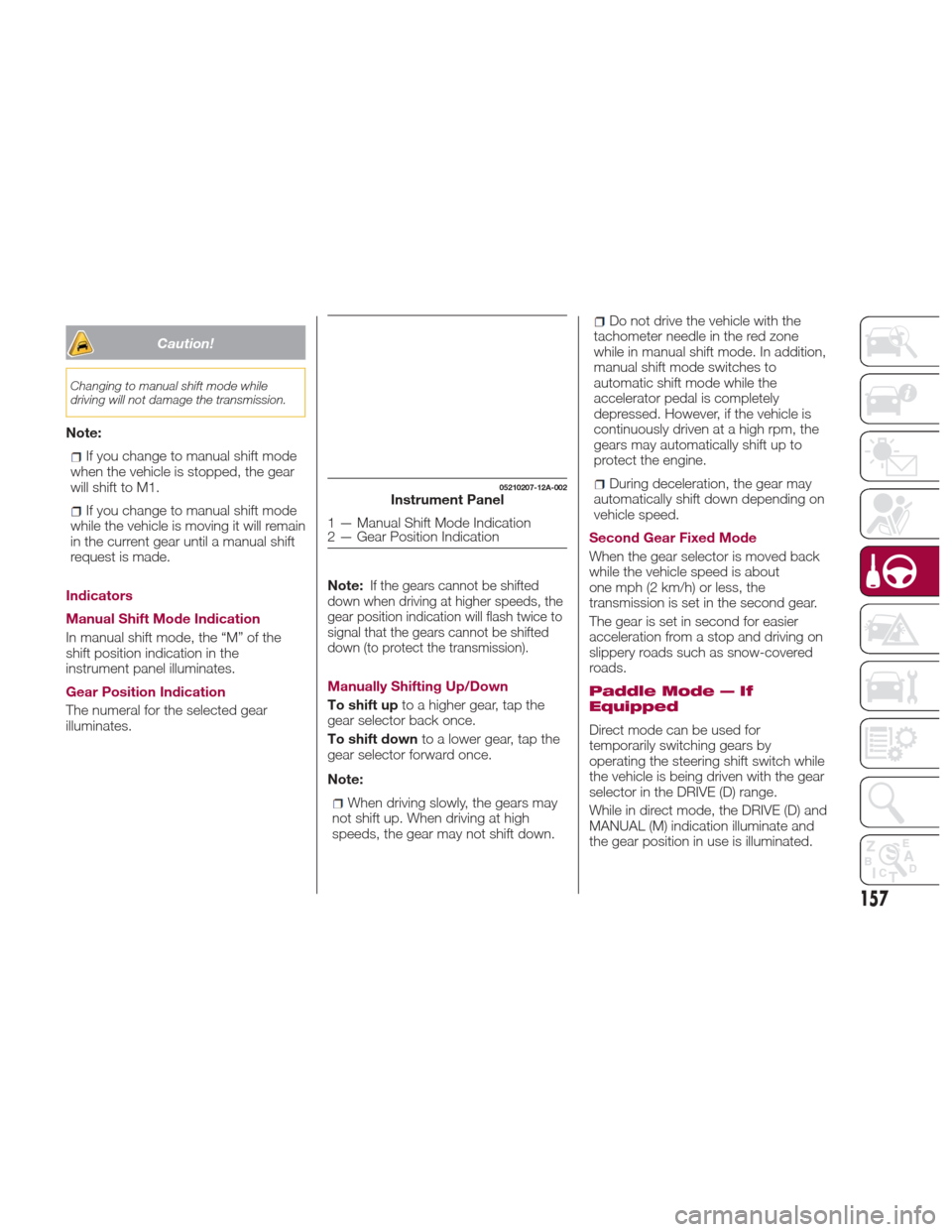
In manual shift mode, the “M” of the
shift position indication in the
instrument panel illuminates.
Gear Position Indication
The numeral for the selected gear
illuminates. Note:
If the gears cannot be shifted
down when driving at higher speeds, the
gear position indication will flash twice to
signal that the gears cannot be shifted
down (to protect the transmission).
Manually Shifting Up/Down
To shift up to a higher gear, tap the
gear selector back once.
To shift down to a lower gear, tap the
gear selector forward once.
Note:
When driving slowly, the gears may
not shift up. When driving at high
speeds, the gear may not shift down.
Do not drive the vehicle with the
tachometer needle in the red zone
while in manual shift mode. In addition,
manual shift mode switches to
automatic shift mode while the
accelerator pedal is completely
depressed. However, if the vehicle is
continuously driven at a high rpm, the
gears may automatically shift up to
protect the engine.
During deceleration, the gear may
automatically shift down depending on
vehicle speed.
Second Gear Fixed Mode
When the gear selector is moved back
while the vehicle speed is about
one mph (2 km/h) or less, the
transmission is set in the second gear.
The gear is set in second for easier
acceleration from a stop and driving on
slippery roads such as snow-covered
roads.
Paddle Mode — If
Equipped
Direct mode can be used for
temporarily switching gears by
operating the steering shift switch while
the vehicle is being driven with the gear
selector in the DRIVE (D) range.
While in direct mode, the DRIVE (D) and
MANUAL (M) indication illuminate and
the gear position in use is illuminated.
05210207-12A-002Instrument Panel
1 — Manual Shift Mode Indication
2 — Gear Position Indication
157
Page 160 of 300
Direct mode is cancelled (released)
under the following conditions:
The vehicle is driven for a certain
amount of time or longer (time differs
depending on the driving conditions
while operating).
The vehicle is stopped or moving at a
slow speed.
Note: Shifting up and down while in
direct mode may not be possible
depending on the vehicle speed. In
addition, because direct mode is
cancelled (released) depending on the
rate of acceleration or if the accelerator
is fully depressed, use of the manual
shift mode is recommended if you need
to drive the vehicle in a particular gear
for long periods.
Driving Tips
Overtaking
For extra power when passing another
vehicle or climbing steep grades, press
the accelerator fully. The transmission
will shift to a lower gear, depending on
vehicle speed.
Note:
The accelerator pedal may initially
feel heavy as it is being pressed, then
feel lighter as it is pressed further. This
change in pedal force aids the engine
control system in determining how
much the accelerator pedal has been pressed for performing kickdown, and
functions to control whether or not
kickdown should be performed.
While the gear selector is in the
MANUAL (M) position and the Dynamic
Stability Control (DSC) is turned off,
manual shift mode does not switch to
automatic shift mode even if the
accelerator pedal is completely
pressed. Operate the gear selector.
Climbing steep grades from a stop
To climb a steep grade from a stopped
position:
1. Press the brake pedal.
2. Shift to DRIVE (D) or M1, depending
on the load weight and grade
steepness.
3. Release the brake pedal while
gradually accelerating.
Descending steep grades
When descending a steep grade, shift
to lower gears, depending on load
weight and grade steepness.
Descend slowly, using the brakes only
occasionally to prevent them from
overheating.
ELECTRONIC SPEED
CONTROL
Electronic Speed
Control
This is an electronically controlled
driving assistance feature that allows
the desired vehicle speed to be
maintained, without having to press the
accelerator pedal.
This feature can be used at a speed
above 25 mph (40 km/h) on long
stretches of dry, straight roads with few
variations (e.g. motorways).
It is therefore not recommended to use
this feature on city roads with traffic.
Do not use it in town.
Warning!
Do not use the cruise control under the
following conditions:
hilly terrain
steep inclines
heavy or unsteady traffic
slippery or winding roads
similar restrictions that require
inconsistent speed
Using the cruise control under the following
conditions is dangerous and could result in
loss of vehicle control.
158
STARTING AND OPERATING
Page 163 of 300
Decreasing Speed
To decrease speed using cruise
control buttons:
Push the SET/- button and hold itthe
vehicle will gradually slow down.
Release the button at the desired
speed.
Push the SET/- button and release it
immediately to adjust the set speed.
Multiple activations will decrease the set
speed according to the number of
times it is pushed.
Decreasing speed with a single
SET/- button operation:
Instrument Cluster Display for vehicle
speed is indicated in mph: 1 mph
Instrument Cluster Display for vehicle
speed is indicated in km/h: 1 km/h
Resume Speed
If any other method besides the
OFF/CANCEL button was used to
cancel cruising speed (such as applying
the brake pedal or pressing in the
clutch pedal) and the system is still
activated, the most recent set speed
will automatically resume when the
RESUME/+ button is pushed.
If vehicle speed is below 25 mph
(40 km/h), increase the vehicle speed
up to 16 mph (25 km/h) or more and
push RESUME/+ button.
TEMPORARILY
CANCELLING THE
SYSTEM
Warning!
Leaving the Electronic Speed Control
system on when not in use is dangerous.
You could accidentally set the system or
cause it to go faster than you want. You
could lose control and have an accident.
Always leave the system OFF when you are
not using it.
To temporarily cancel the system, use
one of these methods:
Slightly depress the brake pedal.
Depress the clutch pedal (if equipped
with a manual transmission).
Push OFF/CANCEL button.
If the RESUME/+ button is pushed
when the vehicle speed is 25 mph
(40 km/h) or higher, the system reverts
to the previously set speed. Note:
If any of the following conditions occur,
the cruise control system is temporarily
canceled:
The parking brake is applied
Automatic Transmission
:the
gear selector is in the P or N position.
Manual Transmission : the gear
selector is in the neutral position.
Automatic Transmission :the
cruise control cannot be cancelled
while driving in manual mode (gear
selector shifted from D to M position).
Therefore, engine braking will not be
applied even if the transmission is
shifted down to a lower gear. If
deceleration is required, lower the set
speed or depress the brake pedal.
When the cruise control system is
temporarily canceled, the speed cannot
be reset.
161
Page 165 of 300

REAR PARK ASSIST
— IF EQUIPPED
Rear Park Assist
Warning!
Do not rely completely on the parking
sensor system and be sure to confirm the
safety around your vehicle visually when
driving. This system can assist the driver in
operating the vehicle in the forward and
backward directions while parking. The
detection ranges of the sensors are limited,
therefore, driving the vehicle while relying
only on the system may cause an accident.
Always confirm the safety around your
vehicle visually when driving.
Parking and other potentially dangerous
manoeuvres are, however, always the
driver’s responsibility. When performing
these operations, always make sure that
there are no other people (especially
children) or animals on the route you want
to drive into. The parking sensors are an
aid for the driver, but the driver must
never allow their attention to lapse during
potentially dangerous manoeuvres, even
those executed at low speeds.
The rear park assist system uses four
ultrasonic sensors (two rear sensors
and two rear corner sensors) to detect
obstructions around the vehicle while
parking the vehicle in a garage or
during parallel parking when the gear
selector is in Reverse (R).
The system is equipped with an assist
device to notify the driver of the
approximate distance from the vehicle
to the surrounding obstruction using a
audible signal.
Note:
Do not install any accessories within
the detection ranges of the sensors. It
may affect the system operation.
Depending on the type of
obstruction and the surrounding
conditions, the detection range of a
sensor may narrow, or the sensors
may not be able to detect
obstructions.
The system may not operate
normally under the following
conditions:
Mud, ice, or snow is adhering to the
sensor area (returns to normal
operation when removed).
The sensor area is frozen (returns to
normal operation when the ice is
thawed).
The sensor is covered by a hand or
excessively shocked.
The vehicle is excessively tilted.
Under extremely hot or cold
weather conditions.
The vehicle is driven on bumps,
inclines, gravel, or grass covered
roads.
Anything which generates
ultrasound is near the vehicle, such as
another vehicle's horn, the engine
sound of a motorcycle, the air brakes
of a large-sized vehicle, or another
vehicle's sensors.
The vehicle is driven in heavy rain or
in road conditions causing
water-splash.
05200100-121-001Parking Sensor Locations
163
Page 168 of 300

When Warning Alert Is Activated
The system notifies the driver of an obstacle by activating the audible alert.
BeepHow To Check
The audible alert is not heard The
system may have a malfunction. Contact an Authorized Dealer as soon as
possible.
When the engine switch is turned ON or if the parking
sensor detects a problem while driving, the intermittent sound of the buzzer is heard one-four times (*) Remove any foreign material from the sensor area. If the system does not recover,
contact an Authorized Dealer as soon as possible.
(*) The number of times the buzzer activates changes depending on the malfunction location.
166
STARTING AND OPERATING
Page 175 of 300

REFUELING THE
VEHICLE
Refueling The Vehicle
Stop the engine before refueling.
Fuel Requirements
Vehicles with catalytic converters or
oxygen sensors must use ONLY
UNLEADED FUEL, which will reduce
exhaust emissions and keep spark plug
fouling to a minimum.
Fuel: Premium unleaded fuel.
Octane Rating (Anti-knock index): 91
(R + M)/2 method or above (96 RON or
above) (U.S. federal law requires that
octane ratings be posted on gasoline
station pumps).
Regular unleaded fuel with an octane
rating from 87 to 90 (91 to 95 RON) can
be used, but this will reduce
performance slightly, such as reduced
engine output, and engine knocking.
Fuel with a rating lower than 87 octane
(91 RON) will negatively affect the
emission control system performance
and could also cause engine knocking
and serious engine damage.
While operating on gasoline with an
octane number of 87, hearing a light
knocking sound from the engine is not
a cause for concern. However, if the
engine is heard making a heavy
knocking sound, see your Authorized
Dealer immediately. Use of gasoline
with an octane number lower than87 can cause engine failure and may
void or not be covered by the New
Vehicle Limited Warranty. Poor quality
gasoline can cause problems such as
hard starting, stalling, and hesitations. If
you experience these symptoms, try
another brand of gasoline before
considering service for the vehicle.
Gasoline blended with oxygenates such
as alcohol or ether compounds are
generally referred to as oxygenated
fuels.
The common gasoline blend that can
be used with your vehicle is ethanol
blended at no more than 15%. Gasoline
containing alcohol, such as ethanol or
methanol, may be marketed under the
name "Gasohol".
Vehicle damage and drivability
problems resulting from the use of the
following may not be covered by the
New Vehicle Limited Warranty:
Alcohol containing more than 15%
ethanol.
Gasoline or alcohol containing
methanol.
Leaded fuel or leaded alcohol.
Reformulated Gasoline
Many areas of the country require the
use of cleaner burning gasoline referred
to as “Reformulated Gasoline”.
Reformulated gasoline contains
oxygenates and are specifically blended to reduce vehicle emissions and
improve air quality.
The use of reformulated gasoline is
recommended. Properly blended
reformulated gasoline will provide
improved performance and durability of
engine and fuel system components.
Gasoline/Oxygenate
Blends
Some fuel suppliers blend unleaded
gasoline with oxygenates such as
ethanol.
Caution!
DO NOT use gasoline containing methanol
or gasoline containing more than 15%
ethanol (E-15). Use of these blends may
result in starting and drivability problems,
damage critical fuel system components,
cause emissions to exceed the applicable
standard, and/or cause the “Malfunction
Indicator Light” to illuminate. Please
observe pump labels as they should clearly
communicate if a fuel contains greater than
15% ethanol (E-15).
Problems that result from using
gasoline containing more than 15%
ethanol (E-15) or gasoline containing
methanol are not the responsibility of
the manufacturer and may void or not
be covered under New Vehicle Limited
Warranty.
173