Page 128 of 530
Mute/Un-Mute (Mute ON/OFF)
When you mute the Uconnect Phone, you will still be able
to hear the conversation coming from the other party, but
the other party will not be able to hear you. To mute the
Uconnect Phone:
•Push the Voice Command
button.
•Following the beep, say “Mute.”
To un-mute the Uconnect Phone:
• Push the Voice Command
button.
•Following the beep, say “Mute off.”
Advanced Phone Connectivity
Transfer Call To And From Mobile Phone
The Uconnect Phone allows ongoing calls to be transferred
from your mobile phone to the Uconnect Phone without
terminating the call. To transfer an ongoing call from your
Uconnect Phone paired mobile phone to the Uconnect
Phone or vice versa, push the Voice Command
button
and say “Transfer Call.” Connect Or Disconnect Link Between The Uconnect
Phone And Mobile Phone
Your mobile phone can be paired with many different
electronic devices, but can only be actively “connected”
with one electronic device at a time.
If you would like to connect or disconnect the Bluetooth
connection between your mobile phone and the Uconnect
Phone System, follow the instructions described in your
mobile phone User ’s Manual.
List Paired Mobile Phone Names
To list the paired mobile phone names using Voice Com-
mand:
1. Push the Phone
button to begin.
2. After the “Ready” prompt and the following beep, say
“Setup Phone Pairing.”
3. When prompted, say “List Phones.”
The Uconnect Phone will play the phone names of all
paired mobile phones in order from the highest to the
lowest priority. To “Select” or “Delete” a paired phone
being announced, push the Voice Command
button
126 UNDERSTANDING THE FEATURES OF YOUR VEHICLE
Page 129 of 530
and say “Select” or “Delete.” Also, see the next two
sections for an alternate way to “Select” or “Delete” a
paired phone.
Select Another Mobile Phone
This feature allows you to select and start using another
mobile phone paired with the Uconnect Phone.
To select another mobile phone using Voice Command:
1. Push the Phone
button to begin.
2. After the “Ready” prompt and the following beep, say“Setup Select Phone” and follow the prompts.
• You can also push the Phone
button at any time
while the list is being played, and choose the phone
that you wish to select.
The selected phone will be used for the next phone call. If
the selected phone is not available, the Uconnect Phone
will return to using the highest priority phone present in or
near (approximately within 30 ft [9 m]) the vehicle.
Delete Uconnect Phone Paired Mobile Phones
To delete Uconnect phone paired mobile phones using
Voice Command:
1. Push the Phone
button to begin.
2. After the “Ready” prompt and the following beep, say “Setup Phone Pairing.”
3. At the next prompt, say “Delete” and follow the prompts.
• You can also push the Phone
button at any time
while the list is being played, and then choose the
phone you wish to delete.
Things You Should Know About Your Uconnect
Phone
Uconnect Phone Tutorial
To hear a brief tutorial of the system features, push the
Phone
button and say “Uconnect Tutorial.”
Voice Training
For users experiencing difficulty with the system recogniz-
ing their voice commands or numbers, the Uconnect Phone
Voice Training feature may be used. To enter this training
mode, follow one of the two following procedures:
From outside the Uconnect Phone mode (e.g., from radio
mode):
• Push and hold the Voice Command
button for five
seconds until the session begins, or, 3
UNDERSTANDING THE FEATURES OF YOUR VEHICLE 127
Page 130 of 530
•Push the Voice Commandbutton and say the “Voice
Training,” “System Training,” or “Start Voice Train-
ing” command.
You can either push the Uconnect Phone button to restore
the factory setting or repeat the words and phrases when
prompted by the Uconnect Phone. For best results, the
Voice Training session should be completed when the
vehicle is parked with the engine running, all windows
closed, and the blower fan switched off.
This procedure may be repeated with a new user. The
system will adapt to the last trained voice only.
Reset
To Reset all settings using Voice Command:
1. Push the Phone
button.
2. After the “Ready” prompt and the following beep, say “Setup,” then “Reset.”
• This will delete all phone pairing, phone book entries,
and other settings in all language modes. The System
will prompt you before resetting to factory settings.
Voice Command
For best performance:
• Adjust the rearview mirror to provide at least ½ inch (1
cm) gap between the overhead console (if equipped) and
the mirror.
• Always wait for the beep before speaking.
• Speak normally without pausing, just as you would
speak to a person sitting a few feet/meters away from
you.
• Make sure that no one other than you is speaking during
a Voice Command period.
Performance is maximized under:
• Low-to-medium blower setting
• Low-to-medium vehicle speed
• Low road noise
• Smooth road surface
• Fully closed windows
• Dry weather condition
128 UNDERSTANDING THE FEATURES OF YOUR VEHICLE
Page 131 of 530
NOTE:
•Even though the system is designed for users speaking
in North American English, French, and Spanish accents,
the system may not always work for some.
• When navigating through an automated system such as
voice mail, or when sending a page, at the end of
speaking the digit string, make sure to say “Send.”
• Storing names in the phonebook when the vehicle is not
in motion is recommended.
• It is not recommended to store similar sounding names
in the Uconnect Phonebook.
• Phonebook (Downloaded and Uconnect Phone Local)
name recognition rate is optimized when the entries are
not similar.
• Numbers must be spoken in single digits. “800” must be
spoken “eight-zero-zero” not “eight hundred.”
• You can say “O” (letter “O”) for “0” (zero).
• Even though international dialing for most number
combinations is supported, some shortcut dialing num-
ber combinations may not be supported.Far End Audio Performance
Audio quality is maximized under:
•Low-to-medium blower setting
• Low-to-medium vehicle speed
• Low road noise
• Smooth road surface
• Fully closed windows
• Dry weather conditions, and
• Operation from the driver’s seat.
NOTE:
• Performance, such as audio clarity, echo, and loudness
to a large degree rely on the phone and network, and not
the Uconnect Phone.
• Echo at the phone far end can sometimes be reduced by
lowering the in-vehicle audio volume.
• In a convertible vehicle, system performance may be
compromised with the convertible top down.
3
UNDERSTANDING THE FEATURES OF YOUR VEHICLE 129
Page 132 of 530
Recent Calls
If your phone supports “Automatic Phonebook Down-
load,” Uconnect Phone can list your Outgoing, Incoming
and Missed Calls.
SMS
Uconnect Phone can read or send new messages on your
phone.
Read Messages:
If you receive a new text message while your phone is
connected to Uconnect Phone, an announcement will be
made to notify you that you have a new text message. If
you wish to hear the new message:
1. Push the Phone
button.
2. After the “Ready” prompt and the following beep, say“SMS Read” or “Read Messages.”
• Uconnect Phone will play the new text message for
you.
After reading a message, you can “Reply” or “Forward”
the message using Uconnect Phone. Send Messages:
You can send messages using Uconnect Phone. To send a
new message:
1. Push the Phone
button.
2. After the “Ready” prompt and the following beep, say
“SMS Send” or “Send Message.”
3. You can either say the message you wish to send or say “List Messages.” There are 20 preset messages.
To send a message, push the Voice Command
button
while the system is listing the message and say “Send.”
Uconnect Phone will prompt you to say the name or
number of the person you wish to send the message to.
130 UNDERSTANDING THE FEATURES OF YOUR VEHICLE
Page 133 of 530
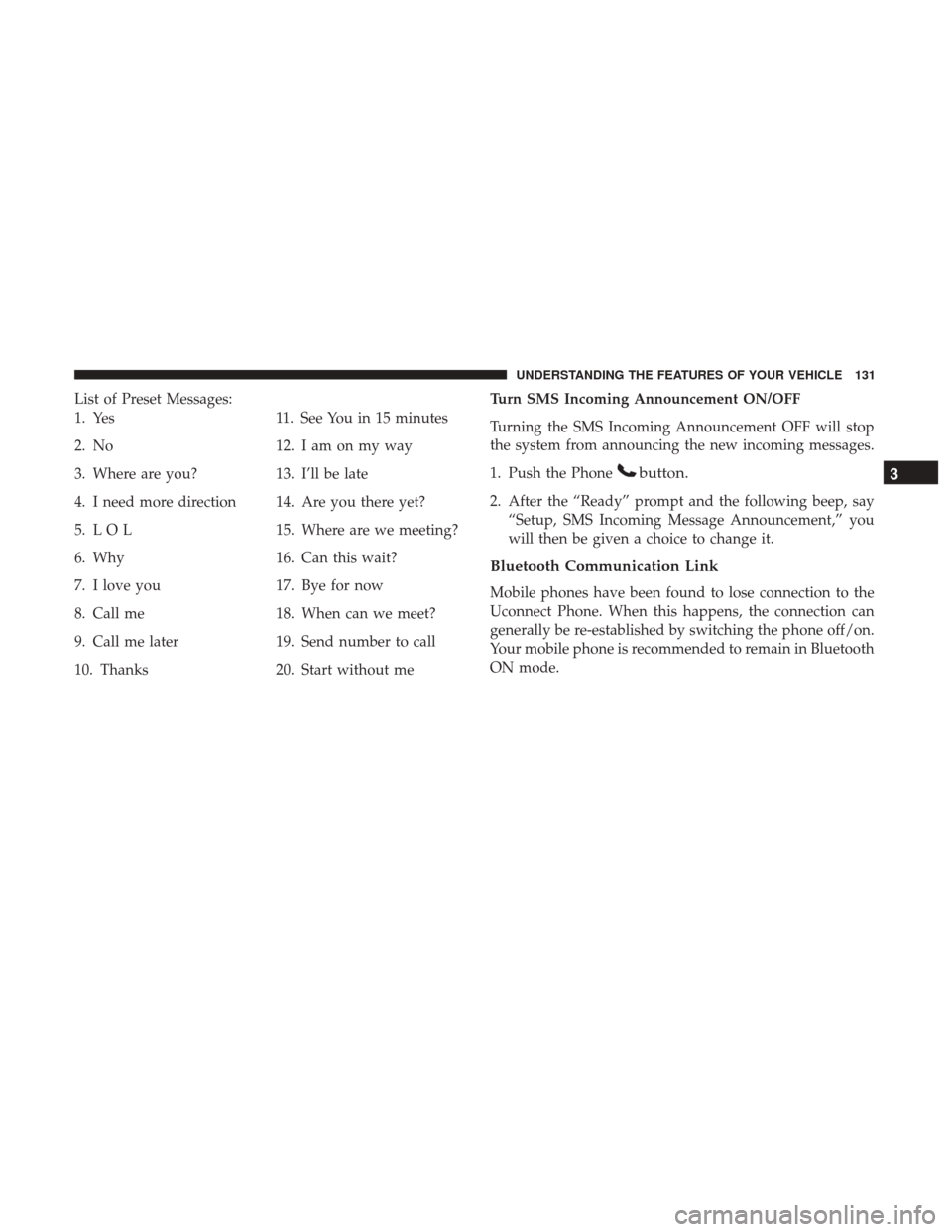
List of Preset Messages:
1. Yes
2. No
3. Where are you?
4. I need more direction
5. L O L
6. Why
7. I love you
8. Call me
9. Call me later
10. Thanks11. See You in 15 minutes
12. I am on my way
13. I’ll be late
14. Are you there yet?
15. Where are we meeting?
16. Can this wait?
17. Bye for now
18. When can we meet?
19. Send number to call
20. Start without me Turn SMS Incoming Announcement ON/OFF
Turning the SMS Incoming Announcement OFF will stop
the system from announcing the new incoming messages.
1. Push the Phone
button.
2. After the “Ready” prompt and the following beep, say
“Setup, SMS Incoming Message Announcement,” you
will then be given a choice to change it.
Bluetooth Communication Link
Mobile phones have been found to lose connection to the
Uconnect Phone. When this happens, the connection can
generally be re-established by switching the phone off/on.
Your mobile phone is recommended to remain in Bluetooth
ON mode.
3
UNDERSTANDING THE FEATURES OF YOUR VEHICLE 131
Page 137 of 530
Voice Commands
PrimaryAlternate (s)
zero
one
two
three
four
five
six
seven
eight
nine
star (*)
plus (+)
pound (#)
add location
all
call
cancel
confirmation prompts
continue
Primary Alternate (s)
delete
dial
download
edit
emergency
English
erase all
Espanol
Francais
help
home
language
list names
list phones
mobile
mute
mute off
new entry
no
other
3
UNDERSTANDING THE FEATURES OF YOUR VEHICLE 135
Page 138 of 530
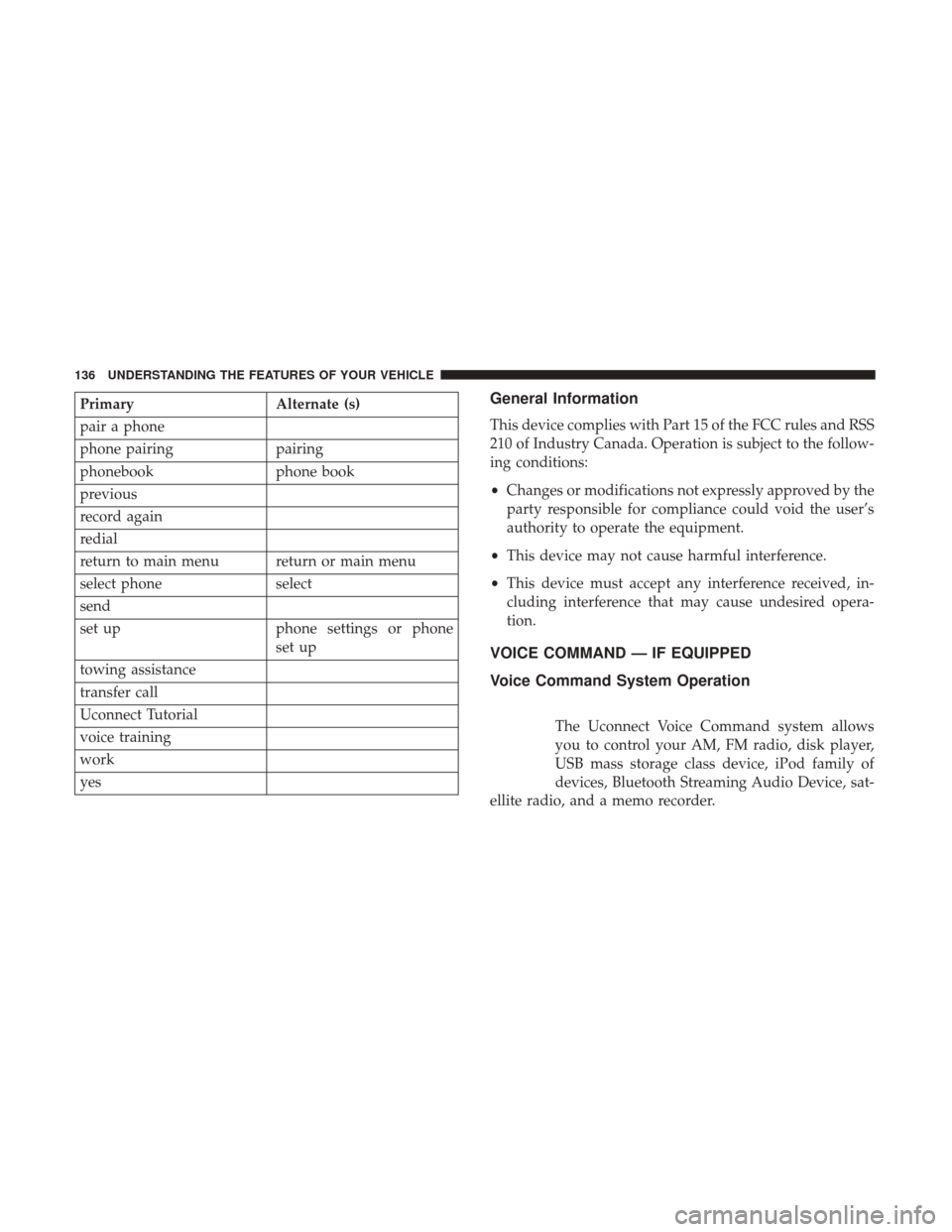
PrimaryAlternate (s)
pair a phone
phone pairing pairing
phonebook phone book
previous
record again
redial
return to main menu return or main menu
select phone select
send
set up phone settings or phone
set up
towing assistance
transfer call
Uconnect Tutorial
voice training
work
yesGeneral Information
This device complies with Part 15 of the FCC rules and RSS
210 of Industry Canada. Operation is subject to the follow-
ing conditions:
• Changes or modifications not expressly approved by the
party responsible for compliance could void the user’s
authority to operate the equipment.
• This device may not cause harmful interference.
• This device must accept any interference received, in-
cluding interference that may cause undesired opera-
tion.
VOICE COMMAND — IF EQUIPPED
Voice Command System Operation
The Uconnect Voice Command system allows
you to control your AM, FM radio, disk player,
USB mass storage class device, iPod family of
devices, Bluetooth Streaming Audio Device, sat-
ellite radio, and a memo recorder.
136 UNDERSTANDING THE FEATURES OF YOUR VEHICLE