2017 Citroen GRAND C4 PICASSO Sim
[x] Cancel search: SimPage 161 of 527

159
C4-Picasso-II_en_Chap04_conduite_ed02-2016
Steering mounted controls
6. Cruise control pause / resume indication.
7. Cruise control mode selection indication.
8.
Spe
ed setting.
Cruise control - "CRUISE"
System which automatically maintains the speed of the vehicle at the value programmed by the driver, without any action on the accelerator pedal.
The cruise control system cannot, in any circumstances, replace the need to observe speed limits, nor can it replace the need for vigilance on the part of the driver.
You are advised to keep your feet near the pedals at all times.
S
witching on the cruise control requires a
minimum vehicle speed of 25 mph (40 km/h).
As well as engagement of:
-
f
ourth gear or higher on a manual gearbox,
-
s
econd gear or higher in manual mode on
an automatic gearbox,
-
position
D on an automatic gearbox.
The system remains active after changing gear
on vehicles with a manual gearbox and Stop &
Start.
The cruise control is paused by pressing
button 4 or the brake pedal or on triggering of
the ESC system for safety reasons.
It is possible to exceed the programmed speed
temporarily by pressing the accelerator pedal.
To return to the programmed speed, simply
release the accelerator pedal until the
programmed cruise speed is reached again. 1.
S
elect cruise control mode.
2.
S
et the current speed of the vehicle
as the programmed speed / Lower the
programmed speed.
3.
S
et the current speed of the vehicle
as the programmed speed / Raise the
programmed speed.
4.
P
ause / resume cruise control.
5.
D
isplay the list of memorised speeds or,
A
ccept the speed suggested by the speed
limit recognition system.
Displays in the instrument panel
Switching off the ignition cancels any
programmed speed value. For more information on Memorising speeds
,
refer to the corresponding section.
For more information on Speed limit
recognition and memorisation, refer to the
corresponding section.
4
Driving
Page 167 of 527

165
C4-Picasso-II_en_Chap04_conduite_ed02-2016
In the event of the presence of a
vehicle detected by the radar, if the
speed selected is much higher than
the speed of that vehicle, the system
is not activated and the alert message
"Activation not possible, conditions
unsuitable" is displayed until driving
conditions are safe to allow activation of
the system.
Exceeding the speed setting
The information is grouped together in the
instrument panel.
6.
I
ndication of cruise control pause/resume.
7.
I
ndication of selection of cruise control
mode, or
v
ehicle speed adjustment phase.
8.
C
ruise speed setting, or
a
djusted speed lower than the cruise
setting.
Displays in the instrument panel
Modification of the inter-vehicle
distance
Press button 6 to choose a new inter-vehicle
distance setting from the 3 available (" Close",
" Normal ", "Distant ").
This value remains in memory, whatever the
state of the system.
It is possible to exceed the speed setting
temporarily by depressing the accelerator
pedal.
Then simply release the accelerator pedal to
return to the programmed speed.
If the speed setting is unintentionally exceeded,
descending a steep hill for example, the speed
setting in the instrument panel flashes as a
warning.
4
Driving
Page 175 of 527
173
C4-Picasso-II_en_Chap04_conduite_ed02-2016
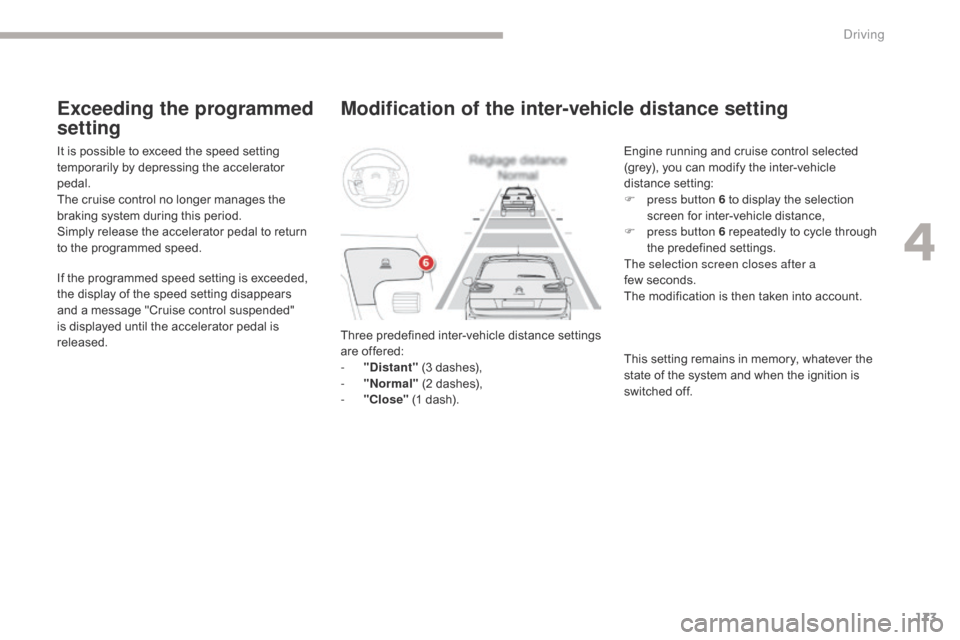
Modification of the inter-vehicle distance setting
Three predefined inter-vehicle distance settings
are offered:
-
"
Distant" (3 dashes),
-
"
Normal" (2 dashes),
-
"
Close" (1 dash). Engine running and cruise control selected
(grey), you can modify the inter-vehicle
distance setting:
F
p
ress button 6 to display the selection
screen for inter-vehicle distance,
F
p
ress button 6 repeatedly to cycle through
the predefined settings.
The selection screen closes after a
few seconds.
The modification is then taken into account.
This setting remains in memory, whatever the
state of the system and when the ignition is
switched off.
It is possible to exceed the speed setting
temporarily by depressing the accelerator
pedal.
The cruise control no longer manages the
braking system during this period.
Simply release the accelerator pedal to return
to the programmed speed.
If the programmed speed setting is exceeded,
the display of the speed setting disappears
and a message "Cruise control suspended"
is displayed until the accelerator pedal is
released.
Exceeding the programmed
setting
4
Driving
Page 197 of 527

195
C4-Picasso-II_en_Chap04_conduite_ed02-2016
360 Vision
This system provides a view in the instrument
panel of the near surroundings of your vehicle,
using cameras mounted at the front and rear of
your vehicle and under the door mirrors.
Depending on the angle of view chosen (front
view, rear view or 360° panoramic view),
360 Vision provides special visual assistance
in particular driving conditions such as when
entering a blind junction or manoeuvring in
areas of reduced visibility.
Once activated, this function operates up to
9
mph (15 km/h). Above 18 mph (30 km/h), the
function is deactivated automatically. This system is a visual aid which in no
circumstances can replace the need for
vigilance on the part of the driver.
The images provided by the cameras
may be deformed by the relief. The
presence of areas in shade, in sunny
conditions, or of low ambient light may
darken the image and reduce contrast.Forward vision
The camera located in the front bumper is
activated and views of the areas located at
front left and front right appear simultaneously
in the instrument panel.
Rear vision
The camera located in the tailgate is activated
and the view of the area behind your vehicle is
displayed in the instrument panel and behaves
like a reversing camera, whatever the position
of the gear selector lever.
The blue lines represent the width of your
vehicle (excluding mirrors): they move
according to the position of the steering wheel.
The red line represents a distance of 30 cm
from the rear bumper, and the two green
lines, 1 m and 2 m from the rear bumper,
respectively.
Rear vision is displayed automatically
when engaging reverse, regardless of
the state of the system.
4
Driving
Page 234 of 527

232
C4-Picasso-II_en_Chap06_securite_ed02-2016
Localised Assistance Call
If you purchased your vehicle outside
the CITROËN dealer network, we
invite you to have a dealer check the
configuration of these services and, if
desired, modified to suit your wishes.
In a multi-lingual country, configuration
is possible in the official national
language of your choice.
A fault with the system does not
prevent the vehicle being driven. For technical reasons and in particular
to improve the quality of "Telematic
services" services to customers, the
manufacturer reserves the right to
carry out updates to the vehicle's on-
board telematic system.
A voice message confirms that the call has
been made**.
**
D
epending on the geographical cover of
"Localised Emergency Call", "Localised
Assistance Call" and the official national
language selected by the owner of the
vehicle.
The list of countries covered and Telematic
services is available from dealers or at
www.citroen.co.uk.Operation of the system
When the ignition is switched
on, the green LED comes on for
3 seconds indicating that the
system is operating correctly.
The red indicator lamp flashes
then goes off: there is a system
fault.
For all countries except Russia, Belarus
and Kazakhstan.
The red indicator lamp is on continuously:
replace the back-up battery.
For Russia, Belarus and Kazakhstan.
The red indicator lamp is on
continuously: there is a system
fault.
The red indicator lamp flashes: replace the
back-up battery.
In either case, the emergency and assistance
calls may not function.
Contact a qualified repairer as soon as
possible. Press this button for more than
2
seconds to request assistance
if the vehicle breaks down.
Pressing this button again immediately cancels
the request.
The cancellation is confirmed by a voice
message.
Geo-location
You can deactivate geo-location by
simultaneously pressing the "Localised
Emergency Call" and "Localised Assistance
Call" buttons, followed by a press on "Localised
Assistance Call" to confirm.
To reactivate geo-location, simultaneously
press the "Localised Emergency Call" and
"Localised Assistance Call" buttons again,
followed by a press on "Localised Assistance
Call" to confirm.
Safety
Page 285 of 527

283
C4-Picasso-II_en_Chap07_info-pratiques_ed02-2016
Freezing of the AdBlue®
AdBlue® freezes at temperatures below
around -11°C.
The SCR system includes a heater
for the AdBlue
® tank, allowing you
to continue driving in all weather
conditions.
Topping-up the AdBlue®
Filling the AdBlue® tank is an operation
included in every routine service on your
vehicle by a CITROËN dealer or a qualified
workshop.
Nevertheless, given the capacity of the tank, it
may be necessary to top-up the fluid between
services, more particularly if an alert (warning
lamps and a message) signals the requirement.
You can go to a CITROËN dealer or a qualified
workshop.
If you envisage topping-up yourself, please
read the following warnings carefully.Precautions in use
Use only AdBlue® fluid that meets the
ISO
22241 standard.
AdBlue® is a urea-based solution. This liquid is
non-flammable, colourless and odourless (kept
in a cool area).
In the event of contact with the skin, wash
the affected area with soap and water. In the
event of contact with the eyes, wash (irrigate)
the eyes with large amounts of water or with
an eye wash solution for at least 15 minutes.
If a burning sensation or irritation persists, get
medical attention.
If swallowed, immediately wash out the mouth
with clean water and then drink plenty of water.
In certain conditions (high temperature, for
example), the risk of release of ammonia
cannot be excluded: do not inhale the fluid.
Ammonia vapour has an irritant effect on
mucous membranes (eyes, nose and throat). The supply in a non-drip container or bottle
simplifies topping-up. You can obtain 1.89 litre
(half a US gallon) bottles or 5 litre containers
from a CITROËN
dealer or a qualified
workshop. Never dilute AdBlue
® with water.
Never pour AdBlue® into the Diesel fuel
tank.
Never top-up from an AdBlue
®
dispenser reserved for heavy goods
vehicles.
Keep AdBlue
® out of the reach of
children, in its original container or
bottle.
Never transfer AdBlue
® to another
container: it would lose its purity.
7
Practical information
Page 349 of 527

Fuel used for petrol engines
The petrol engines are compatible with bio-fuels that conform to current and future European standards and can be obtained from filling stations.
Fuel used for Diesel
engines
The Diesel engines are compatible with biofuels that conform to current and future European standards and can be obtained from filling stations.
The use of B20 or B30 fuel meeting standard EN16709 is possible in your Diesel engine. However, this use, even occasional, requires strict application of the special servicing conditions referred to as "Arduous conditions".
The use of any other type of (bio)fuel (vegetable or animal oils, pure or diluted, domestic fuel...) is strictly prohibited (risk of damage to the engine and fuel system).
The only Diesel additives authorised for use are those that meet the B715000 standard.
The only petrol additives authorised for use are those that meet the B715001 standard.
Petrol that meets the EN228 standard, mixed with a bio-fuel meeting the EN15376 standard.
Travelling abroad Cer tain fuels could damage the engine of your vehicle. In cer tain countries, the use of a par ticular fuel may be required (specific octane rating, specific sales name…) to ensure correct operation of the
engine. For any additional information, contact your dealer.
Diesel fuel that meets standard EN590 mixed with a biofuel that meets standard EN14214 (possibly containing up to 7% Fatty Acid Methyl Ester).
Diesel fuel that meets standard EN16734 mixed with a biofuel that meets standard EN14214 (possibly containing up to 10% Fatty Acid Methyl Ester).
Paraffinic Diesel fuel that meets standard EN15940 mixed with a biofuel that meets standard EN14214 (possibly containing up to 7% Fatty Acid Methyl Ester).
For more information, contact a dealer of the brand or a qualified workshop.
Compatibility of fuels
Diesel fuel at low temperature
In temperatures below 0°C (+32°F), the formation of paraffins in the summer diesel fuels may result in abnormal operation of the fuel supply system. To avoid this, the use of winter diesel fuels is recommended, keeping
the tank topped up to more than 50% of its capacity. If in spite of this you experience difficulties starting the engine in temperatures below -15°C (+5°F), simply leave the vehicle in a garage or a heated workshop for a while.
16CAR.A040*16CAR.A040*
Page 358 of 527

5
.
Audio and Telematics
Steering mounted controls
Media (short press): change the multimedia source. Telephone (short press): call. Call in progress (short press): access to telephone menu. Telephone (long press): reject an incoming call, end call, access to telephone menu.
Decrease volume.
Voice commands : Short press, system voice commands. Long press, smartphone voice commands via the system. Mute / Restore the sound. Or Mute by pressing the volume
increase and decrease buttons simultaneously. Restore the sound by pressing one of the two volume buttons.
Radio (rotate): automatic search for the previous / next station. Media (rotate): previous / next track, move in a list. Short press : confirm a selection; other than selection, access to presets.
Radio : display the list of stations. Media : display the list of tracks. Radio (press and hold): update the list of stations received.
Increase volume.