Page 240 of 442
238
Dashboard fuses
The 2 fuseboxes are placed in the lower
dashboard, in the glove box.Fuse
N° Rating
(A) Functions
F29 -Not used.
F30 30Heated rear screen.
F31 10Heated mirrors.
F32 -Not used.
F33 40Front electric windows.
F34 40Rear electric windows.
F35 30Not used.
F36 -Not used.
F37 -Not used.
F38 -Not used.
F39 -Not used.
F40 -Not used.
Access to the fuses
F Open the glove box.
F
U nclip the fuse boxes protection cover.
Upper fusebox
In the event of a breakdown
Page 241 of 442
239
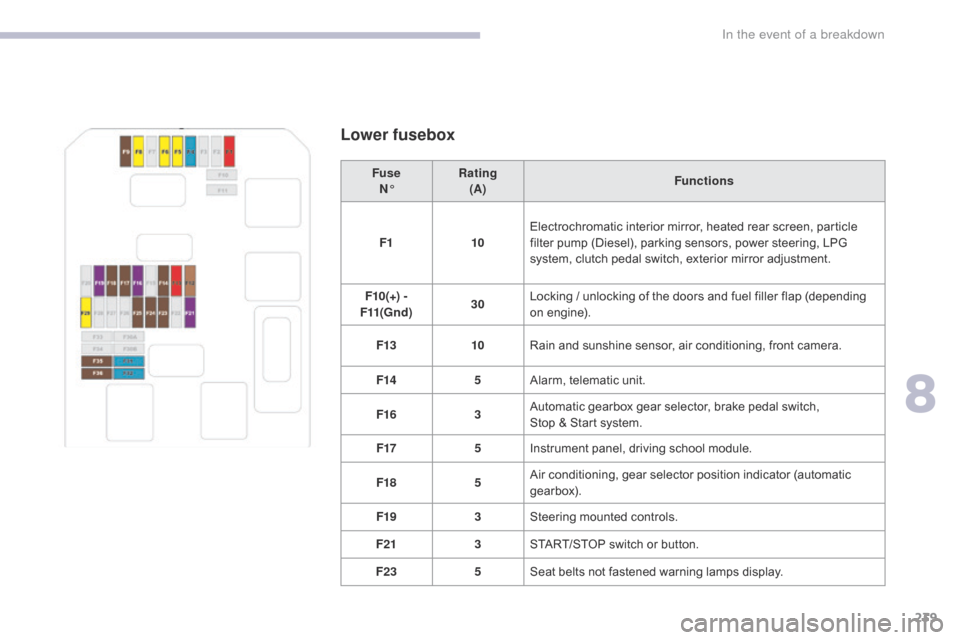
Lower fusebox
FuseN° Rating
(A) Functions
F1 10Electrochromatic interior mirror, heated rear screen, particle
filter pump (Diesel), parking sensors, power steering, LPG
system, clutch pedal switch, exterior mirror adjustment.
F10(+) -
F11(Gnd) 30Locking / unlocking of the doors and fuel filler flap (depending
on engine).
F13 10Rain and sunshine sensor, air conditioning, front camera.
F14 5Alarm, telematic unit.
F16 3Automatic gearbox gear selector, brake pedal switch,
Stop & Start system.
F17 5Instrument panel, driving school module.
F18 5Air conditioning, gear selector position indicator (automatic
gearbox).
F19 3Steering mounted controls.
F21 3START/STOP switch or button.
F23 5Seat belts not fastened warning lamps display.
8
In the event of a breakdown
Page 254 of 442
252
Dimensions (in mm)These dimensions have been measured on an unladen vehicle.
* Mirrors folded.
T
Page 258 of 442

256
Maintenance (advice) ....................................2 14
Maintenance, routine ........................................ 9
M
ap reading lamps
......................................... 90
M
arkings, identification
................................. 25
3
Mat
.......
.....................................................92, 95
Memorising a speed
..................................... 16
6
Mirror, rear view
............................................ 10
0
Mirrors, door............................................99, 180
Misfuel prevention
...............................
..........19 4
Mountings, Isofix
...............................
............13 9 Pads, brake
...................................................
20
9
Paint colour code
..........................................
25
3
Panoramic glass sunroof
................................
91
P
arcel shelf, rear ....................................... 9 7, 98
Parking brake ..................................1 5, 155, 209
Parking sensors, rear.................................... 183
Plates, identification ...................................... 253
Port, USB
..................................................
92, 94
Pre-heater, Diesel
...............................
............15
Pressures, tyres
....................................2
20, 253
Pre-tensioning seat belts
..............................12
4
Priming the fuel system
................................2
15
Protecting children
........................ 1
26, 130 -132,
137, 139 -141, 143
Protectors
...................................................... 2
14
Puncture
................
........................................216
Number plate lamps
...................................... 23
4
M
P
N
Lighting, interior ..............................................90
L ighting, welcome ......................................... 10
7
Loading
..............................
............................... 9
Load reduction mode
.................................... 19
8
Localised Assistance Call
......................11
5 , 117
Locating your vehicle
...................................... 55
Lo
cking
......................................................5
4, 60
Locking from the inside
..............................
........................67
Low fuel level
..............................
..................192Oil change
............................... ......................204
Oil consumption
............................................20
4
Oil, engine
...............................
......................204
Opening the bonnet
......................................2
01
Opening the boot
..............................
. 54, 56, 66
Opening the doors
............................. 5
4, 56, 65
O
Labels, identification .....................................25 3
Lamp, boot ............................... ............... 91, 235
Lamps, parking
............................................. 10
6
Lane Departure Warning System (LDWS)
...17
9
LEDs - Light-emitting diodes
........................10
6
Level, AdBlue
................................................ 2
07
Level, brake fluid
........................................... 20
5
Level, Diesel additive
.................................... 2
07
Level, engine coolant
..............................2
8, 206
Level, engine oil
...............................
.......32, 204
Levels and checks
..............................
..202-207
Level, screenwash fluid
................................20
6
Lighting
................
............................................ 14
Lighting, guide-me home
..............................10
7
L
Key ......................................... 53, 56, 58, 60, 61
Key, electronic ...........................................56
-58
Keyless Entry and Starting
... 5
6, 58, 60, 149, 152
Key not recognised
....................................... 15
4
Key with remote control
................................14
9
Kit, temporary puncture repair
................ 9
7, 216K
Jack .................................................94, 221, 222
Jump starting .............................. ..................244
J
Alphabetical index
Page 272 of 442
6
12:13
18,5 21,5
23 °C
21,518,5
12:1323 °C12:13
18,5 21,5
23 °C
12:13
18,5 21,5
23 °C
Audio and Telematics
Connected navigation
Driving
Applications
Enter navigation settings and choose a destination. Use services available in real time, depending on equipment.
Activate, deactivate and configure certain vehicle functions.
Operate certain applications on a smartphone connected via CarPlay ® or MirrorLink ® or MirrorLink ®TM . Check the state of the Bluetooth ® and Wi-Fi ® and Wi-Fi ®
connections.
Menus
Air conditioning
Manage the various temperature and air flow settings.
A c c o r d i n g t o v e r s i o n
Page 307 of 442
41
.
223
Audio and Telematics
Internet Browser Connectivity Applications
Press " Internet Browser " to display the browser home page.
Select your country of residence.
Press " Connectivity " to go to the CarPlay® or ® or ®MirrorLinkTM function.
Press " Connectivity " to go to the " Internet Browser " function. Pres s " Applications " to display the applications home page.
Connection to the internet is via one of the network connections provided by the vehicle or the user.
Press Applications to display the primary page. Press Applications to display the primary page. Press Applications to display the primary page.
Press " OK " to save and start the browser.
Page 310 of 442
44
12:13
18,5 21,5
23 °C
2
Audio and Telematics
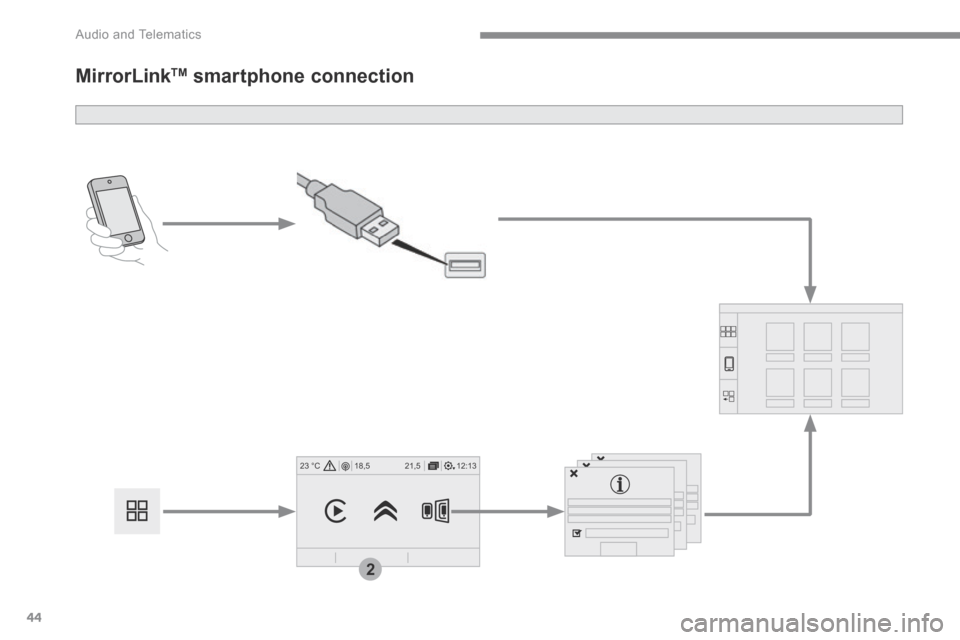
MirrorLink TM smartphone connection
Page 311 of 442
45
.
2
Audio and Telematics
As a safety measure and because it requires the sustained attention of the driver, using a smartphone when driving is prohibited. Operation must be with the vehicle stationary . stationary . stationary
The synchronisation of a smartphone allows applications on a smartphone that are adapted to the MirrorLink TM technology to be displayed in the vehicle's screen. The principles and standards are constantly evolving. For the communication process between the smartphone and the system to work correctly, the smartphone must be unlocked; update the operating system of your smar tphone as well as the date and time in the smartphone and the system. For the list of eligible smartphones, connect to the Brand's internet website in your country.
The " MirrorLinkTM " function requires the use of a compatible smartphone
and applications.
There may be a wait for the availability of applications, depending on the quality of your network.
When connecting a smartphone to the system, it is recommended that Bluetooth ® be started on the smartphone ® be started on the smartphone ®
Depending on the smartphone, it may be necessary to activate the " MirrorLinkTM " function.
During the procedure, several screen pages relating to certain functions are displayed. Accept to start and end the connection.
Connect a USB cable. The smartphone charges when connected by a USB cable.
Press " MirrorLinkTM " to start the system's application.
Once connection is established, a page is displayed with the applications already downloaded to your smartphone and adapted to MirrorLink TM t e c h n o l o g y .
Access to the different audio sources remains accessible in the margin of the MirrorLink TM
display, using touch buttons in the upper bar. Access to the menus for the system is possible at any time using the dedicated buttons
From the system, press on " Applications " to display the primary page.
As a safety measure, applications can only be viewed with the vehicle stationary; display is interrupted once the vehicle is moving.
Press " Connectivity " to go to the MirrorLink TM function.