2017 CITROEN C-ELYSÉE phone
[x] Cancel search: phonePage 216 of 260

05
BACK
214
C-elysee_en_Chap12a_RD5(RD45)_ed01-2016
USING THE TELEPHONE
To display the " TELEPHONE " menu:
-
Make
a long press on
SRC/TEL
.
-
Or
, press the dial to display the
contextual
menu. Select "Call"
and
confirm.
-
Or
, press MENU, select
"Telephone"
and confirm. Select
"
Call" and confirm.
Select "Directory "
and confirm. An
incoming call is announced by a ring and a superimposed display in
the multifunction screen.
Mobile
(depending
on the information
available
in the contact records of
the
telephone connected). "YES"
to accept the call is selected by
default.
Press
the control knob to accept the
call.
Select "
NO" and confirm to reject the
call.
Making a call - From the directory of contacts
Select a contact then confirm.
Receiving a call
Select the number and confirm.A
long press on
BACK
or on
SCR/TEL
also rejects an incoming call.
Business Home or
Press one of these buttons to accept
the call.
Page 217 of 260

05
215
C-elysee_en_Chap12a_RD5(RD45)_ed01-2016
USING THE TELEPHONE
During a call, press the control knob to display the contextual menu.
Hang up In
the contextual menu:
-
select
"Micro OFF" to switch off the
microphone.
-
deselect
"Micro OFF" to switch the
microphone
on.
Managing calls
A long press on one of these buttons also
ends the call.
In
the contextual menu, select "Hang up"
to end the call. Secret - Mute
(so that the caller cannot hear)
Page 218 of 260
05
216
C-elysee_en_Chap12a_RD5(RD45)_ed01-2016
USING THE TELEPHONE
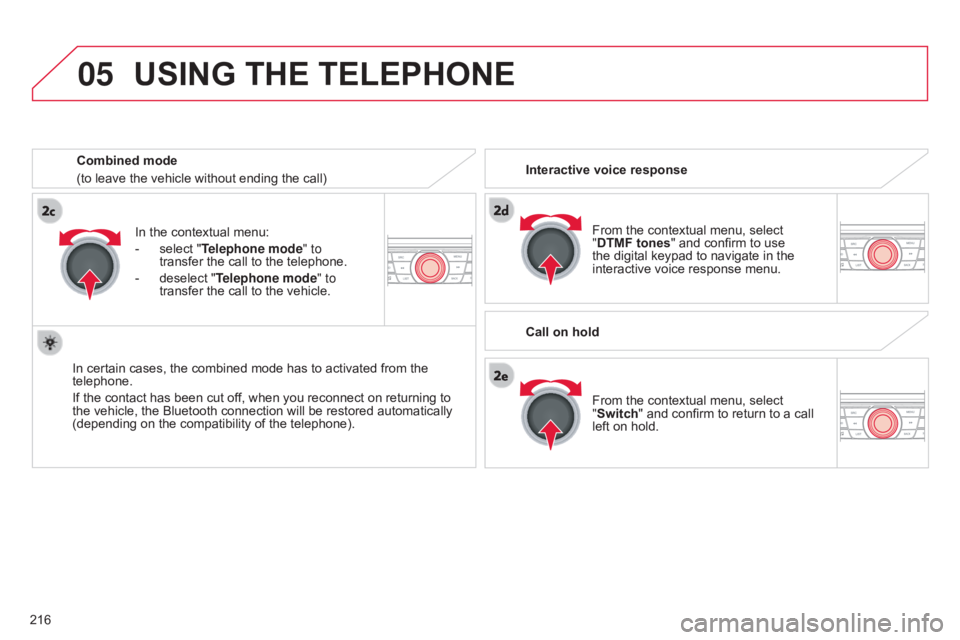
From the contextual menu, select "DTMF tones" and confirm to use
the
digital keypad to navigate in the
interactive
voice response menu.
From
the contextual menu, select
"
Switch" and confirm to return to a call
left
on hold.
Interactive voice response
Call on hold
In
the
contextual
menu:
-
select
"Telephone mode " to
transfer
the
call
to
the
telephone.
-
deselect
"Telephone mode" to
transfer
the
call
to
the
vehicle.
In
certain
cases,
the
combined
mode
has
to
activated
from
the
telephone.
If
the
contact
has
been
cut
off,
when
you
reconnect
on
returning
to
the
vehicle,
the
Bluetooth
connection
will
be
restored
automatically
(depending
on
the
compatibility
of
the
telephone).
Combined mode
(to
leave
the
vehicle
without
ending
the
call)
Page 219 of 260

05
217
C-elysee_en_Chap12a_RD5(RD45)_ed01-2016
USING THE TELEPHONE
Directory
The telephone directory is sent to the system, depending on the compatibility of the telephone.
The
directory is temporary and depends on the Bluetooth
connection.
Contacts
imported from the telephone to the audio system directory
are
saved in a permanent directory visible to all, whatever the
telephone
connected. To
modify the contacts saved in the
system,
press MENU then select
"Telephone"
and confirm.
Select "Directory management "
and
confirm.
Y
ou can:
-
"
Consult an entry",
-
"
Delete an entry",
-
"
Delete all entries".
Select "Directory
" to see the list of
contacts.
For
access to the directory make a long
press on
SRC/TEL
or
Press
the control knob then select
"
Call" and confirm.
Page 221 of 260

07
219
C-elysee_en_Chap12a_RD5(RD45)_ed01-2016
SCREEN MENU MAP(S)
S
CREEN C
MEDIAMedia parameters
Choice of playback mode
Choice of track listing
TELEPHONE
Call
Dial
Directory
Calls list
Voice mail box
Directory management
Consult an entry
Delete an entry
Delete all entries
Telephone management
Telephone status
Hang up
BLUETOOTH CONNECTION
Normal
Random
Random
all
Repeat By
folders
By artists
By genres
By playlists
Radio parameters
1
2
2
1
2
2
2
2
1
2
2
2
1
2
1
1
1
3
3
3
3
3
3
3
3
1
Connections management
Search for a device
MAIN FUNCTION
Option A1
Option
A1
1
Option A
Option B...1
2
3
1
Page 225 of 260

223
C-elysee_en_Chap12a_RD5(RD45)_ed01-2016
FREqUENTLY ASKED q UESTIONS
qUESTION ANSWER SOLUTION
The
CD is ejected
automatically
or is not
played
by the player. The
CD is inserted upside down, is unplayable, does not contain any
audio
data or contains an audio format which the player cannot play.
The
CD is protected by an anti-pirating protection system which is not
recognised
by the audio equipment. -
Check
that the CD is inserted in the player the
right
way up.
-
Check
the condition of the CD: the CD cannot
be
played if it is too damaged.
-
Check
the content in the case of a recorded
CD:
consult the advice in the "Audio" section.
-
The
audio equipment's CD player does not
play
DVDs.
-
Due
to their quality level, certain writeable
CDs
will not be played by the audio system.
The
CD player sound is
poor
. The
CD used is scratched or of poor quality.Insert
good quality CDs and store them in suitable
conditions.
The
audio settings (bass, treble, ambience) are unsuitable.Set
the treble or bass level to 0, without selecting
an
ambience.
I
am
unable to connect
my
Bluetooth telephone. It
is possible that Bluetooth is switched off on the telephone or that the
telephone
has not been made not visible.-
Check
that your telephone has Bluetooth
switched
on.
-
Check
in the telephone's settings that it is
"V
isible to all".
The
Bluetooth telephone is not compatible with the system.You
can check the compatibility of your telephone
on
www.citroen.co.uk (services).
The
Bluetooth connection
is
cut. The
battery of the peripheral may not be sufficiently charged.Recharge
the battery of the peripheral device.
Page 226 of 260

224
C-elysee_en_Chap12a_RD5(RD45)_ed01-2016
FREqUENTLY ASKED q UESTIONS
qUESTION ANSWER SOLUTION
The
message "USB
peripheral error"
or "Peripheral not
recognised"
is displayed
in
the
screen. The
USB memory stick is not recognised.
The
memory stick may be corrupt. Reformat
the memory stick (FAT32).
A telephone connects
automatically,
disconnecting
another
telephone. Automatic
connection overrides manual connection.Modify
the telephone settings to remove automatic
connection.
The Apple
® player is
not
recognised when
connecting
to the USB
port. The Apple
® player is of a generation that is not compatible with a USB connection.
Connect
the Apple® player to the AUX Jack socket using
a
suitable
cable (not supplied).
The
hard
disk
or
device
is
not
recognised
when
connecting
to
the
USB
port. Some
hard
disks
and
devices
need
a
power
supply
greater
than
is
provided
by
the
audio
system. Connect
the
device
to the 230 V socket, the 12 V
socket
or
an
external power supply.
Caution:
ensure
that the device does not transmit
a
voltage
greater
than 5 V (risk of destruction of
the
system).
When
streaming,
the
sound
cuts
momentarily. Some
telephones
prioritise
connection
of
the
"hands-free"
profile. Delete
the
"hands-free" connection profile to
improve
streaming.
In
"Random
all"
play,
not
all
of
the
tracks
are
played. In
"Random
all"
play,
the
system
can
only
take
into
account
up
to
999 tracks.
Page 252 of 260

250
C-elysee_en_Chap14_index-alpha_ed01-2016
Radio ............................................................. 19 9
Range, AdBlue ............................... ...............13 4
Rear
s
creen,
d
emisting
................................... 57
R
echarging the battery
.................................16
6
Reduction
of electrical load
..........................16
8
Regeneration
of the particle
filter
........
..................................................... 18 6
Reinitialisation
of the under-inflation
detection
system
......................................... 10
2
Reinitialising
the remote control
.....................35
R
eminder, key in ignition
.................................66
R
eminder, lighting on
...................................... 94
R
emote control
................................... 3
3, 34, 36
Removing
a wheel
..............................
..........148
Removing
the mat
...............................
..........17 7
Replacing
bu
lbs
..............................
......153,
15
7
Replacing
f
uses
..............................
..............159
Replacing
the air filter
...................................18
6
Replacing
the oil filter
...................................18
6
Replacing
t
he
p
assenger
c
ompartment filter
...................................... 18
6
Reservoir, screenwash
................................. 18
5
Resetting
the service indicator
.......................24
R
esetting the trip recorder
..............................25
R
ev counter
..................................................... 10
R
eversing
lam
ps
........................................... 15
7
Roof bars
....................................................... 17
8
Running
out of fuel
(Diesel)
....................................................... 13
2Safety,
children ............... 1 10, 114-116, 124-126
Screen
C, monochrome
(Audio
system / Bluetooth)
...........................29
S
creen menu map
.........................2
19, 220, 238
Screen,
m
onochrome
........................... 2
19, 238
Screen,
multifunction (with audio
s
yste m)..................................................29,
198
Screens,
very cold conditions
....................1
74
Screenwash, front
........................................... 97
S
CR (Selective Catalytic Reduction)
............13
3
SCR
system
..............................
....................13 3
Seat belts
...................................... 1
07, 109, 120
Seats, front
...............................
.......................43
Seats, rear
....................................................... 45
Sel
ector,
ge
ar
............................................6
9, 77
Serial
number, vehicle
..................................19
3
Service
i
ndicator
.............................................23
S
ervicing
...............................
............................ 8
Sidelamps
....................................... 9
1, 155, 157
Side
r
epeater
..............................
..................15 6
Snow chains
.................................................. 15
2
Socket,
12 V accessory
..................................60
S
ocket, auxiliary
...............................
.............207
Socket,
JACK
...............................
...........60, 207
Sockets,
audio
........................6
0, 205, 207, 235
Sockets,
auxiliary
..........................................23
5
Speed
l
imiter
...............................
....................85
Speedometer
..............................
....................10
Stability
control (ESP)
...................................10
6
Starting
the engine
.........................................64
S
tarting the vehicle
...................... 6
4, 69, 73, 77
Starting
using another battery
......................16
5
Steering
mounted controls, audio
................19
7
Steering
wheel, adjustment
............................48
S
topping the vehicle
.................... 6
4, 69, 73, 77
Stop & Start
...............................1
4, 82, 164, 167
Storage
................
......................................58-60
Storage
b
ox
.....................................................62
RS
Sun visor ......................................................... 59
S witching off the engine .................................64
S
ynchronising the remote control
...................35
T
able of weights
.................................... 1
89, 191
Tables
of engines
..........................1
88, 190, 191
Tables of fuses
.............................................. 15
9
Tank,
AdBlue
® additive ......................... 13 3, 13 7
Tank,
fuel
............................... ................ 129, 130
Technical
da
ta
........................................ 1
8 8 -191
Telephone
..................................................... 2
11
Third
brake
lamp
........................................... 15
8
Three
flashes
(direction indicators)
..............10
0
Time
(setting)
..............................
....................26
To o l s
................
...................................... 145,
14
6
Topping-up
the AdBlue
® additive ................. 13 7
Total
distance
recorder
................................... 25
T
o w b a r
................
........................................... 172
Towed
loads
.......................................... 1
89, 191
Towing
another
vehicle
................................. 17
0
Traction
control
(ASR)
.................................. 10
6
Traffic
information
(TA)
................................. 20
0
Tr a i l e r
...............
............................................. 172
Trip
computer
............................................. 2
7-2 9
Trip
distance
recorder
..................................... 25
T
y r e s
..............................................................
.... 8
Tyre
under-inflation
detection
...............
........ 17, 101, 103, 104, 144
T
Alphabetical index