2017 CITROEN C-ELYSÉE wheel
[x] Cancel search: wheelPage 201 of 306

199
BACK
Receiving a call
An incoming call is announced by a ring and
a superimposed display in the multifunction
screen.
"YES " to accept the call is
selected by default.
Press the thumb wheel to
accept the call.
Select " NO" and confirm to
reject the call.
or
Press one of these buttons to
accept the call. A long press on BACK
or
on SRC/TEL also rejects
an incoming call.
Managing calls
During a call, press the thumb
wheel to display the contextual
menu.
Hang up
In the contextual menu, select
" Hang up " to end the call.
A long press on one of
these buttons also ends
the call.
.
AUDIO and TELEMATICS
Page 203 of 306

201
Directory
The directory of the telephone
is transmitted to the system,
depending on the compatibility
of the telephone.
The directory is temporary
and depends on the Bluetooth
connection.The contacts, imported from
the telephone to the audio
system directory, are saved in
a permanent directory visible to
all, regardless of the telephone
connected. To access the director, press
and hold SRC/TEL
.
or
Press on the thumb wheel
then select " Call" and
confirm.
Select " Directory " to see the
list of contacts.
To modify the contacts saved
in the system, press MENU
then select " Telephone" and
confirm.
Select " Directory
management " and confirm
Yo u c a n :
-
"Consult an entr y ",
-
"Delete an entry ",
-
"Delete all entries ".
.
AUDIO and TELEMATICS
Page 220 of 306

218
Accessories .................................................... 70
AdBlue® ................ ...........................20, 132-13 4
Additive, AdBlue®
........................................... 2
7
Adjusting head restraints
................................47
Adjusting seat
................................................. 46
Adjusting the date
........................................... 31
Adjusting the height of the steering wheel
.....50
Adjusting the time
...................................... 31- 32
Advice on care and maintenance
.........140, 142
Advice on driving
.......................................... 101
Airbags
...............................
................18, 83 , 90
Airbags, curtain
............................................... 86
Airbags, front ....................................... 83-84, 86
Airbags, lateral
.......................................... 85-86
Air conditioning, automatic
.............................59
Air conditioning, electronic (with display screen)
...............................54-56
Air conditioning, manual
................................. 59
A
ir conditioning, manual
(without display screen)
..........................52-53
Alarm
......................................................... 39-40
Anti-lock braking system (ABS)
................17, 77
Anti-theft
....................................................... 102
Armrest
................
............................................ 60
Armrest, front
.................................................. 61
Ashtray
...............
............................................. 60
Ashtray, portable
............................................. 60
ASR
........
.................................................... 18 -19
Assistance call
...............................
............72-73
Assistance, emergency braking
.....................77
Audible warning
.............................................. 71
A
udio streaming (Bluetooth)
.................192, 195 Battery
......................................14, 146 , 172-176
Battery, charging
...........................................174
Battery, remote control
..............................37- 3 8
Blanking screen (snow shield)
......................13 9
BlueHDi
.......................................21, 25 , 27, 132
Bluetooth (hands-free)
.................................. 19
3
Bonnet
...........................................................141
Boot
...........................................................15, 43
Boot (opening)
...............................
..................36
Brake discs
....................................................147
Brake fluid
.......................................................13
Brake lamps
...............................
...................165
Brakes
...........................................................147
Braking
...............
.............................................13
Braking assistance system
.............................77
Bulbs (changing)
...................................161, 165
Child seats
.......................8
2, 87- 8 9 , 93-94 , 96
Child seats, conventional
................................93
Child seats, ISOFIX
...................................97- 9 9
Cigar lighter
.....................................................62
Cleaning (advice)
..........................................140
Clock
...............................................................31
Closing the boot
..................................36 -37, 43
Closing the doors
......................................36 -37
Control, electric windows
................................45
Control, emergency boot release
...................44
Control, heated seats
......................................48
Control stalk, lighting
......................................23
Control stalk, wipers
.......................................68
C
ourtesy lamps ...............................................69
Cruise control
.........................................12 2-124
Cup holder
.......................................................60ABC
Capacity, fuel tank ........................................ 129
Cap, fuel filler ............................... .................129
CD
................................................................. 188
CD, MP3
................................................. 188 -189
Central locking
.......................................... 3
6 -37
Changing a bulb
............. 16
1, 162-163 , 165, 166
Changing a fuse
............................. 16
7-169, 171
Changing a wheel
.................................. 15
4 -15 6
Changing a wiper blade
.......................... 68,
13 8
Changing the remote control battery
..............37
Characteristics (engine)
................................179
Checking the levels
................................ 143 -145
Checking tyre pressures (using the kit)
............................... 14 9 -15 0, 152
Checks
........................................... 142, 146 -147
Checks, routine
...................................... 146 -147
Child lock
........................................... 94, 9 9 -10 0
Children
............................................... 94, 98-99
Children (safety)
............................................ 10 0
Alphabetical index
Page 221 of 306

219
Date (setting) ................................................... 31
Daytime running lamps ...................................66
Deactivating the passenger airbag
.....83-84 , 90
Defrosting
............................................ 52-53, 58
Defrosting, front
.............................................. 57
Defrosting, lower windscreen
.........................58
Demisting
.................................................. 52-53
Demisting, front
............................................... 57
D
emisting, rear screen
...................................58
Dimensions
..............................
.....................182
Dipstick
................
................................... 143 -14 4
Direction indicators
...................23, 71 , 162 , 165
Display screen, instrument panel
.................115
Door pockets
...............................
....................60
Doors
......................................................... 15, 41
DSC
............................................................ 18 -19
Dynamic stability control (DSC)
...........19, 7 7-79
Filling the AdBlue tank
..................................13 4
Filling the fuel tank
.................................12 9 -131
Filter, air
........................................................146
Filter, oil
................
.........................................146
Filter, particle
.........................................145 -146
Filter, passenger compartment
.....................146
Fitting a wheel
................................157, 15 9 -16 0
Fitting roof bars
.............................................140
Fittings, interior
............................................... 60
F
lap, fuel filler
.........................................12 9 -13 0
Flashing indicators
............................23, 71 , 162
Fluid, engine coolant
.......................................15
Foglamp, rear
..............................22, 64-65 , 165
Foglamps, front
...........................23, 64-65 , 163
Fuel ................................................................ 131
Fuel tank ........................................................ 13 0
Fusebox, dashboard
......................167-169, 171
Fusebox, engine compartment
......167-169 , 171
Fuses
.............................................. 16
7-169, 171 Hazard warning lamps
....................................71
Hazard warning lamps, automatic operation ..71
headlamp adjustment
.....................................67
Headlamps, dipped beam
....................... 23,
163
Headlamps, halogen
.....................................161
Headlamps, main beam
..........................23, 162
Head restraints, front
......................................47
Head restraints, rear
.......................................49
Heating
................................................ 5
2-56, 59
Horn ................................................................. 71
EDEconomy mode .............................................13 7
Electronic brake force distribution (EBFD) .....77
Emergency braking assistance (EBA)
............77
Emergency call
.......................................... 72-73
Emergency warning lamps
.............................71
Emissions control system, SCR
...............21, 29
Energy economy mode
................................. 13
7
Engine
................................................ 15 -16, 179
Engine compartment
.................................... 14
2
Engine, Diesel
......................... 16, 131 , 148 , 181
Engine, petrol
...............................
.131 , 142 , 18 0
Engines
.................................................. 179 -181
Environment
.................................................... 38
F
G
H
Gauge, fuel.................................................... 129
Gearbox, automatic ................11 0 -114, 147, 172
Gearbox, electronic
10
6 -109, 11 6 -118 , 147, 172
Gearbox, manual
.................................. 105, 147
Gear lever, automatic gearbox
...............111 -114
Gear lever, electronic gearbox
.....................147
Gear lever, manual gearbox
.........................105
Gear shift indicator ~ Gear efficiency indicator
..................................... 115
Glove box
........................................................ 60
.
Alphabetical index
Page 223 of 306

221
Radio ............................................................. 18 6
Range, AdBlue ................................................ 27
Rear screen, demisting
...................................58
Recharging the battery
.................................174
Reduction of electrical load
..........................137
Regeneration of the particle filter
.................146
Reinitialisation of the under- inflation detection system
.............................75
Reinitialising the remote control
..................... 37
R
eminder, key in ignition
...............................10
4
Reminder, lighting on
...................................... 65
R
emote control
.......................................... 36-38
Removing a wheel
.........................157, 15 9 -16 0
Removing the mat
........................................... 63
Replacing bulbs
.................................... 16
1, 165
Replacing fuses
............................. 167-169, 171
Replacing the air filter
................................... 14
6
Replacing the oil filter
................................... 14
6
Replacing the passenger compartment filter
146
Reservoir, screenwash
.................................145
Resetting the service indicator
.......................26
Resetting the trip recorder
..............................30
Reversing camera
...............................
..........127
Reversing lamps
..............................
.............165
Roof bars
....................................................... 140
Running out of fuel (Diesel)
..........................148Safety, children
.......................83-84, 87- 8 9 , 98
Screen, multifunction (with audio system)
....18 6
Screens, very cold conditions
.....................13
9
Screenwash, front
...........................................68
SCR (Selective Catalytic Reduction)
............132
SCR system
..................................................132
Seat belts
............................................80-82, 93
Seats, front
...............................
.......................46
Seats, heated
..................................................48
Seats, rear
.................................................48-49
Selector, gear
.........................................1 0 6 -113
Serial number, vehicle
..................................183
Service
............................................................22
Service indicator
.......................................25 -26
Sidelamps
............................................. 16
3, 165
Side repeater
................................................16 4
Snow chains
..................................................13 6
Socket, 12 V accessory
..................................62
Socket, auxiliary
............................................ 19
1
Socket, JACK
..........................................62, 191
Sockets, audio
......................... 62
, 19 0 -191, 213
Sockets, auxiliary
...............................
...........213
Speed limiter
.......................................... 11
9 -12 1
Stability control (ESC)..................................... 77
Starting a Diesel engine
............................... 13
1
Starting the vehicle
................. 10
2-104, 1 0 6 -114
Starting using another battery
......................173
Stay, bonnet
..................................................141
Steering mounted controls, audio
................ 18
5
Steering wheel, adjustment
............................ 50
S
topping the vehicle
...............102-104, 1 0 6 -114
Stop & Start
.....22-23 , 35, 59, 11 6 -118 , 172, 176
Storage
......................................................60 - 61
Storage box
.....................................................63
Sun visor
...............................
..........................60Tables of engines
...................................
180 -181
Tables of fuses ...............................167-169, 171
Ta n k , f u e l
................................................12 9 -13 0
Technical data
........................................180 -181
Telephone
..............................
.......................195
Temperature, coolant
................................13, 15
Third brake lamp
...........................................166
Three flashes (direction indicators)
................ 71
T
ime (setting)
.............................................31- 32
To o l s
.......................................................15 4 -15 6
Total distance recorder
...................................30
To w b a r
...............................
............................13 9
Towed loads
..................................................179
Towing another vehicle
..........................17 7-178
Traction control (ASR)
.........................19, 7 7-79
Traffic information (TA)
.................................187
Tr a i l e r
...............
..............................13 9, 18 0 -181
Trajectory control systems
..............................77
T
rip computer
............................................33-35
Trip distance recorder
..................................... 3
0
Ty r e s
..............................................................183
Tyre under-inflation detection
............74 -76, 153
STR
.
Alphabetical index
Page 224 of 306
222
Ventilation ........................................... 52-56, 59
Warning and indicator lamps
.......................... 12
W
arning lamp, Diesel engine pre-heater
.......16
Warning lamps
................................................ 12
Warning lamp, SCR emissions control system
.............................................. 21
Washing (advice) ................................... 140, 142
Weights
...............
.......................................... 179
Wheel, spare
...............................
..15 4 -15 6 , 183
Window controls
............................................. 45
Windscreen, heated
........................................ 58
Wiper blades (changing)
.........................68, 13 8
Wipers
............................................................. 68
Under-inflation (detection)
........................
17, 74
Unlocking
........................................................
36
Unlocking the boot
...............................
...........
36
Updating the date
............................................ 31
U
pdating the time
...............................
........
31- 32
UREA
..............................................................
27
U
V
W
Alphabetical index
Page 235 of 306
3
In the "Settings" menu you can create
a profile for just one person or a group
of people with common features, with
the possibility of entering a multitude of
settings (radio presets, audio
settings, navigation history, contact
favourites, ...); these settings are taken
into account automatically.
In very hot conditions, the volume may
be limited to protect the system. It may go
into standby (screen and sound off) for at
least 5 minutes.
The return to normal takes place when
the temperature in the passenger
compartment has dropped.Steering mounted controls
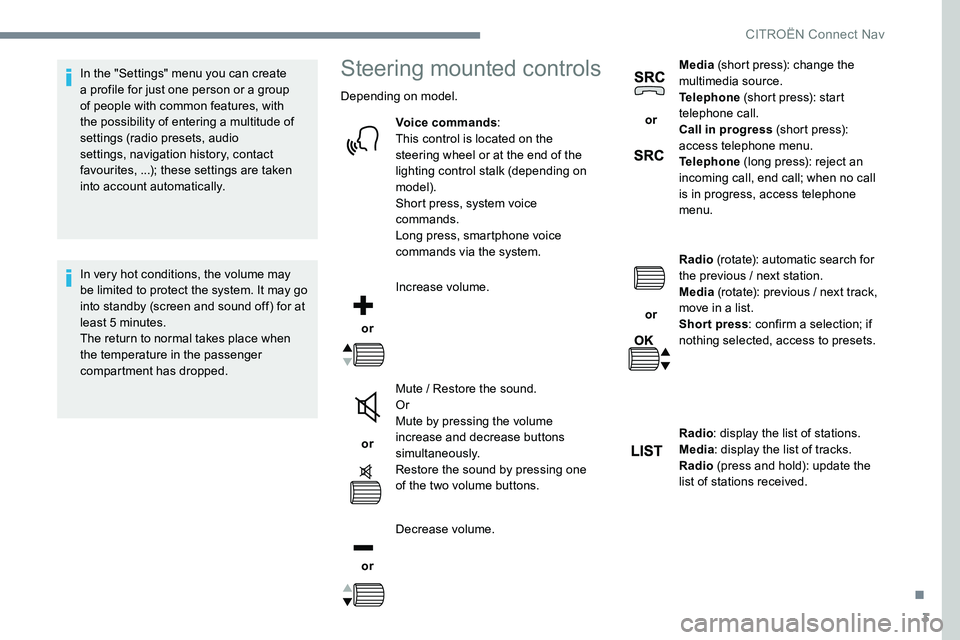
Depending on model.Voice commands :
This control is located on the
steering wheel or at the end of the
lighting control stalk (depending on
model).
Short press, system voice
commands.
Long press, smartphone voice
commands via the system.
or Increase volume.
or Mute / Restore the sound.
Or
Mute by pressing the volume
increase and decrease buttons
simultaneously.
Restore the sound by pressing one
of the two volume buttons.
or Decrease volume. or
Media
(short press): change the
multimedia source.
Telephone (short press): start
telephone call.
Call in progress (short press):
access telephone menu.
Telephone (long press): reject an
incoming call, end call; when no call
is in progress, access telephone
menu.
or Radio
(rotate): automatic search for
the previous / next station.
Media (rotate): previous / next track,
move in a list.
Short press : confirm a selection; if
nothing selected, access to presets.
Radio : display the list of stations.
Media : display the list of tracks.
Radio (press and hold): update the
list of stations received.
.
CITROËN Connect Nav
Page 238 of 306

6
First steps
Example of a "voice command" for
navigation:
"Navigate to address 11 Regent
Street, London".
Example of a "voice command" for
the radio and media:
"Play ar tist Madonna" .
Example of a "voice command" for
the telephone:
"Call David Miller" .
The voice commands, with a choice of
12 languages (English, French, Italian,
Spanish, German, Dutch, Portuguese,
Polish, Turkish, Russian, Arabic,
Brazilian), are made using the language
previously chosen and set in the system.
For some voice commands, there are
alternative synonyms.
Example: Guide to / Navigate to / Go to / ...
The voice commands in Arabic for:
"Navigate to address" and "Display POI in
the city", are not available.
Information - Using the
system
Press the Push To Talk button
and tell me what you'd like
after the tone. Remember
you can interrupt me at any
time by pressing this button.
If you press it again while
I'm waiting for you to speak,
it'll end the conversation. If
you need to start over, say
"cancel". If you want to undo
something, say "undo". And
to get information and tips at
any time, just say "help". If
you ask to me do something
and there's some information
missing that I need, I'll give
you some examples or take
you through it step by step.
There's more information
available in "beginner" mode.
You can set the dialogue
mode to "expert" when you
feel comfortable.
Global voice commands
These commands can be made from any
screen page after pressing the " Voice
command" or "Telephone" button located
on the steering wheel, as long as there is
no telephone call in progress.
CITRO