Page 257 of 828
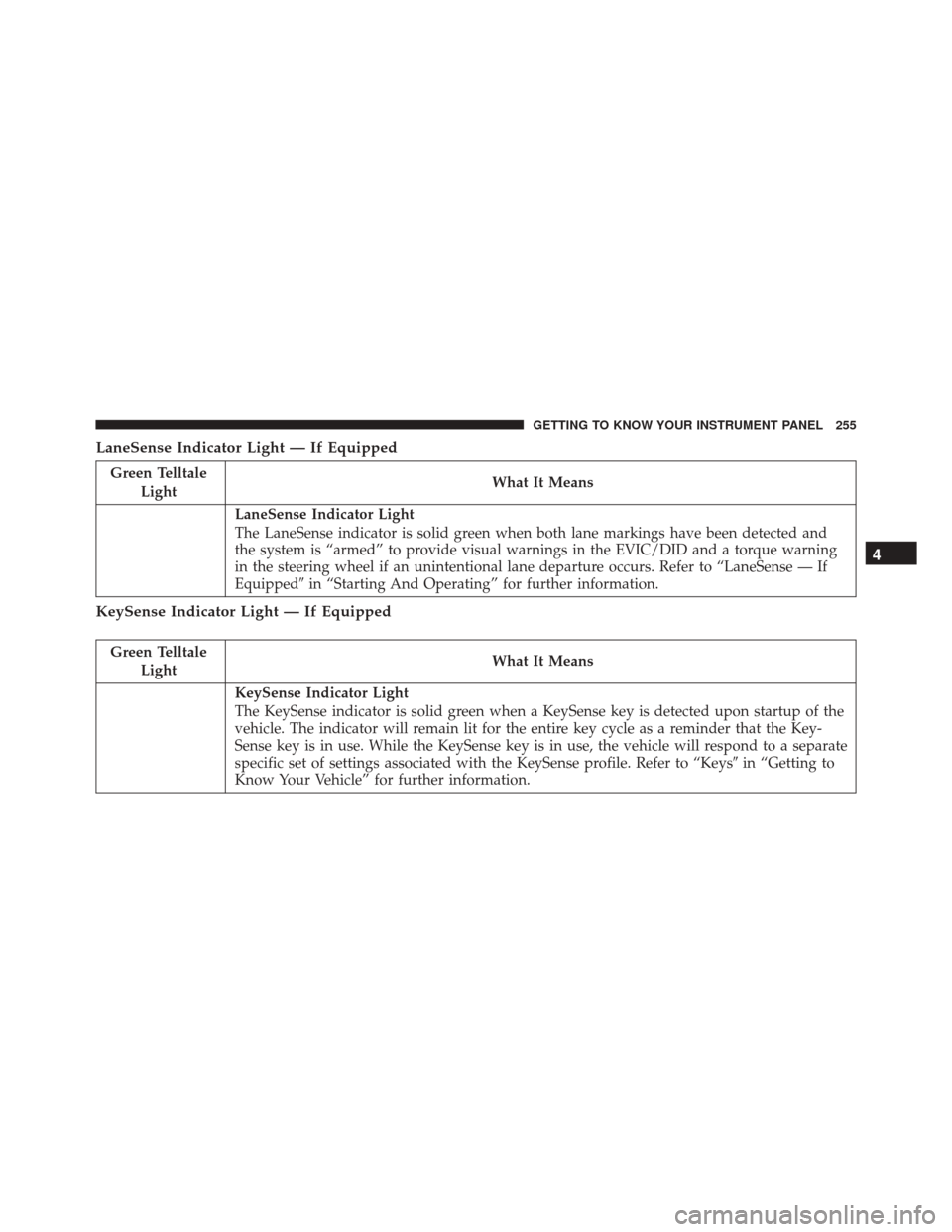
LaneSense Indicator Light — If Equipped
Green TelltaleLight What It Means
LaneSense Indicator Light
The LaneSense indicator is solid green when both lane markings have been detected and
the system is “armed” to provide visual warnings in the EVIC/DID and a torque warning
in the steering wheel if an unintentional lane departure occurs. Refer to “LaneSense — If
Equipped�
in “Starting And Operating” for further information.
KeySense Indicator Light — If Equipped
Green Telltale
Light What It Means
KeySense Indicator Light
The KeySense indicator is solid green when a KeySense key is detected upon startup of the
vehicle. The indicator will remain lit for the entire key cycle as a reminder that the Key-
Sense key is in use. While the KeySense key is in use, the vehicle will respond to a separate
specific set of settings associated with the KeySense profile. Refer to “Keys
�in “Getting to
Know Your Vehicle” for further information.
4
GETTING TO KNOW YOUR INSTRUMENT PANEL 255
Page 261 of 828
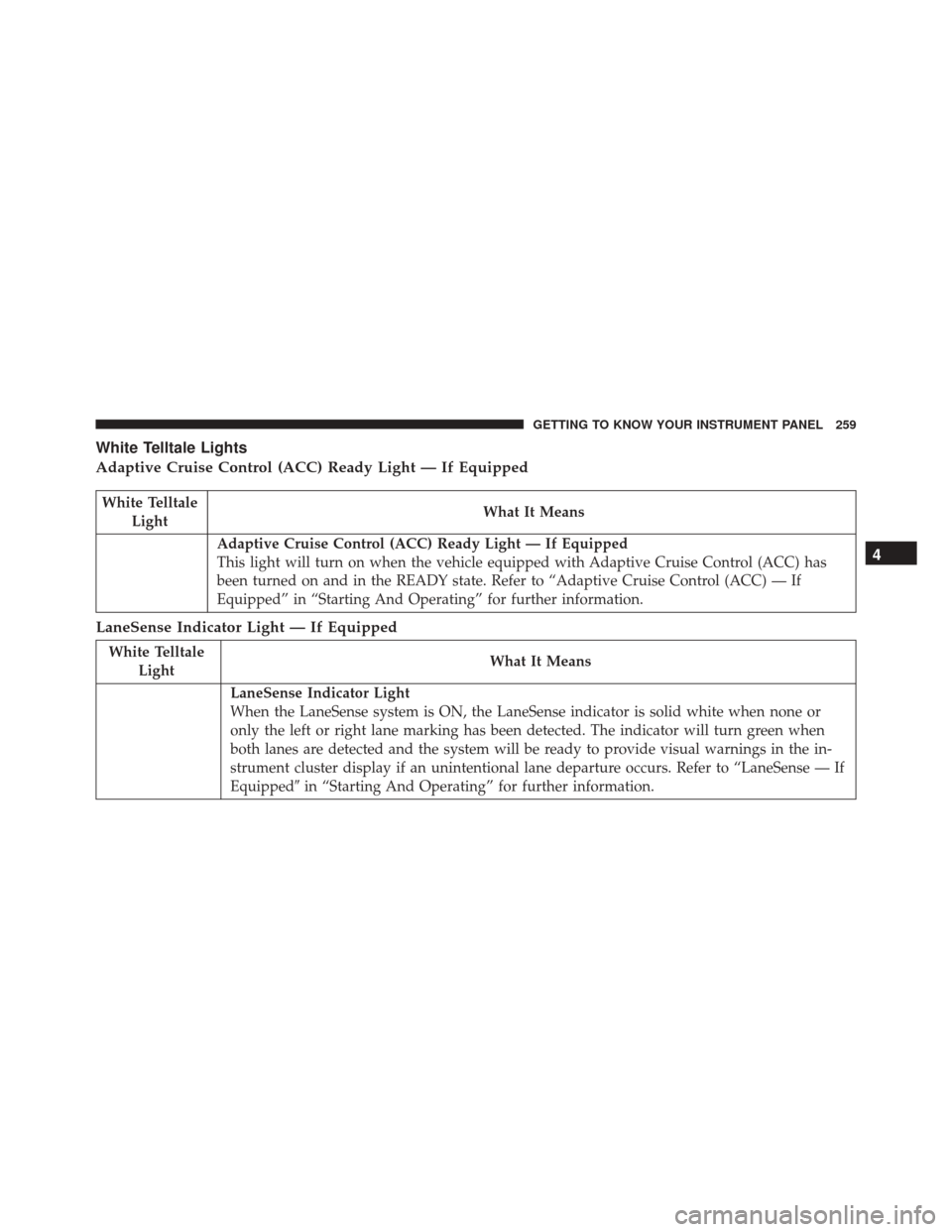
White Telltale Lights
Adaptive Cruise Control (ACC) Ready Light — If Equipped
White TelltaleLight What It Means
Adaptive Cruise Control (ACC) Ready Light — If Equipped
This light will turn on when the vehicle equipped with Adaptive Cruise Control (ACC) has
been turned on and in the READY state. Refer to “Adaptive Cruise Control (ACC) — If
Equipped” in “Starting And Operating” for further information.
LaneSense Indicator Light — If Equipped
White Telltale
Light What It Means
LaneSense Indicator Light
When the LaneSense system is ON, the LaneSense indicator is solid white when none or
only the left or right lane marking has been detected. The indicator will turn green when
both lanes are detected and the system will be ready to provide visual warnings in the in-
strument cluster display if an unintentional lane departure occurs. Refer to “LaneSense — If
Equipped�
in “Starting And Operating” for further information.
4
GETTING TO KNOW YOUR INSTRUMENT PANEL 259
Page 263 of 828

Speed Warning Light — If Equipped
White WarningLight What It Means
Speed Warning Light
When Speed Warning is turned on the speed warning telltale will illuminate in the instru-
ment cluster, with a number matching the set speed. Each time the set speed is exceeded, an
audible chime will sound for up to 10 seconds, or until the speed is no longer exceeded. The
telltale in the instrument cluster will also change from white to yellow, and a pop up warn-
ing message will pop up on the EVIC/DID screen. Speed Warning can be turned on and off
in the EVIC/DID, for further information refer to “EVIC/DID Display Menu Items” in “Get-
ting To Know Your Instrument Panel”
ONBOARD DIAGNOSTIC SYSTEM — OBD II
Your vehicle is equipped with a sophisticated Onboard
Diagnostic system called OBD II. This system monitors
the performance of the emissions, engine, and automatic
transmission control systems. When these systems are
operating properly, your vehicle will provide excellent performance and fuel economy, as well as engine emis-
sions well within current government regulations.
If any of these systems require service, the OBD II system
will turn on the Malfunction Indicator Light (MIL). It will
also store diagnostic codes and other information to
4
GETTING TO KNOW YOUR INSTRUMENT PANEL 261
Page 268 of 828

ACTIVE SAFETY FEATURES
Anti-Lock Brake System (ABS)
The Anti-Lock Brake System (ABS) provides increased
vehicle stability and brake performance under most
braking conditions. The system automatically prevents
wheel lock, and enhances vehicle control during braking.
The ABS performs a self-check cycle to ensure that the
ABS is working properly each time the vehicle is started
and driven. During this self-check, you may hear a slight
clicking sound as well as some related motor noises.
ABS is activated during braking when the system detects
one or more wheels begins to lock. Road conditions such
as ice, snow, gravel, bumps, railroad tracks, loose debris,
or panic stops may increase the likelihood of ABS activa-
tion(s).
You also may experience the following when ABS acti-
vates:•
The ABS motor noise (it may continue to run for a
short time after the stop).
• The clicking sound of solenoid valves.
• Brake pedal pulsations.
• A slight drop of the brake pedal at the end of the stop.
These are all normal characteristics of ABS.
WARNING!
• The ABS contains sophisticated electronic equip-
ment that may be susceptible to interference
caused by improperly installed or high output
radio transmitting equipment. This interference
can cause possible loss of anti-lock braking capa-
bility. Installation of such equipment should be
performed by qualified professionals.
(Continued)
266 SAFETY
Page 269 of 828

WARNING!(Continued)
•Pumping of the Anti-Lock Brakes will diminish
their effectiveness and may lead to a collision.
Pumping makes the stopping distance longer. Just
press firmly on your brake pedal when you need to
slow down or stop.
• The ABS cannot prevent the natural laws of phys-
ics from acting on the vehicle, nor can it increase
braking or steering efficiency beyond that afforded
by the condition of the vehicle brakes and tires or
the traction afforded.
• The ABS cannot prevent collisions, including those
resulting from excessive speed in turns, following
another vehicle too closely, or hydroplaning.
• The capabilities of an ABS equipped vehicle must
never be exploited in a reckless or dangerous
manner that could jeopardize the user ’s safety or
the safety of others. ABS is designed to function with the OEM tires. Modifi-
cation may result in degraded ABS performance.Anti-Lock Brake Warning Light
The yellow “Anti-Lock Brake Warning Light” will turn
on when the ignition switch is turned to the ON position
and may stay on for as long as four seconds.
If the “Anti-Lock Brake Warning Light” remains on or
comes on while driving, it indicates that the anti-lock
portion of the brake system is not functioning and that
service is required. However, the conventional brake
system will continue to operate normally if the “Brake
System Warning Light” is not on.
If the “Anti-Lock Brake Warning Light” is on, the brake
system should be serviced as soon as possible to restore
the benefits of anti-lock brakes. If the “Anti-Lock Brake
5
SAFETY 267
Page 270 of 828

Warning Light” does not come on when the ignition
switch is turned to the ON position, have the light
repaired as soon as possible.
Electronic Brake Control System
Your vehicle is equipped with an advanced Electronic
Brake Control system (EBC). This system includes Elec-
tronic Brake Force Distribution (EBD), Anti-Lock Brake
System (ABS), Brake Assist System (BAS), Hill Start
Assist (HSA), Traction Control System (TCS), Electronic
Stability Control (ESC), and Electronic Roll Mitigation
(ERM). These systems work together to enhance both
vehicle stability and control in various driving condi-
tions.
Your vehicle may also be equipped with Ready Alert
Braking (RAB), Rain Brake Support (RBS), Trailer Sway
Control (TSC), and Dynamic Steering Torque (DST).
Traction Control System (TCS)
This system monitors the amount of wheel spin of each of
the driven wheels. If wheel spin is detected, the TCS may
apply brake pressure to the spinning wheel(s) and/or
reduce engine power to provide enhanced acceleration
and stability. A feature of the TCS, Brake Limited Differ-
ential (BLD), functions similar to a limited slip differen-
tial and controls the wheel spin across a driven axle. If
one wheel on a driven axle is spinning faster than the
other, the system will apply the brake of the spinning
wheel. This will allow more engine torque to be applied
to the wheel that is not spinning. BLD may remain
enabled even if TCS and ESC are in a reduced mode.
Brake Assist System (BAS)
The BAS is designed to optimize the vehicle’s braking
capability during emergency braking maneuvers. The
system detects an emergency braking situation by sens-
ing the rate and amount of brake application and then
268 SAFETY
Page 271 of 828

applies optimum pressure to the brakes. This can help
reduce braking distances. The BAS complements the
anti-lock brake system (ABS). Applying the brakes very
quickly results in the best BAS assistance. To receive the
benefit of the system, you must apply continuous brak-
ing pressure during the stopping sequence, (do not
“pump” the brakes). Do not reduce brake pedal pressure
unless braking is no longer desired. Once the brake pedal
is released, the BAS is deactivated.
WARNING!
The Brake Assist System (BAS) cannot prevent the
natural laws of physics from acting on the vehicle,
nor can it increase the traction afforded by prevailing
road conditions. BAS cannot prevent collisions, in-
cluding those resulting from excessive speed in
(Continued)
WARNING!(Continued)
turns, driving on very slippery surfaces, or hydro-
planing. The capabilities of a BAS-equipped vehicle
must never be exploited in a reckless or dangerous
manner, which could jeopardize the user’s safety or
the safety of others.
Brake System Warning Light
The red “Brake System Warning Light” will turn on when
the ignition switch is turned to the ON position and may
stay on for as long as four seconds.
If the “Brake System Warning Light” remains on or
comes on while driving, it indicates that the brake system
is not functioning properly and that immediate service is
required. If the “Brake System Warning Light” does not
come on when the ignition switch is turned to the ON
position, have the light repaired as soon as possible.
5
SAFETY 269
Page 273 of 828

road conditions, leaving the roadway, or striking objects
or other vehicles.
WARNING!
Many factors, such as vehicle loading, road condi-
tions and driving conditions, influence the chance
that wheel lift or rollover may occur. ERM cannot
prevent all wheel lift or roll overs, especially those
that involve leaving the roadway or striking objects
or other vehicles. The capabilities of an ERM-
equipped vehicle must never be exploited in a reck-
less or dangerous manner which could jeopardize the
user’s safety or the safety of others.
Electronic Stability Control (ESC)
This system enhances directional control and stability of
the vehicle under various driving conditions. ESC cor-
rects for oversteering or understeering of the vehicle byapplying the brake of the appropriate wheel(s) to assist in
counteracting the oversteer or understeer condition. En-
gine power may also be reduced to help the vehicle
maintain the desired path.
ESC uses sensors in the vehicle to determine the vehicle
path intended by the driver and compares it to the actual
path of the vehicle. When the actual path does not match
the intended path, ESC applies the brake of the appro-
priate wheel to assist in counteracting the oversteer or
understeer condition.
•
Oversteer - when the vehicle is turning more than
appropriate for the steering wheel position.
• Understeer - when the vehicle is turning less than
appropriate for the steering wheel position.
The “ESC Activation/Malfunction Indicator Light” lo-
cated in the instrument cluster will start to flash as soon
as the ESC system becomes active. The “ESC Activation/
5
SAFETY 271