Page 199 of 828

WARNING!
To avoid serious injury or death:
•Only devices designed for use in this type of outlet
should be inserted into any 12 Volt outlet.
• Do not touch with wet hands.
• Close the lid when not in use and while driving the
vehicle.
• If this outlet is mishandled, it may cause an electric
shock and failure.
CAUTION!
• Many accessories that can be plugged in draw
power from the vehicle’s battery, even when not in
use (i.e., cellular phones, etc.). Eventually, if
plugged in long enough, the vehicle’s battery will
(Continued)
CAUTION! (Continued)
discharge sufficiently to degrade battery life and/or
prevent the engine from starting.
• Accessories that draw higher power (i.e., coolers,
vacuum cleaners, lights, etc.) will degrade the bat-
tery even more quickly. Only use these intermit-
tently and with greater caution.
• After the use of high power draw accessories, or
long periods of the vehicle not being started (with
accessories still plugged in), the vehicle must be
driven a sufficient length of time to allow the
generator to recharge the vehicle’s battery.
Power Inverter — If Equipped
There is a 115 Volt, 150 Watt Power Inverter outlet located
on the right side of the vehicle, before the third row of
seats to convert DC current to AC current. The Power
Inverter can power cellular phones, electronics and other
3
GETTING TO KNOW YOUR VEHICLE 197
Page 201 of 828

Cigar Lighter — If Equipped
NOTE:Cigar lighters can be purchased at an authorized
dealer through MOPAR parts. To ensure proper cigar
lighter operation, a MOPAR knob and element must be
used.
The cigar lighter is located at the bottom of the instru-
ment panel. Push lighter inward to heat.
After a few seconds, the lighter automatically returns to
its initial position and is ready to be used.
WARNING!
When the cigar lighter is in use it becomes very hot.
To avoid serious injury, handle the cigar lighter with
care. Always check that the cigar lighter has turned
off.
CAUTION!
Do not connect devices with power higher than 180
Watts (15 Amps) to the socket. Do not damage the
socket by using unsuitable adaptors. If the 180 Watt
(15 Amp) power rating is exceeded the fuse protect-
ing the system will need to be replaced.
Smoker’s Package Kit — If Equipped
With the optional authorized dealer-installed Smoker’s
Package Kit, a removable ash receiver is inserted into one
of the two cupholders in the center floor console. To
install the ash receiver, align the receiver so the thumb
grip on the lid is facing rearward. Push the ash receiver
into either of the cup wells to secure. Pull upward on the
ash receiver to remove for cleaning and/or storage.
The left rear trim panel cupholder is designed to accom-
modate a second ash receiver, if desired.
3
GETTING TO KNOW YOUR VEHICLE 199
Page 213 of 828
GETTING TO KNOW YOUR INSTRUMENT PANEL
CONTENTS
�INSTRUMENT CLUSTER .................212
▫ Instrument Cluster Descriptions ...........214
� DISPLAY ............................ .215
▫ Instrument Cluster Display Location and
Controls ........................... .215
▫ Oil Change Reset .....................217
▫ KeySense Cluster Messages — If Equipped . . .218
▫ EVIC/DID Display Menu Items ...........219
▫ Battery Saver On/Battery Saver Mode Message —
Electrical Load Reduction Actions — If
Equipped .......................... .226�
TRIP COMPUTER ..................... .229
�
WARNING/INDICATOR LIGHTS AND MESSAGES . .230
▫ Red Telltale Lights ....................231
▫ Yellow Telltale Lights ...................243
▫ Green Telltale Lights ...................254
▫ Blue Telltale Lights ....................258
▫ White Telltale Lights ...................259
� ONBOARD DIAGNOSTIC SYSTEM — OBD II . .261
▫ Onboard Diagnostic System (OBD II)
Cybersecurity ....................... .262
4
Page 224 of 828

– Current Fuel Economy (MPG, L/100 km, or km/l)
– The Max and Min values will correspond to theparticular engine requirements
• Hold OKto reset average fuel economy information.
Trip Info
Push and release the UPorDOWNarrow button
until the Trip Menu item is highlighted in the EVIC/
DID. Push the LEFT
orRIGHTarrow button to
scroll through the Trip A and Trip B submenus. The
Trip information will display the following:
• Distance
• Average Fuel Economy
• Elapsed Time
Hold the OKbutton to reset feature information.
Audio
Push and release the UPorDOWNarrow button
until the Audio Menu displays in the EVIC/DID.
Navigation
When this feature is selected, the navigation system
utilizes voice commands, guiding through the drive
route, mile by mile, turn-by-turn until the final destina-
tion is reached.
Stored Messages
Push and release the UPorDOWNarrow button
until the Messages Menu displays in the EVIC/DID.
This feature shows the number of stored warning
messages. Pushing the RIGHT
arrow button will
allow you to see what the stored messages are.
222 GETTING TO KNOW YOUR INSTRUMENT PANEL
Page 227 of 828
•Audio
• Digital Speed
• Menu Title (Default)
3. Lower Right •None
• Compass
• Outside Temp. (Default)
• Time
• Range
• Average MPG (L/100km, or km/L)
• Current MPG (L/100km, or km/L)
• Trip A Distance
• Trip B Distance
4. Current Gear •On
• Off (Default) 5. Odometer
•Show
• Hide (Odometer will still appear when door is open)
6. Defaults •Restore
• Cancel
Speed Warning — If Equipped (7” DID)
Push and release the UPorDOWNarrow button
until the Speed Warning Menu title is highlighted in
the DID. Push and release the OKbutton to enter
speed warning. Use the UP
orDOWNarrow
button to turn the speed warning ON or OFF, then
push and release the OKbutton to confirm the selec-
tion. If the ON status is selected, use the UP
or
DOWN
arrow button to set the desired speed, then
press the OKbutton to set the speed for the speed
warning. A speed warning telltale will illuminate in 4
GETTING TO KNOW YOUR INSTRUMENT PANEL 225
Page 229 of 828

NOTE:
•The charging system is independent from load reduc-
tion. The charging system performs a diagnostic on the
charging system continuously.
• If the Battery Charge Warning Light is on it may
indicate a problem with the charging system. Refer to
“Battery Charge Warning Light” in ”Warning/
Indicator Lights And Messages” located in ”Under-
standing Your Instrument Panel” for further informa-
tion.
The electrical loads that may be switched off (if
equipped), and vehicle functions which can be effected
by load reduction:
• Heated Seat/Vented Seats/Heated Wheel
• Heated/Cooled Cup Holders — If Equipped
• Rear Defroster And Heated Mirrors •
HVAC System
• 115V AC Power Inverter System
• Audio and Telematics System
Loss of the battery charge may indicate one or more of
the following conditions:
• The charging system cannot deliver enough electrical
power to the vehicle system because the electrical
loads are larger than the capability of charging system.
The charging system is still functioning properly.
• Turning on all possible vehicle electrical loads (e.g.
HVAC to max settings, exterior and interior lights,
overloaded power outlets +12V, 115V AC, USB ports)
during certain driving conditions (city driving, tow-
ing, frequent stopping).
4
GETTING TO KNOW YOUR INSTRUMENT PANEL 227
Page 232 of 828
WARNING/INDICATOR LIGHTS AND MESSAGES
IMPORTANT:The warning/indicator light switches on
in the instrument panel together with a dedicated mes-
sage and/or acoustic signal when applicable. These
indications are indicative and precautionary and as such
must not be considered as exhaustive and/or alternative
to the information contained in the Owner Manual,
which you are advised to read carefully in all cases.
Always refer to the information in this chapter in the
event of a failure indication. All active telltales will display first, if applicable. The
system check menu may appear different based upon
equipment options and current vehicle status. Some
telltales are optional and may not appear.
230 GETTING TO KNOW YOUR INSTRUMENT PANEL
Page 233 of 828
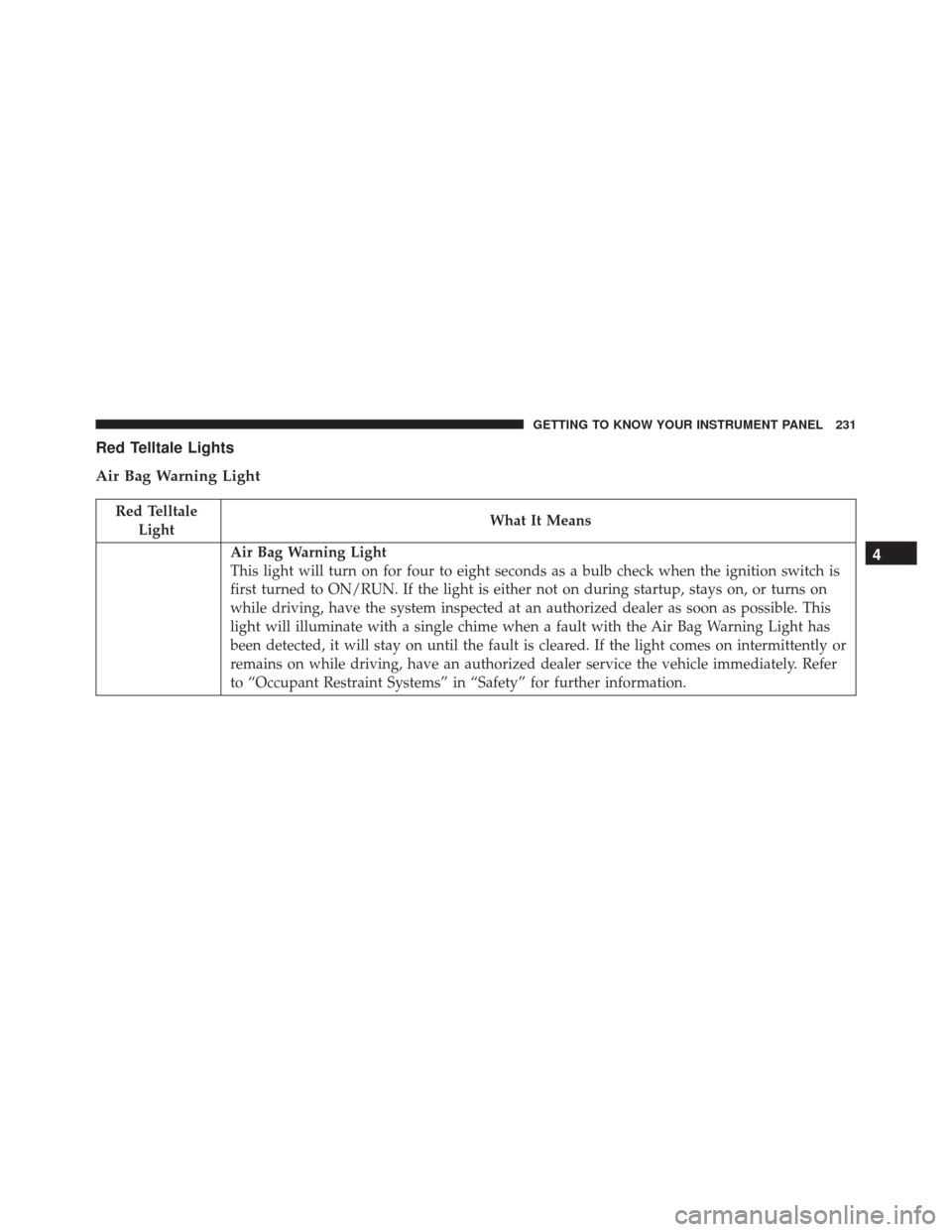
Red Telltale Lights
Air Bag Warning Light
Red TelltaleLight What It Means
Air Bag Warning Light
This light will turn on for four to eight seconds as a bulb check when the ignition switch is
first turned to ON/RUN. If the light is either not on during startup, stays on, or turns on
while driving, have the system inspected at an authorized dealer as soon as possible. This
light will illuminate with a single chime when a fault with the Air Bag Warning Light has
been detected, it will stay on until the fault is cleared. If the light comes on intermittently or
remains on while driving, have an authorized dealer service the vehicle immediately. Refer
to “Occupant Restraint Systems” in “Safety” for further information.4
GETTING TO KNOW YOUR INSTRUMENT PANEL 231