Page 129 of 828

CAUTION!
Failure to follow these cautions can cause damage to
the heating elements:
•Use care when washing the inside of the rear
window. Do not use abrasive window cleaners on
the interior surface of the window. Use a soft cloth
and a mild washing solution, wiping parallel to the
heating elements. Labels can be peeled off after
soaking with warm water.
• Do not use scrapers, sharp instruments, or abrasive
window cleaners on the interior surface of the
window.
• Keep all objects a safe distance from the window.
6. Passenger Temperature Control Up Button
Provides the passenger with independent temperature
control. Push the button on the faceplate for warmer
temperature settings or on the touchscreen, press and slide the temperature bar towards the red arrow button
on the touchscreen for warmer temperature settings.
When the SYNC feature is active, the passenger ’s tem-
perature will move up with the driver ’s temperature,
when it is increased.
7. Passenger Temperature Control Down Button
Provides the passenger with independent temperature
control. Push the button on the faceplate for cooler
temperature settings or on the touchscreen, press and
slide the temperature bar towards the blue arrow button
on the touchscreen for cooler temperature settings. When
the SYNC feature is active, the passenger ’s temperature
will move up with the driver ’s temperature, when it is
increased.
8. Blower Control
Blower control is used to regulate the amount of air
forced through the climate system. There are seven
blower speeds available. Adjusting the blower will cause
3
GETTING TO KNOW YOUR VEHICLE 127
Page 131 of 828

•Floor
Air is directed through the floor outlets with a
small amount flowing through the defrost and
side window demister outlets.
• Mix
Air is directed through the floor, defrost, and
side window demister outlets. This setting
works best in cold or snowy conditions that
require extra heat to the windshield. This setting is
good for maintaining comfort while reducing mois-
ture on the windshield.
10. Climate Control OFF Button
Press and release this button to turn the Climate Control
ON/OFF. 11. Driver Temperature Control Down Button
Provides the driver with independent temperature con-
trol. Push the button on the faceplate for cooler tempera-
ture settings or on the touchscreen, press and slide the
temperature bar button towards the blue arrow for cooler
temperature settings. When the SYNC feature is active,
the driver ’s temperature will move down with the pas-
senger ’s temperature, when it is decreased.
12. Driver Temperature Control Up Button
Provides the driver with independent temperature con-
trol. Push the button on the faceplate for warmer tem-
perature settings or on the touchscreen, press and slide
the temperature bar button towards the red arrow for
warmer temperature settings. When the SYNC feature is
active, the driver ’s temperature will move up with the
passenger ’s temperature, when it is increased.
3
GETTING TO KNOW YOUR VEHICLE 129
Page 138 of 828

8. Passenger Temperature Control Up Button
Provides the passenger with independent temperature
control. Push the button on the faceplate for warmer
temperature settings or on the touchscreen, press and
slide the temperature bar button towards the red arrow
for warmer temperature settings.
NOTE:Pressing this button while in Sync mode will
automatically exit Sync.
9. Passenger Temperature Control Down Button
Provides the passenger with independent temperature
control. Push the button on the faceplate for cooler
temperature settings or on the touchscreen, press and
slide the temperature bar button towards the blue arrow
for cooler temperature settings.
NOTE: Pressing this button while in Sync mode will
automatically exit Sync. 10. SYNC
Press the Sync button on the touchscreen to toggle the
Sync feature On/Off. The Sync indicator is illuminated
when this feature is enabled. Sync is used to synchronize
the passenger temperature setting with the driver tem-
perature setting. The Sync feature also synchronizes the
rear passengers’ temperature to the driver temperature
setting. Changing the passenger temperature setting
while in Sync will automatically exit this feature.
136 GETTING TO KNOW YOUR VEHICLE
Page 140 of 828
•Bi-Level Mode
Air comes from the instrument panel outlets
and floor outlets. A slight amount of air is
directed through the defrost and side window demis-
ter outlets.
NOTE: BI-LEVEL mode is designed under comfort con-
ditions to provide cooler air out of the panel outlets and
warmer air from the floor outlets.
•Floor Mode
Air comes from the floor outlets. A slight
amount of air is directed through the defrost
and side window demister outlets.
• Mix Mode
Air is directed through the floor, defrost, and
side window demister outlets. This setting
works best in cold or snowy conditions that require extra heat to the windshield. This setting is
good for maintaining comfort while reducing mois-
ture on the windshield.
13. Climate Control OFF Button
Press and release this button to turn the Climate Control
ON/OFF.
14. Driver Temperature Control Down Button
Provides the driver with independent temperature con-
trol. Push the button on the faceplate for cooler tempera-
ture settings or on the touchscreen, press and slide the
temperature bar button towards the blue arrow for cooler
temperature settings.
NOTE: In Sync mode, this button will also automatically
adjust the passenger, and rear temperature setting at the
same time.
138 GETTING TO KNOW YOUR VEHICLE
Page 141 of 828

15. Driver Temperature Control Up Button
Provides the driver with independent temperature con-
trol. Push the button on the faceplate for warmer tem-
perature settings or on the touchscreen, press and slide
the temperature bar button towards the red arrow for
warmer temperature settings.
NOTE:In Sync mode, this button will also automatically
adjust the passenger temperature setting at the same
time.
Driver and Passenger Temperature Control Button
Provides the temperature setting for both the driver and
the passenger seating positions, which can be indepen-
dently set after selecting this button.Climate Control Functions
A/C (Air Conditioning)
The Air Conditioning (A/C) button allows the operator
to manually activate or deactivate the air conditioning
system. When the air conditioning system is turned on,
cool dehumidified air will flow through the outlets into
the cabin. For improved fuel economy, press the A/C
button to turn off the air conditioning and manually
adjust the blower and airflow mode settings. Also, make
sure to select only Panel, Bi-Level or Floor modes.
NOTE:
• If fog or mist appears on the windshield or side glass,
select Defrost mode and increase blower speed if
needed.
• If your air conditioning performance seems lower than
expected, check the front of the A/C condenser (lo-
cated in front of the radiator), for an accumulation of
3
GETTING TO KNOW YOUR VEHICLE 139
Page 160 of 828
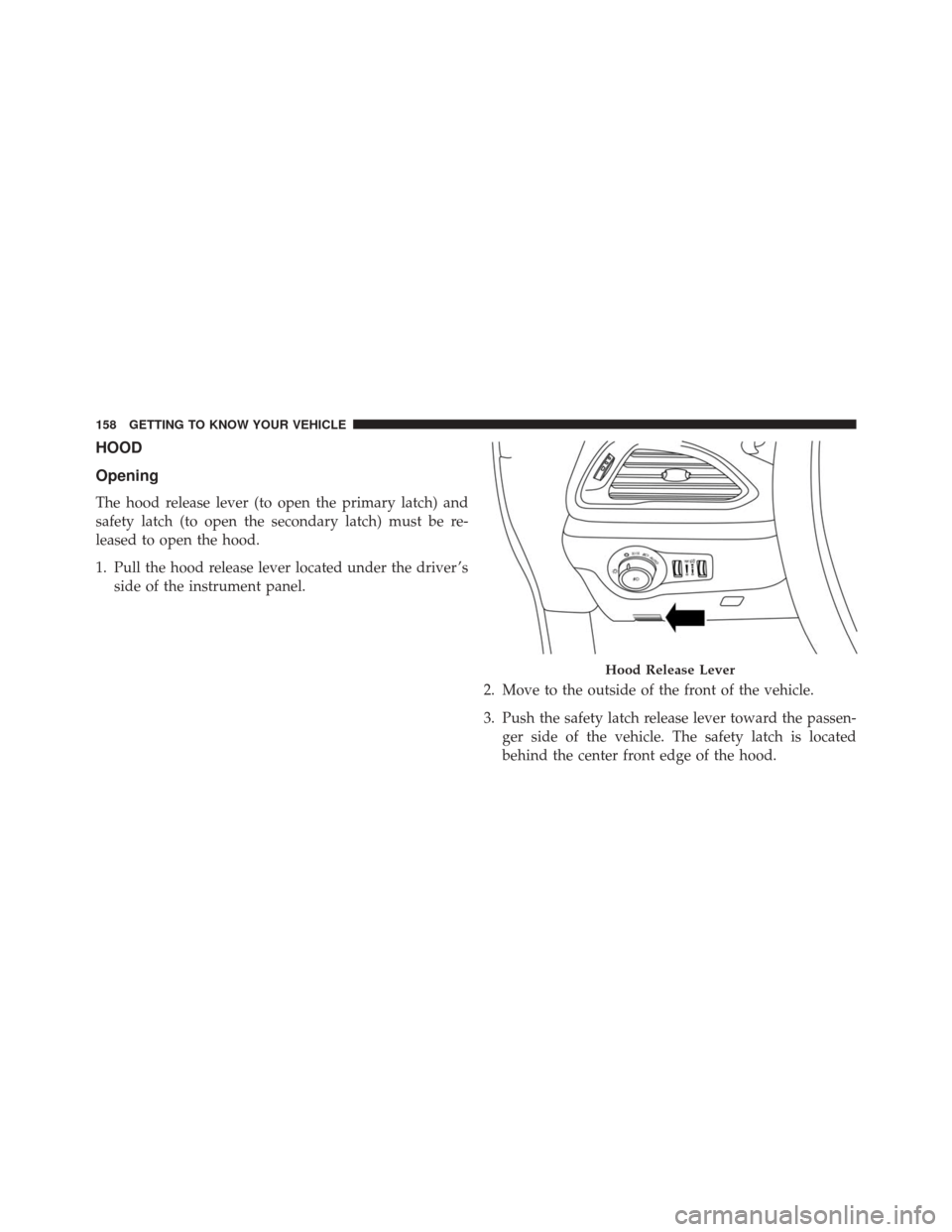
HOOD
Opening
The hood release lever (to open the primary latch) and
safety latch (to open the secondary latch) must be re-
leased to open the hood.
1. Pull the hood release lever located under the driver ’sside of the instrument panel.
2. Move to the outside of the front of the vehicle.
3. Push the safety latch release lever toward the passen-ger side of the vehicle. The safety latch is located
behind the center front edge of the hood.
Hood Release Lever
158 GETTING TO KNOW YOUR VEHICLE
Page 168 of 828

below the liftgate door handle. Do not move your foot
sideways or in a sweeping motion or the sensors may not
detect the motion.
Vehicles Equipped With A Trailer Tow Package
If your vehicle is equipped with the Trailer Tow Pack-
age, the hands-free activation zone(s) for the Power
Liftgate will be located on the left and right side of the
receiver. Use the same gentile straight kicking motion
under either activation zone to open/close the Hands-
Free Liftgate.
NOTE:To open or close the Hands-Free Liftgate requires
a valid Passive Entry RKE Key Fob within 3 ft (1 m) of the
door handle. If a valid Passive Entry RKE Key Fob is not
within 3 ft (1 m), the liftgate will not respond to any
kicks. The Hands-Free Liftgate feature may be turned on or
off in Uconnect Settings. Refer to “Uconnect Settings”
in “Multimedia” for further information. The Hands-
Free Liftgate feature should be turned off during Jack-
ing, Tire Changing, and Service.
NOTE:
• The liftgate will not power open or close if the gear
selector is in gear or the vehicle speed is above 0 MPH
(0 km/h).
• If anything obstructs the power liftgate while it is
closing or opening, the liftgate will automatically
reverse to the closed or open position, provided it
meets sufficient resistance.
• There are pinch sensors attached to the side of the
liftgate opening. Light pressure anywhere along these
strips will cause the liftgate to return to the open
position.
166 GETTING TO KNOW YOUR VEHICLE
Page 170 of 828
WARNING!
During power operation, personal injury or cargo
damage may occur. Ensure the liftgate travel path is
clear. Make sure the liftgate is closed and latched
before driving away.
Cargo Area Features
Cargo Area Storage
When the third row seats are not in the stowed position,
there is a large area for cargo storage.NOTE:With all rear seats stowed or removed,4x8foot
sheets of building material will fit on the vehicle floor
with the liftgate closed. The front seats must be moved
slightly forward of the rearmost position.
Rear Cargo Area
168 GETTING TO KNOW YOUR VEHICLE