Page 117 of 828

Lane Change Assist — If Equipped
Tap the lever up or down once, without moving beyond
the detent, and the turn signal (right or left) will flash
three times then automatically turn off.
High/Low Beam Switch
When the headlights are turned on, pushing the multi-
function lever toward the instrument panel will switch
from low beams to high beams. Pulling back to the
neutral position returns the headlights to the low beam
operation.
Flash-To-Pass
You can signal another vehicle with your headlights by
lightly pulling the multifunction lever toward you. This
will cause the headlights to turn on at high beam and
remain on until the lever is released.
Automatic High Beam — If Equipped
The Automatic High Beam system provides increased
forward lighting at night by automating high beam
control through the use of a digital camera mounted on
the windshield. This camera detects vehicle specific light
and automatically switches from high beams to low
beams until the approaching vehicle is out of view.
NOTE:Broken, muddy or obstructed headlights and
taillights of vehicles in the field of view will cause
headlights to remain on longer (closer to the vehicle).
Also, dirt, film and other obstructions on the windshield
or camera lens will cause the system to function improp-
erly.
To Activate
1. Select “Automatic High Beams — ON” through the Uconnect system. Refer to �Uconnect Settings” in
“Multimedia” for further information.
3
GETTING TO KNOW YOUR VEHICLE 115
Page 118 of 828

2. Rotate the headlight switch counterclockwise to theAUTO (A) position.
3. Push the multifunction lever away from you to switch the headlights to the high beam position. Refer to
“Multifunction Lever” in this section for further infor-
mation.
NOTE: This system will not activate until the vehicle is
at, or above, 25 mph (40 km/h).
To Deactivate
Perform either of the following steps to deactivate the
Automatic High Beam system.
1. Select “Automatic High Beams — OFF” through the Uconnect System. Refer to “Uconnect Settings” in
“Multimedia” for further information. 2. Pull the multifunction lever toward you to switch the
headlights from the high beam to the low beam
position.
3. Rotate the headlight switch clockwise from the AUTO to the on position.
Battery Protection
This feature provides battery protection to avoid wearing
down the battery if the headlights or parking lights are
left on for extended periods of time when the ignition
switch is in the LOCK position. After eight minutes of the
ignition switch being in the LOCK position and the
headlight switch in any position other than OFF or
AUTO, the lights will turn off automatically until the next
cycle of the ignition switch or headlight switch.
The battery protection feature will be disabled if the
ignition switch is turned to any other position other than
LOCK during the eight minute delay.
116 GETTING TO KNOW YOUR VEHICLE
Page 125 of 828

the end of the multifunction lever to one of the four
intermittent wiper sensitivity settings to activate this
feature.
The sensitivity of the system is adjustable from the
multifunction lever. Wiper sensitivity position 3 has been
calibrated for best overall wiping sensitivity. If the opera-
tor desires more wiping sensitivity, they may select
sensitivity positions 4. If the operator desires less wiping
sensitivity, they may select sensitivity positions 2 or 1.
Place the multifunction lever in the OFF position when
not using the system.
NOTE:
•The Rain Sensing feature will not operate when the
wiper speed is in the low or high position.
• The Rain Sensing feature may not function properly
when ice or dried saltwater is present on the wind-
shield. •
Use of Rain-X or products containing wax or silicone
may reduce rain sensor performance.
• The Rain Sensing feature can be turned on and off
through the Uconnect System. Refer to “Uconnect
Settings” in “Multimedia” for further information.
The Rain Sensing system has protective features for the
wiper blades and arms. It will not operate under the
following conditions:
• Low Temperature Wipe Inhibit — The Rain Sensing
feature will not operate when the ignition is first
switched ON, and the vehicle is stationary, and the
outside temperature is below 32°F (0°C), unless the
wiper control on the multifunction lever is moved, the
vehicle speed becomes greater than 0 mph (0 km/h),
or the outside temperature rises above freezing.
3
GETTING TO KNOW YOUR VEHICLE 123
Page 144 of 828
NOTE:The system will not automatically sense the
presence of fog, mist or ice on the windshield. DEFROST
mode must be manually selected to clear the windshield
and side glass.
Controlling The Rear Climate Controls From The
Front ATC Panel
The Three-Zone ATC system allows for adjustment of the
rear climate controls from the front ATC panel.
To change the rear system settings:
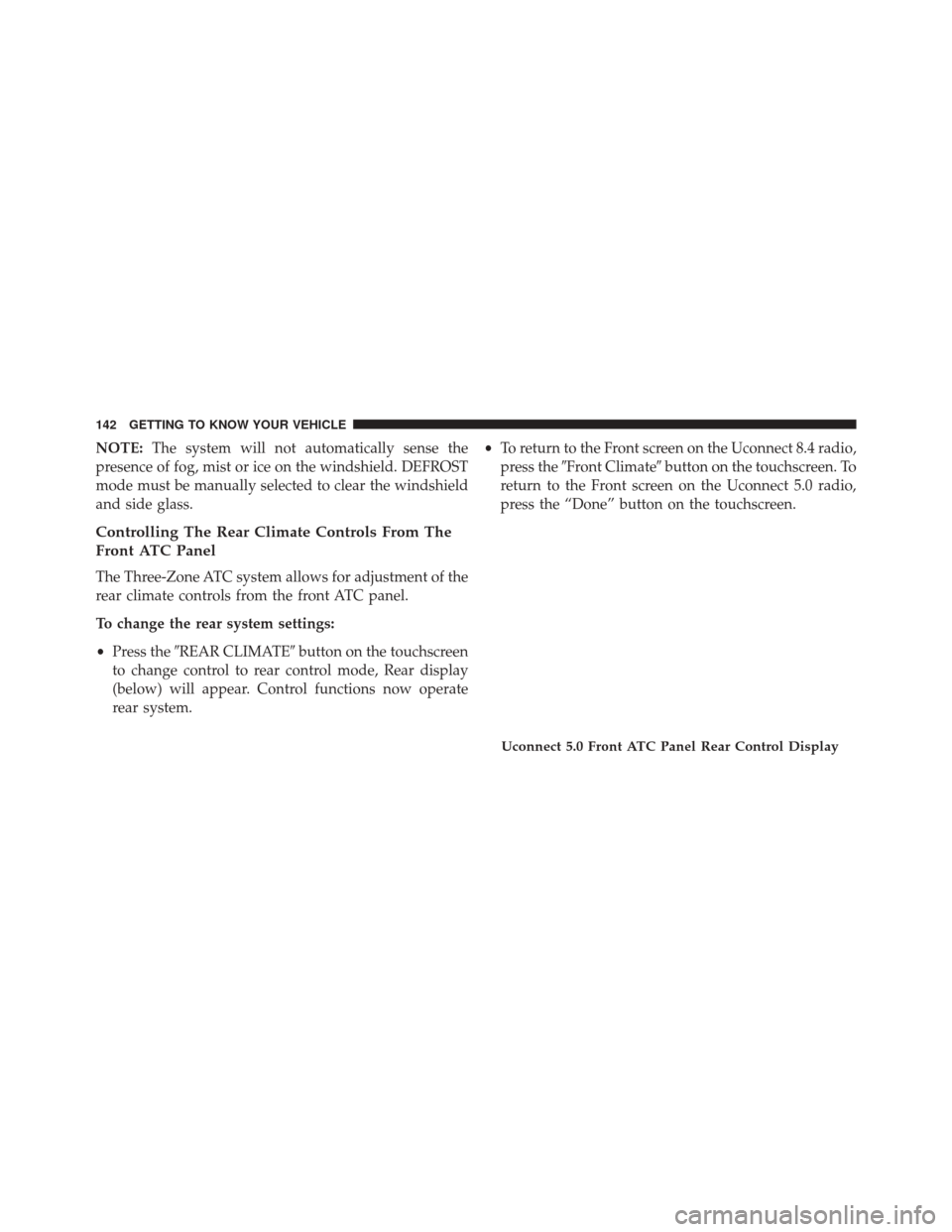
• Press the �REAR CLIMATE� button on the touchscreen
to change control to rear control mode, Rear display
(below) will appear. Control functions now operate
rear system. •
To return to the Front screen on the Uconnect 8.4 radio,
press the �Front Climate� button on the touchscreen. To
return to the Front screen on the Uconnect 5.0 radio,
press the “Done” button on the touchscreen.
Uconnect 5.0 Front ATC Panel Rear Control Display
142 GETTING TO KNOW YOUR VEHICLE
Page 159 of 828

NOTE:If the sunroof is open, the shade will close to the
half-open position. Pushing the shade close button again
will automatically close both the sunroof and shade
completely.
Closing Power Shade — Manual Mode
To close the shade, push and hold the switch in the
forward position. Any release of the switch will stop the
movement and the shade will remain in a partially closed
condition until the switch is pushed again.
Pinch Protect Feature
This feature will detect an obstruction in the opening of
the sunroof during Express Close operation. If an ob-
struction in the path of the sunroof is detected, the
sunroof will automatically retract. Remove the obstruc-
tion if this occurs. NOTE:
If three consecutive sunroof close attempts result
in Pinch Protect reversals, Pinch Protect will disable and
the sunroof must be closed in Manual Mode.
Sunroof Maintenance
Use only a non-abrasive cleaner and a soft cloth to clean
the glass panel.
Ignition OFF Operation
The power sunroof switch will remain active for up to
approximately ten minutes after the ignition switch is
turned to the LOCK position. Opening either front door
will cancel this feature.
NOTE: Ignition Off time is programmable through the
Uconnect System. Refer to “Uconnect Settings” in “Mu-
litmedia” for further information.
3
GETTING TO KNOW YOUR VEHICLE 157
Page 164 of 828
NOTE:If “Unlock All Doors 1st Press”’ is programmed
in Uconnect Settings, all doors will unlock with a Passive
Entry handle activation. If ‘Unlock Driver Door 1st Press”
is programmed in Uconnect Settings, only the liftgate
will unlock. Refer to “Uconnect Settings” in “Multime-
dia” for further information.
Closing
To Close The Vehicle
Grasp the liftgate closing handle and initiate lowering the
liftgate. Release the handle when the liftgate takes over
the closing effort.
The liftgate can also be closed using the Rear Power
Liftgate button (If Equipped), located in the upper left
trim in the liftgate opening. Pushing button will only
close the liftgate. This button cannot be used to open the
liftgate. To Lock The Vehicle
With a valid Passive Entry RKE Key Fob within 3 ft (1 m)
of the liftgate, pushing the passive entry lock button
located to the right of the outside handle will lock the
vehicle.
Rear Power Liftgate Switch
162 GETTING TO KNOW YOUR VEHICLE
Page 166 of 828
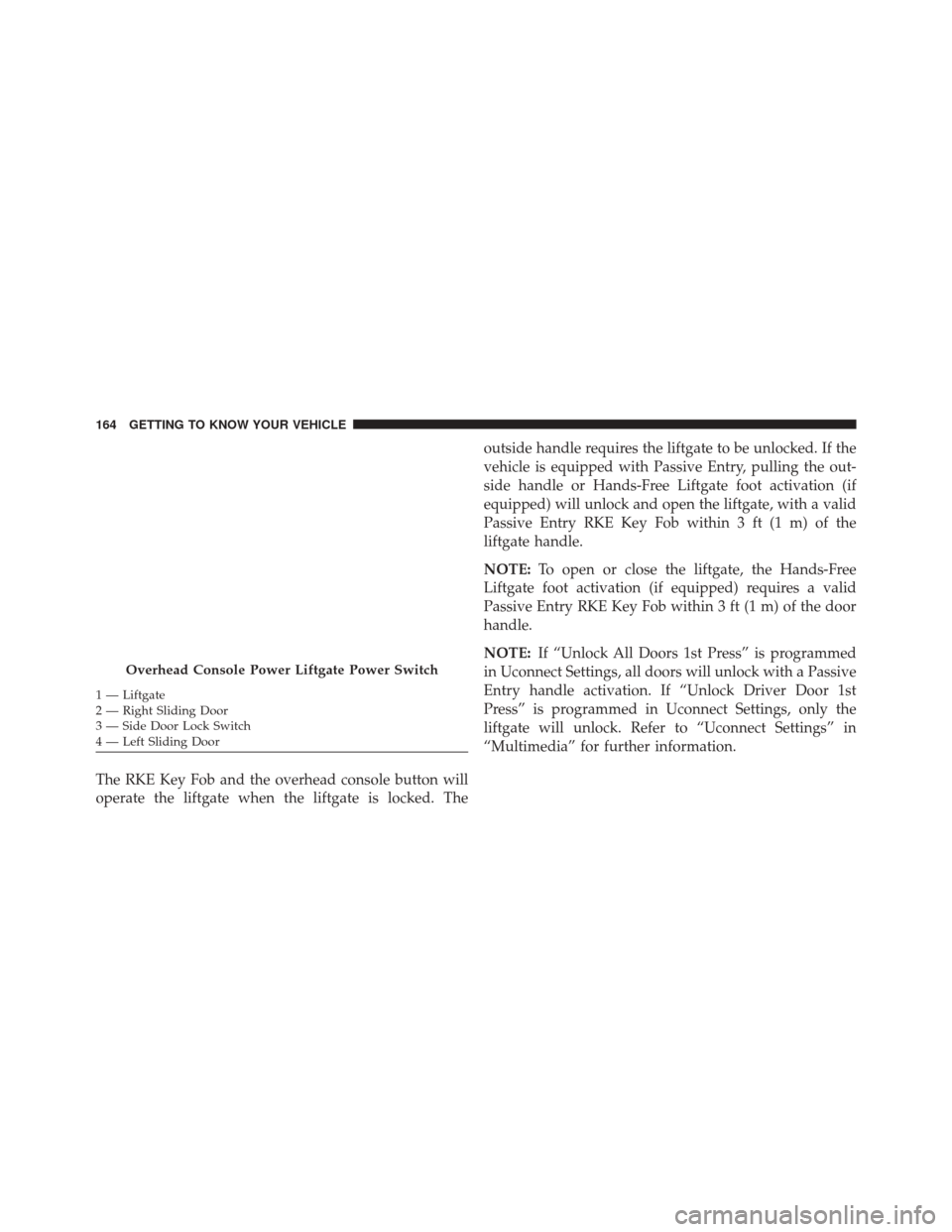
The RKE Key Fob and the overhead console button will
operate the liftgate when the liftgate is locked. Theoutside handle requires the liftgate to be unlocked. If the
vehicle is equipped with Passive Entry, pulling the out-
side handle or Hands-Free Liftgate foot activation (if
equipped) will unlock and open the liftgate, with a valid
Passive Entry RKE Key Fob within 3 ft (1 m) of the
liftgate handle.
NOTE:
To open or close the liftgate, the Hands-Free
Liftgate foot activation (if equipped) requires a valid
Passive Entry RKE Key Fob within 3 ft (1 m) of the door
handle.
NOTE: If “Unlock All Doors 1st Press” is programmed
in Uconnect Settings, all doors will unlock with a Passive
Entry handle activation. If “Unlock Driver Door 1st
Press” is programmed in Uconnect Settings, only the
liftgate will unlock. Refer to “Uconnect Settings” in
“Multimedia” for further information.
Overhead Console Power Liftgate Power Switch
1 — Liftgate
2 — Right Sliding Door
3 — Side Door Lock Switch
4 — Left Sliding Door 164 GETTING TO KNOW YOUR VEHICLE
Page 167 of 828
NOTE:Tones are sounded and the turn signals are
flashed with liftgate movements. These alerts can be
turned on or off in Uconnect Settings. Refer to “Uconnect
Settings” in “Multimedia” for further information.
Lock The Vehicle
With a valid Passive Entry RKE Key Fob within 3 ft (1 m)
of the liftgate, pushing the passive entry lock button
located to the right of the outside handle will lock the
vehicle.Hands-Free Liftgate — If Equipped
To open or close the liftgate using hands-free activation,
use a gentle straight forward and back kicking motion
under the vehicle activation zone in the general location
Hands-Free Liftgate Activation Zone
3
GETTING TO KNOW YOUR VEHICLE 165