Page 440 of 828

Display (DID) indicating the vehicle speed is too fast. The
system will become active again if the vehicle speed is
decreased to speeds less than approximately 6 mph
(9 km/h).
ParkSense Sensors
The four ParkSense sensors, located in the rear fascia/
bumper, monitor the area behind the vehicle that is
within the sensors’ field of view. The sensors can detect
obstacles from approximately 12 in (30 cm) up to 79 in
(200 cm) from the rear fascia/bumper in the horizontal
direction, depending on the location, type and orienta-
tion of the obstacle.
ParkSense Visual Alert
The ParkSense Warning screen will only be displayed if
Sound and Display is selected from the Customer -
Programmable Features section of the Uconnect System.
Refer to�Uconnect Settings” in “Multimedia” for further
information. The ParkSense Warning screen is located within the
EVIC/DID. It provides visual warnings to indicate the
distance between the rear fascia/bumper and the de-
tected obstacle. Refer to “Display” in “Getting To Know
Your Instrument Panel” for further information.
ParkSense Display
When the vehicle is in REVERSE and an obstacle has
been detected, the warning display will turn ON indicat-
ing the system status.
The system will indicate a detected obstacle by showing
a single arc in one or more regions based on the obstacle’s
distance and location relative to the vehicle.
If an obstacle is detected in the center rear region, the
display will show a single solid arc in the center rear
region and will produce a one-half second tone. As the
vehicle moves closer to the obstacle, the display will
show the single arc moving closer to the vehicle and the
sound tone will change from slow, to fast, to continuous.
438 STARTING AND OPERATING
Page 451 of 828

active until the vehicle speed is increased to approxi-
mately 7 mph (11 km/h) or above. When in REVERSE
and above the system’s operating speed, a warning will
appear in the EVIC/DID indicating the vehicle speed is
too fast. The system will become active again if the
vehicle speed is decreased to speeds less than approxi-
mately 6 mph (9 km/h).
ParkSense Sensors
The four ParkSense sensors, located in the rear fascia/
bumper, monitor the area behind the vehicle that is
within the sensors’ field of view. The sensors can detect
obstacles from approximately 12 in (30 cm) up to 79 in
(200 cm) from the rear fascia/bumper in the horizontal
direction, depending on the location, type and orienta-
tion of the obstacle.NOTE:
If your vehicle is equipped with the ParkSense
Active Park Assist system, six sensors will be located in
the rear fascia/bumper. Refer to the �ParkSense Active
Park Assist System� section for further information.
The six ParkSense sensors, located in the front fascia/
bumper, monitor the area in front of the vehicle that is
within the sensors’ field of view. The sensors can detect
obstacles from approximately 12 in (30 cm) up to 47 in
(120 cm) from the front fascia/bumper in the horizontal
direction, depending on the location, type and orienta-
tion of the obstacle.
ParkSense Visual Alert
The ParkSense Warning screen will only be displayed if
Sound and Display is selected from the Customer -
Programmable Features section of the Uconnect System.
Refer to �Uconnect Settings” in “Multimedia” for further
information.
6
STARTING AND OPERATING 449
Page 460 of 828

WARNING ALERTS
Front Distance (in/cm) Greater than
47 in (120 cm) 47-39 in
(120-100 cm) 39-25 in
(100-65 cm) 25-12 in
(65-30 cm) Less than
12 in (30 cm)
Arcs — Left None NoneNone 2nd Flashing 1st Flashing
Arcs — Center None 4th Solid 3rd Flashing 2nd Flashing 1st Flashing
Arcs — Right None NoneNone 2nd Flashing 1st Flashing
Audible Alert Chime None
NoneNone FastContinuous
Radio Volume Reduced No
NoNoYes Yes
NOTE: ParkSense will reduce the volume of the radio, if
on, when the system is sounding an audio tone.
Front Park Assist Audible Alerts
ParkSense will turn off the Front Park Assist audible alert
(chime) after approximately three seconds when an ob-
stacle has been detected, the vehicle is stationary, and
brake pedal is applied. Adjustable Chime Volume Settings
Front and Rear chime volume settings can be selected
from the Customer-Programmable Features section of the
Uconnect System, refer to “Uconnect Settings” in “Mul-
timedia” for further information.
If the Uconnect System is equipped, chime volume
settings will not be accessible from the EVIC/DID.
458 STARTING AND OPERATING
Page 461 of 828
The chime volume settings include LOW, MEDIUM, and
HIGH. The factory default volume setting is MEDIUM.
ParkSense will retain its last known configuration state
through ignition cycles.
Enabling And Disabling ParkSense
ParkSense can be enabled and disabled with the
ParkSense switch, located on the switch panel below the
Uconnect display.When the ParkSense switch is pushed to disable the
system, the instrument cluster will display the
“PARKSENSE OFF” message for approximately five sec-
onds. Refer to “Display” in “Getting To Know Your
Instrument Panel” for further information. When the
gear selector is moved to REVERSE and the system is
ParkSense Switch
6
STARTING AND OPERATING 459
Page 496 of 828

Changing LaneSense Status
The LaneSense system has settings to adjust the intensity
of the torque warning and the warning zone sensitivity
(Early/Medium/Late) that you can configure through
the Uconnect system screen. Refer to “Uconnect Settings”
in “Multimedia” for further information.
NOTE:
•When enabled the system operates above 37 mph
(60 km/h) and below 112 mph (180 km/h).
• Use of the turn signal suppresses the warnings.
• The system will not apply torque to the steering wheel
whenever a safety system engages. (anti-lock brakes,
traction control system, electronic stability control,
forward collision warning, etc.).
PARKVIEW REAR BACK UP CAMERA — IF
EQUIPPED
Your vehicle may be equipped with the ParkView Rear
Back Up Camera that allows you to see an on-screen
image of the rear surroundings of your vehicle whenever
the gear selector is put into REVERSE. The image will be
displayed on the touchscreen display along with a cau-
tion note “Check Entire Surroundings” across the top of
the screen. After five seconds this note will disappear.
The ParkView camera is located on the rear of the vehicle
above the rear license plate.
NOTE: The ParkView Rear Back Up Camera has pro-
grammable modes of operation that may be selected
through the Uconnect System. Refer to “Uconnect Set-
tings” in “Multimedia” for further information.
494 STARTING AND OPERATING
Page 499 of 828

WARNING!
Drivers must be careful when backing up even when
using the ParkView Rear Back Up Camera. Always
check carefully behind your vehicle, and be sure to
check for pedestrians, animals, other vehicles, ob-
structions, or blind spots before backing up. You are
responsible for the safety of your surroundings and
must continue to pay attention while backing up.
Failure to do so can result in serious injury or death.
SURROUND VIEW CAMERA SYSTEM — IF
EQUIPPED
Your vehicle may be equipped with the Surround View
Camera System that allows you to see an on-screen image
of the surroundings and top view of your vehicle when-
ever the gear selector is put into REVERSE or a differentview is selected through the
�on screen soft buttons�. The
top view of the vehicle will show which doors are open.
The image will be displayed on the touchscreen display
along with a caution note; “Check Entire Surroundings”
across the top of the screen. After five seconds this note
will disappear. The Surround View Camera System is
comprised of 4 sequential cameras located in the front
grille, rear liftgate and side mirrors.
NOTE: The Surround View Camera System has pro-
grammable settings that may be selected through the
Uconnect System. Refer to “Uconnect Settings” in “Mul-
timedia” for further information.
When the vehicle is shifted into REVERSE, the rear
camera view & top view is the default view of the system.
When the vehicle is shifted out of REVERSE (with camera
delay turned ON), the camera image will continue to be
displayed for up to 10 seconds after shifting out of
6
STARTING AND OPERATING 497
Page 523 of 828
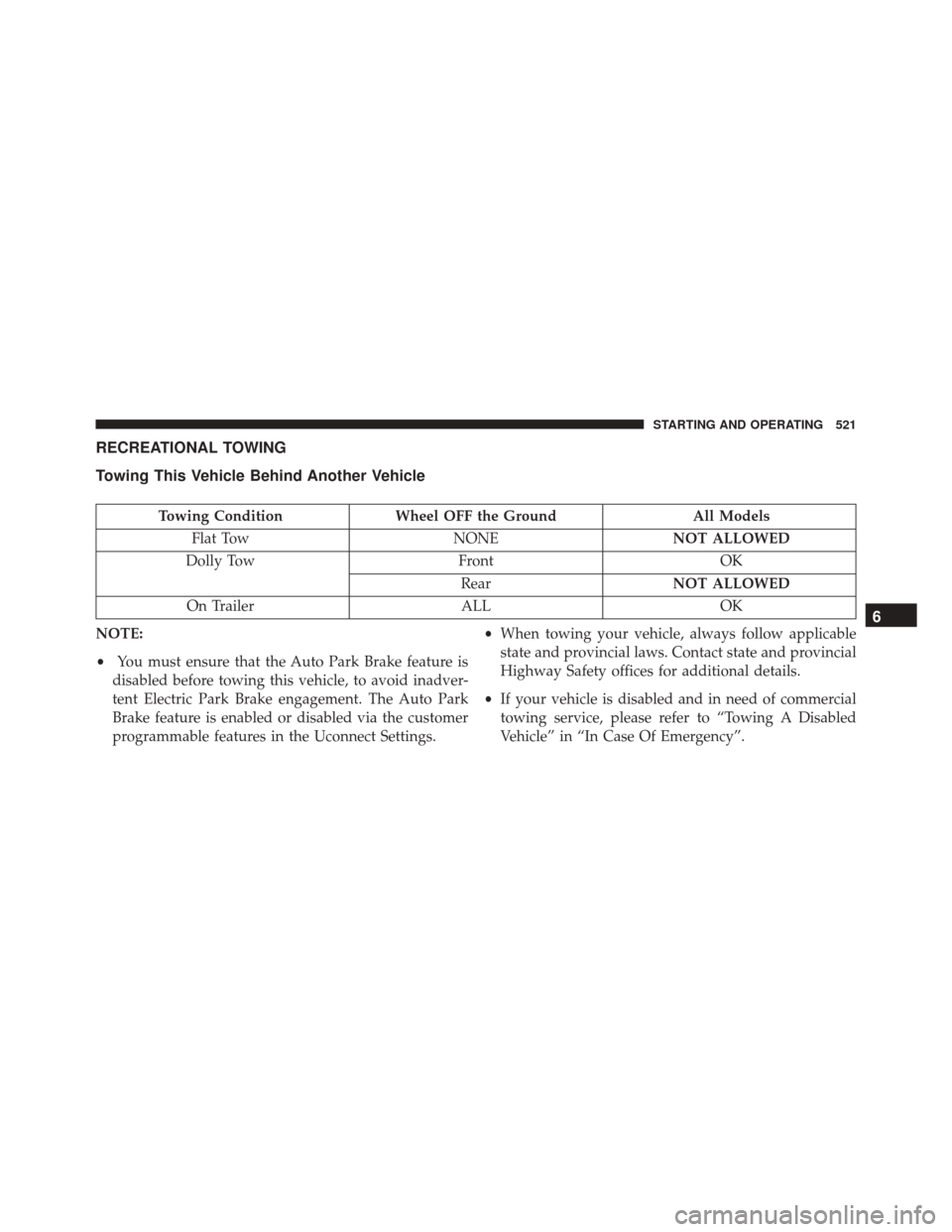
RECREATIONAL TOWING
Towing This Vehicle Behind Another Vehicle
Towing ConditionWheel OFF the Ground All Models
Flat Tow NONENOT ALLOWED
Dolly Tow FrontOK
Rear NOT ALLOWED
On Trailer ALLOK
NOTE:
• You must ensure that the Auto Park Brake feature is
disabled before towing this vehicle, to avoid inadver-
tent Electric Park Brake engagement. The Auto Park
Brake feature is enabled or disabled via the customer
programmable features in the Uconnect Settings. •
When towing your vehicle, always follow applicable
state and provincial laws. Contact state and provincial
Highway Safety offices for additional details.
• If your vehicle is disabled and in need of commercial
towing service, please refer to “Towing A Disabled
Vehicle” in “In Case Of Emergency”.
6
STARTING AND OPERATING 521
Page 607 of 828
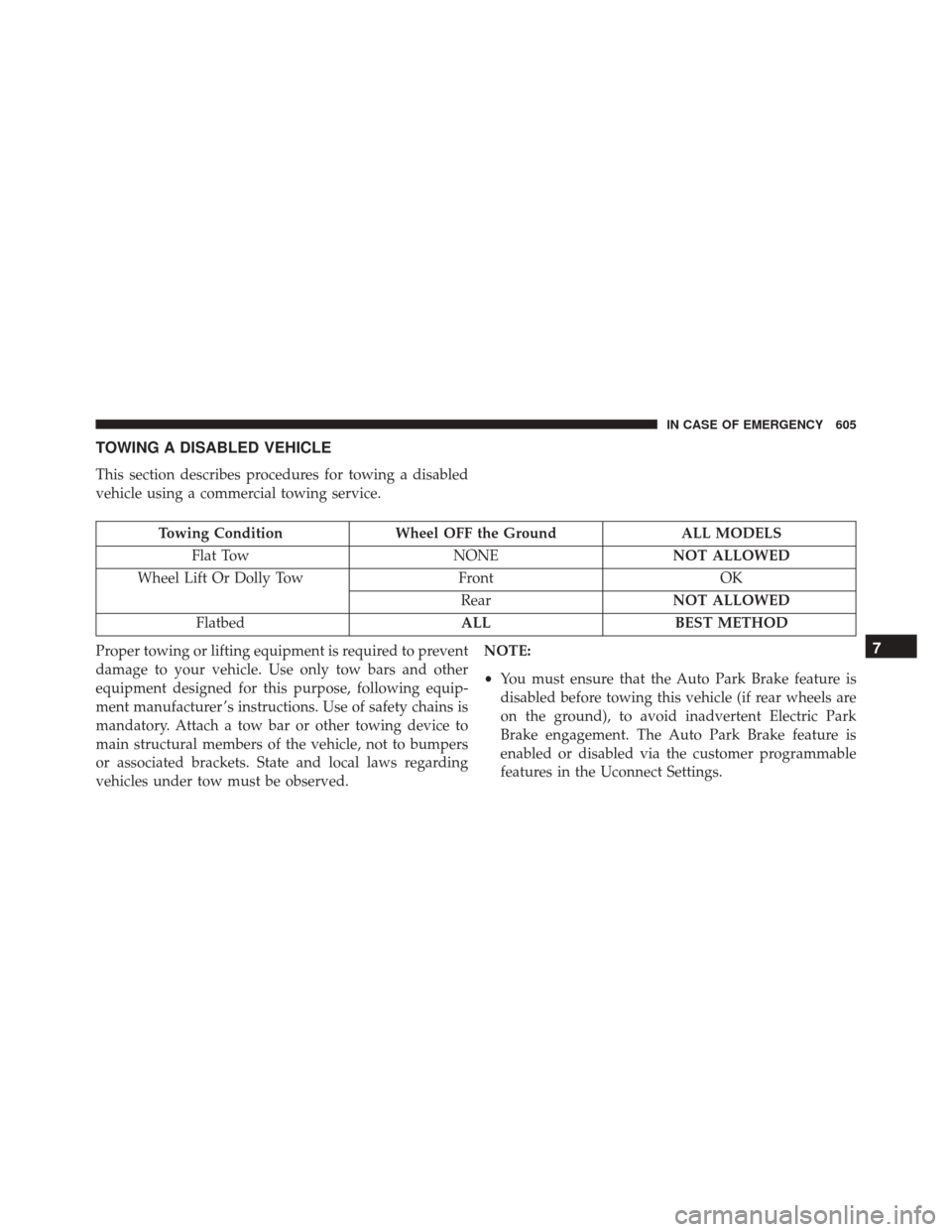
TOWING A DISABLED VEHICLE
This section describes procedures for towing a disabled
vehicle using a commercial towing service.
Towing ConditionWheel OFF the Ground ALL MODELS
Flat Tow NONENOT ALLOWED
Wheel Lift Or Dolly Tow FrontOK
Rear NOT ALLOWED
Flatbed ALLBEST METHOD
Proper towing or lifting equipment is required to prevent
damage to your vehicle. Use only tow bars and other
equipment designed for this purpose, following equip-
ment manufacturer ’s instructions. Use of safety chains is
mandatory. Attach a tow bar or other towing device to
main structural members of the vehicle, not to bumpers
or associated brackets. State and local laws regarding
vehicles under tow must be observed. NOTE:
•
You must ensure that the Auto Park Brake feature is
disabled before towing this vehicle (if rear wheels are
on the ground), to avoid inadvertent Electric Park
Brake engagement. The Auto Park Brake feature is
enabled or disabled via the customer programmable
features in the Uconnect Settings.
7
IN CASE OF EMERGENCY 605