Page 95 of 828

5. Push and release the LOCK button on the RKE KeyFob within 10 seconds.
NOTE: Your RKE Key Fob can be unlinked to your
memory settings by pushing the SET (S) button, and
within 10 seconds, followed by pushing the UNLOCK
button on the RKE Key Fob.
Memory Position Recall
NOTE: The vehicle must be in PARK to recall memory
positions. If a recall is attempted when the vehicle is not
in PARK, a message will be displayed in the EVIC or
DID.
To recall the memory settings for driver one, push
MEMORY button 1 on the driver’s door or the UNLOCK
button on the RKE Key Fob linked to memory position 1.
To recall the memory setting for driver two, push
MEMORY button 2 on the driver’s door or the UNLOCK
button on the RKE Key Fob linked to Memory Position 2. A recall can be cancelled by pushing any of the MEMORY
buttons on the driver’s door during a recall (S, 1, or 2).
When a recall is cancelled, the driver’s seat stop moving.
A delay of one second will occur before another recall can
be selected.
NOTE:
Pushing the mirror adjust switch will cancel the
memory mirror recall.Easy Entry/Exit Seat (Available With Memory Seat
Only)
This feature provides automatic driver seat positioning to
enhance driver mobility when entering and exiting the
vehicle.
The distance the driver seat moves depends on where
you have the driver seat positioned when you remove the
key from the ignition switch.
• When the ignition switch transitions to the LOCK
position, the driver seat will move about 2.4 inches
3
GETTING TO KNOW YOUR VEHICLE 93
Page 96 of 828

(60 mm) rearward if the driver seat position is greater
than or equal to 2.7 inches (67.7 mm) forward of the
rear stop. The seat will return to its previously set
position when the ignition switch transtions out of the
LOCK position.
• When the ignition switch transitions out of the LOCK
position, the driver seat will move to a position 0.3
inches (7.7 mm) forward of the rear stop if the driver
seat position is between 0.9 – 2.7 inches (22.7 – 67.7
mm) forward of the rear stop. The seat will return to its
previously set position when the ignition switch tran-
sitions out of the LOCK position.
• The Easy Entry/Easy Exit feature is disabled when the
driver seat position is less than 0.9 inches (22.7 mm)
forward of the rear stop. At this position, there is no
benefit to the driver by moving the seat for Easy Exit
or Easy Entry. Each stored memory setting will have an associated Easy
Entry and Easy Exit Position.
NOTE:
The Easy Entry/Easy Exit feature can be enabled
or disabled through the programmable features in the
Electronic Vehicle Information Center (EVIC) or Driver
Information Display (DID). For further information refer
to “Display” in “Getting To Know Your Instrument
Panel”.
Heated Seats — If Equipped
Front Heated Seats — If Equipped
The front heated seats control buttons are located within
the climate or controls screen of the touchscreen.
You can choose from HI, LO or OFF heat settings. The
indicator lights in each switch indicate the level of heat in
use. Two indicator lights will illuminate for HI, one for
LO and none for OFF.
94 GETTING TO KNOW YOUR VEHICLE
Page 99 of 828
Push the switch once to select HI-level heating. Push the
switch a second time to select LO-level heating. Push the
switch a third time to shut the heating elements OFF.
NOTE:Once a heat setting is selected, heat will be felt
within two to five minutes.
When the HI-level setting is selected, the heater will
provide a boosted heat level during the initial stages of
operation. Then, the heat output will drop to the normal
HI-level. If the HI-level setting is selected, the system will
automatically switch to LO-level after approximately 60
minutes of continuous operation. At that time, the dis-
play will change from HI to LO, indicating the change.
The LO-level setting will turn OFF automatically after
approximately 45 minutes.
Ventilated Seats — If Equipped
Located in the first row seat cushions are small fans that
draw the air from the passenger compartment and move air through fine perforations in the seat cover to help
keep the driver and front passenger cooler in higher
ambient temperatures. The fans operate at two speeds,
HI and LO.
The front ventilated seats control buttons are located
within the climate or controls screen of the touchscreen.
•
Press the ventilated seat button
once to choose HI.
•Press the ventilated seat buttona second time to
choose LO.
• Press the ventilated seat buttona third time to
turn the ventilated seat OFF.
NOTE: The engine must be running for the ventilated
seats to operate.
3
GETTING TO KNOW YOUR VEHICLE 97
Page 127 of 828
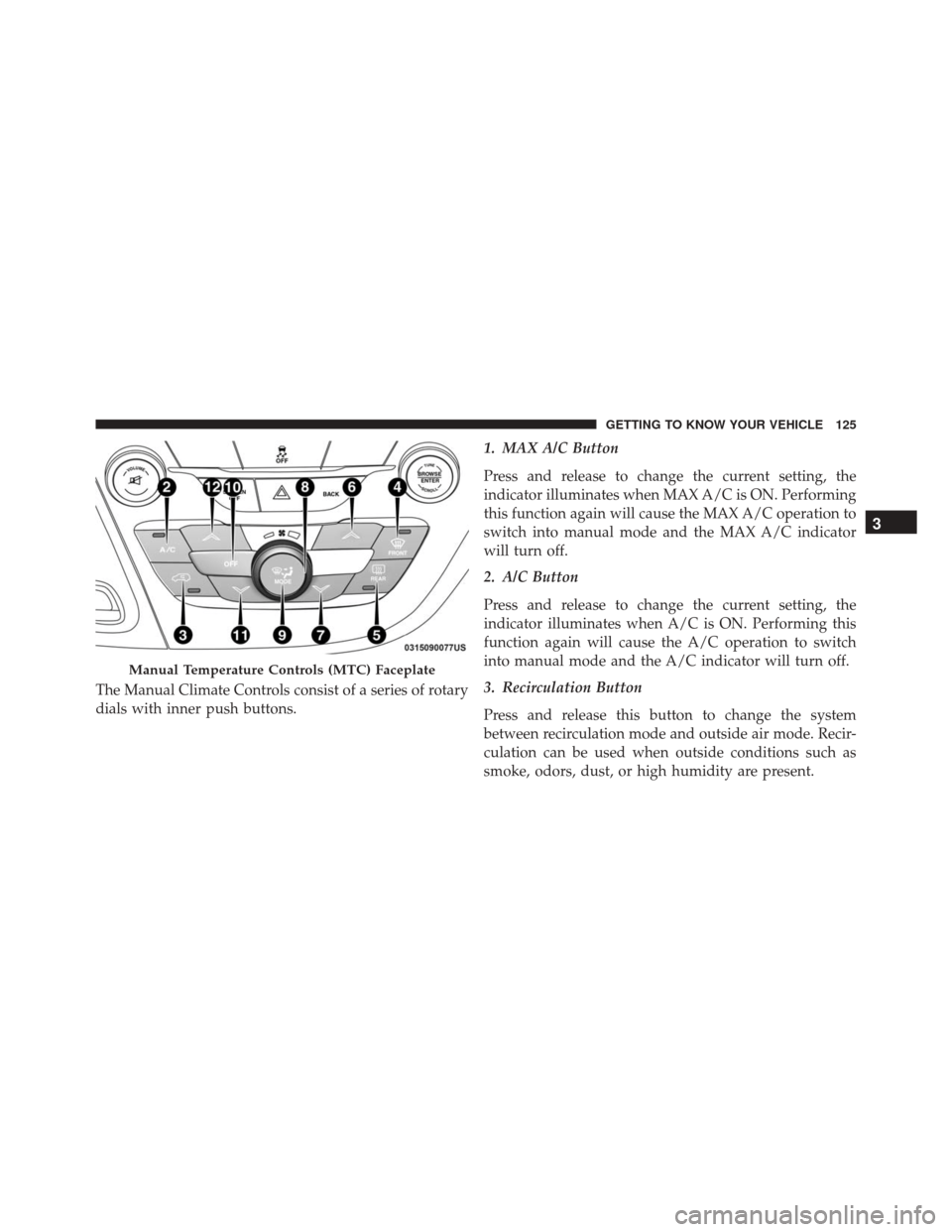
The Manual Climate Controls consist of a series of rotary
dials with inner push buttons.1. MAX A/C Button
Press and release to change the current setting, the
indicator illuminates when MAX A/C is ON. Performing
this function again will cause the MAX A/C operation to
switch into manual mode and the MAX A/C indicator
will turn off.
2. A/C Button
Press and release to change the current setting, the
indicator illuminates when A/C is ON. Performing this
function again will cause the A/C operation to switch
into manual mode and the A/C indicator will turn off.
3. Recirculation Button
Press and release this button to change the system
between recirculation mode and outside air mode. Recir-
culation can be used when outside conditions such as
smoke, odors, dust, or high humidity are present.
Manual Temperature Controls (MTC) Faceplate
3
GETTING TO KNOW YOUR VEHICLE 125
Page 130 of 828

automatic mode to switch to manual operation. The
speeds can be selected using either the blower control
knob on the faceplate or the buttons on the touchscreen
as follows:
Blower Control Knob On The Faceplate
The blower speed increases as you turn the blower
control knob clockwise from the lowest blower setting.
The blower speed decreases as you turn the blower
control knob counterclockwise.
Button On The Touchscreen
Use the small blower icon to reduce the blower setting
and the large blower icon to increase the blower setting.
Blower can also be selected by pressing the blower bar
area between the icons.
9. Mode Control
Push this button to change the system between Modes
(Panel, Bi-Level, Floor, Mix, Defrost).•
Panel
Air comes from the outlets in the instrument
panel. Each of these outlets can be individu-
ally adjusted to direct the flow of air. The air
vanes of the center outlets and outboard outlets can
be moved up and down or side to side to regulate
airflow direction. There is a shut off wheel located
below the air vanes to shut off or adjust the amount
of airflow from these outlets.
• Bi-Level
Air comes from the instrument panel outlets
and floor outlets. A slight amount of air is
directed through the defrost and side window
demister outlets.
NOTE: BI-LEVEL mode is designed under comfort con-
ditions to provide cooler air out of the panel outlets and
warmer air from the floor outlets.
128 GETTING TO KNOW YOUR VEHICLE
Page 132 of 828
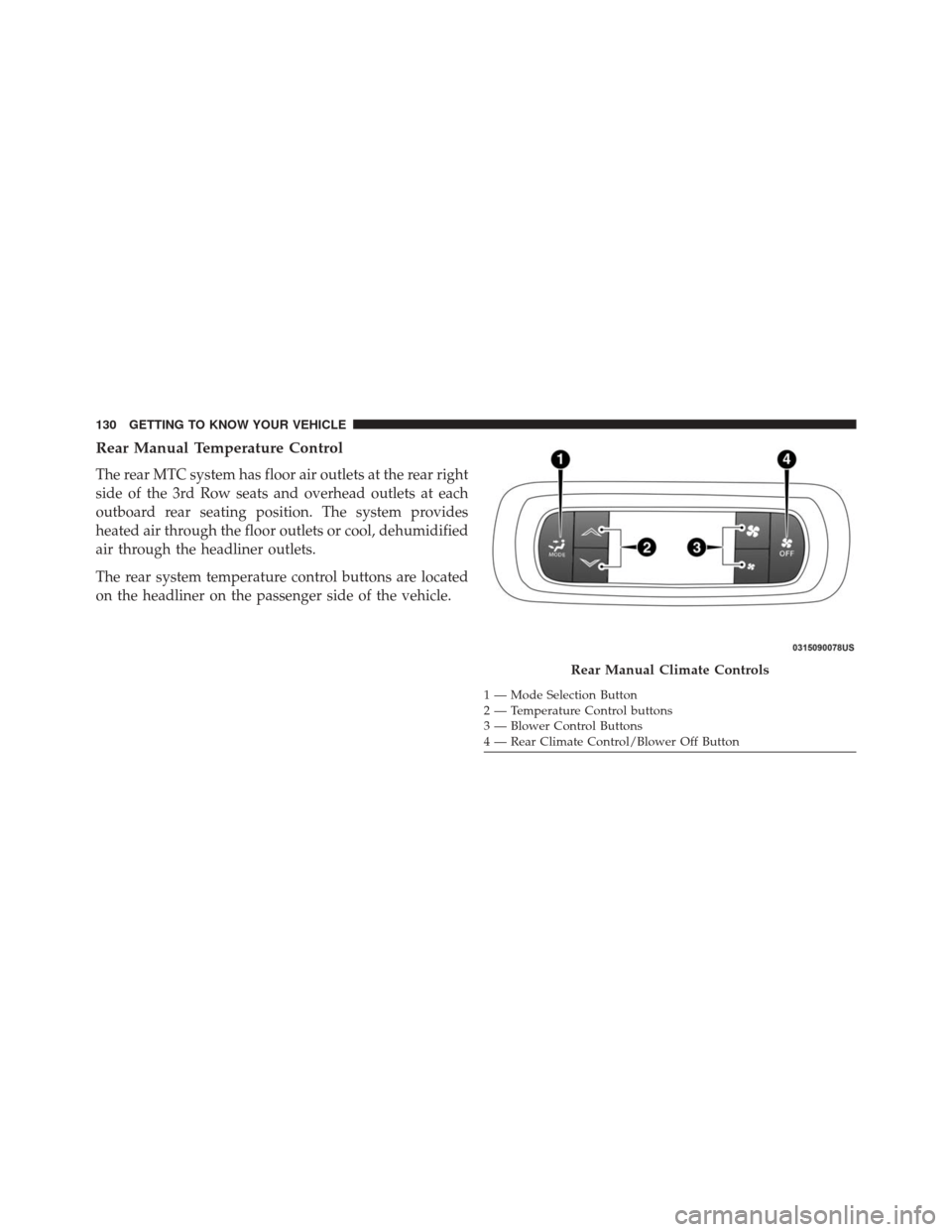
Rear Manual Temperature Control
The rear MTC system has floor air outlets at the rear right
side of the 3rd Row seats and overhead outlets at each
outboard rear seating position. The system provides
heated air through the floor outlets or cool, dehumidified
air through the headliner outlets.
The rear system temperature control buttons are located
on the headliner on the passenger side of the vehicle.
Rear Manual Climate Controls
1 — Mode Selection Button
2 — Temperature Control buttons
3 — Blower Control Buttons
4 — Rear Climate Control/Blower Off Button
130 GETTING TO KNOW YOUR VEHICLE
Page 134 of 828
CAUTION!
Interior air enters the Rear Automatic Temperature
Control System through an intake grille, located in
floor under the passengers’ seats. Do not block or
place objects directly in front of the inlet grille or
heater outlets. The electrical system could overload
causing damage to the blower motor.
Rear Climate Control/Blower Off
To manually set the rear blower controls to off, press the
Rear Climate Control/Blower Off button.
Automatic Temperature Control (ATC) – 3 Zone —
If Equipped
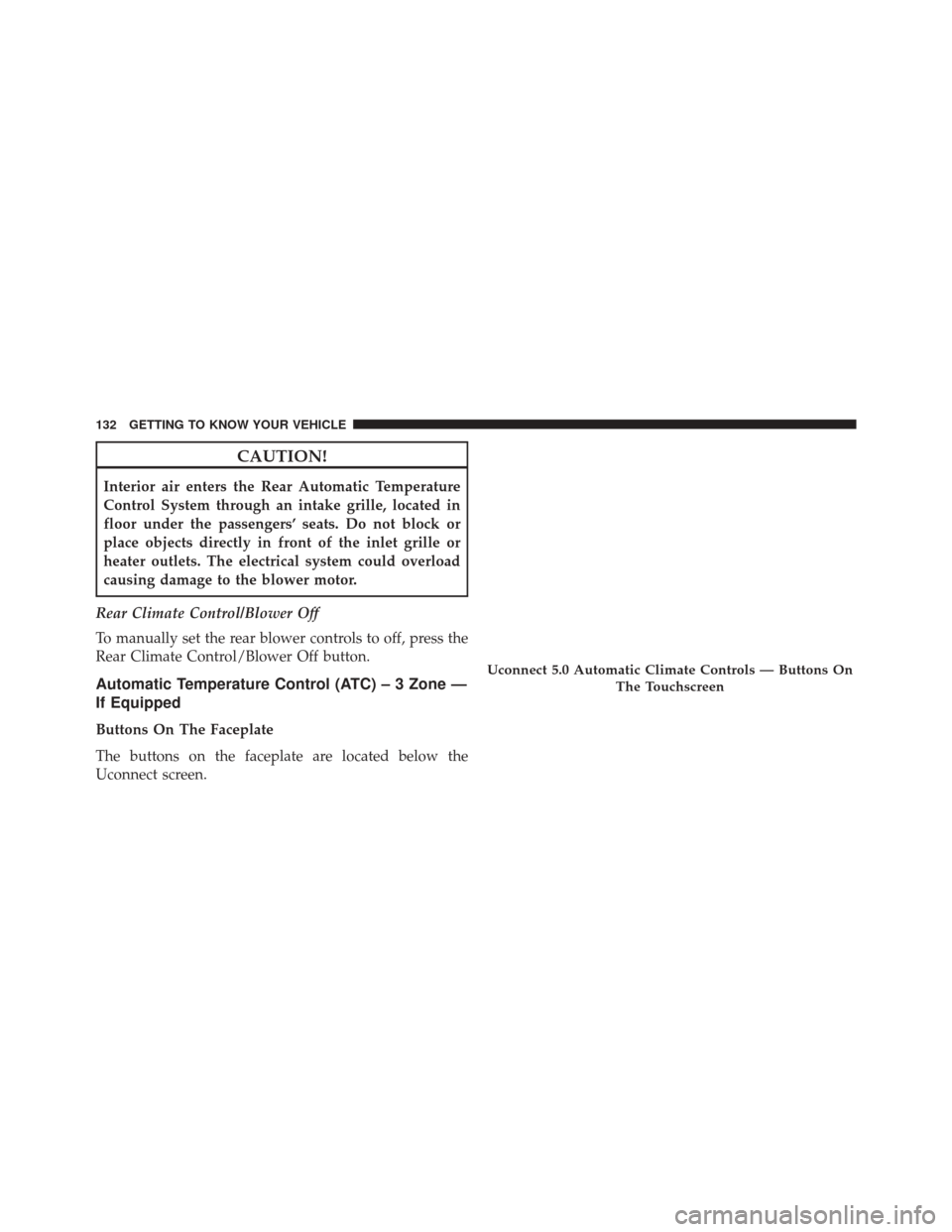
Buttons On The Faceplate
The buttons on the faceplate are located below the
Uconnect screen.
Uconnect 5.0 Automatic Climate Controls — Buttons On The Touchscreen
132 GETTING TO KNOW YOUR VEHICLE
Page 135 of 828
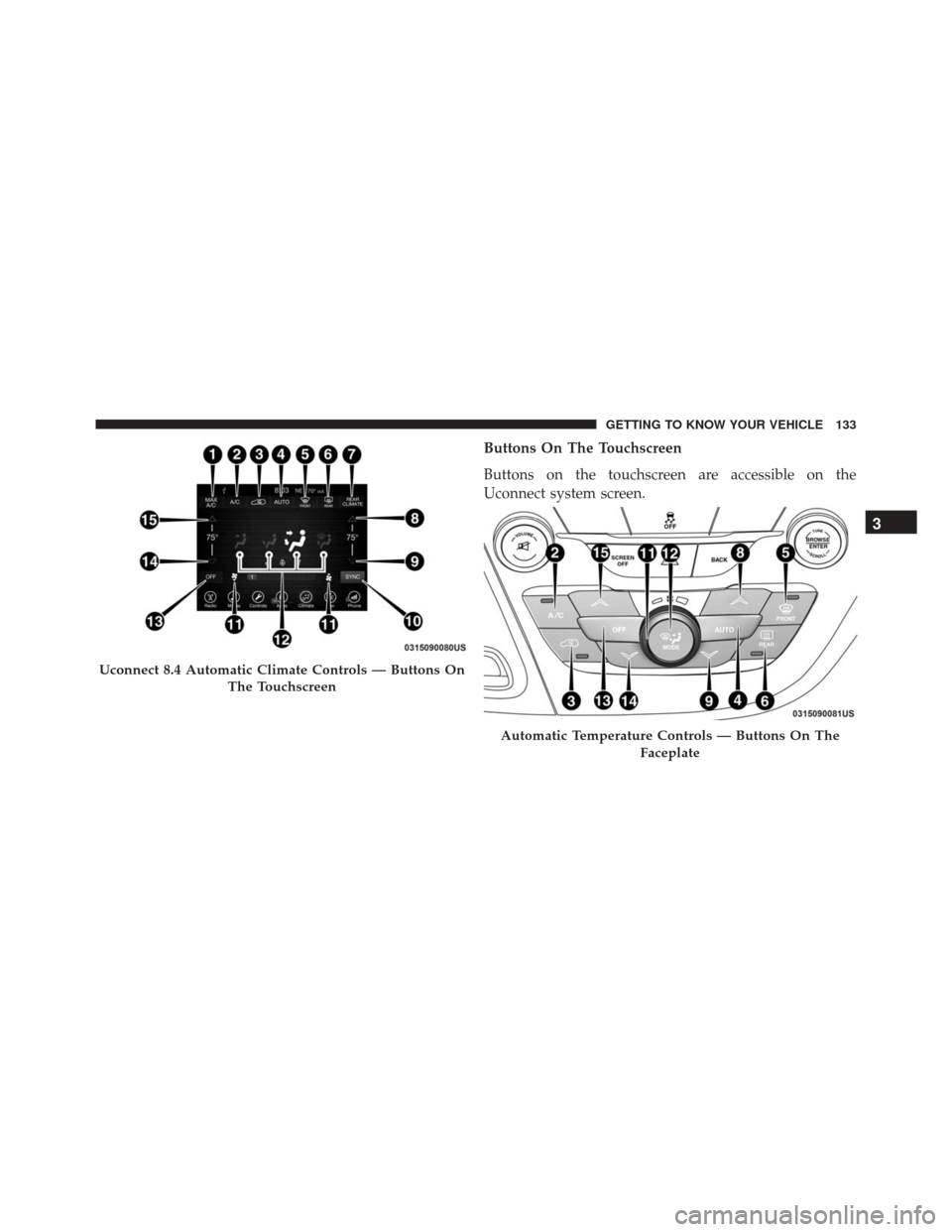
Buttons On The Touchscreen
Buttons on the touchscreen are accessible on the
Uconnect system screen.
Uconnect 8.4 Automatic Climate Controls — Buttons OnThe Touchscreen
Automatic Temperature Controls — Buttons On The Faceplate
3
GETTING TO KNOW YOUR VEHICLE 133