Page 407 of 592
CavityCartridge Fuse Blade FuseDescription
F78A –15 Amp Blue TCM / E-Shifter
F78B – Instrument Cluster
F79A –10 Amp Red ICS / Frt & Rr HVAC /
EPB Sw / SCCM
F79B – Not Used
F80 –5 Amp Tan OBCM
F81 –5 Amp Tan APM
F82 ––Not Used
F83 30 Amp Pink –Trans Oil Pump 1 - Protect
For
F84 ––Not Used
F85 –20 Amp Yellow Cigar Lighter
F86 ––Not Used
F87 ––Not Used
F88 –20 Amp Yellow Front Heated Seats
F89 –20 Amp Yellow Rear Heated Seats
F90 –5 Amp Tan EBCM - ECU
F91 –15 Amp Blue Front Ventilated Seats/
Heated Steering Wheel
F92A ––Not Used
7
IN CASE OF EMERGENCY 405
Page 415 of 592

If the tire does not inflate to at least 26 psi (1.8 Bar)
pressure within 15 minutes:
•The tire is too badly damaged. Do not attempt to drive
the vehicle further. Call for assistance.
If the tire inflates to the recommended pressure or is at
least 26 psi (1.8 Bar) pressure within 15 minutes:
NOTE: If the tire becomes over-inflated, push the Deflation
Button to reduce the tire pressure to the recommended
inflation pressure before continuing.
1. Push the Power Button to turn off theTire Service Kit.
2. Remove the speed limit label from the Tire Service Kit and place sticker
on the steering wheel. 3. Immediately disconnect the Sealant Hose from the valve
stem, reinstall the cap on the fitting at the end of the
hose, and place the Tire Service Kit in the vehicle storage
location. Proceed to “Drive Vehicle.”
Drive Vehicle: Immediately after injecting sealant and
inflating the tire, drive the vehicle 5
miles (8 km) or 10 minutes to ensure
distribution of the Tire Service Kit Seal-
ant within the tire. Do not exceed
50 mph (80 km/h).
WARNING!
Tire Service Kit is not a permanent flat tire repair. Have
the tire inspected and repaired or replaced after using
Tire Service Kit. Do not exceed 50 mph (80 km/h) until
the tire is repaired or replaced. Failure to follow this
warning can result in injuries that are serious or fatal
to you, your passengers, and others around you. Have
the tire checked as soon as possible at an authorized
dealer.
7
IN CASE OF EMERGENCY 413
Page 417 of 592

If the tire pressure is 19 psi (1.3 Bar) or higher:1. Push the Power Button to turn onTire Service Kit and inflate the tire to
the cold tire inflation pressure found
on the tire and loading information
label located in the driver-side door
opening.
NOTE: If the tire becomes over-inflated, push the Deflation
Button to reduce the tire pressure to the recommended
inflation pressure before continuing.
2. Disconnect the Tire Service Kit from the valve stem, reinstall the cap on the valve stem and unplug from 12
Volt outlet.
3. Place the Tire Service Kit in its proper storage area in the vehicle.
4. Have the tire inspected and repaired or replaced at the earliest opportunity at an authorized dealer or tire
service center.
5. Remove the Speed Limit sticker from the steering wheel after the tire has been repaired.
6. Replace the Sealant Bottle at your authorized dealer as soon as possible. Refer to “Sealant Bottle Replacement”. NOTE:
When having the tire serviced, advise the autho-
rized dealer or service center that the tire has been sealed
using the Tire Service Kit.
Sealant Bottle Replacement:
1. Unwrap the power cord.
2. Unwrap the hose.
Unwrap The Hose
7
IN CASE OF EMERGENCY 415
Page 424 of 592

•You can also turn the temperature control to maximum
heat, the mode control to floor and the blower control to
high. This allows the heater core to act as a supplement
to the radiator and aids in removing heat from the
engine cooling system.
WARNING!
You or others can be badly burned by hot engine
coolant (antifreeze) or steam from your radiator. If you
see or hear steam coming from under the hood, do not
open the hood until the radiator has had time to cool.
Never try to open a cooling system pressure cap when
the radiator or coolant bottle is hot.
CAUTION!
Driving with a hot cooling system could damage your
vehicle. If temperature gauge reads “H”, pull over and
stop the vehicle. Idle the vehicle with the air condi-
tioner turned off until the pointer drops back into the
normal range. If the pointer remains on the “H”, turn
the vehicle off immediately, and call for service.
FREEING A STUCK VEHICLE
If your vehicle becomes stuck in mud, sand or snow, it can
often be moved using a rocking motion. Turn the steering
wheel right and left to clear the area around the front
wheels. Then shift back and forth between DRIVE and
REVERSE while gently pressing the accelerator.
NOTE: Shifts between DRIVE and REVERSE can only be
achieved at wheel speeds of 5 mph (8 km/h) or less.
Whenever the transmission remains in NEUTRAL for more
than half a second, you must press the brake pedal to
engage DRIVE or REVERSE.
Use the least amount of accelerator pedal pressure that will
maintain the rocking motion without spinning the wheels
or holding down the accelerator pedal.
NOTE: Push the �ESC Off� switch to place the Electronic
Stability Control (ESC) system in �Partial Off�mode, before
rocking the vehicle. Refer to “Electronic Brake Control
System” in “Safety” for further information. Once the
vehicle has been freed, push the �ESC Off�switch again to
restore �ESC On� mode.
422 IN CASE OF EMERGENCY
Page 470 of 592

Keep dismounted tires in a cool, dry place with as little
exposure to light as possible. Protect tires from contact with
oil, grease, and gasoline.
Replacement Tires
The tires on your new vehicle provide a balance of many
characteristics. They should be inspected regularly for
wear and correct cold tire inflation pressures. The manu-
facturer strongly recommends that you use tires equivalent
to the originals in size, quality and performance when
replacement is needed. Refer to the paragraph on “Tread
Wear Indicators” in this section. Refer to the Tire and
Loading Information placard or the Vehicle Certification
Label for the size designation of your tire. The Load Index
and Speed Symbol for your tire will be found on the
original equipment tire sidewall.
See the Tire Sizing Chart example found in the “Tire Safety
Information” section of this manual for more information
relating to the Load Index and Speed Symbol of a tire.
It is recommended to replace the two front tires or two rear
tires as a pair. Replacing just one tire can seriously affect
your vehicle’s handling. If you ever replace a wheel, make
sure that the wheel’s specifications match those of the
original wheels.It is recommended you contact your authorized tire dealer
or original equipment dealer with any questions you may
have on tire specifications or capability. Failure to use
equivalent replacement tires may adversely affect the
safety, handling, and ride of your vehicle.
WARNING!
•
Do not use a tire, wheel size, load rating, or speed
rating other than that specified for your vehicle.
Some combinations of unapproved tires and wheels
may change suspension dimensions and perfor-
mance characteristics, resulting in changes to steer-
ing, handling, and braking of your vehicle. This can
cause unpredictable handling and stress to steering
and suspension components. You could lose control
and have a collision resulting in serious injury or
death. Use only the tire and wheel sizes with load
ratings approved for your vehicle.
• Never use a tire with a smaller load index or capacity,
other than what was originally equipped on your
vehicle. Using a tire with a smaller load index could
result in tire overloading and failure. You could lose
control and have a collision.
(Continued)
468 SERVICING AND MAINTENANCE
Page 495 of 592

MULTIMEDIA
CONTENTS
�UCONNECT RADIOS ....................495
� PERSONALIZED MENU BAR ...............495
� CYBERSECURITY ....................... .495
� UCONNECT SETTINGS ...................497
▫ Customer Programmable Features — Uconnect 8.4
Settings ............................. .497
� STEERING WHEEL AUDIO CONTROLS .......520
▫ Radio Operation ....................... .521
� AUX/USB/MP3 CONTROL ................521
� UCONNECT THEATER — IF EQUIPPED ......523
▫ Uconnect Theater Overview ...............523
▫ Getting Started ....................... .523
▫ Accessing The System From The Uconnect
Radio .............................. .524
▫ Uconnect Theater Controls ................525 ▫
Accessing The System From The Uconnect Theater
Rear Screens ......................... .526
▫ Pairing The Remote .....................527
▫ Unpairing The Remote ...................528
▫ Media Sources ........................ .528
▫ Uconnect Theater Remote Control ...........529
▫ Uconnect Theater Home Screen And Controls . . .530
▫ Play A DVD/Blu-ray Or USB Media File From
Uconnect System ...................... .532
▫ Blu-ray Controls – Disc Specific Functions .....534
▫ Uconnect Theater Apps ...................535
▫ Using The Rear Video USB Port .............537
▫ Play Video Games ..................... .538
▫ Headphones Operation .................. .538
▫ Disc
Menu ........................... .541
10
Page 507 of 592
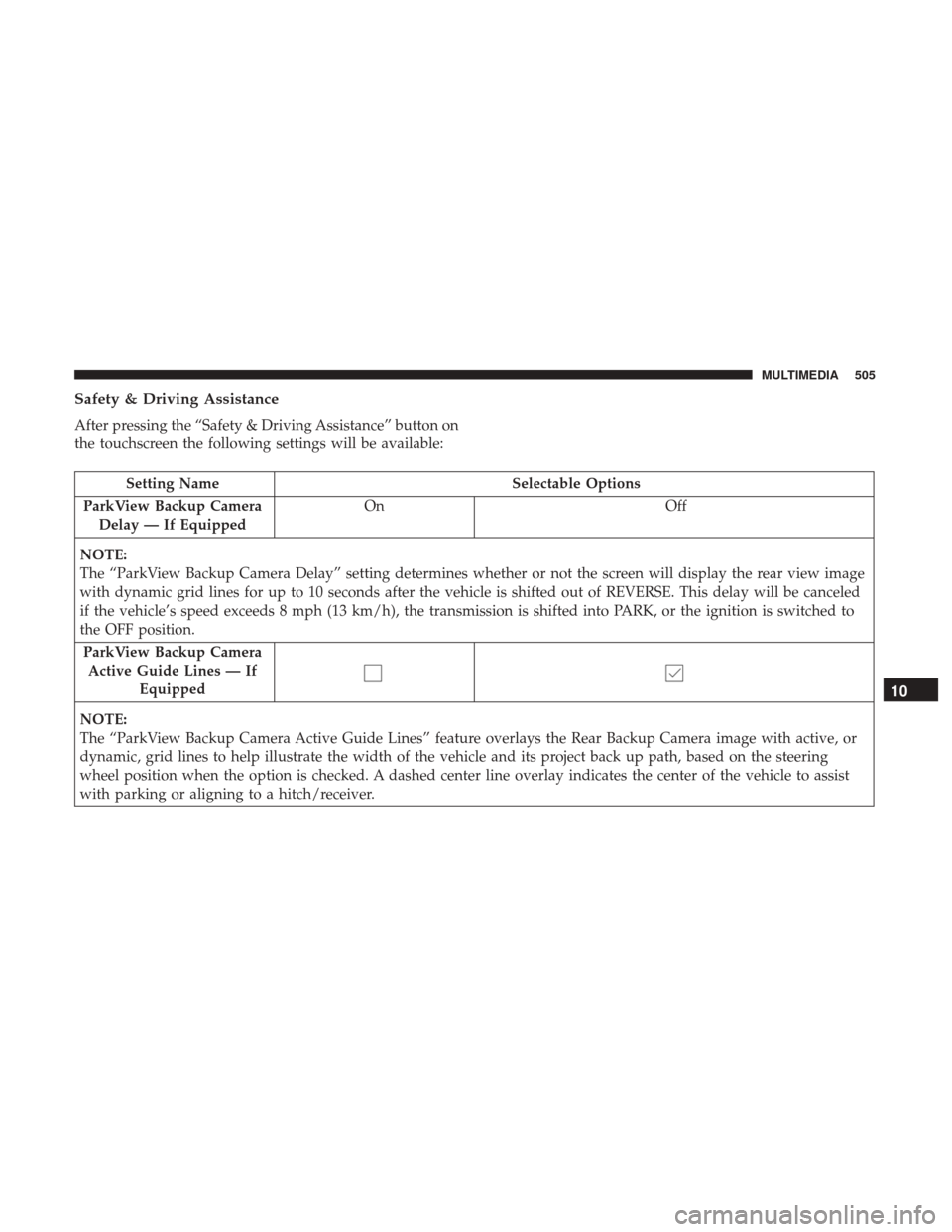
Safety & Driving Assistance
After pressing the “Safety & Driving Assistance” button on
the touchscreen the following settings will be available:
Setting NameSelectable Options
ParkView Backup Camera Delay — If Equipped On
Off
NOTE:
The “ParkView Backup Camera Delay” setting determines whether or not the screen will display the rear view image
with dynamic grid lines for up to 10 seconds after the vehicle is shifted out of REVERSE. This delay will be canceled
if the vehicle’s speed exceeds 8 mph (13 km/h), the transmission is shifted into PARK, or the ignition is switched to
the OFF position. ParkView Backup Camera Active Guide Lines — If Equipped
NOTE:
The “ParkView Backup Camera Active Guide Lines” feature overlays the Rear Backup Camera image with active, or
dynamic, grid lines to help illustrate the width of the vehicle and its project back up path, based on the steering
wheel position when the option is checked. A dashed center line overlay indicates the center of the vehicle to assist
with parking or aligning to a hitch/receiver.
10
MULTIMEDIA 505
Page 510 of 592
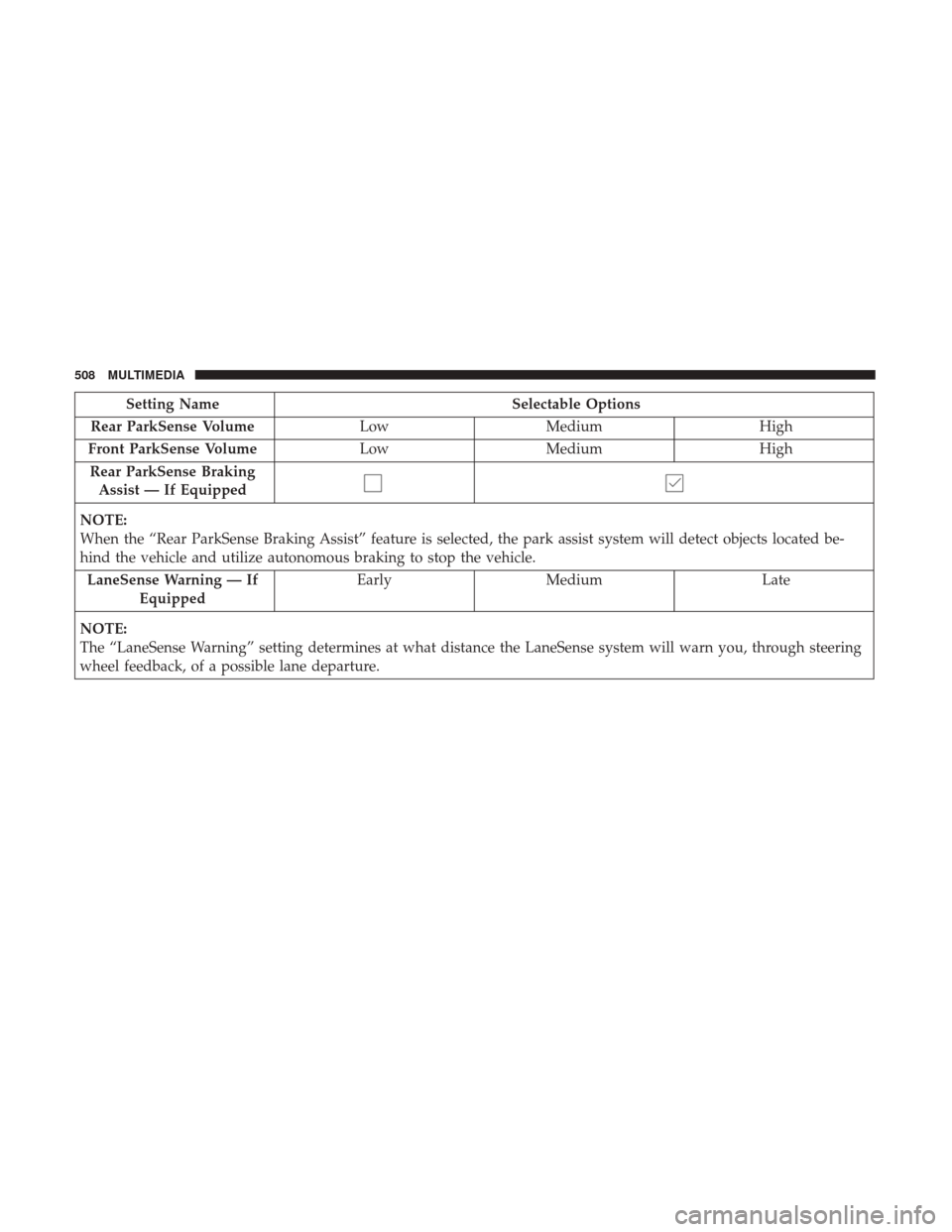
Setting NameSelectable Options
Rear ParkSense Volume LowMedium High
Front ParkSense Volume LowMedium High
Rear ParkSense Braking Assist — If Equipped
NOTE:
When the “Rear ParkSense Braking Assist” feature is selected, the park assist system will detect objects located be-
hind the vehicle and utilize autonomous braking to stop the vehicle. LaneSense Warning — If Equipped Early
Medium Late
NOTE:
The “LaneSense Warning” setting determines at what distance the LaneSense system will warn you, through steering
wheel feedback, of a possible lane departure.
508 MULTIMEDIA