2017 CHEVROLET SUBURBAN service
[x] Cancel search: servicePage 51 of 465

Chevrolet Tahoe/Suburban Owner Manual (GMNA-Localizing-U.S./Canada/
Mexico-9955986) - 2017 - crc - 7/5/16
50 Keys, Doors, and Windows
.Presslon the bottom edge of
the liftgate next to the latch to
close.
Press any liftgate button, the touch
pad, or
bon the RKE transmitter
while the liftgate is moving to stop it.
Pressing any liftgate button or
pressing
btwice quickly on the
RKE transmitter restarts the
operation in the reverse direction.
Pressing the touch pad on the
liftgate handle will restart the
motion, but only in the opening
direction.
Caution
Manually forcing the liftgate to
open or close during a power
cycle can damage the vehicle.
Allow the power cycle to
complete.
The power liftgate may be
temporarily disabled in extremely
low temperatures, or after repeated
power cycling over a short period of time. If this occurs, the liftgate can
still be operated manually. Select
OFF on the liftgate switch.
If the vehicle is shifted out of
P (Park) while the power function is
in progress, the liftgate will continue
to completion. If the vehicle is
accelerated before the liftgate has
completed moving, the liftgate may
stop or reverse direction. Check for
Driver Information Center (DIC)
messages and make sure the
liftgate is closed and latched before
driving.
Falling Liftgate Detection
If the power liftgate automatically
closes after a power opening cycle,
it indicates that the system is
reacting to excess weight on the
liftgate or a possible support strut
failure. Remove any excess weight.
If the liftgate continues to
automatically close after opening,
see your dealer for service before
using the power liftgate.
Interfering with the power liftgate
motion or manually closing the
liftgate too quickly after power
opening may resemble a supportstrut failure. This could also activate
the falling liftgate detection feature.
Allow the liftgate to complete its
operation and wait a few seconds
before manually closing the liftgate.
Obstacle Detection Features
If the liftgate encounters an obstacle
during a power open or close cycle,
the liftgate will automatically reverse
direction and move a short distance
away from the obstacle. After
removing the obstruction, the power
liftgate operation can be used again.
If the liftgate encounters multiple
obstacles on the same power cycle,
the power function will deactivate.
After removing the obstructions,
manually close the liftgate. This will
allow normal power operation
functions to resume.
If the vehicle is locked while the
liftgate is closing, and an obstacle
prevents the liftgate from completely
closing, the horn will sound as an
alert that the liftgate did not close.
Pinch sensors are on the side
edges of the liftgate. If an object is
caught between the liftgate and the
vehicle and presses against a
Page 56 of 465
Chevrolet Tahoe/Suburban Owner Manual (GMNA-Localizing-U.S./Canada/
Mexico-9955986) - 2017 - crc - 7/5/16
Keys, Doors, and Windows 55
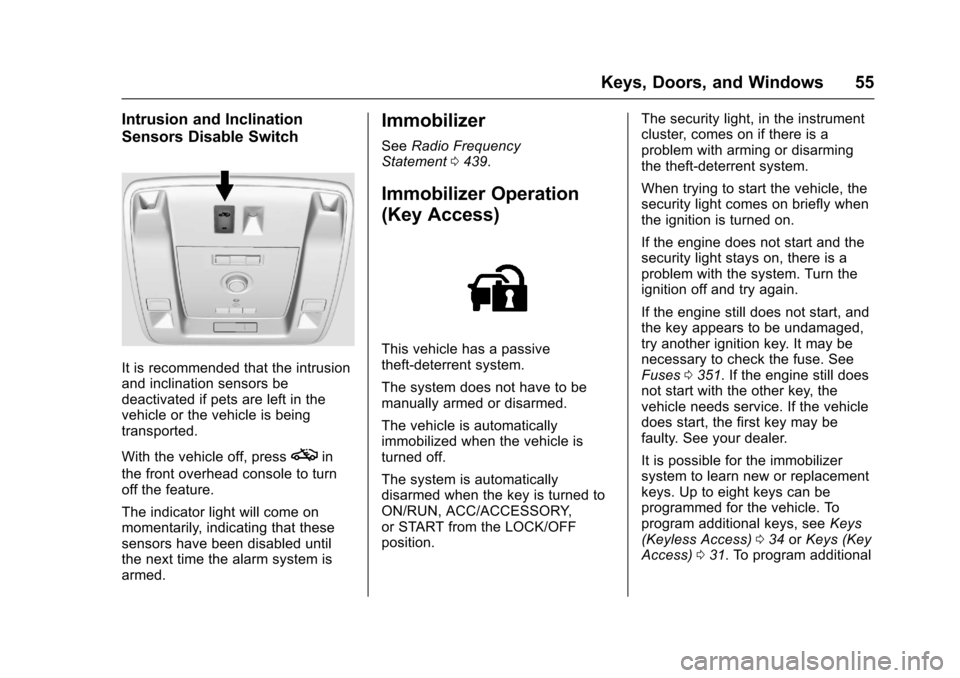
Intrusion and Inclination
Sensors Disable Switch
It is recommended that the intrusion
and inclination sensors be
deactivated if pets are left in the
vehicle or the vehicle is being
transported.
With the vehicle off, press
oin
the front overhead console to turn
off the feature.
The indicator light will come on
momentarily, indicating that these
sensors have been disabled until
the next time the alarm system is
armed.
Immobilizer
See Radio Frequency
Statement 0439.
Immobilizer Operation
(Key Access)
This vehicle has a passive
theft-deterrent system.
The system does not have to be
manually armed or disarmed.
The vehicle is automatically
immobilized when the vehicle is
turned off.
The system is automatically
disarmed when the key is turned to
ON/RUN, ACC/ACCESSORY,
or START from the LOCK/OFF
position. The security light, in the instrument
cluster, comes on if there is a
problem with arming or disarming
the theft-deterrent system.
When trying to start the vehicle, the
security light comes on briefly when
the ignition is turned on.
If the engine does not start and the
security light stays on, there is a
problem with the system. Turn the
ignition off and try again.
If the engine still does not start, and
the key appears to be undamaged,
try another ignition key. It may be
necessary to check the fuse. See
Fuses
0351. If the engine still does
not start with the other key, the
vehicle needs service. If the vehicle
does start, the first key may be
faulty. See your dealer.
It is possible for the immobilizer
system to learn new or replacement
keys. Up to eight keys can be
programmed for the vehicle. To
program additional keys, see Keys
(Keyless Access) 034 orKeys (Key
Access) 031. To program additional
Page 57 of 465
Chevrolet Tahoe/Suburban Owner Manual (GMNA-Localizing-U.S./Canada/
Mexico-9955986) - 2017 - crc - 7/5/16
56 Keys, Doors, and Windows
transmitters, seeRemote Keyless
Entry (RKE) System Operation (Key
Access) 035 orRemote Keyless
Entry (RKE) System Operation
(Keyless Access) 037.
Do not leave the key or device that
disarms or deactivates the vehicle
theft system in the vehicle.
See your dealer to get a new key
blank cut exactly as the ignition key
that operates the system.
Immobilizer Operation
(Keyless Access)
This vehicle has a passive
theft-deterrent system.
The system does not have to be
manually armed or disarmed.
The vehicle is automatically
immobilized when the vehicle is
turned off.
The immobilization system is
disarmed when the ignition button is
pressed in and a valid transmitter is
found in the vehicle.
The security light in the instrument
cluster comes on if there is a
problem with arming or disarming
the theft-deterrent system.
The system has one or more
transmitters matched to an
immobilizer control unit in the
vehicle. Only a correctly matched
transmitter will start the vehicle.
If the transmitter is ever damaged,
you may not be able to start the
vehicle.
When trying to start the vehicle, the
security light comes on briefly when
the ignition is turned on.
If the engine does not start and the
security light stays on, there is a
problem with the system. Turn the
vehicle off and try again.
If the RKE transmitter appears to be
undamaged, try another transmitter
or place the transmitter in the
transmitter pocket/insert next to the center console storage area
between the driver and front
passenger seats. See
“Starting the
Vehicle with a Low Transmitter”
under Remote Keyless Entry (RKE)
System Operation (Key Access)
0 35 orRemote Keyless Entry
(RKE) System Operation (Keyless
Access) 037.
If the engine does not start with the
other transmitter or when the
transmitter is in the pocket in the
center console, the vehicle needs
service. See your dealer who can
service the theft-deterrent system
and have a new transmitter
programmed to the vehicle.
Do not leave the transmitter or
device that disarms or deactivates
the theft-deterrent system in the
vehicle.
Page 72 of 465
Chevrolet Tahoe/Suburban Owner Manual (GMNA-Localizing-U.S./Canada/
Mexico-9955986) - 2017 - crc - 7/5/16
Seats and Restraints 71
2. Adjust the driver seat, outsidemirrors, power tilt and
telescoping steering column (if
equipped), and adjustable
pedals (if equipped).
3. Press and release SET. A beep will sound.
4. Immediately press and hold 1 until two beeps sound.
5. Repeat Steps 1–4 for a second driver using 2.
To store exit positions and easy exit
features to the
B(Exit) button,
repeat Steps 1–4 using
Bto store
your positions for getting out of the
vehicle.
Manually Recalling Memory
Positions
Press and hold 1, 2, or
B(Exit) to
manually recall the previously
stored memory positions. Releasing
1, 2, or
Bbefore the stored
positions are reached stops the
recall. If something has blocked the driver
seat, power tilt and telescoping
steering column, and/or adjustable
pedals while recalling a memory
position, the recall may stop.
Remove the obstruction; then press
and hold the appropriate manual
control for the memory item that is
not recalling for two seconds. Try
recalling the memory position again
by pressing the appropriate memory
button. If the memory position is still
not recalling, see your dealer for
service.
Automatically Recalling Memory
Positions (Auto Memory Recall)
If programmed on in the vehicle
personalization menu, the Auto
(Automatic) Memory Recall feature
automatically recalls the current
driver
’s previously stored 1 or 2
position when the ignition is
changed from off to ON/RUN or
ACC/ACCESSORY.
See “Auto Memory Recall” under
“Comfort and Convenience” in
Vehicle Personalization 0178. To stop recall movement, press one
of the memory, power mirror,
or power seat controls; press the
power tilt and telescoping steering
column control (if equipped); or
press the adjustable pedal control (if
equipped).
If the vehicle driver has changed, in
some vehicles the Driver ID may be
displayed for the first few ignition
cycles.
RKE transmitters are not labeled
with a number. If your memory seat
position is stored to 1 or 2, but this
position is not automatically
recalling, then store your positions
to the other button or switch RKE
transmitters with the other driver.
Easy Exit Recall
If programmed on in the vehicle
personalization menu, the easy exit
feature automatically recalls the
previously storedBpositions when
leaving the vehicle. See Vehicle
Personalization 0178.
Easy exit recall automatically
activates when one of the following
occurs:
Page 73 of 465
Chevrolet Tahoe/Suburban Owner Manual (GMNA-Localizing-U.S./Canada/
Mexico-9955986) - 2017 - crc - 7/5/16
72 Seats and Restraints
.The vehicle is turned off and the
driver door is opened within a
short time.
. The vehicle is turned off with the
driver door open.
To stop recall movement, press one
of the memory, driver seat, outside
mirror, or power tilt and telescoping
steering column controls.
Obstructions
If something has blocked the driver
seat, power tilt and telescoping
steering column, and/or adjustable
pedals while recalling a memory
position, the recall may stop.
Remove the obstruction. Then do
one of the following:
. If automatically or manually
recalling the stored memory
position, press and hold the
appropriate manual control for
two seconds. Try recalling again
by pressing the appropriate
memory button.
. If recalling the exit position,
press and hold the appropriate
manual control for the exit feature not recalling for
two seconds. Then try recalling
the exit position again.
If the memory position is still not
recalling, see your dealer for
service.
Heated and Ventilated
Front Seats
{Warning
If you cannot feel temperature
change or pain to the skin, the
seat heater may cause burns. To
reduce the risk of burns, people
with such a condition should use
care when using the seat heater,
especially for long periods of
time. Do not place anything on
the seat that insulates against
heat, such as a blanket, cushion,
cover, or similar item. This may
cause the seat heater to
overheat. An overheated seat
heater may cause a burn or may
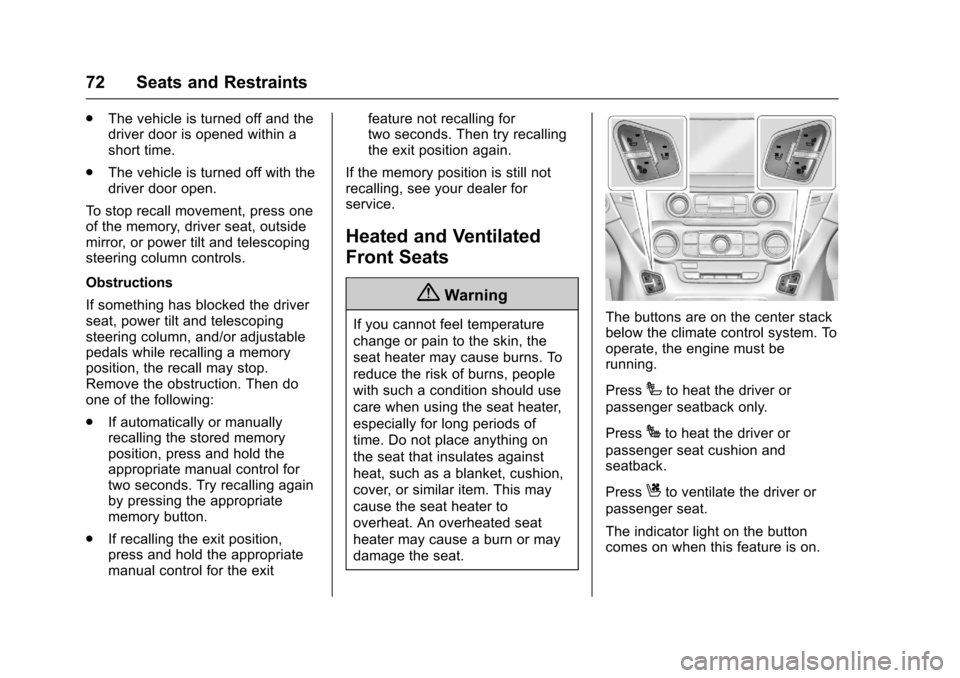
damage the seat.The buttons are on the center stack
below the climate control system. To
operate, the engine must be
running.
Press
Ito heat the driver or
passenger seatback only.
Press
Jto heat the driver or
passenger seat cushion and
seatback.
Press
Cto ventilate the driver or
passenger seat.
The indicator light on the button
comes on when this feature is on.
Page 99 of 465
Chevrolet Tahoe/Suburban Owner Manual (GMNA-Localizing-U.S./Canada/
Mexico-9955986) - 2017 - crc - 7/5/16
98 Seats and Restraints
.Airbags are designed to inflate
only once. After an airbag
inflates, you will need some new
parts for the airbag system.
If you do not get them, the
airbag system will not be there
to help protect you in another
crash. A new system will include
airbag modules and possibly
other parts. The service manual
for the vehicle covers the need
to replace other parts.
. The vehicle has a crash sensing
and diagnostic module which
records information after a
crash. See Vehicle Data
Recording and Privacy 0440
and Event Data
Recorders 0441.
. Let only qualified technicians
work on the airbag systems.
Improper service can mean that
an airbag system will not work
properly. See your dealer for
service.Passenger Sensing
System
The vehicle has a passenger
sensing system for the front
outboard passenger position. The
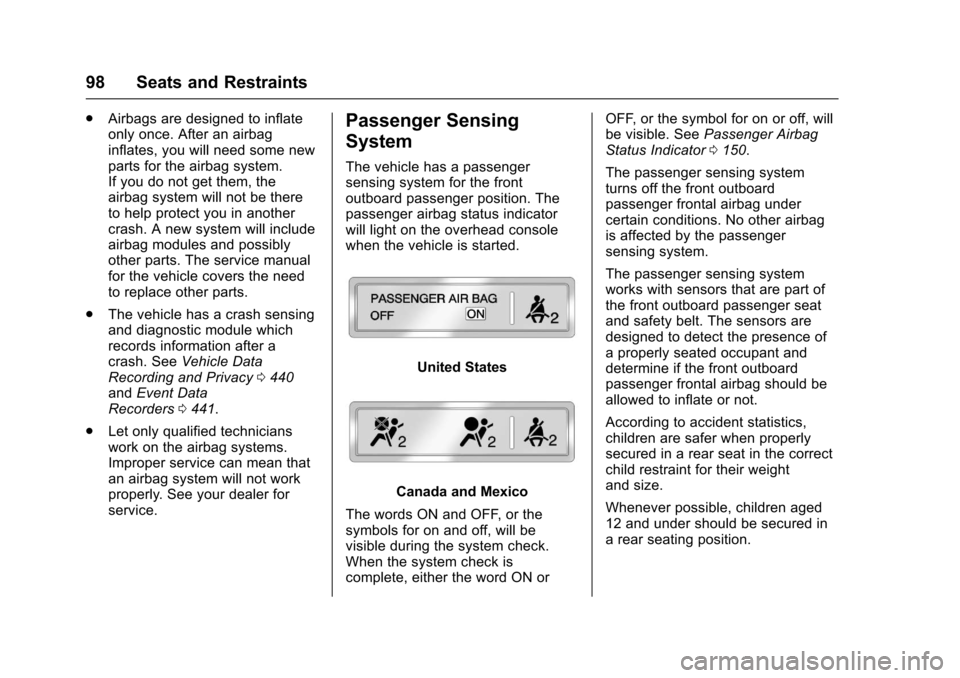
passenger airbag status indicator
will light on the overhead console
when the vehicle is started.
United States
Canada and Mexico
The words ON and OFF, or the
symbols for on and off, will be
visible during the system check.
When the system check is
complete, either the word ON or OFF, or the symbol for on or off, will
be visible. See
Passenger Airbag
Status Indicator 0150.
The passenger sensing system
turns off the front outboard
passenger frontal airbag under
certain conditions. No other airbag
is affected by the passenger
sensing system.
The passenger sensing system
works with sensors that are part of
the front outboard passenger seat
and safety belt. The sensors are
designed to detect the presence of
a properly seated occupant and
determine if the front outboard
passenger frontal airbag should be
allowed to inflate or not.
According to accident statistics,
children are safer when properly
secured in a rear seat in the correct
child restraint for their weight
and size.
Whenever possible, children aged
12 and under should be secured in
a rear seating position.
Page 101 of 465
Chevrolet Tahoe/Suburban Owner Manual (GMNA-Localizing-U.S./Canada/
Mexico-9955986) - 2017 - crc - 7/5/16
100 Seats and Restraints
wear a safety belt
properly—whether or not there is
an airbag for that person.
{Warning
If the airbag readiness light ever
comes on and stays on, it means
that something may be wrong
with the airbag system. To help
avoid injury to yourself or others,
have the vehicle serviced right
away. See Airbag Readiness
Light 0149 for more information,
including important safety
information.
If the On Indicator is Lit for a
Child Restraint
The passenger sensing system is
designed to turn off the front
outboard passenger frontal airbag if
the system determines that an infant
is present in a child restraint. If a
child restraint has been installed
and the on indicator is lit:
1. Turn the vehicle off. 2. Remove the child restraint from
the vehicle.
3. Remove any additional items from the seat such as blankets,
cushions, seat covers, seat
heaters, or seat massagers.
4. Reinstall the child restraint following the directions
provided by the child restraint
manufacturer and refer to
Securing Child Restraints (With
the Safety Belt in the Center
Front Seat) 0121 orSecuring
Child Restraints (With the
Safety Belt in the Rear Seat)
0 119 orSecuring Child
Restraints (With the Safety Belt
in the Front Passenger
Seat) 0122.
Make sure the safety belt
retractor is locked by pulling
the shoulder belt all the way
out of the retractor when
installing the child restraint,
even if the child restraint is
equipped with a safety belt
lock-off. When the retractor lock is set, the belt can be
tightened but not pulled out of
the retractor.
5. If, after reinstalling the child restraint and restarting the
vehicle, the on indicator is still
lit, turn the vehicle off. Then
slightly recline the vehicle
seatback and adjust the seat
cushion, if adjustable, to make
sure that the vehicle seatback
is not pushing the child
restraint into the seat cushion.
Also make sure the child
restraint is not trapped under
the vehicle head restraint.
If this happens, adjust the head
restraint. See Head
Restraints 066.
6. Restart the vehicle.
The passenger sensing system may
or may not turn off the airbag for a
child in a child restraint depending
upon the child’s size. It is better to
secure the child restraint in a rear
seat. Never put a rear-facing child
restraint in the front seat, even if the
on indicator is not lit.
Page 103 of 465
Chevrolet Tahoe/Suburban Owner Manual (GMNA-Localizing-U.S./Canada/
Mexico-9955986) - 2017 - crc - 7/5/16
102 Seats and Restraints
A thick layer of additional material,
such as a blanket or cushion,
or aftermarket equipment such as
seat covers, seat heaters, and seat
massagers can affect how well the
passenger sensing system
operates. We recommend that you
not use seat covers or other
aftermarket equipment except when
approved by GM for your specific
vehicle. SeeAdding Equipment to
the Airbag-Equipped Vehicle 0102
for more information about
modifications that can affect how
the system operates.
The on indicator may be lit if an
object, such as a briefcase,
handbag, grocery bag, laptop,
or other electronic device, is put on
an unoccupied seat. If this is not
desired, remove the object from
the seat.
{Warning
Stowing of articles under the
passenger seat or between the
passenger seat cushion and
(Continued)
Warning (Continued)
seatback may interfere with the
proper operation of the passenger
sensing system.
Servicing the
Airbag-Equipped Vehicle
Airbags affect how the vehicle
should be serviced. There are parts
of the airbag system in several
places around the vehicle. Your
dealer and the service manual have
information about servicing the
vehicle and the airbag system. To
purchase a service manual, see
Service Publications Ordering
Information0438.
{Warning
For up to 10 seconds after the
vehicle is turned off and the
battery is disconnected, an airbag
can still inflate during improper
service. You can be injured if you
(Continued)
Warning (Continued)
are close to an airbag when it
inflates. Avoid yellow connectors.
They are probably part of the
airbag system. Be sure to follow
proper service procedures, and
make sure the person performing
work for you is qualified to do so.
Adding Equipment to the
Airbag-Equipped Vehicle
Adding accessories that change the
vehicle's frame, bumper system,
height, front end, or side sheet
metal may keep the airbag system
from working properly.
The operation of the airbag system
can also be affected by changing
any parts of the front seats, safety
belts, airbag sensing and diagnostic
module, steering wheel, instrument
panel, any of the airbag modules,
ceiling or pillar garnish trim,
overhead console, front sensors,
side impact sensors, airbag wiring,
or front center console.