2017 CHEVROLET SS wheel
[x] Cancel search: wheelPage 246 of 400

Chevrolet SS Sedan Owner Manual (GMNA-Localizing-U.S.-10122752) -2017 - crc - 8/31/16
Driving and Operating 245
Ride Control Systems
Traction Control/
Electronic Stability
Control
System Operation
The vehicle has a Traction ControlSystem (TCS) and StabiliTrak®,anelectronic stability control system.These systems help limit wheel slipand assist the driver in maintainingcontrol, especially on slippery roadconditions.
TCS activates if it senses that anyof the drive wheels are spinning orbeginning to lose traction. When thishappens, TCS applies the brakes tothe spinning wheels and reducesengine power to limit wheel spin.
StabiliTrak activates when thevehicle senses a difference betweenthe intended path and the directionthe vehicle is actually traveling.StabiliTrak selectively appliesbraking pressure to any one of the
vehicle wheel brakes to assist thedriver in keeping the vehicle on theintended path.
If cruise control is being used andtraction control or StabiliTrak beginsto limit wheel spin, cruise control willdisengage. Cruise control may beturned back on when roadconditions allow.
Both systems come onautomatically when the vehicle isstarted and begins to move. Thesystems may be heard or felt whilethey are operating or whileperforming diagnostic checks. Thisis normal and does not mean thereis a problem with the vehicle.
It is recommended to leave bothsystems on for normal drivingconditions, but it may be necessaryto turn TCS off if the vehicle getsstuck in sand, mud, ice, or snow.SeeIf the Vehicle Is Stuck0225and“Turning the Systems Off andOn”later in this section.
The indicator light for both systemsis in the instrument cluster. Thislight will:
.Flash when TCS is limitingwheel spin.
.Flash when StabiliTrak isactivated.
.Turn on and stay on when eithersystem is not working.
If either system fails to turn on or toactivate, a message displays in theDriver Information Center (DIC),
anddcomes on and stays on to
indicate that the system is inactiveand is not assisting the driver inmaintaining control. The vehicle issafe to drive, but driving should beadjusted accordingly.
Ifdcomes on and stays on:
1. Stop the vehicle.
Page 247 of 400

Chevrolet SS Sedan Owner Manual (GMNA-Localizing-U.S.-10122752) -2017 - crc - 8/31/16
246 Driving and Operating
2. Turn the engine off and wait15 seconds.
3. Start the engine.
Drive the vehicle. Ifdcomes on
and stays on, the vehicle may needmore time to diagnose the problem.If the condition persists, see yourdealer.
Turning the Systems Off
and On
To t u r n t h e s y s t e m o f f , p r e s sgon
the center console.
To t u r n o f f o n l y T C S , p r e s s a n d
releaseg.Thetractionofflighti
displays in the instrument cluster.
To t u r n T C S o n a g a i n , p r e s s a n d
releaseg.Thetractionofflighti
displayed in the instrument clusterwill turn off.
If TCS is limiting wheel spin wheng
is pressed, the system will not turnoff until the wheels stop spinning.
To t u r n o f f b o t h T C S a n d S t a b i l i T r a k ,
press and holdguntil the traction
off lightiand StabiliTrak OFF
lightgcome on and stay on in the
instrument cluster.
To t u r n T C S a n d S t a b i l i T r a k o n
again, press and releaseg.The
traction off lightiand StabiliTrak
OFF lightgin the instrument cluster
turn off.
Adding accessories can affect thevehicle performance. SeeAccessories and Modifications0272.
Page 249 of 400
Chevrolet SS Sedan Owner Manual (GMNA-Localizing-U.S.-10122752) -2017 - crc - 8/31/16
248 Driving and Operating
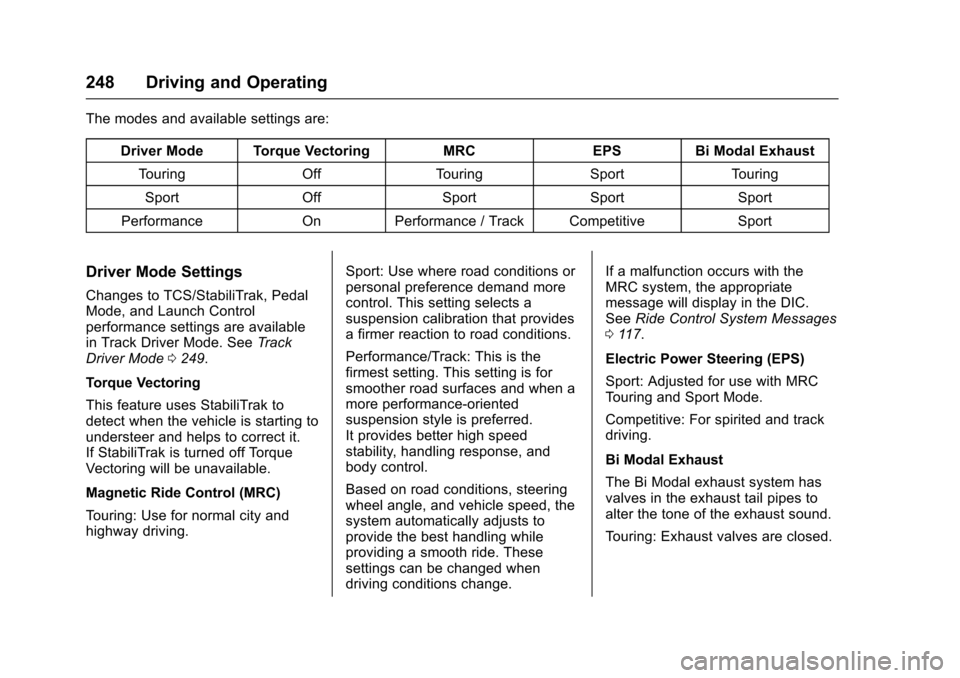
The modes and available settings are:
Driver Mode Torque VectoringMRCEPSBi Modal Exhaust
To u r i n gOffTo u r i n gSportTo u r i n g
SportOffSportSportSport
PerformanceOnPerformance / Track CompetitiveSport
Driver Mode Settings
Changes to TCS/StabiliTrak, PedalMode, and Launch Controlperformance settings are availablein Track Driver Mode. SeeTr a c kDriver Mode0249.
Torque Vectoring
This feature uses StabiliTrak todetect when the vehicle is starting toundersteer and helps to correct it.If StabiliTrak is turned off TorqueVectoring will be unavailable.
Magnetic Ride Control (MRC)
To u r i n g : U s e f o r n o r m a l c i t y a n dhighway driving.
Sport: Use where road conditions orpersonal preference demand morecontrol. This setting selects asuspension calibration that providesafirmerreactiontoroadconditions.
Performance/Track: This is thefirmest setting. This setting is forsmoother road surfaces and when amore performance-orientedsuspension style is preferred.It provides better high speedstability, handling response, andbody control.
Based on road conditions, steeringwheel angle, and vehicle speed, thesystem automatically adjusts toprovide the best handling whileproviding a smooth ride. Thesesettings can be changed whendriving conditions change.
If a malfunction occurs with theMRC system, the appropriatemessage will display in the DIC.SeeRide Control System Messages011 7.
Electric Power Steering (EPS)
Sport: Adjusted for use with MRCTo u r i n g a n d S p o r t M o d e .
Competitive: For spirited and trackdriving.
Bi Modal Exhaust
The Bi Modal exhaust system hasvalves in the exhaust tail pipes toalter the tone of the exhaust sound.
To u r i n g : E x h a u s t v a l v e s a r e c l o s e d .
Page 250 of 400

Chevrolet SS Sedan Owner Manual (GMNA-Localizing-U.S.-10122752) -2017 - crc - 8/31/16
Driving and Operating 249
Sport: Exhaust valves operate toprovide a sporty exhaust character.
Track Driver Mode
Track Driver Mode and LaunchControl are systems designed toallow increased performance whileaccelerating and/or cornering. Thisis accomplished by regulating andoptimizing the engine, brakes, andsuspension performance. Thesemodes are for use at a closedcourse race track and are notintended for use on public roads.These systems will not compensatefor driver inexperience or lack offamiliarity with the race track.
{Warning
Track Driver Mode and Launch
Control change the way
StabiliTrak and TCS perform and
should not be used on public
roads. These modes should only
be used on closed courses by
experienced drivers.
Caution
Attempting to shift when the drive
wheels are spinning and do not
have traction may cause damage
to the transmission. Damage
caused by misuse of the vehicle
is not covered by the vehicle
warranty. Do not attempt to shift
when the drive wheels do not
have traction.
Racing will result in the prematurewear of brakes, tires, and drivelinecomponents. Inspect and replacecomponents as necessary.
Page 251 of 400

Chevrolet SS Sedan Owner Manual (GMNA-Localizing-U.S.-10122752) -2017 - crc - 8/31/16
250 Driving and Operating
The modes and available settings are:
DriverModeTCS StabiliTrak LaunchControlTo r q u eVectoringMRC EPS PedalModeBi ModalExhaust
Track Competitive Competitive On OnPerformance/TrackCompetitive Track Sport
In Track Driver Mode, TCS andStabiliTrak are adjusted and LaunchControl is available. Adjust yourdriving style to account for the moreavailable performance. See“LaunchControl”later in this section.
Track Driver Mode will return to theprevious setting, Touring, Sport orPerformance, when the vehicle isrestarted.
Pressgtwice quickly to set Track
Driver Mode. Messages display inthe Driver Information Center (DIC).SeeRide Control System Messages011 7.Also,theStabiliTrakOFFlight and TCS OFF light stay onwhen the vehicle is in TrackDriver Mode.
To r e t u r n t h e v e h i c l e t o n o r m a l T C S
and StabiliTrak operation, pressg.
Track Driver Mode will return to theprevious setting.
Pedal Mode
In Track Driver Mode or with TCSoff, the accelerator pedal responseis changed to allow for smootherthrottle control on a track.
Launch Control (ManualTransmissions Only)
This feature is available in TrackDriver Mode, and allows the vehicleto reach high levels of accelerationin a straight line. Launch Controladjusts tire slip during standing startlaunches. Use this feature duringclosed course race events whereconsistent zero to sixty and quartermile times are desirable.
Launch Control is onlyavailable when:
.Track Driver Mode is selected.
.The vehicle is not moving.
.The steering wheel is pointingstraight.
.The clutch pedal is pressed andthe vehicle is in 1 (First) gear.
.The accelerator pedal is rapidlyapplied to wide open throttle.
This feature initially limits enginespeed as the accelerator pedal israpidly pressed to wide openthrottle. A smooth, quick release ofthe clutch pedal, while maintainingthe fully pressed accelerator pedal,will manage wheel slip. SeeManualTr a n s m i s s i o n0240.
Page 252 of 400

Chevrolet SS Sedan Owner Manual (GMNA-Localizing-U.S.-10122752) -2017 - crc - 8/31/16
Driving and Operating 251
After the vehicle is launched, thesystem continues in TrackDriver Mode.
Limited-Slip Rear Axle
Vehicles with a limited-slip rear axlecan give more traction on snow,mud, ice, sand, or gravel. Whentraction is low, this feature allowsthe drive wheel with the mosttraction to move the vehicle. Thelimited-slip rear axle also gives thedriver enhanced control whencornering hard or completing amaneuver, such as a lane change.For vehicles with a limited-slip rearaxle, driven under severeconditions, the rear axle fluid shouldbe changed. SeeTr a c k D r i v e r M o d e0249andMaintenance Schedule0349.
Cruise Control
With cruise control, the vehicle canmaintain a speed of about 40 km/h(25 mph) or more without keepingyour foot on the accelerator. Cruisecontrol does not work at speedsbelow 40 km/h (25 mph).
{Warning
Cruise control can be dangerous
where you cannot drive safely at
asteadyspeed.Donotuse
cruise control on winding roads or
in heavy traffic.
Cruise control can be dangerous
on slippery roads. On such roads,
fast changes in tire traction can
cause excessive wheel slip, and
you could lose control. Do not use
cruise control on slippery roads.
If the vehicle has the StabiliTrak®
system and begins to limit wheelspin while using cruise control, thecruise control will automaticallydisengage. SeeTr a c t i o n C o n t r o l /Electronic Stability Control0245.
When road conditions allow you tosafely use it again, the cruisecontrol can be turned back on.
If the brakes are applied, cruisecontrol disengages.
1:Press to turn the cruise controlsystem on and off. A white indicatorcomes on in the instrument clusterwhen cruise is turned on.
*:Press to disengage cruisecontrol without erasing the setspeed from memory.
RES/+ :If there is a set speed inmemory, move the thumbwheel upbriefly to resume to that speed or
Page 253 of 400

Chevrolet SS Sedan Owner Manual (GMNA-Localizing-U.S.-10122752) -2017 - crc - 8/31/16
252 Driving and Operating
hold upwards to accelerate. If cruisecontrol is already active, use toincrease vehicle speed.
SET/✓:Move the thumbwheel downbriefly to set the speed and activatecruise control. If cruise control isalready active, use to decreasespeed.
The speedometer reading can bedisplayed in either English or metricunits. SeeDriver Information Center(DIC)0108.Theincrementvalueused depends on the unitsdisplayed.
Setting Cruise Control
If1is on when not in use, SET/- or
RES/+ could get bumped and gointo cruise when not desired. Keep1off when cruise control is notbeing used.
To s e t a s p e e d :
1. Press1.
2. Get to the speed desired.
3. Move the thumbwheel downtoward SET/✓and release it.
4. Remove foot from theaccelerator.
The cruise control indicator on theinstrument cluster turns green aftercruise control has been set to thedesired speed. SeeInstrumentCluster096.
Resuming a Set Speed
If the cruise control is set at adesired speed and then the brakes
are applied or*is pressed, the
cruise control is disengaged withouterasing the set speed from memory.
Once the vehicle reaches about40 km/h (25 mph) or more, move thethumbwheel up toward RES/+briefly. The vehicle returns to theprevious set speed.
Increasing Speed While UsingCruise Control
If the cruise control system isalready activated:
.Move the thumbwheel up towardRES/+ and hold it until thedesired speed is reached, thenrelease it.
.To i n c r e a s e t h e s p e e d i n s m a l lincrements, move thethumbwheel up toward RES/+briefly. For each press, thevehicle goes about 1.6 km/h(1 mph) faster.
Reducing Speed While UsingCruise Control
If the cruise control system isalready activated:
.Move the thumbwheel towardSET/✓and hold until the desiredlower speed is reached, thenrelease it.
.To d e c r e a s e t h e v e h i c l e s p e e d i nsmall increments, move thethumbwheel toward SET/✓briefly. For each press, thevehicle goes about 1.6 km/h(1 mph) slower.
Passing Another Vehicle WhileUsing Cruise Control
Use the accelerator pedal toincrease the vehicle speed. Whenyou take your foot off the pedal, thevehicle slows down to the previouslyset cruise control speed. Whilepressing the accelerator pedal or
Page 254 of 400

Chevrolet SS Sedan Owner Manual (GMNA-Localizing-U.S.-10122752) -2017 - crc - 8/31/16
Driving and Operating 253
shortly following the release tooverride cruise control, brieflymoving the thumbwheel towardSET/–will result in cruise control setto the current vehicle speed.
Using Cruise Control on Hills
How well the cruise control workson hills depends upon the vehiclespeed, load, and the steepness ofthe hills. When going up steep hills,you might have to step on theaccelerator pedal to maintain thevehicle speed. When goingdownhill, you might have to brake orshift to a lower gear to keep yourspeed down. If the brake pedal isapplied, cruise control willdisengage.
Ending Cruise Control
There are four ways to disengagecruise control:
.Step lightly on the brake pedalor clutch for a manualtransmission.
.Press*.
.Shift the transmission toN(Neutral).
.To t u r n o f f t h e c r u i s e c o n t r o l ,
press1.
Erasing Speed Memory
The cruise control set speed is
erased from memory if1is pressed
or if the vehicle is turned off.
Driver Assistance
Systems
This vehicle may have features thatwork together to help avoid crashesor reduce crash damage whiledriving, backing, and parking. Readthis entire section before usingthese systems.
{Warning
Do not rely on the Driver
Assistance Systems. These
systems do not replace the need
for paying attention and driving
safely. You may not hear or see
alerts or warnings provided by
these systems. Failure to use
proper care when driving may
result in injury, death, or vehicle
damage. SeeDefensive Driving
0217.
(Continued)