2017 CHEVROLET SS steering
[x] Cancel search: steeringPage 225 of 400

Chevrolet SS Sedan Owner Manual (GMNA-Localizing-U.S.-10122752) -2017 - crc - 8/31/16
224 Driving and Operating
.Pay attention to special roadsigns (e.g., falling rocks area,winding roads, long grades,passing or no-passing zones)and take appropriate action.
Winter Driving
Driving on Snow or Ice
Snow or ice between the tires andthe road creates less traction orgrip, so drive carefully. Wet ice canoccur at about 0 °C (32 °F) whenfreezing rain begins to fall. Avoiddriving on wet ice or in freezing rainuntil roads can be treated.
For Slippery Road Driving:
.Accelerate gently. Acceleratingtoo quickly causes the wheels tospin and makes the surfaceunder the tires slick.
.Turn on Traction Control. SeeTr a c t i o n C o n t r o l / E l e c t r o n i cStability Control0245.
.The Antilock Brake System(ABS) improves vehicle stabilityduring hard stops, but thebrakes should be applied sooner
than when on dry pavement.SeeAntilock Brake System(ABS)0241.
.Allow greater following distanceand watch for slippery spots. Icypatches can occur on otherwiseclear roads in shaded areas.The surface of a curve or anoverpass can remain icy whenthe surrounding roads are clear.Avoid sudden steeringmaneuvers and braking whileon ice.
.Turn off cruise control.
Blizzard Conditions
Stop the vehicle in a safe place andsignal for help. Stay with the vehicleunless there is help nearby.If possible, use RoadsideAssistance. SeeRoadsideAssistance Program0368.Togethelp and keep everyone in thevehicle safe:
.Turn on the hazard warningflashers.
.Tie a red cloth to an outsidemirror.
{Warning
Snow can trap engine exhaust
under the vehicle. This may
cause exhaust gases to get
inside. Engine exhaust contains
carbon monoxide (CO), which
cannot be seen or smelled. It can
cause unconsciousness and even
death.
If the vehicle is stuck in snow:
.Clear snow from the base ofthe vehicle, especially anyblocking the exhaust pipe.
.Open a window about 5 cm(2 in) on the vehicle sidethat is away from the wind,to bring in fresh air.
.Fully open the air outlets onor under the instrumentpanel.
.Adjust the climate controlsystem to circulate the airinside the vehicle and set
(Continued)
Page 226 of 400

Chevrolet SS Sedan Owner Manual (GMNA-Localizing-U.S.-10122752) -2017 - crc - 8/31/16
Driving and Operating 225
Warning (Continued)
the fan speed to the highestsetting. See“ClimateControl Systems.”
For more information about CO,
seeEngine Exhaust0235.
To s a v e f u e l , r u n t h e e n g i n e f o rshort periods to warm the vehicleand then shut the engine off andpartially close the window. Movingabout to keep warm also helps.
If it takes time for help to arrive,when running the engine, push theaccelerator pedal slightly so theengine runs faster than the idlespeed. This keeps the batterycharged to restart the vehicle and tosignal for help with the headlamps.Do this as little as possible, tosave fuel.
If the Vehicle Is Stuck
Slowly and cautiously spin thewheels to free the vehicle whenstuck in sand, mud, ice, or snow.
If stuck too severely for the tractionsystem to free the vehicle, turn thetraction system off and use therocking method. SeeTr a c t i o nControl/Electronic Stability Control0245.
{Warning
If the vehicle's tires spin at high
speed, they can explode, and you
or others could be injured. The
vehicle can overheat, causing an
engine compartment fire or other
damage. Spin the wheels as little
as possible and avoid going
above 56 km/h (35 mph).
Rocking the Vehicle to Get
it Out
Turn the steering wheel left andright to clear the area around thefront wheels. Turn off any tractionsystem. Shift back and forthbetween R (Reverse) and a lowforward gear, spinning the wheelsas little as possible. To preventtransmission wear, wait until thewheels stop spinning before shiftinggears. Release the acceleratorpedal while shifting, and presslightly on the accelerator pedalwhen the transmission is in gear.Slowly spinning the wheels in theforward and reverse directionscauses a rocking motion that couldfree the vehicle. If that does not getthe vehicle out after a few tries, itmight need to be towed out. If thevehicle does need to be towed out,seeTo w i n g t h e V e h i c l e0337.
Page 231 of 400

Chevrolet SS Sedan Owner Manual (GMNA-Localizing-U.S.-10122752) -2017 - crc - 8/31/16
230 Driving and Operating
working, the vehicle may be near astrong radio antenna signal causinginterference to the Keyless Accesssystem. SeeRemote Keyless Entry(RKE) System Operation025.
To s h i f t o u t o f P ( P a r k ) , t h e v e h i c l emust be in ACC/ACCESSORY orON/RUN and the brake pedal mustbe applied.
Stopping the Engine/OFF (NoIndicator Lights) :When thevehicle is stopped, press ENGINESTART/STOP once to turn theengine off.
If the vehicle is in P (Park), theignition will turn off, and RetainedAccessory Power (RAP) will remainactive. SeeRetained AccessoryPower (RAP)0232.
Automatic Transmission
If the vehicle is not in P (Park), theignition will return to ACC/ACCESSORY and display amessage in the Driver InformationCenter (DIC). SeeTr a n s m i s s i o nMessages011 9.Whenthevehicleis shifted into P (Park), the ignitionsystem will switch to OFF.
Manual Transmission
If the vehicle is stationary, theignition will turn OFF, and RetainedAccessory Power (RAP) will remainactive. SeeRetained AccessoryPower (RAP)0232.
Do not turn the engine off when thevehicle is moving. This will cause aloss of power assist in the brakeand steering systems and disablethe airbags.
If the vehicle must be shut off in anemergency:
1. Brake using a firm and steadypressure. Do not pump thebrakes repeatedly. This maydeplete power assist, requiringincreased brake pedal force.
2. Shift the vehicle to N (Neutral).This can be done while thevehicle is moving. After shiftingto N (Neutral), firmly apply thebrakes and steer the vehicle toasafelocation.
3. Come to a complete stop. Shiftto P (Park) with an automatictransmission, or Neutral with amanual transmission. Turn theignition to OFF.
4. Set the parking brake. SeeElectric Parking Brake0242.
{Warning
Turning off the vehicle while
moving may cause loss of power
assist in the brake and steering
systems and disable the airbags.
While driving, only shut the
vehicle off in an emergency.
If the vehicle cannot be pulled over,and must be shut off while driving,press and hold ENGINE START/STOP for longer than two seconds,or press twice in five seconds.
ACC/ACCESSORY (AmberIndicator Light) :This mode allowsyou to use some electricalaccessories when the engine is off.
Page 240 of 400

Chevrolet SS Sedan Owner Manual (GMNA-Localizing-U.S.-10122752) -2017 - crc - 8/31/16
Driving and Operating 239
On the bottom of the display, M andthe currently selected gear appearas long as A/S mode is selected.
Alternatively, the paddles can beused to shift to the required gear:
To s h i f t u p a g e a r, b r i e f l y p u l l t h e+(Plus) paddle toward the steeringwheel and release it.
To s h i f t d o w n a g e a r, b r i e f l y p u l l t h e✓(Minus) paddle toward the steeringwheel and release it.
.The transmission will shift to aselected gear only if the enginespeed is within a suitable range.
If not suitable, SHIFT DENIEDwill be displayed in the DIC, andthe transmission will not shiftgears. Continuing to hold thelever in the✓(Minus) positionwill select the requested gear assoon as the vehicle speeddecreases to the allowed speedfor that gear.
.If the engine speed becomes toolow for the currently selectedgear, the transmission willautomatically shift down, eventhough A/S mode is stillselected.
.While in A/S mode, 2 (Second)or 3 (Third) gear starts can beselected from a standing start.This is useful for gentleacceleration on slipperysurfaces.
To d i s a b l e A / S m o d e a n d r e t u r n t oNormal Shift mode, push the shiftlever to the left, to position D (Drive).The bottom of the display shows D.
To d i s a b l e A / S m o d e a n d r e t u r n t oSport Shift mode, hold the shift leverin the + (Plus) position for more thanone second. The bottom of thedisplay shows S.
Temporary Active Select
(A/S) Mode
A/S can also be operated fromD(Drive) using the steering wheelpaddles only. With the vehicle inmotion, briefly pulling the + (Plus) or✓(Minus) steering wheel paddles atany time will engage Temporary A/Smode.
In this mode A/S functions as ifactivated from Sport mode, exceptthat the transmission willautomatically exit Temporary A/Smode to Normal Shift mode if any ofthe following conditions are met:
.The vehicle speed drops belowapproximately 10 km/h (6 mph).
.No shift paddle is pressed, andsteady driving withoutaccelerating, decelerating,or cornering is detected forapproximately seven seconds.
Page 241 of 400

Chevrolet SS Sedan Owner Manual (GMNA-Localizing-U.S.-10122752) -2017 - crc - 8/31/16
240 Driving and Operating
.The + (Plus) steering wheelpaddle is pulled and held formore than one second.
.The shift lever is moved out ofD(Drive) to Sport Shift mode.
Manual Transmission
To o p e r a t e t h e t r a n s m i s s i o n :
1:Press the clutch pedal and shiftinto 1 (First). Then slowly let up onthe clutch pedal while pressing theaccelerator pedal.
Shift into 1 (First) when going lessthan 64 km/h (40 mph). If the vehiclecomes to a complete stop and it ishard to shift into 1 (First), put theshift lever in Neutral and let up onthe clutch. Press the clutch pedalback down. Then shift into 1 (First).
2:Press the clutch pedal whileletting up on the accelerator pedaland shift into 2 (Second). Then,slowly let up on the clutch pedalwhile pressing the acceleratorpedal.
3, 4, 5, and 6 :Shift into 3 (Third),4(Fourth), 5(Fifth), and 6(Sixth) thesame way as 2 (Second). Slowly letup on the clutch pedal whilepressing the accelerator pedal.
To s t o p , l e t u p o n t h e a c c e l e r a t o rpedal and press the brake pedal.Just before the vehicle stops, pressthe clutch pedal and the brakepedal, and shift to Neutral.
Neutral :Use this position whenstarting or idling the engine. Theshift lever is in Neutral when it iscentered in the shift pattern, not inany gear.
R:To b a c k u p , p r e s s t h e c l u t c hpedal and shift into R (Reverse).Apply pressure to get the lever past5(Fifth) and 6(Sixth) intoR(Reverse). Let up on the clutchpedal slowly while pressing theaccelerator pedal.
Page 243 of 400

Chevrolet SS Sedan Owner Manual (GMNA-Localizing-U.S.-10122752) -2017 - crc - 8/31/16
242 Driving and Operating
If driving safely on a wet road and itbecomes necessary to slam on thebrakes and continue braking toavoid a sudden obstacle, acomputer senses the wheels areslowing down. If one of the wheelsis about to stop rolling, the computerwill separately work the brakes ateach wheel.
ABS can change the brake pressureto each wheel, as required, fasterthan any driver could. This can helpyou steer around the obstacle whilebraking hard.
As the brakes are applied, thecomputer keeps receiving updateson wheel speed and controlsbraking pressure accordingly.
Remember: ABS does not changethe time needed to get a foot up tothe brake pedal or always decreasestopping distance. If you get tooclose to the vehicle in front of you,there will not be enough time toapply the brakes if that vehiclesuddenly slows or stops. Alwaysleave enough room up ahead tostop, even with ABS.
Using ABS
Do not pump the brakes. Just holdthe brake pedal down firmly and letABS work. You may hear the ABSpump or motor operating and feelthe brake pedal pulsate. This isnormal.
Braking in Emergencies
ABS allows you to steer and brakeat the same time. In manyemergencies, steering can helpmore than even the very bestbraking.
Electric Parking Brake
The vehicle has an Electric ParkingBrake (EPB). The switch is on thecenter console. The EPB canalways be activated, even if theignition is off. To prevent drainingthe battery, avoid repeated cycles ofthe EPB when the engine is notrunning.
The system has a red parking brakestatus light and an amber parkingbrake warning light. SeeElectricParking Brake Light0103andService Electric Parking Brake Light0103.Therearealsoparkingbrake-related Driver InformationCenter (DIC) messages. SeeBrakeSystem Messages011 3.Incaseofinsufficient electrical power, the EPBcannot be applied or released.
Before leaving the vehicle, checkthe red parking brake status light toensure that the parking brake isapplied.
EPB Apply
To a p p l y t h e E P B :
1. Be sure the vehicle is at acomplete stop.
Page 249 of 400
Chevrolet SS Sedan Owner Manual (GMNA-Localizing-U.S.-10122752) -2017 - crc - 8/31/16
248 Driving and Operating
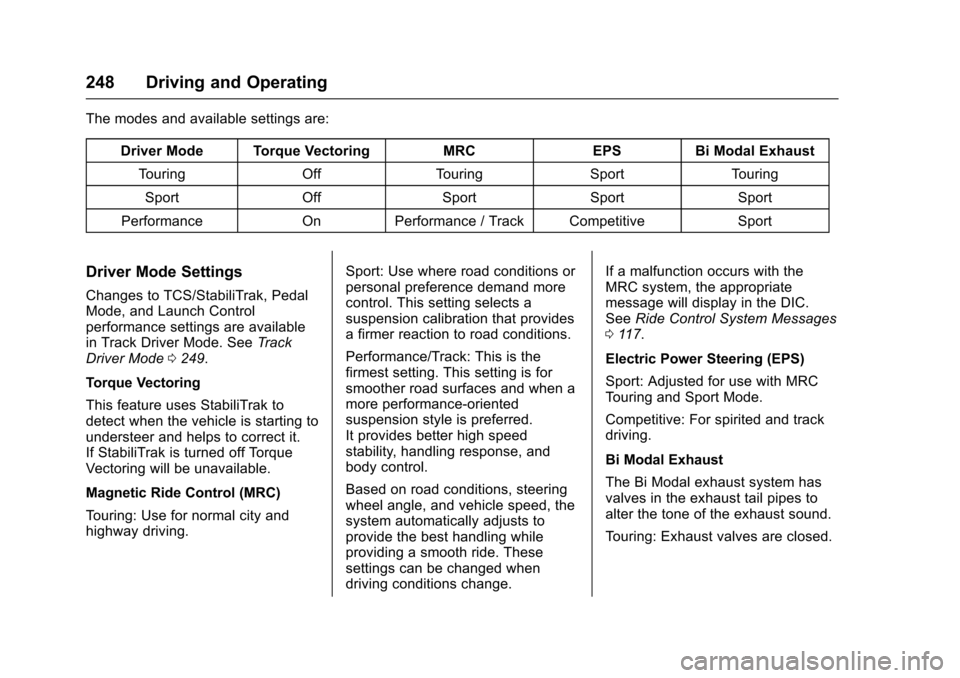
The modes and available settings are:
Driver Mode Torque VectoringMRCEPSBi Modal Exhaust
To u r i n gOffTo u r i n gSportTo u r i n g
SportOffSportSportSport
PerformanceOnPerformance / Track CompetitiveSport
Driver Mode Settings
Changes to TCS/StabiliTrak, PedalMode, and Launch Controlperformance settings are availablein Track Driver Mode. SeeTr a c kDriver Mode0249.
Torque Vectoring
This feature uses StabiliTrak todetect when the vehicle is starting toundersteer and helps to correct it.If StabiliTrak is turned off TorqueVectoring will be unavailable.
Magnetic Ride Control (MRC)
To u r i n g : U s e f o r n o r m a l c i t y a n dhighway driving.
Sport: Use where road conditions orpersonal preference demand morecontrol. This setting selects asuspension calibration that providesafirmerreactiontoroadconditions.
Performance/Track: This is thefirmest setting. This setting is forsmoother road surfaces and when amore performance-orientedsuspension style is preferred.It provides better high speedstability, handling response, andbody control.
Based on road conditions, steeringwheel angle, and vehicle speed, thesystem automatically adjusts toprovide the best handling whileproviding a smooth ride. Thesesettings can be changed whendriving conditions change.
If a malfunction occurs with theMRC system, the appropriatemessage will display in the DIC.SeeRide Control System Messages011 7.
Electric Power Steering (EPS)
Sport: Adjusted for use with MRCTo u r i n g a n d S p o r t M o d e .
Competitive: For spirited and trackdriving.
Bi Modal Exhaust
The Bi Modal exhaust system hasvalves in the exhaust tail pipes toalter the tone of the exhaust sound.
To u r i n g : E x h a u s t v a l v e s a r e c l o s e d .
Page 251 of 400

Chevrolet SS Sedan Owner Manual (GMNA-Localizing-U.S.-10122752) -2017 - crc - 8/31/16
250 Driving and Operating
The modes and available settings are:
DriverModeTCS StabiliTrak LaunchControlTo r q u eVectoringMRC EPS PedalModeBi ModalExhaust
Track Competitive Competitive On OnPerformance/TrackCompetitive Track Sport
In Track Driver Mode, TCS andStabiliTrak are adjusted and LaunchControl is available. Adjust yourdriving style to account for the moreavailable performance. See“LaunchControl”later in this section.
Track Driver Mode will return to theprevious setting, Touring, Sport orPerformance, when the vehicle isrestarted.
Pressgtwice quickly to set Track
Driver Mode. Messages display inthe Driver Information Center (DIC).SeeRide Control System Messages011 7.Also,theStabiliTrakOFFlight and TCS OFF light stay onwhen the vehicle is in TrackDriver Mode.
To r e t u r n t h e v e h i c l e t o n o r m a l T C S
and StabiliTrak operation, pressg.
Track Driver Mode will return to theprevious setting.
Pedal Mode
In Track Driver Mode or with TCSoff, the accelerator pedal responseis changed to allow for smootherthrottle control on a track.
Launch Control (ManualTransmissions Only)
This feature is available in TrackDriver Mode, and allows the vehicleto reach high levels of accelerationin a straight line. Launch Controladjusts tire slip during standing startlaunches. Use this feature duringclosed course race events whereconsistent zero to sixty and quartermile times are desirable.
Launch Control is onlyavailable when:
.Track Driver Mode is selected.
.The vehicle is not moving.
.The steering wheel is pointingstraight.
.The clutch pedal is pressed andthe vehicle is in 1 (First) gear.
.The accelerator pedal is rapidlyapplied to wide open throttle.
This feature initially limits enginespeed as the accelerator pedal israpidly pressed to wide openthrottle. A smooth, quick release ofthe clutch pedal, while maintainingthe fully pressed accelerator pedal,will manage wheel slip. SeeManualTr a n s m i s s i o n0240.