2017 CHEVROLET SS ECO mode
[x] Cancel search: ECO modePage 211 of 400

Chevrolet SS Sedan Owner Manual (GMNA-Localizing-U.S.-10122752) -2017 - crc - 8/31/16
210 Climate Controls
Climate Controls
Climate Control Systems
Dual Automatic ClimateControl System . . . . . . . . . . . . . 210
Air Vents
Air Vents . . . . . . . . . . . . . . . . . . . . . 214
Maintenance
Passenger Compartment AirFilter . . . . . . . . . . . . . . . . . . . . . . . . 215Service . . . . . . . . . . . . . . . . . . . . . . . 215
Climate Control Systems
Dual Automatic Climate Control System
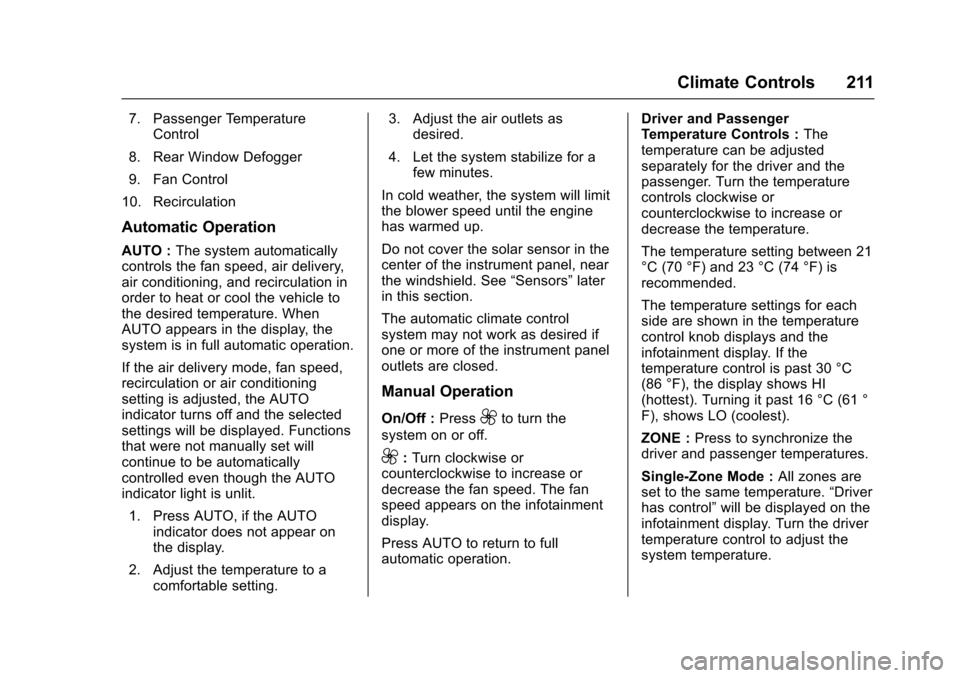
The heating, cooling, and ventilation for the vehicle can be controlled withthis system.
1. Driver Temperature Control
2. AUTO (Automatic Operation)
3. Air Conditioning
4. Air Delivery Mode Controls
5. Front Defrost
6. ZONE
Page 212 of 400
Chevrolet SS Sedan Owner Manual (GMNA-Localizing-U.S.-10122752) -2017 - crc - 8/31/16
Climate Controls 211
7. Passenger TemperatureControl
8. Rear Window Defogger
9. Fan Control
10. Recirculation
Automatic Operation
AUTO :The system automaticallycontrols the fan speed, air delivery,air conditioning, and recirculation inorder to heat or cool the vehicle tothe desired temperature. WhenAUTO appears in the display, thesystem is in full automatic operation.
If the air delivery mode, fan speed,recirculation or air conditioningsetting is adjusted, the AUTOindicator turns off and the selectedsettings will be displayed. Functionsthat were not manually set willcontinue to be automaticallycontrolled even though the AUTOindicator light is unlit.
1. Press AUTO, if the AUTOindicator does not appear onthe display.
2. Adjust the temperature to acomfortable setting.
3. Adjust the air outlets asdesired.
4. Let the system stabilize for afew minutes.
In cold weather, the system will limitthe blower speed until the enginehas warmed up.
Do not cover the solar sensor in thecenter of the instrument panel, nearthe windshield. See“Sensors”laterin this section.
The automatic climate controlsystem may not work as desired ifone or more of the instrument paneloutlets are closed.
Manual Operation
On/Off :Press9to turn the
system on or off.
9:Turn clockwise orcounterclockwise to increase ordecrease the fan speed. The fanspeed appears on the infotainmentdisplay.
Press AUTO to return to fullautomatic operation.
Driver and PassengerTe m p e r a t u r e C o n t r o l s :Thetemperature can be adjustedseparately for the driver and thepassenger. Turn the temperaturecontrols clockwise orcounterclockwise to increase ordecrease the temperature.
The temperature setting between 21°C (70 °F) and 23 °C (74 °F) isrecommended.
The temperature settings for eachside are shown in the temperaturecontrol knob displays and theinfotainment display. If thetemperature control is past 30 °C(86 °F), the display shows HI(hottest). Turning it past 16 °C (61 °F), shows LO (coolest).
ZONE :Press to synchronize thedriver and passenger temperatures.
Single-Zone Mode :All zones areset to the same temperature.“Driverhas control”will be displayed on theinfotainment display. Turn the drivertemperature control to adjust thesystem temperature.
Page 213 of 400

Chevrolet SS Sedan Owner Manual (GMNA-Localizing-U.S.-10122752) -2017 - crc - 8/31/16
212 Climate Controls
Dual-Zone Mode :Allows differenttemperatures to be set for the driverand passenger sides.
Enter Dual-Zone mode by adjustingthe passenger side temperaturewhen in Single-Zone mode.
Air Delivery Mode Controls :
PressY,),-,or[to change
the current airflow mode. Thecurrent mode selection appears inthe infotainment display. Changingthe mode cancels the automaticoperation and the system goes intosemi-automatic operation. PressAUTO to return to full automaticoperation.
Select from the following:
Y:Air is directed to the instrumentpanel outlets and console outlet.
):Air is divided between theinstrument panel outlets, consoleoutlet and the floor outlets. Coolerair is directed to the upper outletsand warmer air to the floor outlets.
[:Air is directed to the flooroutlets with some air directed to theouter instrument panel, windshield,and side window outlets.
-:Air is directed to the windshield,floor and side window outlets. Usethis mode to clear the windows offog or moisture and warm thepassengers.
5FRONT :Press to turn the
defrost on or off. The5FRONT
indicator appears in the display.Aportionoftheairisdirectedtothewindshield and side window outlets,with some air directed to the outerinstrument panel outlets.
For best results, clear all snow andice from the windshield beforedefrosting.
Air Conditioning
#:Press to turn the airconditioning system on or off. The#appears on the infotainmentdisplay when the air conditioning ison. When the air conditioning is
turned off,#OFF appears on the
infotainment display.
The air conditioning systemremoves moisture and heat fromthe air.
The air conditioning mightautomatically turn off during heavyacceleration, abnormal systempressure or very cold outsidetemperatures.
When-,h,or5FRONTis
selected, the air conditioning isautomatically switched on toimprove defogging performance andremove moisture from the air.
Recirculation
h:Press to change the air intakebetween recirculated air and outside
air.happears on the
infotainment display whenrecirculation is activated.
The recirculation mode recyclesinterior air and is not recommendedfor extended use. If it is used for along period of time, the systemautomatically lets some outside airinto the vehicle for ventilation.
Do not use the recirculation mode ifoccupants are smoking.
The recirculation mode cannot beturned on in defrost mode.
Page 217 of 400

Chevrolet SS Sedan Owner Manual (GMNA-Localizing-U.S.-10122752) -2017 - crc - 8/31/16
216 Driving and Operating
Driving and
Operating
Driving Information
Distracted Driving . . . . . . . . . . . . 217Defensive Driving . . . . . . . . . . . . . 217Drunk Driving . . . . . . . . . . . . . . . . . 218Control of a Vehicle . . . . . . . . . . . 218Braking . . . . . . . . . . . . . . . . . . . . . . . 218Steering . . . . . . . . . . . . . . . . . . . . . . 218Off-Road Recovery . . . . . . . . . . . 219Loss of Control . . . . . . . . . . . . . . . 219Track Events and CompetitiveDriving . . . . . . . . . . . . . . . . . . . . . . 220Driving on Wet Roads . . . . . . . . 222Hill and Mountain Roads . . . . . 223Winter Driving . . . . . . . . . . . . . . . . 224If the Vehicle Is Stuck . . . . . . . . 225Vehicle Load Limits . . . . . . . . . . . 226
Starting and Operating
New Vehicle Break-In . . . . . . . . . 229Ignition Positions . . . . . . . . . . . . . 229Starting the Engine . . . . . . . . . . . 231Retained AccessoryPower (RAP) . . . . . . . . . . . . . . . . 232Shifting Into Park (AutomaticTransmission) . . . . . . . . . . . . . . . 232Shifting out of Park . . . . . . . . . . . 233
Parking . . . . . . . . . . . . . . . . . . . . . . . 234Parking over ThingsThat Burn . . . . . . . . . . . . . . . . . . . 234Extended Parking . . . . . . . . . . . . 235
Engine Exhaust
Engine Exhaust . . . . . . . . . . . . . . 235Running the Vehicle WhileParked . . . . . . . . . . . . . . . . . . . . . . 236
Automatic Transmission
Automatic Transmission . . . . . . 236Manual Mode . . . . . . . . . . . . . . . . . 238
Manual Transmission
Manual Transmission . . . . . . . . . 240
Brakes
Antilock BrakeSystem (ABS) . . . . . . . . . . . . . . . 241Electric Parking Brake . . . . . . . . 242Brake Assist . . . . . . . . . . . . . . . . . . 244Hill Start Assist (HSA) . . . . . . . . 244
Ride Control Systems
Traction Control/ElectronicStability Control . . . . . . . . . . . . . 245Driver Mode Control . . . . . . . . . . 247Track Driver Mode . . . . . . . . . . . . 249Limited-Slip Rear Axle . . . . . . . . 251
Cruise Control
Cruise Control . . . . . . . . . . . . . . . . 251
Driver Assistance Systems
Driver Assistance Systems . . . 253Assistance Systems forParking or Backing . . . . . . . . . . 254Assistance Systems forDriving . . . . . . . . . . . . . . . . . . . . . . 259Forward Collision Alert (FCA)System . . . . . . . . . . . . . . . . . . . . . . 259Side Blind ZoneAlert (SBZA) . . . . . . . . . . . . . . . . 261Lane DepartureWarning (LDW) . . . . . . . . . . . . . 263
Fuel
Fuel . . . . . . . . . . . . . . . . . . . . . . . . . . 264California FuelRequirements . . . . . . . . . . . . . . . 265Fuels in Foreign Countries . . . 266Fuel Additives . . . . . . . . . . . . . . . . 266Filling the Tank . . . . . . . . . . . . . . . 266Filling a Portable FuelContainer . . . . . . . . . . . . . . . . . . . 267
Trailer Towing
Trailer Towing . . . . . . . . . . . . . . . . 268
Conversions and Add-Ons
Add-On ElectricalEquipment . . . . . . . . . . . . . . . . . . 268
Page 231 of 400

Chevrolet SS Sedan Owner Manual (GMNA-Localizing-U.S.-10122752) -2017 - crc - 8/31/16
230 Driving and Operating
working, the vehicle may be near astrong radio antenna signal causinginterference to the Keyless Accesssystem. SeeRemote Keyless Entry(RKE) System Operation025.
To s h i f t o u t o f P ( P a r k ) , t h e v e h i c l emust be in ACC/ACCESSORY orON/RUN and the brake pedal mustbe applied.
Stopping the Engine/OFF (NoIndicator Lights) :When thevehicle is stopped, press ENGINESTART/STOP once to turn theengine off.
If the vehicle is in P (Park), theignition will turn off, and RetainedAccessory Power (RAP) will remainactive. SeeRetained AccessoryPower (RAP)0232.
Automatic Transmission
If the vehicle is not in P (Park), theignition will return to ACC/ACCESSORY and display amessage in the Driver InformationCenter (DIC). SeeTr a n s m i s s i o nMessages011 9.Whenthevehicleis shifted into P (Park), the ignitionsystem will switch to OFF.
Manual Transmission
If the vehicle is stationary, theignition will turn OFF, and RetainedAccessory Power (RAP) will remainactive. SeeRetained AccessoryPower (RAP)0232.
Do not turn the engine off when thevehicle is moving. This will cause aloss of power assist in the brakeand steering systems and disablethe airbags.
If the vehicle must be shut off in anemergency:
1. Brake using a firm and steadypressure. Do not pump thebrakes repeatedly. This maydeplete power assist, requiringincreased brake pedal force.
2. Shift the vehicle to N (Neutral).This can be done while thevehicle is moving. After shiftingto N (Neutral), firmly apply thebrakes and steer the vehicle toasafelocation.
3. Come to a complete stop. Shiftto P (Park) with an automatictransmission, or Neutral with amanual transmission. Turn theignition to OFF.
4. Set the parking brake. SeeElectric Parking Brake0242.
{Warning
Turning off the vehicle while
moving may cause loss of power
assist in the brake and steering
systems and disable the airbags.
While driving, only shut the
vehicle off in an emergency.
If the vehicle cannot be pulled over,and must be shut off while driving,press and hold ENGINE START/STOP for longer than two seconds,or press twice in five seconds.
ACC/ACCESSORY (AmberIndicator Light) :This mode allowsyou to use some electricalaccessories when the engine is off.
Page 232 of 400

Chevrolet SS Sedan Owner Manual (GMNA-Localizing-U.S.-10122752) -2017 - crc - 8/31/16
Driving and Operating 231
With the ignition off, pressing thebutton one time without the brakepedal applied will place the ignitionsystem in ACC/ACCESSORY.
The ignition will switch from ACC/ACCESSORY to OFF afterfive minutes to prevent batteryrundown.
ON/RUN/START (Green IndicatorLight) :This mode is for driving andstarting. With the ignition off, andthe brake pedal applied forautomatic transmission vehicles,and the clutch pedal applied formanual transmission vehicles,pressing the button once will placethe ignition system in ON/RUN/START. Once engine crankingbegins, release the button. Enginecranking will continue until theengine starts. SeeStarting theEngine0231.Theignitionwillthenremain in ON/RUN.
Service Only Mode
This power mode is available forservice and diagnostics, and toverify the proper operation of themalfunction indicator lamp as maybe required for emission inspection
purposes. With the vehicle off, andthe brake pedal not applied,pressing and holding the button formore than five seconds will placethe vehicle in Service Only Mode.The instruments and audio systemswill operate as they do in ON/RUN,but the vehicle will not be able to bedriven. The engine will not start inService Only Mode. Press thebutton again to turn the vehicle off.
Starting the Engine
Place the transmission in theproper gear.
Caution
If you add electrical parts or
accessories, you could change
the way the engine operates. Any
resulting damage would not be
covered by the vehicle warranty.
SeeAdd-On Electrical Equipment
0268.
Automatic Transmission
Move the shift lever to P (Park) orN(Neutral). To restart the vehiclewhen it is already moving, useN(Neutral) only.
Caution
Do not try to shift to P (Park) if the
vehicle is moving. If you do, you
could damage the transmission.
Shift to P (Park) only when the
vehicle is stopped.
Manual Transmission
The shift lever should be in Neutraland the parking brake engaged.Hold the clutch pedal down to thefloor and start the engine.
Starting Procedure
1. With the Keyless Accesssystem, the RKE transmittermust be in the vehicle. PressENGINE START/STOP with thebrake pedal applied onvehicles with an automatictransmission, and the clutchpedal applied on vehicles with
Page 239 of 400

Chevrolet SS Sedan Owner Manual (GMNA-Localizing-U.S.-10122752) -2017 - crc - 8/31/16
238 Driving and Operating
Sport Shift mode can be selectedwhere maximum responsiveness isrequired.
When operated in Sport Shift mode,the transmission will delay upshiftsand allow earlier downshifts.
Performance Mode
In addition, the transmission cansense aggressive driving, at whichpoint it may delay upshifting anddownshift earlier when braking. Thisis designed to maximize vehicleperformance. SeeTr a n s m i s s i o nMessages011 9
To a c t i v a t e S p o r t S h i f t m o d e :
1. Move the shift lever toD(Drive).
2. Push the shift lever to the right.
Sport Mode On is displayed onthe DIC.
Do not move the shift lever to+(Plus) or✓(Minus), otherwiseActive Select mode will beenabled.
3. To return to Normal Shift mode,move the shift lever left, toD(Drive). Sport Mode Off isdisplayed on the DIC.
On the bottom of the display, Sappears as long as Sport Shiftmode is selected.
Normal Shift Mode
Normal shift mode is recommendedfor normal or freeway driving, as itprovides optimum fuel economy.
When the shift lever is moved toD(Drive), normal shift mode isselected.
Manual Mode
Active Select (A/S) Mode
A/S mode allows gears to beselected manually.
It can also provide engine brakingby selecting the appropriate lowergear on a steep downhill grade.
To e n a b l e A / S m o d e :
1. Move the shift lever toD(Drive).
2. Push the lever to the right.
3. Shift to the required gear:
To s h i f t u p a g e a r, b r i e f l y p u s hthe lever forward toward the+(Plus) and release it.
To s h i f t d o w n a g e a r, b r i e f l ypull the lever rearward towardthe✓(Minus) and release it.
After changing the gear andreleasing the shift lever, it returns tothe center position on the right sideof the selector.
Page 240 of 400

Chevrolet SS Sedan Owner Manual (GMNA-Localizing-U.S.-10122752) -2017 - crc - 8/31/16
Driving and Operating 239
On the bottom of the display, M andthe currently selected gear appearas long as A/S mode is selected.
Alternatively, the paddles can beused to shift to the required gear:
To s h i f t u p a g e a r, b r i e f l y p u l l t h e+(Plus) paddle toward the steeringwheel and release it.
To s h i f t d o w n a g e a r, b r i e f l y p u l l t h e✓(Minus) paddle toward the steeringwheel and release it.
.The transmission will shift to aselected gear only if the enginespeed is within a suitable range.
If not suitable, SHIFT DENIEDwill be displayed in the DIC, andthe transmission will not shiftgears. Continuing to hold thelever in the✓(Minus) positionwill select the requested gear assoon as the vehicle speeddecreases to the allowed speedfor that gear.
.If the engine speed becomes toolow for the currently selectedgear, the transmission willautomatically shift down, eventhough A/S mode is stillselected.
.While in A/S mode, 2 (Second)or 3 (Third) gear starts can beselected from a standing start.This is useful for gentleacceleration on slipperysurfaces.
To d i s a b l e A / S m o d e a n d r e t u r n t oNormal Shift mode, push the shiftlever to the left, to position D (Drive).The bottom of the display shows D.
To d i s a b l e A / S m o d e a n d r e t u r n t oSport Shift mode, hold the shift leverin the + (Plus) position for more thanone second. The bottom of thedisplay shows S.
Temporary Active Select
(A/S) Mode
A/S can also be operated fromD(Drive) using the steering wheelpaddles only. With the vehicle inmotion, briefly pulling the + (Plus) or✓(Minus) steering wheel paddles atany time will engage Temporary A/Smode.
In this mode A/S functions as ifactivated from Sport mode, exceptthat the transmission willautomatically exit Temporary A/Smode to Normal Shift mode if any ofthe following conditions are met:
.The vehicle speed drops belowapproximately 10 km/h (6 mph).
.No shift paddle is pressed, andsteady driving withoutaccelerating, decelerating,or cornering is detected forapproximately seven seconds.