2017 CHEVROLET SS ECO mode
[x] Cancel search: ECO modePage 241 of 400

Chevrolet SS Sedan Owner Manual (GMNA-Localizing-U.S.-10122752) -2017 - crc - 8/31/16
240 Driving and Operating
.The + (Plus) steering wheelpaddle is pulled and held formore than one second.
.The shift lever is moved out ofD(Drive) to Sport Shift mode.
Manual Transmission
To o p e r a t e t h e t r a n s m i s s i o n :
1:Press the clutch pedal and shiftinto 1 (First). Then slowly let up onthe clutch pedal while pressing theaccelerator pedal.
Shift into 1 (First) when going lessthan 64 km/h (40 mph). If the vehiclecomes to a complete stop and it ishard to shift into 1 (First), put theshift lever in Neutral and let up onthe clutch. Press the clutch pedalback down. Then shift into 1 (First).
2:Press the clutch pedal whileletting up on the accelerator pedaland shift into 2 (Second). Then,slowly let up on the clutch pedalwhile pressing the acceleratorpedal.
3, 4, 5, and 6 :Shift into 3 (Third),4(Fourth), 5(Fifth), and 6(Sixth) thesame way as 2 (Second). Slowly letup on the clutch pedal whilepressing the accelerator pedal.
To s t o p , l e t u p o n t h e a c c e l e r a t o rpedal and press the brake pedal.Just before the vehicle stops, pressthe clutch pedal and the brakepedal, and shift to Neutral.
Neutral :Use this position whenstarting or idling the engine. Theshift lever is in Neutral when it iscentered in the shift pattern, not inany gear.
R:To b a c k u p , p r e s s t h e c l u t c hpedal and shift into R (Reverse).Apply pressure to get the lever past5(Fifth) and 6(Sixth) intoR(Reverse). Let up on the clutchpedal slowly while pressing theaccelerator pedal.
Page 249 of 400
Chevrolet SS Sedan Owner Manual (GMNA-Localizing-U.S.-10122752) -2017 - crc - 8/31/16
248 Driving and Operating
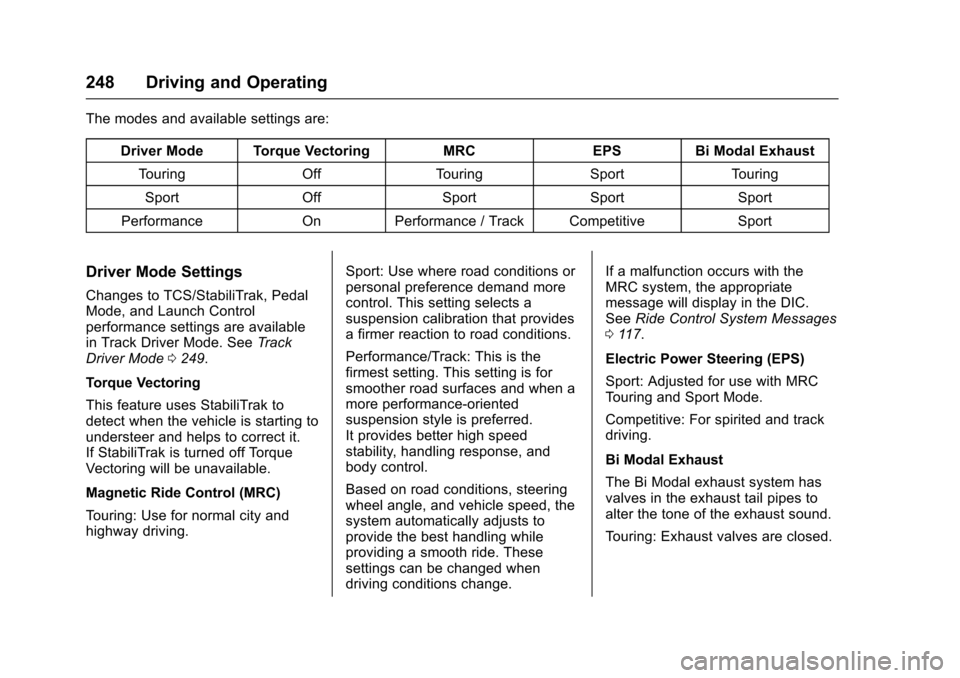
The modes and available settings are:
Driver Mode Torque VectoringMRCEPSBi Modal Exhaust
To u r i n gOffTo u r i n gSportTo u r i n g
SportOffSportSportSport
PerformanceOnPerformance / Track CompetitiveSport
Driver Mode Settings
Changes to TCS/StabiliTrak, PedalMode, and Launch Controlperformance settings are availablein Track Driver Mode. SeeTr a c kDriver Mode0249.
Torque Vectoring
This feature uses StabiliTrak todetect when the vehicle is starting toundersteer and helps to correct it.If StabiliTrak is turned off TorqueVectoring will be unavailable.
Magnetic Ride Control (MRC)
To u r i n g : U s e f o r n o r m a l c i t y a n dhighway driving.
Sport: Use where road conditions orpersonal preference demand morecontrol. This setting selects asuspension calibration that providesafirmerreactiontoroadconditions.
Performance/Track: This is thefirmest setting. This setting is forsmoother road surfaces and when amore performance-orientedsuspension style is preferred.It provides better high speedstability, handling response, andbody control.
Based on road conditions, steeringwheel angle, and vehicle speed, thesystem automatically adjusts toprovide the best handling whileproviding a smooth ride. Thesesettings can be changed whendriving conditions change.
If a malfunction occurs with theMRC system, the appropriatemessage will display in the DIC.SeeRide Control System Messages011 7.
Electric Power Steering (EPS)
Sport: Adjusted for use with MRCTo u r i n g a n d S p o r t M o d e .
Competitive: For spirited and trackdriving.
Bi Modal Exhaust
The Bi Modal exhaust system hasvalves in the exhaust tail pipes toalter the tone of the exhaust sound.
To u r i n g : E x h a u s t v a l v e s a r e c l o s e d .
Page 250 of 400

Chevrolet SS Sedan Owner Manual (GMNA-Localizing-U.S.-10122752) -2017 - crc - 8/31/16
Driving and Operating 249
Sport: Exhaust valves operate toprovide a sporty exhaust character.
Track Driver Mode
Track Driver Mode and LaunchControl are systems designed toallow increased performance whileaccelerating and/or cornering. Thisis accomplished by regulating andoptimizing the engine, brakes, andsuspension performance. Thesemodes are for use at a closedcourse race track and are notintended for use on public roads.These systems will not compensatefor driver inexperience or lack offamiliarity with the race track.
{Warning
Track Driver Mode and Launch
Control change the way
StabiliTrak and TCS perform and
should not be used on public
roads. These modes should only
be used on closed courses by
experienced drivers.
Caution
Attempting to shift when the drive
wheels are spinning and do not
have traction may cause damage
to the transmission. Damage
caused by misuse of the vehicle
is not covered by the vehicle
warranty. Do not attempt to shift
when the drive wheels do not
have traction.
Racing will result in the prematurewear of brakes, tires, and drivelinecomponents. Inspect and replacecomponents as necessary.
Page 251 of 400

Chevrolet SS Sedan Owner Manual (GMNA-Localizing-U.S.-10122752) -2017 - crc - 8/31/16
250 Driving and Operating
The modes and available settings are:
DriverModeTCS StabiliTrak LaunchControlTo r q u eVectoringMRC EPS PedalModeBi ModalExhaust
Track Competitive Competitive On OnPerformance/TrackCompetitive Track Sport
In Track Driver Mode, TCS andStabiliTrak are adjusted and LaunchControl is available. Adjust yourdriving style to account for the moreavailable performance. See“LaunchControl”later in this section.
Track Driver Mode will return to theprevious setting, Touring, Sport orPerformance, when the vehicle isrestarted.
Pressgtwice quickly to set Track
Driver Mode. Messages display inthe Driver Information Center (DIC).SeeRide Control System Messages011 7.Also,theStabiliTrakOFFlight and TCS OFF light stay onwhen the vehicle is in TrackDriver Mode.
To r e t u r n t h e v e h i c l e t o n o r m a l T C S
and StabiliTrak operation, pressg.
Track Driver Mode will return to theprevious setting.
Pedal Mode
In Track Driver Mode or with TCSoff, the accelerator pedal responseis changed to allow for smootherthrottle control on a track.
Launch Control (ManualTransmissions Only)
This feature is available in TrackDriver Mode, and allows the vehicleto reach high levels of accelerationin a straight line. Launch Controladjusts tire slip during standing startlaunches. Use this feature duringclosed course race events whereconsistent zero to sixty and quartermile times are desirable.
Launch Control is onlyavailable when:
.Track Driver Mode is selected.
.The vehicle is not moving.
.The steering wheel is pointingstraight.
.The clutch pedal is pressed andthe vehicle is in 1 (First) gear.
.The accelerator pedal is rapidlyapplied to wide open throttle.
This feature initially limits enginespeed as the accelerator pedal israpidly pressed to wide openthrottle. A smooth, quick release ofthe clutch pedal, while maintainingthe fully pressed accelerator pedal,will manage wheel slip. SeeManualTr a n s m i s s i o n0240.
Page 252 of 400

Chevrolet SS Sedan Owner Manual (GMNA-Localizing-U.S.-10122752) -2017 - crc - 8/31/16
Driving and Operating 251
After the vehicle is launched, thesystem continues in TrackDriver Mode.
Limited-Slip Rear Axle
Vehicles with a limited-slip rear axlecan give more traction on snow,mud, ice, sand, or gravel. Whentraction is low, this feature allowsthe drive wheel with the mosttraction to move the vehicle. Thelimited-slip rear axle also gives thedriver enhanced control whencornering hard or completing amaneuver, such as a lane change.For vehicles with a limited-slip rearaxle, driven under severeconditions, the rear axle fluid shouldbe changed. SeeTr a c k D r i v e r M o d e0249andMaintenance Schedule0349.
Cruise Control
With cruise control, the vehicle canmaintain a speed of about 40 km/h(25 mph) or more without keepingyour foot on the accelerator. Cruisecontrol does not work at speedsbelow 40 km/h (25 mph).
{Warning
Cruise control can be dangerous
where you cannot drive safely at
asteadyspeed.Donotuse
cruise control on winding roads or
in heavy traffic.
Cruise control can be dangerous
on slippery roads. On such roads,
fast changes in tire traction can
cause excessive wheel slip, and
you could lose control. Do not use
cruise control on slippery roads.
If the vehicle has the StabiliTrak®
system and begins to limit wheelspin while using cruise control, thecruise control will automaticallydisengage. SeeTr a c t i o n C o n t r o l /Electronic Stability Control0245.
When road conditions allow you tosafely use it again, the cruisecontrol can be turned back on.
If the brakes are applied, cruisecontrol disengages.
1:Press to turn the cruise controlsystem on and off. A white indicatorcomes on in the instrument clusterwhen cruise is turned on.
*:Press to disengage cruisecontrol without erasing the setspeed from memory.
RES/+ :If there is a set speed inmemory, move the thumbwheel upbriefly to resume to that speed or
Page 309 of 400

Chevrolet SS Sedan Owner Manual (GMNA-Localizing-U.S.-10122752) -2017 - crc - 8/31/16
308 Vehicle Care
Light Truck (LT-Metric) Tire:A
tire used on light duty trucks and
some multipurpose passenger
vehicles.
Load Index:An assigned
number ranging from 1 to 279
that corresponds to the load
carrying capacity of a tire.
Maximum Inflation Pressure:
The maximum air pressure to
which a cold tire can be inflated.
The maximum air pressure is
molded onto the sidewall.
Maximum Load Rating:The
load rating for a tire at the
maximum permissible inflation
pressure for that tire.
Maximum Loaded Vehicle
Weight:The sum of curb
weight, accessory weight,
vehicle capacity weight, and
production options weight.
Normal Occupant Weight:The
number of occupants a vehicle
is designed to seat multiplied by
68 kg (150 lb). SeeVehicle Load
Limits0226.
Occupant Distribution:
Designated seating positions.
Outward Facing Sidewall:The
side of an asymmetrical tire that
has a particular side that faces
outward when mounted on a
vehicle. The side of the tire that
contains a whitewall, bears
white lettering, or bears
manufacturer, brand, and/or
model name molding that is
higher or deeper than the same
moldings on the other sidewall
of the tire.
Passenger (P-Metric) Tire:A
tire used on passenger cars and
some light duty trucks and
multipurpose vehicles.
Recommended Inflation
Pressure:Vehicle
manufacturer's recommended
tire inflation pressure as shown
on the tire placard. SeeTire
Pressure0309andVehicle
Load Limits0226.
Radial Ply Tire:Apneumatic
tire in which the ply cords that
extend to the beads are laid at
90 degrees to the centerline of
the tread.
Rim:Ametalsupportforatire
and upon which the tire beads
are seated.
Sidewall:The portion of a tire
between the tread and the bead.
Speed Rating:An
alphanumeric code assigned to
atireindicatingthemaximum
speed at which a tire can
operate.
Traction:The friction between
the tire and the road surface.
The amount of grip provided.
Tread:The portion of a tire that
comes into contact with
the road.
Page 315 of 400

Chevrolet SS Sedan Owner Manual (GMNA-Localizing-U.S.-10122752) -2017 - crc - 8/31/16
314 Vehicle Care
for service if the TPMS malfunctionlight and DIC message, if equipped,come on and stay on.
TPMS Sensor Matching
Process
Each TPMS sensor has a uniqueidentification code. The identificationcode needs to be matched to a newtire/wheel position after rotating thevehicle’stiresorreplacingoneormore of the TPMS sensors. Also,the TPMS sensor matching processshould be performed after replacingasparetirewitharoadtirecontaining the TPMS sensor. Themalfunction light and the DICmessage, if equipped, should go offat the next ignition cycle. Thesensors are matched to the tire/wheel positions, using a TPMSrelearn tool, in the following order:left front tire, right front tire, rightrear tire, and left rear tire. See yourdealer for service or to purchase arelearn tool. A TPMS relearn toolcan also be purchased. See TirePressure Monitor Sensor ActivationTo o l a t
www.gmtoolsandequipment.com orcall 1-800-GM TOOLS(1-800-468-6657).
There are two minutes to match thefirst tire/wheel position, andfive minutes overall to match all fourtire/wheel positions. If it takeslonger, the matching process stopsand must be restarted.
The TPMS sensor matchingprocess is:
1. Set the parking brake.
2. Place the vehicle power modein ON/RUN/START. SeeIgnition Positions0229.
3. Press MENU to select theVehicle Information Menu inthe Driver InformationCenter (DIC).
4. Use the thumbwheel to scroll tothe Tire Pressure Menu Itemscreen.
5. Press and hold SET/CLR tobegin the sensor matchingprocess.
Amessagerequestingacceptance of the process maydisplay.
6. If requested, press SET/CLRagain to confirm the selection.
The horn sounds twice tosignal the receiver is in relearnmode and the TIRE LEARN orTIRE LEARNING ACTIVEmessage displays on the DICscreen.
7. Start with the left front tire.
8. Place the relearn tool againstthe tire sidewall, near the valvestem. Then press the button toactivate the TPMS sensor.Ahornchirpconfirmsthatthesensor identification code hasbeen matched to this tire andwheel position.
9. Proceed to the right front tire,and repeat the procedure inStep 8.
10. Proceed to the right rear tire,and repeat the procedure inStep 8.
Page 369 of 400

Chevrolet SS Sedan Owner Manual (GMNA-Localizing-U.S.-10122752) -2017 - crc - 8/31/16
368 Customer Information
.Find theChevrolet-recommendedmaintenance services.
GM Mobility
Reimbursement Program
This program is available toqualified applicants for costreimbursement of eligibleaftermarket adaptive equipmentrequired for the vehicle, such ashand controls or a wheelchair/scooter lift for the vehicle.
For more information on the limitedoffer, visit www.gmmobility.com orcall the GM Mobility AssistanceCenter at 1-800-323-9935. TextTe l e p h o n e ( T T Y ) u s e r s , c a l l1-800-833-9935.
General Motors of Canada also hasaMobilityProgram.Visitwww.gm.caor call 1-800-GM-DRIVE (463-7483)for details. TTY users call1-800-263-3830.
Roadside Assistance
Program
For U.S.-purchased vehicles, call1-800-243-8872. (Text Telephone(TTY): 1-888-889-2438.)
For Canadian-purchased vehicles,call 1-800-268-6800.
Service is available 24 hours a day,365 days a year.
Calling for Assistance
When calling Roadside Assistance,have the following informationready:
.Yo u r n a m e , h o m e a d d r e s s , a n dhome telephone number.
.Te l e p h o n e n u m b e r o f y o u rlocation.
.Location of the vehicle.
.Model, year, color, and licenseplate number of the vehicle.
.Odometer reading, VehicleIdentification Number (VIN), anddelivery date of the vehicle.
.Description of the problem.
Coverage
Services are provided for theduration of the vehicle’spowertrainwarranty.
In the U.S., anyone driving thevehicle is covered. In Canada, aperson driving the vehicle withoutpermission from the owner is notcovered.
Roadside Assistance is not a part ofthe New Vehicle Limited Warranty.General Motors North America andChevrolet reserve the right to makeany changes or discontinue theRoadside Assistance program atany time without notification.
General Motors North America andChevrolet reserve the right to limitservices or payment to an owner ordriver if they decide the claims aremade too often, or the same type ofclaim is made many times.