2017 CHEVROLET SONIC ignition
[x] Cancel search: ignitionPage 8 of 342

Chevrolet Sonic Owner Manual (GMNA-Localizing-U.S./Canada-10122660) -2017 - crc - 5/13/16
In Brief 7
1.Air Vents0168.
2.Exterior Lamp Controls0134.
Instrument Panel IlluminationControl0137.
3. Turn Signal Lever. SeeTu r nand Lane-ChangeSignals0136.
4.Instrument Cluster0107.
5.Windshield Wiper/Washer0102.
6. Card Holder.
7.Infotainment0141.
8. Light Sensor. SeeAutomaticHeadlamp System0135.
9.Instrument Panel Storage097.
10.Passenger SensingSystem071.
11 .Hazard WarningFlashers0136.
12.USB Port0149(If Equipped).
Auxiliary Devices0155(IfEquipped).
13. Shift Lever. SeeAutomaticTr a n s m i s s i o n0191(IfEquipped) orManualTr a n s m i s s i o n0193(IfEquipped).
14. Trunk Release (Sedan). SeeTr u n k ( S e d a n )041.
Lane Departure Warning(LDW)0206(If Equipped).
Tr a c t i o n C o n t r o l / E l e c t r o n i cStability Control0197.
15.Power Outlets0105.
16.Climate ControlSystems0166.
17. Central Locking Switch. SeeDoor Locks038.
18. Ignition Switch. SeeIgnitionPositions (Key Access)0182orIgnition Positions (KeylessAccess)0183.
19.Steering Wheel Controls0101.
20.Horn0102.
21.Steering WheelAdjustment0101.
22.Cruise Control0199.
Forward Collision Alert (FCA)System0204(If Equipped.
Heated Steering Wheel0102(If Equipped).
23. Data Link Connector (DLC)(Out of View). SeeMalfunctionIndicator Lamp (Check EngineLight)011 2.
24. Hood Release. SeeHood0215.
Page 9 of 342

Chevrolet Sonic Owner Manual (GMNA-Localizing-U.S./Canada-10122660) -2017 - crc - 5/13/16
8 In Brief
Initial Drive
Information
This section provides a briefoverview about some of theimportant features that may or maynot be on your specific vehicle.
For more detailed information, referto each of the features which can befound later in this owner manual.
Remote Keyless Entry
(RKE) System
The Remote Keyless Entry (RKE)transmitter may work up to 60 m(197 ft) away from the vehicle.
Key Access with Remote Start
Shown
Press the key release button toextend the key blade. The key canbe used for the ignition and alllocks.
Keyless Access with Remote Start
Shown
Press the button to release the key.The key can be used for all locks.
PressKto unlock the driver door or
all doors, liftgate or trunk.
PressQto lock all doors, liftgate or
trunk.
Lock and unlock feedback can bepersonalized. SeeVehiclePersonalization0127.
If equipped, press and holdYfor
key access, or pressXtwice for
keyless access, to release the trunk.
Page 17 of 342
Chevrolet Sonic Owner Manual (GMNA-Localizing-U.S./Canada-10122660) -2017 - crc - 5/13/16
16 In Brief
;:Turns on the parking lampsincluding all lamps except theheadlamps.
5:Turns the headlamps ontogether with the parking lamps andinstrument panel lights. A warningchime sounds if the driver door isopened when the ignition switch isoff and the headlamps are on.
#:For vehicles with fog lamps,press to turn the lamps on or off.
See:
.Exterior Lamp Controls0134
.Daytime Running Lamps(DRL)0135
.Fog Lamps0137
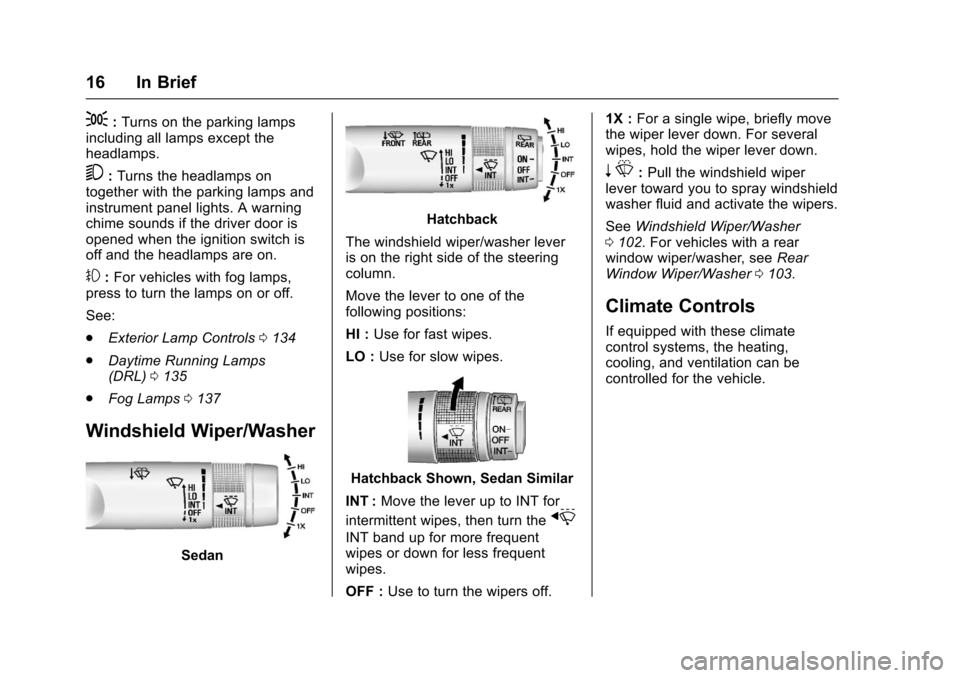
Windshield Wiper/Washer
Sedan
Hatchback
The windshield wiper/washer leveris on the right side of the steeringcolumn.
Move the lever to one of thefollowing positions:
HI :Use for fast wipes.
LO :Use for slow wipes.
Hatchback Shown, Sedan Similar
INT :Move the lever up to INT for
intermittent wipes, then turn thex
INT band up for more frequentwipes or down for less frequentwipes.
OFF :Use to turn the wipers off.
1X :For a single wipe, briefly movethe wiper lever down. For severalwipes, hold the wiper lever down.
nL:Pull the windshield wiperlever toward you to spray windshieldwasher fluid and activate the wipers.
SeeWindshield Wiper/Washer0102.Forvehicleswitharearwindow wiper/washer, seeRearWindow Wiper/Washer0103.
Climate Controls
If equipped with these climatecontrol systems, the heating,cooling, and ventilation can becontrolled for the vehicle.
Page 20 of 342

Chevrolet Sonic Owner Manual (GMNA-Localizing-U.S./Canada-10122660) -2017 - crc - 5/13/16
In Brief 19
features are also available throughthe instrument cluster and steeringwheel controls.
Before driving:
.Become familiar with theoperation, faceplate buttons, andscreen buttons.
.Set up the audio by presettingfavorite stations, setting thetone, and adjusting thespeakers.
.Set up phone numbers inadvance so they can be calledeasily by pressing a singlebutton or by using a single voicecommand if equipped withBluetooth phone capability.
SeeDefensive Driving0172.
To p l a y t h e i n f o t a i n m e n t s y s t e m w i t hthe ignition off, seeRetainedAccessory Power (RAP)0187.
Radio(s)
O:
.Press to turn the power on.
.Press and hold to turn thepower off.
.Press to mute/unmute thesystem when on.
.Turn to decrease or increase thevolume.
g:
.Radio: Press and release to fastseek the strongest previousstation or channel.
.USB/Music/Pictures: Press to goto the previous content. Pressand hold to fast rewind.
d:
.Radio: Press and release to fastseek the next strongest stationor channel.
.USB/Music/Pictures: Press to goto the next content. Press andhold to fast forward.
5:
.Press and release to access thephone screen, answer anincoming call, or access thedevice home screen.
SeeOverview0143.
Satellite Radio
If equipped, vehicles with aSiriusXM®satellite radio tuner and avalid SiriusXM satellite radiosubscription can receive SiriusXMprogramming.
SiriusXM Satellite Radio
Service
SiriusXM is a satellite radio servicebased in the 48 contiguous UnitedStates and 10 Canadian provinces.SiriusXM satellite radio has a widevariety of programming andcommercial-free music, coast tocoast, and in digital-quality sound.AfeeisrequiredtoreceivetheSiriusXM service.
Refer to:
.www.siriusxm.com or call1-888-601-6296 (U.S.).
.www.siriusxm.ca or call1-877-438-9677 (Canada).
SeeSatellite Radio0146.
Page 23 of 342

Chevrolet Sonic Owner Manual (GMNA-Localizing-U.S./Canada-10122660) -2017 - crc - 5/19/16
22 In Brief
greater. LDW uses a camera sensorto detect the lane markings. The
LDW light,@,isgreenifalane
marking is detected. If the vehicledeparts the lane without using a turnsignal in that direction, the light willchange to amber and flash. Inaddition, beeps will sound.
SeeLane Departure Warning(LDW)0206.
Rear Vision
Camera (RVC)
If equipped, RVC displays a view ofthe area behind the vehicle, on theinfotainment display, when thevehicle is shifted into R (Reverse).
SeeRear Vision Camera(RVC)0201.
Power Outlets
The accessory power outlets can beused to plug in electrical equipment,such as a cell phone or MP3 player.
The vehicle has an accessorypower outlet behind the cupholderson the center floor console.
SeePower Outlets0105.
Sunroof
If equipped, the sunroof onlyoperates when the ignition is on orRetained Accessory Power (RAP) isactive. SeeRetained AccessoryPower (RAP)0187.
Express-open :Press and
releaseeto express-open the
sunroof. Press again to stop themovement.
Open/Close (Manual Mode) :
Press and holdeto open the
sunroof. Release the switch to stop
the movement. Press and holdg
to close the sunroof. Release theswitch to stop the movement.
Vent :Press and holdgto vent
the sunroof.
The sunshade opens automaticallywith the sunroof, but must be closedmanually.
The sunroof will not operate if thevehicle has an electrical failure.
SeeSunroof050.
Page 27 of 342

Chevrolet Sonic Owner Manual (GMNA-Localizing-U.S./Canada-10122660) -2017 - crc - 5/13/16
26 Keys, Doors, and Windows
Keys, Doors, and
Windows
Keys and Locks
Keys . . . . . . . . . . . . . . . . . . . . . . . . . . . 26Remote Keyless Entry (RKE)System . . . . . . . . . . . . . . . . . . . . . . . 28Remote Keyless Entry (RKE)System Operation (KeyAccess) . . . . . . . . . . . . . . . . . . . . . . 29Remote Keyless Entry (RKE)System Operation (KeylessAccess) . . . . . . . . . . . . . . . . . . . . . . 31Remote Vehicle Start . . . . . . . . . . 37Door Locks . . . . . . . . . . . . . . . . . . . . 38Delayed Locking . . . . . . . . . . . . . . . 39Automatic Door Locks . . . . . . . . . 40Lockout Protection . . . . . . . . . . . . . 40Safety Locks . . . . . . . . . . . . . . . . . . . 40
Doors
Trunk (Sedan) . . . . . . . . . . . . . . . . . 41Liftgate (Hatchback) . . . . . . . . . . . 43
Vehicle Security
Vehicle Security . . . . . . . . . . . . . . . . 44Vehicle Alarm System . . . . . . . . . 44Immobilizer . . . . . . . . . . . . . . . . . . . . 45Immobilizer Operation . . . . . . . . . 45
Exterior Mirrors
Convex Mirrors . . . . . . . . . . . . . . . . 46Manual Mirrors . . . . . . . . . . . . . . . . . 46Power Mirrors . . . . . . . . . . . . . . . . . . 46Folding Mirrors . . . . . . . . . . . . . . . . . 47Heated Mirrors . . . . . . . . . . . . . . . . . 47
Interior Mirrors
Manual Rearview Mirror . . . . . . . . 47
Windows
Windows . . . . . . . . . . . . . . . . . . . . . . . 47Manual Windows . . . . . . . . . . . . . . 48Power Windows . . . . . . . . . . . . . . . 48Sun Visors . . . . . . . . . . . . . . . . . . . . . 49
Roof
Sunroof . . . . . . . . . . . . . . . . . . . . . . . . 50
Keys and Locks
Keys
{Warning
Leaving children in a vehicle with
an ignition key or Remote
Keyless Entry (RKE) transmitter is
dangerous and children or others
could be seriously injured or
killed. They could operate the
power window or other controls or
make the vehicle move. The
windows will function with the key
in the ignition or with the RKE
transmitter in the vehicle, and
children or others could be caught
in the path of a closing window.
Do not leave children in a vehicle
with the ignition key or an RKE
transmitter.
Page 28 of 342

Chevrolet Sonic Owner Manual (GMNA-Localizing-U.S./Canada-10122660) -2017 - crc - 5/13/16
Keys, Doors, and Windows 27
{Warning
If the key is unintentionally
rotated while the vehicle is
running, the ignition could be
moved out of the RUN position.
This could be caused by heavy
items hanging from the key ring,
or by large or long items attached
to the key ring that could be
contacted by the driver or
steering wheel. If the ignition
moves out of the RUN position,
the engine will shut off, braking
and steering power assist may be
(Continued)
Warning (Continued)
impacted, and airbags may not
deploy. To reduce the risk of
unintentional rotation of the
ignition key, do not change the
way the ignition key and Remote
Keyless Entry (RKE) transmitter,
if equipped, are connected to the
provided key rings.
The ignition key, key rings, and RKEtransmitter, if equipped, aredesigned to work together. As asystem, it reduces the risk ofunintentionally moving the key outof the RUN position. If replacementsor additions are required, see yourdealer. Limit added items to a fewessential keys or small, light itemsno larger than an RKE transmitter.
Interference from radio-frequencyidentification (RFID) tags mayprevent the key from starting thevehicle. Keep RFID tags away fromthe key when starting the vehicle.
Page 29 of 342

Chevrolet Sonic Owner Manual (GMNA-Localizing-U.S./Canada-10122660) -2017 - crc - 5/13/16
28 Keys, Doors, and Windows
Key Access with Remote Start
Shown
The key that is part of the RemoteKeyless Entry (RKE) transmitter canbe used for the ignition and alllocks.
Press the button on the RKEtransmitter to extend the key. Pressthe button and the key blade toretract the key.
Keyless Access with Remote Start
Shown
The key that is part of the RemoteKeyless Entry (RKE) transmitter canbe used for all locks.
See your dealer if a new key isneeded.
If the vehicle has an ignition, and itbecomes difficult to turn the key,inspect the key blade for debris.
If you are locked out of the vehicle,seeRoadside AssistanceProgram0311.
Remote Keyless Entry
(RKE) System
SeeRadio FrequencyStatement0317.
If there is a decrease in the RemoteKeyless Entry (RKE) operatingrange:
.Check the distance. Thetransmitter may be too far fromthe vehicle.
.Check the location. Othervehicles or objects may beblocking the signal.
.Check the transmitter's battery.See“Battery Replacement”laterin this section.
.If the transmitter is still notworking correctly, see yourdealer or a qualified technicianfor service.