2017 CHEVROLET SONIC change date
[x] Cancel search: change datePage 105 of 342

Chevrolet Sonic Owner Manual (GMNA-Localizing-U.S./Canada-10122660) -2017 - crc - 5/13/16
104 Instruments and Controls
in R (Reverse), and the frontwindshield wiper is performing lowor high speed wipes. If the rearwiper control is off, the shift lever isin R (Reverse), and the frontwindshield wiper is performinginterval wipes, then the rear wiperautomatically performs intervalwipes.
This feature can be changed. SeeVehicle Personalization0127.
The windshield washer reservoir isused for the windshield and the rearwindow. Check the fluid level in thereservoir if either washer is notworking. SeeWasher Fluid0231.
Compass
The vehicle may have a compassdisplay in the Driver InformationCenter (DIC). The compass receivesits heading and other informationfrom the Global PositioningSystem (GPS) antenna, StabiliTrak,and vehicle speed information.
Avoid covering the GPS antenna,located on the roof, for long periodsof time with objects that mayinterfere with the antenna's ability to
receive a satellite signal. Thecompass system is designed tooperate for a certain number ofmiles or degrees of turn beforeneeding a signal from the GPSsatellites. When the compassdisplay shows CAL, drive thevehicle for a short distance in anopen area where it can receive aGPS signal. The compass systemwill automatically determine whenthe GPS signal is restored andprovide a heading again.
Clock
The infotainment system controlsare used to access the time anddate settings through the menusystem. SeeOperation0144onhow to use the menu system.
Setting the Time and Date
When Auto Set is enabled the timecannot be manually set.
1. Press{,thentouch
SETTINGS.
2. Touch Time and Date, then SetTime or Set Date.
3. Touch + or✓to adjust thevalue.
4. TouchRorQto adjust AM or
PM for 12 hour format.
5. Touch0.
Using Auto Set
Auto Set requires an OnStarsubscription.
1. Press{,thentouch
SETTINGS.
2. Touch Time and Date, thenAuto Set.
3. Select from the availableselections.
4. Touch0.
Setting the 12/24 Hour Format
1. Press{,thentouch
SETTINGS.
2. Touch Time and Date, then SetTime Format.
3. Select 12h or 24h format.
4. Touch0.
Page 196 of 342
Chevrolet Sonic Owner Manual (GMNA-Localizing-U.S./Canada-10122660) -2017 - crc - 5/13/16
Driving and Operating 195
Up-Shift Light
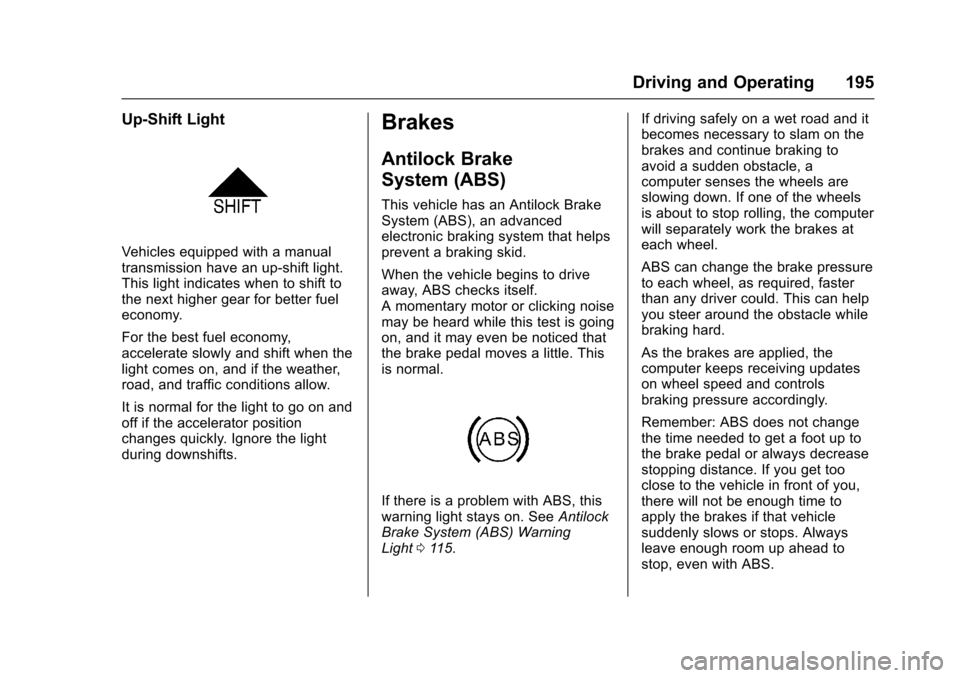
Vehicles equipped with a manualtransmission have an up-shift light.This light indicates when to shift tothe next higher gear for better fueleconomy.
For the best fuel economy,accelerate slowly and shift when thelight comes on, and if the weather,road, and traffic conditions allow.
It is normal for the light to go on andoff if the accelerator positionchanges quickly. Ignore the lightduring downshifts.
Brakes
Antilock Brake
System (ABS)
This vehicle has an Antilock BrakeSystem (ABS), an advancedelectronic braking system that helpsprevent a braking skid.
When the vehicle begins to driveaway, ABS checks itself.Amomentarymotororclickingnoisemay be heard while this test is goingon, and it may even be noticed thatthe brake pedal moves a little. Thisis normal.
If there is a problem with ABS, thiswarning light stays on. SeeAntilockBrake System (ABS) WarningLight011 5.
If driving safely on a wet road and itbecomes necessary to slam on thebrakes and continue braking toavoid a sudden obstacle, acomputer senses the wheels areslowing down. If one of the wheelsis about to stop rolling, the computerwill separately work the brakes ateach wheel.
ABS can change the brake pressureto each wheel, as required, fasterthan any driver could. This can helpyou steer around the obstacle whilebraking hard.
As the brakes are applied, thecomputer keeps receiving updateson wheel speed and controlsbraking pressure accordingly.
Remember: ABS does not changethe time needed to get a foot up tothe brake pedal or always decreasestopping distance. If you get tooclose to the vehicle in front of you,there will not be enough time toapply the brakes if that vehiclesuddenly slows or stops. Alwaysleave enough room up ahead tostop, even with ABS.
Page 263 of 342
Chevrolet Sonic Owner Manual (GMNA-Localizing-U.S./Canada-10122660) -2017 - crc - 5/13/16
262 Vehicle Care
Warning (Continued)
off and cause an accident. When
changing a wheel, remove any
rust or dirt from places where the
wheel attaches to the vehicle. In
an emergency, a cloth or a paper
towel can be used; however, use
ascraperorwirebrushlaterto
remove all rust or dirt.
Lightly coat the center of the
wheel hub with wheel bearing
grease after a wheel change or
tire rotation to prevent corrosion
or rust build-up. Do not get
grease on the flat wheel
mounting surface or on the
wheel nuts or bolts.
When It Is Time for New
Tires
Factors such as maintenance,temperatures, driving speeds,vehicle loading, and road conditionsaffect the wear rate of the tires.
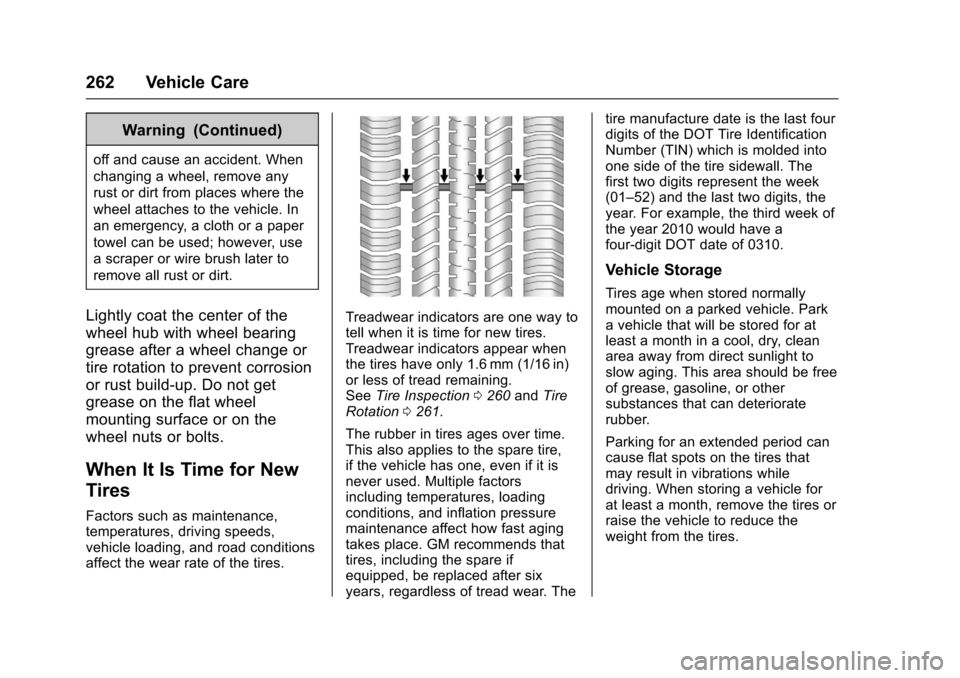
Treadwear indicators are one way totell when it is time for new tires.Treadwear indicators appear whenthe tires have only 1.6 mm (1/16 in)or less of tread remaining.SeeTire Inspection0260andTireRotation0261.
The rubber in tires ages over time.This also applies to the spare tire,if the vehicle has one, even if it isnever used. Multiple factorsincluding temperatures, loadingconditions, and inflation pressuremaintenance affect how fast agingtakes place. GM recommends thattires, including the spare ifequipped, be replaced after sixyears, regardless of tread wear. The
tire manufacture date is the last fourdigits of the DOT Tire IdentificationNumber (TIN) which is molded intoone side of the tire sidewall. Thefirst two digits represent the week(01–52) and the last two digits, theyear. For example, the third week ofthe year 2010 would have afour-digit DOT date of 0310.
Vehicle Storage
Tires age when stored normallymounted on a parked vehicle. Parkavehiclethatwillbestoredforatleast a month in a cool, dry, cleanarea away from direct sunlight toslow aging. This area should be freeof grease, gasoline, or othersubstances that can deterioraterubber.
Parking for an extended period cancause flat spots on the tires thatmay result in vibrations whiledriving. When storing a vehicle forat least a month, remove the tires orraise the vehicle to reduce theweight from the tires.
Page 290 of 342

Chevrolet Sonic Owner Manual (GMNA-Localizing-U.S./Canada-10122660) -2017 - crc - 5/13/16
Service and Maintenance 289
Service and
Maintenance
General Information
General Information . . . . . . . . . . 289
Maintenance Schedule
Maintenance Schedule . . . . . . . 290
Special Application Services
Special ApplicationServices . . . . . . . . . . . . . . . . . . . . 296
Additional Maintenance
and Care
Additional Maintenanceand Care . . . . . . . . . . . . . . . . . . . . 297
Recommended Fluids,
Lubricants, and Parts
Recommended Fluids andLubricants . . . . . . . . . . . . . . . . . . . 300Maintenance ReplacementParts . . . . . . . . . . . . . . . . . . . . . . . . 301
Maintenance Records
Maintenance Records . . . . . . . . 302
General Information
Yo u r v e h i c l e i s a n i m p o r t a n tinvestment. This section describesthe required maintenance for thevehicle. Follow this schedule to helpprotect against major repairexpenses resulting from neglect orinadequate maintenance. It mayalso help to maintain the value ofthe vehicle if it is sold. It is theresponsibility of the owner to haveall required maintenance performed.
Yo u r d e a l e r h a s t r a i n e d t e c h n i c i a n swho can perform requiredmaintenance using genuinereplacement parts. They haveup-to-date tools and equipment forfast and accurate diagnostics. Manydealers have extended evening andSaturday hours, courtesytransportation, and onlinescheduling to assist with serviceneeds.
Yo u r d e a l e r r e c o g n i z e s t h eimportance of providingcompetitively priced maintenanceand repair services. With trainedtechnicians, the dealer is the placefor routine maintenance such as oil
changes and tire rotations andadditional maintenance items liketires, brakes, batteries, and wiperblades.
Caution
Damage caused by improper
maintenance can lead to costly
repairs and may not be covered
by the vehicle warranty.
Maintenance intervals, checks,
inspections, recommended fluids,
and lubricants are important to
keep the vehicle in good working
condition.
The Tire Rotation and RequiredServices are the responsibility of thevehicle owner. It is recommended tohave your dealer perform theseservices every 12 000 km/7,500 mi.Proper vehicle maintenance helps tokeep the vehicle in good workingcondition, improves fuel economy,and reduces vehicle emissions.
Because of the way people usevehicles, maintenance needs vary.There may need to be more
Page 309 of 342
Chevrolet Sonic Owner Manual (GMNA-Localizing-U.S./Canada-10122660) -2017 - crc - 5/13/16
308 Customer Information
resolved by your dealership withoutfurther help, in the U.S., call theChevrolet Customer AssistanceCenter at 1-800-222-1020. InCanada, call General Motors ofCanada Customer Care Centre at1-800-263-3777 (English),or 1-800-263-7854 (French).
We encourage you to call thetoll-free number in order to give yourinquiry prompt attention. Have thefollowing information available togive the Customer Assistancerepresentative:
.Vehicle IdentificationNumber (VIN). This is availablefrom the vehicle registration ortitle, or the plate at the top left ofthe instrument panel and visiblethrough the windshield.
.Dealership name and location.
.Vehicle delivery date andpresent mileage.
When contacting Chevrolet,remember that your concern willlikely be resolved at a dealer'sfacility. That is why we suggestfollowing Step One first.
STEP THREE—U.S. Owners :Both General Motors and yourdealer are committed to makingsure you are completely satisfiedwith your new vehicle. However,if you continue to remain unsatisfiedafter following the procedureoutlined in Steps One and Two, youcan file with the Better BusinessBureau (BBB) Auto Line®Programto enforce your rights.
The BBB Auto Line Program is anout-of-court program administeredby the Council of Better BusinessBureaus to settle automotivedisputes regarding vehicle repairs orthe interpretation of the New VehicleLimited Warranty. Although you maybe required to resort to this informaldispute resolution program prior tofiling a court action, use of theprogram is free of charge and yourcase will generally be heard within40 days. If you do not agree with thedecision given in your case, youmay reject it and proceed with anyother venue for relief availableto you.
Yo u m a y c o n t a c t t h e B B B A u t o L i n eProgram using the toll-freetelephone number or write them atthe following address:
BBB Auto Line ProgramCouncil of Better Business Bureaus,Inc.3033 Wilson BoulevardSuite 600Arlington, VA 22201
Te l e p h o n e : 1 - 8 0 0 - 9 5 5 - 5 1 0 0http://www.bbb.org/council/programs-services/dispute-handling-and-resolution/bbb-auto-line
This program is available in all50 states and the District ofColumbia. Eligibility is limited byvehicle age, mileage, and otherfactors. General Motors reservesthe right to change eligibilitylimitations and/or discontinue itsparticipation in this program.
STEP THREE—CanadianOwners :In the event that you donot feel your concerns have beenaddressed after following theprocedure outlined in Steps Oneand Two, General Motors of Canada
Page 312 of 342
Chevrolet Sonic Owner Manual (GMNA-Localizing-U.S./Canada-10122660) -2017 - crc - 5/13/16
Customer Information 311
.Find theChevrolet-recommendedmaintenance services.
GM Mobility
Reimbursement Program
This program is available toqualified applicants for costreimbursement of eligibleaftermarket adaptive equipmentrequired for the vehicle, such ashand controls or a wheelchair/scooter lift for the vehicle.
For more information on the limitedoffer, visit www.gmmobility.com orcall the GM Mobility AssistanceCenter at 1-800-323-9935. TextTe l e p h o n e ( T T Y ) u s e r s , c a l l1-800-833-9935.
General Motors of Canada also hasaMobilityProgram.Visitwww.gm.caor call 1-800-GM-DRIVE (463-7483)for details. TTY users call1-800-263-3830.
Roadside Assistance
Program
For U.S.-purchased vehicles, call1-800-243-8872. (Text Telephone(TTY): 1-888-889-2438.)
For Canadian-purchased vehicles,call 1-800-268-6800.
Service is available 24 hours a day,365 days a year.
Calling for Assistance
When calling Roadside Assistance,have the following informationready:
.Yo u r n a m e , h o m e a d d r e s s , a n dhome telephone number.
.Te l e p h o n e n u m b e r o f y o u rlocation.
.Location of the vehicle.
.Model, year, color, and licenseplate number of the vehicle.
.Odometer reading, VehicleIdentification Number (VIN), anddelivery date of the vehicle.
.Description of the problem.
Coverage
Services are provided for theduration of the vehicle’spowertrainwarranty.
In the U.S., anyone driving thevehicle is covered. In Canada, aperson driving the vehicle withoutpermission from the owner is notcovered.
Roadside Assistance is not a part ofthe New Vehicle Limited Warranty.General Motors North America andChevrolet reserve the right to makeany changes or discontinue theRoadside Assistance program atany time without notification.
General Motors North America andChevrolet reserve the right to limitservices or payment to an owner ordriver if they decide the claims aremade too often, or the same type ofclaim is made many times.
Page 327 of 342
Chevrolet Sonic Owner Manual (GMNA-Localizing-U.S./Canada-10122660) -2017 - crc - 5/13/16
326 OnStar
OnStar Additional
Information
In-Vehicle Audio Messages
Audio messages may play importantinformation at the following times:
.Prior to vehicle purchase. PressQto set up an account.
.With the OnStar Basic Plan,every 60 days.
.After change in ownership andat 90 days.
Transferring Service
PressQto request account transfer
eligibility information. The Advisorcan cancel or change accountinformation.
Selling/Transferring the
Vehicle
Call 1-888-4ONSTAR(1-888-466-7827) immediately toterminate your OnStar services ifthe vehicle is disposed of, sold,transferred, or if the lease ends.
Reactivation for Subsequent
Owners
PressQand follow the prompts to
speak to an Advisor as soon aspossible. The Advisor will updatevehicle records and explain OnStarservice options.
How OnStar Service Works
Automatic Crash Response,Emergency Services, Crisis Assist,Stolen Vehicle Assistance,Advanced Vehicle Diagnostics,Remote Services, RoadsideAssistance, Turn-by-TurnNavigation, and Hands-Free Callingare available on most vehicles. Notall OnStar services are availableeverywhere or on all vehicles. Formore information, a full descriptionof OnStar services, systemlimitations, and OnStar User Terms,Privacy Statement, and SoftwareTe r m s :
.Call 1-888-4ONSTAR(1-888-466-7827).
.See www.onstar.com (U.S.).
.See www.onstar.ca (Canada).
.Call TTY 1-877-248-2080.
.PressQto speak with an
Advisor.
OnStar services cannot work unlessthe vehicle is in a place whereOnStar has an agreement with awireless service provider for servicein that area. The wireless serviceprovider must also have coverage,network capacity, reception, andtechnology compatible with OnStarservices. Service involving locationinformation about the vehicle cannotwork unless GPS signals areavailable, unobstructed, andcompatible with the OnStarhardware. OnStar services may notwork if the OnStar equipment is notproperly installed or it has not beenproperly maintained. If equipment orsoftware is added, connected,or modified, OnStar services maynot work. Other problems beyondthe control of OnStar—such ashills, tall buildings, tunnels, weather,electrical system design andarchitecture of the vehicle, damage
Page 329 of 342
Chevrolet Sonic Owner Manual (GMNA-Localizing-U.S./Canada-10122660) -2017 - crc - 5/13/16
328 OnStar
AtemporarylossofGPScancauseloss of the ability to send aTurn-by-Turn Navigation route. TheAdvisor may give a verbal route ormay ask for a call back after thevehicle is driven into an open area.
Cellular and GPS Antennas
Cellular reception is required forOnStar to send remote signals tothe vehicle. Do not place items overor near the antenna to preventblocking cellular and GPS signalreception.
Unable to Connect to OnStar
Message
If there is limited cellular coverageor the cellular network has reachedmaximum capacity, this message
may come on. PressQto try the
call again or try again after driving afew miles into another cellular area.
Vehicle and Power Issues
OnStar services require a vehicleelectrical system, wireless service,and GPS satellite technologies to beavailable and operating for features
to function properly. These systemsmay not operate if the battery isdischarged or disconnected.
Add-on Electrical Equipment
The OnStar system is integratedinto the electrical architecture of thevehicle. Do not add any electricalequipment. SeeAdd-On ElectricalEquipment0211.Addedelectricalequipment may interfere with theoperation of the OnStar system andcause it to not operate.
Vehicle Software Updates
OnStar or GM may remotely deliversoftware updates or changes to thevehicle without further notice orconsent. These updates or changesmay enhance or maintain safety,security, or the operation of thevehicle or the vehicle systems.Software updates or changes mayaffect or erase data or settings thatare stored in the vehicle, such asOnStar Hands-Free Calling nametags, saved navigation destinations,or pre-set radio stations. NeitherOnStar nor GM is responsible forany affected or erased data or
settings. These updates or changesmay also collect personalinformation. Such collection isdescribed in the OnStar privacystatement or separately disclosed atthe time of installation. Theseupdates or changes may also causeasystemtoautomaticallycommunicate with GM servers tocollect information about vehiclesystem status, identify whetherupdates or changes are available,or deliver updates or changes. Anactive OnStar agreement constitutesconsent to these software updatesor changes and agreement thateither OnStar or GM may remotelydeliver them to the vehicle.
Privacy
The complete OnStar PrivacyStatement may be found atwww.onstar.com (U.S.),or www.onstar.ca (Canada). Werecommend that you review it. If youhave any questions, call1-888-4ONSTAR (1-888-466-7827)
or pressQto speak with an
Advisor. Users of wirelesscommunications are cautioned that