2017 CHEVROLET SONIC mirror
[x] Cancel search: mirrorPage 6 of 342

Chevrolet Sonic Owner Manual (GMNA-Localizing-U.S./Canada-10122660) -2017 - crc - 5/13/16
In Brief 5
In Brief
Instrument Panel
Instrument Panel . . . . . . . . . . . . . . . . 6
Initial Drive Information
Initial Drive Information . . . . . . . . . . 8Remote Keyless Entry (RKE)System . . . . . . . . . . . . . . . . . . . . . . . . 8Remote Vehicle Start . . . . . . . . . . . 9Door Locks . . . . . . . . . . . . . . . . . . . . . 9Liftgate (Hatchback) . . . . . . . . . . . 10Trunk Release (Sedan) . . . . . . . . 10Windows . . . . . . . . . . . . . . . . . . . . . . . 11Seat Adjustment . . . . . . . . . . . . . . . 11Second Row Seats . . . . . . . . . . . . 13Head Restraint Adjustment . . . . 13Safety Belts . . . . . . . . . . . . . . . . . . . . 13Passenger Sensing System . . . 13Mirror Adjustment . . . . . . . . . . . . . . 14Steering Wheel Adjustment . . . . 14Interior Lighting . . . . . . . . . . . . . . . . 15Exterior Lighting . . . . . . . . . . . . . . . 15Windshield Wiper/Washer . . . . . . 16Climate Controls . . . . . . . . . . . . . . . 16Transmission . . . . . . . . . . . . . . . . . . 17
Vehicle Features
Infotainment System . . . . . . . . . . . 18Radio(s) . . . . . . . . . . . . . . . . . . . . . . . 19
Satellite Radio . . . . . . . . . . . . . . . . . 19Portable Audio Devices . . . . . . . . 20Bluetooth®..................... 20Steering Wheel Controls . . . . . . . 20Cruise Control . . . . . . . . . . . . . . . . . 21Driver InformationCenter (DIC) . . . . . . . . . . . . . . . . . 21Forward Collision Alert (FCA)System . . . . . . . . . . . . . . . . . . . . . . . 21Lane DepartureWarning (LDW) . . . . . . . . . . . . . . . 21Rear Vision Camera (RVC) . . . . 22Power Outlets . . . . . . . . . . . . . . . . . 22Sunroof . . . . . . . . . . . . . . . . . . . . . . . . 22
Performance and Maintenance
Traction Control/ElectronicStability Control . . . . . . . . . . . . . . 23Tire Pressure Monitor . . . . . . . . . . 23Fuel . . . . . . . . . . . . . . . . . . . . . . . . . . . 23E85 or FlexFuel . . . . . . . . . . . . . . . . 24Engine Oil Life System . . . . . . . . 24Driving for Better FuelEconomy . . . . . . . . . . . . . . . . . . . . . 24Roadside AssistanceProgram . . . . . . . . . . . . . . . . . . . . . . 25
Page 15 of 342
Chevrolet Sonic Owner Manual (GMNA-Localizing-U.S./Canada-10122660) -2017 - crc - 5/13/16
14 In Brief
The passenger airbag statusindicator will be visible on theinstrument panel when the vehicle isstarted. SeePassenger AirbagStatus Indicator0111.
Mirror Adjustment
Exterior Mirrors
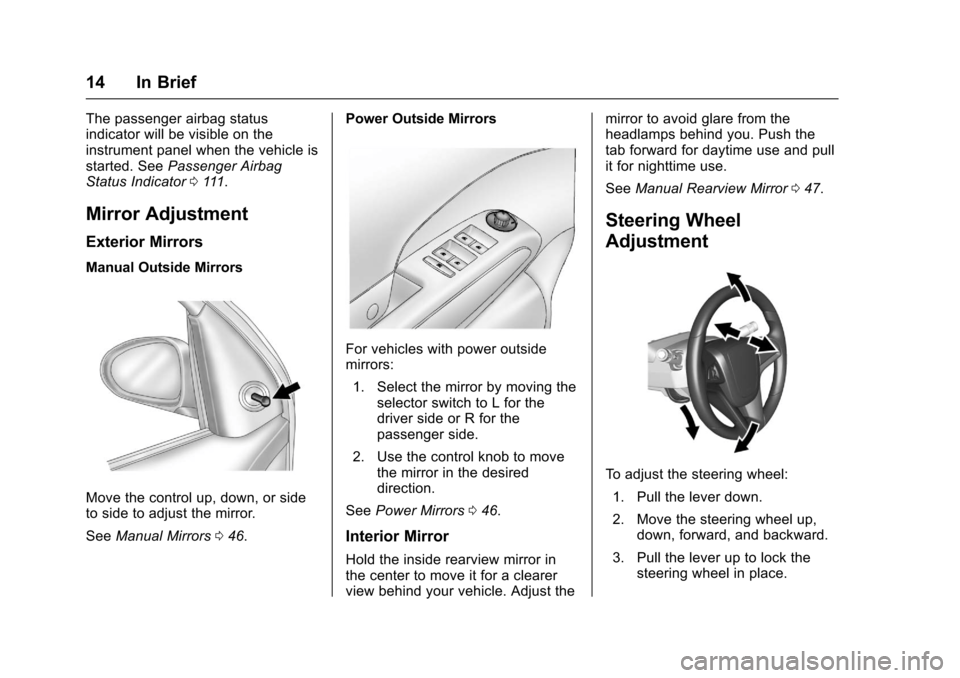
Manual Outside Mirrors
Move the control up, down, or sideto side to adjust the mirror.
SeeManual Mirrors046.
Power Outside Mirrors
For vehicles with power outsidemirrors:
1. Select the mirror by moving theselector switch to L for thedriver side or R for thepassenger side.
2. Use the control knob to movethe mirror in the desireddirection.
SeePower Mirrors046.
Interior Mirror
Hold the inside rearview mirror inthe center to move it for a clearerview behind your vehicle. Adjust the
mirror to avoid glare from theheadlamps behind you. Push thetab forward for daytime use and pullit for nighttime use.
SeeManual Rearview Mirror047.
Steering Wheel
Adjustment
To a d j u s t t h e s t e e r i n g w h e e l :
1. Pull the lever down.
2. Move the steering wheel up,down, forward, and backward.
3. Pull the lever up to lock thesteering wheel in place.
Page 27 of 342

Chevrolet Sonic Owner Manual (GMNA-Localizing-U.S./Canada-10122660) -2017 - crc - 5/13/16
26 Keys, Doors, and Windows
Keys, Doors, and
Windows
Keys and Locks
Keys . . . . . . . . . . . . . . . . . . . . . . . . . . . 26Remote Keyless Entry (RKE)System . . . . . . . . . . . . . . . . . . . . . . . 28Remote Keyless Entry (RKE)System Operation (KeyAccess) . . . . . . . . . . . . . . . . . . . . . . 29Remote Keyless Entry (RKE)System Operation (KeylessAccess) . . . . . . . . . . . . . . . . . . . . . . 31Remote Vehicle Start . . . . . . . . . . 37Door Locks . . . . . . . . . . . . . . . . . . . . 38Delayed Locking . . . . . . . . . . . . . . . 39Automatic Door Locks . . . . . . . . . 40Lockout Protection . . . . . . . . . . . . . 40Safety Locks . . . . . . . . . . . . . . . . . . . 40
Doors
Trunk (Sedan) . . . . . . . . . . . . . . . . . 41Liftgate (Hatchback) . . . . . . . . . . . 43
Vehicle Security
Vehicle Security . . . . . . . . . . . . . . . . 44Vehicle Alarm System . . . . . . . . . 44Immobilizer . . . . . . . . . . . . . . . . . . . . 45Immobilizer Operation . . . . . . . . . 45
Exterior Mirrors
Convex Mirrors . . . . . . . . . . . . . . . . 46Manual Mirrors . . . . . . . . . . . . . . . . . 46Power Mirrors . . . . . . . . . . . . . . . . . . 46Folding Mirrors . . . . . . . . . . . . . . . . . 47Heated Mirrors . . . . . . . . . . . . . . . . . 47
Interior Mirrors
Manual Rearview Mirror . . . . . . . . 47
Windows
Windows . . . . . . . . . . . . . . . . . . . . . . . 47Manual Windows . . . . . . . . . . . . . . 48Power Windows . . . . . . . . . . . . . . . 48Sun Visors . . . . . . . . . . . . . . . . . . . . . 49
Roof
Sunroof . . . . . . . . . . . . . . . . . . . . . . . . 50
Keys and Locks
Keys
{Warning
Leaving children in a vehicle with
an ignition key or Remote
Keyless Entry (RKE) transmitter is
dangerous and children or others
could be seriously injured or
killed. They could operate the
power window or other controls or
make the vehicle move. The
windows will function with the key
in the ignition or with the RKE
transmitter in the vehicle, and
children or others could be caught
in the path of a closing window.
Do not leave children in a vehicle
with the ignition key or an RKE
transmitter.
Page 47 of 342
Chevrolet Sonic Owner Manual (GMNA-Localizing-U.S./Canada-10122660) -2017 - crc - 5/13/16
46 Keys, Doors, and Windows
Exterior Mirrors
Convex Mirrors
{Warning
Aconvexmirrorcanmakethings,
like other vehicles, look farther
away than they really are. If you
cut too sharply into the right lane,
you could hit a vehicle on the
right. Check the inside mirror or
glance over your shoulder before
changing lanes.
The passenger side mirror is convexshaped. A convex mirror's surface iscurved so more can be seen fromthe driver seat.
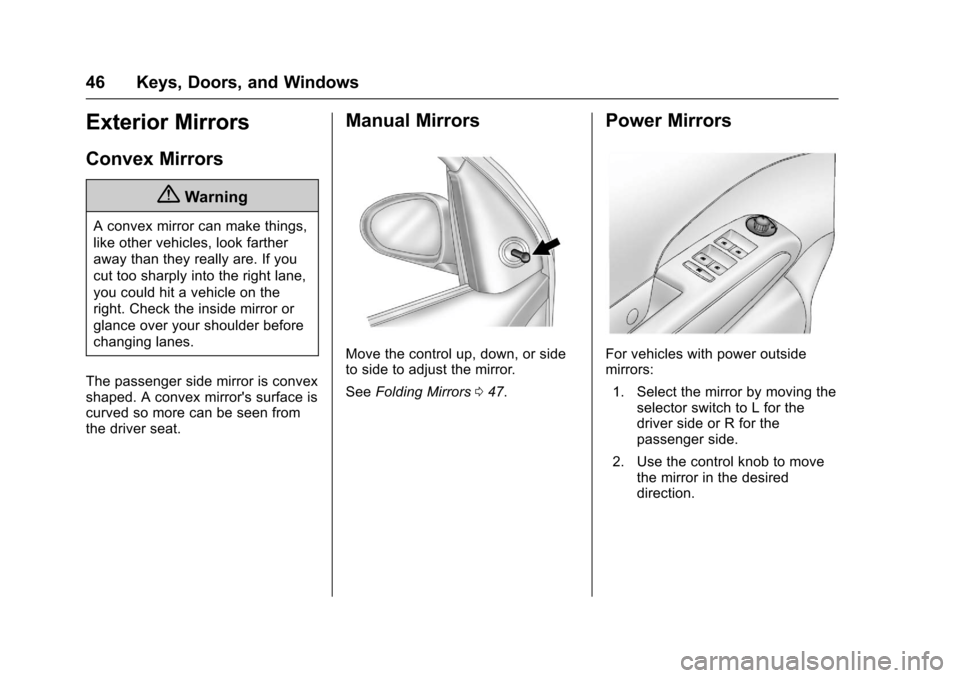
Manual Mirrors
Move the control up, down, or sideto side to adjust the mirror.
SeeFolding Mirrors047.
Power Mirrors
For vehicles with power outsidemirrors:
1. Select the mirror by moving theselector switch to L for thedriver side or R for thepassenger side.
2. Use the control knob to movethe mirror in the desireddirection.
Page 48 of 342
Chevrolet Sonic Owner Manual (GMNA-Localizing-U.S./Canada-10122660) -2017 - crc - 5/13/16
Keys, Doors, and Windows 47
Folding Mirrors
Manual Folding Mirrors
The vehicle has manual foldingmirrors. These mirrors can be foldedinward to prevent damage whengoing through an automatic carwash. To fold, pull the mirror towardthe vehicle. Push the mirror outwardto return it to the original position.
Heated Mirrors
1:If equipped, press to heat themirrors. See“Rear Window andOutside Mirror Defogger”underClimate Control Systems0166.
Interior Mirrors
Manual Rearview Mirror
Hold the inside rearview mirror inthe center to move it for a clearerview behind your vehicle. Adjust themirror to avoid glare from theheadlamps behind you. Push thetab forward for daytime use and pullit for nighttime use.
Vehicles with OnStar®have threecontrol buttons at the bottom of themirror. See your dealer for moreinformation about OnStar and howto subscribe to it. SeeOnStarOverview0321.
Windows
{Warning
Never leave a child, a helpless
adult, or a pet alone in a vehicle,
especially with the windows
closed in warm or hot weather.
They can be overcome by the
extreme heat and suffer
permanent injuries or even death
from heat stroke.
The vehicle aerodynamics aredesigned to improve fuel economyperformance. This may result in a
Page 50 of 342
Chevrolet Sonic Owner Manual (GMNA-Localizing-U.S./Canada-10122660) -2017 - crc - 5/13/16
Keys, Doors, and Windows 49
Window Express Movement
Express-down allows the windowsto be opened without holding thewindow switch. Express-up,if equipped, allows the windows tobe closed without holding thewindow switch. Press the windowswitch fully down or pull it up, andquickly release it to engage. Brieflypress or pull the same switch tostop window movement.
Express Window Obstacle
Detection
The express-up feature will reversewindow movement if it comes incontact with an object. Extreme coldor ice could cause the window toauto-reverse. The window willoperate as normal after the object orcondition is removed.
Obstacle Detection Override
{Warning
If obstacle detection override is
activated, the window will not
reverse automatically. You or
others could be injured and the
window could be damaged.
Before you use obstacle detection
override, make sure that all
people and obstructions are clear
of the window path.
The window can be closed byholding the window switch in the upposition if conditions prevent it fromexpress closing.
Programming the Power
Windows
Programming may be necessary ifthe vehicle's battery has beendisconnected or discharged. If thewindow is unable to express-up,program the window:
1. Close all doors.
2. Place the ignition in ACC/ACCESSORY or ON/RUN.
3. Partially open the window to beprogrammed, then close it andcontinue to pull the switchbriefly after the window hasfully closed.
4. Press the power window switchuntil the window is fully openand briefly hold.
Sun Visors
To b l o c k o u t g l a r e , s w i n g d o w n t h esun visors. You can also removethem from the center mount andswing them to the side.
Visor Vanity Mirror
Va n i t y m i r r o r s a r e o n t h e b a c k o f t h esun visors. Swing down the sunvisor and open the cover.
Page 169 of 342
Chevrolet Sonic Owner Manual (GMNA-Localizing-U.S./Canada-10122660) -2017 - crc - 5/13/16
168 Climate Controls
To a l l o w o u t s i d e a i r t o e n t e r i n t h e s econditions, press the recirculationbutton twice. The recirculationindicator will not be lit.
MorL:If equipped, press to heatthe driver or passenger seat. SeeHeated Front Seats056.
Rear Window and Outside
Mirror Defogger
1:Press to turn the rear windowand outside mirror defogger on oroff. An indicator light comes on toshow that the feature is on.
The rear window defogger can be
turned off by pressing1again or
by turning the ignition to ACC/ACCESSORY or LOCK/OFF.
If equipped with heated outsiderearview mirrors, they turn on withthe rear window defogger and helpto clear fog or frost from the surfaceof the mirror. SeeHeatedMirrors047.
Caution
Using a razor blade or sharp
object on the inside rear window
can damage the antenna or
defogger. Repairs would not be
covered by the vehicle warranty.
Do not stick anything to the rear
window.
Air Vents
Use the air vents located in thecenter and on the side of theinstrument panel to direct theairflow. Move the slats on the centerair vents to direct airflow.
Turn the knobs on the side air ventscounterclockwise or clockwise toopen or close off the airflow.
Operation Tips
.Clear away any ice, snow,or leaves from the air inlets atthe base of the windshield thatmay block the flow of air into thevehicle.
.Use of non-GM approved hooddeflectors may adversely affectthe performance of the system.
.Keep the path under the frontseats clear of objects to helpcirculate the air inside thevehicle more effectively.
Page 176 of 342
Chevrolet Sonic Owner Manual (GMNA-Localizing-U.S./Canada-10122660) -2017 - crc - 5/13/16
Driving and Operating 175
The vehicle may straighten out.Be ready for a second skid if itoccurs.
.Slow down and adjust yourdriving according to weatherconditions. Stopping distancecan be longer and vehiclecontrol can be affected whentraction is reduced by water,snow, ice, gravel, or othermaterial on the road. Learn torecognize warning clues—suchas enough water, ice, or packedsnow on the road to make amirrored surface—and slowdown when you have any doubt.
.Try to avoid sudden steering,acceleration, or braking,including reducing vehicle speedby shifting to a lower gear. Anysudden changes could causethe tires to slide.
Remember: Antilock brakes helpavoid only the braking skid.
Driving on Wet Roads
Rain and wet roads can reducevehicle traction and affect yourability to stop and accelerate.
Always drive slower in these typesof driving conditions and avoiddriving through large puddles anddeep-standing or flowing water.
{Warning
Wet brakes can cause crashes.
They might not work as well in a
quick stop and could cause
pulling to one side. You could
lose control of the vehicle.
After driving through a large
puddle of water or a car/vehicle
wash, lightly apply the brake
pedal until the brakes work
normally.
Flowing or rushing water creates
strong forces. Driving through
flowing water could cause the
vehicle to be carried away. If this
happens, you and other vehicle
occupants could drown. Do not
ignore police warnings and be
very cautious about trying to drive
through flowing water.
Hydroplaning
Hydroplaning is dangerous. Watercan build up under the vehicle'stires so they actually ride on thewater. This can happen if the road iswet enough and you are going fastenough. When the vehicle ishydroplaning, it has little or nocontact with the road.
There is no hard and fast rule abouthydroplaning. The best advice is toslow down when the road is wet.
Other Rainy Weather Tips
Besides slowing down, other wetweather driving tips include:
.Allow extra following distance.
.Pass with caution.
.Keep windshield wipingequipment in good shape.
.Keep the windshield washer fluidreservoir filled.
.Have good tires with propertread depth. SeeTires0248.
.Turn off cruise control.