2017 CHEVROLET SONIC warning
[x] Cancel search: warningPage 135 of 342
Chevrolet Sonic Owner Manual (GMNA-Localizing-U.S./Canada-10122660) -2017 - crc - 5/13/16
134 Lighting
Lighting
Exterior Lighting
Exterior Lamp Controls . . . . . . . 134Headlamp High/Low-BeamChanger . . . . . . . . . . . . . . . . . . . . 134Flash-to-Pass . . . . . . . . . . . . . . . . 135Daytime RunningLamps (DRL) . . . . . . . . . . . . . . . 135Automatic HeadlampSystem . . . . . . . . . . . . . . . . . . . . . . 135Hazard Warning Flashers . . . . . 136Turn and Lane-ChangeSignals . . . . . . . . . . . . . . . . . . . . . . 136Fog Lamps . . . . . . . . . . . . . . . . . . . 137
Interior Lighting
Instrument Panel IlluminationControl . . . . . . . . . . . . . . . . . . . . . . 137Courtesy Lamps . . . . . . . . . . . . . . 138Dome Lamps . . . . . . . . . . . . . . . . . 138Reading Lamps . . . . . . . . . . . . . . 138
Lighting Features
Entry Lighting . . . . . . . . . . . . . . . . 138Exit Lighting . . . . . . . . . . . . . . . . . . 138Battery Load Management . . . 139Battery Power Protection . . . . . 139Exterior Lighting BatterySaver . . . . . . . . . . . . . . . . . . . . . . . 139
Exterior Lighting
Exterior Lamp Controls
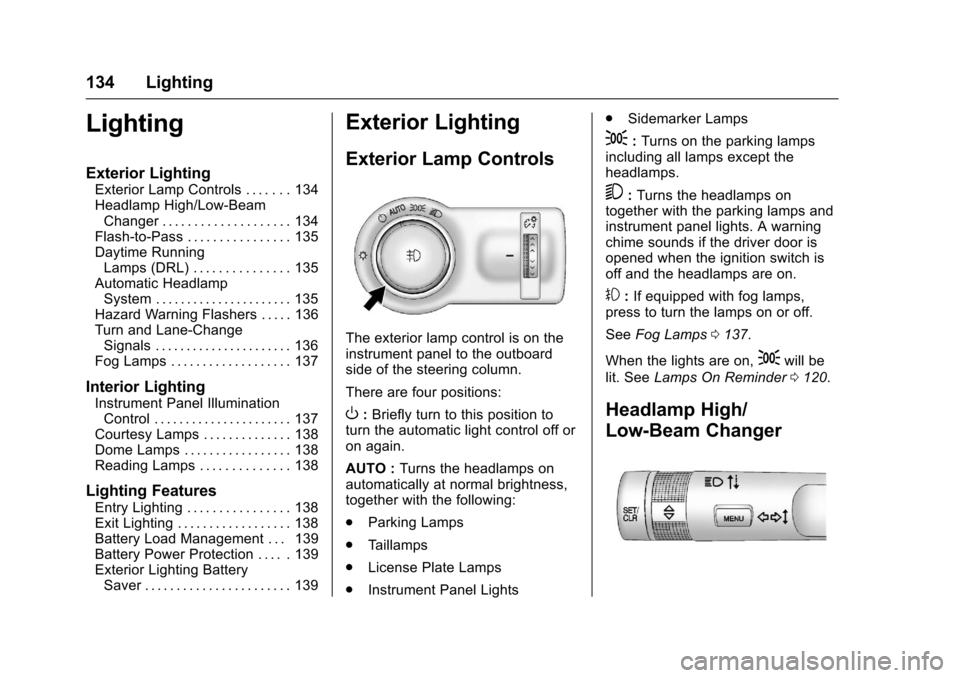
The exterior lamp control is on theinstrument panel to the outboardside of the steering column.
There are four positions:
O:Briefly turn to this position toturn the automatic light control off oron again.
AUTO :Turns the headlamps onautomatically at normal brightness,together with the following:
.Parking Lamps
.Ta i l l a m p s
.License Plate Lamps
.Instrument Panel Lights
.Sidemarker Lamps
;:Turns on the parking lampsincluding all lamps except theheadlamps.
5:Turns the headlamps ontogether with the parking lamps andinstrument panel lights. A warningchime sounds if the driver door isopened when the ignition switch isoff and the headlamps are on.
#:If equipped with fog lamps,press to turn the lamps on or off.
SeeFog Lamps0137.
When the lights are on,;will be
lit. SeeLamps On Reminder0120.
Headlamp High/
Low-Beam Changer
Page 137 of 342
Chevrolet Sonic Owner Manual (GMNA-Localizing-U.S./Canada-10122660) -2017 - crc - 5/13/16
136 Lighting
Lights On with Wipers
If the windshield wipers areactivated in daylight with the engineon, and the exterior lamp control isin AUTO, the headlamps, parkinglamps, and other exterior lampscome on. The transition time for thelamps coming on varies based onwiper speed. When the wipers arenot operating, these lamps turn off.
Move the exterior lamp control toP
or;to disable this feature.
Hazard Warning Flashers
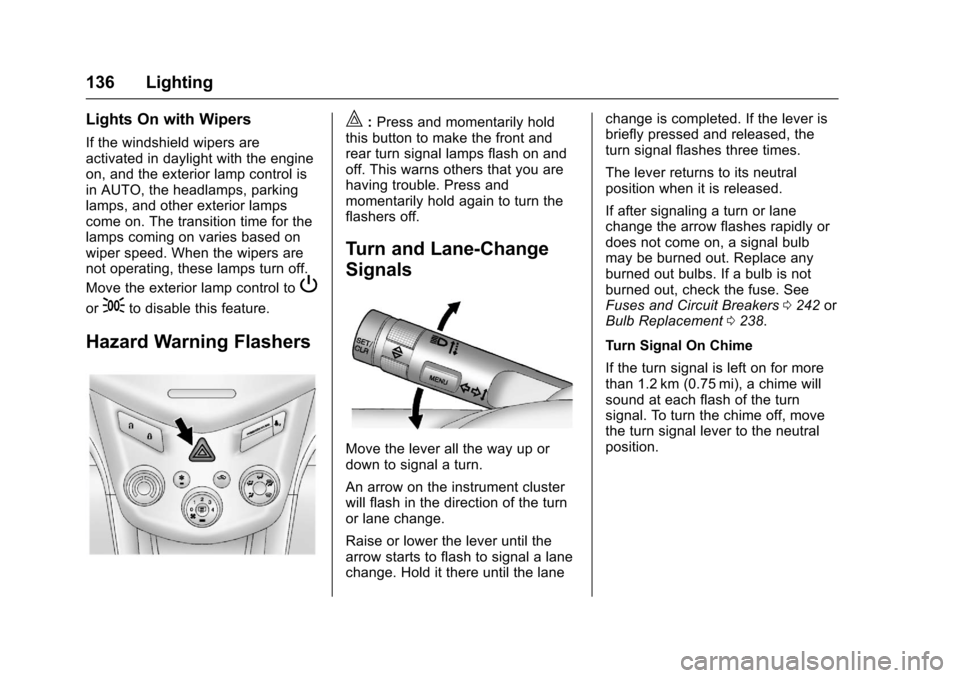
|:Press and momentarily holdthis button to make the front andrear turn signal lamps flash on andoff. This warns others that you arehaving trouble. Press andmomentarily hold again to turn theflashers off.
Turn and Lane-Change
Signals
Move the lever all the way up ordown to signal a turn.
An arrow on the instrument clusterwill flash in the direction of the turnor lane change.
Raise or lower the lever until thearrow starts to flash to signal a lanechange. Hold it there until the lane
change is completed. If the lever isbriefly pressed and released, theturn signal flashes three times.
The lever returns to its neutralposition when it is released.
If after signaling a turn or lanechange the arrow flashes rapidly ordoes not come on, a signal bulbmay be burned out. Replace anyburned out bulbs. If a bulb is notburned out, check the fuse. SeeFuses and Circuit Breakers0242orBulb Replacement0238.
Turn Signal On Chime
If the turn signal is left on for morethan 1.2 km (0.75 mi), a chime willsound at each flash of the turnsignal. To turn the chime off, movethe turn signal lever to the neutralposition.
Page 142 of 342

Chevrolet Sonic Owner Manual (GMNA-Localizing-U.S./Canada-10122660) -2017 - crc - 5/19/16
Infotainment System 141
Infotainment
System
Introduction
Infotainment . . . . . . . . . . . . . . . . . . 141Theft-Deterrent Feature . . . . . . 142Overview . . . . . . . . . . . . . . . . . . . . . 143Home Page . . . . . . . . . . . . . . . . . . 144Operation . . . . . . . . . . . . . . . . . . . . . 144
Radio
AM-FM Radio . . . . . . . . . . . . . . . . 145Satellite Radio . . . . . . . . . . . . . . . . 146Radio Reception . . . . . . . . . . . . . . 148Multi-Band Antenna . . . . . . . . . . 148
Audio Players
Avoiding Untrusted MediaDevices . . . . . . . . . . . . . . . . . . . . . 149USB Port . . . . . . . . . . . . . . . . . . . . . 149Auxiliary Devices . . . . . . . . . . . . . 155
Phone
Bluetooth (Overview) . . . . . . . . . 155Bluetooth (InfotainmentControls) . . . . . . . . . . . . . . . . . . . . 157Apple CarPlay andAndroid Auto . . . . . . . . . . . . . . . . 161Hands-Free Phone . . . . . . . . . . . 161
Trademarks and License
Agreements
Trademarks and LicenseAgreements . . . . . . . . . . . . . . . . . 164
Introduction
Infotainment
Read the following pages tobecome familiar with the features.
{Warning
Ta k i n g y o u r e y e s o f f t h e r o a d f o r
too long or too often while using
any infotainment feature can
cause a crash. You or others
could be injured or killed. Do not
give extended attention to
infotainment tasks while driving.
Limit your glances at the vehicle
displays and focus your attention
on driving. Use voice commands
whenever possible.
The infotainment system has built-infeatures intended to help avoiddistraction by disabling somefunctions when driving. Thesefunctions may gray out when theyare unavailable. Many infotainment
Page 157 of 342
Chevrolet Sonic Owner Manual (GMNA-Localizing-U.S./Canada-10122660) -2017 - crc - 5/13/16
156 Infotainment System
.Pair cell phone(s) to the vehicle.The system may not work withall cell phones. See“Pairing”inthis section.
.If the cell phone has voicedialing capability, learn to usethat feature to access theaddress book or contact list. See“Vo i c e P a s s - T h r u”in thissection.
.See“Storing and Deleting PhoneNumbers”in this section.
{Warning
When using a cell phone, it can
be distracting to look too long or
too often at the screen of the
phone or the infotainment system.
Ta k i n g y o u r e y e s o f f t h e r o a d t o o
long or too often could cause a
crash resulting in injury or death.
Focus your attention on driving.
Vehicles with a Bluetooth systemcan use a Bluetooth-capable cellphone with a Hands-Free Profile tomake and receive phone calls. Theinfotainment system and voice
recognition are used to control thesystem. The system can be usedwhile in ON/RUN or ACC/ACCESSORY. The range of theBluetooth system can be up to 9.1 m(30 ft). Not all phones support allfunctions and not all phones workwith the Bluetooth system. Seewww.gm.com/bluetooth for moreinformation about compatiblephones.
Bluetooth Controls
Use the buttons located on theinfotainment system and thesteering wheel to operate theBluetooth system.
Steering Wheel Controls
b/g:Press to answer incomingcalls, confirm system information,and start voice recognition.
$/i:Press to end a call, rejectacall,orcancelanoperation.
Infotainment System Controls
If equipped, the infotainment systemallows certain controls to beselected on the infotainment display.SeeOnStar Overview0321.
For information about how tonavigate the menu system using theinfotainment controls. SeeOperation0144.
5\>:Press to enter the Phonemain menu. Press to mute the audiosystem.
Voice Recognition
The voice recognition system usescommands to control the systemand dial phone numbers.
Noise :The system may notrecognize voice commands if thereis too much background noise.
When to Speak :Atonesoundstoindicate that the system is ready foravoicecommand.Waitforthetoneand then speak.
How to Speak :Speak clearly in acalm and natural voice.
Audio System
When using the Bluetooth system,sound comes through the vehicle'sfront audio system speakers andoverrides the audio system. Use the
VOL/Oknob during a call to
Page 172 of 342

Chevrolet Sonic Owner Manual (GMNA-Localizing-U.S./Canada-10122660) -2017 - crc - 5/13/16
Driving and Operating 171
Driving and
Operating
Driving Information
Distracted Driving . . . . . . . . . . . . 172Defensive Driving . . . . . . . . . . . . . 172Drunk Driving . . . . . . . . . . . . . . . . . 172Control of a Vehicle . . . . . . . . . . . 173Braking . . . . . . . . . . . . . . . . . . . . . . . 173Steering . . . . . . . . . . . . . . . . . . . . . . 173Off-Road Recovery . . . . . . . . . . . 174Loss of Control . . . . . . . . . . . . . . . 174Driving on Wet Roads . . . . . . . . 175Hill and Mountain Roads . . . . . 176Winter Driving . . . . . . . . . . . . . . . . 176If the Vehicle Is Stuck . . . . . . . . 178Vehicle Load Limits . . . . . . . . . . . 178
Starting and Operating
New Vehicle Break-In . . . . . . . . . 181Ignition Positions (KeyAccess) . . . . . . . . . . . . . . . . . . . . . 182Ignition Positions (KeylessAccess) . . . . . . . . . . . . . . . . . . . . . 183Starting the Engine . . . . . . . . . . . 185Engine Heater . . . . . . . . . . . . . . . . 186Retained AccessoryPower (RAP) . . . . . . . . . . . . . . . . 187
Shifting Into Park (AutomaticTransmission) . . . . . . . . . . . . . . . 187Shifting out of Park (AutomaticTransmission) . . . . . . . . . . . . . . . 188Parking . . . . . . . . . . . . . . . . . . . . . . . 189Parking over ThingsThat Burn . . . . . . . . . . . . . . . . . . . 189Extended Parking . . . . . . . . . . . . 189
Engine Exhaust
Engine Exhaust . . . . . . . . . . . . . . 190Running the Vehicle WhileParked . . . . . . . . . . . . . . . . . . . . . . 190
Automatic Transmission
Automatic Transmission . . . . . . 191Manual Mode . . . . . . . . . . . . . . . . . 192
Manual Transmission
Manual Transmission . . . . . . . . . 193
Brakes
Antilock BrakeSystem (ABS) . . . . . . . . . . . . . . . 195Parking Brake . . . . . . . . . . . . . . . . 196Brake Assist . . . . . . . . . . . . . . . . . . 196Hill Start Assist (HSA) . . . . . . . . 197
Ride Control Systems
Traction Control/ElectronicStability Control . . . . . . . . . . . . . 197
Cruise Control
Cruise Control . . . . . . . . . . . . . . . . 199
Driver Assistance Systems
Rear Vision Camera (RVC) . . . 201Parking Assist . . . . . . . . . . . . . . . . 203Forward Collision Alert (FCA)System . . . . . . . . . . . . . . . . . . . . . . 204Lane DepartureWarning (LDW) . . . . . . . . . . . . . 206
Fuel
Fuel . . . . . . . . . . . . . . . . . . . . . . . . . . 207California FuelRequirements . . . . . . . . . . . . . . . 208Fuels in Foreign Countries . . . 208Fuel Additives . . . . . . . . . . . . . . . . 208Filling the Tank . . . . . . . . . . . . . . . 209Filling a Portable FuelContainer . . . . . . . . . . . . . . . . . . . 210
Trailer Towing
General Towing Information . . . 211
Conversions and Add-Ons
Add-On ElectricalEquipment . . . . . . . . . . . . . . . . . . 211
Page 173 of 342
Chevrolet Sonic Owner Manual (GMNA-Localizing-U.S./Canada-10122660) -2017 - crc - 5/13/16
172 Driving and Operating
Driving Information
Distracted Driving
Distraction comes in many formsand can take your focus from thetask of driving. Exercise goodjudgment and do not let otheractivities divert your attention awayfrom the road. Many localgovernments have enacted lawsregarding driver distraction. Becomefamiliar with the local laws inyour area.
To a v o i d d i s t r a c t e d d r i v i n g , k e e pyour eyes on the road, keep yourhands on the steering wheel, andfocus your attention on driving.
.Do not use a phone indemanding driving situations.Use a hands-free method toplace or receive necessaryphone calls.
.Watch the road. Do not read,take notes, or look upinformation on phones or otherelectronic devices.
.Designate a front seatpassenger to handle potentialdistractions.
.Become familiar with vehiclefeatures before driving, such asprogramming favorite radiostations and adjusting climatecontrol and seat settings.Program all trip information intoany navigation device prior todriving.
.Wait until the vehicle is parkedto retrieve items that have fallento the floor.
.Stop or park the vehicle to tendto children.
.Keep pets in an appropriatecarrier or restraint.
.Avoid stressful conversationswhile driving, whether with apassenger or on a cell phone.
{Warning
Ta k i n g y o u r e y e s o f f t h e r o a d t o o
long or too often could cause a
crash resulting in injury or death.
Focus your attention on driving.
Refer to the Infotainment section formore information on using thatsystem, including pairing and usingacellphone.
Defensive Driving
Defensive driving means“alwaysexpect the unexpected.”The firststep in driving defensively is to wearthe safety belt. SeeSafetyBelts059.
.Assume that other road users(pedestrians, bicyclists, andother drivers) are going to becareless and make mistakes.Anticipate what they might doand be ready.
.Allow enough following distancebetween you and the driver infront of you.
.Focus on the task of driving.
Drunk Driving
Death and injury associated withdrinking and driving is a globaltragedy.
Page 174 of 342
Chevrolet Sonic Owner Manual (GMNA-Localizing-U.S./Canada-10122660) -2017 - crc - 5/13/16
Driving and Operating 173
{Warning
Drinking and then driving is very
dangerous. Your reflexes,
perceptions, attentiveness, and
judgment can be affected by even
asmallamountofalcohol.You
can have a serious—or even
fatal—collision if you drive after
drinking.
Do not drink and drive or ride with
adriverwhohasbeendrinking.
Ride home in a cab; or if you are
with a group, designate a driver
who will not drink.
Control of a Vehicle
Braking, steering, and acceleratingare important factors in helping tocontrol a vehicle while driving.
Braking
Braking action involves perceptiontime and reaction time. Deciding topush the brake pedal is perceptiontime. Actually doing it isreaction time.
Average driver reaction time isabout three-quarters of a second. Inthat time, a vehicle moving at100 km/h (60 mph) travels 20 m(66 ft), which could be a lot ofdistance in an emergency.
Helpful braking tips to keep in mindinclude:
.Keep enough distance betweenyou and the vehicle in frontof you.
.Avoid needless heavy braking.
.Keep pace with traffic.
If the engine ever stops while thevehicle is being driven, brakenormally but do not pump thebrakes. Doing so could make thepedal harder to push down. If theengine stops, there will be somepower brake assist but it will beused when the brake is applied.Once the power assist is used up, itcan take longer to stop and thebrake pedal will be harder to push.
Steering
Electric Power Steering
The vehicle has electric powersteering. It does not have powersteering fluid. Regular maintenanceis not required.
If power steering assist is lost dueto a system malfunction, the vehiclecan be steered, but may requireincreased effort. See your dealer ifthere is a problem.
If the steering wheel is turned until itreaches the end of its travel and isheld against that position for anextended period of time, powersteering assist may be reduced.
If the steering assist is used for anextended period of time, powerassist may be reduced.
Normal use of the power steeringassist should return when thesystem cools down.
See your dealer if there is aproblem.
Page 176 of 342
Chevrolet Sonic Owner Manual (GMNA-Localizing-U.S./Canada-10122660) -2017 - crc - 5/13/16
Driving and Operating 175
The vehicle may straighten out.Be ready for a second skid if itoccurs.
.Slow down and adjust yourdriving according to weatherconditions. Stopping distancecan be longer and vehiclecontrol can be affected whentraction is reduced by water,snow, ice, gravel, or othermaterial on the road. Learn torecognize warning clues—suchas enough water, ice, or packedsnow on the road to make amirrored surface—and slowdown when you have any doubt.
.Try to avoid sudden steering,acceleration, or braking,including reducing vehicle speedby shifting to a lower gear. Anysudden changes could causethe tires to slide.
Remember: Antilock brakes helpavoid only the braking skid.
Driving on Wet Roads
Rain and wet roads can reducevehicle traction and affect yourability to stop and accelerate.
Always drive slower in these typesof driving conditions and avoiddriving through large puddles anddeep-standing or flowing water.
{Warning
Wet brakes can cause crashes.
They might not work as well in a
quick stop and could cause
pulling to one side. You could
lose control of the vehicle.
After driving through a large
puddle of water or a car/vehicle
wash, lightly apply the brake
pedal until the brakes work
normally.
Flowing or rushing water creates
strong forces. Driving through
flowing water could cause the
vehicle to be carried away. If this
happens, you and other vehicle
occupants could drown. Do not
ignore police warnings and be
very cautious about trying to drive
through flowing water.
Hydroplaning
Hydroplaning is dangerous. Watercan build up under the vehicle'stires so they actually ride on thewater. This can happen if the road iswet enough and you are going fastenough. When the vehicle ishydroplaning, it has little or nocontact with the road.
There is no hard and fast rule abouthydroplaning. The best advice is toslow down when the road is wet.
Other Rainy Weather Tips
Besides slowing down, other wetweather driving tips include:
.Allow extra following distance.
.Pass with caution.
.Keep windshield wipingequipment in good shape.
.Keep the windshield washer fluidreservoir filled.
.Have good tires with propertread depth. SeeTires0248.
.Turn off cruise control.