2017 CHEVROLET SONIC warning
[x] Cancel search: warningPage 197 of 342
Chevrolet Sonic Owner Manual (GMNA-Localizing-U.S./Canada-10122660) -2017 - crc - 5/13/16
196 Driving and Operating
Using ABS
Do not pump the brakes. Just holdthe brake pedal down firmly and letABS work. You may hear the ABSpump or motor operating and feelthe brake pedal pulsate. This isnormal.
Braking in Emergencies
ABS allows you to steer and brakeat the same time. In manyemergencies, steering can helpmore than even the very bestbraking.
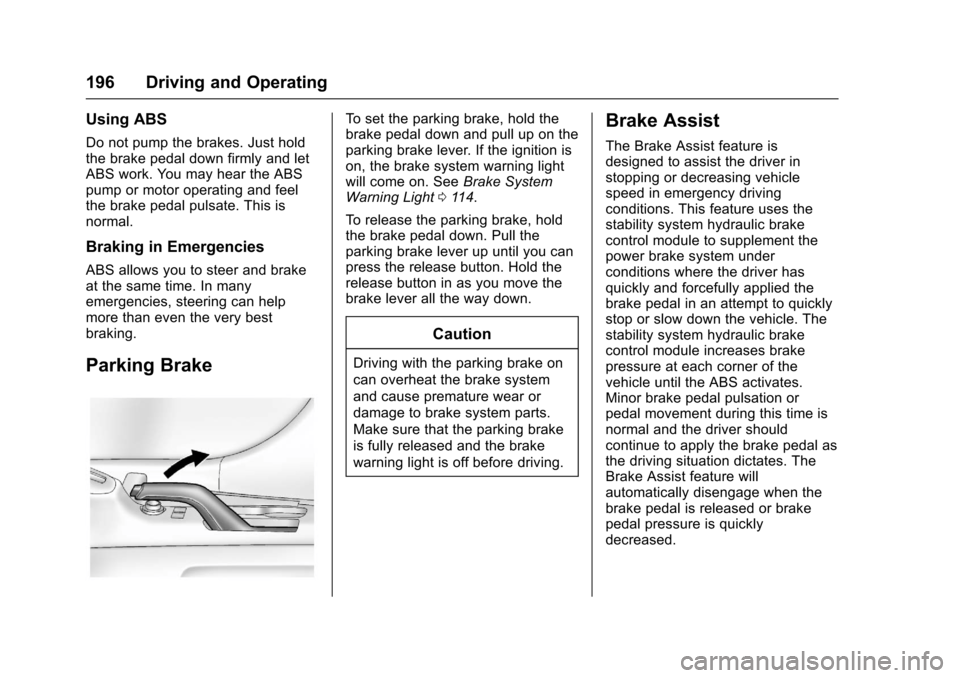
Parking Brake
To s e t t h e p a r k i n g b r a k e , h o l d t h ebrake pedal down and pull up on theparking brake lever. If the ignition ison, the brake system warning lightwill come on. SeeBrake SystemWarning Light011 4.
To r e l e a s e t h e p a r k i n g b r a k e , h o l dthe brake pedal down. Pull theparking brake lever up until you canpress the release button. Hold therelease button in as you move thebrake lever all the way down.
Caution
Driving with the parking brake on
can overheat the brake system
and cause premature wear or
damage to brake system parts.
Make sure that the parking brake
is fully released and the brake
warning light is off before driving.
Brake Assist
The Brake Assist feature isdesigned to assist the driver instopping or decreasing vehiclespeed in emergency drivingconditions. This feature uses thestability system hydraulic brakecontrol module to supplement thepower brake system underconditions where the driver hasquickly and forcefully applied thebrake pedal in an attempt to quicklystop or slow down the vehicle. Thestability system hydraulic brakecontrol module increases brakepressure at each corner of thevehicle until the ABS activates.Minor brake pedal pulsation orpedal movement during this time isnormal and the driver shouldcontinue to apply the brake pedal asthe driving situation dictates. TheBrake Assist feature willautomatically disengage when thebrake pedal is released or brakepedal pressure is quicklydecreased.
Page 200 of 342
Chevrolet Sonic Owner Manual (GMNA-Localizing-U.S./Canada-10122660) -2017 - crc - 5/13/16
Driving and Operating 199
To t u r n T C S a n d S t a b i l i T r a k o n
again, press and releaseg.The
traction off lightiand StabiliTrak
OFF lightgin the instrument cluster
turn off.
Adding accessories can affect thevehicle performance. SeeAccessories andModifications0214.
Cruise Control
If the vehicle is equipped with cruisecontrol, a speed of about 40 km/h(25 mph) or more can be maintainedwithout keeping your foot on theaccelerator. Cruise control does notwork at speeds below 40 km/h(25 mph).
{Warning
Cruise control can be dangerous
where you cannot drive safely at
asteadyspeed.Donotuse
cruise control on winding roads or
in heavy traffic.
Cruise control can be dangerous
on slippery roads. On such roads,
fast changes in tire traction can
cause excessive wheel slip, and
you could lose control. Do not use
cruise control on slippery roads.
If the vehicle's Traction ControlSystem (TCS) or StabiliTrak systembegins to limit wheel spin whileusing cruise control, the cruisecontrol will automatically disengage.
SeeTr a c t i o n C o n t r o l / E l e c t r o n i cStability Control0197.Ifacollisionalert occurs when cruise control isactivated, cruise control isdisengaged. SeeForward CollisionAlert (FCA) System0204.Whenroad conditions allow you to safelyuse it again, the cruise control canbe turned back on.
If the brakes are applied, cruisecontrol disengages.
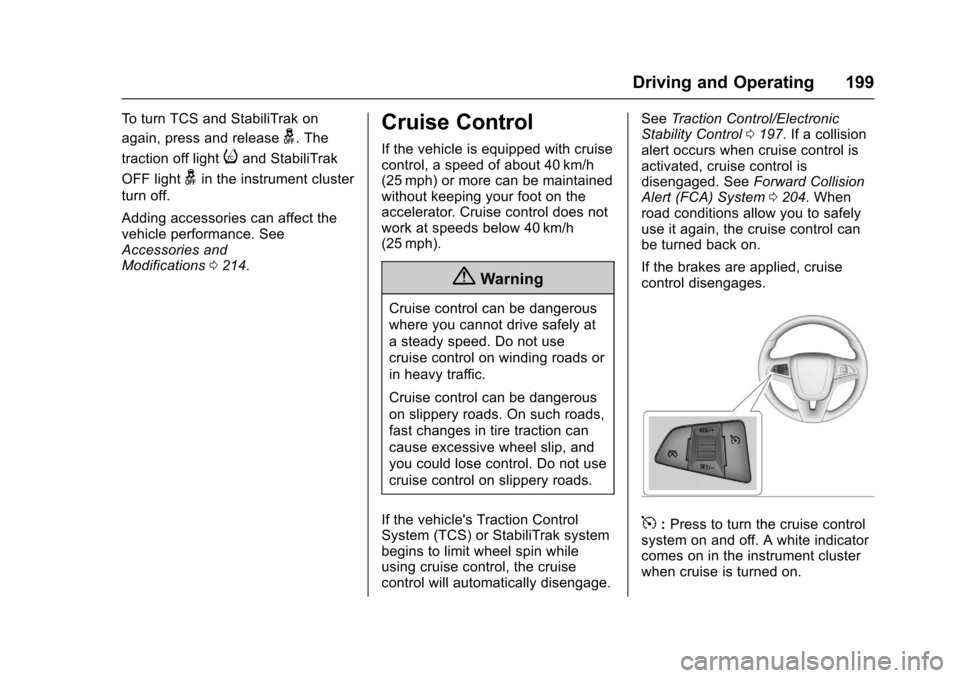
5:Press to turn the cruise controlsystem on and off. A white indicatorcomes on in the instrument clusterwhen cruise is turned on.
Page 202 of 342
Chevrolet Sonic Owner Manual (GMNA-Localizing-U.S./Canada-10122660) -2017 - crc - 5/13/16
Driving and Operating 201
The speedometer reading can bedisplayed in either English or metricunits. SeeDriver Information Center(DIC)0121.Theincrementvalueused depends on the unitsdisplayed.
Passing Another Vehicle WhileUsing Cruise Control
Use the accelerator pedal toincrease the vehicle speed. Whenyou take your foot off the pedal, thevehicle slows down to the previousset cruise control speed. Whilepressing the accelerator pedal orshortly following the release tooverride cruise control, brieflymoving the thumbwheel towardSET/- will result in cruise control setto the current vehicle speed.
Using Cruise Control on Hills
How well cruise control works onhills depends on the vehicle speed,load, and the steepness of the hills.When going up steep hills, youmight have to step on theaccelerator pedal to maintain thevehicle speed. When goingdownhill, you might have to brake orshift to a lower gear to keep your
speed down. If the brake pedal isapplied, cruise control willdisengage.
Ending Cruise Control
There are four ways to end cruisecontrol:
.To d i s e n g a g e c r u i s e c o n t r o l ,step lightly on the brake pedal orclutch for manual transmission.
.Press*.
.Shift the transmission toN(Neutral).
.To t u r n o f f c r u i s e c o n t r o l ,
press5.
Erasing Speed Memory
The cruise control set speed is
erased from memory if5is pressed
or if the ignition is turned off.
Driver Assistance
Systems
Rear Vision
Camera (RVC)
This vehicle may have the RVCsystem. Read this entire sectionbefore using it.
The RVC system can assist thedriver when backing up bydisplaying a view of the area behindthe vehicle.
{Warning
The camera(s) do not display
children, pedestrians, bicyclists,
crossing traffic, animals, or any
other object outside of the
cameras’field of view, below the
bumper, or under the vehicle.
Shown distances may be different
from actual distances. Do not
drive or park the vehicle using
only these camera(s). Always
check behind and around the
(Continued)
Page 203 of 342
Chevrolet Sonic Owner Manual (GMNA-Localizing-U.S./Canada-10122660) -2017 - crc - 5/13/16
202 Driving and Operating
Warning (Continued)
vehicle before driving. Failure to
use proper care may result in
injury, death, or vehicle damage.
An image appears on theinfotainment screen when thevehicle is shifted into R (Reverse).The infotainment screen goes to theprevious screen after approximatelyfour seconds once the vehicle isshifted out of R (Reverse).
To r e t u r n t o t h e p r e v i o u s s c r e e nsooner, do one of the following:
.Shift into P (Park).
.Reach a vehicle speed of8km/h (5mph).
Guidelines
The RVC system has a guidelineoverlay that can help the driver alignthe vehicle when backing into aparking spot.
To t u r n t h e g u i d e l i n e s o n o r o f f :
1. Shift into P (Park).
2. From the home page on theinfotainment system, selectSettings.
3. Select Rear Camera Options.
4. Select Guidelines.
Rear Vision Camera ErrorMessages
SERVICE REAR VISION CAMERASYSTEM :This message candisplay when the system is notoperating properly.
If any other problem occurs or if aproblem persists, see your dealer.
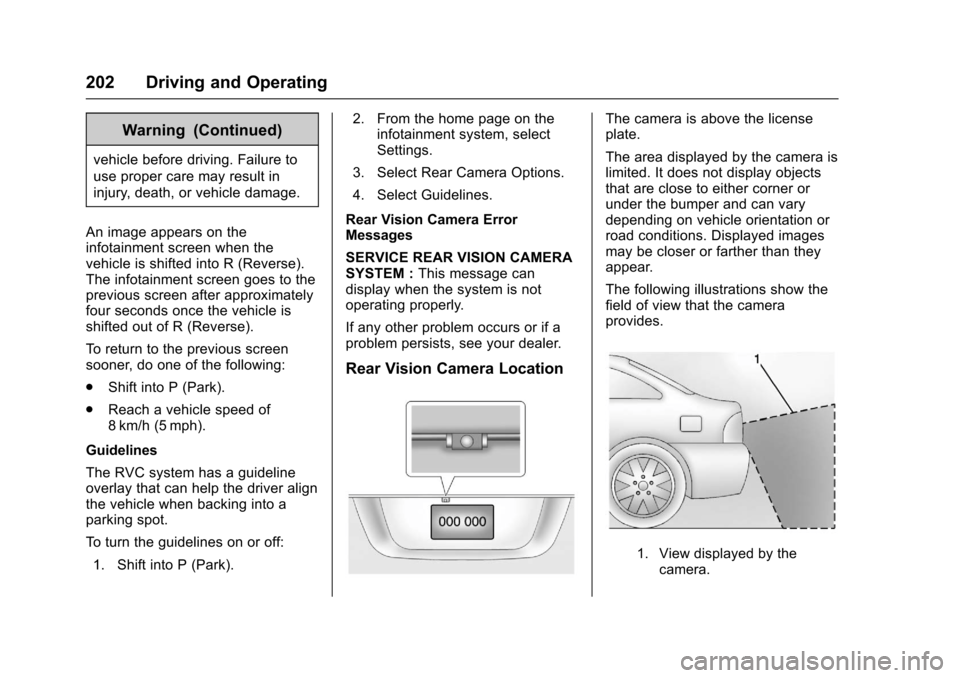
Rear Vision Camera Location
The camera is above the licenseplate.
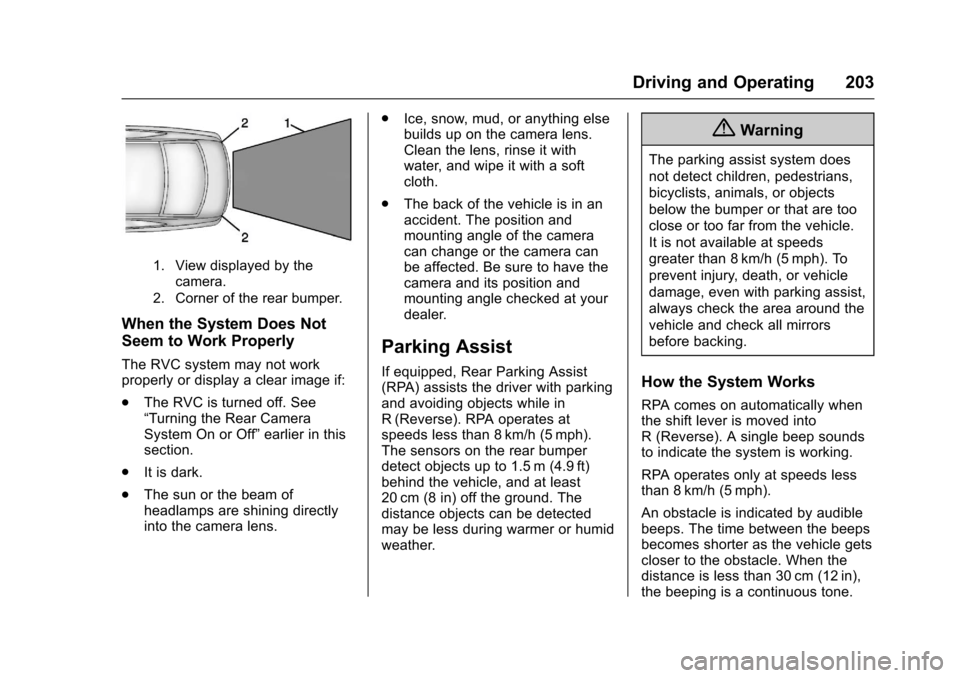
The area displayed by the camera islimited. It does not display objectsthat are close to either corner orunder the bumper and can varydepending on vehicle orientation orroad conditions. Displayed imagesmay be closer or farther than theyappear.
The following illustrations show thefield of view that the cameraprovides.
1. View displayed by thecamera.
Page 204 of 342
Chevrolet Sonic Owner Manual (GMNA-Localizing-U.S./Canada-10122660) -2017 - crc - 5/13/16
Driving and Operating 203
1. View displayed by thecamera.
2. Corner of the rear bumper.
When the System Does Not
Seem to Work Properly
The RVC system may not workproperly or display a clear image if:
.The RVC is turned off. See“Turning the Rear CameraSystem On or Off”earlier in thissection.
.It is dark.
.The sun or the beam ofheadlamps are shining directlyinto the camera lens.
.Ice, snow, mud, or anything elsebuilds up on the camera lens.Clean the lens, rinse it withwater, and wipe it with a softcloth.
.The back of the vehicle is in anaccident. The position andmounting angle of the cameracan change or the camera canbe affected. Be sure to have thecamera and its position andmounting angle checked at yourdealer.
Parking Assist
If equipped, Rear Parking Assist(RPA) assists the driver with parkingand avoiding objects while inR(Reverse). RPA operates atspeeds less than 8 km/h (5 mph).The sensors on the rear bumperdetect objects up to 1.5 m (4.9 ft)behind the vehicle, and at least20 cm (8 in) off the ground. Thedistance objects can be detectedmay be less during warmer or humidweather.
{Warning
The parking assist system does
not detect children, pedestrians,
bicyclists, animals, or objects
below the bumper or that are too
close or too far from the vehicle.
It is not available at speeds
greater than 8 km/h (5 mph). To
prevent injury, death, or vehicle
damage, even with parking assist,
always check the area around the
vehicle and check all mirrors
before backing.
How the System Works
RPA comes on automatically whenthe shift lever is moved intoR(Reverse).Asinglebeepsoundsto indicate the system is working.
RPA operates only at speeds lessthan 8 km/h (5 mph).
An obstacle is indicated by audiblebeeps. The time between the beepsbecomes shorter as the vehicle getscloser to the obstacle. When thedistance is less than 30 cm (12 in),the beeping is a continuous tone.
Page 205 of 342

Chevrolet Sonic Owner Manual (GMNA-Localizing-U.S./Canada-10122660) -2017 - crc - 5/13/16
204 Driving and Operating
Turning the System On and Off
The RPA system can be turned onand off using the infotainmentsystem controls. SeeVehiclePersonalization0127.
When the system is off, PARKASSIST OFF displays on the DriverInformation Center (DIC). Themessage disappears after a shortperiod of time.
RPA defaults to the on setting eachtime the vehicle is started.
Turn off RPA when towing a trailer.
When the System Does Not
Seem to Work Properly
The following messages may bedisplayed on the DIC:
SERVICE PARKING ASSIST :Ifthis message occurs, check thefollowing conditions:
.The sensors are not clean. Keepthe vehicle's rear bumper free ofmud, dirt, snow, ice, and slush.For cleaning instructions, seeExterior Care0280.
.The park assist sensors arecovered by frost or ice. Frost orice can form around and behindthe sensors and may not alwaysbe seen; this can occur afterwashing the vehicle in coldweather. The message may notclear until the frost or ice hasmelted.
If the above conditions do not exist,take the vehicle to your dealer torepair the system.
PA R K A S S I S T O F F :If the RPAsystem does not activate due to atemporary condition, the messagedisplays on the DIC. This can occurunder the following conditions:
.The driver has disabled thesystem.
.An object was hanging out of thetrunk during the last drive cycle.Once the object is removed,RPA will return to normaloperation.
.The bumper is damaged. Takethe vehicle to your dealer torepair the system.
.Other conditions, such asvibrations from a jackhammer orthe compression of air brakes onaverylargetruck,areaffectingsystem performance.
Forward Collision Alert
(FCA) System
If equipped, the FCA system mayhelp to avoid or reduce the harmcaused by front-end crashes. Whenapproaching a vehicle ahead tooquickly, FCA provides a red flashingalert on the windshield and rapidlybeeps.
FCA detects vehicles within adistance of approximately 60 m(197 ft) and operates at speedsabove 40 km/h (25 mph).
{Warning
FCA is a warning system and
does not apply the brakes. When
approaching a slower-moving or
stopped vehicle ahead too rapidly,
or when following a vehicle too
(Continued)
Page 206 of 342
Chevrolet Sonic Owner Manual (GMNA-Localizing-U.S./Canada-10122660) -2017 - crc - 5/13/16
Driving and Operating 205
Warning (Continued)
closely, FCA may not provide a
warning with enough time to help
avoid a crash. It also may not
provide any warning at all. FCA
does not warn of pedestrians,
animals, signs, guardrails,
bridges, construction barrels,
or other objects. Be ready to take
action and apply the brakes. See
Defensive Driving0172.
FCA can be disabled with the FCAsteering wheel control.
Detecting the Vehicle Ahead
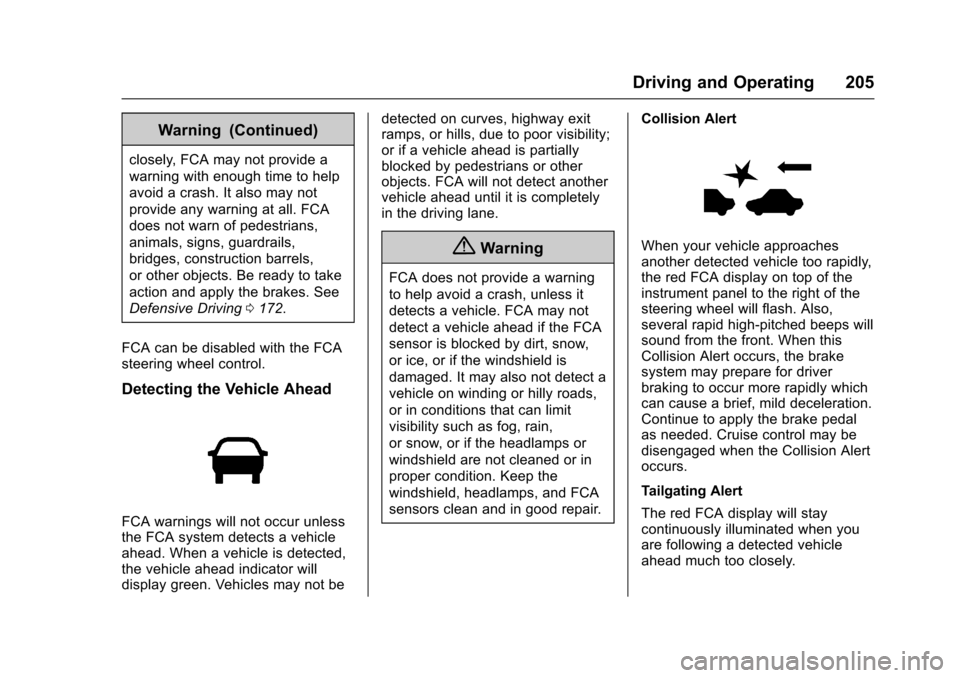
FCA warnings will not occur unlessthe FCA system detects a vehicleahead. When a vehicle is detected,the vehicle ahead indicator willdisplay green. Vehicles may not be
detected on curves, highway exitramps, or hills, due to poor visibility;or if a vehicle ahead is partiallyblocked by pedestrians or otherobjects. FCA will not detect anothervehicle ahead until it is completelyin the driving lane.
{Warning
FCA does not provide a warning
to help avoid a crash, unless it
detects a vehicle. FCA may not
detect a vehicle ahead if the FCA
sensor is blocked by dirt, snow,
or ice, or if the windshield is
damaged. It may also not detect a
vehicle on winding or hilly roads,
or in conditions that can limit
visibility such as fog, rain,
or snow, or if the headlamps or
windshield are not cleaned or in
proper condition. Keep the
windshield, headlamps, and FCA
sensors clean and in good repair.
Collision Alert
When your vehicle approachesanother detected vehicle too rapidly,the red FCA display on top of theinstrument panel to the right of thesteering wheel will flash. Also,several rapid high-pitched beeps willsound from the front. When thisCollision Alert occurs, the brakesystem may prepare for driverbraking to occur more rapidly whichcan cause a brief, mild deceleration.Continue to apply the brake pedalas needed. Cruise control may bedisengaged when the Collision Alertoccurs.
Tailgating Alert
The red FCA display will staycontinuously illuminated when youare following a detected vehicleahead much too closely.
Page 207 of 342
Chevrolet Sonic Owner Manual (GMNA-Localizing-U.S./Canada-10122660) -2017 - crc - 5/13/16
206 Driving and Operating
Selecting the Alert Timing
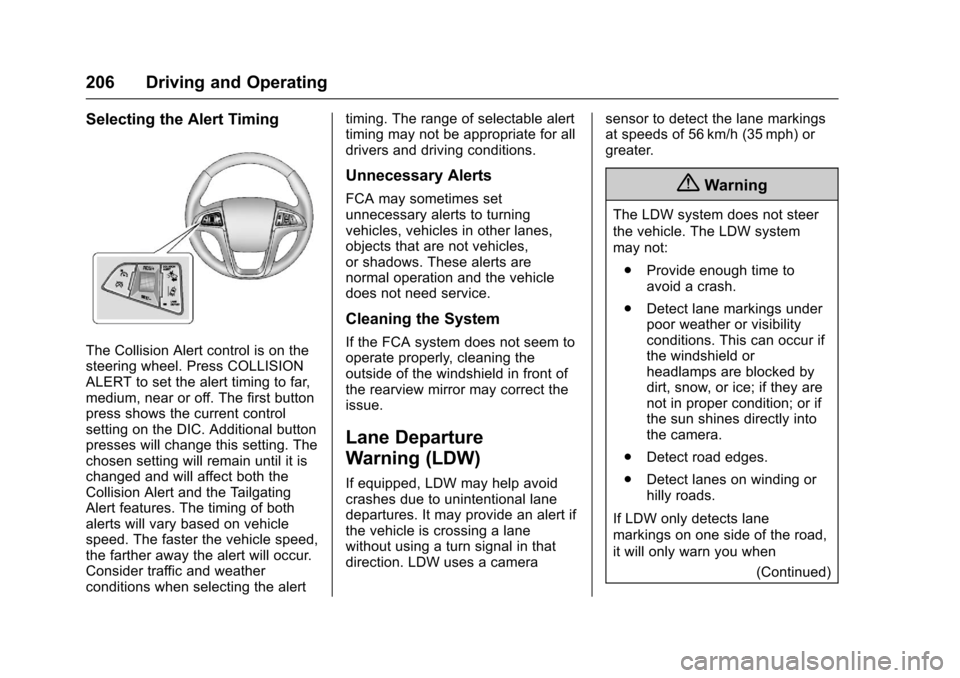
The Collision Alert control is on thesteering wheel. Press COLLISIONALERT to set the alert timing to far,medium, near or off. The first buttonpress shows the current controlsetting on the DIC. Additional buttonpresses will change this setting. Thechosen setting will remain until it ischanged and will affect both theCollision Alert and the TailgatingAlert features. The timing of bothalerts will vary based on vehiclespeed. The faster the vehicle speed,the farther away the alert will occur.Consider traffic and weatherconditions when selecting the alert
timing. The range of selectable alerttiming may not be appropriate for alldrivers and driving conditions.
Unnecessary Alerts
FCA may sometimes setunnecessary alerts to turningvehicles, vehicles in other lanes,objects that are not vehicles,or shadows. These alerts arenormal operation and the vehicledoes not need service.
Cleaning the System
If the FCA system does not seem tooperate properly, cleaning theoutside of the windshield in front ofthe rearview mirror may correct theissue.
Lane Departure
Warning (LDW)
If equipped, LDW may help avoidcrashes due to unintentional lanedepartures. It may provide an alert ifthe vehicle is crossing a lanewithout using a turn signal in thatdirection. LDW uses a camera
sensor to detect the lane markingsat speeds of 56 km/h (35 mph) orgreater.
{Warning
The LDW system does not steer
the vehicle. The LDW system
may not:
.Provide enough time toavoid a crash.
.Detect lane markings underpoor weather or visibilityconditions. This can occur ifthe windshield orheadlamps are blocked bydirt, snow, or ice; if they arenot in proper condition; or ifthe sun shines directly intothe camera.
.Detect road edges.
.Detect lanes on winding orhilly roads.
If LDW only detects lane
markings on one side of the road,
it will only warn you when
(Continued)