2017 CHEVROLET SONIC warning
[x] Cancel search: warningPage 98 of 342
Chevrolet Sonic Owner Manual (GMNA-Localizing-U.S./Canada-10122660) -2017 - crc - 5/13/16
Storage 97
Storage
Storage Compartments
Storage Compartments . . . . . . . . 97Instrument Panel Storage . . . . . . 97Glove Box . . . . . . . . . . . . . . . . . . . . . 97
Luggage/Load Locations
Load Compartment(Hatchback) . . . . . . . . . . . . . . . . . . 98
Additional Storage Features
Cargo Cover (Hatchback) . . . . . . 98
Storage
Compartments
{Warning
Do not store heavy or sharp
objects in storage compartments.
In a crash, these objects may
cause the cover to open and
could result in injury.
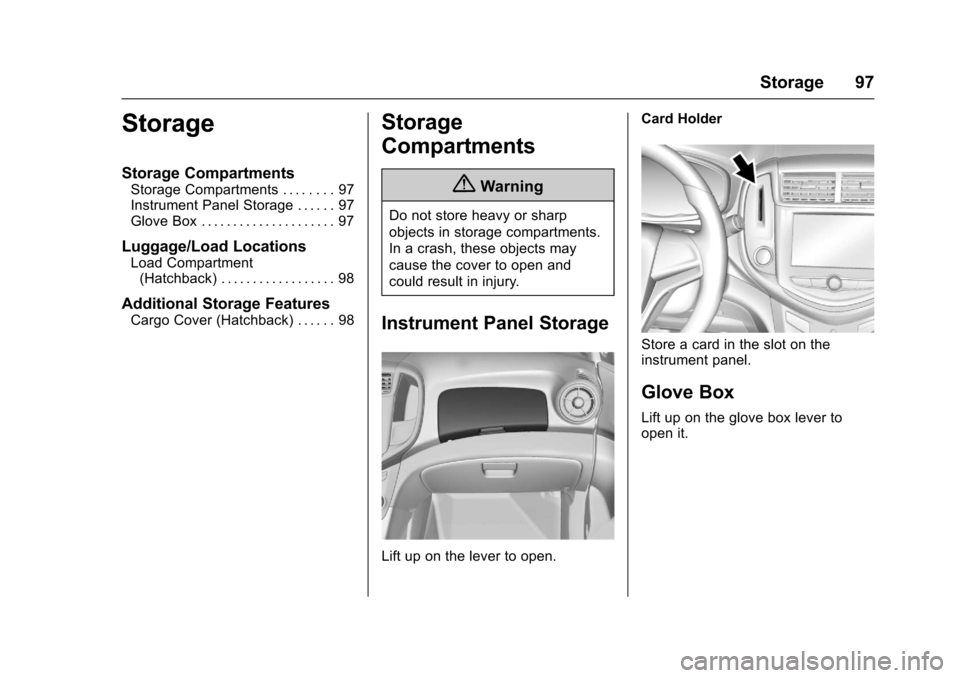
Instrument Panel Storage
Lift up on the lever to open.
Card Holder
Store a card in the slot on theinstrument panel.
Glove Box
Lift up on the glove box lever toopen it.
Page 99 of 342
Chevrolet Sonic Owner Manual (GMNA-Localizing-U.S./Canada-10122660) -2017 - crc - 5/13/16
98 Storage
Luggage/Load
Locations
Load Compartment
(Hatchback)
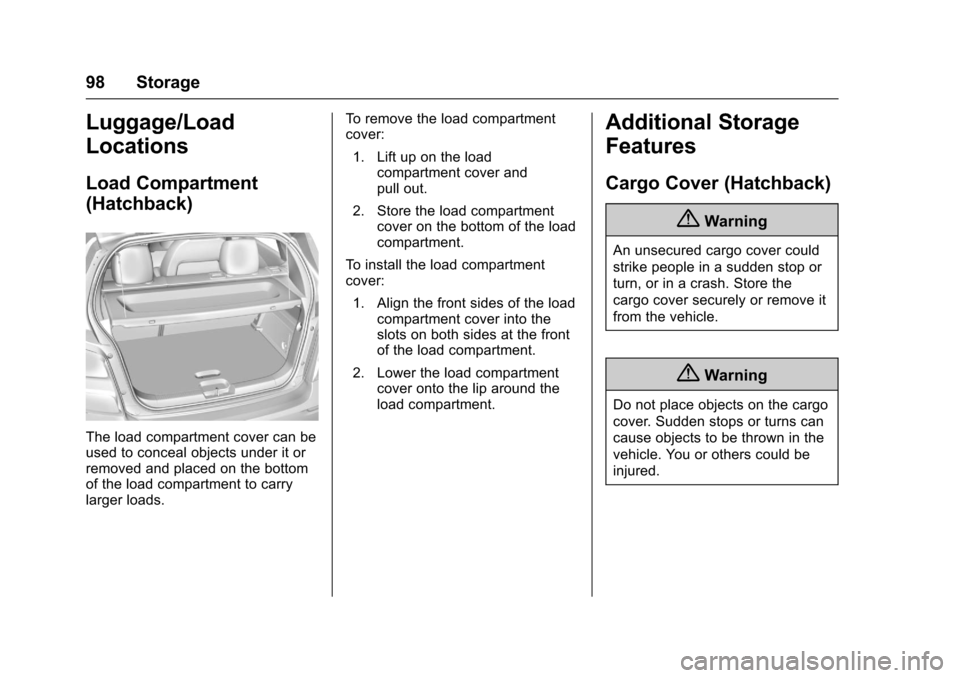
The load compartment cover can beused to conceal objects under it orremoved and placed on the bottomof the load compartment to carrylarger loads.
To r e m o v e t h e l o a d c o m p a r t m e n tcover:
1. Lift up on the loadcompartment cover andpull out.
2. Store the load compartmentcover on the bottom of the loadcompartment.
To i n s t a l l t h e l o a d c o m p a r t m e n tcover:
1. Align the front sides of the loadcompartment cover into theslots on both sides at the frontof the load compartment.
2. Lower the load compartmentcover onto the lip around theload compartment.
Additional Storage
Features
Cargo Cover (Hatchback)
{Warning
An unsecured cargo cover could
strike people in a sudden stop or
turn, or in a crash. Store the
cargo cover securely or remove it
from the vehicle.
{Warning
Do not place objects on the cargo
cover. Sudden stops or turns can
cause objects to be thrown in the
vehicle. You or others could be
injured.
Page 101 of 342

Chevrolet Sonic Owner Manual (GMNA-Localizing-U.S./Canada-10122660) -2017 - crc - 5/13/16
100 Instruments and Controls
Instruments and
Controls
Controls
Steering Wheel Adjustment . . . 101Steering Wheel Controls . . . . . . 101Heated Steering Wheel . . . . . . . 102Horn . . . . . . . . . . . . . . . . . . . . . . . . . . 102Windshield Wiper/Washer . . . . 102Rear Window Wiper/Washer . . . . . . . . . . . . . . . . . . . . . 103Compass . . . . . . . . . . . . . . . . . . . . . 104Clock . . . . . . . . . . . . . . . . . . . . . . . . . 104Power Outlets . . . . . . . . . . . . . . . . 105
Warning Lights, Gauges, and
Indicators
Warning Lights, Gauges, andIndicators . . . . . . . . . . . . . . . . . . . 106Instrument Cluster . . . . . . . . . . . . 107Speedometer . . . . . . . . . . . . . . . . . 109Odometer . . . . . . . . . . . . . . . . . . . . . 109Trip Odometer . . . . . . . . . . . . . . . . 109Ta c h o m e t e r . . . . . . . . . . . . . . . . . . . 1 0 9Fuel Gauge . . . . . . . . . . . . . . . . . . . 109Safety Belt Reminders . . . . . . . . 110Airbag Readiness Light . . . . . . . 110Passenger Airbag StatusIndicator . . . . . . . . . . . . . . . . . . . . . 111
Charging System Light . . . . . . . 112Malfunction Indicator Lamp(Check Engine Light) . . . . . . . . 112Service Vehicle Soon Light . . . 114Owner Manual Indicator . . . . . . 114Brake System WarningLight . . . . . . . . . . . . . . . . . . . . . . . . 114Antilock Brake System (ABS)Warning Light . . . . . . . . . . . . . . . 115Operate Pedal Light . . . . . . . . . . 115Up-Shift Light . . . . . . . . . . . . . . . . . 115Power Steering WarningLight . . . . . . . . . . . . . . . . . . . . . . . . 115Lane Departure Warning(LDW) Light . . . . . . . . . . . . . . . . . 116Forward Collision Alert (FCA)Warning Light . . . . . . . . . . . . . . . 116Vehicle Ahead Indicator . . . . . . . 116Ultrasonic Parking SensorLight . . . . . . . . . . . . . . . . . . . . . . . . 116Traction Off Light . . . . . . . . . . . . . 117StabiliTrak®OFF Light . . . . . . . . 117Traction Control System (TCS)/StabiliTrak®Light . . . . . . . . . . . . 117Engine Coolant TemperatureWarning Light . . . . . . . . . . . . . . . 118Tire Pressure Light . . . . . . . . . . . 118Engine Oil Pressure Light . . . . . 118Low Fuel Warning Light . . . . . . . 119Immobilizer Light . . . . . . . . . . . . . 119
Reduced Engine PowerLight . . . . . . . . . . . . . . . . . . . . . . . . 120High-Beam On Light . . . . . . . . . . 120Front Fog Lamp Light . . . . . . . . . 120Lamps On Reminder . . . . . . . . . 120Cruise Control Light . . . . . . . . . . 120Door Ajar Light . . . . . . . . . . . . . . . 121Trunk Ajar Light . . . . . . . . . . . . . . 121
Information Displays
Driver InformationCenter (DIC) . . . . . . . . . . . . . . . . 121
Vehicle Messages
Vehicle Messages . . . . . . . . . . . . 126Engine Oil Messages . . . . . . . . . 127Tire Messages . . . . . . . . . . . . . . . . 127
Vehicle Personalization
Vehicle Personalization . . . . . . . 127
Page 104 of 342

Chevrolet Sonic Owner Manual (GMNA-Localizing-U.S./Canada-10122660) -2017 - crc - 5/13/16
Instruments and Controls 103
If the ignition is put in OFF while thewipers are performing wipes due towindshield washing, the wiperscontinue to run until they reach thebase of the windshield.
nL:Pull the windshield wiperlever toward you to spray windshieldwasher fluid and activate the wipers.The wipers will continue until thelever is released or the maximumwash time is reached. When thewindshield wiper lever is released,additional wipes may occurdepending on how long thewindshield washer had beenactivated. SeeWasher Fluid0231for information on filling thewindshield washer fluid reservoir.
{Warning
In freezing weather, do not use
the washer until the windshield is
warmed. Otherwise the washer
fluid can form ice on the
windshield, blocking your vision.
Clear snow and ice from the wiperblades before using them. If frozento the windshield, carefully loosen orthaw them. Damaged wiper bladesshould be replaced. SeeWiperBlade Replacement0236.
Heavy snow or ice can overload thewiper motor. A circuit breaker willstop the motor until it cools down.
Rear Window Wiper/
Washer
If equipped with the rear wiper/washer, the controls are on the endof the windshield wiper lever.
ON :Press the upper portion of thebutton for continuous rear windowwipes.
OFF :The rear wiper turns off whenthe button is returned to the middleposition.
INT :Press the lower portion of thebutton for a delay between wipes.
a:Push the windshield wiper leverforward to spray washer fluid on therear window. The lever returns to itsstarting position when released.
Rear Wiper Arm AssemblyProtection
When using an automatic car wash,move the rear wiper control to OFFto disable the rear wiper. In somevehicles, if the transmission is inN(Neutral)andthevehiclespeedisvery slow, the rear wiper willautomatically park under the rearspoiler.
The wiper operations return tonormal when the transmission is nolonger in N (Neutral) or the vehiclespeed has increased.
Auto Wipe in Reverse Gear
If the rear wiper control is off, therear wiper will automatically operatecontinuously when the shift lever is
Page 106 of 342
Chevrolet Sonic Owner Manual (GMNA-Localizing-U.S./Canada-10122660) -2017 - crc - 5/13/16
Instruments and Controls 105
Setting the Month and Day
Format
1. Press{,thentouch
SETTINGS.
2. Touch Time and Date, then SetDate Format.
3. Select DD/MM/YYYY (day/month/year), MM/DD/YYYY(month/day/year), or YYYY/MM/DD (year/month/day)format.
4. Touch0.
Power Outlets
The accessory power outlets can beused to plug in electrical equipment,such as a cell phone or MP3 player.
The vehicle has an accessorypower outlet behind the cupholderson the center floor console.
Remove the cover to access andreplace when not in use.
{Warning
Power is always supplied to the
outlets. Do not leave electrical
equipment plugged in when the
vehicle is not in use because the
vehicle could catch fire and cause
injury or death.
Caution
Leaving electrical equipment
plugged in for an extended period
of time while the vehicle is off will
drain the battery. Always unplug
electrical equipment when not in
use and do not plug in equipment
that exceeds the maximum
20 amp rating.
Certain accessory power plugs maynot be compatible with theaccessory power outlet and couldoverload vehicle or adapter fuses.If a problem is experienced, seeyour dealer.
When adding electrical equipment,be sure to follow the properinstallation instructions included withthe equipment. SeeAdd-OnElectrical Equipment0211.
Caution
Hanging heavy equipment from
the power outlet can cause
damage not covered by the
vehicle warranty. The power
outlets are designed for
accessory power plugs only, such
as cell phone charge cords.
Page 107 of 342

Chevrolet Sonic Owner Manual (GMNA-Localizing-U.S./Canada-10122660) -2017 - crc - 5/13/16
106 Instruments and Controls
Warning Lights,
Gauges, and
Indicators
Warning lights and gauges cansignal that something is wrongbefore it becomes serious enoughto cause an expensive repair orreplacement. Paying attention to thewarning lights and gauges couldprevent injury.
Some warning lights come on brieflywhen the engine is started toindicate they are working. Whenone of the warning lights comes onand stays on while driving, or whenone of the gauges shows there maybe a problem, check the section thatexplains what to do. Waiting to dorepairs can be costly and evendangerous.
Page 110 of 342
Chevrolet Sonic Owner Manual (GMNA-Localizing-U.S./Canada-10122660) -2017 - crc - 5/13/16
Instruments and Controls 109
Speedometer
The speedometer shows thevehicle's speed in either kilometersper hour (km/h) or miles perhour (mph).
Odometer
The odometer shows how far thevehicle has been driven, in eitherkilometers or miles.
Trip Odometer
The trip odometer shows how farthe vehicle has been driven sincethe trip odometer was last reset.
The trip odometer is accessed andreset through the Driver InformationCenter (DIC). SeeDriverInformation Center (DIC)0121.
Tachometer
The tachometer displays the enginespeed in revolutions perminute (rpm).
Caution
If the engine is operated with the
rpm’sinthewarningareaatthe
high end of the tachometer, the
vehicle could be damaged, and
the damage would not be covered
by the vehicle warranty. Do not
operate the engine with the rpm’s
in the warning area.
Fuel Gauge
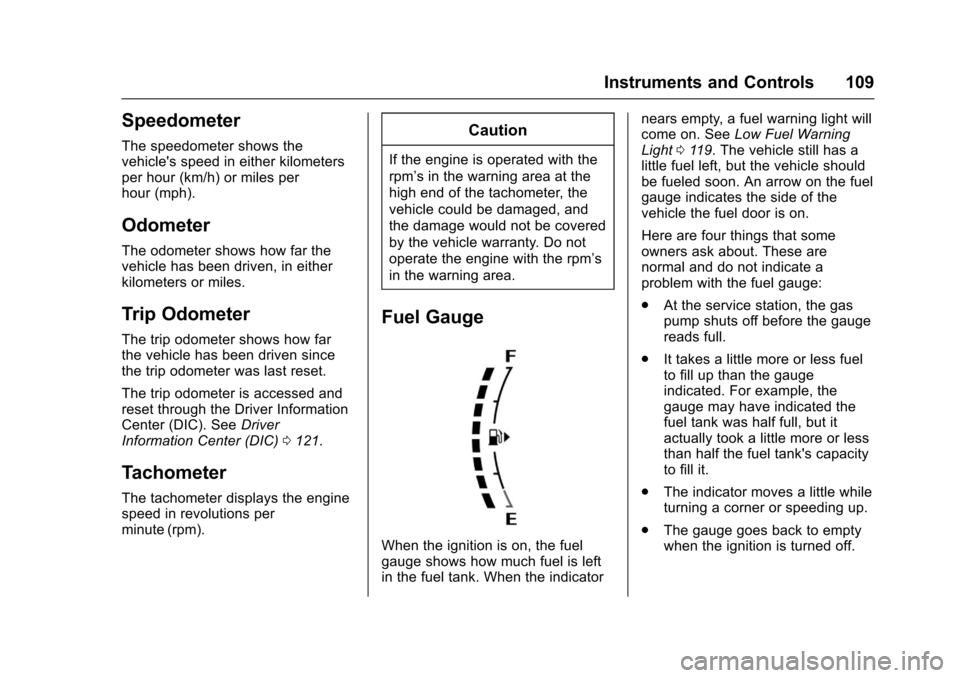
When the ignition is on, the fuelgauge shows how much fuel is leftin the fuel tank. When the indicator
nears empty, a fuel warning light willcome on. SeeLow Fuel WarningLight011 9.Thevehiclestillhasalittle fuel left, but the vehicle shouldbe fueled soon. An arrow on the fuelgauge indicates the side of thevehicle the fuel door is on.
Here are four things that someowners ask about. These arenormal and do not indicate aproblem with the fuel gauge:
.At the service station, the gaspump shuts off before the gaugereads full.
.It takes a little more or less fuelto fill up than the gaugeindicated. For example, thegauge may have indicated thefuel tank was half full, but itactually took a little more or lessthan half the fuel tank's capacityto fill it.
.The indicator moves a little whileturning a corner or speeding up.
.The gauge goes back to emptywhen the ignition is turned off.
Page 112 of 342
Chevrolet Sonic Owner Manual (GMNA-Localizing-U.S./Canada-10122660) -2017 - crc - 5/13/16
Instruments and Controls 111
{Warning
If the airbag readiness light stays
on after the vehicle is started or
comes on while driving, it means
the airbag system might not be
working properly. The airbags in
the vehicle might not inflate in a
crash, or they could even inflate
without a crash. To help avoid
injury, have the vehicle serviced
right away.
Passenger Airbag Status
Indicator
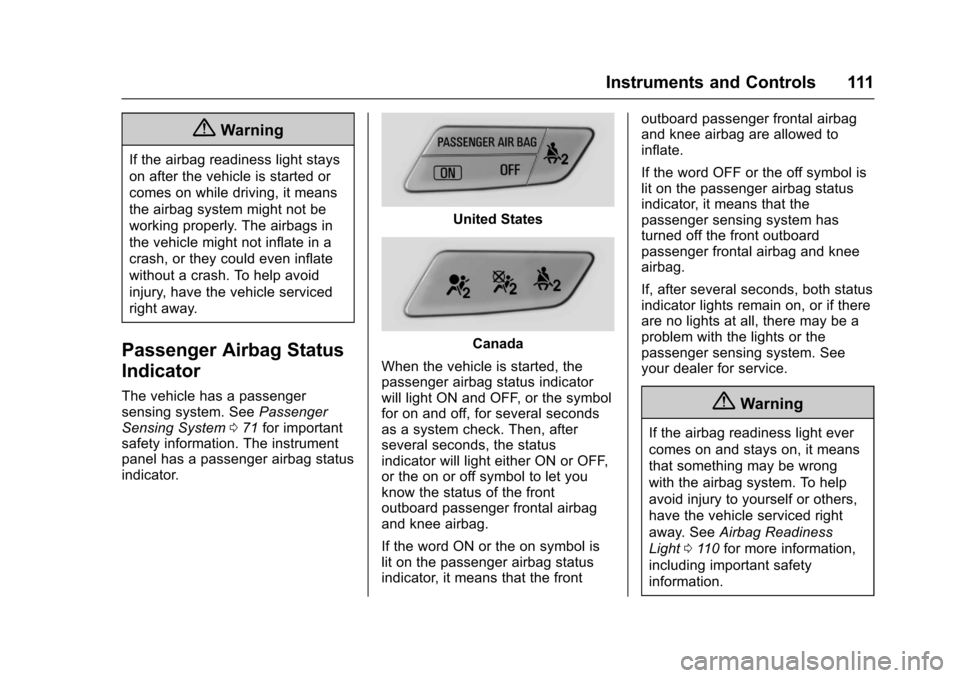
The vehicle has a passengersensing system. SeePassengerSensing System071for importantsafety information. The instrumentpanel has a passenger airbag statusindicator.
United States
Canada
When the vehicle is started, thepassenger airbag status indicatorwill light ON and OFF, or the symbolfor on and off, for several secondsas a system check. Then, afterseveral seconds, the statusindicator will light either ON or OFF,or the on or off symbol to let youknow the status of the frontoutboard passenger frontal airbagand knee airbag.
If the word ON or the on symbol islit on the passenger airbag statusindicator, it means that the front
outboard passenger frontal airbagand knee airbag are allowed toinflate.
If the word OFF or the off symbol islit on the passenger airbag statusindicator, it means that thepassenger sensing system hasturned off the front outboardpassenger frontal airbag and kneeairbag.
If, after several seconds, both statusindicator lights remain on, or if thereare no lights at all, there may be aproblem with the lights or thepassenger sensing system. Seeyour dealer for service.
{Warning
If the airbag readiness light ever
comes on and stays on, it means
that something may be wrong
with the airbag system. To help
avoid injury to yourself or others,
have the vehicle serviced right
away. SeeAirbag Readiness
Light011 0for more information,
including important safety
information.